Pastaba.
Prieigai prie šio puslapio reikalingas įgaliojimas. Galite bandyti prisijungti arba pakeisti katalogus.
Prieigai prie šio puslapio reikalingas įgaliojimas. Galite bandyti pakeisti katalogus.
In the Azure public cloud platform, Microsoft and you share responsibility for reliability. Each workload you design and deploy offers different levels of reliability, so it's important to understand who holds primary responsibility for each level from a reliability perspective.
To help you better understand how shared responsibility works, especially when confronting an outage or disaster, this article describes the shared responsibility model for reliability. For more information on how to use this model to plan for disaster recovery, see Recommendations for designing a disaster recovery strategy.
Shared responsibility model for reliability
The shared responsibility model for reliability has three levels:
- Core platform reliability. The Azure platform provides a base level of reliability for all customers and all services through the underlying infrastructure, services, and processes.
- Reliability-enhancing capabilities. Azure offers a suite of built-in features and services that enhance reliability, such as using availability zones, deploying across multiple regions, and implementing backup strategies. While Azure provides these capabilities, it's your responsibility to evaluate and configure them to align with your specific requirements. Requirements can include reliability, cost, performance, and compliance with regulatory standards.
- Applications. To make effective use of the other levels, you must design your application and workload for reliability.
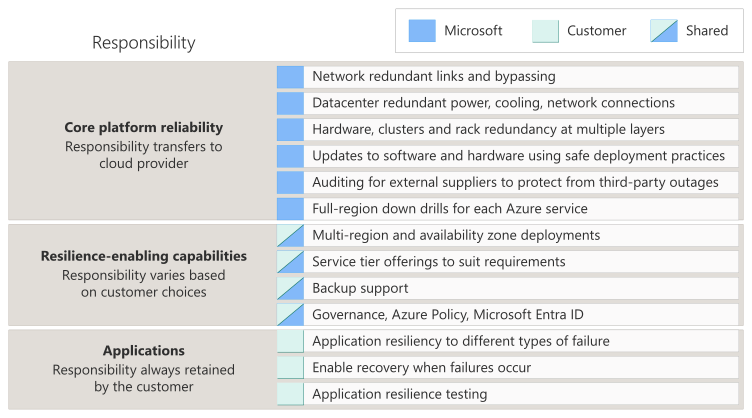
Microsoft is solely responsible for core platform reliability. Microsoft is also responsible for providing reliability-enhancing capabilities that you can use. You're responsible for selecting and using the appropriate components.
The service category you choose - SaaS, PaaS, or IaaS - determines what kind of decisions you make. For example, if you use a SaaS service, you typically don't need to opt into using availability zones. If you use PaaS services for your data tier, you might have automated capabilities for backup available to you. If you use IaaS services, you typically need to plan and implement many reliability capabilities yourself.
Note
Service categories (SaaS, PaaS, and IaaS) are useful as a broad grouping of services, but it's important to understand your responsibilities for each individual service you use.
The reliability guides provide an overview of how each service works from a reliability perspective and help you make informed decisions about how to configure your services to meet your needs.
You're also responsible for your application and workload design, and for defining your reliability requirements, which helps you decide how to design and configure your solution. You must ensure that your design respects any applicable regulatory or contractual requirements, such as the geographic location where data is stored.
Core platform reliability
The Microsoft cloud platform consists of a large amount of infrastructure, hardware, software, and processes to support service deployment and management. Each component is designed to be highly resilient, with multiple redundancies for hardware and with research-based software processes. Together, these components comprise the core platform reliability level. Some examples of how Microsoft provides a reliable platform include the following features:
- Networks have redundant links and can dynamically bypass faulty segments.
- Within each region, datacenters are connected through a low-latency network, which enables a variety of data replication approaches.
- Datacenter facilities have redundant power, cooling, and network connections. Onsite teams operate them, securing, monitoring, and managing the facilities.
- Hardware, including clusters and racks, has redundancy at multiple layers.
- Updates to compute clusters, racks, and hosts follow a controlled process. The platform uses techniques like hotpatching to reduce or eliminate impact to hosts.
- Software platform updates and configuration changes follow safe deployment practices.
- Microsoft audits critical external suppliers to ensure that a third-party outage doesn't disrupt Azure services.
- Each Azure service must have a detailed disaster recovery plan. Microsoft conducts full-region down drills in regions that match production environments.
All Azure services benefit from these core platform reliability capabilities, and from the ongoing improvements Microsoft makes.
Reliability-enhancing capabilities
Azure provides many different reliability-enhancing capabilities. Although Microsoft is responsible for providing these capabilities, you're entirely responsible for selecting and using the appropriate ones for your needs. Some examples of these capabilities include:
Regions. Azure has over 70 regions, and you can use multiple regions in a single solution to achieve geo-redundancy, meet your data residency needs, and enable low-latency communication to users globally. To learn more about regions, see What are Azure regions?
Availability zones. Many Azure regions support availability zones, which enable you to distribute your workloads across multiple independent sets of datacenters. Azure services support availability zones in a way that suits their intended purpose, usually by supporting zonal deployments (pinned to a single zone) or zone-redundant deployments (spread across multiple zones). To learn more about availability zones, see What are availability zones?
Service tiers. Services provide a range of offerings and tiers that suit different requirements. You're responsible for choosing the appropriate tier based on your reliability goals and other needs. For example, when you create a virtual machine, you can choose between a standard disk, which provides a low-cost option, or a premium disk to achieve a higher level of availability.
Backups. Many Azure services that store data support backups, which might be automatic, manual, or both. By using backups, you can protect your workload against outages as well as data corruption and other data loss events. You're responsible for verifying whether backups are enabled and for configuring them appropriately.
Governance. You can configure platform capabilities like Azure Policy, role-based access control, and Microsoft Entra ID identity protection capabilities to enforce your organization's requirements consistently. By using these approaches, you can protect your workloads against security incidents and accidental changes that might cause downtime or other problems with your workload. Microsoft provides these governance tools, but you're responsible for configuring and maintaining them.
Important
It's important to understand the service level agreements (SLAs) for each Azure service. SLAs provide important information on the expected uptime of the service, and any conditions you need to meet to be eligible for the SLA. You're responsible for understanding and meeting these conditions; Microsoft doesn't monitor or enforce your eligibility.
For SLAs for each service, see Service Level Agreements (SLA) for Online Services.
Applications
You're responsible for making sure that your applications are designed to be resilient to faults, and to follow other reliability best practices. Use the Azure Well-Architected Framework pillars to drive architectural excellence at the fundamental level of a workload. The reliability pillar focuses on how you can make your workload and applications resilient to different types of failures, and to enable recovery when failures occur.
Next steps
The shared responsibility model applies to other parts of your solution beyond reliability. For more information on the shared responsibility model for security, see Microsoft Trust Center.