Pastaba.
Prieigai prie šio puslapio reikalingas įgaliojimas. Galite bandyti prisijungti arba pakeisti katalogus.
Prieigai prie šio puslapio reikalingas įgaliojimas. Galite bandyti pakeisti katalogus.
Schema object descriptions give the data agent business context about tables, columns, and other elements in a data source schema. This context helps the agent distinguish between similarly named or ambiguous objects, understand the purpose of each object, and generate more accurate queries. Descriptions are especially useful for large schemas where object names alone don't clearly convey their meaning.
Schema object descriptions are supported for SQL data sources, including lakehouses, warehouses, Fabric SQL databases, and mirrored databases.
Note
Schema object descriptions are currently in public preview.
Note
Schema object descriptions are available only when your data agent uses the preview runtime.
Add or edit a description
By default, the data agent inherits available descriptions from the data source and updates them automatically. When you edit an inherited description in the data agent, the change applies only to the data agent. It doesn't overwrite the description in the source, and that object no longer receives description updates from the source.
- Open your data agent, and then select Setup.
- Under the data source, select Schema object descriptions.
- Expand the schema to find the object that you want to describe.
- Select the Edit icon next to the object.
- Enter a description, and then select Done.
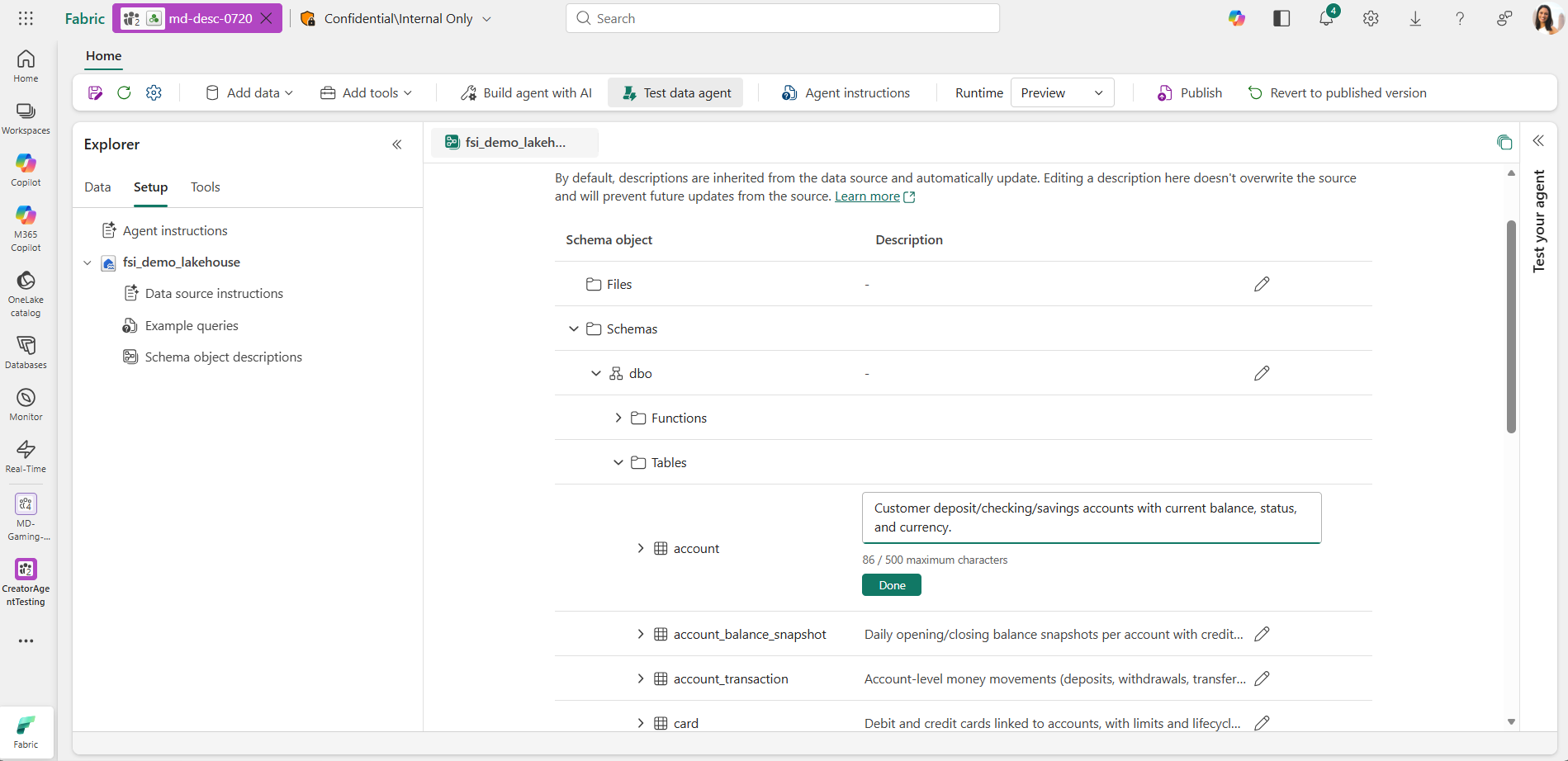
Add a description with the Python SDK
Use the Fabric data agent Python SDK to manage schema object descriptions programmatically. The following example sets a description for one table in the first data source of an existing data agent:
from fabric.dataagent.client import FabricDataAgentManagement

agent = FabricDataAgentManagement("<data-agent-name>")
datasource = agent.get_datasources()[0]

table_path = ("Schemas", "dbo", "Tables", "adoptions")
datasource.update_description({
    table_path: "Contains one row for each pet adoption transaction."
})
The tuple identifies the schema element by its path in the data source. To describe a column, add its name to the table path. For example, use table_path + ("adoption_date",). Path names are case-sensitive and must match the hierarchy shown for the data source.
Write effective descriptions
Use descriptions to explain business meaning that isn't evident from an object's name. Keep each description concise and specific.
- For tables, describe the business entities or events represented, the table's level of detail, and its primary purpose.
- For columns, define the value's business meaning, format, unit, or expected values when they might be unclear.
- For other schema elements, explain their role and when the data agent should use them.
- Clarify abbreviations, internal terminology, and similarly named objects.
- Include context that helps the agent select the correct objects and relationships when generating a query.