Piezīmes
Lai piekļūtu šai lapai, ir nepieciešama autorizācija. Varat mēģināt pierakstīties vai mainīt direktorijus.
Lai piekļūtu šai lapai, ir nepieciešama autorizācija. Varat mēģināt mainīt direktorijus.
This article is part of the Attack surface reduction (ASR) rules deployment guide.
After testing ASR rules in Audit mode, transition them to Block or Warn mode, starting with your first deployment ring.
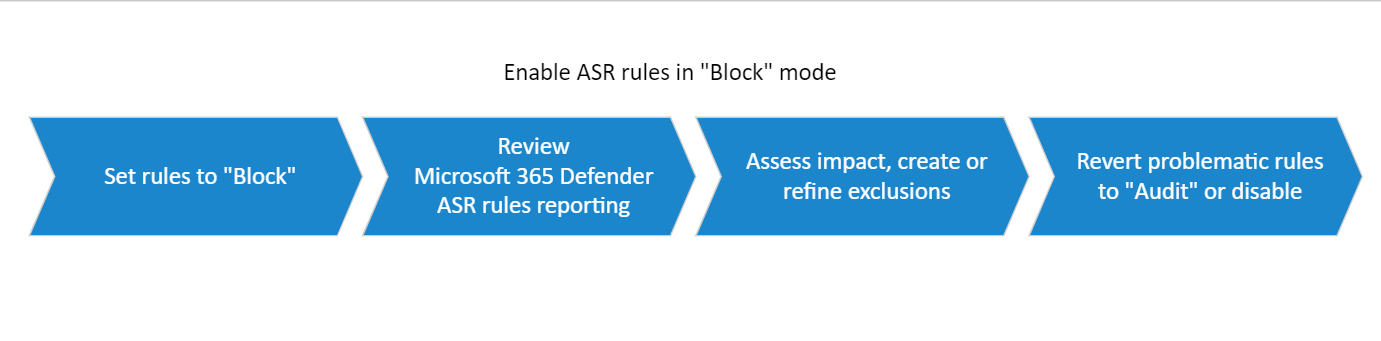
Step 1: Transition ASR from Audit to Block
After you determine all required exclusions for rules in Audit mode, start setting some rules to Block or Warn mode. Start with the rule with the fewest triggered events. For instructions, see Configure attack surface reduction (ASR) rules and exclusions.
Review ASR rule activity. Also review feedback from your champions.
Refine exclusions or create new exclusions as necessary.
Tip
Rule exclusions are better than turning off rules or switching them back to Audit mode.
Take advantage of the Warn mode in available rules to limit disruptions. Warn mode enables you to capture triggered events and view potential disruptions without actually blocking user access (they can click through the warning notification). For more information, see ASR rule modes.
Step 2: Expand deployment to ring n + 1
When you're confident you correctly configured ASR rules for ring 1, you can widen the scope of your deployment to the next ring (ring n + 1).
The deployment process for each subsequent ring is:
Enable ASR rules in Audit mode.
Review ASR rule activity.
Review ASR rule activity and refine exclusions.
Set rules to Block mode.
Review ASR rule activity.
Disable problematic rules or switch them back to Audit mode.
Related content
- Attack surface reduction (ASR) rules deployment guide
- Plan your attack surface reduction (ASR) rules deployment
- Test your attack surface reduction (ASR) rules deployment
- Manage and monitor your attack surface reduction (ASR) rules deployment
- Attack surface reduction (ASR) rules overview
- Configure attack surface reduction (ASR) rules and exclusions