Nota
L-aċċess għal din il-paġna jeħtieġ l-awtorizzazzjoni. Tista’ tipprova tidħol jew tibdel id-direttorji.
L-aċċess għal din il-paġna jeħtieġ l-awtorizzazzjoni. Tista’ tipprova tibdel id-direttorji.
You can create flows that trigger based on a Dataverse action that's included in both a Catalog and a Category. This trigger enables integrations using Microsoft Dataverse business events.
Additionally, your role needs permissions to read it, which might require read access to the sdkmessage, customapi, or workflows tables in Dataverse.

As the name suggests, this trigger runs the flow whenever a specific Dataverse action is performed. A Dataverse action is distinct from a Power Automate action. In Dataverse custom actions are a way of extending out-of-the-box operations on data. You can use them to define reusable custom business logic. Custom API is the recommended Dataverse capability to create custom actions. Learn more in Create and use custom APIs.
Learn more about how to run Dataverse actions from Power Automate in Perform bound or unbound actions.
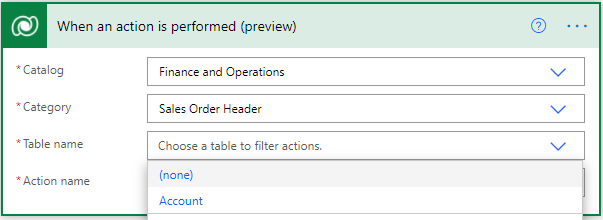
Here are the input fields for the trigger.
| Input field | Description |
|---|---|
| Catalog | Used to organize and manage Dataverse actions, similar to the way you use folders to organize files. |
| Category | Used as a subclassification within a catalog. |
| Table name | Used to filter the available actions by their associated table (bound actions), or to filter global actions (unbound actions). For unbound actions, select (none). |
| Action name | Used to identify the action that triggers the flow each time it runs successfully. The list of available actions is filtered by the catalog, category, and table name. |
Using dynamic content and action inputs and outputs
A Dataverse custom action is meant for custom business logic. It accepts input parameters and returns output parameters. When this trigger runs, the flow makes these parameters available as dynamic content, and you can use them in subsequent steps.
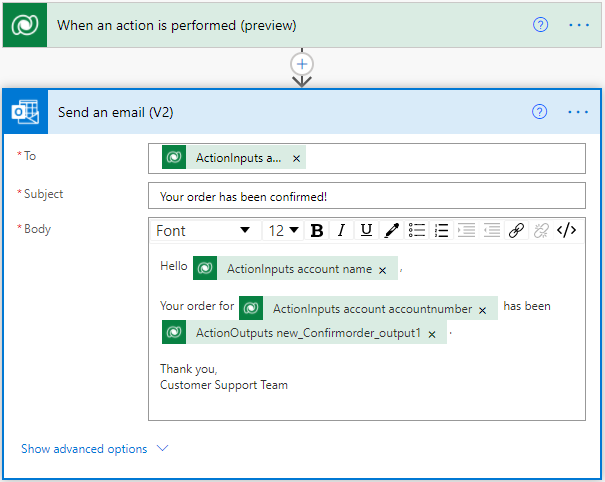
Here's the naming scheme for the parameters:
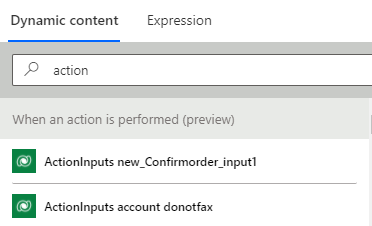
The prefixes ActionInputs and ActionOutputs specify whether the parameter is an input or output parameter.
The next literal is the name of the parameter.
For complex data types such as an entity object, the last literal is the column name, for example, donotfax.