Notitie
Voor toegang tot deze pagina is autorisatie vereist. U kunt proberen u aan te melden of mappen te wijzigen.
Voor toegang tot deze pagina is autorisatie vereist. U kunt proberen om mappen te wijzigen.
Opmerking
De Microsoft Foundation Classes-bibliotheek (MFC) wordt nog steeds ondersteund. We voegen echter geen functies meer toe of werken de documentatie bij.
Een pop-updialoogvenster dat werkt als een berichtvak, maar kan aanvullende informatie voor de gebruiker weergeven. De CTaskDialog bevat ook functionaliteit voor het verzamelen van informatie van de gebruiker.
Syntaxis
class CTaskDialog : public CObject
Leden
Constructeurs
| Naam | Beschrijving |
|---|---|
| CTaskDialog::CTaskDialog | Maakt een CTaskDialog-object. |
Methoden
| Naam | Beschrijving |
|---|---|
| CTaskDialog::AddCommandControl | Hiermee voegt u een besturingselement voor de opdrachtknop toe aan de CTaskDialog. |
| CTaskDialog::AddRadioButton | Hiermee voegt u een keuzerondje toe aan de CTaskDialog. |
| CTaskDialog::ClickCommandControl | Klik op een besturingselement voor een opdrachtknop of een veelgebruikte knop via een programma. |
| CTaskDialog::ClickRadioButton | Klik programmatisch op een keuzerondje. |
| CTaskDialog::D oModal- | Geeft de CTaskDialogweer. |
| CTaskDialog::GetCommonButtonCount | Hiermee haalt u het aantal beschikbare algemene knoppen op. |
| CTaskDialog::GetCommonButtonFlag | Converteert een standaardknop met Windows naar het algemene knoptype dat is gekoppeld aan de CTaskDialog-klasse. |
| CTaskDialog::GetCommonButtonId | Converteert een van de algemene knoptypen die zijn gekoppeld aan de CTaskDialog-klasse naar een standaardknop windows. |
| CTaskDialog::GetOptions- | Retourneert de optievlagmen voor deze CTaskDialog. |
| CTaskDialog::GetSelectedCommandControlID | Retourneert het geselecteerde besturingselement voor de opdrachtknop. |
| CTaskDialog::GetSelectedRadioButtonID | Retourneert het geselecteerde keuzerondje. |
| CTaskDialog::GetVerificationCheckboxState | Hiermee wordt de status van het verificatievak opgehaald. |
| CTaskDialog::IsCommandControlEnabled | Hiermee bepaalt u of een besturingselement voor een opdrachtknop of algemene knop is ingeschakeld. |
| CTaskDialog::IsRadioButtonEnabled | Bepaalt of een keuzerondje is ingeschakeld. |
| CTaskDialog::IsSupported | Bepaalt of de computer waarop de toepassing wordt uitgevoerd, de CTaskDialogondersteunt. |
| CTaskDialog::LoadCommandControls | Hiermee voegt u besturingselementen voor opdrachtknoppen toe met behulp van gegevens uit de tekenreekstabel. |
| CTaskDialog::LoadRadioButtons | Hiermee voegt u keuzerondjes toe met behulp van gegevens uit de tekenreekstabel. |
| CTaskDialog::NavigateTo | Hiermee wordt de focus verplaatst naar een andere CTaskDialog. |
| CTaskDialog::OnCommandControlClick | Het framework roept deze methode aan wanneer de gebruiker op een opdrachtknop besturingselement klikt. |
| CTaskDialog::OnCreate | Het framework roept deze methode aan nadat de CTaskDialogis gemaakt. |
| CTaskDialog::OnDestroy | Het framework roept deze methode onmiddellijk aan voordat het de CTaskDialogvernietigt. |
| CTaskDialog::OnExpandButtonClick | In het framework wordt deze methode aangeroepen wanneer de gebruiker op de uitbreidingsknop klikt. |
| CTaskDialog::OnHelp | Dit framework roept deze methode aan wanneer de gebruiker om hulp vraagt. |
| CTaskDialog::OnHyperlinkClick | In het framework wordt deze methode aangeroepen wanneer de gebruiker op een hyperlink klikt. |
| CTaskDialog::OnInit | Dit framework roept deze methode aan wanneer de CTaskDialog wordt geïnitialiseerd. |
| CTaskDialog::OnNavigatePage | In het framework wordt deze methode aangeroepen wanneer de gebruiker de focus verplaatst naar besturingselementen op de CTaskDialog. |
| CTaskDialog::OnRadioButtonClick | Dit framework roept deze methode aan wanneer de gebruiker een keuzerondje selecteert. |
| CTaskDialog::OnTimer | Dit framework roept deze methode aan wanneer de timer verloopt. |
| CTaskDialog::OnVerificationCheckboxClick | In het framework wordt deze methode aangeroepen wanneer de gebruiker op het verificatievak klikt. |
| CTaskDialog::RemoveAllCommandControls | Hiermee verwijdert u alle opdrachtbesturingselementen uit de CTaskDialog. |
| CTaskDialog::RemoveAllRadioButtons | Hiermee verwijdert u alle keuzerondjes uit de CTaskDialog. |
| CTaskDialog::SetCommandControlOptions- | Hiermee werkt u een besturingselement voor een opdrachtknop op de CTaskDialogbij. |
| CTaskDialog::SetCommonButtonOptions- | Hiermee wordt een subset van veelgebruikte knoppen bijgewerkt die moeten worden ingeschakeld en UAC-uitbreiding is vereist. |
| CTaskDialog::SetCommonButtons | Voegt algemene knoppen toe aan de CTaskDialog. |
| CTaskDialog::SetContent | Hiermee wordt de inhoud van de CTaskDialogbijgewerkt. |
| CTaskDialog::SetDefaultCommandControl | Hiermee geeft u het standaardopdrachtknop besturingselement. |
| CTaskDialog::SetDefaultRadioButton | Hiermee geeft u het standaard keuzerondje. |
| CTaskDialog::SetDialogWidth | Hiermee past u de breedte van de CTaskDialogaan. |
| CTaskDialog::SetExpansionArea | Hiermee wordt het uitbreidingsgebied van de CTaskDialogbijgewerkt. |
| CTaskDialog::SetFooterIcon | Hiermee werkt u het voettekstpictogram voor de CTaskDialogbij. |
| CTaskDialog::SetFooterText | Hiermee wordt de tekst in de voettekst van de CTaskDialogbijgewerkt. |
| CTaskDialog::SetMainIcon | Hiermee wordt het hoofdpictogram van de CTaskDialogbijgewerkt. |
| CTaskDialog::SetMainInstruction | Werkt de belangrijkste instructie van de CTaskDialogbij. |
| CTaskDialog::SetOptions- | Hiermee configureert u de opties voor de CTaskDialog. |
| CTaskDialog::SetProgressBarMarquee | Hiermee configureert u een selectiebalk voor de CTaskDialog en voegt u deze toe aan het dialoogvenster. |
| CTaskDialog::SetProgressBarPosition | Hiermee past u de positie van de voortgangsbalk aan. |
| CTaskDialog::SetProgressBarRange | Hiermee past u het bereik van de voortgangsbalk aan. |
| CTaskDialog::SetProgressBarState | Hiermee stelt u de status van de voortgangsbalk in en wordt deze weergegeven op de CTaskDialog. |
| CTaskDialog::SetRadioButtonOptions | Hiermee schakelt u een keuzerondje in of uit. |
| CTaskDialog::SetVerificationCheckbox | Hiermee stelt u de ingeschakelde status van het verificatievak in. |
| CTaskDialog::SetVerificationCheckboxText | Hiermee stelt u de tekst aan de rechterkant van het verificatievak in. |
| CTaskDialog::SetWindowTitle | Hiermee stelt u de titel van de CTaskDialogin. |
| CTaskDialog::ShowDialog | Hiermee wordt een CTaskDialoggemaakt en weergegeven. |
| CTaskDialog::TaskDialogCallback | Het framework roept dit aan als reactie op verschillende Windows-berichten. |
Gegevensleden
| Naam | Beschrijving |
|---|---|
m_aButtons |
De matrix met opdrachtknopbesturingselementen voor de CTaskDialog. |
m_aRadioButtons |
De matrix van keuzerondjebesturingselementen voor de CTaskDialog. |
m_bVerified |
TRUE geeft aan dat het selectievakje verificatie is ingeschakeld; FALSE geeft aan dat dit niet het is. |
m_footerIcon |
Het pictogram in de voettekst van het CTaskDialog. |
m_hWnd |
Een ingang naar het venster voor de CTaskDialog. |
m_mainIcon |
Het hoofdpictogram van de CTaskDialog. |
m_nButtonDisabled |
Een masker dat aangeeft welke van de algemene knoppen zijn uitgeschakeld. |
m_nButtonElevation |
Een masker dat aangeeft welke van de algemene knoppen UAC-uitbreiding vereisen. |
m_nButtonId |
De id van het geselecteerde besturingselement voor de opdrachtknop. |
m_nCommonButton |
Een masker dat aangeeft welke algemene knoppen worden weergegeven op de CTaskDialog. |
m_nDefaultCommandControl |
De id van het opdrachtknop besturingselement dat wordt geselecteerd wanneer de CTaskDialog wordt weergegeven. |
m_nDefaultRadioButton |
De id van het keuzerondje dat is geselecteerd wanneer de CTaskDialog wordt weergegeven. |
m_nFlags |
Een masker dat de opties voor de CTaskDialogaangeeft. |
m_nProgressPos |
De huidige positie voor de voortgangsbalk. Deze waarde moet tussen m_nProgressRangeMin en m_nProgressRangeMaxzijn. |
m_nProgressRangeMax |
De maximumwaarde voor de voortgangsbalk. |
m_nProgressRangeMin |
De minimumwaarde voor de voortgangsbalk. |
m_nProgressState |
De status van de voortgangsbalk. Zie CTaskDialog::SetProgressBarStatevoor meer informatie. |
m_nRadioId |
De id van het geselecteerde keuzerondje. |
m_nWidth |
De breedte van de CTaskDialog in pixels. |
m_strCollapse |
De tekenreeks die CTaskDialog rechts van het uitbreidingsvak wordt weergegeven wanneer de uitgebreide informatie verborgen is. |
m_strContent |
De inhoudsreeks van de CTaskDialog. |
m_strExpand |
De tekenreeks die de CTaskDialog rechts van het uitbreidingsvak weergeeft wanneer de uitgebreide informatie wordt weergegeven. |
m_strFooter |
De voettekst van de CTaskDialog. |
m_strInformation |
De uitgebreide informatie voor de CTaskDialog. |
m_strMainInstruction |
De belangrijkste instructie van de CTaskDialog. |
m_strTitle |
De titel van de CTaskDialog. |
m_strVerification |
De tekenreeks die in de CTaskDialog rechts van het verificatievak wordt weergegeven. |
Opmerkingen
De CTaskDialog-klasse vervangt het standaardberichtvak van Windows en beschikt over extra functionaliteit, zoals nieuwe besturingselementen om informatie van de gebruiker te verzamelen. Deze klasse bevindt zich in de MFC-bibliotheek in Visual Studio 2010 en hoger. De CTaskDialog is beschikbaar vanaf Windows Vista. Eerdere versies van Windows kunnen het CTaskDialog-object niet weergeven. Gebruik CTaskDialog::IsSupported om tijdens runtime te bepalen of de huidige gebruiker het taakdialoogvenster kan weergeven. Het standaardberichtvenster van Windows wordt nog steeds ondersteund.
De CTaskDialog is alleen beschikbaar wanneer u uw toepassing bouwt met behulp van de Unicode-bibliotheek.
De CTaskDialog heeft twee verschillende constructors. Met één constructor kunt u twee opdrachtknoppen en maximaal zes gewone knopbesturingselementen opgeven. U kunt meer opdrachtknoppen toevoegen nadat u de CTaskDialoghebt gemaakt. De tweede constructor biedt geen ondersteuning voor opdrachtknoppen, maar u kunt een onbeperkt aantal gewone knopbesturingselementen toevoegen. Zie CTaskDialog::CTaskDialogvoor meer informatie over de constructors.
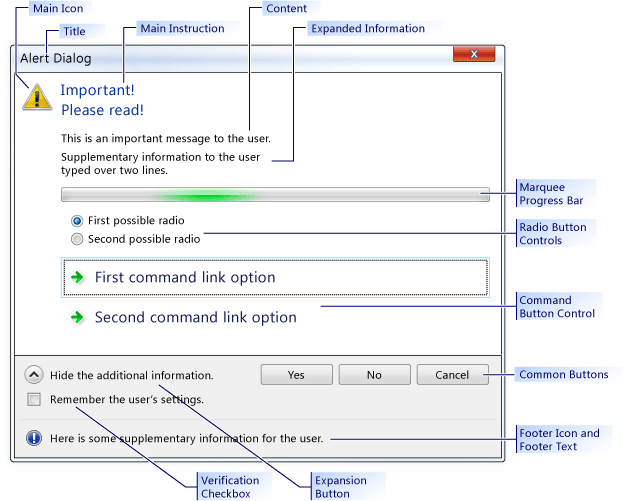
In de volgende afbeelding ziet u een voorbeeld CTaskDialog om de locatie van een aantal besturingselementen te illustreren.
CTaskDialog-voorbeeld
Eisen
Minimaal vereist besturingssysteem: Windows Vista
koptekst: afxtaskdialog.h
CTaskDialog::AddCommandControl
Hiermee voegt u een nieuw besturingselement voor de opdrachtknop toe aan de CTaskDialog.
void AddCommandControl(
    int nCommandControlID,
    const CString& strCaption,
    BOOL bEnabled = TRUE,
    BOOL bRequiresElevation = FALSE);
Parameters
nCommandControlID-
[in] Het identificatienummer van het opdrachtbeheer.
strCaption-
[in] De tekenreeks die door de CTaskDialog wordt weergegeven aan de gebruiker. Gebruik deze tekenreeks om het doel van de opdracht uit te leggen.
bEnabled-
[in] Een Booleaanse parameter die aangeeft of de nieuwe knop is ingeschakeld of uitgeschakeld.
bRequiresElevation-
[in] Een Booleaanse parameter die aangeeft of voor een opdracht uitbreiding is vereist.
Opmerkingen
De CTaskDialog Class kan een onbeperkt aantal besturingselementen voor de opdrachtknop weergeven. Als een CTaskDialog echter besturingselementen voor opdrachtknoppen weergeeft, kan er maximaal zes knoppen worden weergegeven. Als een CTaskDialog geen besturingselementen voor opdrachtknoppen heeft, kan er een onbeperkt aantal knoppen worden weergegeven.
Wanneer de gebruiker een opdrachtknop besturingselement selecteert, wordt het CTaskDialog gesloten. Als in uw toepassing het dialoogvenster wordt weergegeven met behulp van CTaskDialog::D oModal, retourneert DoModal de nCommandControlID van het geselecteerde opdrachtknopbesturingselement.
Voorbeeld
// TODO: Replace the strings below with the appropriate message,
// main instruction, and dialog title.
CString message("This is an important message to the user.");
CString mainInstruction("Important!\nPlease read!");
CString title("Alert Dialog");

CTaskDialog taskDialog(message, mainInstruction, title,
                       TDCBF_YES_BUTTON | TDCBF_NO_BUTTON | TDCBF_CANCEL_BUTTON);

taskDialog.AddCommandControl(201, L"First command button control");
taskDialog.AddCommandControl(202, L"Second command button control");
taskDialog.AddCommandControl(203, L"Third command button control");

// Show the CTaskDialog and remember how the user closed it.
int selection = taskDialog.DoModal();

switch (selection)
{
case 201:
   // TODO: Place processing here for the first
   // command button control.
   break;

case 202:
   // TODO: Place processing here for the second
   // command button control.
   break;

case 203:
   // TODO: Place processing here for the third
   // command button control.
   break;

default:
   break;
}

// Remove all the command controls so that we can use the same task
// dialog with new command button controls.
taskDialog.RemoveAllCommandControls();

taskDialog.AddCommandControl(301,
                             L"New first command button control");
taskDialog.AddCommandControl(302,
                             L"New second command button control should require elevation",
                             TRUE, TRUE);
taskDialog.AddCommandControl(303,
                             L"New third command button control should be disabled");

// Change the default command button control
taskDialog.SetDefaultCommandControl(302);

// Make sure the third option is disabled.
if (taskDialog.IsCommandControlEnabled(303))
{
   taskDialog.SetCommandControlOptions(303, FALSE);
}

taskDialog.DoModal();

switch (taskDialog.GetSelectedCommandControlID())
{
case 301:
   // TODO: Place processing here for new first
   // command button control.
   break;

case 302:
   // TODO: Place processing here for new second
   // command button control.
   break;

case 303:
   // TODO: Place processing here for the new third
   // command button control.
   break;

default:
   break;
}

// Remove all the command button controls and add new ones from
// the string table resource.
taskDialog.RemoveAllCommandControls();
taskDialog.LoadCommandControls(1001, 1005);
CTaskDialog::AddRadioButton
Hiermee voegt u een keuzerondje toe aan de CTaskDialog.
void CTaskDialog::AddRadioButton(
    int nRadioButtonID,
    const CString& strCaption,
    BOOL bEnabled = TRUE);
Parameters
nRadioButtonID
[in] Het identificatienummer van het keuzerondje.
strCaption-
[in] De tekenreeks die door het CTaskDialog naast het keuzerondje wordt weergegeven.
bEnabled-
[in] Een Booleaanse parameter die aangeeft of het keuzerondje is ingeschakeld.
Opmerkingen
Met de keuzerondjes voor de CTaskDialog Class kunt u gegevens van de gebruiker verzamelen. Gebruik de functie CTaskDialog::GetSelectedRadioButtonID om te bepalen welk keuzerondje is geselecteerd.
De CTaskDialog vereist niet dat de parameters nRadioButtonID uniek zijn voor elk keuzerondje. U kunt echter onverwacht gedrag ondervinden als u geen afzonderlijke id gebruikt voor elk keuzerondje.
Voorbeeld
// TODO: Replace the strings below with the appropriate message,
// main instruction, and dialog title
CString message("This is an important message to the user.");
CString mainInstruction("Important!\nPlease read!");
CString title("Alert Dialog");

CTaskDialog taskDialog(message, mainInstruction, title,
                       TDCBF_YES_BUTTON | TDCBF_NO_BUTTON | TDCBF_CANCEL_BUTTON);

taskDialog.AddRadioButton(201, L"First option");
taskDialog.AddRadioButton(202, L"Second option");
taskDialog.AddRadioButton(203, L"Third option");

taskDialog.DoModal();
int selection = taskDialog.GetSelectedRadioButtonID();

switch (selection)
{
case 201:
   // TODO: Place processing here for the first
   // radio button.
   break;

case 202:
   // TODO: Place processing here for the second
   // radio button.
   break;

case 203:
   // TODO: Place processing here for the third
   // radio button.
   break;

default:
   break;
}

// Remove all the radio buttons so that we can use the same task
// dialog with new radio buttons.
taskDialog.RemoveAllRadioButtons();

taskDialog.AddRadioButton(301, L"New first option");
taskDialog.AddRadioButton(302, L"New second option");
taskDialog.AddRadioButton(303,
                          L"New third option should be disabled");

// Change the default radio button to the second option
taskDialog.SetDefaultRadioButton(302);

// Make sure the third option is disabled.
if (taskDialog.IsRadioButtonEnabled(303))
{
   taskDialog.SetRadioButtonOptions(303, FALSE);
}

taskDialog.DoModal();
selection = taskDialog.GetSelectedRadioButtonID();

switch (taskDialog.GetSelectedRadioButtonID())
{
case 301:
   // TODO: Place processing here for new first
   // command button control.
   break;

case 302:
   // TODO: Place processing here for new second
   // command button control.
   break;

case 303:
   // TODO: Place processing here for the new third
   // command button control.
   break;

default:
   break;
}

// Remove all the radio button controls and add new ones from
// the string table resource.
taskDialog.RemoveAllRadioButtons();
taskDialog.LoadRadioButtons(1001, 1005);
CTaskDialog::ClickCommandControl
Klik op een besturingselement voor een opdrachtknop of een veelgebruikte knop via een programma.
protected:
void ClickCommandControl(int nCommandControlID) const;
Parameters
nCommandControlID-
[in] De opdracht-id van het besturingselement om op te klikken.
Opmerkingen
Met deze methode wordt het Windows-bericht TDM_CLICK_BUTTON gegenereerd.
CTaskDialog::ClickRadioButton
Klik programmatisch op een keuzerondje.
protected:
void ClickRadioButton(int nRadioButtonID) const;
Parameters
nRadioButtonID
[in] De id van het keuzerondje om op te klikken.
Opmerkingen
Met deze methode wordt het Windows-bericht TDM_CLICK_RADIO_BUTTON gegenereerd.
CTaskDialog::CTaskDialog
Hiermee maakt u een exemplaar van de CTaskDialog-klasse.
CTaskDialog(
    const CString& strContent,
    const CString& strMainInstruction,
    const CString& strTitle,
    int nCommonButtons = TDCBF_OK_BUTTON | TDCBF_CANCEL_BUTTON,
    int nTaskDialogOptions = TDF_ENABLE_HYPERLINKS | TDF_USE_COMMAND_LINKS,
    const CString& strFooter = _T(""));

CTaskDialog(
    const CString& strContent,
    const CString& strMainInstruction,
    const CString& strTitle,
    int nIDCommandControlsFirst,
    int nIDCommandControlsLast,
    int nCommonButtons,
    int nTaskDialogOptions = TDF_ENABLE_HYPERLINKS | TDF_USE_COMMAND_LINKS,
    const CString& strFooter = _T(""));
Parameters
strContent-
[in] De tekenreeks die moet worden gebruikt voor de inhoud van de CTaskDialog.
strMainInstruction-
[in] De belangrijkste instructie van de CTaskDialog.
strTitle-
[in] De titel van de CTaskDialog.
nCommonButtons
[in] Een masker van de algemene knoppen die moeten worden toegevoegd aan de CTaskDialog.
nTaskDialogOptions-
[in] De set opties die moeten worden gebruikt voor de CTaskDialog.
strFooter-
[in] De tekenreeks die moet worden gebruikt als voettekst.
nIDCommandControlsFirst
[in] De tekenreeks-id van de eerste opdracht.
nIDCommandControlsLast
[in] De tekenreeks-id van de laatste opdracht.
Opmerkingen
Er zijn twee manieren waarop u een CTaskDialog aan uw toepassing kunt toevoegen. De eerste manier is om een van de constructors te gebruiken om een CTaskDialog te maken en weer te geven met behulp van CTaskDialog::D oModal. De tweede manier is het gebruik van de statische functie CTaskDialog::ShowDialog, waarmee u een CTaskDialog kunt weergeven zonder expliciet een CTaskDialog-object te maken.
Met de tweede constructor maakt u besturingselementen voor opdrachtknoppen met behulp van gegevens uit het resourcebestand van uw toepassing. De tekenreekstabel in het resourcebestand bevat verschillende tekenreeksen met gekoppelde tekenreeks-id's. Met deze methode wordt een opdrachtknopbesturingselement toegevoegd voor elke geldige vermelding in de tekenreekstabel tussen nIDCommandControlsFirst en nCommandControlsLast, inclusief. Voor deze besturingselementen voor de opdrachtknop is de tekenreeks in de tekenreekstabel het bijschrift van het besturingselement en is de tekenreeks-id de id van het besturingselement.
Zie CTaskDialog::SetOptions voor een lijst met geldige opties.
Voorbeeld
// TODO: Replace the strings below with the appropriate message,
// main instruction, and dialog title
CString message("This is an important message to the user.");
CString mainInstruction("Important!\nPlease read!");
CString title("Alert Dialog");

CTaskDialog taskDialog(message, mainInstruction, title,
                       TDCBF_YES_BUTTON | TDCBF_NO_BUTTON | TDCBF_CANCEL_BUTTON);

// Setting new information to be able to reuse the dialog resource
taskDialog.SetWindowTitle(L"New title for the task dialog");
taskDialog.SetContent(L"New message to show the user.");
taskDialog.SetMainInstruction(L"Even more important!");
taskDialog.SetMainIcon(TD_ERROR_ICON);
taskDialog.SetDialogWidth(300);

// Add a footer
taskDialog.SetFooterText(L"Footer information for the dialog.");
taskDialog.SetFooterIcon(TD_INFORMATION_ICON);

// Add expansion information
taskDialog.SetExpansionArea(L"Additional information\non two lines.",
                            L"Click here for more information.",
                            L"Click here to hide the extra information.");

// Change the options to show the expanded information by default.
// It is necessary to retrieve the current options first.
int options = taskDialog.GetOptions();
options |= TDF_EXPANDED_BY_DEFAULT;
taskDialog.SetOptions(options);

taskDialog.DoModal();
CTaskDialog::D oModal
Toont de CTaskDialog en maakt het modaal.
INT_PTR DoModal (HWND hParent = ::GetActiveWindow());
Parameters
hParent
[in] Het bovenliggende venster voor de CTaskDialog.
Retourwaarde
Een geheel getal dat overeenkomt met de selectie die door de gebruiker is gemaakt.
Opmerkingen
Geeft dit exemplaar weer van de CTaskDialog-. De toepassing wacht vervolgens totdat de gebruiker het dialoogvenster sluit.
Het CTaskDialog wordt gesloten wanneer de gebruiker een algemene knop, een besturingselement voor opdrachtkoppeling selecteert of de CTaskDialogsluit. De retourwaarde is de id die aangeeft hoe de gebruiker het dialoogvenster heeft gesloten.
Voorbeeld
// TODO: Replace the strings below with the appropriate message,
// main instruction, and dialog title
CString message("This is an important message to the user.");
CString mainInstruction("Important!\nPlease read!");
CString title("Alert Dialog");

CTaskDialog taskDialog(message, mainInstruction, title,
                       TDCBF_YES_BUTTON | TDCBF_NO_BUTTON | TDCBF_CANCEL_BUTTON);

// Setting new information to be able to reuse the dialog resource
taskDialog.SetWindowTitle(L"New title for the task dialog");
taskDialog.SetContent(L"New message to show the user.");
taskDialog.SetMainInstruction(L"Even more important!");
taskDialog.SetMainIcon(TD_ERROR_ICON);
taskDialog.SetDialogWidth(300);

// Add a footer
taskDialog.SetFooterText(L"Footer information for the dialog.");
taskDialog.SetFooterIcon(TD_INFORMATION_ICON);

// Add expansion information
taskDialog.SetExpansionArea(L"Additional information\non two lines.",
                            L"Click here for more information.",
                            L"Click here to hide the extra information.");

// Change the options to show the expanded information by default.
// It is necessary to retrieve the current options first.
int options = taskDialog.GetOptions();
options |= TDF_EXPANDED_BY_DEFAULT;
taskDialog.SetOptions(options);

taskDialog.DoModal();
CTaskDialog::GetCommonButtonCount
Hiermee haalt u het aantal algemene knoppen op.
int GetCommonButtonCount() const;
Retourwaarde
Het aantal algemene knoppen dat beschikbaar is.
Opmerkingen
De algemene knoppen zijn de standaardknoppen die u opgeeft voor CTaskDialog::CTaskDialog. In de CTaskDialog Class worden de knoppen onder aan het dialoogvenster weergegeven.
De opgesomde lijst met knoppen is beschikbaar in CommCtrl.h.
CTaskDialog::GetCommonButtonFlag
Converteert een standaard windows-knop naar het algemene knoptype dat is gekoppeld aan de CTaskDialog Class.
int GetCommonButtonFlag(int nButtonId) const;
Parameters
nButtonId
[in] De standaardknopwaarde van Windows.
Retourwaarde
De waarde van de bijbehorende CTaskDialog algemene knop. Als er geen bijbehorende algemene knop is, retourneert deze methode 0.
CTaskDialog::GetCommonButtonId
Converteert een van de algemene knoptypen die zijn gekoppeld aan de CTaskDialog Class naar een standaardknop windows.
int GetCommonButtonId(int nFlag);
Parameters
nFlag-
[in] Het algemene knoptype dat is gekoppeld aan de CTaskDialog-klasse.
Retourwaarde
De waarde van de bijbehorende standaardknop Windows. Als er geen bijbehorende Windows-knop is, retourneert de methode 0.
CTaskDialog::GetOptions
Retourneert de optievlagmen voor deze CTaskDialog.
int GetOptions() const;
Retourwaarde
De vlaggen voor de CTaskDialog.
Opmerkingen
Zie CTaskDialog::SetOptionsvoor meer informatie over de opties die beschikbaar zijn voor de CTaskDialog Class.
Voorbeeld
// TODO: Replace the strings below with the appropriate message,
// main instruction, and dialog title
CString message("This is an important message to the user.");
CString mainInstruction("Important!\nPlease read!");
CString title("Alert Dialog");

CTaskDialog taskDialog(message, mainInstruction, title,
                       TDCBF_YES_BUTTON | TDCBF_NO_BUTTON | TDCBF_CANCEL_BUTTON);

// Setting new information to be able to reuse the dialog resource
taskDialog.SetWindowTitle(L"New title for the task dialog");
taskDialog.SetContent(L"New message to show the user.");
taskDialog.SetMainInstruction(L"Even more important!");
taskDialog.SetMainIcon(TD_ERROR_ICON);
taskDialog.SetDialogWidth(300);

// Add a footer
taskDialog.SetFooterText(L"Footer information for the dialog.");
taskDialog.SetFooterIcon(TD_INFORMATION_ICON);

// Add expansion information
taskDialog.SetExpansionArea(L"Additional information\non two lines.",
                            L"Click here for more information.",
                            L"Click here to hide the extra information.");

// Change the options to show the expanded information by default.
// It is necessary to retrieve the current options first.
int options = taskDialog.GetOptions();
options |= TDF_EXPANDED_BY_DEFAULT;
taskDialog.SetOptions(options);

taskDialog.DoModal();
CTaskDialog::GetSelectedCommandControlID
Retourneert het geselecteerde besturingselement voor de opdrachtknop.
int GetSelectedCommandControlID() const;
Retourwaarde
De id van het geselecteerde opdrachtknop besturingselement.
Opmerkingen
U hoeft deze methode niet te gebruiken om de id op te halen van de opdrachtknop die de gebruiker heeft geselecteerd. Deze id wordt geretourneerd door CTaskDialog::D oModal of CTaskDialog::ShowDialog.
Voorbeeld
// TODO: Replace the strings below with the appropriate message,
// main instruction, and dialog title.
CString message("This is an important message to the user.");
CString mainInstruction("Important!\nPlease read!");
CString title("Alert Dialog");

CTaskDialog taskDialog(message, mainInstruction, title,
                       TDCBF_YES_BUTTON | TDCBF_NO_BUTTON | TDCBF_CANCEL_BUTTON);

taskDialog.AddCommandControl(201, L"First command button control");
taskDialog.AddCommandControl(202, L"Second command button control");
taskDialog.AddCommandControl(203, L"Third command button control");

// Show the CTaskDialog and remember how the user closed it.
int selection = taskDialog.DoModal();

switch (selection)
{
case 201:
   // TODO: Place processing here for the first
   // command button control.
   break;

case 202:
   // TODO: Place processing here for the second
   // command button control.
   break;

case 203:
   // TODO: Place processing here for the third
   // command button control.
   break;

default:
   break;
}

// Remove all the command controls so that we can use the same task
// dialog with new command button controls.
taskDialog.RemoveAllCommandControls();

taskDialog.AddCommandControl(301,
                             L"New first command button control");
taskDialog.AddCommandControl(302,
                             L"New second command button control should require elevation",
                             TRUE, TRUE);
taskDialog.AddCommandControl(303,
                             L"New third command button control should be disabled");

// Change the default command button control
taskDialog.SetDefaultCommandControl(302);

// Make sure the third option is disabled.
if (taskDialog.IsCommandControlEnabled(303))
{
   taskDialog.SetCommandControlOptions(303, FALSE);
}

taskDialog.DoModal();

switch (taskDialog.GetSelectedCommandControlID())
{
case 301:
   // TODO: Place processing here for new first
   // command button control.
   break;

case 302:
   // TODO: Place processing here for new second
   // command button control.
   break;

case 303:
   // TODO: Place processing here for the new third
   // command button control.
   break;

default:
   break;
}

// Remove all the command button controls and add new ones from
// the string table resource.
taskDialog.RemoveAllCommandControls();
taskDialog.LoadCommandControls(1001, 1005);
CTaskDialog::GetSelectedRadioButtonID
Retourneert het geselecteerde keuzerondje.
int GetSelectedRadioButtonID() const;
Retourwaarde
De id van het geselecteerde keuzerondje.
Opmerkingen
U kunt deze methode gebruiken nadat de gebruiker het dialoogvenster sluit om het geselecteerde keuzerondje op te halen.
Voorbeeld
// TODO: Replace the strings below with the appropriate message,
// main instruction, and dialog title
CString message("This is an important message to the user.");
CString mainInstruction("Important!\nPlease read!");
CString title("Alert Dialog");

CTaskDialog taskDialog(message, mainInstruction, title,
                       TDCBF_YES_BUTTON | TDCBF_NO_BUTTON | TDCBF_CANCEL_BUTTON);

taskDialog.AddRadioButton(201, L"First option");
taskDialog.AddRadioButton(202, L"Second option");
taskDialog.AddRadioButton(203, L"Third option");

taskDialog.DoModal();
int selection = taskDialog.GetSelectedRadioButtonID();

switch (selection)
{
case 201:
   // TODO: Place processing here for the first
   // radio button.
   break;

case 202:
   // TODO: Place processing here for the second
   // radio button.
   break;

case 203:
   // TODO: Place processing here for the third
   // radio button.
   break;

default:
   break;
}

// Remove all the radio buttons so that we can use the same task
// dialog with new radio buttons.
taskDialog.RemoveAllRadioButtons();

taskDialog.AddRadioButton(301, L"New first option");
taskDialog.AddRadioButton(302, L"New second option");
taskDialog.AddRadioButton(303,
                          L"New third option should be disabled");

// Change the default radio button to the second option
taskDialog.SetDefaultRadioButton(302);

// Make sure the third option is disabled.
if (taskDialog.IsRadioButtonEnabled(303))
{
   taskDialog.SetRadioButtonOptions(303, FALSE);
}

taskDialog.DoModal();
selection = taskDialog.GetSelectedRadioButtonID();

switch (taskDialog.GetSelectedRadioButtonID())
{
case 301:
   // TODO: Place processing here for new first
   // command button control.
   break;

case 302:
   // TODO: Place processing here for new second
   // command button control.
   break;

case 303:
   // TODO: Place processing here for the new third
   // command button control.
   break;

default:
   break;
}

// Remove all the radio button controls and add new ones from
// the string table resource.
taskDialog.RemoveAllRadioButtons();
taskDialog.LoadRadioButtons(1001, 1005);
CTaskDialog::GetVerificationCheckboxState
Hiermee wordt de status van het verificatievak opgehaald.
BOOL GetVerificationCheckboxState() const;
Retourwaarde
WAAR als het selectievakje is ingeschakeld, ONWAAR als dit niet het geval is.
Voorbeeld
// TODO: Replace the strings below with the appropriate message,
// main instruction, and dialog title
CString message("This is an important message to the user.");
CString mainInstruction("Important!\nPlease read!");
CString title("Alert Dialog");

CTaskDialog taskDialog(message, mainInstruction, title,
                       TDCBF_YES_BUTTON | TDCBF_NO_BUTTON | TDCBF_CANCEL_BUTTON);

// Add the verification checkbox and set the default state.
taskDialog.SetVerificationCheckboxText(L"Remember your selection.");
taskDialog.SetVerificationCheckbox(false);

taskDialog.DoModal();

if (taskDialog.GetVerificationCheckboxState())
{
   // TODO: Write settings of the task dialog to the registry
}
CTaskDialog::IsCommandControlEnabled
Bepaalt of een besturingselement of knop voor een opdrachtknop is ingeschakeld.
BOOL IsCommandControlEnabled(int nCommandControlID) const;
Parameters
nCommandControlID-
[in] De id van het besturingselement of de knop voor de opdrachtknop die u wilt testen.
Retourwaarde
WAAR als het besturingselement is ingeschakeld, ONWAAR als dit niet het geval is.
Opmerkingen
U kunt deze methode gebruiken om de beschikbaarheid van besturingselementen voor opdrachtknoppen en de algemene knoppen van de CTaskDialog Klasse* te bepalen.
Als nCommandControlID geen geldige id is voor een algemene CTaskDialog knop of een opdrachtknopbesturingselement, genereert deze methode een uitzondering.
Voorbeeld
// TODO: Replace the strings below with the appropriate message,
// main instruction, and dialog title.
CString message("This is an important message to the user.");
CString mainInstruction("Important!\nPlease read!");
CString title("Alert Dialog");

CTaskDialog taskDialog(message, mainInstruction, title,
                       TDCBF_YES_BUTTON | TDCBF_NO_BUTTON | TDCBF_CANCEL_BUTTON);

taskDialog.AddCommandControl(201, L"First command button control");
taskDialog.AddCommandControl(202, L"Second command button control");
taskDialog.AddCommandControl(203, L"Third command button control");

// Show the CTaskDialog and remember how the user closed it.
int selection = taskDialog.DoModal();

switch (selection)
{
case 201:
   // TODO: Place processing here for the first
   // command button control.
   break;

case 202:
   // TODO: Place processing here for the second
   // command button control.
   break;

case 203:
   // TODO: Place processing here for the third
   // command button control.
   break;

default:
   break;
}

// Remove all the command controls so that we can use the same task
// dialog with new command button controls.
taskDialog.RemoveAllCommandControls();

taskDialog.AddCommandControl(301,
                             L"New first command button control");
taskDialog.AddCommandControl(302,
                             L"New second command button control should require elevation",
                             TRUE, TRUE);
taskDialog.AddCommandControl(303,
                             L"New third command button control should be disabled");

// Change the default command button control
taskDialog.SetDefaultCommandControl(302);

// Make sure the third option is disabled.
if (taskDialog.IsCommandControlEnabled(303))
{
   taskDialog.SetCommandControlOptions(303, FALSE);
}

taskDialog.DoModal();

switch (taskDialog.GetSelectedCommandControlID())
{
case 301:
   // TODO: Place processing here for new first
   // command button control.
   break;

case 302:
   // TODO: Place processing here for new second
   // command button control.
   break;

case 303:
   // TODO: Place processing here for the new third
   // command button control.
   break;

default:
   break;
}

// Remove all the command button controls and add new ones from
// the string table resource.
taskDialog.RemoveAllCommandControls();
taskDialog.LoadCommandControls(1001, 1005);
CTaskDialog::IsRadioButtonEnabled
Bepaalt of een keuzerondje is ingeschakeld.
BOOL IsRadioButtonEnabled(int nRadioButtonID) const;
Parameters
nRadioButtonID
[in] De id van het keuzerondje dat moet worden getest.
Retourwaarde
WAAR als het keuzerondje is ingeschakeld, ONWAAR als dit niet het geval is.
Opmerkingen
Als nRadioButtonID geen geldige id is voor een keuzerondje, genereert deze methode een uitzondering.
Voorbeeld
// TODO: Replace the strings below with the appropriate message,
// main instruction, and dialog title
CString message("This is an important message to the user.");
CString mainInstruction("Important!\nPlease read!");
CString title("Alert Dialog");

CTaskDialog taskDialog(message, mainInstruction, title,
                       TDCBF_YES_BUTTON | TDCBF_NO_BUTTON | TDCBF_CANCEL_BUTTON);

taskDialog.AddRadioButton(201, L"First option");
taskDialog.AddRadioButton(202, L"Second option");
taskDialog.AddRadioButton(203, L"Third option");

taskDialog.DoModal();
int selection = taskDialog.GetSelectedRadioButtonID();

switch (selection)
{
case 201:
   // TODO: Place processing here for the first
   // radio button.
   break;

case 202:
   // TODO: Place processing here for the second
   // radio button.
   break;

case 203:
   // TODO: Place processing here for the third
   // radio button.
   break;

default:
   break;
}

// Remove all the radio buttons so that we can use the same task
// dialog with new radio buttons.
taskDialog.RemoveAllRadioButtons();

taskDialog.AddRadioButton(301, L"New first option");
taskDialog.AddRadioButton(302, L"New second option");
taskDialog.AddRadioButton(303,
                          L"New third option should be disabled");

// Change the default radio button to the second option
taskDialog.SetDefaultRadioButton(302);

// Make sure the third option is disabled.
if (taskDialog.IsRadioButtonEnabled(303))
{
   taskDialog.SetRadioButtonOptions(303, FALSE);
}

taskDialog.DoModal();
selection = taskDialog.GetSelectedRadioButtonID();

switch (taskDialog.GetSelectedRadioButtonID())
{
case 301:
   // TODO: Place processing here for new first
   // command button control.
   break;

case 302:
   // TODO: Place processing here for new second
   // command button control.
   break;

case 303:
   // TODO: Place processing here for the new third
   // command button control.
   break;

default:
   break;
}

// Remove all the radio button controls and add new ones from
// the string table resource.
taskDialog.RemoveAllRadioButtons();
taskDialog.LoadRadioButtons(1001, 1005);
CTaskDialog::IsSupported
Bepaalt of de computer waarop de toepassing wordt uitgevoerd, de CTaskDialogondersteunt.
static BOOL IsSupported();
Retourwaarde
WAAR als de computer de CTaskDialogondersteunt; ANDERS ONWAAR.
Opmerkingen
Gebruik deze functie om tijdens runtime te bepalen of de computer waarop uw toepassing wordt uitgevoerd, ondersteuning biedt voor de CTaskDialog klasse. Als de computer de CTaskDialogniet ondersteunt, moet u een andere methode opgeven voor het doorgeven van informatie aan de gebruiker. Uw toepassing loopt vast als deze probeert een CTaskDialog te gebruiken op een computer die de CTaskDialog klasse niet ondersteunt.
Voorbeeld
// TODO: Replace the string below with the actual message to the user
CString message("Important information to the user");
// TODO: Replace the string below with the title of this project
CString title("Project Title");

CString emptyString;

if (CTaskDialog::IsSupported())
{
   CTaskDialog::ShowDialog(message, emptyString, title, 0, 0,
                           TDCBF_OK_BUTTON);
}
else
{
   AfxMessageBox(message);
}
CTaskDialog::LoadCommandControls
Hiermee voegt u besturingselementen voor opdrachtknoppen toe met behulp van gegevens uit de tekenreekstabel.
void LoadCommandControls(
    int nIDCommandControlsFirst,
    int nIDCommandControlsLast);
Parameters
nIDCommandControlsFirst
[in] De tekenreeks-id van de eerste opdracht.
nIDCommandControlsLast
[in] De tekenreeks-id van de laatste opdracht.
Opmerkingen
Met deze methode maakt u besturingselementen voor opdrachtknoppen met behulp van gegevens uit het resourcebestand van uw toepassing. De tekenreekstabel in het resourcebestand bevat verschillende tekenreeksen met gekoppelde tekenreeks-id's. Nieuwe besturingselementen voor opdrachtknoppen die met deze methode worden toegevoegd, gebruiken de tekenreeks voor het bijschrift van het besturingselement en de tekenreeks-id voor de id van het besturingselement. Het geselecteerde bereik van tekenreeksen wordt geleverd door nIDCommandControlsFirst en nCommandControlsLast, inclusief. Als het bereik een lege vermelding bevat, voegt de methode geen besturingselement voor de opdrachtknop voor die vermelding toe.
Standaard zijn nieuwe besturingselementen voor opdrachtknoppen ingeschakeld en zijn geen benodigde bevoegdheden vereist.
Voorbeeld
// TODO: Replace the strings below with the appropriate message,
// main instruction, and dialog title.
CString message("This is an important message to the user.");
CString mainInstruction("Important!\nPlease read!");
CString title("Alert Dialog");

CTaskDialog taskDialog(message, mainInstruction, title,
                       TDCBF_YES_BUTTON | TDCBF_NO_BUTTON | TDCBF_CANCEL_BUTTON);

taskDialog.AddCommandControl(201, L"First command button control");
taskDialog.AddCommandControl(202, L"Second command button control");
taskDialog.AddCommandControl(203, L"Third command button control");

// Show the CTaskDialog and remember how the user closed it.
int selection = taskDialog.DoModal();

switch (selection)
{
case 201:
   // TODO: Place processing here for the first
   // command button control.
   break;

case 202:
   // TODO: Place processing here for the second
   // command button control.
   break;

case 203:
   // TODO: Place processing here for the third
   // command button control.
   break;

default:
   break;
}

// Remove all the command controls so that we can use the same task
// dialog with new command button controls.
taskDialog.RemoveAllCommandControls();

taskDialog.AddCommandControl(301,
                             L"New first command button control");
taskDialog.AddCommandControl(302,
                             L"New second command button control should require elevation",
                             TRUE, TRUE);
taskDialog.AddCommandControl(303,
                             L"New third command button control should be disabled");

// Change the default command button control
taskDialog.SetDefaultCommandControl(302);

// Make sure the third option is disabled.
if (taskDialog.IsCommandControlEnabled(303))
{
   taskDialog.SetCommandControlOptions(303, FALSE);
}

taskDialog.DoModal();

switch (taskDialog.GetSelectedCommandControlID())
{
case 301:
   // TODO: Place processing here for new first
   // command button control.
   break;

case 302:
   // TODO: Place processing here for new second
   // command button control.
   break;

case 303:
   // TODO: Place processing here for the new third
   // command button control.
   break;

default:
   break;
}

// Remove all the command button controls and add new ones from
// the string table resource.
taskDialog.RemoveAllCommandControls();
taskDialog.LoadCommandControls(1001, 1005);
CTaskDialog::LoadRadioButtons
Hiermee voegt u besturingselementen voor keuzerondje toe met behulp van gegevens uit de tekenreekstabel.
void LoadRadioButtons(
    int nIDRadioButtonsFirst,
    int nIDRadioButtonsLast);
Parameters
nIDRadioButtonsFirst
[in] De tekenreeks-id van het eerste keuzerondje.
nIDRadioButtonsLast
[in] De tekenreeks-id van het laatste keuzerondje.
Opmerkingen
Met deze methode worden keuzerondjes gemaakt met behulp van gegevens uit het resourcebestand van uw toepassing. De tekenreekstabel in het resourcebestand bevat verschillende tekenreeksen met gekoppelde tekenreeks-id's. Nieuwe keuzerondjes die met deze methode worden toegevoegd, gebruiken de tekenreeks voor het bijschrift van het keuzerondje en de tekenreeks-id voor de id van het keuzerondje. Het geselecteerde bereik van tekenreeksen wordt geleverd door nIDRadioButtonsFirst en nRadioButtonsLast, inclusief. Als er een lege vermelding in het bereik staat, voegt de methode geen keuzerondje voor dat item toe.
Standaard zijn nieuwe keuzerondjes ingeschakeld.
Voorbeeld
// TODO: Replace the strings below with the appropriate message,
// main instruction, and dialog title
CString message("This is an important message to the user.");
CString mainInstruction("Important!\nPlease read!");
CString title("Alert Dialog");

CTaskDialog taskDialog(message, mainInstruction, title,
                       TDCBF_YES_BUTTON | TDCBF_NO_BUTTON | TDCBF_CANCEL_BUTTON);

taskDialog.AddRadioButton(201, L"First option");
taskDialog.AddRadioButton(202, L"Second option");
taskDialog.AddRadioButton(203, L"Third option");

taskDialog.DoModal();
int selection = taskDialog.GetSelectedRadioButtonID();

switch (selection)
{
case 201:
   // TODO: Place processing here for the first
   // radio button.
   break;

case 202:
   // TODO: Place processing here for the second
   // radio button.
   break;

case 203:
   // TODO: Place processing here for the third
   // radio button.
   break;

default:
   break;
}

// Remove all the radio buttons so that we can use the same task
// dialog with new radio buttons.
taskDialog.RemoveAllRadioButtons();

taskDialog.AddRadioButton(301, L"New first option");
taskDialog.AddRadioButton(302, L"New second option");
taskDialog.AddRadioButton(303,
                          L"New third option should be disabled");

// Change the default radio button to the second option
taskDialog.SetDefaultRadioButton(302);

// Make sure the third option is disabled.
if (taskDialog.IsRadioButtonEnabled(303))
{
   taskDialog.SetRadioButtonOptions(303, FALSE);
}

taskDialog.DoModal();
selection = taskDialog.GetSelectedRadioButtonID();

switch (taskDialog.GetSelectedRadioButtonID())
{
case 301:
   // TODO: Place processing here for new first
   // command button control.
   break;

case 302:
   // TODO: Place processing here for new second
   // command button control.
   break;

case 303:
   // TODO: Place processing here for the new third
   // command button control.
   break;

default:
   break;
}

// Remove all the radio button controls and add new ones from
// the string table resource.
taskDialog.RemoveAllRadioButtons();
taskDialog.LoadRadioButtons(1001, 1005);
CTaskDialog::NavigateTo
Hiermee wordt de focus verplaatst naar een andere CTaskDialog.
protected:
void NavigateTo(CTaskDialog& oTaskDialog) const;
Parameters
oTaskDialog-
[in] De CTaskDialog die de focus krijgt.
Opmerkingen
Met deze methode wordt de huidige CTaskDialog verborgen wanneer de oTaskDialog-wordt weergegeven. De oTaskDialog- wordt weergegeven op dezelfde locatie als de huidige CTaskDialog.
CTaskDialog::OnCommandControlClick
Het framework roept deze methode aan wanneer de gebruiker op een opdrachtknop besturingselement klikt.
virtual HRESULT OnCommandControlClick(int nCommandControlID);
Parameters
nCommandControlID-
[in] De id van het opdrachtknop besturingselement dat de gebruiker heeft geselecteerd.
Retourwaarde
De standaard implementatie retourneert S_OK.
Opmerkingen
Overschrijf deze methode in een afgeleide klasse om aangepast gedrag te implementeren.
CTaskDialog::OnCreate
Het framework roept deze methode aan nadat de CTaskDialogis gemaakt.
virtual HRESULT OnCreate();
Retourwaarde
De standaard implementatie retourneert S_OK.
Opmerkingen
Overschrijf deze methode in een afgeleide klasse om aangepast gedrag te implementeren.
CTaskDialog::OnDestroy
Het framework roept deze methode onmiddellijk aan voordat het de CTaskDialogvernietigt.
virtual HRESULT OnDestroy();
Retourwaarde
De standaard implementatie retourneert S_OK.
Opmerkingen
Overschrijf deze methode in een afgeleide klasse om aangepast gedrag te implementeren.
CTaskDialog::OnExpandButtonClick
In het framework wordt deze methode aangeroepen wanneer de gebruiker op de uitbreidingsknop klikt.
virtual HRESULT OnExpandButtonClicked(BOOL bExpanded);
Parameters
bExpanded
[in] Een niet-nulwaarde geeft aan dat de extra informatie wordt weergegeven; 0 geeft aan dat de extra informatie verborgen is.
Retourwaarde
De standaard implementatie retourneert S_OK.
Opmerkingen
Overschrijf deze methode in een afgeleide klasse om aangepast gedrag te implementeren.
CTaskDialog::OnHelp
Dit framework roept deze methode aan wanneer de gebruiker om hulp vraagt.
virtual HRESULT OnHelp();
Retourwaarde
De standaard implementatie retourneert S_FALSE.
Opmerkingen
Overschrijf deze methode in een afgeleide klasse om aangepast gedrag te implementeren.
CTaskDialog::OnHyperlinkClick
In het framework wordt deze methode aangeroepen wanneer de gebruiker op een hyperlink klikt.
virtual HRESULT OnHyperlinkClick(const CString& strHref);
Parameters
strHref-
[in] De tekenreeks die de hyperlink vertegenwoordigt.
Retourwaarde
De standaard implementatie retourneert S_OK.
Opmerkingen
Met deze methode wordt ShellExecute- aangeroepen voordat deze S_OK retourneert.
Overschrijf deze methode in een afgeleide klasse om aangepast gedrag te implementeren.
CTaskDialog::OnInit
Dit framework roept deze methode aan wanneer de CTaskDialog wordt geïnitialiseerd.
virtual HRESULT OnInit();
Retourwaarde
De standaard implementatie retourneert S_OK.
Opmerkingen
Overschrijf deze methode in een afgeleide klasse om aangepast gedrag te implementeren.
CTaskDialog::OnNavigatePage
Dit framework roept deze methode aan als reactie op de methode CTaskDialog::NavigateTo.
virtual HRESULT OnNavigatePage();
Retourwaarde
De standaard implementatie retourneert S_OK.
Opmerkingen
Overschrijf deze methode in een afgeleide klasse om aangepast gedrag te implementeren.
CTaskDialog::OnRadioButtonClick
Dit framework roept deze methode aan wanneer de gebruiker een keuzerondje selecteert.
virtual HRESULT OnRadioButtonClick(int nRadioButtonID);
Parameters
nRadioButtonID
[in] De id van het keuzerondje waarop de gebruiker heeft geklikt.
Retourwaarde
De standaard implementatie retourneert S_OK.
Opmerkingen
Overschrijf deze methode in een afgeleide klasse om aangepast gedrag te implementeren.
CTaskDialog::OnTimer
Dit framework roept deze methode aan wanneer de timer verloopt.
virtual HRESULT OnTimer(long lTime);
Parameters
lTime-
[in] Tijd in milliseconden sinds de CTaskDialog is gemaakt of de timer opnieuw is ingesteld.
Retourwaarde
De standaard implementatie retourneert S_OK.
Opmerkingen
Overschrijf deze methode in een afgeleide klasse om aangepast gedrag te implementeren.
CTaskDialog::OnVerificationCheckboxClick
In het framework wordt deze methode aangeroepen wanneer de gebruiker op het verificatievak klikt.
virtual HRESULT OnVerificationCheckboxClick(BOOL bChecked);
Parameters
bChecked
[in] TRUE geeft aan dat het selectievakje verificatie is ingeschakeld; FALSE geeft aan dat dit niet het is.
Retourwaarde
De standaard implementatie retourneert S_OK.
Opmerkingen
Overschrijf deze methode in een afgeleide klasse om aangepast gedrag te implementeren.
CTaskDialog::RemoveAllCommandControls
Hiermee verwijdert u alle besturingselementen voor de opdrachtknop uit de CTaskDialog.
void RemoveAllCommandControls();
Voorbeeld
// TODO: Replace the strings below with the appropriate message,
// main instruction, and dialog title.
CString message("This is an important message to the user.");
CString mainInstruction("Important!\nPlease read!");
CString title("Alert Dialog");

CTaskDialog taskDialog(message, mainInstruction, title,
                       TDCBF_YES_BUTTON | TDCBF_NO_BUTTON | TDCBF_CANCEL_BUTTON);

taskDialog.AddCommandControl(201, L"First command button control");
taskDialog.AddCommandControl(202, L"Second command button control");
taskDialog.AddCommandControl(203, L"Third command button control");

// Show the CTaskDialog and remember how the user closed it.
int selection = taskDialog.DoModal();

switch (selection)
{
case 201:
   // TODO: Place processing here for the first
   // command button control.
   break;

case 202:
   // TODO: Place processing here for the second
   // command button control.
   break;

case 203:
   // TODO: Place processing here for the third
   // command button control.
   break;

default:
   break;
}

// Remove all the command controls so that we can use the same task
// dialog with new command button controls.
taskDialog.RemoveAllCommandControls();

taskDialog.AddCommandControl(301,
                             L"New first command button control");
taskDialog.AddCommandControl(302,
                             L"New second command button control should require elevation",
                             TRUE, TRUE);
taskDialog.AddCommandControl(303,
                             L"New third command button control should be disabled");

// Change the default command button control
taskDialog.SetDefaultCommandControl(302);

// Make sure the third option is disabled.
if (taskDialog.IsCommandControlEnabled(303))
{
   taskDialog.SetCommandControlOptions(303, FALSE);
}

taskDialog.DoModal();

switch (taskDialog.GetSelectedCommandControlID())
{
case 301:
   // TODO: Place processing here for new first
   // command button control.
   break;

case 302:
   // TODO: Place processing here for new second
   // command button control.
   break;

case 303:
   // TODO: Place processing here for the new third
   // command button control.
   break;

default:
   break;
}

// Remove all the command button controls and add new ones from
// the string table resource.
taskDialog.RemoveAllCommandControls();
taskDialog.LoadCommandControls(1001, 1005);
CTaskDialog::RemoveAllRadioButtons
Hiermee verwijdert u alle keuzerondjes uit de CTaskDialog.
void RemoveAllRadioButtons();
Voorbeeld
// TODO: Replace the strings below with the appropriate message,
// main instruction, and dialog title
CString message("This is an important message to the user.");
CString mainInstruction("Important!\nPlease read!");
CString title("Alert Dialog");

CTaskDialog taskDialog(message, mainInstruction, title,
                       TDCBF_YES_BUTTON | TDCBF_NO_BUTTON | TDCBF_CANCEL_BUTTON);

taskDialog.AddRadioButton(201, L"First option");
taskDialog.AddRadioButton(202, L"Second option");
taskDialog.AddRadioButton(203, L"Third option");

taskDialog.DoModal();
int selection = taskDialog.GetSelectedRadioButtonID();

switch (selection)
{
case 201:
   // TODO: Place processing here for the first
   // radio button.
   break;

case 202:
   // TODO: Place processing here for the second
   // radio button.
   break;

case 203:
   // TODO: Place processing here for the third
   // radio button.
   break;

default:
   break;
}

// Remove all the radio buttons so that we can use the same task
// dialog with new radio buttons.
taskDialog.RemoveAllRadioButtons();

taskDialog.AddRadioButton(301, L"New first option");
taskDialog.AddRadioButton(302, L"New second option");
taskDialog.AddRadioButton(303,
                          L"New third option should be disabled");

// Change the default radio button to the second option
taskDialog.SetDefaultRadioButton(302);

// Make sure the third option is disabled.
if (taskDialog.IsRadioButtonEnabled(303))
{
   taskDialog.SetRadioButtonOptions(303, FALSE);
}

taskDialog.DoModal();
selection = taskDialog.GetSelectedRadioButtonID();

switch (taskDialog.GetSelectedRadioButtonID())
{
case 301:
   // TODO: Place processing here for new first
   // command button control.
   break;

case 302:
   // TODO: Place processing here for new second
   // command button control.
   break;

case 303:
   // TODO: Place processing here for the new third
   // command button control.
   break;

default:
   break;
}

// Remove all the radio button controls and add new ones from
// the string table resource.
taskDialog.RemoveAllRadioButtons();
taskDialog.LoadRadioButtons(1001, 1005);
CTaskDialog::SetCommandControlOptions
Hiermee werkt u een besturingselement voor een opdrachtknop op de CTaskDialogbij.
void SetCommandControlOptions(
    int nCommandControlID,
    BOOL bEnabled,
    BOOL bRequiresElevation = FALSE);
Parameters
nCommandControlID-
[in] De id van het opdrachtbeheer dat moet worden bijgewerkt.
bEnabled-
[in] Een Booleaanse parameter die aangeeft of het opgegeven besturingselement voor de opdrachtknop is ingeschakeld of uitgeschakeld.
bRequiresElevation-
[in] Een Booleaanse parameter die aangeeft of het opgegeven opdrachtknop besturingselement benodigde bevoegdheden vereist.
Opmerkingen
Gebruik deze methode om te wijzigen of een opdrachtknop besturingselement is ingeschakeld of benodigde bevoegdheden nadat het is toegevoegd aan de CTaskDialog-klasse.
Voorbeeld
// TODO: Replace the strings below with the appropriate message,
// main instruction, and dialog title.
CString message("This is an important message to the user.");
CString mainInstruction("Important!\nPlease read!");
CString title("Alert Dialog");

CTaskDialog taskDialog(message, mainInstruction, title,
                       TDCBF_YES_BUTTON | TDCBF_NO_BUTTON | TDCBF_CANCEL_BUTTON);

taskDialog.AddCommandControl(201, L"First command button control");
taskDialog.AddCommandControl(202, L"Second command button control");
taskDialog.AddCommandControl(203, L"Third command button control");

// Show the CTaskDialog and remember how the user closed it.
int selection = taskDialog.DoModal();

switch (selection)
{
case 201:
   // TODO: Place processing here for the first
   // command button control.
   break;

case 202:
   // TODO: Place processing here for the second
   // command button control.
   break;

case 203:
   // TODO: Place processing here for the third
   // command button control.
   break;

default:
   break;
}

// Remove all the command controls so that we can use the same task
// dialog with new command button controls.
taskDialog.RemoveAllCommandControls();

taskDialog.AddCommandControl(301,
                             L"New first command button control");
taskDialog.AddCommandControl(302,
                             L"New second command button control should require elevation",
                             TRUE, TRUE);
taskDialog.AddCommandControl(303,
                             L"New third command button control should be disabled");

// Change the default command button control
taskDialog.SetDefaultCommandControl(302);

// Make sure the third option is disabled.
if (taskDialog.IsCommandControlEnabled(303))
{
   taskDialog.SetCommandControlOptions(303, FALSE);
}

taskDialog.DoModal();

switch (taskDialog.GetSelectedCommandControlID())
{
case 301:
   // TODO: Place processing here for new first
   // command button control.
   break;

case 302:
   // TODO: Place processing here for new second
   // command button control.
   break;

case 303:
   // TODO: Place processing here for the new third
   // command button control.
   break;

default:
   break;
}

// Remove all the command button controls and add new ones from
// the string table resource.
taskDialog.RemoveAllCommandControls();
taskDialog.LoadCommandControls(1001, 1005);
CTaskDialog::SetCommonButtonOptions
Hiermee wordt een subset van veelgebruikte knoppen bijgewerkt die moeten worden ingeschakeld en UAC-uitbreiding vereist.
void SetCommonButtonOptions(
    int nDisabledButtonMask,
    int nElevationButtonMask = 0);
Parameters
nDisabledButtonMask
[in] Een masker voor de algemene knoppen die moeten worden uitgeschakeld.
nElevationButtonMask-
[in] Een masker voor de algemene knoppen waarvoor benodigde bevoegdheden zijn vereist.
Opmerkingen
U kunt de algemene knoppen instellen die beschikbaar zijn voor een exemplaar van de CTaskDialog-klasse met behulp van de constructor CTaskDialog::CTaskDialog en de methode CTaskDialog::SetCommonButtons.
CTaskDialog::SetCommonButtonOptions biedt geen ondersteuning voor het toevoegen van nieuwe algemene knoppen.
Als u deze methode gebruikt om een algemene knop uit te schakelen of uit te breiden die niet beschikbaar is voor deze CTaskDialog, genereert deze methode een uitzondering met behulp van de ENSURE macro.
Met deze methode kunt u elke knop inschakelen die beschikbaar is voor de CTaskDialog, maar zich niet in de nDisabledButtonMaskbevindt, zelfs als deze eerder is uitgeschakeld. Met deze methode worden uitbreidingen op een vergelijkbare manier behandeld: er worden algemene knoppen vastgelegd omdat er geen uitbreiding is vereist als de algemene knop beschikbaar is, maar niet is opgenomen in nElevationButtonMask.
Voorbeeld
// TODO: Replace the strings below with the appropriate message,
// main instruction, and dialog title
CString message("This is an important message to the user.");
CString mainInstruction("Important!\nPlease read!");
CString title("Alert Dialog");

CTaskDialog taskDialog(message, mainInstruction, title);

// Create a button mask.
int buttons = TDCBF_OK_BUTTON | TDCBF_CANCEL_BUTTON;
buttons |= TDCBF_RETRY_BUTTON | TDCBF_CLOSE_BUTTON;

taskDialog.SetCommonButtons(buttons);

// Disable the close button and make the retry button require
// elevation.
taskDialog.SetCommonButtonOptions(TDCBF_CLOSE_BUTTON,
                                  TDCBF_RETRY_BUTTON);

taskDialog.DoModal();
CTaskDialog::SetCommonButtons
Voegt algemene knoppen toe aan de CTaskDialog.
void SetCommonButtons(
    int nButtonMask,
    int nDisabledButtonMask = 0,
    int nElevationButtonMask = 0);
Parameters
nButtonMask-
[in] Een masker van de knoppen die aan de CTaskDialogmoeten worden toegevoegd.
nDisabledButtonMask
[in] Een masker van de knoppen om uit te schakelen.
nElevationButtonMask-
[in] Een masker van de knoppen waarvoor benodigde bevoegdheden zijn vereist.
Opmerkingen
U kunt deze methode niet aanroepen nadat het weergavevenster voor dit exemplaar van de CTaskDialog-klasse is gemaakt. Als u dit doet, genereert deze methode een uitzondering.
De knoppen die worden aangegeven door nButtonMask eventuele veelgebruikte knoppen die eerder aan de CTaskDialogzijn toegevoegd, overschrijven. Alleen de knoppen die worden aangegeven in nButtonMask zijn beschikbaar.
Als nDisabledButtonMask of nElevationButtonMask een knop bevat die zich niet in nButtonMaskbevindt, genereert deze methode een uitzondering met behulp van de ENSURE macro.
Standaard zijn alle algemene knoppen ingeschakeld en zijn geen benodigde bevoegdheden vereist.
Voorbeeld
// TODO: Replace the strings below with the appropriate message,
// main instruction, and dialog title
CString message("This is an important message to the user.");
CString mainInstruction("Important!\nPlease read!");
CString title("Alert Dialog");

CTaskDialog taskDialog(message, mainInstruction, title);

// Create a button mask.
int buttons = TDCBF_OK_BUTTON | TDCBF_CANCEL_BUTTON;
buttons |= TDCBF_RETRY_BUTTON | TDCBF_CLOSE_BUTTON;

taskDialog.SetCommonButtons(buttons);

// Disable the close button and make the retry button require
// elevation.
taskDialog.SetCommonButtonOptions(TDCBF_CLOSE_BUTTON,
                                  TDCBF_RETRY_BUTTON);

taskDialog.DoModal();
CTaskDialog::SetContent
Hiermee wordt de inhoud van de CTaskDialogbijgewerkt.
void SetContent(const CString& strContent);
Parameters
strContent-
[in] De tekenreeks die moet worden weergegeven aan de gebruiker.
Opmerkingen
De inhoud van de klasse CTaskDialog is de tekst die wordt weergegeven aan de gebruiker in de hoofdsectie van het dialoogvenster.
Voorbeeld
// TODO: Replace the strings below with the appropriate message,
// main instruction, and dialog title
CString message("This is an important message to the user.");
CString mainInstruction("Important!\nPlease read!");
CString title("Alert Dialog");

CTaskDialog taskDialog(message, mainInstruction, title,
                       TDCBF_YES_BUTTON | TDCBF_NO_BUTTON | TDCBF_CANCEL_BUTTON);

// Setting new information to be able to reuse the dialog resource
taskDialog.SetWindowTitle(L"New title for the task dialog");
taskDialog.SetContent(L"New message to show the user.");
taskDialog.SetMainInstruction(L"Even more important!");
taskDialog.SetMainIcon(TD_ERROR_ICON);
taskDialog.SetDialogWidth(300);

// Add a footer
taskDialog.SetFooterText(L"Footer information for the dialog.");
taskDialog.SetFooterIcon(TD_INFORMATION_ICON);

// Add expansion information
taskDialog.SetExpansionArea(L"Additional information\non two lines.",
                            L"Click here for more information.",
                            L"Click here to hide the extra information.");

// Change the options to show the expanded information by default.
// It is necessary to retrieve the current options first.
int options = taskDialog.GetOptions();
options |= TDF_EXPANDED_BY_DEFAULT;
taskDialog.SetOptions(options);

taskDialog.DoModal();
CTaskDialog::SetDefaultCommandControl
Hiermee geeft u het standaardopdrachtknop besturingselement.
void SetDefaultCommandControl(int nCommandControlID);
Parameters
nCommandControlID-
[in] De id van het besturingselement voor de opdrachtknop is de standaardinstelling.
Opmerkingen
Het standaard besturingselement voor de opdrachtknop is het besturingselement dat is geselecteerd wanneer de CTaskDialog voor het eerst wordt weergegeven aan de gebruiker.
Met deze methode wordt een uitzondering gegenereerd als het opdrachtknopbesturingselement dat is opgegeven door nCommandControlIDniet kan vinden.
Voorbeeld
// TODO: Replace the strings below with the appropriate message,
// main instruction, and dialog title.
CString message("This is an important message to the user.");
CString mainInstruction("Important!\nPlease read!");
CString title("Alert Dialog");

CTaskDialog taskDialog(message, mainInstruction, title,
                       TDCBF_YES_BUTTON | TDCBF_NO_BUTTON | TDCBF_CANCEL_BUTTON);

taskDialog.AddCommandControl(201, L"First command button control");
taskDialog.AddCommandControl(202, L"Second command button control");
taskDialog.AddCommandControl(203, L"Third command button control");

// Show the CTaskDialog and remember how the user closed it.
int selection = taskDialog.DoModal();

switch (selection)
{
case 201:
   // TODO: Place processing here for the first
   // command button control.
   break;

case 202:
   // TODO: Place processing here for the second
   // command button control.
   break;

case 203:
   // TODO: Place processing here for the third
   // command button control.
   break;

default:
   break;
}

// Remove all the command controls so that we can use the same task
// dialog with new command button controls.
taskDialog.RemoveAllCommandControls();

taskDialog.AddCommandControl(301,
                             L"New first command button control");
taskDialog.AddCommandControl(302,
                             L"New second command button control should require elevation",
                             TRUE, TRUE);
taskDialog.AddCommandControl(303,
                             L"New third command button control should be disabled");

// Change the default command button control
taskDialog.SetDefaultCommandControl(302);

// Make sure the third option is disabled.
if (taskDialog.IsCommandControlEnabled(303))
{
   taskDialog.SetCommandControlOptions(303, FALSE);
}

taskDialog.DoModal();

switch (taskDialog.GetSelectedCommandControlID())
{
case 301:
   // TODO: Place processing here for new first
   // command button control.
   break;

case 302:
   // TODO: Place processing here for new second
   // command button control.
   break;

case 303:
   // TODO: Place processing here for the new third
   // command button control.
   break;

default:
   break;
}

// Remove all the command button controls and add new ones from
// the string table resource.
taskDialog.RemoveAllCommandControls();
taskDialog.LoadCommandControls(1001, 1005);
CTaskDialog::SetDefaultRadioButton
Hiermee geeft u het standaard keuzerondje.
void SetDefaultRadioButton(int nRadioButtonID);
Parameters
nRadioButtonID
[in] De id van het keuzerondje is de standaardwaarde.
Opmerkingen
Het standaard keuzerondje is de knop die is geselecteerd wanneer de CTaskDialog voor het eerst aan de gebruiker wordt weergegeven.
Deze methode genereert een uitzondering als het keuzerondje dat is opgegeven door nRadioButtonIDniet kan vinden.
Voorbeeld
// TODO: Replace the strings below with the appropriate message,
// main instruction, and dialog title
CString message("This is an important message to the user.");
CString mainInstruction("Important!\nPlease read!");
CString title("Alert Dialog");

CTaskDialog taskDialog(message, mainInstruction, title,
                       TDCBF_YES_BUTTON | TDCBF_NO_BUTTON | TDCBF_CANCEL_BUTTON);

taskDialog.AddRadioButton(201, L"First option");
taskDialog.AddRadioButton(202, L"Second option");
taskDialog.AddRadioButton(203, L"Third option");

taskDialog.DoModal();
int selection = taskDialog.GetSelectedRadioButtonID();

switch (selection)
{
case 201:
   // TODO: Place processing here for the first
   // radio button.
   break;

case 202:
   // TODO: Place processing here for the second
   // radio button.
   break;

case 203:
   // TODO: Place processing here for the third
   // radio button.
   break;

default:
   break;
}

// Remove all the radio buttons so that we can use the same task
// dialog with new radio buttons.
taskDialog.RemoveAllRadioButtons();

taskDialog.AddRadioButton(301, L"New first option");
taskDialog.AddRadioButton(302, L"New second option");
taskDialog.AddRadioButton(303,
                          L"New third option should be disabled");

// Change the default radio button to the second option
taskDialog.SetDefaultRadioButton(302);

// Make sure the third option is disabled.
if (taskDialog.IsRadioButtonEnabled(303))
{
   taskDialog.SetRadioButtonOptions(303, FALSE);
}

taskDialog.DoModal();
selection = taskDialog.GetSelectedRadioButtonID();

switch (taskDialog.GetSelectedRadioButtonID())
{
case 301:
   // TODO: Place processing here for new first
   // command button control.
   break;

case 302:
   // TODO: Place processing here for new second
   // command button control.
   break;

case 303:
   // TODO: Place processing here for the new third
   // command button control.
   break;

default:
   break;
}

// Remove all the radio button controls and add new ones from
// the string table resource.
taskDialog.RemoveAllRadioButtons();
taskDialog.LoadRadioButtons(1001, 1005);
CTaskDialog::SetDialogWidth
Hiermee past u de breedte van de CTaskDialogaan.
void SetDialogWidth(int nWidth = 0);
Parameters
nWidth-
[in] De breedte van het dialoogvenster, in pixels.
Opmerkingen
De parameter nWidth- moet groter zijn dan of gelijk zijn aan 0. Anders genereert deze methode een uitzondering.
Als nWidth- is ingesteld op 0, wordt met deze methode het dialoogvenster ingesteld op de standaardgrootte.
Voorbeeld
// TODO: Replace the strings below with the appropriate message,
// main instruction, and dialog title
CString message("This is an important message to the user.");
CString mainInstruction("Important!\nPlease read!");
CString title("Alert Dialog");

CTaskDialog taskDialog(message, mainInstruction, title,
                       TDCBF_YES_BUTTON | TDCBF_NO_BUTTON | TDCBF_CANCEL_BUTTON);

// Setting new information to be able to reuse the dialog resource
taskDialog.SetWindowTitle(L"New title for the task dialog");
taskDialog.SetContent(L"New message to show the user.");
taskDialog.SetMainInstruction(L"Even more important!");
taskDialog.SetMainIcon(TD_ERROR_ICON);
taskDialog.SetDialogWidth(300);

// Add a footer
taskDialog.SetFooterText(L"Footer information for the dialog.");
taskDialog.SetFooterIcon(TD_INFORMATION_ICON);

// Add expansion information
taskDialog.SetExpansionArea(L"Additional information\non two lines.",
                            L"Click here for more information.",
                            L"Click here to hide the extra information.");

// Change the options to show the expanded information by default.
// It is necessary to retrieve the current options first.
int options = taskDialog.GetOptions();
options |= TDF_EXPANDED_BY_DEFAULT;
taskDialog.SetOptions(options);

taskDialog.DoModal();
CTaskDialog::SetExpansionArea
Hiermee wordt het uitbreidingsgebied van de CTaskDialogbijgewerkt.
void SetExpansionArea(
    const CString& strExpandedInformation,
    const CString& strCollapsedLabel = _T(""),
    const CString& strExpandedLabel = _T(""));
Parameters
strExpandedInformation-
[in] De tekenreeks die de CTaskDialog wordt weergegeven in de hoofdtekst van het dialoogvenster wanneer de gebruiker op de uitbreidingsknop klikt.
strCollapsedLabel
[in] De tekenreeks die door het CTaskDialog wordt weergegeven naast de uitbreidingsknop wanneer het uitgevouwen gebied is samengevouwen.
strExpandedLabel
[in] De tekenreeks die de CTaskDialog naast de uitbreidingsknop weergeeft wanneer het uitgevouwen gebied wordt weergegeven.
Opmerkingen
Met het uitbreidingsgebied van de CTaskDialog-klasse kunt u aanvullende informatie aan de gebruiker verstrekken. Het uitbreidingsgebied bevindt zich in het hoofdgedeelte van de CTaskDialog, direct onder de titel en inhoudsreeks.
Wanneer de CTaskDialog voor het eerst wordt weergegeven, worden de uitgebreide informatie niet weergegeven en wordt strCollapsedLabel naast de uitbreidingsknop weergegeven. Wanneer de gebruiker op de uitbreidingsknop klikt, wordt in de CTaskDialogstrExpandedInformation- weergegeven en wordt het label gewijzigd in strExpandedLabel-.
Voorbeeld
// TODO: Replace the strings below with the appropriate message,
// main instruction, and dialog title
CString message("This is an important message to the user.");
CString mainInstruction("Important!\nPlease read!");
CString title("Alert Dialog");

CTaskDialog taskDialog(message, mainInstruction, title,
                       TDCBF_YES_BUTTON | TDCBF_NO_BUTTON | TDCBF_CANCEL_BUTTON);

// Setting new information to be able to reuse the dialog resource
taskDialog.SetWindowTitle(L"New title for the task dialog");
taskDialog.SetContent(L"New message to show the user.");
taskDialog.SetMainInstruction(L"Even more important!");
taskDialog.SetMainIcon(TD_ERROR_ICON);
taskDialog.SetDialogWidth(300);

// Add a footer
taskDialog.SetFooterText(L"Footer information for the dialog.");
taskDialog.SetFooterIcon(TD_INFORMATION_ICON);

// Add expansion information
taskDialog.SetExpansionArea(L"Additional information\non two lines.",
                            L"Click here for more information.",
                            L"Click here to hide the extra information.");

// Change the options to show the expanded information by default.
// It is necessary to retrieve the current options first.
int options = taskDialog.GetOptions();
options |= TDF_EXPANDED_BY_DEFAULT;
taskDialog.SetOptions(options);

taskDialog.DoModal();
CTaskDialog::SetFooterIcon
Hiermee wordt het voettekstpictogram van de CTaskDialogbijgewerkt.
void SetFooterIcon(HICON hFooterIcon);
void SetFooterIcon(LPCWSTR lpszFooterIcon);
Parameters
hFooterIcon-
[in] Het nieuwe pictogram voor de CTaskDialog.
lpszFooterIcon
[in] Het nieuwe pictogram voor de CTaskDialog.
Opmerkingen
Het voettekstpictogram wordt onderaan de CTaskDialog Classweergegeven. Deze kan gekoppelde voettekst hebben. U kunt de voettekst wijzigen met CTaskDialog::SetFooterText.
Deze methode genereert een uitzondering met de ENSURE macro als de CTaskDialog wordt weergegeven of de invoerparameter NULL is.
Een CTaskDialog kan alleen een HICON of LPCWSTR als voettekstpictogram accepteren. Dit wordt geconfigureerd door de optie in te stellen TDF_USE_HICON_FOOTER in de constructor of CTaskDialog::SetOptions. De CTaskDialog is standaard geconfigureerd voor het gebruik van LPCWSTR als invoertype voor het voettekstpictogram. Met deze methode wordt een uitzondering gegenereerd als u het pictogram probeert in te stellen met het ongepaste type.
Voorbeeld
// TODO: Replace the strings below with the appropriate message,
// main instruction, and dialog title
CString message("This is an important message to the user.");
CString mainInstruction("Important!\nPlease read!");
CString title("Alert Dialog");

CTaskDialog taskDialog(message, mainInstruction, title,
                       TDCBF_YES_BUTTON | TDCBF_NO_BUTTON | TDCBF_CANCEL_BUTTON);

// Setting new information to be able to reuse the dialog resource
taskDialog.SetWindowTitle(L"New title for the task dialog");
taskDialog.SetContent(L"New message to show the user.");
taskDialog.SetMainInstruction(L"Even more important!");
taskDialog.SetMainIcon(TD_ERROR_ICON);
taskDialog.SetDialogWidth(300);

// Add a footer
taskDialog.SetFooterText(L"Footer information for the dialog.");
taskDialog.SetFooterIcon(TD_INFORMATION_ICON);

// Add expansion information
taskDialog.SetExpansionArea(L"Additional information\non two lines.",
                            L"Click here for more information.",
                            L"Click here to hide the extra information.");

// Change the options to show the expanded information by default.
// It is necessary to retrieve the current options first.
int options = taskDialog.GetOptions();
options |= TDF_EXPANDED_BY_DEFAULT;
taskDialog.SetOptions(options);

taskDialog.DoModal();
CTaskDialog::SetFooterText
Hiermee wordt de tekst in de voettekst van de CTaskDialogbijgewerkt.
void SetFooterText(const CString& strFooterText);
Parameters
strFooterText-
[in] De nieuwe tekst voor de voettekst.
Opmerkingen
Het voettekstpictogram wordt weergegeven naast de voettekst onderaan de CTaskDialog. U kunt het voettekstpictogram wijzigen met CTaskDialog::SetFooterIcon.
Voorbeeld
// TODO: Replace the strings below with the appropriate message,
// main instruction, and dialog title
CString message("This is an important message to the user.");
CString mainInstruction("Important!\nPlease read!");
CString title("Alert Dialog");

CTaskDialog taskDialog(message, mainInstruction, title,
                       TDCBF_YES_BUTTON | TDCBF_NO_BUTTON | TDCBF_CANCEL_BUTTON);

// Setting new information to be able to reuse the dialog resource
taskDialog.SetWindowTitle(L"New title for the task dialog");
taskDialog.SetContent(L"New message to show the user.");
taskDialog.SetMainInstruction(L"Even more important!");
taskDialog.SetMainIcon(TD_ERROR_ICON);
taskDialog.SetDialogWidth(300);

// Add a footer
taskDialog.SetFooterText(L"Footer information for the dialog.");
taskDialog.SetFooterIcon(TD_INFORMATION_ICON);

// Add expansion information
taskDialog.SetExpansionArea(L"Additional information\non two lines.",
                            L"Click here for more information.",
                            L"Click here to hide the extra information.");

// Change the options to show the expanded information by default.
// It is necessary to retrieve the current options first.
int options = taskDialog.GetOptions();
options |= TDF_EXPANDED_BY_DEFAULT;
taskDialog.SetOptions(options);

taskDialog.DoModal();
CTaskDialog::SetMainIcon
Hiermee wordt het hoofdpictogram van de CTaskDialogbijgewerkt.
void SetMainIcon(HICON hMainIcon);
void SetMainIcon(LPCWSTR lpszMainIcon);
Parameters
hMainIcon-
[in] Het nieuwe pictogram.
lpszMainIcon
[in] Het nieuwe pictogram.
Opmerkingen
Deze methode genereert een uitzondering met de ENSURE macro als de CTaskDialog wordt weergegeven of de invoerparameter NULL is.
Een CTaskDialog kan alleen een HICON of LPCWSTR als hoofdpictogram accepteren. U kunt dit configureren door de optie TDF_USE_HICON_MAIN in te stellen in de constructor of in de methode CTaskDialog::SetOptions. De CTaskDialog is standaard geconfigureerd voor het gebruik van LPCWSTR als invoertype voor het hoofdpictogram. Met deze methode wordt een uitzondering gegenereerd als u het pictogram probeert in te stellen met het ongepaste type.
Voorbeeld
// TODO: Replace the strings below with the appropriate message,
// main instruction, and dialog title
CString message("This is an important message to the user.");
CString mainInstruction("Important!\nPlease read!");
CString title("Alert Dialog");

CTaskDialog taskDialog(message, mainInstruction, title,
                       TDCBF_YES_BUTTON | TDCBF_NO_BUTTON | TDCBF_CANCEL_BUTTON);

// Setting new information to be able to reuse the dialog resource
taskDialog.SetWindowTitle(L"New title for the task dialog");
taskDialog.SetContent(L"New message to show the user.");
taskDialog.SetMainInstruction(L"Even more important!");
taskDialog.SetMainIcon(TD_ERROR_ICON);
taskDialog.SetDialogWidth(300);

// Add a footer
taskDialog.SetFooterText(L"Footer information for the dialog.");
taskDialog.SetFooterIcon(TD_INFORMATION_ICON);

// Add expansion information
taskDialog.SetExpansionArea(L"Additional information\non two lines.",
                            L"Click here for more information.",
                            L"Click here to hide the extra information.");

// Change the options to show the expanded information by default.
// It is necessary to retrieve the current options first.
int options = taskDialog.GetOptions();
options |= TDF_EXPANDED_BY_DEFAULT;
taskDialog.SetOptions(options);

taskDialog.DoModal();
CTaskDialog::SetMainInstruction
Werkt de belangrijkste instructie van de CTaskDialogbij.
void SetMainInstruction(const CString& strInstructions);
Parameters
strInstructions
[in] De nieuwe hoofdinstructie.
Opmerkingen
De belangrijkste instructie van de CTaskDialog-klasse is tekst die wordt weergegeven aan de gebruiker in een groot vet lettertype. Het bevindt zich in het dialoogvenster onder de titelbalk.
Voorbeeld
// TODO: Replace the strings below with the appropriate message,
// main instruction, and dialog title
CString message("This is an important message to the user.");
CString mainInstruction("Important!\nPlease read!");
CString title("Alert Dialog");

CTaskDialog taskDialog(message, mainInstruction, title,
                       TDCBF_YES_BUTTON | TDCBF_NO_BUTTON | TDCBF_CANCEL_BUTTON);

// Setting new information to be able to reuse the dialog resource
taskDialog.SetWindowTitle(L"New title for the task dialog");
taskDialog.SetContent(L"New message to show the user.");
taskDialog.SetMainInstruction(L"Even more important!");
taskDialog.SetMainIcon(TD_ERROR_ICON);
taskDialog.SetDialogWidth(300);

// Add a footer
taskDialog.SetFooterText(L"Footer information for the dialog.");
taskDialog.SetFooterIcon(TD_INFORMATION_ICON);

// Add expansion information
taskDialog.SetExpansionArea(L"Additional information\non two lines.",
                            L"Click here for more information.",
                            L"Click here to hide the extra information.");

// Change the options to show the expanded information by default.
// It is necessary to retrieve the current options first.
int options = taskDialog.GetOptions();
options |= TDF_EXPANDED_BY_DEFAULT;
taskDialog.SetOptions(options);

taskDialog.DoModal();
CTaskDialog::SetOptions
Hiermee configureert u de opties voor de CTaskDialog.
void SetOptions(int nOptionFlag);
Parameters
nOptionFlag-
[in] De set vlaggen die moeten worden gebruikt voor de CTaskDialog.
Opmerkingen
Met deze methode worden alle huidige opties voor de CTaskDialoggewist. Als u de huidige opties wilt behouden, moet u ze eerst ophalen met CTaskDialog::GetOptions en deze combineren met de opties die u wilt instellen.
De volgende tabel bevat alle geldige opties.
| Naam | Beschrijving |
|---|---|
| TDF_ENABLE_HYPERLINKS | Hiermee schakelt u hyperlinks in de CTaskDialogin. |
| TDF_USE_HICON_MAIN | Hiermee configureert u de CTaskDialog om een HICON te gebruiken voor het hoofdpictogram. Het alternatief is om een LPCWSTRte gebruiken. |
| TDF_USE_HICON_FOOTER | Hiermee configureert u de CTaskDialog om een HICON te gebruiken voor het voettekstpictogram. Het alternatief is om een LPCWSTRte gebruiken. |
| TDF_ALLOW_DIALOG_CANCELLATION | Hiermee kan de gebruiker de CTaskDialog sluiten met behulp van het toetsenbord of met het pictogram in de rechterbovenhoek van het dialoogvenster, zelfs als de knop Annuleren niet is ingeschakeld. Als deze vlag niet is ingesteld en de knop Annuleren niet is ingeschakeld, kan de gebruiker het dialoogvenster niet sluiten met Alt+F4, de Escape-toets of de knop Sluiten van de titelbalk. |
| TDF_USE_COMMAND_LINKS | Hiermee configureert u de CTaskDialog voor het gebruik van besturingselementen voor opdrachtknoppen. |
| TDF_USE_COMMAND_LINKS_NO_ICON | Hiermee configureert u de CTaskDialog om besturingselementen voor opdrachtknoppen te gebruiken zonder een pictogram naast het besturingselement weer te geven. TDF_USE_COMMAND_LINKS overschrijft TDF_USE_COMMAND_LINKS_NO_ICON. |
| TDF_EXPAND_FOOTER_AREA | Geeft aan dat het uitbreidingsgebied momenteel is uitgevouwen. |
| TDF_EXPANDED_BY_DEFAULT | Bepaalt of het uitbreidingsgebied standaard is uitgevouwen. |
| TDF_VERIFICATION_FLAG_CHECKED | Hiermee wordt aangegeven dat het selectievakje verificatie momenteel is ingeschakeld. |
| TDF_SHOW_PROGRESS_BAR | Hiermee configureert u de CTaskDialog om een voortgangsbalk weer te geven. |
| TDF_SHOW_MARQUEE_PROGRESS_BAR | Hiermee configureert u de voortgangsbalk als een voortgangsbalk in een selectiekader. Als u deze optie inschakelt, moet u TDF_SHOW_PROGRESS_BAR instellen op het verwachte gedrag. |
| TDF_CALLBACK_TIMER | Geeft aan dat het CTaskDialog callback-interval is ingesteld op ongeveer 200 milliseconden. |
| TDF_POSITION_RELATIVE_TO_WINDOW | Hiermee configureert u de CTaskDialog die moeten worden gecentreerd ten opzichte van het bovenliggende venster. Als deze vlag niet is ingeschakeld, wordt de CTaskDialog gecentreerd ten opzichte van de monitor. |
| TDF_RTL_LAYOUT | Hiermee configureert u de CTaskDialog voor een leesindeling van rechts naar links. |
| TDF_NO_DEFAULT_RADIO_BUTTON | Geeft aan dat er geen keuzerondje is geselecteerd wanneer de CTaskDialog wordt weergegeven. |
| TDF_CAN_BE_MINIMIZED | Hiermee kan de gebruiker de CTaskDialogminimaliseren. Ter ondersteuning van deze optie kan de CTaskDialog niet modaal zijn. MFC biedt geen ondersteuning voor deze optie omdat MFC geen modusloze CTaskDialogondersteunt. |
Voorbeeld
// TODO: Replace the strings below with the appropriate message,
// main instruction, and dialog title
CString message("This is an important message to the user.");
CString mainInstruction("Important!\nPlease read!");
CString title("Alert Dialog");

CTaskDialog taskDialog(message, mainInstruction, title,
                       TDCBF_YES_BUTTON | TDCBF_NO_BUTTON | TDCBF_CANCEL_BUTTON);

// Setting new information to be able to reuse the dialog resource
taskDialog.SetWindowTitle(L"New title for the task dialog");
taskDialog.SetContent(L"New message to show the user.");
taskDialog.SetMainInstruction(L"Even more important!");
taskDialog.SetMainIcon(TD_ERROR_ICON);
taskDialog.SetDialogWidth(300);

// Add a footer
taskDialog.SetFooterText(L"Footer information for the dialog.");
taskDialog.SetFooterIcon(TD_INFORMATION_ICON);

// Add expansion information
taskDialog.SetExpansionArea(L"Additional information\non two lines.",
                            L"Click here for more information.",
                            L"Click here to hide the extra information.");

// Change the options to show the expanded information by default.
// It is necessary to retrieve the current options first.
int options = taskDialog.GetOptions();
options |= TDF_EXPANDED_BY_DEFAULT;
taskDialog.SetOptions(options);

taskDialog.DoModal();
CTaskDialog::SetProgressBarMarquee
Hiermee configureert u een selectiebalk voor de CTaskDialog en voegt u deze toe aan het dialoogvenster.
void SetProgressBarMarquee(
    BOOL bEnabled = TRUE,
    int nMarqueeSpeed = 0);
Parameters
bEnabled-
[in] WAAR om de balk in te schakelen; FALSE om de balk voor de selectie uit te schakelen en deze uit de CTaskDialogte verwijderen.
nMarqueeSpeed-
[in] Een geheel getal dat de snelheid van de selectiebalk aangeeft.
Opmerkingen
De selectiebalk wordt weergegeven onder de hoofdtekst van de klasse CTaskDialog.
Gebruik nMarqueeSpeed om de snelheid van de balk in te stellen; grotere waarden geven een tragere snelheid aan. Een waarde van 0 voor nMarqueeSpeed zorgt ervoor dat de balk in de selectiebalk wordt verplaatst op de standaardsnelheid voor Windows.
Met deze methode wordt een uitzondering gegenereerd met de macro ENSURE als nMarqueeSpeed kleiner is dan 0.
Voorbeeld
// TODO: Replace the strings below with the appropriate message,
// main instruction, and dialog title
CString message("This is an important message to the user.");
CString mainInstruction("Important!\nPlease read!");
CString title("Alert Dialog");

CTaskDialog taskDialog(message, mainInstruction, title,
                       TDCBF_YES_BUTTON | TDCBF_NO_BUTTON | TDCBF_CANCEL_BUTTON);

// Add a marquee progress bar.
taskDialog.SetProgressBarMarquee();

taskDialog.DoModal();

// Remove the marquee bar and replace it with a standard progress bar
taskDialog.SetProgressBarMarquee(0);
taskDialog.SetProgressBarRange(0, 100);
taskDialog.SetProgressBarPosition(75);
taskDialog.SetProgressBarState();

taskDialog.DoModal();
CTaskDialog::SetProgressBarPosition
Hiermee past u de positie van de voortgangsbalk aan.
void SetProgressBarPosition(int nProgressPos);
Parameters
nProgressPos-
[in] De positie voor de voortgangsbalk.
Opmerkingen
Met deze methode wordt een uitzondering gegenereerd met de macro ENSURE als nProgressPos zich niet in het voortgangsbalkbereik bevindt. U kunt het voortgangsbalkbereik wijzigen met CTaskDialog::SetProgressBarRange.
Voorbeeld
// TODO: Replace the strings below with the appropriate message,
// main instruction, and dialog title
CString message("This is an important message to the user.");
CString mainInstruction("Important!\nPlease read!");
CString title("Alert Dialog");

CTaskDialog taskDialog(message, mainInstruction, title,
                       TDCBF_YES_BUTTON | TDCBF_NO_BUTTON | TDCBF_CANCEL_BUTTON);

// Add a marquee progress bar.
taskDialog.SetProgressBarMarquee();

taskDialog.DoModal();

// Remove the marquee bar and replace it with a standard progress bar
taskDialog.SetProgressBarMarquee(0);
taskDialog.SetProgressBarRange(0, 100);
taskDialog.SetProgressBarPosition(75);
taskDialog.SetProgressBarState();

taskDialog.DoModal();
CTaskDialog::SetProgressBarRange
Hiermee past u het bereik van de voortgangsbalk aan.
void SetProgressBarRange(
    int nRangeMin,
    int nRangeMax);
Parameters
nRangeMin-
[in] De ondergrens van de voortgangsbalk.
nRangeMax-
[in] De bovengrens van de voortgangsbalk.
Opmerkingen
De positie van de voortgangsbalk is relatief ten opzichte van nRangeMin en nRangeMax. Als nRangeMin- bijvoorbeeld 50 is en nRangeMax 100 is, bevindt een positie van 75 zich halverwege de voortgangsbalk. Gebruik CTaskDialog::SetProgressBarPosition om de positie van de voortgangsbalk in te stellen.
Als u de voortgangsbalk wilt weergeven, moet de optie TDF_SHOW_PROGRESS_BAR zijn ingeschakeld en moet TDF_SHOW_MARQUEE_PROGRESS_BAR niet zijn ingeschakeld. Met deze methode worden TDF_SHOW_PROGRESS_BAR automatisch ingesteld en TDF_SHOW_MARQUEE_PROGRESS_BAR gewist. Gebruik CTaskDialog::SetOptions- om de opties voor dit exemplaar van de CTaskDialog-klassehandmatig te wijzigen.
Met deze methode wordt een uitzondering gegenereerd met de macro ENSURE als nRangeMin- niet kleiner is dan nRangeMax-. Deze methode genereert ook een uitzondering als de CTaskDialog al wordt weergegeven en een voortgangsbalk voor een selectiekader heeft.
Voorbeeld
// TODO: Replace the strings below with the appropriate message,
// main instruction, and dialog title
CString message("This is an important message to the user.");
CString mainInstruction("Important!\nPlease read!");
CString title("Alert Dialog");

CTaskDialog taskDialog(message, mainInstruction, title,
                       TDCBF_YES_BUTTON | TDCBF_NO_BUTTON | TDCBF_CANCEL_BUTTON);

// Add a marquee progress bar.
taskDialog.SetProgressBarMarquee();

taskDialog.DoModal();

// Remove the marquee bar and replace it with a standard progress bar
taskDialog.SetProgressBarMarquee(0);
taskDialog.SetProgressBarRange(0, 100);
taskDialog.SetProgressBarPosition(75);
taskDialog.SetProgressBarState();

taskDialog.DoModal();
CTaskDialog::SetProgressBarState
Hiermee stelt u de status van de voortgangsbalk in en wordt deze weergegeven op de CTaskDialog.
void SetProgressBarState(int nState = PBST_NORMAL);
Parameters
nState-
[in] De status van de voortgangsbalk. Zie de sectie Opmerkingen voor de mogelijke waarden.
Opmerkingen
Deze methode genereert een uitzondering met de ENSURE macro als de CTaskDialog al wordt weergegeven en een voortgangsbalk met een selectiekader heeft.
De volgende tabel bevat de mogelijke waarden voor nState. In al deze gevallen wordt de voortgangsbalk gevuld met de normale kleur totdat deze de aangewezen stoppositie bereikt. Op dat moment verandert de kleur op basis van de status.
| Naam | Beschrijving |
|---|---|
| PBST_NORMAL | Nadat de voortgangsbalk is gevuld, verandert de CTaskDialog de kleur van de balk niet. Standaard is de normale kleur groen. |
| PBST_ERROR | Nadat de voortgangsbalk is gevuld, verandert de CTaskDialog de kleur van de balk in de foutkleur. Dit is standaard rood. |
| PBST_PAUSED | Nadat de voortgangsbalk is opgevuld, verandert de CTaskDialog de kleur van de balk in de onderbroken kleur. Dit is standaard geel. |
U kunt instellen waar de voortgangsbalk stopt met CTaskDialog::SetProgressBarPosition.
Voorbeeld
// TODO: Replace the strings below with the appropriate message,
// main instruction, and dialog title
CString message("This is an important message to the user.");
CString mainInstruction("Important!\nPlease read!");
CString title("Alert Dialog");

CTaskDialog taskDialog(message, mainInstruction, title,
                       TDCBF_YES_BUTTON | TDCBF_NO_BUTTON | TDCBF_CANCEL_BUTTON);

// Add a marquee progress bar.
taskDialog.SetProgressBarMarquee();

taskDialog.DoModal();

// Remove the marquee bar and replace it with a standard progress bar
taskDialog.SetProgressBarMarquee(0);
taskDialog.SetProgressBarRange(0, 100);
taskDialog.SetProgressBarPosition(75);
taskDialog.SetProgressBarState();

taskDialog.DoModal();
CTaskDialog::SetRadioButtonOptions
Hiermee schakelt u een keuzerondje in of uit.
void SetRadioButtonOptions(
    int nRadioButtonID,
    BOOL bEnabled);
Parameters
nRadioButtonID
[in] De id van het keuzerondje.
bEnabled-
[in] WAAR om het keuzerondje in te schakelen; FALSE om het keuzerondje uit te schakelen.
Opmerkingen
Deze methode genereert een uitzondering met de ENSURE macro als nRadioButtonID geen geldige id is voor een keuzerondje.
Voorbeeld
// TODO: Replace the strings below with the appropriate message,
// main instruction, and dialog title
CString message("This is an important message to the user.");
CString mainInstruction("Important!\nPlease read!");
CString title("Alert Dialog");

CTaskDialog taskDialog(message, mainInstruction, title,
                       TDCBF_YES_BUTTON | TDCBF_NO_BUTTON | TDCBF_CANCEL_BUTTON);

taskDialog.AddRadioButton(201, L"First option");
taskDialog.AddRadioButton(202, L"Second option");
taskDialog.AddRadioButton(203, L"Third option");

taskDialog.DoModal();
int selection = taskDialog.GetSelectedRadioButtonID();

switch (selection)
{
case 201:
   // TODO: Place processing here for the first
   // radio button.
   break;

case 202:
   // TODO: Place processing here for the second
   // radio button.
   break;

case 203:
   // TODO: Place processing here for the third
   // radio button.
   break;

default:
   break;
}

// Remove all the radio buttons so that we can use the same task
// dialog with new radio buttons.
taskDialog.RemoveAllRadioButtons();

taskDialog.AddRadioButton(301, L"New first option");
taskDialog.AddRadioButton(302, L"New second option");
taskDialog.AddRadioButton(303,
                          L"New third option should be disabled");

// Change the default radio button to the second option
taskDialog.SetDefaultRadioButton(302);

// Make sure the third option is disabled.
if (taskDialog.IsRadioButtonEnabled(303))
{
   taskDialog.SetRadioButtonOptions(303, FALSE);
}

taskDialog.DoModal();
selection = taskDialog.GetSelectedRadioButtonID();

switch (taskDialog.GetSelectedRadioButtonID())
{
case 301:
   // TODO: Place processing here for new first
   // command button control.
   break;

case 302:
   // TODO: Place processing here for new second
   // command button control.
   break;

case 303:
   // TODO: Place processing here for the new third
   // command button control.
   break;

default:
   break;
}

// Remove all the radio button controls and add new ones from
// the string table resource.
taskDialog.RemoveAllRadioButtons();
taskDialog.LoadRadioButtons(1001, 1005);
CTaskDialog::SetVerificationCheckbox
Hiermee stelt u de ingeschakelde status van het verificatievak in.
void SetVerificationCheckbox(BOOL bChecked);
Parameters
bChecked
[in] WAAR als het verificatievak is ingeschakeld wanneer de CTaskDialog wordt weergegeven; ONWAAR als het selectievakje voor verificatie niet is ingeschakeld wanneer de CTaskDialog wordt weergegeven.
Voorbeeld
// TODO: Replace the strings below with the appropriate message,
// main instruction, and dialog title
CString message("This is an important message to the user.");
CString mainInstruction("Important!\nPlease read!");
CString title("Alert Dialog");

CTaskDialog taskDialog(message, mainInstruction, title,
                       TDCBF_YES_BUTTON | TDCBF_NO_BUTTON | TDCBF_CANCEL_BUTTON);

// Add the verification checkbox and set the default state.
taskDialog.SetVerificationCheckboxText(L"Remember your selection.");
taskDialog.SetVerificationCheckbox(false);

taskDialog.DoModal();

if (taskDialog.GetVerificationCheckboxState())
{
   // TODO: Write settings of the task dialog to the registry
}
CTaskDialog::SetVerificationCheckboxText
Hiermee stelt u de tekst in die rechts van het verificatievak wordt weergegeven.
void SetVerificationCheckboxText(CString& strVerificationText);
Parameters
strVerificationText
[in] De tekst die met deze methode wordt weergegeven naast het selectievakje Verificatie.
Opmerkingen
Deze methode genereert een uitzondering met de ENSURE macro als dit exemplaar van de klasse CTaskDialog al wordt weergegeven.
Voorbeeld
// TODO: Replace the strings below with the appropriate message,
// main instruction, and dialog title
CString message("This is an important message to the user.");
CString mainInstruction("Important!\nPlease read!");
CString title("Alert Dialog");

CTaskDialog taskDialog(message, mainInstruction, title,
                       TDCBF_YES_BUTTON | TDCBF_NO_BUTTON | TDCBF_CANCEL_BUTTON);

// Add the verification checkbox and set the default state.
taskDialog.SetVerificationCheckboxText(L"Remember your selection.");
taskDialog.SetVerificationCheckbox(false);

taskDialog.DoModal();

if (taskDialog.GetVerificationCheckboxState())
{
   // TODO: Write settings of the task dialog to the registry
}
CTaskDialog::SetWindowTitle
Hiermee stelt u de titel van de CTaskDialogin.
void SetWindowTitle(CString& strWindowTitle);
Parameters
strWindowTitle-
[in] De nieuwe titel voor de CTaskDialog.
Opmerkingen
Voorbeeld
// TODO: Replace the strings below with the appropriate message,
// main instruction, and dialog title
CString message("This is an important message to the user.");
CString mainInstruction("Important!\nPlease read!");
CString title("Alert Dialog");

CTaskDialog taskDialog(message, mainInstruction, title,
                       TDCBF_YES_BUTTON | TDCBF_NO_BUTTON | TDCBF_CANCEL_BUTTON);

// Setting new information to be able to reuse the dialog resource
taskDialog.SetWindowTitle(L"New title for the task dialog");
taskDialog.SetContent(L"New message to show the user.");
taskDialog.SetMainInstruction(L"Even more important!");
taskDialog.SetMainIcon(TD_ERROR_ICON);
taskDialog.SetDialogWidth(300);

// Add a footer
taskDialog.SetFooterText(L"Footer information for the dialog.");
taskDialog.SetFooterIcon(TD_INFORMATION_ICON);

// Add expansion information
taskDialog.SetExpansionArea(L"Additional information\non two lines.",
                            L"Click here for more information.",
                            L"Click here to hide the extra information.");

// Change the options to show the expanded information by default.
// It is necessary to retrieve the current options first.
int options = taskDialog.GetOptions();
options |= TDF_EXPANDED_BY_DEFAULT;
taskDialog.SetOptions(options);

taskDialog.DoModal();
CTaskDialog::ShowDialog
Hiermee wordt een CTaskDialoggemaakt en weergegeven.
static INT_PTR ShowDialog(
    const CString& strContent,
    const CString& strMainInstruction,
    const CString& strTitle,
    int nIDCommandControlsFirst,
    int nIDCommandControlsLast,
    int nCommonButtons = TDCBF_YES_BUTTON | TDCBF_NO_BUTTON,
    int nTaskDialogOptions = TDF_ENABLE_HYPERLINKS | TDF_USE_COMMAND_LINKS,
    const CString& strFooter = _T(""));
Parameters
strContent-
[in] De tekenreeks die moet worden gebruikt voor de inhoud van de CTaskDialog.
strMainInstruction-
[in] De belangrijkste instructie van de CTaskDialog.
strTitle-
[in] De titel van de CTaskDialog.
nIDCommandControlsFirst
[in] De tekenreeks-id van de eerste opdracht.
nIDCommandControlsLast
[in] De tekenreeks-id van de laatste opdracht.
nCommonButtons
[in] Een masker van de knoppen die aan de CTaskDialogmoeten worden toegevoegd.
nTaskDialogOptions-
[in] De set opties die moeten worden gebruikt voor de CTaskDialog.
strFooter-
[in] De tekenreeks die moet worden gebruikt als voettekst.
Retourwaarde
Een geheel getal dat overeenkomt met de selectie die door de gebruiker is gemaakt.
Opmerkingen
Met deze statische methode kunt u een exemplaar van de CTaskDialog-klasse maken zonder expliciet een CTaskDialog-object in uw code te maken. Omdat er geen CTaskDialog object is, kunt u geen andere methoden van de CTaskDialog aanroepen als u deze methode gebruikt om een CTaskDialog aan de gebruiker weer te geven.
Met deze methode maakt u besturingselementen voor opdrachtknoppen met behulp van gegevens uit het resourcebestand van uw toepassing. De tekenreekstabel in het resourcebestand bevat verschillende tekenreeksen met gekoppelde tekenreeks-id's. Met deze methode wordt een opdrachtknopbesturingselement toegevoegd voor elke geldige vermelding in de tekenreekstabel tussen nIDCommandControlsFirst en nCommandControlsLast, inclusief. Voor deze besturingselementen voor de opdrachtknop is de tekenreeks in de tekenreekstabel het bijschrift van het besturingselement en is de tekenreeks-id de id van het besturingselement.
Zie CTaskDialog::SetOptions voor een lijst met geldige opties.
Het CTaskDialog wordt gesloten wanneer de gebruiker een algemene knop, een besturingselement voor opdrachtkoppeling selecteert of de CTaskDialogsluit. De retourwaarde is de id die aangeeft hoe de gebruiker het dialoogvenster heeft gesloten.
Voorbeeld
// TODO: Replace the string below with the actual message to the user
CString message("Important information to the user");
// TODO: Replace the string below with the title of this project
CString title("Project Title");

CString emptyString;

if (CTaskDialog::IsSupported())
{
   CTaskDialog::ShowDialog(message, emptyString, title, 0, 0,
                           TDCBF_OK_BUTTON);
}
else
{
   AfxMessageBox(message);
}
CTaskDialog::TaskDialogCallback
Dit framework roept deze methode aan als reactie op verschillende Windows-berichten.
friend:
HRESULT TaskDialogCallback(
    HWND hWnd,
    UINT uNotification,
    WPARAM wParam,
    LPARAM lParam,
    LONG_PTR dwRefData);
Parameters
[in] Een ingang naar de m_hWnd structuur voor de CTaskDialog.
uNotification-
[in] De meldingscode waarmee het gegenereerde bericht wordt opgegeven.
wParam-
[in] Meer informatie over het bericht.
lParam-
[in] Meer informatie over het bericht.
dwRefData-
[in] Een aanwijzer naar het CTaskDialog-object waarop het callback-bericht van toepassing is.
Retourwaarde
Afhankelijk van de specifieke meldingscode. Zie de sectie Opmerkingen voor meer informatie.
Opmerkingen
De standaard implementatie van TaskDialogCallback verwerkt het specifieke bericht en roept vervolgens de juiste On-methode van de CTaskDialog-klasseaan. Als antwoord op het TDN_BUTTON_CLICKED bericht TaskDialogCallback bijvoorbeeld CTaskDialog::OnCommandControlClick.
De waarden voor wParam en lParam zijn afhankelijk van het specifieke gegenereerde bericht. Het is mogelijk dat een of beide waarden leeg zijn. De volgende tabel bevat de standaardmeldingen die worden ondersteund en wat de waarden van wParam en lParam vertegenwoordigen. Als u deze methode in een afgeleide klasse overschrijft, moet u de callback-code voor elk bericht in de volgende tabel implementeren.
| Meldingsbericht | wParam-waarde | lParam waarde |
|---|---|---|
| TDN_CREATED | Niet gebruikt. | Niet gebruikt. |
| TDN_NAVIGATED | Niet gebruikt. | Niet gebruikt. |
| TDN_BUTTON_CLICKED | De besturings-id van de opdrachtknop. | Niet gebruikt. |
| TDN_HYPERLINK_CLICKED | Niet gebruikt. | Een LPCWSTR- structuur die de koppeling bevat. |
| TDN_TIMER | Tijd in milliseconden sinds de CTaskDialog is gemaakt of de timer opnieuw is ingesteld. |
Niet gebruikt. |
| TDN_DESTROYED | Niet gebruikt. | Niet gebruikt. |
| TDN_RADIO_BUTTON_CLICKED | De keuzerondje-id. | Niet gebruikt. |
| TDN_DIALOG_CONSTRUCTED | Niet gebruikt. | Niet gebruikt. |
| TDN_VERIFICATION_CLICKED | 1 als het selectievakje is ingeschakeld, 0 als dat niet het is. | Niet gebruikt. |
| TDN_HELP | Niet gebruikt. | Niet gebruikt. |
| TDN_EXPANDO_BUTTON_CLICKED | 0 als het uitbreidingsgebied is samengevouwen; niet-nul als de uitbreidingstekst wordt weergegeven. | Niet gebruikt. |
Zie ook
klassen
CObject-klasse
Hiërarchiegrafiek
walkthrough: een CTaskDialog toevoegen aan een toepassings-