Notitie
Voor toegang tot deze pagina is autorisatie vereist. U kunt proberen u aan te melden of de directory te wijzigen.
Voor toegang tot deze pagina is autorisatie vereist. U kunt proberen de mappen te wijzigen.
Groepschatorchestratie modelleert een gezamenlijk gesprek tussen meerdere agenten, gecoördineerd door een orkestrator die de sprekerselectie en gespreksstroom bepaalt. Dit patroon is ideaal voor scenario's waarvoor iteratieve verfijning, probleemoplossing voor samenwerking of analyse met meerdere perspectieven is vereist.
Intern verzamelt de groepschatorchestratie agenten in een stertopologie, met een orchestrator in het midden. De orchestrator kan verschillende strategieën implementeren voor het selecteren van welke agent hierna spreekt, zoals round robin, selectie op basis van prompts of aangepaste logica op basis van gesprekscontext, waardoor deze een flexibel en krachtig patroon is voor samenwerking met meerdere agents.
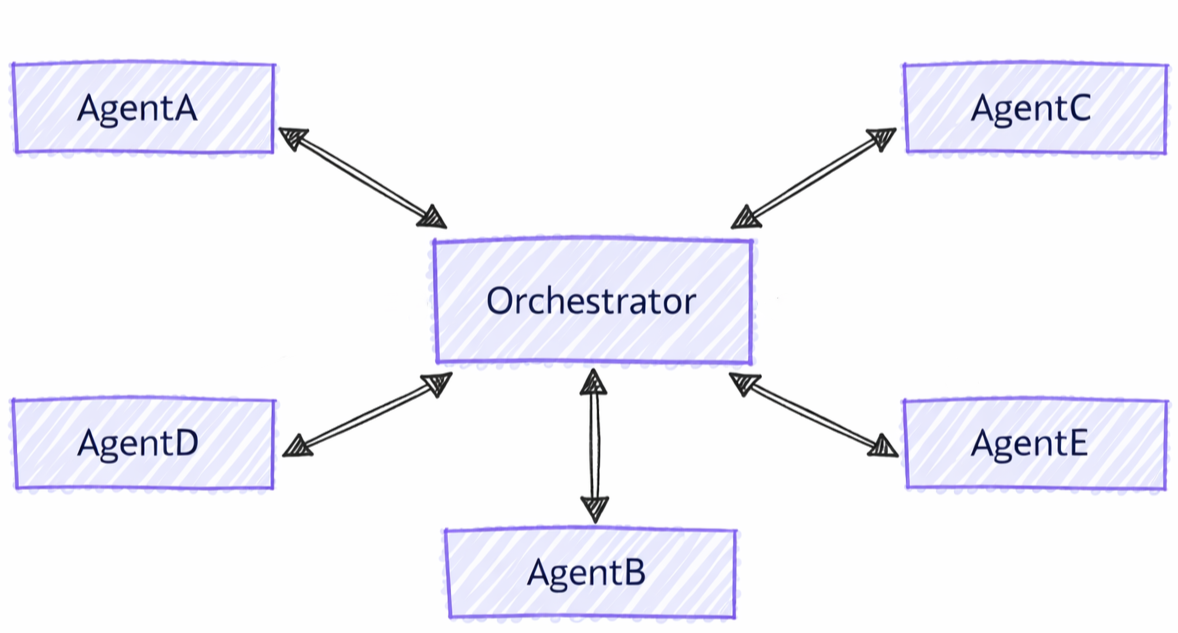
Verschillen tussen groepschat en andere patronen
Groepschatcoördinatie heeft verschillende kenmerken in vergelijking met andere patronen met meerdere agenten.
- Gecentraliseerde coördinatie: in tegenstelling tot handoff-patronen waarbij agents rechtstreeks controle overdragen, maakt groepschat gebruik van een orchestrator om te coördineren wie hierna spreekt
- Iteratieve verfijning: agents kunnen elkaars antwoorden in meerdere rondes beoordelen en erop voortbouwen
- Flexibele sprekerselectie: de orchestrator kan verschillende strategieën (round robin, op prompt gebaseerde, aangepaste logica) gebruiken om sprekers te selecteren
- Gedeelde context: alle agents zien de volledige gespreksgeschiedenis, waardoor gezamenlijke verfijning mogelijk is
Wat u leert
- Gespecialiseerde agenten creëren voor samenwerking in groepen
- Strategieën voor sprekerselectie configureren
- Werkstromen bouwen met iteratieve agentverfijning
- Hoe u de gespreksstroom kunt aanpassen met orchestrators op maat
De Azure OpenAI-client instellen
using System;
using System.Collections.Generic;
using System.Threading.Tasks;
using Azure.AI.OpenAI;
using Azure.Identity;
using Microsoft.Agents.AI.Workflows;
using Microsoft.Extensions.AI;
using Microsoft.Agents.AI;

// Set up the Azure OpenAI client
var endpoint = Environment.GetEnvironmentVariable("AZURE_OPENAI_ENDPOINT") ??
    throw new InvalidOperationException("AZURE_OPENAI_ENDPOINT is not set.");
var deploymentName = Environment.GetEnvironmentVariable("AZURE_OPENAI_DEPLOYMENT_NAME") ?? "gpt-4o-mini";
var client = new AzureOpenAIClient(new Uri(endpoint), new AzureCliCredential())
    .GetChatClient(deploymentName)
    .AsIChatClient();
Uw agents definiëren
Maak gespecialiseerde agents voor verschillende rollen in het groepsgesprek:
// Create a copywriter agent
ChatClientAgent writer = new(client,
    "You are a creative copywriter. Generate catchy slogans and marketing copy. Be concise and impactful.",
    "CopyWriter",
    "A creative copywriter agent");

// Create a reviewer agent
ChatClientAgent reviewer = new(client,
    "You are a marketing reviewer. Evaluate slogans for clarity, impact, and brand alignment. " +
    "Provide constructive feedback or approval.",
    "Reviewer",
    "A marketing review agent");
Groepschat configureren met Round-Robin Orchestrator
Bouw de werkstroom voor groepschats met behulp van AgentWorkflowBuilder:
// Build group chat with round-robin speaker selection
// The manager factory receives the list of agents and returns a configured manager
var workflow = AgentWorkflowBuilder
    .CreateGroupChatBuilderWith(agents =>
        new RoundRobinGroupChatManager(agents)
        {
            MaximumIterationCount = 5  // Maximum number of turns
        })
    .AddParticipants(writer, reviewer)
    .Build();
De groepschatwerkstroom uitvoeren
Voer de werkstroom uit en bekijk het iteratieve gesprek:
// Start the group chat
var messages = new List<ChatMessage> {
    new(ChatRole.User, "Create a slogan for an eco-friendly electric vehicle.")
};

StreamingRun run = await InProcessExecution.StreamAsync(workflow, messages);
await run.TrySendMessageAsync(new TurnToken(emitEvents: true));

await foreach (WorkflowEvent evt in run.WatchStreamAsync().ConfigureAwait(false))
{
    if (evt is AgentResponseUpdateEvent update)
    {
        // Process streaming agent responses
        AgentResponse response = update.AsResponse();
        foreach (ChatMessage message in response.Messages)
        {
            Console.WriteLine($"[{update.ExecutorId}]: {message.Text}");
        }
    }
    else if (evt is WorkflowOutputEvent output)
    {
        // Workflow completed
        var conversationHistory = output.As<List<ChatMessage>>();
        Console.WriteLine("\n=== Final Conversation ===");
        foreach (var message in conversationHistory)
        {
            Console.WriteLine($"{message.AuthorName}: {message.Text}");
        }
        break;
    }
}
Voorbeeldinteractie
[CopyWriter]: "Green Dreams, Zero Emissions" - Drive the future with style and sustainability.

[Reviewer]: The slogan is good, but "Green Dreams" might be a bit abstract. Consider something
more direct like "Pure Power, Zero Impact" to emphasize both performance and environmental benefit.

[CopyWriter]: "Pure Power, Zero Impact" - Experience electric excellence without compromise.

[Reviewer]: Excellent! This slogan is clear, impactful, and directly communicates the key benefits.
The tagline reinforces the message perfectly. Approved for use.

[CopyWriter]: Thank you! The final slogan is: "Pure Power, Zero Impact" - Experience electric
excellence without compromise.
De chatclient instellen
from agent_framework.azure import AzureOpenAIChatClient
from azure.identity import AzureCliCredential

# Initialize the Azure OpenAI chat client
chat_client = AzureOpenAIChatClient(credential=AzureCliCredential())
Uw agents definiëren
Maak gespecialiseerde agents met verschillende rollen:
from agent_framework import ChatAgent

# Create a researcher agent
researcher = ChatAgent(
    name="Researcher",
    description="Collects relevant background information.",
    instructions="Gather concise facts that help answer the question. Be brief and factual.",
    chat_client=chat_client,
)

# Create a writer agent
writer = ChatAgent(
    name="Writer",
    description="Synthesizes polished answers using gathered information.",
    instructions="Compose clear, structured answers using any notes provided. Be comprehensive.",
    chat_client=chat_client,
)
Groepschat configureren met eenvoudige selector
Bouw een groepschat met aangepaste logica voor sprekerselectie:
from agent_framework import GroupChatBuilder, GroupChatState

def round_robin_selector(state: GroupChatState) -> str:
    """A round-robin selector function that picks the next speaker based on the current round index."""

    participant_names = list(state.participants.keys())
    return participant_names[state.current_round % len(participant_names)]


# Build the group chat workflow
workflow = (
    GroupChatBuilder()
    .with_select_speaker_func(round_robin_selector)
    .participants([researcher, writer])
    # Terminate after 4 turns (researcher → writer → researcher → writer)
    .with_termination_condition(lambda conversation: len(conversation) >= 4)
    .build()
)
Groepschat configureren met Agent-Based Orchestrator
U kunt ook een agent-gebaseerde orchestrator gebruiken voor intelligente sprekerselectie. De orchestrator is een volledige ChatAgent met toegang tot hulpprogramma's, context en waarneembaarheid:
# Create orchestrator agent for speaker selection
orchestrator_agent = ChatAgent(
    name="Orchestrator",
    description="Coordinates multi-agent collaboration by selecting speakers",
    instructions="""
You coordinate a team conversation to solve the user's task.

Guidelines:
- Start with Researcher to gather information
- Then have Writer synthesize the final answer
- Only finish after both have contributed meaningfully
""",
    chat_client=chat_client,
)

# Build group chat with agent-based orchestrator
workflow = (
    GroupChatBuilder()
    .with_agent_orchestrator(orchestrator_agent)
    # Set a hard termination condition: stop after 4 assistant messages
    # The agent orchestrator will intelligently decide when to end before this limit but just in case
    .with_termination_condition(lambda messages: sum(1 for msg in messages if msg.role == Role.ASSISTANT) >= 4)
    .participants([researcher, writer])
    .build()
)
De groepschatwerkstroom uitvoeren
Voer de werkstroom- en proces gebeurtenissen uit:
from typing import cast
from agent_framework import AgentResponseUpdateEvent, Role, WorkflowOutputEvent

task = "What are the key benefits of async/await in Python?"

print(f"Task: {task}\n")
print("=" * 80)

final_conversation: list[ChatMessage] = []
last_executor_id: str | None = None

# Run the workflow
async for event in workflow.run_stream(task):
    if isinstance(event, AgentResponseUpdateEvent):
        # Print streaming agent updates
        eid = event.executor_id
        if eid != last_executor_id:
            if last_executor_id is not None:
                print()
            print(f"[{eid}]:", end=" ", flush=True)
            last_executor_id = eid
        print(event.data, end="", flush=True)
    elif isinstance(event, WorkflowOutputEvent):
        # Workflow completed - data is a list of ChatMessage
        final_conversation = cast(list[ChatMessage], event.data)

if final_conversation:
    print("\n\n" + "=" * 80)
    print("Final Conversation:")
    for msg in final_conversation:
        author = getattr(msg, "author_name", "Unknown")
        text = getattr(msg, "text", str(msg))
        print(f"\n[{author}]\n{text}")
        print("-" * 80)

print("\nWorkflow completed.")
Voorbeeldinteractie
Task: What are the key benefits of async/await in Python?

================================================================================

[Researcher]: Async/await in Python provides non-blocking I/O operations, enabling
concurrent execution without threading overhead. Key benefits include improved
performance for I/O-bound tasks, better resource utilization, and simplified
concurrent code structure using native coroutines.

[Writer]: The key benefits of async/await in Python are:

1. **Non-blocking Operations**: Allows I/O operations to run concurrently without
   blocking the main thread, significantly improving performance for network
   requests, file I/O, and database queries.

2. **Resource Efficiency**: Avoids the overhead of thread creation and context
   switching, making it more memory-efficient than traditional threading.

3. **Simplified Concurrency**: Provides a clean, synchronous-looking syntax for
   asynchronous code, making concurrent programs easier to write and maintain.

4. **Scalability**: Enables handling thousands of concurrent connections with
   minimal resource consumption, ideal for high-performance web servers and APIs.

--------------------------------------------------------------------------------

Workflow completed.
Sleutelbegrippen
- Gecentraliseerd beheer: Groepschat maakt gebruik van een manager om sprekerselectie en -stroom te coördineren
- AgentWorkflowBuilder.CreateGroupChatBuilderWith(): Hiermee maakt u werkstromen met een managerfactoryfunctie
- RoundRobinGroupChatManager: Ingebouwde manager die sprekers op round robin-wijze omwisselt
- MaximumIterationCount: bepaalt het maximum aantal agentbeurten voordat er wordt beëindigd
-
Aangepaste managers:
RoundRobinGroupChatManageruitbreiden of aangepaste logica implementeren - Iteratieve verfijning: agents beoordelen en verbeteren elkaars bijdragen
- Gedeelde context: alle deelnemers zien de volledige gespreksgeschiedenis
- Flexibele orchestratorstrategieën: kiezen tussen eenvoudige selectors, op agents gebaseerde orchestrators of aangepaste logica
- GroupChatBuilder: Hiermee maakt u werkstromen met configureerbare sprekerselectie
- with_select_speaker_func(): Aangepaste Python-functies definiëren voor sprekerselectie
- with_agent_orchestrator(): een orchestrator op basis van agents gebruiken voor intelligente sprekercoördinatie
- GroupChatState: geeft de gespreksstatus voor selectiebeslissingen
- Iteratieve samenwerking: Agents bouwen voort op elkaars bijdragen
-
Gebeurtenisstreaming: Verwerken
AgentResponseUpdateEventenWorkflowOutputEventin realtime - list[ChatMessage] Uitvoer: Alle orkestraties geven een chatberichtenlijst terug
Geavanceerd: Aangepaste sprekerselectie
U kunt aangepaste managerlogica implementeren door een aangepast groepschatbeheer te maken:
public class ApprovalBasedManager : RoundRobinGroupChatManager
{
    private readonly string _approverName;

    public ApprovalBasedManager(IReadOnlyList<AIAgent> agents, string approverName)
        : base(agents)
    {
        _approverName = approverName;
    }

    // Override to add custom termination logic
    protected override ValueTask<bool> ShouldTerminateAsync(
        IReadOnlyList<ChatMessage> history,
        CancellationToken cancellationToken = default)
    {
        var last = history.LastOrDefault();
        bool shouldTerminate = last?.AuthorName == _approverName &&
            last.Text?.Contains("approve", StringComparison.OrdinalIgnoreCase) == true;

        return ValueTask.FromResult(shouldTerminate);
    }
}

// Use custom manager in workflow
var workflow = AgentWorkflowBuilder
    .CreateGroupChatBuilderWith(agents =>
        new ApprovalBasedManager(agents, "Reviewer")
        {
            MaximumIterationCount = 10
        })
    .AddParticipants(writer, reviewer)
    .Build();
U kunt geavanceerde selectielogica implementeren op basis van de gespreksstatus:
def smart_selector(state: GroupChatState) -> str:
    """Select speakers based on conversation content and context."""
    conversation = state.conversation

    last_message = conversation[-1] if conversation else None

    # If no messages yet, start with Researcher
    if not last_message:
        return "Researcher"

    # Check last message content
    last_text = last_message.text.lower()

    # If researcher finished gathering info, switch to writer
    if "I have finished" in last_text and last_message.author_name == "Researcher":
        return "Writer"

    # Else continue with researcher until it indicates completion
    return "Researcher"

workflow = (
    GroupChatBuilder()
    .with_select_speaker_func(smart_selector, orchestrator_name="SmartOrchestrator")
    .participants([researcher, writer])
    .build()
)
Contextsynchronisatie
Zoals vermeld aan het begin van deze handleiding, zien alle agents in een groepschat de volledige gespreksgeschiedenis.
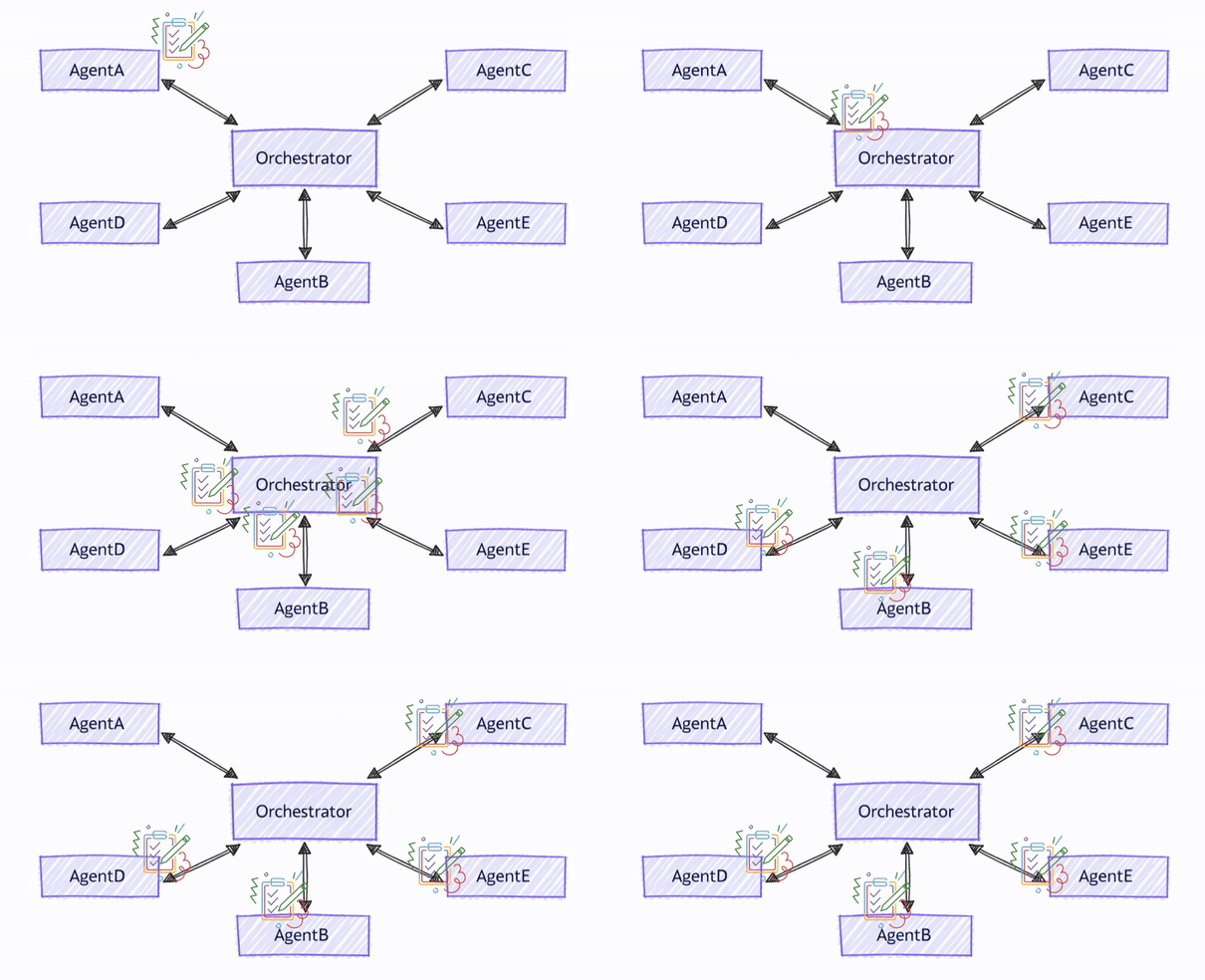
Agents in Agent Framework zijn afhankelijk van agentthreads (AgentThread) voor het beheren van context. In een groepschatorchestratie delen agenten niet dezelfde threadinstantie, maar de orkestrator zorgt ervoor dat de thread van elke agent vóór elke beurt met de volledige gespreksgeschiedenis synchroniseert. Om dit te bereiken, zendt de orchestrator na de beurt van elke agent het antwoord uit naar alle andere agents, zodat alle deelnemers de nieuwste context voor hun volgende beurt hebben.
Aanbeveling
Agents delen niet hetzelfde thread-exemplaar omdat verschillende agenttypen mogelijk verschillende implementaties van de AgentThread abstractie hebben. Het delen van hetzelfde threadexemplaar kan leiden tot inconsistenties in hoe elke agent context verwerkt en onderhoudt.
Nadat het antwoord is uitgezonden, beslist de orchestrator vervolgens de volgende spreker en verzendt een aanvraag naar de geselecteerde agent, die nu de volledige gespreksgeschiedenis heeft om het antwoord te genereren.
Wanneer gebruikt u Groepschat?
Groepschatindeling is ideaal voor:
- Iteratieve verfijning: Meerdere rondes van beoordeling en verbetering
- Collaborative Problem-Solving: Agents met complementaire expertise die samenwerken
- Inhoud maken: Werkstromen van schrijver-revisor voor het maken van documenten
- Analyse met meerdere perspectieven: diverse standpunten op dezelfde invoer krijgen
- Kwaliteitsgarantie: Geautomatiseerde beoordelings- en goedkeuringsprocessen
Houd rekening met alternatieven wanneer:
- U hebt strikte sequentiële verwerking nodig (gebruik sequentiële indeling)
- Agents moeten volledig onafhankelijk werken (concurrente orkestratie gebruiken)
- Directe handoffs van agent naar agent zijn nodig (gebruik Handoff-indeling)
- Complexe dynamische planning is vereist (gebruik Magentic-orchestratie)