Notitie
Voor toegang tot deze pagina is autorisatie vereist. U kunt proberen u aan te melden of de directory te wijzigen.
Voor toegang tot deze pagina is autorisatie vereist. U kunt proberen de mappen te wijzigen.
Een van de centrale functies van Windows Workflow Foundation (WF) is de mogelijkheid van de runtime om niet-actieve werkstromen in een database te behouden en te verwijderen. De stappen in Procedure: Een werkstroom uitvoeren heeft de basisbeginselen van het hosten van werkstromen gedemonstreerd met behulp van een consoletoepassing. Voorbeelden zijn weergegeven van beginwerkstromen, werkstroomlevenscyclushandlers en het hervatten van bladwijzers. Om de werkstroompersistentie effectief te demonstreren, is een complexere werkstroomhost vereist die ondersteuning biedt voor het starten en hervatten van meerdere werkstroomexemplaren. Deze stap in de zelfstudie laat zien hoe u een Windows-formulierhosttoepassing maakt die ondersteuning biedt voor het starten en hervatten van meerdere werkstroomexemplaren, werkstroompersistentie en biedt een basis voor de geavanceerde functies, zoals bijhouden en versiebeheer die worden gedemonstreerd in de volgende zelfstudiestappen.
Notitie
In deze zelfstudiestap en de volgende stappen worden alle drie de werkstroomtypen gebruikt: Een werkstroom maken.
De persistentiedatabase maken
Open SQL Server Management Studio en maak verbinding met de lokale server, bijvoorbeeld .\SQLEXPRESS. Klik met de rechtermuisknop op het knooppunt Databases op de lokale server en selecteer Nieuwe database. Geef de nieuwe database de naam WF45GettingStartedTutorial, accepteer alle andere waarden en selecteer OK.
Notitie
Zorg ervoor dat u de machtiging Database maken hebt op de lokale server voordat u de database maakt.
Kies Openen, Bestand in het menu Bestand . Blader naar de volgende map: C:\Windows\Microsoft.NET\Framework\v4.0.30319\sql\en
Selecteer de volgende twee bestanden en klik op Openen.
SqlWorkflowInstanceStoreLogic.sql
SqlWorkflowInstanceStoreSchema.sql
Kies SqlWorkflowInstanceStoreSchema.sql in het menu Venster . Zorg ervoor dat WF45GettingStartedTutorial is geselecteerd in de vervolgkeuzelijst Beschikbare databases en kies Uitvoeren in het menu Query.
Kies SqlWorkflowInstanceStoreLogic.sql in het menu Venster . Zorg ervoor dat WF45GettingStartedTutorial is geselecteerd in de vervolgkeuzelijst Beschikbare databases en kies Uitvoeren in het menu Query.
Waarschuwing
Het is belangrijk om de vorige twee stappen in de juiste volgorde uit te voeren. Als de query's niet op volgorde worden uitgevoerd, treden er fouten op en is de persistentiedatabase niet juist geconfigureerd.
De verwijzing naar de DurableInstancing-assembly's toevoegen
Klik met de rechtermuisknop op NumberGuessWorkflowHost in Solution Explorer en selecteer Verwijzing toevoegen.
Selecteer Assembly's in de lijst Verwijzing toevoegen en typ
DurableInstancingin het vak Zoekassembly's . Hierdoor worden de assembly's gefilterd en kunnen de gewenste verwijzingen gemakkelijker worden geselecteerd.Schakel het selectievakje naast System.Activities.DurableInstancing en System.Runtime.DurableInstancing in de lijst met zoekresultaten in en klik op OK.
Het hostformulier voor de werkstroom maken
Klik met de rechtermuisknop op NumberGuessWorkflowHost in Solution Explorer en kies Toevoegen, Nieuw item.
Kies Windows-formulier in de lijst geïnstalleerde sjablonen, typ
WorkflowHostFormhet vak Naam en klik op Toevoegen.Configureer de volgende eigenschappen op het formulier.
Eigenschappen Weergegeven als FormBorderStyle FixedSingle MaximaliseerBox Onwaar Tekengrootte 400, 420 Voeg de volgende besturingselementen toe aan het formulier in de opgegeven volgorde en configureer de eigenschappen zoals omgeleid.
Control Eigenschap: waarde Knop Naam: NewGame
Locatie: 13, 13
Grootte: 75, 23
Tekst: Nieuw spelLabel Locatie: 94, 18
Tekst: Een getal raden van 1 totKeuzelijst met invoervak Naam: NumberRange
DropDownStyle: DropDownList
Items: 10, 100, 1000
Locatie: 228, 12
Grootte: 143, 21Label Locatie: 13, 43
Tekst: werkstroomtypeKeuzelijst met invoervak Naam: WorkflowType
DropDownStyle: DropDownList
Items: StateMachineNumberGuessWorkflow, FlowchartNumberGuessWorkflow, SequentialNumberGuessWorkflow
Locatie: 94, 40
Grootte: 277, 21Label Naam: WorkflowVersion
Locatie: 13, 362
Tekst: werkstroomversieGroepsvak Locatie: 13, 67
Grootte: 358, 287
Tekst: GameNotitie
Wanneer u de volgende besturingselementen toevoegt, plaatst u deze in het groepsvak.
Control Eigenschap: waarde Label Locatie: 7, 20
Tekst: Id van werkstroomexemplarenKeuzelijst met invoervak Naam: InstanceId
DropDownStyle: DropDownList
Locatie: 121, 17
Grootte: 227, 21Label Locatie: 7, 47
Tekst: SchattingTextBox Naam: Schatting
Locatie: 50, 44
Grootte: 65, 20Knop Naam: EnterGuess
Locatie: 121, 42
Grootte: 75, 23
Tekst: Schatting invoerenKnop Naam: QuitGame
Locatie: 274, 42
Grootte: 75, 23
Tekst: AfsluitenTextBox Naam: WorkflowStatus
Locatie: 10, 73
Multiline: Waar
Alleen-lezen: Waar
Schuifbalken: verticaal
Grootte: 338, 208Stel de eigenschap AcceptButton van het formulier in op EnterGuess.
In het volgende voorbeeld ziet u het ingevulde formulier.
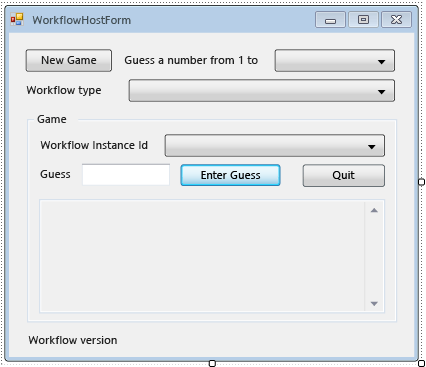
De eigenschappen en helpermethoden van het formulier toevoegen
Met de stappen in deze sectie worden eigenschappen en helpermethoden toegevoegd aan de formulierklasse waarmee de gebruikersinterface van het formulier wordt geconfigureerd ter ondersteuning van actieve en hervatting van werkstromen voor het raden van getallen.
Klik met de rechtermuisknop op WorkflowHostForm in Solution Explorer en kies Code weergeven.
Voeg de volgende
using(ofImports) instructies toe boven aan het bestand met de andereusing(ofImports) instructies.Imports System.Activities Imports System.Activities.DurableInstancing Imports System.Data.SqlClient Imports System.IO Imports System.Windows.Formsusing System.Activities; using System.Activities.DurableInstancing; using System.Data.SqlClient; using System.IO; using System.Windows.Forms;Voeg de volgende liddeclaraties toe aan de klasse WorkflowHostForm .
Belangrijk
Microsoft raadt u aan de veiligste verificatiestroom te gebruiken die beschikbaar is. Als u verbinding maakt met Azure SQL, is Managed Identities voor Azure-resources de aanbevolen verificatiemethode.
Const connectionString = "Server=.\SQLEXPRESS;Initial Catalog=WF45GettingStartedTutorial;Integrated Security=SSPI"
Dim store As SqlWorkflowInstanceStore
Dim workflowStarting As Boolean
const string connectionString = "Server=.\\SQLEXPRESS;Initial Catalog=WF45GettingStartedTutorial;Integrated Security=SSPI"; SqlWorkflowInstanceStore store; bool workflowStarting;Notitie
Als uw verbindingsreeks anders is, werkt
connectionStringu deze bij om naar uw database te verwijzen.Voeg een
WorkflowInstanceIdeigenschap toe aan deWorkflowFormHostklasse.Public ReadOnly Property WorkflowInstanceId() As Guid Get If InstanceId.SelectedIndex = -1 Then Return Guid.Empty Else Return New Guid(InstanceId.SelectedItem.ToString()) End If End Get End Propertypublic Guid WorkflowInstanceId { get { return InstanceId.SelectedIndex == -1 ? Guid.Empty : (Guid)InstanceId.SelectedItem; } }De
InstanceIdkeuzelijst met invoervak bevat een lijst met persistente werkstroomexemplaren en deWorkflowInstanceIdeigenschap retourneert de momenteel geselecteerde werkstroom.Voeg een handler toe voor de formulier
Loadgebeurtenis. Als u de handler wilt toevoegen, schakelt u over naar de ontwerpweergave voor het formulier, klikt u op het pictogram Gebeurtenissen boven aan het venster Eigenschappen en dubbelklikt u op Laden.Private Sub WorkflowHostForm_Load(sender As Object, e As EventArgs) Handles Me.Load End Subprivate void WorkflowHostForm_Load(object sender, EventArgs e) { }Voeg de volgende code toe aan
WorkflowHostForm_Load.' Initialize the store and configure it so that it can be used for ' multiple WorkflowApplication instances. store = New SqlWorkflowInstanceStore(connectionString) WorkflowApplication.CreateDefaultInstanceOwner(store, Nothing, WorkflowIdentityFilter.Any) ' Set default ComboBox selections. NumberRange.SelectedIndex = 0 WorkflowType.SelectedIndex = 0 ListPersistedWorkflows()// Initialize the store and configure it so that it can be used for // multiple WorkflowApplication instances. store = new SqlWorkflowInstanceStore(connectionString); WorkflowApplication.CreateDefaultInstanceOwner(store, null, WorkflowIdentityFilter.Any); // Set default ComboBox selections. NumberRange.SelectedIndex = 0; WorkflowType.SelectedIndex = 0; ListPersistedWorkflows();Wanneer het formulier wordt geladen, worden de
SqlWorkflowInstanceStorekeuzelijsten met invoervakbereik en werkstroomtype ingesteld op standaardwaarden en worden de persistente werkstroomexemplaren toegevoegd aan deInstanceIdkeuzelijst met invoervak.Voeg een
SelectedIndexChangedhandler toe voorInstanceId. Als u de handler wilt toevoegen, schakelt u over naar de ontwerpweergave voor het formulier, selecteert u deInstanceIdkeuzelijst met invoervak, klikt u op het pictogram Gebeurtenissen boven aan het venster Eigenschappen en dubbelklikt u op SelectedIndexChanged.Private Sub InstanceId_SelectedIndexChanged(sender As Object, e As EventArgs) Handles InstanceId.SelectedIndexChanged End Subprivate void InstanceId_SelectedIndexChanged(object sender, EventArgs e) { }Voeg de volgende code toe aan
InstanceId_SelectedIndexChanged. Wanneer de gebruiker een werkstroom selecteert met behulp van de keuzelijst met invoervak, wordt het statusvenster bijgewerkt.If InstanceId.SelectedIndex = -1 Then Return End If ' Clear the status window. WorkflowStatus.Clear() ' Get the workflow version and display it. ' If the workflow is just starting then this info will not ' be available in the persistence store so do not try and retrieve it. If Not workflowStarting Then Dim instance As WorkflowApplicationInstance = _ WorkflowApplication.GetInstance(WorkflowInstanceId, store) WorkflowVersion.Text = _ WorkflowVersionMap.GetIdentityDescription(instance.DefinitionIdentity) ' Unload the instance. instance.Abandon() End Ifif (InstanceId.SelectedIndex == -1) { return; } // Clear the status window. WorkflowStatus.Clear(); // Get the workflow version and display it. // If the workflow is just starting then this info will not // be available in the persistence store so do not try and retrieve it. if (!workflowStarting) { WorkflowApplicationInstance instance = WorkflowApplication.GetInstance(this.WorkflowInstanceId, store); WorkflowVersion.Text = WorkflowVersionMap.GetIdentityDescription(instance.DefinitionIdentity); // Unload the instance. instance.Abandon(); }Voeg de volgende
ListPersistedWorkflowsmethode toe aan de formulierklasse.Private Sub ListPersistedWorkflows() Using localCon As New SqlConnection(connectionString) Dim localCmd As String = _ "SELECT [InstanceId] FROM [System.Activities.DurableInstancing].[Instances] ORDER BY [CreationTime]" Dim cmd As SqlCommand = localCon.CreateCommand() cmd.CommandText = localCmd localCon.Open() Using reader As SqlDataReader = cmd.ExecuteReader(CommandBehavior.CloseConnection) While (reader.Read()) ' Get the InstanceId of the persisted Workflow. Dim id As Guid = Guid.Parse(reader(0).ToString()) InstanceId.Items.Add(id) End While End Using End Using End Subusing (var localCon = new SqlConnection(connectionString)) { string localCmd = "SELECT [InstanceId] FROM [System.Activities.DurableInstancing].[Instances] ORDER BY [CreationTime]"; SqlCommand cmd = localCon.CreateCommand(); cmd.CommandText = localCmd; localCon.Open(); using (SqlDataReader reader = cmd.ExecuteReader(CommandBehavior.CloseConnection)) { while (reader.Read()) { // Get the InstanceId of the persisted Workflow. Guid id = Guid.Parse(reader[0].ToString()); InstanceId.Items.Add(id); } } }ListPersistedWorkflowsvoert een query uit op het exemplaararchief voor persistente werkstroomexemplaren en voegt de exemplaar-id's toe aan decboInstanceIdkeuzelijst met invoervak.Voeg de volgende
UpdateStatusmethode en de bijbehorende gemachtigde toe aan de formulierklasse. Met deze methode wordt het statusvenster op het formulier bijgewerkt met de status van de huidige actieve werkstroom.Private Delegate Sub UpdateStatusDelegate(msg As String) Public Sub UpdateStatus(msg As String) ' We may be on a different thread so we need to ' make this call using BeginInvoke. If InvokeRequired Then BeginInvoke(New UpdateStatusDelegate(AddressOf UpdateStatus), msg) Else If Not msg.EndsWith(vbCrLf) Then msg = msg & vbCrLf End If WorkflowStatus.AppendText(msg) ' Ensure that the newly added status is visible. WorkflowStatus.SelectionStart = WorkflowStatus.Text.Length WorkflowStatus.ScrollToCaret() End If End Subprivate delegate void UpdateStatusDelegate(string msg); public void UpdateStatus(string msg) { // We may be on a different thread so we need to // make this call using BeginInvoke. if (InvokeRequired) { BeginInvoke(new UpdateStatusDelegate(UpdateStatus), msg); } else { if (!msg.EndsWith("\r\n")) { msg += "\r\n"; } WorkflowStatus.AppendText(msg); WorkflowStatus.SelectionStart = WorkflowStatus.Text.Length; WorkflowStatus.ScrollToCaret(); } }Voeg de volgende
GameOvermethode en de bijbehorende gemachtigde toe aan de formulierklasse. Wanneer een werkstroom is voltooid, wordt met deze methode de formuliergebruikersinterface bijgewerkt door de exemplaar-id van de voltooide werkstroom uit de keuzelijst met invoervak InstanceId te verwijderen.Private Delegate Sub GameOverDelegate() Private Sub GameOver() If InvokeRequired Then BeginInvoke(New GameOverDelegate(AddressOf GameOver)) Else ' Remove this instance from the InstanceId combo box. InstanceId.Items.Remove(InstanceId.SelectedItem) InstanceId.SelectedIndex = -1 End If End Subprivate delegate void GameOverDelegate(); private void GameOver() { if (InvokeRequired) { BeginInvoke(new GameOverDelegate(GameOver)); } else { // Remove this instance from the combo box. InstanceId.Items.Remove(InstanceId.SelectedItem); InstanceId.SelectedIndex = -1; } }
Het exemplaararchief, de handlers voor de levenscyclus van werkstromen en extensies configureren
Voeg een
ConfigureWorkflowApplicationmethode toe aan de formulierklasse.Private Sub ConfigureWorkflowApplication(wfApp As WorkflowApplication) End Subprivate void ConfigureWorkflowApplication(WorkflowApplication wfApp) { }Met deze methode configureert u de
WorkflowApplicationgewenste extensies en voegt u handlers toe voor de levenscyclus van de werkstroom.Geef
ConfigureWorkflowApplicationin , geef deSqlWorkflowInstanceStorevoor deWorkflowApplication.' Configure the persistence store. wfApp.InstanceStore = store// Configure the persistence store. wfApp.InstanceStore = store;Maak vervolgens een
StringWriterexemplaar en voeg deze toe aan deExtensionsverzameling van deWorkflowApplication. Wanneer eenStringWriterwordt toegevoegd aan de extensies, worden alleWriteLineactiviteitsuitvoer vastgelegd. Wanneer de werkstroom niet actief wordt, kan deWriteLineuitvoer worden geëxtraheerd uit hetStringWriterformulier en worden weergegeven.' Add a StringWriter to the extensions. This captures the output ' from the WriteLine activities so we can display it in the form. Dim sw As New StringWriter() wfApp.Extensions.Add(sw)// Add a StringWriter to the extensions. This captures the output // from the WriteLine activities so we can display it in the form. var sw = new StringWriter(); wfApp.Extensions.Add(sw);Voeg de volgende handler toe voor de
Completedgebeurtenis. Wanneer een werkstroom is voltooid, wordt het aantal beurten om te raden dat het getal wordt weergegeven in het statusvenster. Als de werkstroom wordt beëindigd, wordt de uitzonderingsinformatie die de beëindiging heeft veroorzaakt, weergegeven. Aan het einde van de handler wordt deGameOvermethode aangeroepen, waardoor de voltooide werkstroom uit de lijst met werkstromen wordt verwijderd.wfApp.Completed = _ Sub(e As WorkflowApplicationCompletedEventArgs) If e.CompletionState = ActivityInstanceState.Faulted Then UpdateStatus($"Workflow Terminated. Exception: {e.TerminationException.GetType().FullName}{vbCrLf}{e.TerminationException.Message}") ElseIf e.CompletionState = ActivityInstanceState.Canceled Then UpdateStatus("Workflow Canceled.") Else Dim turns As Integer = Convert.ToInt32(e.Outputs("Turns")) UpdateStatus($"Congratulations, you guessed the number in {turns} turns.") End If GameOver() End SubwfApp.Completed = delegate(WorkflowApplicationCompletedEventArgs e) { if (e.CompletionState == ActivityInstanceState.Faulted) { UpdateStatus($"Workflow Terminated. Exception: {e.TerminationException.GetType().FullName}\r\n{e.TerminationException.Message}"); } else if (e.CompletionState == ActivityInstanceState.Canceled) { UpdateStatus("Workflow Canceled."); } else { int turns = Convert.ToInt32(e.Outputs["Turns"]); UpdateStatus($"Congratulations, you guessed the number in {turns} turns."); } GameOver(); };Voeg het volgende
AbortedenOnUnhandledExceptionde handlers toe. DeGameOvermethode wordt niet aangeroepen vanuit deAbortedhandler omdat wanneer een werkstroomexemplaren worden afgebroken, deze niet wordt beëindigd en het is mogelijk om het exemplaar op een later tijdstip te hervatten.wfApp.Aborted = _ Sub(e As WorkflowApplicationAbortedEventArgs) UpdateStatus($"Workflow Aborted. Exception: {e.Reason.GetType().FullName}{vbCrLf}{e.Reason.Message}") End Sub wfApp.OnUnhandledException = _ Function(e As WorkflowApplicationUnhandledExceptionEventArgs) UpdateStatus($"Unhandled Exception: {e.UnhandledException.GetType().FullName}{vbCrLf}{e.UnhandledException.Message}") GameOver() Return UnhandledExceptionAction.Terminate End FunctionwfApp.Aborted = delegate(WorkflowApplicationAbortedEventArgs e) { UpdateStatus($"Workflow Aborted. Exception: {e.Reason.GetType().FullName}\r\n{e.Reason.Message}"); }; wfApp.OnUnhandledException = delegate(WorkflowApplicationUnhandledExceptionEventArgs e) { UpdateStatus($"Unhandled Exception: {e.UnhandledException.GetType().FullName}\r\n{e.UnhandledException.Message}"); GameOver(); return UnhandledExceptionAction.Terminate; };Voeg de volgende
PersistableIdlehandler toe. Deze handler haalt deStringWriterextensie op die is toegevoegd, extraheert de uitvoer van deWriteLineactiviteiten en geeft deze weer in het statusvenster.wfApp.PersistableIdle = _ Function(e As WorkflowApplicationIdleEventArgs) ' Send the current WriteLine outputs to the status window. Dim writers = e.GetInstanceExtensions(Of StringWriter)() For Each writer In writers UpdateStatus(writer.ToString()) Next Return PersistableIdleAction.Unload End FunctionwfApp.PersistableIdle = delegate(WorkflowApplicationIdleEventArgs e) { // Send the current WriteLine outputs to the status window. var writers = e.GetInstanceExtensions<StringWriter>(); foreach (var writer in writers) { UpdateStatus(writer.ToString()); } return PersistableIdleAction.Unload; };De PersistableIdleAction opsomming heeft drie waarden: None, Persisten Unload. Persist zorgt ervoor dat de werkstroom blijft bestaan, maar dat zorgt er niet voor dat de werkstroom wordt uitgeladen. Unload zorgt ervoor dat de werkstroom behouden blijft en wordt uitgeladen.
Het volgende voorbeeld is de voltooide
ConfigureWorkflowApplicationmethode.Private Sub ConfigureWorkflowApplication(wfApp As WorkflowApplication) ' Configure the persistence store. wfApp.InstanceStore = store ' Add a StringWriter to the extensions. This captures the output ' from the WriteLine activities so we can display it in the form. Dim sw As New StringWriter() wfApp.Extensions.Add(sw) wfApp.Completed = _ Sub(e As WorkflowApplicationCompletedEventArgs) If e.CompletionState = ActivityInstanceState.Faulted Then UpdateStatus($"Workflow Terminated. Exception: {e.TerminationException.GetType().FullName}{vbCrLf}{e.TerminationException.Message}") ElseIf e.CompletionState = ActivityInstanceState.Canceled Then UpdateStatus("Workflow Canceled.") Else Dim turns As Integer = Convert.ToInt32(e.Outputs("Turns")) UpdateStatus($"Congratulations, you guessed the number in {turns} turns.") End If GameOver() End Sub wfApp.Aborted = _ Sub(e As WorkflowApplicationAbortedEventArgs) UpdateStatus($"Workflow Aborted. Exception: {e.Reason.GetType().FullName}{vbCrLf}{e.Reason.Message}") End Sub wfApp.OnUnhandledException = _ Function(e As WorkflowApplicationUnhandledExceptionEventArgs) UpdateStatus($"Unhandled Exception: {e.UnhandledException.GetType().FullName}{vbCrLf}{e.UnhandledException.Message}") GameOver() Return UnhandledExceptionAction.Terminate End Function wfApp.PersistableIdle = _ Function(e As WorkflowApplicationIdleEventArgs) ' Send the current WriteLine outputs to the status window. Dim writers = e.GetInstanceExtensions(Of StringWriter)() For Each writer In writers UpdateStatus(writer.ToString()) Next Return PersistableIdleAction.Unload End Function End Subprivate void ConfigureWorkflowApplication(WorkflowApplication wfApp) { // Configure the persistence store. wfApp.InstanceStore = store; // Add a StringWriter to the extensions. This captures the output // from the WriteLine activities so we can display it in the form. var sw = new StringWriter(); wfApp.Extensions.Add(sw); wfApp.Completed = delegate(WorkflowApplicationCompletedEventArgs e) { if (e.CompletionState == ActivityInstanceState.Faulted) { UpdateStatus($"Workflow Terminated. Exception: {e.TerminationException.GetType().FullName}\r\n{e.TerminationException.Message}"); } else if (e.CompletionState == ActivityInstanceState.Canceled) { UpdateStatus("Workflow Canceled."); } else { int turns = Convert.ToInt32(e.Outputs["Turns"]); UpdateStatus($"Congratulations, you guessed the number in {turns} turns."); } GameOver(); }; wfApp.Aborted = delegate(WorkflowApplicationAbortedEventArgs e) { UpdateStatus($"Workflow Aborted. Exception: {e.Reason.GetType().FullName}\r\n{e.Reason.Message}"); }; wfApp.OnUnhandledException = delegate(WorkflowApplicationUnhandledExceptionEventArgs e) { UpdateStatus($"Unhandled Exception: {e.UnhandledException.GetType().FullName}\r\n{e.UnhandledException.Message}"); GameOver(); return UnhandledExceptionAction.Terminate; }; wfApp.PersistableIdle = delegate(WorkflowApplicationIdleEventArgs e) { // Send the current WriteLine outputs to the status window. var writers = e.GetInstanceExtensions<StringWriter>(); foreach (var writer in writers) { UpdateStatus(writer.ToString()); } return PersistableIdleAction.Unload; }; }
Starten en hervatten van meerdere werkstroomtypen inschakelen
Als u een werkstroomexemplaren wilt hervatten, moet de host de werkstroomdefinitie opgeven. In deze zelfstudie zijn er drie werkstroomtypen en in de volgende zelfstudiestappen worden meerdere versies van deze typen geïntroduceerd. WorkflowIdentity biedt een manier voor een hosttoepassing om identificatiegegevens te koppelen aan een persistent werkstroomexemplaren. De stappen in deze sectie laten zien hoe u een hulpprogrammaklasse maakt om u te helpen bij het toewijzen van de werkstroomidentiteit van een persistent werkstroomexemplaren aan de bijbehorende werkstroomdefinitie. Zie WorkflowIdentity en Versiebeheer gebruiken voor meer informatie over WorkflowIdentity en versiebeheer.
Klik met de rechtermuisknop op NumberGuessWorkflowHost in Solution Explorer en kies Toevoegen, Klasse. Typ
WorkflowVersionMapin het vak Naam en klik op Toevoegen.Voeg de volgende
usingofImportsinstructies toe bovenaan het bestand met de andereusingofImportsinstructies.Imports System.Activities Imports NumberGuessWorkflowActivitiesusing System.Activities; using NumberGuessWorkflowActivities;Vervang de
WorkflowVersionMapklassedeclaratie door de volgende declaratie.Public Module WorkflowVersionMap Dim map As Dictionary(Of WorkflowIdentity, Activity) ' Current version identities. Public StateMachineNumberGuessIdentity As WorkflowIdentity Public FlowchartNumberGuessIdentity As WorkflowIdentity Public SequentialNumberGuessIdentity As WorkflowIdentity Sub New() map = New Dictionary(Of WorkflowIdentity, Activity) ' Add the current workflow version identities. StateMachineNumberGuessIdentity = New WorkflowIdentity With { .Name = "StateMachineNumberGuessWorkflow", .Version = New Version(1, 0, 0, 0) } FlowchartNumberGuessIdentity = New WorkflowIdentity With { .Name = "FlowchartNumberGuessWorkflow", .Version = New Version(1, 0, 0, 0) } SequentialNumberGuessIdentity = New WorkflowIdentity With { .Name = "SequentialNumberGuessWorkflow", .Version = New Version(1, 0, 0, 0) } map.Add(StateMachineNumberGuessIdentity, New StateMachineNumberGuessWorkflow()) map.Add(FlowchartNumberGuessIdentity, New FlowchartNumberGuessWorkflow()) map.Add(SequentialNumberGuessIdentity, New SequentialNumberGuessWorkflow()) End Sub Public Function GetWorkflowDefinition(identity As WorkflowIdentity) As Activity Return map(identity) End Function Public Function GetIdentityDescription(identity As WorkflowIdentity) As String Return identity.ToString() End Function End Modulepublic static class WorkflowVersionMap { static Dictionary<WorkflowIdentity, Activity> map; // Current version identities. static public WorkflowIdentity StateMachineNumberGuessIdentity; static public WorkflowIdentity FlowchartNumberGuessIdentity; static public WorkflowIdentity SequentialNumberGuessIdentity; static WorkflowVersionMap() { map = new Dictionary<WorkflowIdentity, Activity>(); // Add the current workflow version identities. StateMachineNumberGuessIdentity = new WorkflowIdentity { Name = "StateMachineNumberGuessWorkflow", Version = new Version(1, 0, 0, 0) }; FlowchartNumberGuessIdentity = new WorkflowIdentity { Name = "FlowchartNumberGuessWorkflow", Version = new Version(1, 0, 0, 0) }; SequentialNumberGuessIdentity = new WorkflowIdentity { Name = "SequentialNumberGuessWorkflow", Version = new Version(1, 0, 0, 0) }; map.Add(StateMachineNumberGuessIdentity, new StateMachineNumberGuessWorkflow()); map.Add(FlowchartNumberGuessIdentity, new FlowchartNumberGuessWorkflow()); map.Add(SequentialNumberGuessIdentity, new SequentialNumberGuessWorkflow()); } public static Activity GetWorkflowDefinition(WorkflowIdentity identity) { return map[identity]; } public static string GetIdentityDescription(WorkflowIdentity identity) { return identity.ToString(); } }WorkflowVersionMapbevat drie werkstroomidentiteiten die zijn toegewezen aan de drie werkstroomdefinities uit deze zelfstudie en worden gebruikt in de volgende secties wanneer werkstromen worden gestart en hervat.
Een nieuwe werkstroom starten
Voeg een
Clickhandler toe voorNewGame. Als u de handler wilt toevoegen, schakelt u over naar de ontwerpweergave voor het formulier en dubbelklikt u eropNewGame. Er wordt eenNewGame_Clickhandler toegevoegd en de weergave schakelt over naar de codeweergave voor het formulier. Wanneer de gebruiker op deze knop klikt, wordt er een nieuwe werkstroom gestart.Private Sub NewGame_Click(sender As Object, e As EventArgs) Handles NewGame.Click End Subprivate void NewGame_Click(object sender, EventArgs e) { }Voeg de volgende code toe aan de klikhandler. Met deze code maakt u een woordenlijst met invoerargumenten voor de werkstroom, gesleuteld op argumentnaam. Deze woordenlijst bevat één vermelding die het bereik bevat van het willekeurig gegenereerde getal dat is opgehaald uit de keuzelijst met invoervak voor het bereik.
Dim inputs As New Dictionary(Of String, Object)()
inputs.Add("MaxNumber", Convert.ToInt32(NumberRange.SelectedItem))
var inputs = new Dictionary<string, object>(); inputs.Add("MaxNumber", Convert.ToInt32(NumberRange.SelectedItem));Voeg vervolgens de volgende code toe waarmee de werkstroom wordt gestart. De
WorkflowIdentitydefinitie van de werkstroom en de werkstroom die overeenkomt met het type werkstroom dat is geselecteerd, worden opgehaald met behulp van deWorkflowVersionMaphelperklasse. Vervolgens wordt een nieuwWorkflowApplicationexemplaar gemaakt met behulp van de werkstroomdefinitieWorkflowIdentityen de woordenlijst met invoerargumenten.Dim identity As WorkflowIdentity = Nothing Select Case WorkflowType.SelectedItem.ToString() Case "SequentialNumberGuessWorkflow" identity = WorkflowVersionMap.SequentialNumberGuessIdentity Case "StateMachineNumberGuessWorkflow" identity = WorkflowVersionMap.StateMachineNumberGuessIdentity Case "FlowchartNumberGuessWorkflow" identity = WorkflowVersionMap.FlowchartNumberGuessIdentity End Select Dim wf As Activity = WorkflowVersionMap.GetWorkflowDefinition(identity) Dim wfApp = New WorkflowApplication(wf, inputs, identity)WorkflowIdentity identity = null; switch (WorkflowType.SelectedItem.ToString()) { case "SequentialNumberGuessWorkflow": identity = WorkflowVersionMap.SequentialNumberGuessIdentity; break; case "StateMachineNumberGuessWorkflow": identity = WorkflowVersionMap.StateMachineNumberGuessIdentity; break; case "FlowchartNumberGuessWorkflow": identity = WorkflowVersionMap.FlowchartNumberGuessIdentity; break; }; Activity wf = WorkflowVersionMap.GetWorkflowDefinition(identity); WorkflowApplication wfApp = new WorkflowApplication(wf, inputs, identity);Voeg vervolgens de volgende code toe waarmee de werkstroom wordt toegevoegd aan de lijst met werkstromen en de versiegegevens van de werkstroom op het formulier worden weergegeven.
' Add the workflow to the list and display the version information.
workflowStarting = True
InstanceId.SelectedIndex = InstanceId.Items.Add(wfApp.Id)
WorkflowVersion.Text = identity.ToString()
workflowStarting = False
// Add the workflow to the list and display the version information. workflowStarting = true; InstanceId.SelectedIndex = InstanceId.Items.Add(wfApp.Id); WorkflowVersion.Text = identity.ToString(); workflowStarting = false;Aanroep
ConfigureWorkflowApplicationvoor het configureren van het exemplaararchief, extensies en werkstroomlevenscyclushandlers voor ditWorkflowApplicationexemplaar.' Configure the instance store, extensions, and ' workflow lifecycle handlers. ConfigureWorkflowApplication(wfApp)// Configure the instance store, extensions, and // workflow lifecycle handlers. ConfigureWorkflowApplication(wfApp);Bel ten slotte
Run.' Start the workflow. wfApp.Run()// Start the workflow. wfApp.Run();Het volgende voorbeeld is de voltooide
NewGame_Clickhandler.Private Sub NewGame_Click(sender As Object, e As EventArgs) Handles NewGame.Click ' Start a new workflow. Dim inputs As New Dictionary(Of String, Object)() inputs.Add("MaxNumber", Convert.ToInt32(NumberRange.SelectedItem)) Dim identity As WorkflowIdentity = Nothing Select Case WorkflowType.SelectedItem.ToString() Case "SequentialNumberGuessWorkflow" identity = WorkflowVersionMap.SequentialNumberGuessIdentity Case "StateMachineNumberGuessWorkflow" identity = WorkflowVersionMap.StateMachineNumberGuessIdentity Case "FlowchartNumberGuessWorkflow" identity = WorkflowVersionMap.FlowchartNumberGuessIdentity End Select Dim wf As Activity = WorkflowVersionMap.GetWorkflowDefinition(identity) Dim wfApp = New WorkflowApplication(wf, inputs, identity) ' Add the workflow to the list and display the version information. workflowStarting = True InstanceId.SelectedIndex = InstanceId.Items.Add(wfApp.Id) WorkflowVersion.Text = identity.ToString() workflowStarting = False ' Configure the instance store, extensions, and ' workflow lifecycle handlers. ConfigureWorkflowApplication(wfApp) ' Start the workflow. wfApp.Run() End Subprivate void NewGame_Click(object sender, EventArgs e) { var inputs = new Dictionary<string, object>(); inputs.Add("MaxNumber", Convert.ToInt32(NumberRange.SelectedItem)); WorkflowIdentity identity = null; switch (WorkflowType.SelectedItem.ToString()) { case "SequentialNumberGuessWorkflow": identity = WorkflowVersionMap.SequentialNumberGuessIdentity; break; case "StateMachineNumberGuessWorkflow": identity = WorkflowVersionMap.StateMachineNumberGuessIdentity; break; case "FlowchartNumberGuessWorkflow": identity = WorkflowVersionMap.FlowchartNumberGuessIdentity; break; }; Activity wf = WorkflowVersionMap.GetWorkflowDefinition(identity); var wfApp = new WorkflowApplication(wf, inputs, identity); // Add the workflow to the list and display the version information. workflowStarting = true; InstanceId.SelectedIndex = InstanceId.Items.Add(wfApp.Id); WorkflowVersion.Text = identity.ToString(); workflowStarting = false; // Configure the instance store, extensions, and // workflow lifecycle handlers. ConfigureWorkflowApplication(wfApp); // Start the workflow. wfApp.Run(); }
Een werkstroom hervatten
Voeg een
Clickhandler toe voorEnterGuess. Als u de handler wilt toevoegen, schakelt u over naar de ontwerpweergave voor het formulier en dubbelklikt u eropEnterGuess. Wanneer de gebruiker op deze knop klikt, wordt een werkstroom hervat.Private Sub EnterGuess_Click(sender As Object, e As EventArgs) Handles EnterGuess.Click End Subprivate void EnterGuess_Click(object sender, EventArgs e) { }Voeg de volgende code toe om ervoor te zorgen dat een werkstroom is geselecteerd in de lijst met werkstromen en of de schatting van de gebruiker geldig is.
If WorkflowInstanceId = Guid.Empty Then
    MessageBox.Show("Please select a workflow.")
    Return
End If

Dim userGuess As Integer
If Not Int32.TryParse(Guess.Text, userGuess) Then
    MessageBox.Show("Please enter an integer.")
    Guess.SelectAll()
    Guess.Focus()
    Return
End If
if (WorkflowInstanceId == Guid.Empty) { MessageBox.Show("Please select a workflow."); return; } int guess; if (!Int32.TryParse(Guess.Text, out guess)) { MessageBox.Show("Please enter an integer."); Guess.SelectAll(); Guess.Focus(); return; }Haal vervolgens het
WorkflowApplicationInstancepersistente werkstroomexemplaren op. AWorkflowApplicationInstancevertegenwoordigt een persistent werkstroomexemplaar dat nog niet is gekoppeld aan een werkstroomdefinitie. DeDefinitionIdentityvan deWorkflowApplicationInstancebevat deWorkflowIdentitypersistente werkstroominstantie. In deze zelfstudie wordt deWorkflowVersionMaphulpprogrammaklasse gebruikt om deWorkflowIdentityjuiste werkstroomdefinitie toe te wijzen. Zodra de werkstroomdefinitie is opgehaald, wordt er eenWorkflowApplicationgemaakt met behulp van de juiste werkstroomdefinitie.Dim instance As WorkflowApplicationInstance = _ WorkflowApplication.GetInstance(WorkflowInstanceId, store) ' Use the persisted WorkflowIdentity to retrieve the correct workflow ' definition from the dictionary. Dim wf As Activity = _ WorkflowVersionMap.GetWorkflowDefinition(instance.DefinitionIdentity) ' Associate the WorkflowApplication with the correct definition Dim wfApp As New WorkflowApplication(wf, instance.DefinitionIdentity)WorkflowApplicationInstance instance = WorkflowApplication.GetInstance(WorkflowInstanceId, store); // Use the persisted WorkflowIdentity to retrieve the correct workflow // definition from the dictionary. Activity wf = WorkflowVersionMap.GetWorkflowDefinition(instance.DefinitionIdentity); // Associate the WorkflowApplication with the correct definition var wfApp = new WorkflowApplication(wf, instance.DefinitionIdentity);Zodra de app
WorkflowApplicationis gemaakt, configureert u het exemplaararchief, de werkstroomlevenscyclushandlers en -extensies door aan te roepenConfigureWorkflowApplication. Deze stappen moeten worden uitgevoerd telkens wanneer er een nieuweWorkflowApplicationwordt gemaakt en moeten worden uitgevoerd voordat het werkstroomexemplaren in hetWorkflowApplicationwerkstroomexemplaren worden geladen. Nadat de werkstroom is geladen, wordt deze hervat met de schatting van de gebruiker.' Configure the extensions and lifecycle handlers. ' Do this before the instance is loaded. Once the instance is ' loaded it is too late to add extensions. ConfigureWorkflowApplication(wfApp) ' Load the workflow. wfApp.Load(instance) ' Resume the workflow. wfApp.ResumeBookmark("EnterGuess", userGuess)// Configure the extensions and lifecycle handlers. // Do this before the instance is loaded. Once the instance is // loaded it is too late to add extensions. ConfigureWorkflowApplication(wfApp); // Load the workflow. wfApp.Load(instance); // Resume the workflow. wfApp.ResumeBookmark("EnterGuess", guess);Ten slotte wist u het tekstvak voor schattingen en bereidt u het formulier voor om een andere schatting te accepteren.
' Clear the Guess textbox.
Guess.Clear()
Guess.Focus()
// Clear the Guess textbox. Guess.Clear(); Guess.Focus();Het volgende voorbeeld is de voltooide
EnterGuess_Clickhandler.Private Sub EnterGuess_Click(sender As Object, e As EventArgs) Handles EnterGuess.Click If WorkflowInstanceId = Guid.Empty Then MessageBox.Show("Please select a workflow.") Return End If Dim userGuess As Integer If Not Int32.TryParse(Guess.Text, userGuess) Then MessageBox.Show("Please enter an integer.") Guess.SelectAll() Guess.Focus() Return End If Dim instance As WorkflowApplicationInstance = _ WorkflowApplication.GetInstance(WorkflowInstanceId, store) ' Use the persisted WorkflowIdentity to retrieve the correct workflow ' definition from the dictionary. Dim wf As Activity = _ WorkflowVersionMap.GetWorkflowDefinition(instance.DefinitionIdentity) ' Associate the WorkflowApplication with the correct definition Dim wfApp As New WorkflowApplication(wf, instance.DefinitionIdentity) ' Configure the extensions and lifecycle handlers. ' Do this before the instance is loaded. Once the instance is ' loaded it is too late to add extensions. ConfigureWorkflowApplication(wfApp) ' Load the workflow. wfApp.Load(instance) ' Resume the workflow. wfApp.ResumeBookmark("EnterGuess", userGuess) ' Clear the Guess textbox. Guess.Clear() Guess.Focus() End Subprivate void EnterGuess_Click(object sender, EventArgs e) { if (WorkflowInstanceId == Guid.Empty) { MessageBox.Show("Please select a workflow."); return; } int guess; if (!Int32.TryParse(Guess.Text, out guess)) { MessageBox.Show("Please enter an integer."); Guess.SelectAll(); Guess.Focus(); return; } WorkflowApplicationInstance instance = WorkflowApplication.GetInstance(WorkflowInstanceId, store); // Use the persisted WorkflowIdentity to retrieve the correct workflow // definition from the dictionary. Activity wf = WorkflowVersionMap.GetWorkflowDefinition(instance.DefinitionIdentity); // Associate the WorkflowApplication with the correct definition var wfApp = new WorkflowApplication(wf, instance.DefinitionIdentity); // Configure the extensions and lifecycle handlers. // Do this before the instance is loaded. Once the instance is // loaded it is too late to add extensions. ConfigureWorkflowApplication(wfApp); // Load the workflow. wfApp.Load(instance); // Resume the workflow. wfApp.ResumeBookmark("EnterGuess", guess); // Clear the Guess textbox. Guess.Clear(); Guess.Focus(); }
Een werkstroom beëindigen
Voeg een
Clickhandler toe voorQuitGame. Als u de handler wilt toevoegen, schakelt u over naar de ontwerpweergave voor het formulier en dubbelklikt u eropQuitGame. Wanneer de gebruiker op deze knop klikt, wordt de geselecteerde werkstroom beëindigd.Private Sub QuitGame_Click(sender As Object, e As EventArgs) Handles QuitGame.Click End Subprivate void QuitGame_Click(object sender, EventArgs e) { }Voeg de volgende code toe aan de
QuitGame_Clickhandler. Met deze code wordt eerst gecontroleerd of een werkstroom is geselecteerd in de lijst met werkstromen. Vervolgens wordt het persistente exemplaar in eenWorkflowApplicationInstancegeladen, wordt de instantie gebruiktDefinitionIdentityom de juiste werkstroomdefinitie te bepalen en initialiseert u vervolgens deWorkflowApplication. Vervolgens worden de uitbreidingen en werkstroomlevenscyclushandlers geconfigureerd met een aanroep naarConfigureWorkflowApplication. Zodra deWorkflowApplicationconfiguratie is geconfigureerd, wordt deze geladen en vervolgensTerminateaangeroepen.If WorkflowInstanceId = Guid.Empty Then MessageBox.Show("Please select a workflow.") Return End If Dim instance As WorkflowApplicationInstance = _ WorkflowApplication.GetInstance(WorkflowInstanceId, store) ' Use the persisted WorkflowIdentity to retrieve the correct workflow ' definition from the dictionary. Dim wf As Activity = WorkflowVersionMap.GetWorkflowDefinition(instance.DefinitionIdentity) ' Associate the WorkflowApplication with the correct definition. Dim wfApp As New WorkflowApplication(wf, instance.DefinitionIdentity) ' Configure the extensions and lifecycle handlers. ConfigureWorkflowApplication(wfApp) ' Load the workflow. wfApp.Load(instance) ' Terminate the workflow. wfApp.Terminate("User resigns.")if (WorkflowInstanceId == Guid.Empty) { MessageBox.Show("Please select a workflow."); return; } WorkflowApplicationInstance instance = WorkflowApplication.GetInstance(WorkflowInstanceId, store); // Use the persisted WorkflowIdentity to retrieve the correct workflow // definition from the dictionary. Activity wf = WorkflowVersionMap.GetWorkflowDefinition(instance.DefinitionIdentity); // Associate the WorkflowApplication with the correct definition var wfApp = new WorkflowApplication(wf, instance.DefinitionIdentity); // Configure the extensions and lifecycle handlers ConfigureWorkflowApplication(wfApp); // Load the workflow. wfApp.Load(instance); // Terminate the workflow. wfApp.Terminate("User resigns.");
De toepassing bouwen en uitvoeren
Dubbelklik op Program.cs (of Module1.vb) in Solution Explorer om de code weer te geven.
Voeg de volgende
using(ofImports) instructie toe boven aan het bestand met de andereusing(ofImports) instructies.Imports System.Windows.Formsusing System.Windows.Forms;Verwijder of markeer de bestaande werkstroomhostingcode uit Procedure: Voer een werkstroom uit en vervang deze door de volgende code.
Sub Main()
    Application.EnableVisualStyles()
    Application.Run(New WorkflowHostForm())
End Sub
static void Main(string[] args) { Application.EnableVisualStyles(); Application.Run(new WorkflowHostForm()); }Klik met de rechtermuisknop op NumberGuessWorkflowHost in Solution Explorer en kies Eigenschappen. Geef op het tabblad Toepassing Windows-toepassing op voor het uitvoertype. Deze stap is optioneel, maar als het consolevenster niet wordt gevolgd, wordt naast het formulier weergegeven.
Druk op Ctrl+Shift+B om de toepassing te bouwen.
Zorg ervoor dat NumberGuessWorkflowHost is ingesteld als de opstarttoepassing en druk op Ctrl+F5 om de toepassing te starten.
Selecteer een bereik voor het gokspel en het type werkstroom dat u wilt starten en klik op Nieuw spel. Voer een schatting in het vak Schatting in en klik op Ga om uw schatting in te dienen. De uitvoer van de
WriteLineactiviteiten wordt weergegeven in het formulier.Start verschillende werkstromen met verschillende werkstroomtypen en numerieke bereiken, voer enkele schattingen in en schakel tussen de werkstromen door een selectie te maken in de lijst Met werkstroomexemplaren .
Wanneer u overschakelt naar een nieuwe werkstroom, worden de vorige schattingen en voortgang van de werkstroom niet weergegeven in het statusvenster. De reden waarom de status niet beschikbaar is, is omdat deze nergens wordt vastgelegd en opgeslagen. In de volgende stap van de zelfstudie, Procedure: Een aangepaste deelnemer voor bijhouden maken, maakt u een aangepaste traceringsdeelnemer die deze informatie opslaat.
Met ons samenwerken op GitHub
De bron voor deze inhoud vindt u op GitHub, waar u ook problemen en pull-aanvragen kunt maken en controleren. Bekijk onze gids voor inzenders voor meer informatie.
