Notitie
Voor toegang tot deze pagina is autorisatie vereist. U kunt proberen u aan te melden of de directory te wijzigen.
Voor toegang tot deze pagina is autorisatie vereist. U kunt proberen de mappen te wijzigen.
One of the biggest changes that you should be aware of with iOS 11 is the deprecation of 32-bit support for apps, as detailed in Apple's press release. All new apps and updates to existing apps must support 64-bit. 32-bit apps will not launch in iOS 11.
To update your app in Visual Studio for Mac, use the following steps:
Right-click on the project name to open Project Options.
Browse to the iOS Build tab.
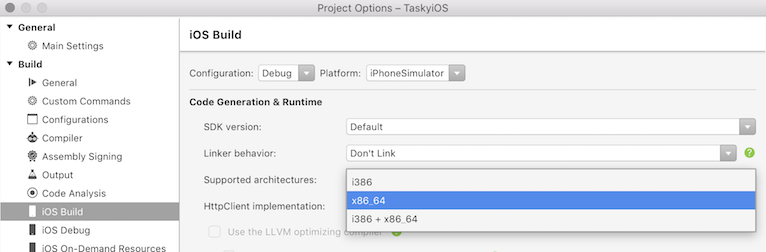
Set the Supported architectures drop-down to x86_64 for the Debug|iPhoneSimulator and Release|iPhoneSimulator:
For iOS devices, change the configuration to Debug|iPhone and set the Supported architectures drop-down to ARM64:
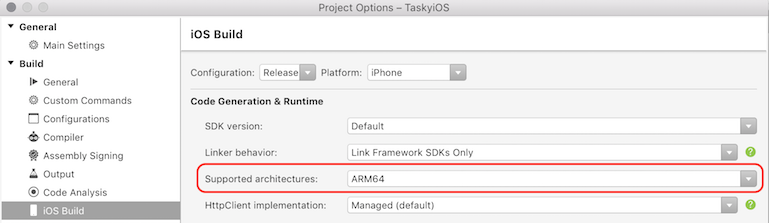
Change the configuration to Release|iPhone and set the Supported architectures drop-down to ARM64.
For more information on 32-bit and 64-bit architectures, see the 32/64 bit Platform Considerations guide.