Notitie
Voor toegang tot deze pagina is autorisatie vereist. U kunt proberen u aan te melden of de directory te wijzigen.
Voor toegang tot deze pagina is autorisatie vereist. U kunt proberen de mappen te wijzigen.
When the Sharepoint Migration Tool (SPMT) migrates a workflow to Power Automate, it finds the Power Automate built-in actions that best match the functions in the original SharePoint workflow. Because of the feature gaps between SharePoint workflow and Power Automate, a converted flow may not carry the exact same behavior as the original one.
SPMT generates one or two Power Automate flows for one SharePoint workflow depending on its start options.
- If a workflow can be manually started, a list flow is generated with manual trigger.
- If a workflow can be auto started on create or update, a list flow is generated with auto-trigger.
The following chart shows the first action in a flow migrated from an out-of-the-box (OOTB) approval workflow (manual start) and the UI form when a user starts the flow. It lists the mapping of five user inputs between original workflow and converted flow.
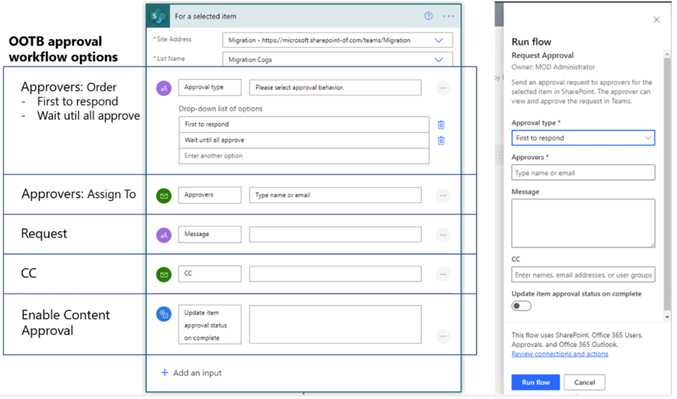
Migrated approval workflow
The approval workflow is migrated with this structure:
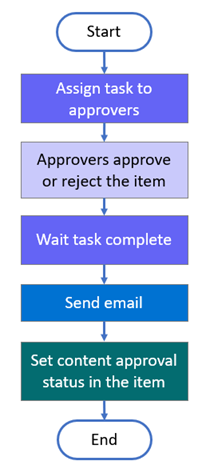
For an auto or manually triggered Power Automate flow, the following workflow configurations are migrated to the destination flow:
| Type | Options |
|---|---|
| Manual approval PA flow | Four user inputs are supported in the migrated flow. They are: - Approval type Options: First to respond, Wait until all approve. - Approvers. Emails - Request. Text - CC. Emails - Enable Content Approval. On/Off |
| Auto triggered PA flow | The following configurations in workflow are migrated to destination flow. - The approval type, Everyone must approve is used in the destination flow. - Approvers. Emails - Request. Text - CC. Emails - Enable Content Approval. On/Off |
Migrated collect feedback workflow
The collect feedback workflow is migrated with this structure:
For an auto or manually triggered Power Automate flow, the following workflow configurations are migrated to the destination flow:
| Type | Options |
|---|---|
| Manual approval PA flow | Three user inputs are supported in the migrated flow. They are: - Reviewers. Emails - Request. Text - CC. Emails |
| Auto triggered PA flow | The following configurations in workflow are migrated to destination flow. They are: - Reviewers. Emails - Request. Text - CC. Emails |
Migrated collect signature workflow
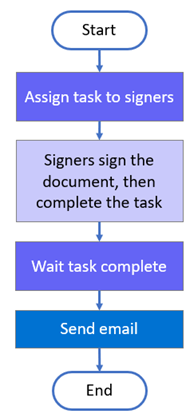
The collect signature workflow is migrated with this structure:
For an auto or manually triggered Power Automate flow, the following workflow configurations are migrated to the destination flow:
| Type | Options |
|---|---|
| Manually triggered collect feedback | Before you start a workflow, three user inputs are supported in the migrated flow. They are: - Signer order maps to Signer type. Options: First to respond, Wait until all approve -Signers maps to Signers. Emails -Request maps to Message. Text - CC maps to CC. Emails |
| Auto triggered collect feedback | Signer order maps to Signer type. "Everyone must approve" is used in migrated flow. - Signers maps to Signers. Emails - Request maps to Message. Text - CC maps to CC. Emails |
Migrated three-state workflow
The three state workflow is migrated with this structure:
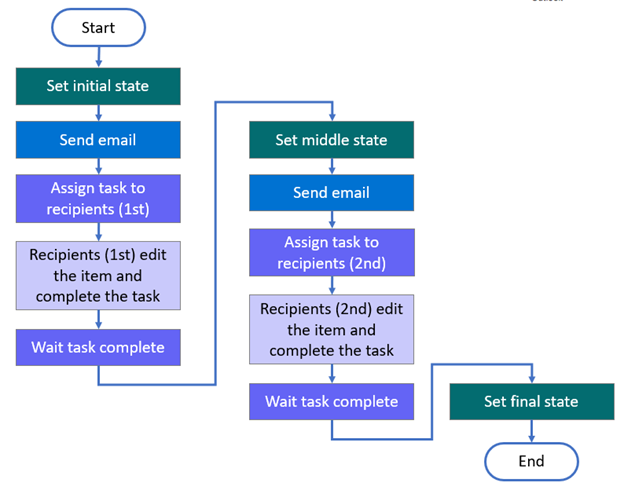
For auto or manual triggered three state Power Automate flow, the following configurations in workflow are migrated to destination flow. The workflow states are:
- StatusField (Status field name)
- InitialState (Initial state value)
- MiddleState (Middle state value)
- FinalState (Final state value)
| Type | State | Details |
|---|---|---|
| Task | Initial | Task Title -CustomMessageText (custom message) -CustomMessageField (Field included in task title) Task Description CustomMessageTextBody (Task description/custom message) CustomMessageBodyField (Field included in task body) Task Assign To - TaskAssignedToCustom (Task assigners is the value of an item field, or Task assigners are customized) -AssignedToField (Task assigner field) -CustomAssignedTo (Customized task assigners) |
| Email message | Initial | - SendEmail (Whether to send email) - IncludeTaskAssignedTo (Whether to include task assigner in to-list) - ToList (Email to-list) - SubjectTextIncludeTitle (Whether to include task title in email subject text) - SubjectText (Email subject text) - BodyTextIncludeLink (Whether to include item link in email message) - BodyText (Email body text) |
| Task | Middle | Task Title - CustomMessageText2 (custom message) - CustomMessageField2 (Field included in task title) Task Description - CustomMessageTextBody2 (Task description/custom message) - CustomMessageBodyField2 (Field included in task body) Task Assign To - TaskAssignedToCustom2 (Task assigners is the value of an item field, or Task assigners are customized) - AssignedToField2 (Task assigner field) - CustomAssignedTo2 (Customized task assigners) |
| E-mail message | Middle | - SendEmail2 (Whether to send email) - IncludeTaskAssignedTo2 (Whether to include task assigner in to-list) - ToList2 (Email to-list) - SubjectTextIncludeTitle2 (Whether to include task title in email subject text) - SubjectText2 (Email subject text) - BodyTextIncludeLink2 (Whether to include item link in email message) - BodyText2 (Email body text) |