Notitie
Voor toegang tot deze pagina is autorisatie vereist. U kunt proberen u aan te melden of de directory te wijzigen.
Voor toegang tot deze pagina is autorisatie vereist. U kunt proberen de mappen te wijzigen.
Als u een werkbalk wilt maken, gebruikt u de functie CreateWindowEx, waarbij u de vensterklasse TOOLBARCLASSNAME opgeeft. De resulterende werkbalk bevat in eerste instantie geen knoppen. Voeg knoppen toe aan de werkbalk met behulp van het TB_ADDBUTTONS of TB_INSERTBUTTON bericht. U moet het TB_AUTOSIZE bericht verzenden nadat alle items en tekenreeksen in het besturingselement zijn ingevoegd, zodat de werkbalk de grootte ervan opnieuw berekent op basis van de inhoud.
Wat u moet weten
Technologieën
Voorwaarden
- C/C++
- Programmeren van Windows-gebruikersinterface
Aanwijzingen
Een werkbalk maken
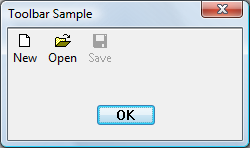
Met de volgende voorbeeldcode wordt de werkbalk gemaakt die wordt weergegeven in de afbeelding, met behulp van standaardsysteempictogrammen. De knop Opslaan is in eerste instantie uitgeschakeld.
HIMAGELIST g_hImageList = NULL;

HWND CreateSimpleToolbar(HWND hWndParent)
{
    // Declare and initialize local constants.
    const int ImageListID    = 0;
    const int numButtons     = 3;
    const int bitmapSize     = 16;

    const DWORD buttonStyles = BTNS_AUTOSIZE;

    // Create the toolbar.
    HWND hWndToolbar = CreateWindowEx(0, TOOLBARCLASSNAME, NULL,
                                      WS_CHILD | TBSTYLE_WRAPABLE, 0, 0, 0, 0,
                                      hWndParent, NULL, g_hInst, NULL);

    if (hWndToolbar == NULL)
        return NULL;

    // Create the image list.
    g_hImageList = ImageList_Create(bitmapSize, bitmapSize,   // Dimensions of individual bitmaps.
                                    ILC_COLOR16 | ILC_MASK,   // Ensures transparent background.
                                    numButtons, 0);

    // Set the image list.
    SendMessage(hWndToolbar, TB_SETIMAGELIST,
                (WPARAM)ImageListID,
                (LPARAM)g_hImageList);

    // Load the button images.
    SendMessage(hWndToolbar, TB_LOADIMAGES,
                (WPARAM)IDB_STD_SMALL_COLOR,
                (LPARAM)HINST_COMMCTRL);

    // Initialize button info.
    // IDM_NEW, IDM_OPEN, and IDM_SAVE are application-defined command constants.

    TBBUTTON tbButtons[numButtons] =
    {
        { MAKELONG(STD_FILENEW,  ImageListID), IDM_NEW,  TBSTATE_ENABLED, buttonStyles, {0}, 0, (INT_PTR)L"New" },
        { MAKELONG(STD_FILEOPEN, ImageListID), IDM_OPEN, TBSTATE_ENABLED, buttonStyles, {0}, 0, (INT_PTR)L"Open"},
        { MAKELONG(STD_FILESAVE, ImageListID), IDM_SAVE, 0,               buttonStyles, {0}, 0, (INT_PTR)L"Save"}
    };

    // Add buttons.
    SendMessage(hWndToolbar, TB_BUTTONSTRUCTSIZE, (WPARAM)sizeof(TBBUTTON), 0);
    SendMessage(hWndToolbar, TB_ADDBUTTONS,       (WPARAM)numButtons,       (LPARAM)&tbButtons);

    // Resize the toolbar, and then show it.
    SendMessage(hWndToolbar, TB_AUTOSIZE, 0, 0);
    ShowWindow(hWndToolbar,  TRUE);

    return hWndToolbar;
}
In het volgende voorbeeld wordt dezelfde werkbalk op dezelfde manier gemaakt, maar in dit geval worden de strings uit een resource gelezen.
HIMAGELIST g_hImageList = NULL;

HWND CreateToolbarFromResource(HWND hWndParent)
{
    // Declare and initialize local constants.
    const int ImageListID    = 0;
    const int numButtons     = 3;
    const int bitmapSize     = 16;

    const DWORD buttonStyles = BTNS_AUTOSIZE;

    // Create the toolbar.
    HWND hWndToolbar = CreateWindowEx(0, TOOLBARCLASSNAME, NULL,
                                      WS_CHILD | TBSTYLE_WRAPABLE, 0, 0, 0, 0,
                                      hWndParent, NULL, g_hInst, NULL);
    if (hWndToolbar == NULL)
        return NULL;

    // Create the image list.
    g_hImageList = ImageList_Create(bitmapSize, bitmapSize, // Dimensions of individual bitmaps.
                                    ILC_COLOR16 | ILC_MASK, // Ensures transparent background.
                                    numButtons, 0);

    // Set the image list.
    SendMessage(hWndToolbar, TB_SETIMAGELIST,
                (WPARAM)ImageListID,
                (LPARAM)g_hImageList);

    // Load the button images.
    SendMessage(hWndToolbar, TB_LOADIMAGES,
                (WPARAM)IDB_STD_SMALL_COLOR,
                (LPARAM)HINST_COMMCTRL);

    // Load the text from a resource.

    // In the string table, the text for all buttons is a single entry that
    // appears as "~New~Open~Save~~". The separator character is arbitrary,
    // but it must appear as the first character of the string. The message
    // returns the index of the first item, and the items are numbered
    // consecutively.

    int iNew = SendMessage(hWndToolbar, TB_ADDSTRING,
                           (WPARAM)g_hInst, (LPARAM)IDS_NEW);

    // Initialize button info.
    // IDM_NEW, IDM_OPEN, and IDM_SAVE are application-defined command constants.

    TBBUTTON tbButtons[numButtons] =
    {
        { MAKELONG(STD_FILENEW,  ImageListID), IDM_NEW,  TBSTATE_ENABLED, buttonStyles, {0}, 0, iNew },
        { MAKELONG(STD_FILEOPEN, ImageListID), IDM_OPEN, TBSTATE_ENABLED, buttonStyles, {0}, 0, iNew + 1},
        { MAKELONG(STD_FILESAVE, ImageListID), IDM_SAVE, 0,               buttonStyles, {0}, 0, iNew + 2}
    };

    // Add buttons.
    SendMessage(hWndToolbar, TB_BUTTONSTRUCTSIZE, (WPARAM)sizeof(TBBUTTON), 0);
    SendMessage(hWndToolbar, TB_ADDBUTTONS,       (WPARAM)numButtons,       (LPARAM)&tbButtons);

    // Resize the toolbar, and then show it.
    SendMessage(hWndToolbar, TB_AUTOSIZE, 0, 0);
    ShowWindow(hWndToolbar,  TRUE);

    return hWndToolbar;
}
Verwante onderwerpen