Notatka
Dostęp do tej strony wymaga autoryzacji. Może spróbować zalogować się lub zmienić katalogi.
Dostęp do tej strony wymaga autoryzacji. Możesz spróbować zmienić katalogi.
Usługa Azure HDInsight 4.0 oferuje najnowsze składniki typu open source ze znacznymi ulepszeniami wydajności, łączności i zabezpieczeń. W tym dokumencie wyjaśniono, jak migrować obciążenia platformy Apache Kafka w usłudze HDInsight 3.6 do usługi HDInsight 4.0. Po przeprowadzeniu migracji obciążeń do usługi HDInsight 4.0 możesz użyć wielu nowych funkcji, które nie są dostępne w usłudze HDInsight 3.6.
Ścieżki migracji dla Kafka w HDInsight 3.6
Usługa HDInsight 3.6 obsługuje dwie wersje platformy Kafka: 1.0.0 i 1.1.0. Usługa HDInsight 4.0 obsługuje wersje 1.1.0 i 2.1.0. W zależności od wersji platformy Kafka i wersji usługi HDInsight, którą chcesz uruchomić, istnieje wiele obsługiwanych ścieżek migracji. Te ścieżki zostały wyjaśnione poniżej i zilustrowane na poniższym diagramie.
- Uruchom platformę Kafka i usługę HDInsight w najnowszych wersjach (zalecane): migrowanie aplikacji HDInsight 3.6 i Kafka 1.0.0 lub 1.1.0 do usługi HDInsight 4.0 przy użyciu platformy Kafka 2.1.0 (ścieżki D i E poniżej).
- Uruchom HDInsight w najnowszej wersji, ale Kafka tylko w bardziej nowej wersji: Migracja aplikacji z HDInsight 3.6 i Kafka 1.0.0 do HDInsight 4.0 na Kafka 1.1.0 (ścieżka B poniżej).
- Uruchom usługę HDInsight w najnowszej wersji, zachowaj wersję platformy Kafka: Migrowanie aplikacji HDInsight 3.6 i Kafka 1.1.0 do usługi HDInsight 4.0 przy użyciu platformy Kafka 1.1.0 (ścieżka C poniżej).
- Uruchom platformę Kafka w nowszej wersji, zachowaj wersję usługi HDInsight: migrowanie aplikacji platformy Kafka 1.0.0 do wersji 1.1.0 i pozostanie w usłudze HDInsight 3.6 (ścieżka A poniżej). Należy pamiętać, że ta opcja nadal będzie wymagać wdrożenia nowego klastra. Uaktualnianie wersji platformy Kafka w istniejącym klastrze nie jest obsługiwane. Po utworzeniu klastra z odpowiednią wersją zmigruj klientów platformy Kafka do korzystania z nowego klastra.
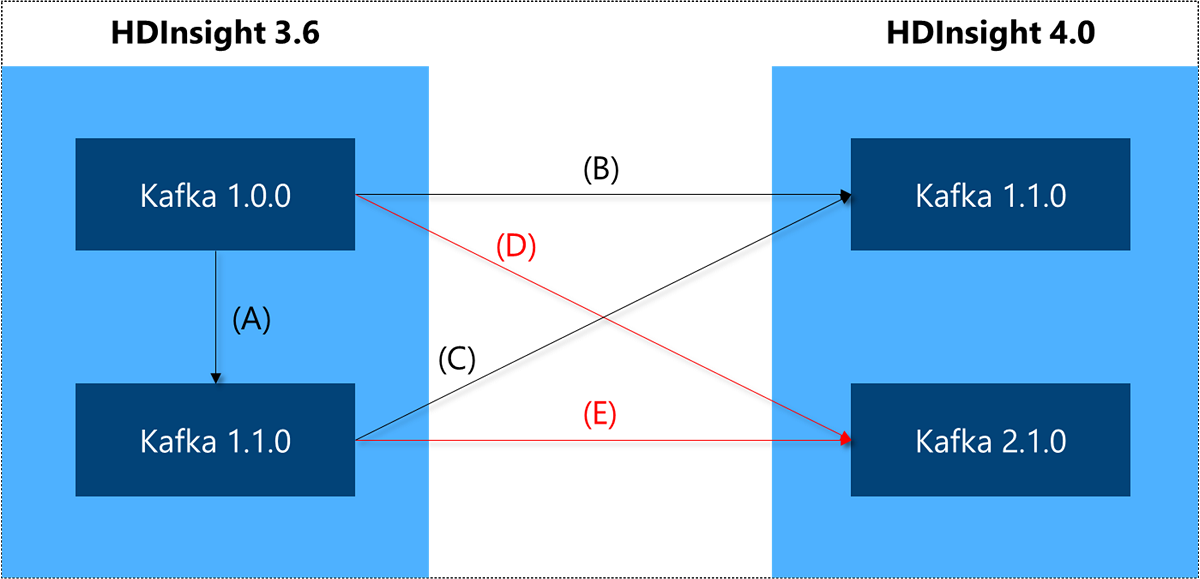
Wersje platformy Apache Kafka
Kafka 1.1.0
W przypadku migracji z platformy Kafka 1.0.0 do wersji 1.1.0 możesz skorzystać z następujących nowych funkcji:
- Ulepszenia kontrolera Kafka przyspieszają kontrolowane zamykanie, co umożliwia szybsze restartowanie brokerów i rozwiązywanie problemów.
- Ulepszenia logiki FetchRequests , które umożliwiają posiadanie większej liczby partycji (a tym samym więcej tematów) w klastrze.
- Platforma Kafka Connect obsługuje nagłówki rekordów i wyrażenia regularne dla tematów.
Aby uzyskać pełną listę aktualizacji, zobacz Informacje o wersji platformy Apache Kafka 1.1.
Apache Kafka 2.1.0
W przypadku migracji do platformy Kafka 2.1 możesz skorzystać z następujących funkcji:
- Lepsza odporność brokera z powodu ulepszonego protokołu replikacji.
- Nowe funkcje w interfejsie API KafkaAdminClient.
- Konfigurowalne zarządzanie limitami przydziału.
- Obsługa kompresji Zstandard.
Aby uzyskać pełną listę aktualizacji, zobacz Informacje o wersji platformy Apache Kafka 2.0 i informacje o wersji platformy Apache Kafka 2.1.
Zgodność klienta platformy Kafka
Nowi brokerzy platformy Kafka obsługują starszych klientów.
KIP-35 — Wersja protokołu pobierania wprowadziła mechanizm dynamicznego określania funkcjonalności brokera platformy Kafka i KIP-97: Ulepszone zasady zgodności RPC klienta platformy Kafka wprowadziły nowe zasady zgodności i gwarancje dla klienta Java. Wcześniej klient platformy Kafka musiał wchodzić w interakcję z brokerem tej samej wersji lub nowszej wersji. Teraz nowsze wersje klientów Java i innych klientów, które obsługują KIP-35, takich jak librdkafka, mogą przełączać się z powrotem na starsze typy żądań lub zgłaszać odpowiednie błędy, jeśli funkcjonalność nie jest dostępna.
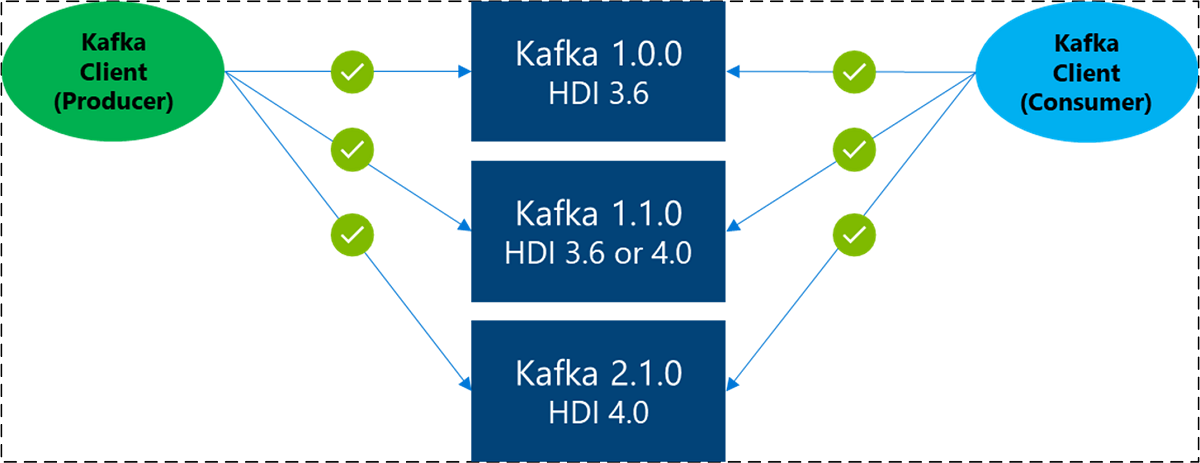
Należy pamiętać, że nie oznacza to, że klient obsługuje starszych brokerów. Aby uzyskać więcej informacji, zobacz Macierz zgodności.
Ogólny proces migracji
Następujące wskazówki dotyczące migracji przyjmują, że klaster Apache Kafka 1.0.0 lub 1.1.0 został wdrożony na platformie HDInsight 3.6 w jednej sieci wirtualnej. Istniejący broker ma kilka tematów i jest aktywnie używany przez producentów i konsumentów.
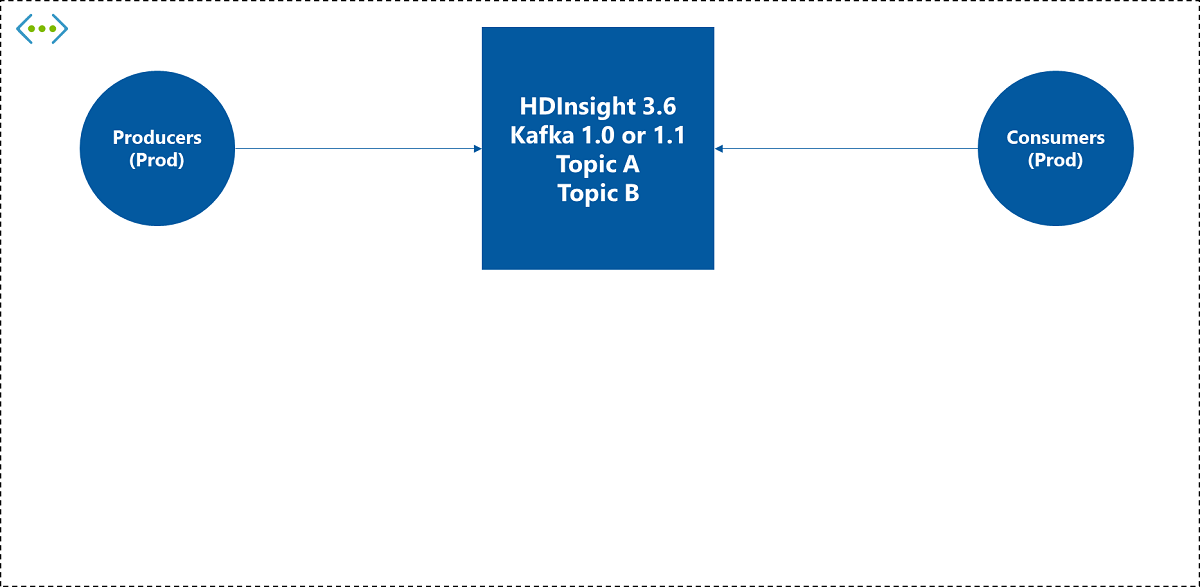
Aby ukończyć migrację, wykonaj następujące czynności:
Wdróż nowy klaster i klientów usługi HDInsight 4.0 na potrzeby testowania. Wdróż nowy klaster Kafka HDInsight 4.0. Jeśli można wybrać wiele wersji klastra Platformy Kafka, zaleca się wybranie najnowszej wersji. Po wdrożeniu ustaw parametry zgodnie z potrzebami i utwórz temat o tej samej nazwie co istniejące środowisko. Ponadto ustaw szyfrowanie TLS i szyfrowanie z użyciem własnego klucza (BYOK) zgodnie z potrzebami. Następnie sprawdź, czy działa poprawnie z nowym klastrem.
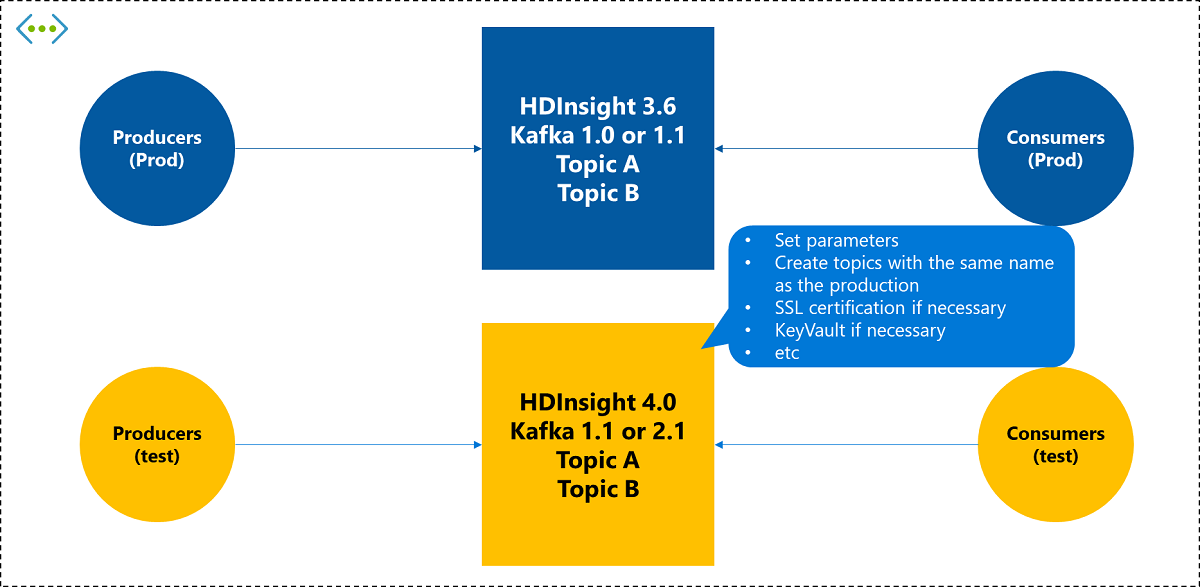
Przełącz klaster dla aplikacji producenta i poczekaj, aż wszystkie dane kolejki będą używane przez bieżących odbiorców. Gdy nowy klaster usługi HDInsight 4.0 Kafka będzie gotowy, zmień istniejący adres docelowy producenta na nowy klaster. Pozostaw ją tak, jak jest, dopóki istniejąca aplikacja konsumenta nie zużyje wszystkich danych z istniejącego klastra.
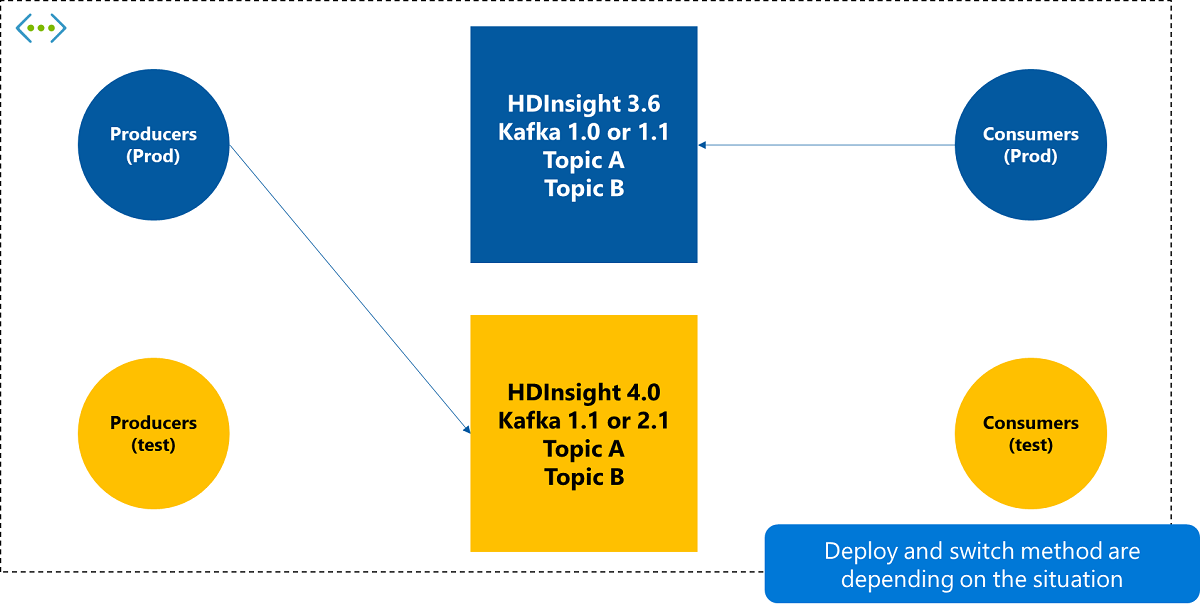
Przełącz klaster w aplikacji konsumenckiej. Po potwierdzeniu, że istniejąca aplikacja konsumenta zakończyła korzystanie ze wszystkich danych z istniejącego klastra, przełącz połączenie z nowym klastrem.
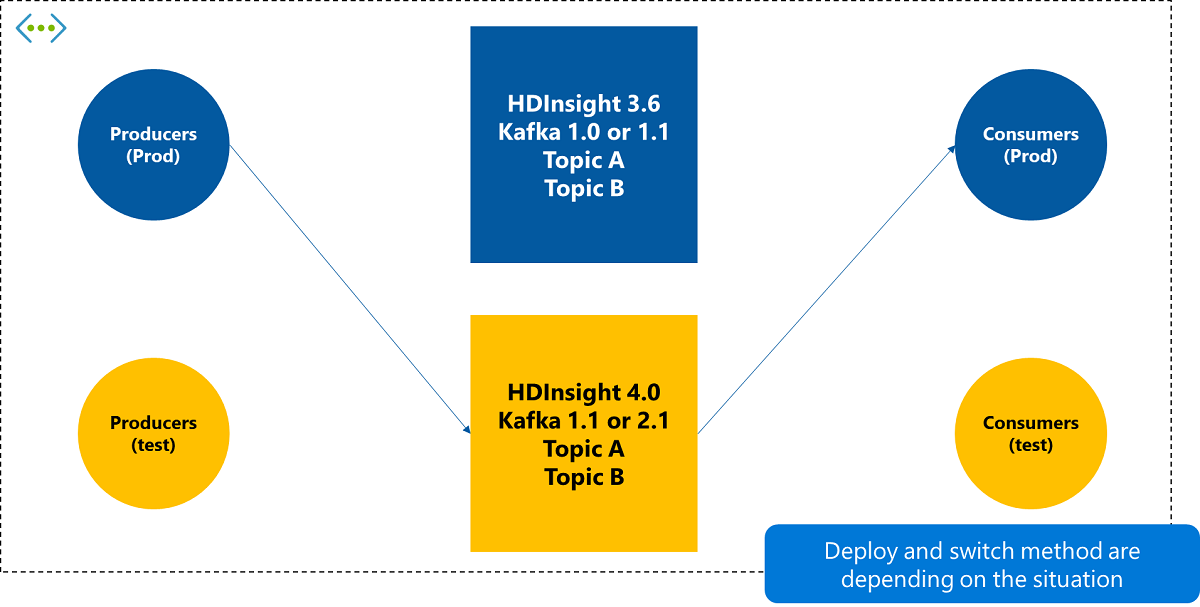
Usuń stary klaster i aplikacje testowe zgodnie z potrzebami. Po zakończeniu i prawidłowym działaniu przełącznika, usuń stary klaster Kafka usługi HDInsight 3.6 oraz, zgodnie z potrzebami, producentów i konsumentów używanych w teście.