Notatka
Dostęp do tej strony wymaga autoryzacji. Może spróbować zalogować się lub zmienić katalogi.
Dostęp do tej strony wymaga autoryzacji. Możesz spróbować zmienić katalogi.
Dotyczy:✅ Magazyn w systemie Microsoft Fabric
Z tego samouczka dowiesz się, jak używać instrukcji języka T-SQL do podróżowania w czasie w tabeli magazynu danych. Podróż czasowa oznacza wykonywanie zapytań o dane, które istniały w określonym punkcie w czasie.
Uwaga
Ten samouczek stanowi część kompleksowego scenariusza . Aby ukończyć ten samouczek, należy najpierw wykonać następujące samouczki:
- Tworzenie obszaru roboczego
- Tworzenie magazynu
- Wprowadzanie danych do magazynu danych
Praca z zapytaniami dotyczącymi podróży w czasie
W tym zadaniu dowiesz się, jak utworzyć widok 10 pierwszych klientów według sprzedaży. Użyjesz widoku w następnym zadaniu, aby uruchomić zapytania dotyczące podróży w czasie.
Upewnij się, że obszar roboczy utworzony w pierwszym samouczku jest otwarty.
Na wstążce Narzędzia główne wybierz pozycję Nowe zapytanie SQL.

W edytorze zapytań wklej następujący kod. Kod tworzy widok o nazwie
Top10Customers. Widok korzysta z zapytania, aby pobrać 10 najlepszych klientów na podstawie wielkości sprzedaży.--Create the Top10Customers view. CREATE VIEW [dbo].[Top10Customers] AS SELECT TOP(10) FS.[CustomerKey], DC.[Customer], SUM(FS.[TotalIncludingTax]) AS [TotalSalesAmount] FROM [dbo].[dimension_customer] AS DC INNER JOIN [dbo].[fact_sale] AS FS ON DC.[CustomerKey] = FS.[CustomerKey] GROUP BY FS.[CustomerKey], DC.[Customer] ORDER BY [TotalSalesAmount] DESC;Uruchom zapytanie.
Po zakończeniu wykonywania zmień nazwę zapytania na
Create Top 10 Customer View.W panelu Eksplorator w folderze Widoki dla schematu
dbosprawdź, czy widokTop10Customersistnieje.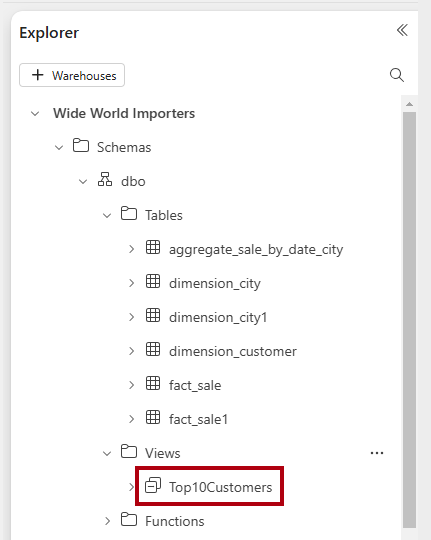
Utwórz nowe zapytanie do obsługi zapytań dotyczących podróży w czasie.
W edytorze zapytań wklej następujący kod. Kod aktualizuje wartość
TotalIncludingTaxw pojedynczym wierszu tabeli faktów, aby celowo zawyżyć jego całkowitą sprzedaż. Pobiera również bieżący znacznik czasu.--Update the TotalIncludingTax for a single fact row to deliberately inflate its total sales. UPDATE [dbo].[fact_sale] SET [TotalIncludingTax] = 200000000 WHERE [SaleKey] = 22632918; --For customer 'Tailspin Toys (Muir, MI)' GO --Retrieve the current (UTC) timestamp. SELECT CURRENT_TIMESTAMP;Uwaga
Obecnie można używać tylko strefy czasowej uniwersalnej koordynowanej (UTC) na potrzeby podróży czasowej.
Uruchom zapytanie.
Po zakończeniu wykonywania zmień nazwę zapytania na
Time Travel.W okienku Wyniki zwróć uwagę na wartość znacznika czasu (wartość będzie bieżącą datą i godziną UTC).
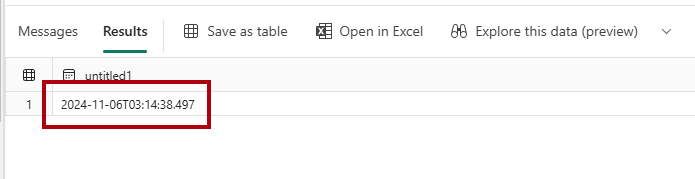
Aby pobrać 10 najlepszych klientów na tę chwilę, w nowym edytorze zapytań wklej następujące polecenie. Kod pobiera 10 najlepszych klientów przy użyciu wskazówki zapytania
FOR TIMESTAMP AS OF.--Retrieve the top 10 customers as of now. SELECT * FROM [dbo].[Top10Customers] OPTION (FOR TIMESTAMP AS OF 'YOUR_TIMESTAMP');Zmień nazwę zapytania na
Time Travel Now.Wróć do zapytania
Time Travel, a następnie skopiuj wyniki zapytania za pomocą polecenia Copy.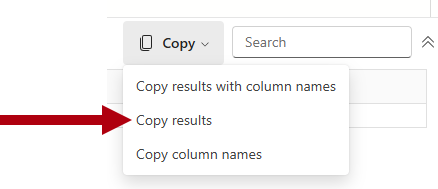
Wróć do zapytania
Time Travel Now, a następnie zastąpYOUR_TIMESTAMPznacznikiem czasu skopiowanym do schowka.Uruchom zapytanie i zwróć uwagę, że druga górna wartość
CustomerKeywynosi 49 dlaTailspin Toys (Muir, MI).Zmodyfikuj wartość znacznika czasu na wcześniejszą , odejmując jedną minutę od znacznika czasu.
Ponownie uruchom zapytanie i zwróć uwagę, że druga górna wartość
CustomerKeywynosi 381 dlaWingtip Toys (Sarversville, PA).
Tip
Aby uzyskać więcej przykładów podróży w czasie, zobacz Jak: Przeprowadzać zapytania z użyciem podróży w czasie na poziomie instrukcji.