Notatka
Dostęp do tej strony wymaga autoryzacji. Może spróbować zalogować się lub zmienić katalogi.
Dostęp do tej strony wymaga autoryzacji. Możesz spróbować zmienić katalogi.
Creating early-bound classes for your .NET projects:
- Improves code readability and maintainability.
- Decreases the risk of errors because they provide compile time type checking.
- Improves developer productivity because developers can discover tables, columns, and choice options by using IntelliSense.
- Provides the OrganizationServiceContext class so you can write Dataverse queries by using LINQ and other capabilities work with data.
Learn more:
Use the Power Platform CLI pac modelbuilder build command to generate early-bound code classes. You can also use the CrmSvcUtil.exe code generation tool, but for Dataverse we recommend using the pac modelbuilder build command. Learn how to use the CrmSvcUtil.exe to generate early-bound classes for the SDK for .NET
Like many Power Platform CLI commands, pac modelbuilder build has many parameters you can use to control the outcome. In this article, we recommend that you start by using the --settingsTemplateFile parameter for most use cases. Use this parameter to refer to a JSON file where you can control all the other available settings. This way, you don't need to compose a long list of parameters, and you can update the configuration appropriate for your project to allow regeneration of the classes when you need them.
You can still use the build command with parameters if you prefer. See Using parameters.
Get started
Before you begin:
- Install Power Platform CLI.
- Connect to your environment by using Power Platform CLI pac auth commands.
Use the following steps to get started:
In your .NET project, add a NuGet package reference to either:
- For a client application: Microsoft.PowerPlatform.Dataverse.Client
- For a Dataverse plug-in project: Microsoft.CrmSdk.CoreAssemblies
Create a folder called
model.In the
modelfolder, add abuilderSettings.jsonfile with the following settings:{ "emitentityetc-comment": "Generate a constants structure that contains all of the field names by entity at the time of code generation.", "emitEntityETC": false, "emitfieldsclasses-comment": "Generate a constants structure that contains all of the field names by entity at the time of code generation.", "emitFieldsClasses": false, "emitvirtualattributes-comment": "When set, includes the Virtual Attributes of entities in the generated code.", "emitVirtualAttributes": false, "entitynamesfilter-comment": "Filters the list of entities are retrieved when reading data from Dataverse.", "entityNamesFilter": [ "account", "contact" ], "entitytypesfolder-comment": "Folder name that contains entities.", "entityTypesFolder": "Entities", "generateGlobalOptionSets-comment": "Emit all Global OptionSets. Note: If an entity contains a reference to a global optionset, it is emitted even if this switch is not present.", "generateGlobalOptionSets": false, "generatesdkmessages-comment": "When set, emits Sdk message classes as part of code generation", "generateSdkMessages": true, "language-comment": "The language to use for the generated proxy code. This value can be either 'CS' or 'VB'. The default language is 'CS'.", "language": "CS", "logLevel-comment": "Log level. The default value is 'Off'.", "logLevel": "Off", "messagenamesfilter-comment": "Filters the list of messages that are retrieved when reading data from Dataverse.", "messageNamesFilter": [ "searchautocomplete", "searchquery", "sample_*" ], "messagestypesfolder-comment": "Folder name that contains messages.", "messagesTypesFolder": "Messages", "namespace-comment": "The namespace for the generated code.", "namespace": "ExampleProject", "optionsetstypesfolder-comment": "Folder name that contains option sets.", "optionSetsTypesFolder": "OptionSets", "serviceContextName-comment": "The name for the generated service context. If a value is passed in, it's used for the Service Context. If not, no Service Context is generated.", "serviceContextName": "OrgContext", "suppressGeneratedCodeAttribute-comment": "When set, this suppress all generated objects being tagged with the code generation engine and version", "suppressGeneratedCodeAttribute": true, "suppressINotifyPattern-comment": "When enabled, doesn't write the INotify wrappers for properties and classes.", "suppressINotifyPattern": true }Note
This file is a modified version of the file you can generate by using
pac modelbuilder buildwith the--writesettingsTemplateFileparameter. Learn how to generate the file without comments in Using parameters.Use the following command to generate early bound classes for the connected environment by using the settings defined in
builderSettings.json. TheC:\projects\exampleproject\path represents the path to your project andmodelis the folder you created.PS C:\projects\exampleproject\model> pac modelbuilder build -o . -stf .\builderSettings.jsonThis command uses these parameters:
-oshortcut for the required--outdirectoryparameter with a value of., to indicate the current directory.-stfshortcut for the--settingsTemplateFileparameter with a value of.\builderSettings.json, to indicate thebuilderSettings.jsoncurrent directory.
You can also use this command from the
exampleprojectdirectory:PS C:\projects\exampleproject>pac modelbuilder build -o model -stf model\builderSettings.json
Understand what files are written
With either command, you receive the following output:
Connected to... Your Organization
Connected as you@yourorganization.onmicrosoft.com
Begin reading metadata from MetadataProviderService
      Begin Reading Metadata from Server
      Read 2 Entities - 00:00:00.732
      Read 0 Global OptionSets - 00:00:00.000
      Read 12 SDK Messages - 00:00:00.889
      Completed Reading Metadata from Server - 00:00:01.694
Completed reading metadata from MetadataProviderService - 00:00:01.697
Begin Writing Code Files
      Processing 2 Entities
      Wrote 2 Entities - 00:00:00.0625873
      Processing 12 Messages
      Wrote 3 Message(s). Skipped 9 Message(s) - 00:00:00.0091589
      Processing 0 Global OptionSets
      Wrote 0 Global OptionSets - 00:00:00.0000045
      Code written to C:\projects\exampleproject\model\Entities\account.cs.
      Code written to C:\projects\exampleproject\model\Entities\contact.cs.
      Code written to C:\projects\exampleproject\model\Messages\searchquery.cs.
      Code written to C:\projects\exampleproject\model\Messages\searchautocomplete.cs.
      Code written to C:\projects\exampleproject\model\OrgContext.cs.
      Code written to C:\projects\exampleproject\model\EntityOptionSetEnum.cs.
Completed Writing Code Files - 00:00:00.116
Generation Complete - 00:00:01.815
PS C:\projects\exampleproject\model>
When you inspect the output, you see that it only generates classes for the tables specified by entityNamesFilter and only the messages specified in the messageNamesFilter. Specify which tables (entities) and messages you use in your project. Otherwise, the command generates classes for all tables and messages.
For messageNamesFilter, use * as a wildcard character in these values. This filter is useful when messages in your solution share a common customization prefix.
pac modelbuilder build writes the files into folders with names you control in the settings file:
- Entity classes go to the folder specified by the
entityTypesFoldersetting. - Message classes go to the folder specified by the
messagesTypesFoldersetting. - The OrganizationServiceContext class goes to a file with the name specified by the
serviceContextNamesetting. - All the classes are part of the namespace you set in the
namespacesetting.
Note
If you're generating message classes, always include a name for the serviceContextName setting. See Include serviceContextName when generating message classes.
This is how the files and folders appear in Visual Studio:
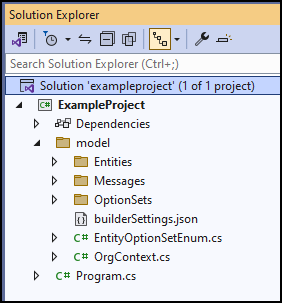
With these files written to your project, you're now ready to use early-bound classes.
If you want to change them, delete the files in the model folder other than builderSettings.json, change the settings in builderSettings.json, and generate them again.
Using parameters
You don't need to use the builderSettings.json settings file or the --settingsTemplateFile parameter with pac modelbuilder build. You can invoke the command by using parameters directly. For reference documentation and examples, see the pac modelbuilder build reference documentation.
If you use the builderSettings.json settings file and the --settingsTemplateFile parameter, you can use command-line parameters to override those settings.
Here's an example that shows how to generate files by using the same settings as the example in the Get started section by using parameters:
PS C:\>pac modelbuilder build `
   --outdirectory C:\projects\exampleproject\model `
   --entitynamesfilter 'account;contact' `
   --generatesdkmessages `
   --messagenamesfilter 'searchautocomplete;searchquery;sample_*' `
   --namespace ExampleProject `
   --serviceContextName OrgContext `
   --suppressGeneratedCodeAttribute `
   --suppressINotifyPattern `
   --writesettingsTemplateFile
This example doesn't include all the settings because it uses the default options. If you use the --writesettingsTemplateFile parameter to generate a builderSettings.json file, it doesn't include the comments in the example in the Get started section of this article. The example that uses parameters writes the following builderSettings.json file in the model folder:
{
  "suppressINotifyPattern": true,
  "suppressGeneratedCodeAttribute": true,
  "language": "CS",
  "namespace": "ExampleProject",
  "serviceContextName": "OrgContext",
  "generateSdkMessages": true,
  "generateGlobalOptionSets": false,
  "emitFieldsClasses": false,
  "entityTypesFolder": "Entities",
  "messagesTypesFolder": "Messages",
  "optionSetsTypesFolder": "OptionSets",
  "entityNamesFilter": [
    "account",
    "contact"
  ],
  "messageNamesFilter": [
    "searchautocomplete",
    "searchquery",
    "sample_*"
  ],
  "emitEntityETC": false,
  "emitVirtualAttributes": false
}
Include serviceContextName when generating message classes
If you're generating message classes, always include a name for the serviceContextName parameter so that an OrganizationServiceContext class is generated with your code.
This class includes an important property to enable use of generated message classes. If you don't include an OrganizationServiceContext, you get the following error when you try to use the generated message classes.
The formatter threw an exception while trying to deserialize the message:
There was an error while trying to deserialize parameter http://schemas.microsoft.com/xrm/2011/Contracts/Services:request.
The InnerException message was 'Error in line 1 position 700. Element 'http://schemas.microsoft.com/xrm/2011/Contracts/Services:request' contains data from a type that maps to the name 'http://schemas.microsoft.com/xrm/2011/new/:<your generated class name>'.
The deserializer has no knowledge of any type that maps to this name.
Consider changing the implementation of the ResolveName method on your DataContractResolver to return a non-null value for name '<your generated class name>' and namespace 'http://schemas.microsoft.com/xrm/2011/new/'.'.
Please see InnerException for more details.
Community tools
The Early Bound Generator V2 is an XrmToolBox plug-in created by the community to provide a user interface that generates the correct builderSettings.json file, and calls the pac modelbuilder build command for the user. Since the UI only generates the builderSettings.json file and calls the pac modelbuilder build command, you can still run the command in a pipeline without a dependency on the XrmToolBox. The plug-in also provides configuration options that the pac modelbuilder doesn't. For example, it provides the ability to explicitly control class and property casing and language-specific transliteration of characters. Early Bound Generator V2 can do this by using the extensibility features of the pac modelbuilder.
Note
Microsoft doesn't extend support to community-developed tools. If you have questions about the tool, contact the publisher. For more information, see XrmToolBox.
For Dynamics 365 Customer Engagement on-premises
The Power Platform CLI isn't available for Dynamics 365 Customer Engagement on-premises. You need to use the CrmSvcUtil.exe code generation tool to generate early bound classes. Learn how to use the CrmSvcUtil.exe to generate early-bound classes for the SDK for .NET
Related articles
Late-bound and early-bound programming
Sample: Early-bound table operations
Developer tools and resources
Dataverse development tools
Learn how to use the CrmSvcUtil.exe to generate early-bound classes for the SDK for .NET