Notatka
Dostęp do tej strony wymaga autoryzacji. Może spróbować zalogować się lub zmienić katalogi.
Dostęp do tej strony wymaga autoryzacji. Możesz spróbować zmienić katalogi.
The AI insights feature for SharePoint Advanced Management uses a language model to identify patterns and potential issues from reporting and receive actionable recommendations to solve issues.
As an IT administrator, you can reduce the manual effort required to review reports during audits, and mitigate content governance issues with the AI insights feature in SharePoint admin center.

Key capabilities of AI insights for SharePoint Advanced Management include:
- Automated analysis of reports and insights generated by SharePoint Advanced Management
- Detection of patterns and potential content governance issues, such as misapplied or missing labels and excessive permissions on site content
- Suggestion of practical recommendations for resolving these issues using the tools and strategies available in the SharePoint ecosystem
What do you need to get started with AI insights?
License requirements
Your organization needs to have the right licenses and meet certain administrative permissions or roles to use the feature described in this article.
First, your organization must have one of the following licenses:
- Office 365 E3, E5, or A5
- Microsoft 365 E1, E3, E5, or A5
Additionally, you need to have a Microsoft 365 Copilot license.
Note
At least one user in your organization must be assigned a Copilot license (this user doesn't need to be a SharePoint administrator). If your organization has a Copilot license and at least one person in your organization is assigned a Copilot license, SharePoint administrators automatically gain access to the SharePoint Advanced Management features needed for Copilot deployment.
Administrator requirements
You must be a SharePoint administrator or have equivalent permissions.
Where can you find AI insights?
You can find the Get AI insights button next to various reports in the SharePoint admin center. Once selected, the AI insights feature extracts patterns from the report and offers a list of potential actions.
Note
You can generate up to five AI insights for each report, depending on the size of the report.
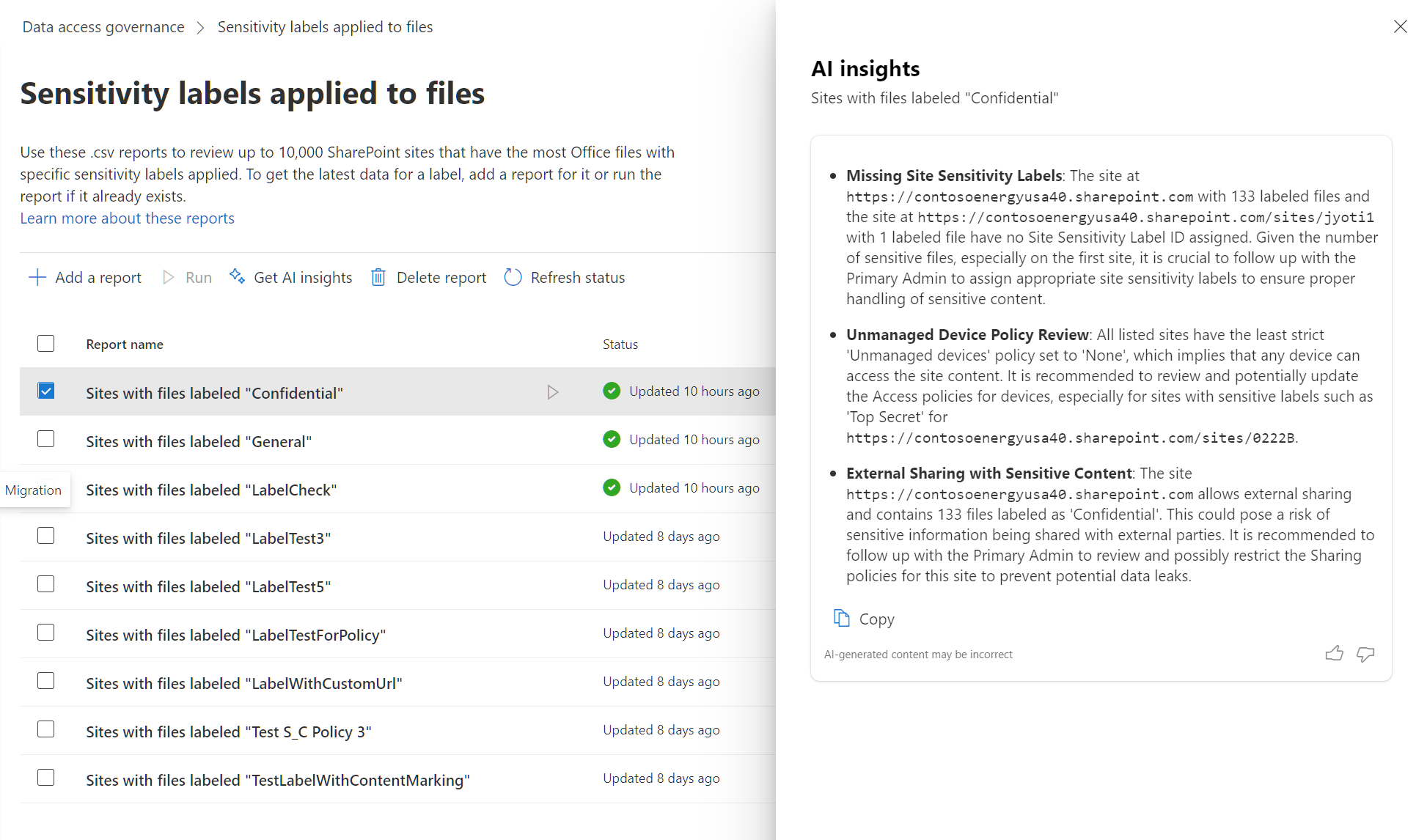
The AI insights feature is available for the following reports:
| Feature | Report name | Description |
|---|---|---|
| Data access governance | Sharing links | View sites where users created the most new sharing links |
| Data access governance | Sensitivity labels applied to files | View sites that have the most Office files that have sensitivity labels applied |
| Site lifecycle management | Inactive site policies | View sites that are in an inactive state |
| Change history | Sites | View recent site actions or changes to organization settings |
Note
Generated AI insights are based on a partial set of data, and not the report as a whole. If you choose to generate another insight, the data will be based on the next set of data of the report.