Set up a location for basic warehousing
For each warehouse, you set up a location in Business Central. For each location, you can decide which warehouse tasks should be used and if bins are mandatory.
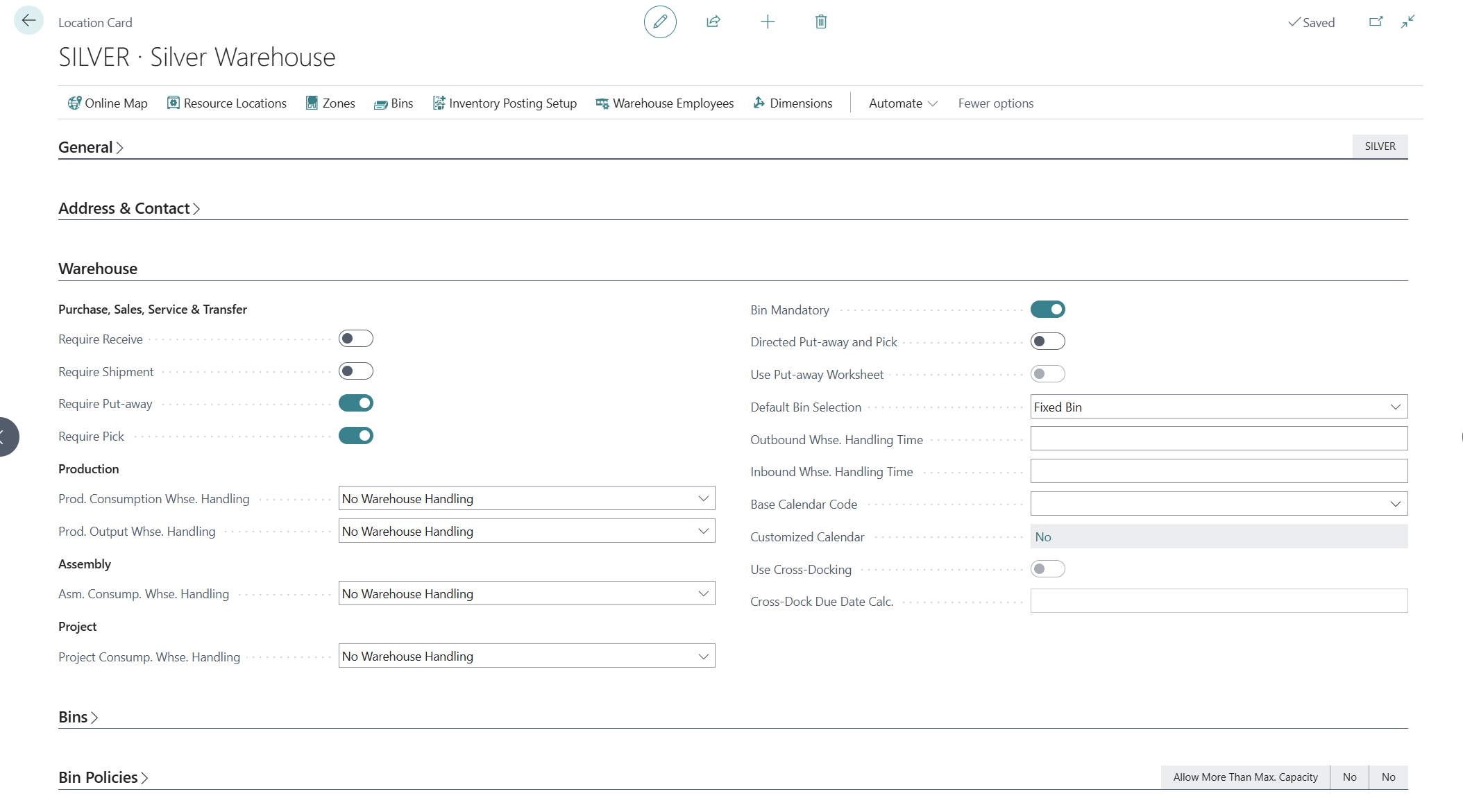
Select the Search for Page icon in the upper-right corner of the page, enter locations, and then select the related link.
The check boxes on the left side of the Warehouse FastTab define the methods that inbound and outbound warehouse processes can handle.
Select the Bin Mandatory option to indicate that bin information is defined and recorded for all movements that occur in this location. This setting means that posting of transactions, both from journals and documents, isn't possible unless a bin code is specified.
The Require Receive, Require Shipment, Require Put-away, and Require Pick options define whether separate warehouse documents are used to handle the respective warehousing processes of receiving, shipping, putting away, and picking. You can decide whether to use one specific document or a combination of documents to support the handling of a corresponding process by using the same logic as you would when deciding to use one or another warehousing function. Also, you should consider the volume and complexity of the warehousing workload and the organizational setting of the warehouse.
If these check boxes are selected, it means that the company has a designated warehouse environment, where actual orders are handled and order posting takes place. Otherwise, the company operates on the premise that all warehousing activities are handled and posted from the actual order document (or journal).
Set up a location for basic warehousing
Watch the following video to learn how to set up a location for basic warehousing in Business Central.