Note
Access to this page requires authorization. You can try signing in or changing directories.
Access to this page requires authorization. You can try changing directories.
The standard data model uses custom tables and is optimized for the configuration of each website component. Each component is stored as a record in a dedicated table in Microsoft Dataverse. The standard model takes more time to load different solutions, tables, and metadata when provisioning a new site. Updating website tables in the standard model requires manual and time-consuming application of package updates.
Note
- All new sites are created by default using the enhanced data model.
- To create a site on the standard data model, disable the enhanced data model in the Power Platform admin center.
- The Power Pages Management app is installed by default on all instances of Microsoft Dataverse in supported regions, including environments where there are no Power Pages sites.
The enhanced data model is a combination of system tables, nonconfiguration tables, and virtual tables.
Benefits
The enhanced data model for Power Pages provides the following benefits:
Modern ALM and deployment
Sites that run on the enhanced data model fully participate in Power Platform application lifecycle management (ALM) processes.
The enhanced data model provides these ALM and deployment capabilities:
Solution-aware site configuration: Site configuration for the enhanced data model is contained in Dataverse solutions, the same packaging unit used by model-driven apps, canvas apps, and Power Automate flows. You can export, import, and layer site components through standard solution mechanisms instead of using the configuration-data export process that the standard model uses.
Single-solution deployment with the rest of the application: Because site configuration is solution-aware, a Power Pages site can be included in the same solution as the model-driven app, the Power Automate flows, and the Dataverse tables that the site depends on. You export, transport, and import the site and its dependencies together as one solution.
Native Git integration (preview): Dataverse Git integration supports Power Pages sites on the enhanced data model and syncs solutions and solution objects with an Azure DevOps Git repository. You can version, branch, and revert site changes alongside the other solution components.
Pipelines for deployments: You can run site deployments through Pipelines in Power Platform, the in-product deployment mechanism for promoting solutions from development to test to production environments.
Environment variables for per-environment configuration: Solution-aware site configuration supports environment variables for site settings. You can define site setting values that differ across environments, such as identity provider configuration, progressive web app settings, and security workspace settings, as environment variables in the solution and resolve them per environment when the solution is imported.
Performance
- Faster website provisioning: New enhanced data model sites provision faster than standard-model sites. The split into system, virtual, and non-configuration tables removes the bulk solution, table, and metadata load that the standard model must perform during provisioning, reducing provision time for enhanced data model.
Ongoing maintenance and investment
Improved platform updates and bug fixes: The enhanced data model automatically delivers enhancements and bug fixes for Power Pages. The manual application of package updates that the standard model requires is no longer needed, which keeps sites current on the latest fixes and security patches without administrator intervention.
Continued platform improvement: New Power Pages features and platform improvements are developed on the enhanced data model. Sites on the enhanced data model receive these capabilities as they become available.
Determine whether your site uses the standard or enhanced data model
To determine which data model your site uses, try the following methods:
Open Power Platform admin center, go to Resources > Power Pages sites, select your site, and then select Manage. The Data Model field in the Site Details section shows which data model your site uses.
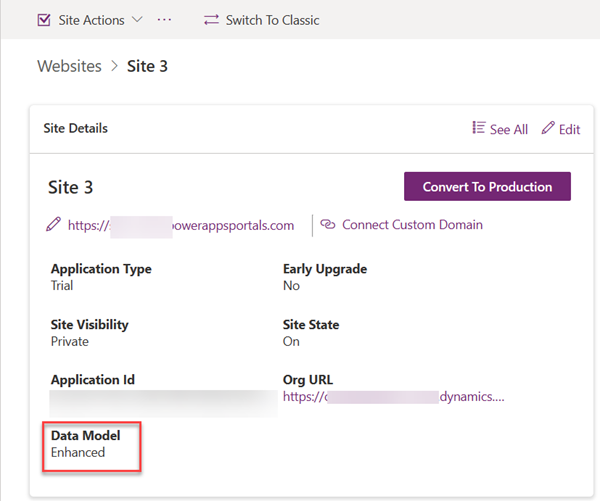
The Setup workspace in the Power Pages design studio shows which data model is being used.
Open the Portal Management app. If the standard data model is in use, the application name appears as Portal Management. If the enhanced data model is in use, the name appears as Power Pages Management.
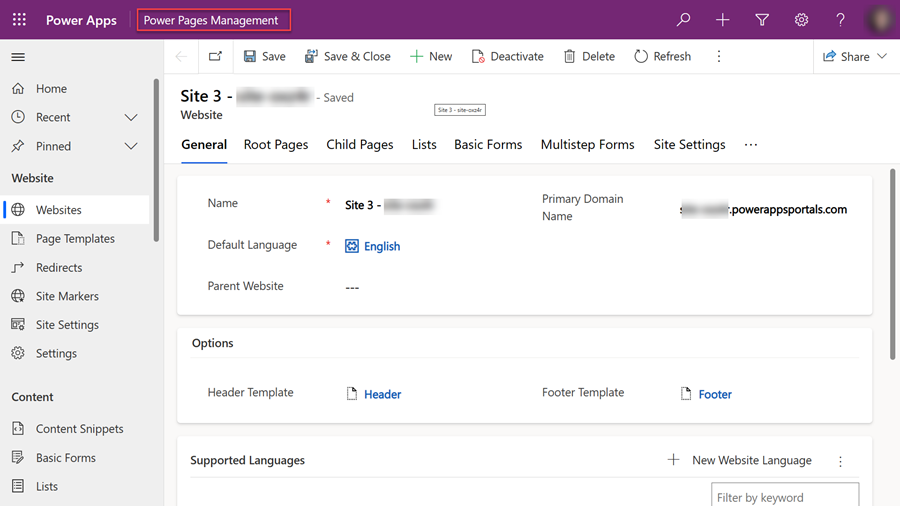
If you're using the Power Platform CLI, run the following command to view which data model is in use.
pac pages list -vNote
This parameter is supported in Power Platform CLI version 1.22.4 and later.
Disable the enhanced data model
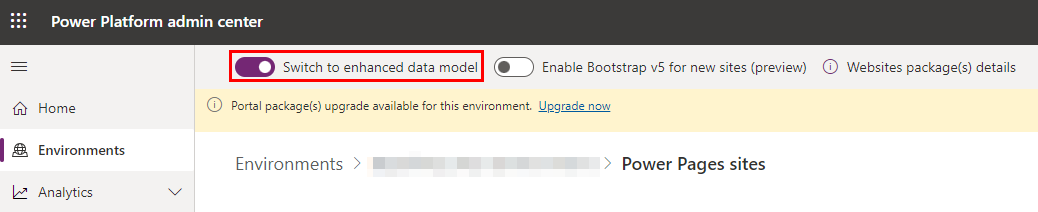
You can opt out of using the enhanced data model for site creation by disabling the Switch to enhanced data model option. Disabling the enhanced data model doesn't remove solution packages or delete any websites.
Existing websites that use the enhanced data model continue to operate. Any new websites use the standard data model.
System tables
The system tables are Power Pages–specific solution-aware tables that are present in all Dataverse environments.
Note
You can't modify these tables.
- Site
- Site Component
- Site Language
Nonconfiguration tables
Nonconfiguration tables are feature-specific tables that contain transactional business data. Data in these tables doesn't participate in ALM processes.
- Ad
- Poll
- Poll Option
- Poll Submission
- External Identity
- Portal comment
- Invitation
- Invitation Redemption
- Setting
- WebFormSession
Note
The enhanced data model removes these tables. The Power Pages Management app doesn't include them:
- Ad
- Poll
- Poll Option
- Poll Submission
Virtual tables
The Power Pages virtual tables represent and contain the metadata of the specific website components. They point to the system tables that contain the website metadata in JavaScript Object Notation (JSON) format. You can update and configure the content of the virtual tables by using the Power Pages Management app. This app has the same look and feel as the older Portal Management app.
Note
- If you develop any custom code or tools that use any of the standard data model tables, update the code so that it uses the enhanced data model tables.
- You can't modify these tables.
- Because these tables aren't modifiable, they don't appear in the list of tables that you can use to create a relationship with other tables. For example, Web Role (mspp_webrole), Table Permission (mspp_entitypermission), and other tables don't appear in the list of tables that you can use to create a relationship.
| System table | Enhanced data model virtual table | Standard data model table |
|---|---|---|
| powerpagesite | mspp_website | adx_website |
| powerpagesitelanguage | mspp_websitelanguage | adx_websitelanguage |
| powerpagecomponent | mspp_columnpermission mspp_columnpermissionprofile mspp_contentsnippet mspp_entityform mspp_entityformmetadata mspp_entitylist mspp_entitypermission mspp_pagetemplate mspp_pollplacement mspp_publishingstate mspp_publishingstatetransitionrule mspp_redirect mspp_shortcut mspp_sitemarker mspp_sitesetting mspp_webfile mspp_webform mspp_webformmetadata mspp_webformstep mspp_weblink mspp_weblinkset mspp_webpage mspp_webpageaccesscontrolrule mspp_webrole mspp_websiteaccess mspp_websitelanguage mspp_webtemplate |
adx_columnpermission adx_columnpermissionprofile adx_contentsnippet adx_entityform adx_entityformmetadata adx_entitylist adx_entitypermission adx_pagetemplate adx_pollplacement adx_publishingstate adx_publishingstatetransitionrule adx_redirect adx_shortcut adx_sitemarker adx_sitesetting adx_webfile adx_webform adx_webformmetadata adx_webformstep adx_weblink adx_weblinkset adx_webpage adx_webpageaccesscontrolrule adx_webrole adx_websiteaccess adx_websitelanguage adx_webtemplate |
Supported templates
The enhanced data model is enabled by default in your Microsoft Power Platform environment.
Any new website that you provision by using one of the following templates uses the enhanced data model:
- Starter layout 1-5
- Application processing
- Blank page
- Program registration
- Schedule meetings
- FAQ
- Community (Dynamics 365)
- Customer Self Service Portal (Dynamics 365)
- Employee Self Service Portal (Dynamics 365)
- Partner Portal (Dynamics 365)
Note
Enhanced data model supports new site creation for the above templates. Some sites previously created with standard data model can't be migrated yet. Specifically, sites created with the Community (Dynamics 365), Customer Self Service Portal (Dynamics 365), Employee Self Service Portal (Dynamics 365), and Partner Portal (Dynamics 365) templates. For guidance and tooling support to help you update from the standard data model to the enhanced data model, go to Migrate standard data model sites to enhanced data mode.
The following templates use the standard data model even if the enhanced data model is enabled in the environment:
- Customer Portal (Dynamics 365)
- Field Service (Dynamics 365)
- Modern Community (Dynamics 365)
- Order Returns (Dynamics 365)
Create a website by using the enhanced data model
After you enable the enhanced data model in an environment, you can create a new site from the Power Pages home page.
Note
The enhanced data model is used to create the new site only if the selected template supports the enhanced data model. For the Community (Dynamics 365), Customer Self Service Portal (Dynamics 365), Employee Self Service Portal (Dynamics 365), and Partner Portal (Dynamics 365) templates, the Power Pages Core Package version must be v1.1.2602.230 or later. For details about upgrading package version, see Update the Power Pages solution.
To create a site by using a template that uses the enhanced data model, follow these steps:
- Open the Power Pages home page.
- Select Create a site.
- Select a template, and then select Choose this template to create the site.
- Fill in the required information, and then select Done.
You're redirected to the Power Pages home page, where the new site appears in the My sites list. When the new site is ready, you can edit it by using the Power Pages design studio.
View the list of enhanced data model sites
You can view newly created sites from the Power Pages home page.
Sites that use the enhanced data model have functional parity with sites that use the standard data model. To determine which data model your website is using, go to the Determine whether your site is using the standard or enhanced data model section.
The Active sites section of the Power Pages home page lists all the available sites. The list shows both sites that use the standard data model and sites that use the enhanced data model, regardless of whether the enhanced data model is enabled for the environment.
Edit a new site that uses the enhanced data model
Sites that use the enhanced data model have functional parity with sites that use the standard data model. You can use either the Power Pages design studio or the Power Pages management app for customization.
Edit a site by using the Power Pages design studio
On the Power Pages home page, on the site card, select Edit to open the Power Pages design studio and edit the site.
Note
The editing process in the Power Pages design studio works the same, regardless of whether the site uses the enhanced data model or the standard data model. There are no functionality gaps.
Edit a site by using the Power Pages Management app
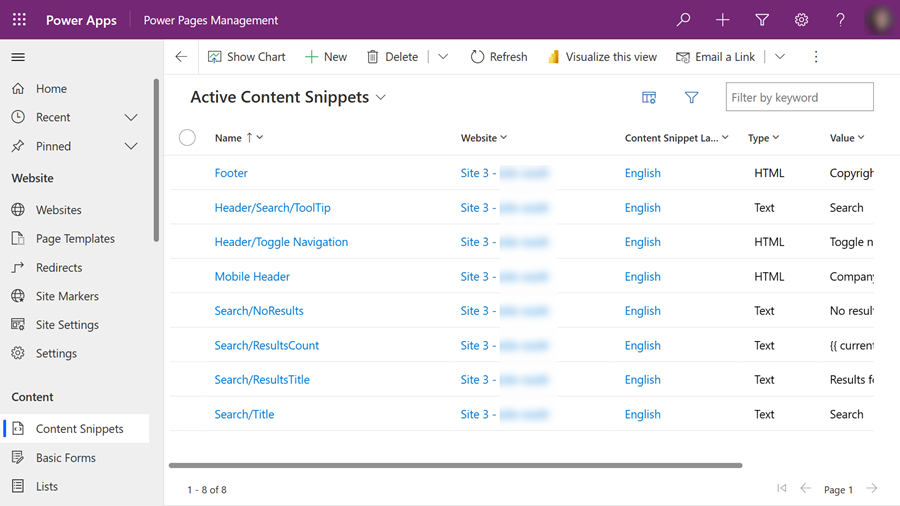
On the Power Pages home page, on the site card, select the ellipsis (…), and then select Power Pages Management to open the Power Pages Management app.
Note
- Power Pages core packages related to enhanced data model will by default be preinstalled on all Dataverse environments irrespective of whether the environments have a Power Pages site or not.
- The enhanced data model includes a new model-driven app named Power Pages Management. You must use this app for advanced customizations that aren't available through the Power Pages design studio.
You can also open the Power Pages Management app from the Power Pages design studio. Select the ellipsis (…), and then select Power Pages Management.
Use the Power Pages Management app to perform advanced customizations that are unavailable in the design studio.
Data model Power Platform CLI parameters
When you use the Power Platform CLI to upload or download configuration data for a website that uses the enhanced data model, you must use the modelVersion parameter. A value of 2 indicates that the enhanced data model should be used.
Download
pac pages download --path <path> --webSiteId <siteId> --modelVersion 2
Upload
pac pages upload --path <path> --modelVersion 2
Note
This parameter is supported in Power Platform CLI version 1.22.4 and later.
For more information, see Power Platform CLI parameters.
Frequently asked questions
How can I update a website from the standard data model to the enhanced data model?
For guidance and tooling support to help you update from the standard data model to the enhanced data model, see Migrate standard data model sites to enhanced data mode.
Can I edit new sites that are based on enhanced data model configurations in the Portal Management app?
You can use the new Power Pages Management app to edit new websites that are created by using the enhanced data model.