Note
Access to this page requires authorization. You can try signing in or changing directories.
Access to this page requires authorization. You can try changing directories.
Important
As of October 2026, this content is archived and no longer maintained. Information on this page may not reflect the latest product plans, features, or guidance. For current roadmap information across Dynamics 365, Power Platform, Dataverse, Microsoft 365, and Copilot, visit the roadmap. Continue to use Microsoft Learn for authoritative product guidance and documentation.
| Enabled for | Public preview | General availability |
|---|---|---|
| Users by admins, makers, or analysts |  Apr 13, 2026
 |
- |
Business value
When you add Microsoft 365 Copilot to your canvas apps, users can get answers and take action right where work happens, without switching between tools or searching for information. This approach leads to faster task completion and decisions, fewer delays caused by missing context, and less reliance on support teams and training to help users navigate processes. The result is improved productivity and app adoption, reduced operational friction, and better use of existing staff and resources.
Feature details
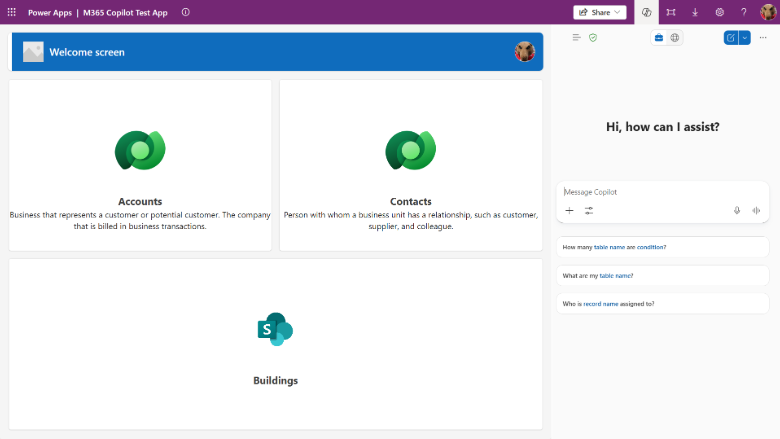
Microsoft 365 Copilot in canvas apps provides end users with an embedded conversational assistant that can answer questions, analyze app data, and help automate common tasks. When you enable it for an app, the chat pane appears directly alongside the app so users can interact with it without leaving their workflow.
Makers can turn on Microsoft 365 Copilot from the app’s settings panel in Power Apps Studio. After the app is enabled and published, users see a Copilot entry point in the app header and can open the chat pane alongside the app.
Admins can further control the feature by using the Power Platform admin center.
Geographic areas
Visit the Explore Feature Geography report for Microsoft Azure areas where this feature is planned or available.
Language availability
Visit the Explore Feature Language report for information on this feature's availability.
Related content
Add Microsoft 365 Copilot for app users in canvas apps (docs)