O Serviço de Agente do Microsoft Foundry usa três componentes principais de tempo de execução — agentes, conversas e respostas — para viabilizar interações com estado e múltiplas etapas. Um agente usa um modelo do catálogo de modelos do Foundry, juntamente com instruções e ferramentas. Uma conversa mantém o histórico entre as etapas. Uma resposta é a saída que o agente produz quando processa a entrada.
Escolha componentes com base no comportamento e no estado de que seu aplicativo precisa:
| Componente |
Relação |
Use-o quando |
|
Agente |
Fornece modelo reutilizável, instruções e ferramentas para uma resposta. |
Várias solicitações precisam do mesmo comportamento ou configuração de ferramenta. |
|
Conversa |
Fornece itens de entrada e saída persistentes para respostas. |
Os turnos seguintes precisam do histórico no lado do servidor. |
|
Resposta |
Executa um modelo ou agente na entrada e produz itens de saída. |
Toda interação exige uma unidade de execução, com ou sem agente ou conversa. |
Comece com uma resposta para uma única interação. Adicione um agente para um comportamento reutilizável, uma conversa com histórico persistente ou ambos. Para obter detalhes da implementação, vá diretamente para criar um agente, gerar respostas ou trabalhar com conversas e itens de conversa.
Os componentes funcionam juntos em um ciclo de vida previsível. Por exemplo, considere um assistente de suporte que responda a uma pergunta de acompanhamento:
- O aplicativo seleciona um agente que define as instruções e as ferramentas de suporte.
- Ele cria uma conversa e adiciona a primeira pergunta do cliente como um item de entrada.
- Uma resposta executa o agente com base na conversa e anexa itens de saída.
- A próxima resposta utiliza a mesma conversa, para que o agente possa responder a uma pergunta complementar dentro do contexto.
Sem uma conversa, o aplicativo pode, em vez disso, levar o contexto adiante fazendo referência a uma resposta armazenada anterior ou reenviando itens anteriores. O modo de streaming e em segundo plano altera a forma como o aplicativo recebe uma resposta, não a relação entre agentes, conversas e respostas.
O diagrama a seguir ilustra como esses componentes interagem em um loop de agente típico.
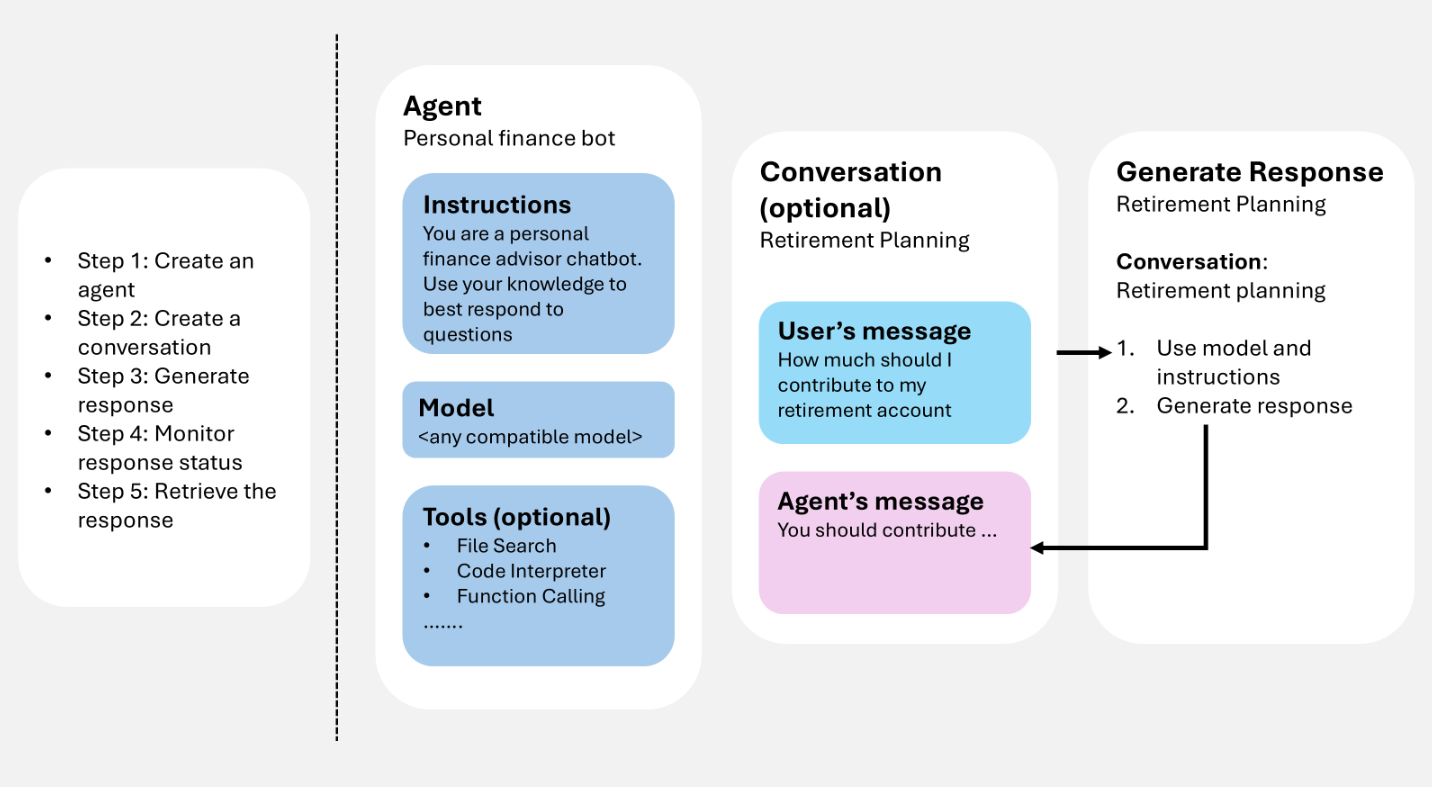
Você fornece entrada do usuário (e, como opção, histórico de conversas), o serviço gera uma resposta (incluindo chamadas de ferramentas quando configuradas), e os itens resultantes podem ser reutilizados como contexto para o próximo turno.
Se você usar um assistente de programação como o GitHub Copilot para projetar a forma como agentes, conversas e respostas funcionam em conjunto, a Microsoft Foundry Skill pode ajudar a aplicar esses componentes ao fluxo de trabalho do seu aplicativo.
Pré-requisitos
Para executar os exemplos neste artigo, você precisa:
pip install "azure-ai-projects>=2.0.0"
pip install azure-identity
dotnet add package Azure.AI.Projects
dotnet add package Azure.AI.Projects.Agents
dotnet add package Azure.AI.Extensions.OpenAI
dotnet add package Azure.Identity
npm install @azure/ai-projects
npm install @azure/identity
Use o Node.js 22 ou posterior com o @azure/ai-projects 2.8.0.
<dependency>
    <groupId>com.azure</groupId>
    <artifactId>azure-ai-agents</artifactId>
    <version>2.2.0</version>
</dependency>
<dependency>
    <groupId>com.azure</groupId>
    <artifactId>azure-identity</artifactId>
    <version>1.18.4</version>
</dependency>
Nenhuma instalação do SDK necessária. Use CLI do Azure para obter um token de acesso:
az login
Criar um agente
Um agente é uma definição de orquestração persistente que combina modelos de IA, instruções, código, ferramentas, parâmetros e controles opcionais de segurança ou governança.
Armazene agentes como ativos nomeados e com controle de versão no Microsoft Foundry. Durante a geração de resposta, a definição do agente funciona com o histórico de interação (conversa ou resposta anterior) para processar e responder à entrada do usuário.
O exemplo a seguir cria um agente de prompt com um nome, um modelo e instruções. Use o cliente do projeto para criação e controle de versão do agente.
from azure.identity import DefaultAzureCredential
from azure.ai.projects import AIProjectClient
from azure.ai.projects.models import PromptAgentDefinition

# Format: "https://resource_name.services.ai.azure.com/api/projects/project_name"
PROJECT_ENDPOINT = "your_project_endpoint"

# Create project client to call Foundry API
project = AIProjectClient(
    endpoint=PROJECT_ENDPOINT,
    credential=DefaultAzureCredential(),
)

# Create a prompt agent
agent = project.agents.create_version(
    agent_name="my-agent",
    definition=PromptAgentDefinition(
        model="gpt-5-mini",
        instructions="You are a helpful assistant.",
    ),
)
print(f"Agent: {agent.name}, Version: {agent.version}")
using Azure.Identity;
using Azure.AI.Projects;

// Format: "https://resource_name.services.ai.azure.com/api/projects/project_name"
var projectEndpoint = "your_project_endpoint";

// Create project client to call Foundry API
AIProjectClient projectClient = new(
    endpoint: new Uri(projectEndpoint),
    tokenProvider: new DefaultAzureCredential());

// Create a prompt agent
ProjectsAgentVersion agent = await projectClient.AgentAdministrationClient
    .CreateAgentVersionAsync(
        agentName: "my-agent",
        options: new(
            new DeclarativeAgentDefinition("gpt-5-mini")
            {
                Instructions = "You are a helpful assistant.",
            }));
Console.WriteLine($"Agent: {agent.Name}, Version: {agent.Version}");
import { DefaultAzureCredential } from "@azure/identity";
import { AIProjectClient } from "@azure/ai-projects";

// Format: "https://resource_name.services.ai.azure.com/api/projects/project_name"
const PROJECT_ENDPOINT = "your_project_endpoint";

// Create project client to call Foundry API
const project = new AIProjectClient(PROJECT_ENDPOINT, new DefaultAzureCredential());

// Create a prompt agent
const agent = await project.agents.createVersion(
  "my-agent",
  {
    kind: "prompt",
    model: "gpt-5-mini",
    instructions: "You are a helpful assistant.",
  },
);
console.log(`Agent: ${agent.name}, Version: ${agent.version}`);
import com.azure.ai.agents.AgentsClientBuilder;
import com.azure.ai.agents.AgentsClient;
import com.azure.ai.agents.models.PromptAgentDefinition;
import com.azure.identity.DefaultAzureCredentialBuilder;

// Format: "https://resource_name.services.ai.azure.com/api/projects/project_name"
String projectEndpoint = "your_project_endpoint";

// Create agents client to call Foundry API
AgentsClient agentsClient = new AgentsClientBuilder()
    .credential(new DefaultAzureCredentialBuilder().build())
    .endpoint(projectEndpoint)
    .buildAgentsClient();

// Create a prompt agent
PromptAgentDefinition definition = new PromptAgentDefinition("gpt-5-mini");
definition.setInstructions("You are a helpful assistant.");

var agent = agentsClient.createAgentVersion("my-agent", definition);
System.out.println("Agent: " + agent.getName() + ", Version: " + agent.getVersion());
# Configuration
ENDPOINT="https://{resource_name}.services.ai.azure.com/api/projects/{project_name}"
ACCESS_TOKEN="$(az account get-access-token --resource https://ai.azure.com/ --query accessToken -o tsv)"

# Create a prompt agent
curl -X POST "${ENDPOINT}/agents?api-version=v1" \
  -H "Authorization: Bearer ${ACCESS_TOKEN}" \
  -H "Content-Type: application/json" \
  -d '{
    "name": "my-agent",
    "definition": {
      "kind": "prompt",
      "model": "gpt-5-mini",
      "instructions": "You are a helpful assistant."
    }
  }'
Nota
Os agentes agora são identificados através do nome do agente e da versão do agente. Eles não têm mais um GUID chamado AgentID .
Para tipos de agente adicionais (hospedados), consulte o ciclo de vida de desenvolvimento do Agente.
As ferramentas estendem o que um agente pode fazer além de gerar texto. Quando você anexa ferramentas a um agente, o agente pode chamar serviços externos, executar código, pesquisar arquivos e acessar fontes de dados durante a geração de resposta, usando ferramentas como pesquisa na Web ou chamada de função.
Você pode anexar uma ou mais ferramentas ao criar um agente. Durante a geração de resposta, o agente decide se deseja chamar uma ferramenta com base na entrada do usuário e em suas instruções. O exemplo a seguir cria um agente com uma ferramenta de pesquisa na Web anexada.
from azure.identity import DefaultAzureCredential
from azure.ai.projects import AIProjectClient
from azure.ai.projects.models import PromptAgentDefinition, WebSearchTool

PROJECT_ENDPOINT = "your_project_endpoint"

project = AIProjectClient(
    endpoint=PROJECT_ENDPOINT,
    credential=DefaultAzureCredential(),
)

# Create an agent with a web search tool
agent = project.agents.create_version(
    agent_name="my-tool-agent",
    definition=PromptAgentDefinition(
        model="gpt-5-mini",
        instructions="You are a helpful assistant that can search the web.",
        tools=[WebSearchTool()],
    ),
)
print(f"Agent: {agent.name}, Version: {agent.version}")
using Azure.Identity;
using Azure.AI.Projects;

var projectEndpoint = "your_project_endpoint";

AIProjectClient projectClient = new(
    endpoint: new Uri(projectEndpoint),
    tokenProvider: new DefaultAzureCredential());

// Create an agent with a web search tool
ProjectsAgentVersion agent = await projectClient.AgentAdministrationClient
    .CreateAgentVersionAsync(
        agentName: "my-tool-agent",
        options: new(
            new DeclarativeAgentDefinition("gpt-5-mini")
            {
                Instructions = "You are a helpful assistant that can search the web.",
                Tools = { ResponseTool.CreateWebSearchTool() },
            }));
Console.WriteLine($"Agent: {agent.Name}, Version: {agent.Version}");
import { DefaultAzureCredential } from "@azure/identity";
import { AIProjectClient } from "@azure/ai-projects";

const PROJECT_ENDPOINT = "your_project_endpoint";
const project = new AIProjectClient(PROJECT_ENDPOINT, new DefaultAzureCredential());

// Create an agent with a web search tool
const agent = await project.agents.createVersion(
  "my-tool-agent",
  {
    kind: "prompt",
    model: "gpt-5-mini",
    instructions: "You are a helpful assistant that can search the web.",
    tools: [{ type: "web_search_preview" }],
  },
);
console.log(`Agent: ${agent.name}, Version: ${agent.version}`);
import com.azure.ai.agents.AgentsClientBuilder;
import com.azure.ai.agents.AgentsClient;
import com.azure.ai.agents.models.PromptAgentDefinition;
import com.azure.ai.agents.models.WebSearchPreviewTool;
import com.azure.identity.DefaultAzureCredentialBuilder;
import java.util.Collections;

String projectEndpoint = "your_project_endpoint";

AgentsClient agentsClient = new AgentsClientBuilder()
    .credential(new DefaultAzureCredentialBuilder().build())
    .endpoint(projectEndpoint)
    .buildAgentsClient();

// Create an agent with a web search tool
WebSearchPreviewTool webSearchTool = new WebSearchPreviewTool();
PromptAgentDefinition definition = new PromptAgentDefinition("gpt-5-mini");
definition.setInstructions("You are a helpful assistant that can search the web.");
definition.setTools(Collections.singletonList(webSearchTool));

var agent = agentsClient.createAgentVersion("my-tool-agent", definition);
System.out.println("Agent: " + agent.getName() + ", Version: " + agent.getVersion());
ENDPOINT="https://{resource_name}.services.ai.azure.com/api/projects/{project_name}"
ACCESS_TOKEN="$(az account get-access-token --resource https://ai.azure.com/ --query accessToken -o tsv)"

# Create an agent with a web search tool
curl -X POST "${ENDPOINT}/agents?api-version=v1" \
  -H "Authorization: Bearer ${ACCESS_TOKEN}" \
  -H "Content-Type: application/json" \
  -d '{
    "name": "my-tool-agent",
    "definition": {
      "kind": "prompt",
      "model": "gpt-5-mini",
      "instructions": "You are a helpful assistant that can search the web.",
      "tools": [{ "type": "web_search_preview" }]
    }
  }'
Para obter a lista completa de ferramentas disponíveis e como adicioná-las a uma Caixa de Ferramentas, consulte a visão geral da Caixa de Ferramentas. Para obter as práticas recomendadas, consulte As práticas recomendadas para usar ferramentas.
Gerar respostas
A geração de resposta invoca o agente. O agente usa sua configuração e qualquer histórico fornecido (conversa ou resposta anterior) para executar tarefas chamando modelos e ferramentas. Como parte da geração de resposta, o agente acrescenta itens à conversa.
Você também pode gerar uma resposta sem definir um agente. Nesse caso, você fornece todas as configurações diretamente na solicitação e as usa apenas para essa resposta. Essa abordagem é útil para cenários simples com ferramentas mínimas.
Além disso, você pode bifurcar a conversa no primeiro ou no segundo ID de resposta.
Gerar uma resposta com um agente
O exemplo a seguir gera uma resposta usando uma referência de agente e envia uma pergunta de acompanhamento usando a resposta anterior como contexto.
from azure.identity import DefaultAzureCredential
from azure.ai.projects import AIProjectClient

# Format: "https://resource_name.services.ai.azure.com/api/projects/project_name"
PROJECT_ENDPOINT = "your_project_endpoint"
AGENT_NAME = "your_agent_name"

# Create clients to call Foundry API
project = AIProjectClient(
    endpoint=PROJECT_ENDPOINT,
    credential=DefaultAzureCredential(),
)
openai = project.get_openai_client()

# Generate a response using the agent
response = openai.responses.create(
    extra_body={
        "agent_reference": {
            "name": AGENT_NAME,
            "type": "agent_reference",
        }
    },
    input="What is the largest city in France?",
)
print(response.output_text)

# Ask a follow-up question using the previous response
follow_up = openai.responses.create(
    extra_body={
        "agent_reference": {
            "name": AGENT_NAME,
            "type": "agent_reference",
        }
    },
    previous_response_id=response.id,
    input="What is the population of that city?",
)
print(follow_up.output_text)
using Azure.Identity;
using Azure.AI.Projects;
using Azure.AI.Extensions.OpenAI;

// Format: "https://resource_name.services.ai.azure.com/api/projects/project_name"
var projectEndpoint = "your_project_endpoint";
var agentName = "your_agent_name";

// Create project client to call Foundry API
AIProjectClient projectClient = new(
    endpoint: new Uri(projectEndpoint),
    tokenProvider: new DefaultAzureCredential());

// Generate a response using the agent
ProjectResponsesClient responsesClient
    = projectClient.ProjectOpenAIClient.GetProjectResponsesClientForAgent(agentName);
ResponseResult response = await responsesClient.CreateResponseAsync(
    "What is the largest city in France?");
Console.WriteLine(response.GetOutputText());

// Ask a follow-up question using the previous response
ResponseResult followUp = await responsesClient.CreateResponseAsync(
    new CreateResponseOptions
    {
        PreviousResponseId = response.Id,
        InputItems = { ResponseItem.CreateUserMessageItem(
            "What is the population of that city?") },
    });
Console.WriteLine(followUp.GetOutputText());
import { DefaultAzureCredential } from "@azure/identity";
import { AIProjectClient } from "@azure/ai-projects";

// Format: "https://resource_name.services.ai.azure.com/api/projects/project_name"
const PROJECT_ENDPOINT = "your_project_endpoint";
const AGENT_NAME = "your_agent_name";

// Create clients to call Foundry API
const project = new AIProjectClient(PROJECT_ENDPOINT, new DefaultAzureCredential());
const openai = project.getOpenAIClient();

// Generate a response using the agent
const response = await openai.responses.create(
  { input: "What is the largest city in France?" },
  { body: { agent_reference: { name: AGENT_NAME, type: "agent_reference" } } },
);
console.log(response.output_text);

// Ask a follow-up question using the previous response
const followUp = await openai.responses.create(
  {
    input: "What is the population of that city?",
    previous_response_id: response.id,
  },
  { body: { agent_reference: { name: AGENT_NAME, type: "agent_reference" } } },
);
console.log(followUp.output_text);
import com.azure.ai.agents.*;
import com.azure.ai.agents.models.AgentReference;
import com.azure.ai.agents.models.AzureCreateResponseOptions;
import com.azure.identity.DefaultAzureCredentialBuilder;
import com.openai.models.responses.Response;
import com.openai.models.responses.ResponseCreateParams;

// Format: "https://resource_name.services.ai.azure.com/api/projects/project_name"
String projectEndpoint = "your_project_endpoint";
String agentName = "your_agent_name";

// Create clients to call Foundry API
AgentsClientBuilder builder = new AgentsClientBuilder()
    .credential(new DefaultAzureCredentialBuilder().build())
    .endpoint(projectEndpoint);
ResponsesClient responsesClient = builder.buildResponsesClient();

// Generate a response using the agent
AgentReference agentRef = new AgentReference(agentName);

Response response = responsesClient.createAzureResponse(
    new AzureCreateResponseOptions().setAgentReference(agentRef),
    ResponseCreateParams.builder()
        .input("What is the largest city in France?"));
System.out.println(response.output());

// Ask a follow-up question using the previous response
Response followUp = responsesClient.createAzureResponse(
    new AzureCreateResponseOptions().setAgentReference(agentRef),
    ResponseCreateParams.builder()
        .input("What is the population of that city?")
        .previousResponseId(response.id()));
System.out.println(followUp.output());
# Configuration
ENDPOINT="https://{resource_name}.services.ai.azure.com/api/projects/{project_name}"
ACCESS_TOKEN="$(az account get-access-token --resource https://ai.azure.com/ --query accessToken -o tsv)"
AGENT_NAME="your_agent_name"

# Generate a response using an agent
RESPONSE=$(curl -s -X POST "${ENDPOINT}/openai/v1/responses" \
  -H "Authorization: Bearer ${ACCESS_TOKEN}" \
  -H "Content-Type: application/json" \
  -d '{
    "input": "What is the largest city in France?",
    "agent_reference": {
      "name": "'"${AGENT_NAME}"'",
      "type": "agent_reference"
    }
  }')
RESPONSE_ID=$(echo "$RESPONSE" | jq -r '.id')

# Ask a follow-up question using the previous response
curl -X POST "${ENDPOINT}/openai/v1/responses" \
  -H "Authorization: Bearer ${ACCESS_TOKEN}" \
  -H "Content-Type: application/json" \
  -d '{
    "input": "What is the population of that city?",
    "previous_response_id": "'"${RESPONSE_ID}"'",
    "agent_reference": {
      "name": "'"${AGENT_NAME}"'",
      "type": "agent_reference"
    }
  }'
Quando um agente usa ferramentas durante a geração de resposta, a saída da resposta contém itens de chamada de ferramenta junto com a mensagem final. Você pode iterar sobre response.output para inspecionar cada item e exibir chamadas de ferramentas, como buscas na web, chamadas de função ou buscas de arquivo, antes de imprimir a resposta de texto.
from azure.identity import DefaultAzureCredential
from azure.ai.projects import AIProjectClient

PROJECT_ENDPOINT = "your_project_endpoint"
AGENT_NAME = "your_agent_name"

project = AIProjectClient(
    endpoint=PROJECT_ENDPOINT,
    credential=DefaultAzureCredential(),
)
openai = project.get_openai_client()

response = openai.responses.create(
    extra_body={
        "agent_reference": {
            "name": AGENT_NAME,
            "type": "agent_reference",
        }
    },
    input="What happened in the news today?",
)

# Print each output item, including tool calls
for item in response.output:
    if item.type == "web_search_call":
        print(f"[Tool] Web search: status={item.status}")
    elif item.type == "function_call":
        print(f"[Tool] Function call: {item.name}({item.arguments})")
    elif item.type == "file_search_call":
        print(f"[Tool] File search: status={item.status}")
    elif item.type == "message":
        print(f"[Assistant] {item.content[0].text}")
using Azure.Identity;
using Azure.AI.Projects;
using Azure.AI.Extensions.OpenAI;

var projectEndpoint = "your_project_endpoint";
var agentName = "your_agent_name";

AIProjectClient projectClient = new(
    endpoint: new Uri(projectEndpoint),
    tokenProvider: new DefaultAzureCredential());

ProjectResponsesClient responsesClient
    = projectClient.ProjectOpenAIClient.GetProjectResponsesClientForAgent(agentName);
ResponseResult response = await responsesClient.CreateResponseAsync(
    "What happened in the news today?");

// Print each output item, including tool calls
foreach (var item in response.OutputItems)
{
    switch (item)
    {
        case ResponseWebSearchCallItem webSearch:
            Console.WriteLine($"[Tool] Web search: status={webSearch.Status}");
            break;
        case ResponseFunctionCallItem functionCall:
            Console.WriteLine($"[Tool] Function call: {functionCall.Name}({functionCall.Arguments})");
            break;
        case ResponseFileSearchCallItem fileSearch:
            Console.WriteLine($"[Tool] File search: status={fileSearch.Status}");
            break;
        case ResponseOutputMessage message:
            Console.WriteLine($"[Assistant] {message.Content[0].Text}");
            break;
    }
}
import { DefaultAzureCredential } from "@azure/identity";
import { AIProjectClient } from "@azure/ai-projects";

const PROJECT_ENDPOINT = "your_project_endpoint";
const AGENT_NAME = "your_agent_name";

const project = new AIProjectClient(PROJECT_ENDPOINT, new DefaultAzureCredential());
const openai = project.getOpenAIClient();

const response = await openai.responses.create(
  { input: "What happened in the news today?" },
  { body: { agent_reference: { name: AGENT_NAME, type: "agent_reference" } } },
);

// Print each output item, including tool calls
for (const item of response.output) {
  switch (item.type) {
    case "web_search_call":
      console.log(`[Tool] Web search: status=${item.status}`);
      break;
    case "function_call":
      console.log(`[Tool] Function call: ${item.name}(${item.arguments})`);
      break;
    case "file_search_call":
      console.log(`[Tool] File search: status=${item.status}`);
      break;
    case "message":
      console.log(`[Assistant] ${item.content[0].text}`);
      break;
  }
}
import com.azure.ai.agents.*;
import com.azure.ai.agents.models.AgentReference;
import com.azure.ai.agents.models.AzureCreateResponseOptions;
import com.azure.identity.DefaultAzureCredentialBuilder;
import com.openai.models.responses.Response;
import com.openai.models.responses.ResponseCreateParams;
import com.openai.models.responses.ResponseOutputItem;

String projectEndpoint = "your_project_endpoint";
String agentName = "your_agent_name";

AgentsClientBuilder builder = new AgentsClientBuilder()
    .credential(new DefaultAzureCredentialBuilder().build())
    .endpoint(projectEndpoint);
ResponsesClient responsesClient = builder.buildResponsesClient();

AgentReference agentRef = new AgentReference(agentName);
Response response = responsesClient.createAzureResponse(
    new AzureCreateResponseOptions().setAgentReference(agentRef),
    ResponseCreateParams.builder()
        .input("What happened in the news today?"));

// Print each output item, including tool calls
for (ResponseOutputItem item : response.output()) {
    item.webSearchCall().ifPresent(ws ->
        System.out.println("[Tool] Web search: status=" + ws.status()));
    item.functionCall().ifPresent(fc ->
        System.out.println("[Tool] Function call: " + fc.name()
            + "(" + fc.arguments() + ")"));
    item.fileSearchCall().ifPresent(fs ->
        System.out.println("[Tool] File search: status=" + fs.status()));
    item.message().ifPresent(msg ->
        System.out.println("[Assistant] "
            + msg.content().get(0).asOutputText().text()));
}
ENDPOINT="https://{resource_name}.services.ai.azure.com/api/projects/{project_name}"
ACCESS_TOKEN="$(az account get-access-token --resource https://ai.azure.com/ --query accessToken -o tsv)"
AGENT_NAME="your_agent_name"

RESPONSE=$(curl -s -X POST "${ENDPOINT}/openai/v1/responses" \
  -H "Authorization: Bearer ${ACCESS_TOKEN}" \
  -H "Content-Type: application/json" \
  -d '{
    "input": "What happened in the news today?",
    "agent_reference": {
      "name": "'"${AGENT_NAME}"'",
      "type": "agent_reference"
    }
  }')

# Print each output item, including tool calls
echo "$RESPONSE" | jq -r '.output[] |
  if .type == "web_search_call" then "[Tool] Web search: status=\(.status)"
  elif .type == "function_call" then "[Tool] Function call: \(.name)(\(.arguments))"
  elif .type == "file_search_call" then "[Tool] File search: status=\(.status)"
  elif .type == "message" then "[Assistant] \(.content[0].text)"
  else "[Unknown] \(.type)"
  end'
Gerar uma resposta sem armazenar
Por padrão, o serviço armazena o histórico de respostas no servidor, para que você possa consultar previous_response_id para o contexto de múltiplas etapas. Se você definir store como false, o serviço não persistirá a resposta. Você deve manter o contexto da conversa passando os itens de saída anteriores como entrada para a próxima solicitação.
Essa abordagem é útil quando você precisa de controle total sobre o estado da conversa, deseja minimizar os dados armazenados ou trabalha em um ambiente de retenção de dados zero.
from azure.identity import DefaultAzureCredential
from azure.ai.projects import AIProjectClient

PROJECT_ENDPOINT = "your_project_endpoint"
AGENT_NAME = "your_agent_name"

project = AIProjectClient(
    endpoint=PROJECT_ENDPOINT,
    credential=DefaultAzureCredential(),
)
openai = project.get_openai_client()

# Generate a response without storing
response = openai.responses.create(
    extra_body={
        "agent_reference": {
            "name": AGENT_NAME,
            "type": "agent_reference",
        }
    },
    input="What is the largest city in France?",
    store=False,
)
print(response.output_text)

# Carry forward context client-side by passing previous output as input
follow_up = openai.responses.create(
    extra_body={
        "agent_reference": {
            "name": AGENT_NAME,
            "type": "agent_reference",
        }
    },
    input=[
        {"role": "user", "content": "What is the largest city in France?"},
        {"role": "assistant", "content": response.output_text},
        {"role": "user", "content": "What is the population of that city?"},
    ],
    store=False,
)
print(follow_up.output_text)
using Azure.Identity;
using Azure.AI.Projects;
using Azure.AI.Extensions.OpenAI;

var projectEndpoint = "your_project_endpoint";
var agentName = "your_agent_name";

AIProjectClient projectClient = new(
    endpoint: new Uri(projectEndpoint),
    tokenProvider: new DefaultAzureCredential());

// Generate a response without storing
ProjectResponsesClient responsesClient
    = projectClient.ProjectOpenAIClient.GetProjectResponsesClientForAgent(agentName);
ResponseResult response = await responsesClient.CreateResponseAsync(
    new CreateResponseOptions
    {
        InputItems = { ResponseItem.CreateUserMessageItem(
            "What is the largest city in France?") },
        Store = false,
    });
Console.WriteLine(response.GetOutputText());

// Carry forward context client-side by passing previous output as input
ResponseResult followUp = await responsesClient.CreateResponseAsync(
    new CreateResponseOptions
    {
        InputItems =
        {
            ResponseItem.CreateUserMessageItem(
                "What is the largest city in France?"),
            ResponseItem.CreateAssistantMessageItem(
                response.GetOutputText()),
            ResponseItem.CreateUserMessageItem(
                "What is the population of that city?"),
        },
        Store = false,
    });
Console.WriteLine(followUp.GetOutputText());
import { DefaultAzureCredential } from "@azure/identity";
import { AIProjectClient } from "@azure/ai-projects";

const PROJECT_ENDPOINT = "your_project_endpoint";
const AGENT_NAME = "your_agent_name";

const project = new AIProjectClient(PROJECT_ENDPOINT, new DefaultAzureCredential());
const openai = project.getOpenAIClient();

// Generate a response without storing
const response = await openai.responses.create(
  { input: "What is the largest city in France?", store: false },
  { body: { agent_reference: { name: AGENT_NAME, type: "agent_reference" } } },
);
console.log(response.output_text);

// Carry forward context client-side by passing previous output as input
const followUp = await openai.responses.create(
  {
    input: [
      { role: "user", content: "What is the largest city in France?" },
      { role: "assistant", content: response.output_text },
      { role: "user", content: "What is the population of that city?" },
    ],
    store: false,
  },
  { body: { agent_reference: { name: AGENT_NAME, type: "agent_reference" } } },
);
console.log(followUp.output_text);
import com.azure.ai.agents.*;
import com.azure.ai.agents.models.AgentReference;
import com.azure.ai.agents.models.AzureCreateResponseOptions;
import com.azure.identity.DefaultAzureCredentialBuilder;
import com.openai.models.responses.Response;
import com.openai.models.responses.ResponseCreateParams;
import com.openai.models.responses.EasyInputMessage;
import java.util.List;

String projectEndpoint = "your_project_endpoint";
String agentName = "your_agent_name";

AgentsClientBuilder builder = new AgentsClientBuilder()
    .credential(new DefaultAzureCredentialBuilder().build())
    .endpoint(projectEndpoint);
ResponsesClient responsesClient = builder.buildResponsesClient();

// Generate a response without storing
AgentReference agentRef = new AgentReference(agentName);

Response response = responsesClient.createAzureResponse(
    new AzureCreateResponseOptions().setAgentReference(agentRef),
    ResponseCreateParams.builder()
        .input("What is the largest city in France?")
        .store(false));
System.out.println(response.output());

// Carry forward context client-side by passing previous output as input
Response followUp = responsesClient.createAzureResponse(
    new AzureCreateResponseOptions().setAgentReference(agentRef),
    ResponseCreateParams.builder()
        .inputOfResponse(List.of(
            EasyInputMessage.builder()
                .role(EasyInputMessage.Role.USER)
                .content("What is the largest city in France?").build(),
            EasyInputMessage.builder()
                .role(EasyInputMessage.Role.ASSISTANT)
                .content(response.outputText()).build(),
            EasyInputMessage.builder()
                .role(EasyInputMessage.Role.USER)
                .content("What is the population of that city?").build()))
        .store(false));
System.out.println(followUp.output());
ENDPOINT="https://{resource_name}.services.ai.azure.com/api/projects/{project_name}"
ACCESS_TOKEN="$(az account get-access-token --resource https://ai.azure.com/ --query accessToken -o tsv)"
AGENT_NAME="your_agent_name"

# Generate a response without storing
RESPONSE=$(curl -s -X POST "${ENDPOINT}/openai/v1/responses" \
  -H "Authorization: Bearer ${ACCESS_TOKEN}" \
  -H "Content-Type: application/json" \
  -d '{
    "input": "What is the largest city in France?",
    "store": false,
    "agent_reference": {
      "name": "'"${AGENT_NAME}"'",
      "type": "agent_reference"
    }
  }')
OUTPUT_TEXT=$(echo "$RESPONSE" | jq -r '.output[] | select(.type=="message") | .content[0].text')

# Carry forward context client-side by passing previous output as input
curl -X POST "${ENDPOINT}/openai/v1/responses" \
  -H "Authorization: Bearer ${ACCESS_TOKEN}" \
  -H "Content-Type: application/json" \
  -d '{
    "input": [
      {"role": "user", "content": "What is the largest city in France?"},
      {"role": "assistant", "content": "'"${OUTPUT_TEXT}"'"},
      {"role": "user", "content": "What is the population of that city?"}
    ],
    "store": false,
    "agent_reference": {
      "name": "'"${AGENT_NAME}"'",
      "type": "agent_reference"
    }
  }'
Conversas e elementos de conversa
As conversas são objetos duráveis com identificadores exclusivos. Após a criação, você pode reutilizá-las entre sessões.
As conversas armazenam itens, que podem incluir mensagens, chamadas de ferramenta, saídas de ferramentas e outros dados.
Criar uma conversa
O exemplo a seguir cria uma conversa com uma mensagem inicial do usuário. Use o cliente OpenAI (obtido do cliente do projeto) para conversas e respostas.
from azure.identity import DefaultAzureCredential
from azure.ai.projects import AIProjectClient

# Format: "https://resource_name.services.ai.azure.com/api/projects/project_name"
PROJECT_ENDPOINT = "your_project_endpoint"

# Create clients to call Foundry API
project = AIProjectClient(
    endpoint=PROJECT_ENDPOINT,
    credential=DefaultAzureCredential(),
)
openai = project.get_openai_client()

# Create a conversation with an initial user message
conversation = openai.conversations.create(
    items=[
        {
            "type": "message",
            "role": "user",
            "content": "What is the largest city in France?",
        }
    ],
)
print(f"Conversation ID: {conversation.id}")
using Azure.Identity;
using Azure.AI.Projects;
using Azure.AI.Extensions.OpenAI;

// Format: "https://resource_name.services.ai.azure.com/api/projects/project_name"
var projectEndpoint = "your_project_endpoint";

// Create project client to call Foundry API
AIProjectClient projectClient = new(
    endpoint: new Uri(projectEndpoint),
    tokenProvider: new DefaultAzureCredential());

// Create a conversation
ProjectConversation conversation
    = await projectClient.ProjectOpenAIClient.GetProjectConversationsClient().CreateProjectConversationAsync();
Console.WriteLine($"Conversation ID: {conversation.Id}");
import { DefaultAzureCredential } from "@azure/identity";
import { AIProjectClient } from "@azure/ai-projects";

// Format: "https://resource_name.services.ai.azure.com/api/projects/project_name"
const PROJECT_ENDPOINT = "your_project_endpoint";

// Create clients to call Foundry API
const project = new AIProjectClient(PROJECT_ENDPOINT, new DefaultAzureCredential());
const openai = project.getOpenAIClient();

// Create a conversation with an initial user message
const conversation = await openai.conversations.create({
  items: [
    {
      type: "message",
      role: "user",
      content: "What is the largest city in France?",
    },
  ],
});
console.log(`Conversation ID: ${conversation.id}`);
import com.azure.ai.agents.AgentsClientBuilder;
import com.azure.identity.DefaultAzureCredentialBuilder;
import com.openai.models.conversations.Conversation;
import com.openai.services.blocking.ConversationService;

// Format: "https://resource_name.services.ai.azure.com/api/projects/project_name"
String projectEndpoint = "your_project_endpoint";

// Create conversations client to call Foundry API
ConversationService conversationService = new AgentsClientBuilder()
    .credential(new DefaultAzureCredentialBuilder().build())
    .endpoint(projectEndpoint)
    .buildOpenAIClient()
    .conversations();

// Create a conversation
Conversation conversation = conversationService.create();
System.out.println("Conversation ID: " + conversation.id());
# Configuration
ENDPOINT="https://{resource_name}.services.ai.azure.com/api/projects/{project_name}"
ACCESS_TOKEN="$(az account get-access-token --resource https://ai.azure.com/ --query accessToken -o tsv)"

# Create a conversation with an initial user message
curl -X POST "${ENDPOINT}/openai/v1/conversations" \
  -H "Authorization: Bearer ${ACCESS_TOKEN}" \
  -H "Content-Type: application/json" \
  -d '{
    "items": [
      {
        "type": "message",
        "role": "user",
        "content": "What is the largest city in France?"
      }
    ]
  }'
Quando usar uma conversa
Use uma conversa quando você desejar:
-
Continuidade de vários turnos: mantenha um histórico estável entre turnos sem recompilar o contexto por conta própria.
-
Continuidade entre sessões: reutilize a mesma conversa para um usuário que retorna mais tarde.
-
Depuração mais fácil: inspecione o que aconteceu ao longo do tempo (por exemplo, chamadas de ferramenta e saídas).
Quando uma conversa é usada para gerar uma resposta (com ou sem um agente), a conversa completa é fornecida como entrada para o modelo. A resposta gerada é acrescentada à mesma conversa.
Nota
Se a conversa exceder o tamanho de contexto com suporte do modelo, o modelo truncará automaticamente o contexto de entrada. A conversa em si não é truncada, mas apenas um subconjunto dela é usado para gerar a resposta.
Se você não criar uma conversa, ainda poderá criar fluxos de vários turnos usando a saída de uma resposta anterior como ponto de partida para a próxima solicitação. Essa abordagem oferece mais flexibilidade do que o padrão baseado em thread mais antigo, em que o estado estava firmemente acoplado a objetos de thread. Para obter diretrizes de migração, consulte Migrar para o SDK de Agentes.
Tipos de item de conversação
Conversas armazenam itens em vez de apenas mensagens de chat. Os itens registram o que ocorreu durante a geração de resposta para que a próxima etapa possa reutilizar esse contexto.
Os tipos de item comuns incluem:
-
Itens de mensagem: mensagens de usuário ou assistente.
-
Itens de chamada de ferramenta: registros de invocações de ferramenta que o agente tentou.
-
Itens de saída da ferramenta: saídas retornadas por ferramentas (por exemplo, resultados de recuperação).
-
Itens de saída: o conteúdo de resposta exibido novamente para o usuário.
Adicionar itens a uma conversa
Depois de criar uma conversa, use conversations.items.create() para adicionar mensagens de usuário subsequentes ou outros itens.
# Add a follow-up message to an existing conversation
openai.conversations.items.create(
    conversation_id=conversation.id,
    items=[
        {
            "type": "message",
            "role": "user",
            "content": "What about Germany?",
        }
    ],
)
// In C#, send follow-up input directly
// through the responses client
var followUp = await responsesClient.CreateResponseAsync(
    "What about Germany?");
Console.WriteLine(followUp.GetOutputText());
// Add a follow-up message to an existing conversation
await openai.conversations.items.create(
  conversation.id,
  {
    items: [
      {
        type: "message",
        role: "user",
        content: "What about Germany?",
      },
    ],
  },
);
// In Java, send follow-up input directly
// through the responses client
AgentReference agentRef = new AgentReference("my-agent");

Response followUp = responsesClient.createAzureResponse(
    new AzureCreateResponseOptions().setAgentReference(agentRef),
    ResponseCreateParams.builder()
        .input("What about Germany?"));
System.out.println(followUp.output());
# Add items to an existing conversation
CONVERSATION_ID="conv_abc123"

curl -X POST "${ENDPOINT}/openai/v1/conversations/${CONVERSATION_ID}/items" \
  -H "Authorization: Bearer ${ACCESS_TOKEN}" \
  -H "Content-Type: application/json" \
  -d '{
    "items": [
      {
        "type": "message",
        "role": "user",
        "content": "What about Germany?"
      }
    ]
  }'
Usar uma conversa com um agente
Combine uma conversa com uma referência de agente para manter o histórico entre várias interações. O agente processa todos os itens na conversa e acrescenta sua saída automaticamente.
from azure.identity import DefaultAzureCredential
from azure.ai.projects import AIProjectClient

PROJECT_ENDPOINT = "your_project_endpoint"
AGENT_NAME = "your_agent_name"

# Create clients to call Foundry API
project = AIProjectClient(
    endpoint=PROJECT_ENDPOINT,
    credential=DefaultAzureCredential(),
)
openai = project.get_openai_client()

# Create a conversation for multi-turn chat
conversation = openai.conversations.create()

# First turn
response = openai.responses.create(
    conversation=conversation.id,
    extra_body={
        "agent_reference": {
            "name": AGENT_NAME,
            "type": "agent_reference",
        }
    },
    input="What is the largest city in France?",
)
print(response.output_text)

# Follow-up turn in the same conversation
follow_up = openai.responses.create(
    conversation=conversation.id,
    extra_body={
        "agent_reference": {
            "name": AGENT_NAME,
            "type": "agent_reference",
        }
    },
    input="What is the population of that city?",
)
print(follow_up.output_text)
using Azure.Identity;
using Azure.AI.Projects;
using Azure.AI.Extensions.OpenAI;

var projectEndpoint = "your_project_endpoint";
var agentName = "your_agent_name";

AIProjectClient projectClient = new(
    endpoint: new Uri(projectEndpoint),
    tokenProvider: new DefaultAzureCredential());

// Create a conversation for multi-turn chat
ProjectConversation conversation
    = await projectClient.ProjectOpenAIClient.GetProjectConversationsClient().CreateProjectConversationAsync();

// First turn
ProjectResponsesClient responsesClient
    = projectClient.ProjectOpenAIClient.GetProjectResponsesClientForAgent(
        agentName, conversation);
ResponseResult response = await responsesClient.CreateResponseAsync(
    "What is the largest city in France?");
Console.WriteLine(response.GetOutputText());

// Follow-up turn in the same conversation
ResponseResult followUp = await responsesClient.CreateResponseAsync(
    "What is the population of that city?");
Console.WriteLine(followUp.GetOutputText());
import { DefaultAzureCredential } from "@azure/identity";
import { AIProjectClient } from "@azure/ai-projects";

const PROJECT_ENDPOINT = "your_project_endpoint";
const AGENT_NAME = "your_agent_name";

const project = new AIProjectClient(PROJECT_ENDPOINT, new DefaultAzureCredential());
const openai = project.getOpenAIClient();

// Create a conversation for multi-turn chat
const conversation = await openai.conversations.create();

// First turn
const response = await openai.responses.create(
  { conversation: conversation.id, input: "What is the largest city in France?" },
  { body: { agent_reference: { name: AGENT_NAME, type: "agent_reference" } } },
);
console.log(response.output_text);

// Follow-up turn in the same conversation
const followUp = await openai.responses.create(
  { conversation: conversation.id, input: "What is the population of that city?" },
  { body: { agent_reference: { name: AGENT_NAME, type: "agent_reference" } } },
);
console.log(followUp.output_text);
import com.azure.ai.agents.*;
import com.azure.ai.agents.models.AgentReference;
import com.azure.ai.agents.models.AzureCreateResponseOptions;
import com.azure.identity.DefaultAzureCredentialBuilder;
import com.openai.models.conversations.Conversation;
import com.openai.models.responses.Response;
import com.openai.models.responses.ResponseCreateParams;
import com.openai.services.blocking.ConversationService;

String projectEndpoint = "your_project_endpoint";
String agentName = "your_agent_name";

AgentsClientBuilder builder = new AgentsClientBuilder()
    .credential(new DefaultAzureCredentialBuilder().build())
    .endpoint(projectEndpoint);
ResponsesClient responsesClient = builder.buildResponsesClient();
ConversationService conversationService
    = builder.buildOpenAIClient().conversations();

// Create a conversation for multi-turn chat
Conversation conversation = conversationService.create();

// First turn
AgentReference agentRef = new AgentReference(agentName);
Response response = responsesClient.createAzureResponse(
    new AzureCreateResponseOptions().setAgentReference(agentRef),
    ResponseCreateParams.builder()
        .conversation(conversation.id())
        .input("What is the largest city in France?"));
System.out.println(response.output());

// Follow-up turn in the same conversation
Response followUp = responsesClient.createAzureResponse(
    new AzureCreateResponseOptions().setAgentReference(agentRef),
    ResponseCreateParams.builder()
        .conversation(conversation.id())
        .input("What is the population of that city?"));
System.out.println(followUp.output());
ENDPOINT="https://{resource_name}.services.ai.azure.com/api/projects/{project_name}"
ACCESS_TOKEN="$(az account get-access-token --resource https://ai.azure.com/ --query accessToken -o tsv)"
AGENT_NAME="your_agent_name"

# Create a conversation
CONVERSATION=$(curl -s -X POST "${ENDPOINT}/openai/v1/conversations" \
  -H "Authorization: Bearer ${ACCESS_TOKEN}" \
  -H "Content-Type: application/json" \
  -d '{}')
CONVERSATION_ID=$(echo "$CONVERSATION" | jq -r '.id')

# First turn
curl -s -X POST "${ENDPOINT}/openai/v1/responses" \
  -H "Authorization: Bearer ${ACCESS_TOKEN}" \
  -H "Content-Type: application/json" \
  -d '{
    "input": "What is the largest city in France?",
    "conversation": "'"${CONVERSATION_ID}"'",
    "agent_reference": {
      "name": "'"${AGENT_NAME}"'",
      "type": "agent_reference"
    }
  }'

# Follow-up turn in the same conversation
curl -X POST "${ENDPOINT}/openai/v1/responses" \
  -H "Authorization: Bearer ${ACCESS_TOKEN}" \
  -H "Content-Type: application/json" \
  -d '{
    "input": "What is the population of that city?",
    "conversation": "'"${CONVERSATION_ID}"'",
    "agent_reference": {
      "name": "'"${AGENT_NAME}"'",
      "type": "agent_reference"
    }
  }'
Para obter exemplos que mostram como conversas e respostas funcionam juntas no código, consulte Criar e usar memória no Serviço do Foundry Agent.
Streaming e respostas em segundo plano
Para operações de execução prolongada, você pode retornar resultados incrementalmente usando streaming ou executar de forma completamente assíncrona usando background modo. Nesses casos, você normalmente monitora a resposta até que ela seja concluída e, em seguida, consuma os itens de saída finais.
Transmitir uma resposta
O streaming retorna resultados parciais conforme são gerados. Essa abordagem é útil para mostrar a saída para os usuários em tempo real.
from azure.identity import DefaultAzureCredential
from azure.ai.projects import AIProjectClient

# Format: "https://resource_name.services.ai.azure.com/api/projects/project_name"
PROJECT_ENDPOINT = "your_project_endpoint"
AGENT_NAME = "your_agent_name"

# Create clients to call Foundry API
project = AIProjectClient(
    endpoint=PROJECT_ENDPOINT,
    credential=DefaultAzureCredential(),
)
openai = project.get_openai_client()

# Stream a response using the agent
stream = openai.responses.create(
    extra_body={
        "agent_reference": {
            "name": AGENT_NAME,
            "type": "agent_reference",
        }
    },
    input="Explain how agents work in one paragraph.",
    stream=True,
)
for event in stream:
    if hasattr(event, "delta") and event.delta:
        print(event.delta, end="", flush=True)
using Azure.Identity;
using Azure.AI.Projects;
using Azure.AI.Extensions.OpenAI;

// Format: "https://resource_name.services.ai.azure.com/api/projects/project_name"
var projectEndpoint = "your_project_endpoint";
var agentName = "your_agent_name";

// Create project client to call Foundry API
AIProjectClient projectClient = new(
    endpoint: new Uri(projectEndpoint),
    tokenProvider: new DefaultAzureCredential());

// Stream a response using the agent
ProjectResponsesClient responsesClient
    = projectClient.ProjectOpenAIClient.GetProjectResponsesClientForAgent(agentName);
await foreach (StreamingResponseUpdate update
    in responsesClient.CreateResponseStreamingAsync(
        "Explain how agents work in one paragraph."))
{
    if (update is StreamingResponseOutputTextDeltaUpdate textDelta)
    {
        Console.Write(textDelta.Delta);
    }
}
import { DefaultAzureCredential } from "@azure/identity";
import { AIProjectClient } from "@azure/ai-projects";

// Format: "https://resource_name.services.ai.azure.com/api/projects/project_name"
const PROJECT_ENDPOINT = "your_project_endpoint";
const AGENT_NAME = "your_agent_name";

// Create clients to call Foundry API
const project = new AIProjectClient(PROJECT_ENDPOINT, new DefaultAzureCredential());
const openai = project.getOpenAIClient();

// Stream a response using the agent
const stream = await openai.responses.create(
  { input: "Explain how agents work in one paragraph.", stream: true },
  { body: { agent_reference: { name: AGENT_NAME, type: "agent_reference" } } },
);
for await (const event of stream) {
  if (event.type === "response.output_text.delta") {
    process.stdout.write(event.delta);
  }
}
import com.azure.ai.agents.*;
import com.azure.ai.agents.models.AgentReference;
import com.azure.ai.agents.models.AzureCreateResponseOptions;
import com.azure.core.util.IterableStream;
import com.azure.identity.DefaultAzureCredentialBuilder;
import com.openai.models.responses.ResponseCreateParams;
import com.openai.models.responses.ResponseStreamEvent;

// Format: "https://resource_name.services.ai.azure.com/api/projects/project_name"
String projectEndpoint = "your_project_endpoint";
String agentName = "your_agent_name";

AgentsClientBuilder builder = new AgentsClientBuilder()
    .credential(new DefaultAzureCredentialBuilder().build())
    .endpoint(projectEndpoint);
ResponsesClient responsesClient = builder.buildResponsesClient();

// Stream a response using the agent
AgentReference agentRef = new AgentReference(agentName);
IterableStream<ResponseStreamEvent> events =
    responsesClient.createStreamingAzureResponse(
        new AzureCreateResponseOptions()
            .setAgentReference(agentRef),
        ResponseCreateParams.builder()
            .input("Explain how agents work in one paragraph."));
for (ResponseStreamEvent event : events) {
    event.outputTextDelta()
        .ifPresent(textEvent ->
            System.out.print(textEvent.delta()));
}
# Configuration
ENDPOINT="https://{resource_name}.services.ai.azure.com/api/projects/{project_name}"
ACCESS_TOKEN="$(az account get-access-token --resource https://ai.azure.com/ --query accessToken -o tsv)"
AGENT_NAME="your_agent_name"

# Stream a response using an agent (returns server-sent events)
curl -N -X POST "${ENDPOINT}/openai/v1/responses" \
  -H "Authorization: Bearer ${ACCESS_TOKEN}" \
  -H "Content-Type: application/json" \
  -d '{
    "input": "Explain how agents work in one paragraph.",
    "stream": true,
    "agent_reference": {
      "name": "'"${AGENT_NAME}"'",
      "type": "agent_reference"
    }
  }'
Para obter detalhes sobre os modos de resposta e como consumir saídas, consulte a API de Respostas.
Executar um agente no modo em segundo plano
O modo em segundo plano executa o agente de forma assíncrona, o que é útil para tarefas de execução longa, como raciocínio complexo ou geração de imagem. Defina background como true e verifique o status da resposta até que ela seja concluída.
from time import sleep
from azure.identity import DefaultAzureCredential
from azure.ai.projects import AIProjectClient

PROJECT_ENDPOINT = "your_project_endpoint"
AGENT_NAME = "your_agent_name"

# Create clients to call Foundry API
project = AIProjectClient(
    endpoint=PROJECT_ENDPOINT,
    credential=DefaultAzureCredential(),
)
openai = project.get_openai_client()

# Start a background response using the agent
response = openai.responses.create(
    extra_body={
        "agent_reference": {
            "name": AGENT_NAME,
            "type": "agent_reference",
        }
    },
    input="Write a detailed analysis of renewable energy trends.",
    background=True,
)

# Poll until the response completes
while response.status in ("queued", "in_progress"):
    sleep(2)
    response = openai.responses.retrieve(response.id)

print(response.output_text)
using Azure.Identity;
using Azure.AI.Projects;
using Azure.AI.Extensions.OpenAI;

var projectEndpoint = "your_project_endpoint";
var agentName = "your_agent_name";

AIProjectClient projectClient = new(
    endpoint: new Uri(projectEndpoint),
    tokenProvider: new DefaultAzureCredential());

// Start a background response using the agent
ProjectResponsesClient responsesClient
    = projectClient.ProjectOpenAIClient.GetProjectResponsesClientForAgent(agentName);
ResponseResult response = await responsesClient.CreateResponseAsync(
    new CreateResponseOptions
    {
        InputItems = { ResponseItem.CreateUserMessageItem(
            "Write a detailed analysis of renewable energy trends.") },
        Background = true,
    });

// Poll until the response completes
while (response.Status is "queued" or "in_progress")
{
    await Task.Delay(2000);
    response = await responsesClient.RetrieveResponseAsync(response.Id);
}
Console.WriteLine(response.GetOutputText());
import { DefaultAzureCredential } from "@azure/identity";
import { AIProjectClient } from "@azure/ai-projects";

const PROJECT_ENDPOINT = "your_project_endpoint";
const AGENT_NAME = "your_agent_name";

const project = new AIProjectClient(PROJECT_ENDPOINT, new DefaultAzureCredential());
const openai = project.getOpenAIClient();

// Start a background response using the agent
let response = await openai.responses.create(
  {
    input: "Write a detailed analysis of renewable energy trends.",
    background: true,
  },
  { body: { agent_reference: { name: AGENT_NAME, type: "agent_reference" } } },
);

// Poll until the response completes
while (response.status === "queued" || response.status === "in_progress") {
  await new Promise((r) => setTimeout(r, 2000));
  response = await openai.responses.retrieve(response.id);
}
console.log(response.output_text);
import com.azure.ai.agents.*;
import com.azure.ai.agents.models.AgentReference;
import com.azure.ai.agents.models.AzureCreateResponseOptions;
import com.azure.identity.DefaultAzureCredentialBuilder;
import com.openai.models.responses.Response;
import com.openai.models.responses.ResponseCreateParams;
import com.openai.models.responses.ResponseStatus;

String projectEndpoint = "your_project_endpoint";
String agentName = "your_agent_name";

// Create clients to call Foundry API
AgentsClientBuilder builder = new AgentsClientBuilder()
    .credential(new DefaultAzureCredentialBuilder().build())
    .endpoint(projectEndpoint);
ResponsesClient responsesClient = builder.buildResponsesClient();

// Start a background response using the agent
AgentReference agentRef = new AgentReference(agentName);

Response response = responsesClient.createAzureResponse(
  new AzureCreateResponseOptions().setAgentReference(agentRef),
  ResponseCreateParams.builder()
    .input("Write a detailed analysis of renewable energy trends.")
    .background(true));

while (response.status().orElse(null) == ResponseStatus.QUEUED
  || response.status().orElse(null) == ResponseStatus.IN_PROGRESS) {
  Thread.sleep(1000);
  response = responsesClient.getResponseService().retrieve(response.id());
}

System.out.println("Response status: " + response.status().orElse(null));
System.out.println(response.output());
ENDPOINT="https://{resource_name}.services.ai.azure.com/api/projects/{project_name}"
ACCESS_TOKEN="$(az account get-access-token --resource https://ai.azure.com/ --query accessToken -o tsv)"
AGENT_NAME="your_agent_name"

# Start a background response using an agent
RESPONSE=$(curl -s -X POST "${ENDPOINT}/openai/v1/responses" \
  -H "Authorization: Bearer ${ACCESS_TOKEN}" \
  -H "Content-Type: application/json" \
  -d '{
    "input": "Write a detailed analysis of renewable energy trends.",
    "background": true,
    "agent_reference": {
      "name": "'"${AGENT_NAME}"'",
      "type": "agent_reference"
    }
  }')
RESPONSE_ID=$(echo "$RESPONSE" | jq -r '.id')

# Poll until the response completes
STATUS=$(echo "$RESPONSE" | jq -r '.status')
while [ "$STATUS" = "queued" ] || [ "$STATUS" = "in_progress" ]; do
  sleep 2
  RESPONSE=$(curl -s -X GET "${ENDPOINT}/openai/v1/responses/${RESPONSE_ID}" \
    -H "Authorization: Bearer ${ACCESS_TOKEN}")
  STATUS=$(echo "$RESPONSE" | jq -r '.status')
done
echo "$RESPONSE" | jq -r '.output[0].content[0].text'
Anexe memória a um agente (versão preliminar)
A memória fornece aos agentes a capacidade de reter informações entre sessões, para que eles possam personalizar respostas e recuperar as preferências do usuário ao longo do tempo. Sem memória, cada conversa começa do zero.
O Serviço do Foundry Agent fornece uma solução de memória gerenciada (versão prévia) que você configura por meio de repositórios de memória. Um repositório de memória define quais tipos de informações o agente deve reter. Anexe um repositório de memória ao seu agente e o agente usa memórias armazenadas como contexto adicional durante a geração de resposta.
O exemplo a seguir cria um repositório de memória e o anexa a um agente.
from azure.identity import DefaultAzureCredential
from azure.ai.projects import AIProjectClient
from azure.ai.projects.models import (
    MemoryStoreDefaultDefinition,
    MemoryStoreDefaultOptions,
)

PROJECT_ENDPOINT = "your_project_endpoint"

project = AIProjectClient(
    endpoint=PROJECT_ENDPOINT,
    credential=DefaultAzureCredential(),
)

# Create a memory store
options = MemoryStoreDefaultOptions(
    chat_summary_enabled=True,
    user_profile_enabled=True,
)
definition = MemoryStoreDefaultDefinition(
    chat_model="gpt-5.2",
    embedding_model="text-embedding-3-small",
    options=options,
)
memory_store = project.beta.memory_stores.create(
    name="my_memory_store",
    definition=definition,
    description="Memory store for my agent",
)
print(f"Memory store: {memory_store.name}")
using Azure.Identity;
using Azure.AI.Projects;

#pragma warning disable AAIP001

var projectEndpoint = "your_project_endpoint";

AIProjectClient projectClient = new(
    new Uri(projectEndpoint),
    new DefaultAzureCredential());

// Create a memory store
MemoryStoreDefaultDefinition memoryStoreDefinition = new(
    chatModel: "gpt-5.2",
    embeddingModel: "text-embedding-3-small");
memoryStoreDefinition.Options = new(
    userProfileEnabled: true,
    chatSummaryEnabled: true);

MemoryStore memoryStore = await projectClient.MemoryStores
    .CreateMemoryStoreAsync(
        name: "my_memory_store",
        definition: memoryStoreDefinition,
        description: "Memory store for my agent");
Console.WriteLine($"Memory store: {memoryStore.Name}");
import { DefaultAzureCredential } from "@azure/identity";
import { AIProjectClient } from "@azure/ai-projects";

const PROJECT_ENDPOINT = "your_project_endpoint";
const project = new AIProjectClient(PROJECT_ENDPOINT, new DefaultAzureCredential());

// Create a memory store
const memoryStore = await project.beta.memoryStores.create(
  "my_memory_store",
  {
    kind: "default",
    chat_model: "gpt-5.2",
    embedding_model: "text-embedding-3-small",
    options: {
      user_profile_enabled: true,
      chat_summary_enabled: true,
    },
  },
  { description: "Memory store for my agent" },
);
console.log(`Memory store: ${memoryStore.name}`);
import com.azure.ai.agents.AgentsClientBuilder;
import com.azure.ai.agents.BetaMemoryStoresClient;
import com.azure.ai.agents.models.MemoryStoreDefaultDefinition;
import com.azure.ai.agents.models.MemoryStoreDetails;
import com.azure.identity.DefaultAzureCredentialBuilder;

String projectEndpoint = "your_project_endpoint";

// Create memory stores client
BetaMemoryStoresClient memoryStoresClient = new AgentsClientBuilder()
    .credential(new DefaultAzureCredentialBuilder().build())
    .endpoint(projectEndpoint)
    .beta()
    .buildBetaMemoryStoresClient();

// Create a memory store
MemoryStoreDefaultDefinition definition =
    new MemoryStoreDefaultDefinition("gpt-5.2", "text-embedding-3-small");
MemoryStoreDetails memoryStore = memoryStoresClient
    .createMemoryStore("my_memory_store", definition,
        "Memory store for my agent", null);
System.out.println("Memory store: " + memoryStore.getName());
ENDPOINT="https://{resource_name}.services.ai.azure.com/api/projects/{project_name}"
API_VERSION="2025-11-15-preview"
ACCESS_TOKEN="$(az account get-access-token --resource https://ai.azure.com/ --query accessToken -o tsv)"

# Create a memory store
curl -X POST "${ENDPOINT}/memory_stores?api-version=${API_VERSION}" \
  -H "Authorization: Bearer ${ACCESS_TOKEN}" \
  -H "Content-Type: application/json" \
  -d '{
    "name": "my_memory_store",
    "description": "Memory store for my agent",
    "definition": {
      "kind": "default",
      "chat_model": "gpt-5.2",
      "embedding_model": "text-embedding-3-small",
      "options": {
        "chat_summary_enabled": true,
        "user_profile_enabled": true
      }
    }
  }'
Para obter detalhes conceituais, consulte Memória no Serviço de Agente da Fábrica. Para obter diretrizes completas de implementação, consulte Criar e usar memória.
Segurança e manipulação de dados
Como conversas e respostas podem persistir conteúdo fornecido pelo usuário e saídas de ferramentas, trate dados de runtime como dados do aplicativo:
-
Evite armazenar segredos em prompts ou histórico de conversas. Em vez disso, use conexões e repositórios de segredo gerenciados (por exemplo, Conseje uma conexão Key Vault).
-
Use o privilégio mínimo para acesso à ferramenta. Quando uma ferramenta acessa sistemas externos, o agente pode potencialmente ler ou enviar dados por meio dessa ferramenta.
-
Tenha cuidado com os serviços não-Microsoft. Se o agente chamar ferramentas suportadas por serviços não-Microsoft, alguns dados poderão fluir para esses serviços. Para considerações relacionadas, consulte a visão geral da Caixa de Ferramentas.
Limites e restrições
Os limites podem depender do modelo, da região e das ferramentas anexadas (por exemplo, disponibilidade de streaming e suporte à ferramenta). Para obter a disponibilidade e as restrições atuais para respostas, consulte a API de Respostas.
Conteúdo relacionado