TextBox.Typography Propriedade
Definição
Importante
Algumas informações se referem a produtos de pré-lançamento que podem ser substancialmente modificados antes do lançamento. A Microsoft não oferece garantias, expressas ou implícitas, das informações aqui fornecidas.
Obtém as variações de tipografia atualmente efetivas para o conteúdo de texto da caixa de texto.
public:
 property System::Windows::Documents::Typography ^ Typography { System::Windows::Documents::Typography ^ get(); };
public System.Windows.Documents.Typography Typography { get; }member this.Typography : System.Windows.Documents.TypographyPublic ReadOnly Property Typography As TypographyValor da propriedade
Um Typography objeto que especifica as variações de tipografia efetivas no momento. Para obter uma lista de valores de tipografia padrão, consulte Typography.
Exemplos
O exemplo a seguir mostra como definir o atributo Typography, usando Paragraph como o elemento de exemplo.
<Paragraph
  TextAlignment="Left"
  FontSize="18"
  FontFamily="Palatino Linotype"
  Typography.NumeralStyle="OldStyle"
  Typography.Fraction="Stacked"
  Typography.Variants="Inferior"
>
  <Run>
    This text has some altered typography characteristics.  Note
    that use of an open type font is necessary for most typographic
    properties to be effective.
  </Run>
  <LineBreak/><LineBreak/>
  <Run>
    0123456789 10 11 12 13
  </Run>
  <LineBreak/><LineBreak/>
  <Run>
    1/2 2/3 3/4
  </Run>
</Paragraph>
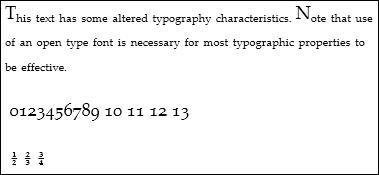
A figura a seguir mostra como este exemplo é renderizado.
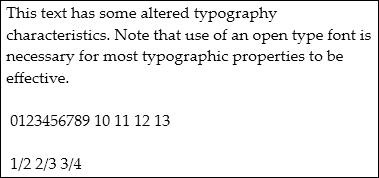
Em comparação, a figura a seguir mostra como um exemplo semelhante com propriedades tipográficas padrão é renderizado.
O exemplo a seguir mostra como definir a propriedade Typography programaticamente.
Paragraph par = new Paragraph();

Run runText = new Run(
    "This text has some altered typography characteristics.  Note" +
    "that use of an open type font is necessary for most typographic" +
    "properties to be effective.");
Run runNumerals = new Run("0123456789 10 11 12 13");
Run runFractions = new Run("1/2 2/3 3/4");

par.Inlines.Add(runText);
par.Inlines.Add(new LineBreak());
par.Inlines.Add(new LineBreak());
par.Inlines.Add(runNumerals);
par.Inlines.Add(new LineBreak());
par.Inlines.Add(new LineBreak());
par.Inlines.Add(runFractions);

par.TextAlignment = TextAlignment.Left;
par.FontSize = 18;
par.FontFamily = new FontFamily("Palatino Linotype");

par.Typography.NumeralStyle = FontNumeralStyle.OldStyle;
par.Typography.Fraction = FontFraction.Stacked;
par.Typography.Variants = FontVariants.Inferior;
Dim par As New Paragraph()

Dim runText As New Run("This text has some altered typography characteristics.  Note" & "that use of an open type font is necessary for most typographic" & "properties to be effective.")
Dim runNumerals As New Run("0123456789 10 11 12 13")
Dim runFractions As New Run("1/2 2/3 3/4")

par.Inlines.Add(runText)
par.Inlines.Add(New LineBreak())
par.Inlines.Add(New LineBreak())
par.Inlines.Add(runNumerals)
par.Inlines.Add(New LineBreak())
par.Inlines.Add(New LineBreak())
par.Inlines.Add(runFractions)

par.TextAlignment = TextAlignment.Left
par.FontSize = 18
par.FontFamily = New FontFamily("Palatino Linotype")

par.Typography.NumeralStyle = FontNumeralStyle.OldStyle
par.Typography.Fraction = FontFraction.Stacked
par.Typography.Variants = FontVariants.Inferior
Comentários
A Typography propriedade é aplicável somente a fontes OpenType. Uma variante de tipografia não tem efeito sobre fontes que não dão suporte à variante. Para obter mais informações sobre este tópico, consulte Tipografia no WPF.
