Nota
O acesso a esta página requer autorização. Pode tentar iniciar sessão ou alterar os diretórios.
O acesso a esta página requer autorização. Pode tentar alterar os diretórios.
Aprende a usar pesquisa vetorial no Azure DocumentDB com o driver .NET MongoDB para armazenar e consultar dados vetoriais de forma eficiente.
Este início rápido oferece uma visita guiada às principais técnicas de pesquisa vetorial usando um exemplo de aplicação .NET, disponível no GitHub.
O aplicativo usa um conjunto de dados de hotel de exemplo em um arquivo JSON com vetores pré-calculados do text-embedding-3-small modelo, embora você também possa gerar os vetores por conta própria. Os dados do hotel incluem nomes de hotéis, locais, descrições e incorporações vetoriais.
Pré-requisitos
Uma assinatura do Azure
- Se você não tiver uma assinatura do Azure, crie uma conta gratuita
Um cluster existente do Azure DocumentDB
Se não tiver um cluster, crie um novo cluster
Firewall configurado para permitir o acesso ao endereço IP do cliente
-
Domínio personalizado configurado
text-embedding-3-smallmodelo implementado
Usa o ambiente Bash em Azure Cloud Shell. Para mais informações, veja Get started with Azure Cloud Shell.

Se preferires executar comandos de referência de CLI localmente, instala o CLI do Azure. Se estiver a usar Windows ou macOS, considere executar o CLI do Azure num contentor Docker. Para mais informações, veja Como executar o CLI do Azure num contentor Docker.
Se você estiver usando uma instalação local, entre na CLI do Azure usando o comando az login . Para concluir o processo de autenticação, siga os passos exibidos no seu terminal. Para outras opções de iniciação de sessão, veja Autenticar para Azure usando CLI do Azure.
Quando solicitado, instale a extensão do CLI do Azure na primeira utilização. Para mais informações sobre extensões, veja Usar e gerir extensões com a CLI do Azure.
Execute az version para descobrir a versão e as bibliotecas dependentes que estão instaladas. Para atualizar para a versão mais recente, execute az upgrade.
.NET 8.0 SDK ou posterior
- Extensão C# para o Visual Studio Code
Dependências do aplicativo
O aplicativo usa os seguintes pacotes NuGet:
-
Azure.Identity: Biblioteca de Identidade do Azure para autenticação sem senha com ID do Microsoft Entra -
Azure.AI.OpenAI: Biblioteca de cliente do Azure OpenAI para se comunicar com modelos de IA e criar incorporações vetoriais -
Microsoft.Extensions.Configuration: Gestão de configuração para definições de aplicação -
MongoDB.Driver: Driver oficial MongoDB .NET para conectividade e operações de banco de dados -
Newtonsoft.Json: Biblioteca popular de serialização e desserialização JSON
Configurar e executar o aplicativo
Complete os seguintes passos para configurar a aplicação com os seus próprios valores e faça pesquisas no seu cluster Azure DocumentDB.
Configurar o aplicativo
Atualize os valores de espaço reservado com os appsettings.json seus:
{
  "AzureOpenAI": {
    "TenantId": "<your-tenant-id>",
    "EmbeddingModel": "text-embedding-3-small",
    "ApiVersion": "2023-05-15",
    "Endpoint": "https://<your-openai-service-name>.openai.azure.com/"
  },
  "DataFiles": {
    "WithoutVectors": "data/Hotels.json",
    "WithVectors": "data/Hotels_Vector.json"
  },
  "Embedding": {
    "FieldToEmbed": "Description",
    "EmbeddedField": "DescriptionVector",
    "Dimensions": 1536,
    "BatchSize": 16
  },
  "MongoDB": {
    "TenantId": "<your-tenant-id>",
    "ClusterName": "<your-cluster-name>",
    "LoadBatchSize": 100
  },
  "VectorSearch": {
    "Query": "quintessential lodging near running trails, eateries, retail",
    "DatabaseName": "Hotels",
    "TopK": 5
  }
}
Autenticar no Azure
O aplicativo de exemplo usa autenticação sem senha via DefaultAzureCredential e Microsoft Entra ID.
Entre no Azure usando uma ferramenta com suporte , como a CLI do Azure ou o Azure PowerShell, antes de executar o aplicativo para que ele possa acessar os recursos do Azure com segurança.
Observação
Assegure que a sua identidade autenticada tem as funções de plano de dados exigidas tanto na conta Azure DocumentDB como no recurso Azure OpenAI.
- CLI do Azure
- CLI para Desenvolvedores do Azure
- Azure PowerShell
az login
Construir e executar o projeto
O aplicativo de exemplo preenche dados de exemplo vetorizados em uma coleção do MongoDB e permite executar diferentes tipos de consultas de pesquisa.
Use o
dotnet runcomando para iniciar o aplicativo:dotnet runO aplicativo imprime um menu para você selecionar o banco de dados e as opções de pesquisa:
=== DocumentDB Vector Samples Menu ===
Please enter your choice (0-5):
1. Create embeddings for data
2. Show all database indexes
3. Run IVF vector search
4. Run HNSW vector search
5. Run DiskANN vector search
0. Exit
Digite
5e pressione enter.Depois que o aplicativo preenche o banco de dados e executa a pesquisa, você vê os cinco principais hotéis que correspondem à consulta de pesquisa vetorial selecionada e suas pontuações de semelhança.
O registo e a saída da aplicação mostram:
- Criação da coleção e status de inserção de dados
- Confirmação de criação de índice vetorial
- Resultados da pesquisa com nomes de hotéis, localizações e pontuações de semelhança
Exemplo de saída (abreviado para brevidade):
MongoDB client initialized with passwordless authentication
Starting DiskANN vector search workflow
Collection is empty, loading data from file
Successfully loaded 50 documents into collection
Creating vector index 'vectorIndex_diskann'
Vector index 'vectorIndex_diskann' is ready for DiskANN search
Executing DiskANN vector search for top 5 results

Search Results (5 found using DiskANN):
1. Royal Cottage Resort (Similarity: 0.4991)
2. Country Comfort Inn (Similarity: 0.4786)
3. Nordick's Valley Motel (Similarity: 0.4635)
4. Economy Universe Motel (Similarity: 0.4461)
5. Roach Motel (Similarity: 0.4388)
Explore o código do aplicativo
As seções a seguir fornecem detalhes sobre os serviços e o código mais importantes no aplicativo de exemplo. Visite o repositório GitHub para explorar o código completo do aplicativo.
Explore o serviço de pesquisa
O VectorSearchService orquestra uma pesquisa de semelhança vetorial de ponta a ponta usando técnicas de pesquisa IVF, HNSW e DiskANN com incorporações do Azure OpenAI.
using Azure.AI.OpenAI;
using Azure.Identity;
using DocumentDBVectorSamples.Models;
using Microsoft.Extensions.Logging;
using MongoDB.Bson;
using MongoDB.Driver;
using Newtonsoft.Json;
using Newtonsoft.Json.Linq;
using System.Reflection;

namespace DocumentDBVectorSamples.Services.VectorSearch;

/// <summary>
/// Service for performing vector similarity searches using different algorithms (IVF, HNSW, DiskANN).
/// Handles data loading, vector index creation, query embedding generation, and search execution.
/// </summary>
public class VectorSearchService
{
    private readonly ILogger<VectorSearchService> _logger;
    private readonly AzureOpenAIClient _openAIClient;
    private readonly MongoDbService _mongoService;
    private readonly AppConfiguration _config;

    public VectorSearchService(ILogger<VectorSearchService> logger, MongoDbService mongoService, AppConfiguration config)
    {
        _logger = logger;
        _mongoService = mongoService;
        _config = config;

        // Initialize Azure OpenAI client with passwordless authentication
        var credentialOptions = new DefaultAzureCredentialOptions();
        if (!string.IsNullOrEmpty(_config.AzureOpenAI.TenantId))
        {
            credentialOptions.TenantId = _config.AzureOpenAI.TenantId;
        }
        var credential = new DefaultAzureCredential(credentialOptions);
        _openAIClient = new AzureOpenAIClient(new Uri(_config.AzureOpenAI.Endpoint), credential);
    }

    /// <summary>
    /// Executes a complete vector search workflow: data setup, index creation, query embedding, and search
    /// </summary>
    /// <param name="indexType">The vector search algorithm to use (IVF, HNSW, or DiskANN)</param>
    public async Task RunSearchAsync(VectorIndexType indexType)
    {
        try
        {
            _logger.LogInformation($"Starting {indexType} vector search workflow");

            // Setup collection
            var collectionSuffix = indexType switch
            {
                VectorIndexType.IVF => "ivf",
                VectorIndexType.HNSW => "hnsw",
                VectorIndexType.DiskANN => "diskann",
                _ => throw new ArgumentException($"Unknown index type: {indexType}")
            };
            var collectionName = $"hotels_{collectionSuffix}";
            var indexName = $"vectorIndex_{collectionSuffix}";

            var collection = _mongoService.GetCollection<HotelData>(_config.VectorSearch.DatabaseName, collectionName);

            // Load data from file if collection is empty
            var assemblyLocation = Path.GetDirectoryName(Assembly.GetExecutingAssembly().Location) ?? string.Empty;
            var dataFilePath = Path.Combine(assemblyLocation, _config.DataFiles.WithVectors);
            await _mongoService.LoadDataIfNeededAsync(collection, dataFilePath);

            // Create the vector index with algorithm-specific search options
            var searchOptions = indexType switch
            {
                VectorIndexType.IVF => CreateIVFSearchOptions(_config.Embedding.Dimensions),
                VectorIndexType.HNSW => CreateHNSWSearchOptions(_config.Embedding.Dimensions),
                VectorIndexType.DiskANN => CreateDiskANNSearchOptions(_config.Embedding.Dimensions),
                _ => throw new ArgumentException($"Unknown index type: {indexType}")
            };

            await _mongoService.CreateVectorIndexAsync(
                _config.VectorSearch.DatabaseName, collectionName, indexName,
                _config.Embedding.EmbeddedField, searchOptions);

            _logger.LogInformation($"Vector index '{indexName}' is ready for {indexType} search");
            await Task.Delay(5000); // Allow index to be fully initialized

            // Create embedding for the query
            var embeddingClient = _openAIClient.GetEmbeddingClient(_config.AzureOpenAI.EmbeddingModel);
            var queryEmbedding = (await embeddingClient.GenerateEmbeddingAsync(_config.VectorSearch.Query)).Value.ToFloats().ToArray();
            _logger.LogInformation($"Generated query embedding with {queryEmbedding.Length} dimensions");

            // Build MongoDB aggregation pipeline for vector search
            var searchPipeline = new BsonDocument[]
            {
                // Vector similarity search using cosmosSearch
                new BsonDocument("$search", new BsonDocument
                {
                    ["cosmosSearch"] = new BsonDocument
                    {
                        ["vector"] = new BsonArray(queryEmbedding.Select(f => new BsonDouble(f))),
                        ["path"] = _config.Embedding.EmbeddedField,  // Field containing embeddings
                        ["k"] = _config.VectorSearch.TopK           // Number of results to return
                    }
                }),
                // Project results with similarity scores
                new BsonDocument("$project", new BsonDocument
                {
                    ["score"] = new BsonDocument("$meta", "searchScore"),
                    ["document"] = "$$ROOT"
                })
            };

            // Execute and process the search
            _logger.LogInformation($"Executing {indexType} vector search for top {_config.VectorSearch.TopK} results");
            var searchResults = (await collection.AggregateAsync<BsonDocument>(searchPipeline)).ToList()
                .Select(result => new SearchResult
                {
                    Document = MongoDB.Bson.Serialization.BsonSerializer.Deserialize<HotelData>(result["document"].AsBsonDocument),
                    Score = result["score"].AsDouble
                }).ToList();

            // Print the results
            if (searchResults?.Count == 0)
            {
                _logger.LogInformation("❌ No search results found. Check query terms and data availability.");
            }
            else
            {
                _logger.LogInformation($"\n✅ Search Results ({searchResults!.Count} found using {indexType}):");
                for (int i = 0; i < searchResults.Count; i++)
                {
                    var result = searchResults[i];
                    var hotelName = result.Document?.HotelName ?? "Unknown Hotel";
                    _logger.LogInformation($"  {i + 1}. {hotelName} (Similarity: {result.Score:F4})");
                }
            }
        }
        catch (Exception ex)
        {
            _logger.LogError(ex, $"{indexType} vector search failed");
            throw;
        }
    }

    /// <summary>
    /// Creates IVF (Inverted File) search options - good for large datasets with fast approximate search
    /// </summary>
    private BsonDocument CreateIVFSearchOptions(int dimensions) => new BsonDocument
    {
        ["kind"] = "vector-ivf",
        ["similarity"] = "COS",
        ["dimensions"] = dimensions,
        ["numLists"] = 1
    };

    /// <summary>
    /// Creates HNSW (Hierarchical Navigable Small World) search options - best accuracy/speed balance
    /// </summary>
    private BsonDocument CreateHNSWSearchOptions(int dimensions) => new BsonDocument
    {
        ["kind"] = "vector-hnsw",
        ["similarity"] = "COS",
        ["dimensions"] = dimensions,
        ["m"] = 16,
        ["efConstruction"] = 64
    };

    /// <summary>
    /// Creates DiskANN search options - optimized for very large datasets stored on disk
    /// </summary>
    private BsonDocument CreateDiskANNSearchOptions(int dimensions) => new BsonDocument
    {
        ["kind"] = "vector-diskann",
        ["similarity"] = "COS",
        ["dimensions"] = dimensions
    };
}
No código anterior, o VectorSearchService executa as seguintes tarefas:
- Determina os nomes de coleção e índice com base no algoritmo solicitado
- Cria ou obtém a coleção MongoDB e carrega dados JSON se estiverem vazios
- Cria as opções de índice específicas do algoritmo (IVF / HNSW / DiskANN) e garante que o índice vetorial exista
- Gera uma incorporação para a consulta configurada por meio do Azure OpenAI
- Constrói e executa o pipeline de pesquisa de agregação
- Desserializa e imprime os resultados
Explore o serviço Azure DocumentDB
O MongoDbService gere interações com o Azure DocumentDB para tratar de tarefas como carregamento de dados, criação de índices vetoriais, listagem de índices e inserções em massa para a pesquisa vetorial de hotel.
using Azure.Identity;
using DocumentDBVectorSamples.Models;
using Microsoft.Extensions.Configuration;
using Microsoft.Extensions.Logging;
using MongoDB.Bson;
using MongoDB.Driver;
using Newtonsoft.Json;

namespace DocumentDBVectorSamples.Services;

/// <summary>
/// Service for MongoDB operations including data insertion, index management, and vector index creation.
/// Supports Azure DocumentDB with passwordless authentication.
/// </summary>
public class MongoDbService
{
    private readonly ILogger<MongoDbService> _logger;
    private readonly AppConfiguration _config;
    private readonly MongoClient _client;

    public MongoDbService(ILogger<MongoDbService> logger, IConfiguration configuration)
    {
        _logger = logger;
        _config = new AppConfiguration();
        configuration.Bind(_config);

        // Validate configuration
        if (string.IsNullOrEmpty(_config.MongoDB.ClusterName))
            throw new InvalidOperationException("MongoDB connection not configured. Please provide ConnectionString or ClusterName.");

        // Configure MongoDB connection for Azure DocumentDB with OIDC authentication
        var connectionString = $"mongodb+srv://{_config.MongoDB.ClusterName}.global.mongocluster.cosmos.azure.com/?tls=true&authMechanism=MONGODB-OIDC&retrywrites=false&maxIdleTimeMS=120000";
        var settings = MongoClientSettings.FromUrl(MongoUrl.Create(connectionString));
        settings.UseTls = true;
        settings.RetryWrites = false;
        settings.MaxConnectionIdleTime = TimeSpan.FromMinutes(2);
        settings.Credential = MongoCredential.CreateOidcCredential(new AzureIdentityTokenHandler(new DefaultAzureCredential(), _config.MongoDB.TenantId));
        settings.Freeze();

        _client = new MongoClient(settings);
        _logger.LogInformation("MongoDB client initialized with passwordless authentication");
    }

    /// <summary>Gets a database instance by name</summary>
    public IMongoDatabase GetDatabase(string databaseName) => _client.GetDatabase(databaseName);

    /// <summary>Gets a collection instance from the specified database</summary>
    public IMongoCollection<T> GetCollection<T>(string databaseName, string collectionName) =>
        _client.GetDatabase(databaseName).GetCollection<T>(collectionName);

    /// <summary>Drops a collection from the specified database</summary>
    public async Task DropCollectionAsync(string databaseName, string collectionName)
    {
        _logger.LogInformation($"Dropping collection '{collectionName}' from database '{databaseName}'");
        await _client.GetDatabase(databaseName).DropCollectionAsync(collectionName);
        _logger.LogInformation($"Collection '{collectionName}' dropped successfully");
    }

    /// <summary>
    /// Creates a vector search index for DocumentDB, with support for IVF, HNSW, and DiskANN algorithms
    /// </summary>
    public async Task<BsonDocument> CreateVectorIndexAsync(string databaseName, string collectionName, string indexName, string embeddedField, BsonDocument cosmosSearchOptions)
    {
        var database = _client.GetDatabase(databaseName);
        var collection = database.GetCollection<BsonDocument>(collectionName);

        // Check if index already exists to avoid duplication
        var indexList = await (await collection.Indexes.ListAsync()).ToListAsync();
        if (indexList.Any(index => index.TryGetValue("name", out var nameValue) && nameValue.AsString == indexName))
        {
            _logger.LogInformation($"Vector index '{indexName}' already exists, skipping creation");
            return new BsonDocument { ["ok"] = 1 };
        }

        // Create the specified vector index type
        _logger.LogInformation($"Creating vector index '{indexName}' on field '{embeddedField}'");
        return await database.RunCommandAsync<BsonDocument>(new BsonDocument
        {
            ["createIndexes"] = collectionName,
            ["indexes"] = new BsonArray
            {
                new BsonDocument
                {
                    ["name"] = indexName,
                    ["key"] = new BsonDocument { [embeddedField] = "cosmosSearch" },
                    ["cosmosSearchOptions"] = cosmosSearchOptions
                }
            }
        });
    }

    /// <summary>
    /// Displays all indexes across all user databases, excluding system databases
    /// </summary>
    public async Task ShowAllIndexesAsync()
    {
        try
        {
            // Get user databases (exclude system databases)
            var databases = (await (await _client.ListDatabaseNamesAsync()).ToListAsync())
                .Where(name => !new[] { "admin", "config", "local" }.Contains(name)).ToList();

            if (!databases.Any())
            {
                _logger.LogInformation("No user databases found or access denied");
                return;
            }

            foreach (var dbName in databases)
            {
                var database = _client.GetDatabase(dbName);
                var collections = await (await database.ListCollectionNamesAsync()).ToListAsync();

                if (!collections.Any())
                {
                    _logger.LogInformation($"Database '{dbName}': No collections found");
                    continue;
                }

                _logger.LogInformation($"\n📂 DATABASE: {dbName} ({collections.Count} collections)");

                // Display indexes for each collection
                foreach (var collName in collections)
                {
                    try
                    {
                        var indexList = await (await database.GetCollection<BsonDocument>(collName).Indexes.ListAsync()).ToListAsync();
                        _logger.LogInformation($"\n  🗃️ COLLECTION: {collName} ({indexList.Count} indexes)");
                        indexList.ForEach(index => _logger.LogInformation($"    Index: {index.ToJson()}"));
                    }
                    catch (Exception ex)
                    {
                        _logger.LogError(ex, $"Failed to list indexes for collection '{collName}'");
                    }
                }
            }
        }
        catch (Exception ex)
        {
            _logger.LogError(ex, "Failed to retrieve database indexes");
            throw;
        }
    }

    /// <summary>
    /// Loads data from file into collection if the collection is empty
    /// </summary>
    /// <param name="collection">Target collection to load data into</param>
    /// <param name="dataFilePath">Path to the JSON data file containing vector embeddings</param>
    /// <returns>Number of documents loaded, or 0 if collection already had data</returns>
    public async Task<int> LoadDataIfNeededAsync<T>(IMongoCollection<T> collection, string dataFilePath) where T : class
    {
        var existingDocCount = await collection.CountDocumentsAsync(Builders<T>.Filter.Empty);

        // Skip loading if collection already has data
        if (existingDocCount > 0)
        {
            _logger.LogInformation("Collection already contains data, skipping load operation");
            return 0;
        }

        // Load and validate data file
        _logger.LogInformation("Collection is empty, loading data from file");
        if (!File.Exists(dataFilePath))
            throw new FileNotFoundException($"Vector data file not found: {dataFilePath}");

        var jsonContent = await File.ReadAllTextAsync(dataFilePath);
        var data = JsonConvert.DeserializeObject<List<T>>(jsonContent) ?? new List<T>();

        if (data.Count == 0)
            throw new InvalidOperationException("No data found in the vector data file");

        // Insert data using existing method
        var summary = await InsertDataAsync(collection, data);
        _logger.LogInformation($"Successfully loaded {summary.Inserted} documents into collection");

        return summary.Inserted;
    }

    /// <summary>
    /// Inserts data into MongoDB collection, converts JSON embeddings to float arrays, and creates standard indexes
    /// </summary>
    public async Task<InsertSummary> InsertDataAsync<T>(IMongoCollection<T> collection, IEnumerable<T> data)
    {
        var dataList = data.ToList();
        _logger.LogInformation($"Processing {dataList.Count} items for insertion");

        // Convert JSON array embeddings to float arrays for vector search compatibility
        foreach (var hotel in dataList.OfType<HotelData>().Where(h => h.ExtraElements != null))
            foreach (var kvp in hotel.ExtraElements.ToList().Where(k => k.Value is Newtonsoft.Json.Linq.JArray))
                hotel.ExtraElements[kvp.Key] = ((Newtonsoft.Json.Linq.JArray)kvp.Value).Select(token => (float)token).ToArray();

        int inserted = 0, failed = 0;
        try
        {
            // Use unordered insert for better performance
            await collection.InsertManyAsync(dataList, new InsertManyOptions { IsOrdered = false });
            inserted = dataList.Count;
            _logger.LogInformation($"Successfully inserted {inserted} items");
        }
        catch (Exception ex)
        {
            failed = dataList.Count;
            _logger.LogError(ex, $"Batch insert failed for {dataList.Count} items");
        }

        // Create standard indexes for common query fields
        var indexFields = new[] { "HotelId", "Category", "Description", "Description_fr" };
        foreach (var field in indexFields)
            await collection.Indexes.CreateOneAsync(new CreateIndexModel<T>(Builders<T>.IndexKeys.Ascending(field)));

        return new InsertSummary { Total = dataList.Count, Inserted = inserted, Failed = failed };
    }

    /// <summary>Disposes the MongoDB client and its resources</summary>
    public void Dispose() => _client?.Cluster?.Dispose();
}
No código anterior, o MongoDbService executa as seguintes tarefas:
- Lê a configuração e cria um cliente sem senha com credenciais do Azure
- Fornece referências de banco de dados ou coleção sob demanda
- Cria um índice de pesquisa vetorial somente se ele ainda não existir
- Lista todos os bancos de dados que não são do sistema, suas coleções e os índices de cada coleção
- Insere dados de exemplo se a coleção estiver vazia e adiciona índices de suporte
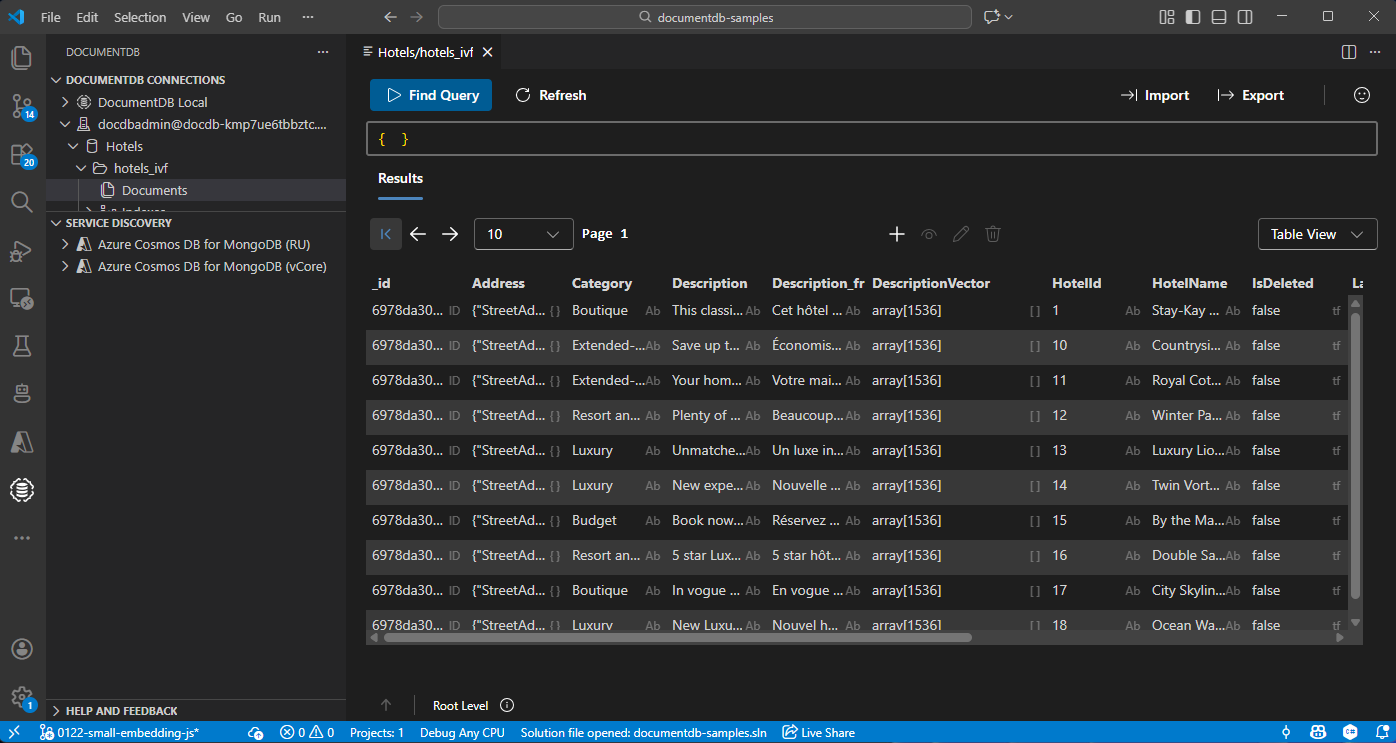
Visualize e gere dados no Visual Studio Code
Instale a extensão do Banco de Dados de Documentos e a extensão C# no Visual Studio Code.
Ligue-se à sua conta Azure DocumentDB usando a extensão DocumentDB.
Veja os dados e índices na base de dados de Hotéis.
Limpeza de recursos
Elimina o grupo de recursos, o cluster Azure DocumentDB e o recurso Azure OpenAI quando já não precisares deles, para evitar custos desnecessários.