Nota
O acesso a esta página requer autorização. Pode tentar iniciar sessão ou alterar os diretórios.
O acesso a esta página requer autorização. Pode tentar alterar os diretórios.
Use pesquisa vetorial no Azure DocumentDB com a biblioteca cliente Python. Armazene e consulte dados vetoriais de forma eficiente.
Este início rápido utiliza um conjunto de dados de amostra de hotel num ficheiro JSON com vetores pré-calculados do modelo text-embedding-3-small. O conjunto de dados inclui nomes de hotéis, locais, descrições e incorporações vetoriais.
Encontre o código de exemplo no GitHub.
Pré-requisitos
Uma assinatura do Azure
- Se você não tiver uma assinatura do Azure, crie uma conta gratuita
Um cluster existente do Azure DocumentDB
Se não tiver um cluster, crie um novo cluster
Firewall configurado para permitir o acesso ao endereço IP do cliente
-
Domínio personalizado configurado
text-embedding-3-smallmodelo implementado
Usa o ambiente Bash em Azure Cloud Shell. Para mais informações, veja Get started with Azure Cloud Shell.

Se preferires executar comandos de referência de CLI localmente, instala o CLI do Azure. Se estiver a usar Windows ou macOS, considere executar o CLI do Azure num contentor Docker. Para mais informações, veja Como executar o CLI do Azure num contentor Docker.
Se você estiver usando uma instalação local, entre na CLI do Azure usando o comando az login . Para concluir o processo de autenticação, siga os passos exibidos no seu terminal. Para outras opções de iniciação de sessão, veja Autenticar para Azure usando CLI do Azure.
Quando solicitado, instale a extensão do CLI do Azure na primeira utilização. Para mais informações sobre extensões, veja Usar e gerir extensões com a CLI do Azure.
Execute az version para descobrir a versão e as bibliotecas dependentes que estão instaladas. Para atualizar para a versão mais recente, execute az upgrade.
- Python 3.9 ou superior
Criar ficheiro de dados com vetores
Crie um novo diretório de dados para o ficheiro de dados dos hotéis:
mkdir dataCopie o
Hotels_Vector.jsonficheiro de dados bruto com vetores para o seudatadiretório.
Criar um projeto em Python
Crie um novo diretório para seu projeto e abra-o no Visual Studio Code:
mkdir vector-search-quickstart
code vector-search-quickstart
No terminal, crie e ative um ambiente virtual:
Para Windows:
python -m venv venv
venv\\Scripts\\activate
Para macOS/Linux:
python -m venv venv
source venv/bin/activate
Instale os pacotes necessários:
pip install pymongo azure-identity openai python-dotenv-
pymongo: Driver MongoDB para Python -
azure-identity: Biblioteca de Identidade do Azure para autenticação sem senha -
openai: Biblioteca de cliente OpenAI para criar vetores -
python-dotenv: Gerenciamento de variáveis de ambiente a partir de arquivos .env
-
Crie um
.envficheiro para variáveis de ambiente emvector-search-quickstart:# Identity for local developer authentication with Azure CLI AZURE_TOKEN_CREDENTIALS=AzureCliCredential # Azure OpenAI configuration AZURE_OPENAI_EMBEDDING_ENDPOINT= AZURE_OPENAI_EMBEDDING_MODEL=text-embedding-3-small AZURE_OPENAI_EMBEDDING_API_VERSION=2023-05-15 # Azure DocumentDB configuration MONGO_CLUSTER_NAME= # Data Configuration (defaults should work) DATA_FILE_WITH_VECTORS=../data/Hotels_Vector.json EMBEDDED_FIELD=DescriptionVector EMBEDDING_DIMENSIONS=1536 EMBEDDING_SIZE_BATCH=16 LOAD_SIZE_BATCH=50Para a autenticação sem senha usada neste artigo, substitua os valores placeholders
.envno arquivo por suas próprias informações.-
AZURE_OPENAI_EMBEDDING_ENDPOINT: URL do ponto final do recurso Azure OpenAI -
MONGO_CLUSTER_NAME: Nome do recurso do Azure DocumentDB
Você deve sempre preferir a autenticação sem senha, mas ela exigirá configuração adicional. Para obter mais informações sobre como configurar a identidade gerenciada e a gama completa de suas opções de autenticação, consulte Autenticar aplicativos Python nos serviços do Azure usando o SDK do Azure para Python.
-
Criar arquivos de código para pesquisa vetorial
Continue o projeto criando arquivos de código para pesquisa vetorial. Quando terminar, a estrutura do projeto deve ter esta aparência:
├── data/
│   ├── Hotels.json              # Source hotel data (without vectors)
│   └── Hotels_Vector.json       # Hotel data with vector embeddings
└── vector-search-quickstart/
    ├── src/
    │   ├── diskann.py           # DiskANN vector search implementation
    │   ├── hnsw.py              # HNSW vector search implementation
    │   ├── ivf.py               # IVF vector search implementation
    │   └── utils.py              # Shared utility functions
    ├── requirements.txt         # Python dependencies
    ├── .env                     # Environment variables template
Cria um diretório src para os teus ficheiros de Python. Adicione dois arquivos: diskann.py e utils.py para a implementação do índice DiskANN:
mkdir src
touch src/diskann.py
touch src/utils.py
Criar código para pesquisa vetorial
Cole o código a seguir no diskann.py arquivo.
import os
from typing import List, Dict, Any
from utils import get_clients, get_clients_passwordless, read_file_return_json, insert_data, print_search_results, drop_vector_indexes
from dotenv import load_dotenv

# Load environment variables
load_dotenv()


def create_diskann_vector_index(collection, vector_field: str, dimensions: int) -> None:

    print(f"Creating DiskANN vector index on field '{vector_field}'...")

    # Drop any existing vector indexes on this field first
    drop_vector_indexes(collection, vector_field)

    # Use the native MongoDB command for DocumentDB vector indexes
    index_command = {
        "createIndexes": collection.name,
        "indexes": [
            {
                "name": f"diskann_index_{vector_field}",
                "key": {
                    vector_field: "cosmosSearch"  # DocumentDB vector search index type
                },
                "cosmosSearchOptions": {
                    # DiskANN algorithm configuration
                    "kind": "vector-diskann",

                    # Vector dimensions must match the embedding model
                    "dimensions": dimensions,

                    # Vector similarity metric - cosine is good for text embeddings
                    "similarity": "COS",

                    # Maximum degree: number of edges per node in the graph
                    # Higher values improve accuracy but increase memory usage
                    "maxDegree": 20,

                    # Build parameter: candidates evaluated during index construction
                    # Higher values improve index quality but increase build time
                    "lBuild": 10
                }
            }
        ]
    }

    try:
        # Execute the createIndexes command directly
        result = collection.database.command(index_command)
        print("DiskANN vector index created successfully")

    except Exception as e:
        print(f"Error creating DiskANN vector index: {e}")

        # Check if it's a tier limitation and suggest alternatives
        if "not enabled for this cluster tier" in str(e):
            print("\nDiskANN indexes require a higher cluster tier.")
            print("Try one of these alternatives:")
            print("  • Upgrade your DocumentDB cluster to a higher tier")
            print("  • Use HNSW instead: python src/hnsw.py")
            print("  • Use IVF instead: python src/ivf.py")
        raise


def perform_diskann_vector_search(collection,
                                 azure_openai_client,
                                 query_text: str,
                                 vector_field: str,
                                 model_name: str,
                                 top_k: int = 5) -> List[Dict[str, Any]]:

    print(f"Performing DiskANN vector search for: '{query_text}'")

    try:
        # Generate embedding for the query text
        embedding_response = azure_openai_client.embeddings.create(
            input=[query_text],
            model=model_name
        )

        query_embedding = embedding_response.data[0].embedding

        # Construct the aggregation pipeline for vector search
        # DocumentDB uses $search with cosmosSearch
        pipeline = [
            {
                "$search": {
                    # Use cosmosSearch for vector operations in DocumentDB
                    "cosmosSearch": {
                        # The query vector to search for
                        "vector": query_embedding,

                        # Field containing the document vectors to compare against
                        "path": vector_field,

                        # Number of final results to return
                        "k": top_k
                    }
                }
            },
            {
                # Add similarity score to the results
                "$project": {
                    "document": "$$ROOT",
                    # Add search score from metadata
                    "score": {"$meta": "searchScore"}
                }
            }
        ]

        # Execute the aggregation pipeline
        results = list(collection.aggregate(pipeline))

        return results

    except Exception as e:
        print(f"Error performing DiskANN vector search: {e}")
        raise


def main():

    # Load configuration from environment variables
    config = {
        'cluster_name': os.getenv('MONGO_CLUSTER_NAME'),
        'database_name': 'Hotels',
        'collection_name': 'hotels_diskann',
        'data_file': os.getenv('DATA_FILE_WITH_VECTORS', '../data/Hotels_Vector.json'),
        'vector_field': os.getenv('EMBEDDED_FIELD', 'DescriptionVector'),
        'model_name': os.getenv('AZURE_OPENAI_EMBEDDING_MODEL', 'text-embedding-3-small'),
        'dimensions': int(os.getenv('EMBEDDING_DIMENSIONS', '1536')),
        'batch_size': int(os.getenv('LOAD_SIZE_BATCH', '100'))
    }

    try:
        # Initialize clients
        print("\nInitializing MongoDB and Azure OpenAI clients...")
        mongo_client, azure_openai_client = get_clients_passwordless()

        # Get database and collection
        database = mongo_client[config['database_name']]
        collection = database[config['collection_name']]

        # Load data with embeddings
        print(f"\nLoading data from {config['data_file']}...")
        data = read_file_return_json(config['data_file'])
        print(f"Loaded {len(data)} documents")

        # Verify embeddings are present
        documents_with_embeddings = [doc for doc in data if config['vector_field'] in doc]
        if not documents_with_embeddings:
            raise ValueError(f"No documents found with embeddings in field '{config['vector_field']}'. "
                           "Please run create_embeddings.py first.")

        # Insert data into collection
        print(f"\nInserting data into collection '{config['collection_name']}'...")

        # Insert the hotel data
        stats = insert_data(
            collection,
            documents_with_embeddings,
            batch_size=config['batch_size']
        )

        if stats['inserted'] == 0 and not stats.get('skipped'):
            raise ValueError("No documents were inserted successfully")

        # Create DiskANN vector index (skip if data was already present)
        if not stats.get('skipped'):
            create_diskann_vector_index(
                collection,
                config['vector_field'],
                config['dimensions']
            )

            # Wait briefly for index to be ready
            import time
            print("Waiting for index to be ready...")
            time.sleep(2)

        # Perform sample vector search
        query = "quintessential lodging near running trails, eateries, retail"

        results = perform_diskann_vector_search(
            collection,
            azure_openai_client,
            query,
            config['vector_field'],
            config['model_name'],
            top_k=5
        )

        # Display results
        print_search_results(results, max_results=5, show_score=True)


    except Exception as e:
        print(f"\nError during DiskANN demonstration: {e}")
        raise

    finally:
        # Close the MongoDB client
        if 'mongo_client' in locals():
            mongo_client.close()


if __name__ == "__main__":
    main()
Este módulo principal fornece estas características:
Inclui funções utilitárias
Cria um objeto de configuração para variáveis de ambiente
Cria clientes para Azure OpenAI e Azure DocumentDB
Conecta-se ao MongoDB, cria um banco de dados e uma coleção, insere dados e cria índices padrão
Cria um índice vetorial usando FIV, HNSW ou DiskANN
Cria uma incorporação para um texto de consulta de exemplo usando o cliente OpenAI. Você pode alterar a consulta na parte superior do arquivo
Executa uma pesquisa vetorial usando a incorporação e imprime os resultados
Criar funções utilitárias
Cole o seguinte código em utils.py:
import json
import os
import time
import warnings
from typing import Dict, List, Any, Optional, Tuple

# Suppress the PyMongo CosmosDB cluster detection warning
# Must be set before importing pymongo
warnings.filterwarnings(
    "ignore",
    message="You appear to be connected to a CosmosDB cluster.*",
)

from pymongo import MongoClient, InsertOne
from pymongo.collection import Collection
from pymongo.errors import BulkWriteError
from azure.identity import DefaultAzureCredential
from pymongo.auth_oidc import OIDCCallback, OIDCCallbackContext, OIDCCallbackResult
from openai import AzureOpenAI
from dotenv import load_dotenv

# Load environment variables from .env file
load_dotenv()

class AzureIdentityTokenCallback(OIDCCallback):
    def __init__(self, credential):
        self.credential = credential

    def fetch(self, context: OIDCCallbackContext) -> OIDCCallbackResult:
        token = self.credential.get_token(
            "https://ossrdbms-aad.database.windows.net/.default").token
        return OIDCCallbackResult(access_token=token)

def get_clients() -> Tuple[MongoClient, AzureOpenAI]:

    # Get MongoDB connection string - required for DocumentDB access
    mongo_connection_string = os.getenv("MONGO_CONNECTION_STRING")
    if not mongo_connection_string:
        raise ValueError("MONGO_CONNECTION_STRING environment variable is required")

    # Create MongoDB client with optimized settings for DocumentDB
    mongo_client = MongoClient(
        mongo_connection_string,
        maxPoolSize=50,  # Allow up to 50 connections for better performance
        minPoolSize=5,   # Keep minimum 5 connections open
        maxIdleTimeMS=30000,  # Close idle connections after 30 seconds
        serverSelectionTimeoutMS=5000,  # 5 second timeout for server selection
        socketTimeoutMS=20000  # 20 second socket timeout
    )

    # Get Azure OpenAI configuration
    azure_openai_endpoint = os.getenv("AZURE_OPENAI_EMBEDDING_ENDPOINT")
    azure_openai_key = os.getenv("AZURE_OPENAI_EMBEDDING_KEY")

    if not azure_openai_endpoint or not azure_openai_key:
        raise ValueError("Azure OpenAI endpoint and key are required")

    # Create Azure OpenAI client for generating embeddings
    azure_openai_client = AzureOpenAI(
        azure_endpoint=azure_openai_endpoint,
        api_key=azure_openai_key,
        api_version=os.getenv("AZURE_OPENAI_EMBEDDING_API_VERSION", "2023-05-15")
    )

    return mongo_client, azure_openai_client


def get_clients_passwordless() -> Tuple[MongoClient, AzureOpenAI]:

    # Get MongoDB cluster name for passwordless authentication
    cluster_name = os.getenv("MONGO_CLUSTER_NAME")
    if not cluster_name:
        raise ValueError("MONGO_CLUSTER_NAME environment variable is required")

    # Create credential object for Azure authentication
    credential = DefaultAzureCredential()

    authProperties = {"OIDC_CALLBACK": AzureIdentityTokenCallback(credential)}

    # Create MongoDB client with Azure AD token callback
    mongo_client = MongoClient(
        f"mongodb+srv://{cluster_name}.global.mongocluster.cosmos.azure.com/",
        connectTimeoutMS=120000,
        tls=True,
        retryWrites=True,
        authMechanism="MONGODB-OIDC",
        authMechanismProperties=authProperties
    )

    # Get Azure OpenAI endpoint
    azure_openai_endpoint = os.getenv("AZURE_OPENAI_EMBEDDING_ENDPOINT")
    if not azure_openai_endpoint:
        raise ValueError("AZURE_OPENAI_EMBEDDING_ENDPOINT environment variable is required")

    # Create Azure OpenAI client with credential-based authentication
    azure_openai_client = AzureOpenAI(
        azure_endpoint=azure_openai_endpoint,
        azure_ad_token_provider=lambda: credential.get_token("https://cognitiveservices.azure.com/.default").token,
        api_version=os.getenv("AZURE_OPENAI_EMBEDDING_API_VERSION", "2023-05-15")
    )

    return mongo_client, azure_openai_client


def azure_identity_token_callback(credential: DefaultAzureCredential) -> str:

    # DocumentDB requires this specific scope
    token_scope = "https://cosmos.azure.com/.default"

    # Get token from Azure AD
    token = credential.get_token(token_scope)

    return token.token


def read_file_return_json(file_path: str) -> List[Dict[str, Any]]:

    try:
        with open(file_path, 'r', encoding='utf-8') as file:
            return json.load(file)
    except FileNotFoundError:
        print(f"Error: File '{file_path}' not found")
        raise
    except json.JSONDecodeError as e:
        print(f"Error: Invalid JSON in file '{file_path}': {e}")
        raise


def write_file_json(data: List[Dict[str, Any]], file_path: str) -> None:

    try:
        with open(file_path, 'w', encoding='utf-8') as file:
            json.dump(data, file, indent=2, ensure_ascii=False)
        print(f"Data successfully written to '{file_path}'")
    except IOError as e:
        print(f"Error writing to file '{file_path}': {e}")
        raise


def insert_data(collection: Collection, data: List[Dict[str, Any]],
                batch_size: int = 100, index_fields: Optional[List[str]] = None) -> Dict[str, int]:

    total_documents = len(data)

    # Check if data already exists in the collection
    existing_count = collection.count_documents({})
    if existing_count >= total_documents:
        print(f"Collection already has {existing_count} documents, skipping insert and index creation")
        return {'total': total_documents, 'inserted': 0, 'failed': 0, 'skipped': True}

    # Clear existing data if counts don't match to ensure clean state
    if existing_count > 0:
        print(f"Collection has {existing_count} documents but expected {total_documents}, clearing and re-inserting...")
        collection.delete_many({})

    inserted_count = 0
    failed_count = 0

    print(f"Starting batch insertion of {total_documents} documents...")

    # Create indexes if specified
    if index_fields:
        for field in index_fields:
            try:
                collection.create_index(field)
                print(f"Created index on field: {field}")
            except Exception as e:
                print(f"Warning: Could not create index on {field}: {e}")

    # Process data in batches to manage memory and error recovery
    for i in range(0, total_documents, batch_size):
        batch = data[i:i + batch_size]
        batch_num = (i // batch_size) + 1
        total_batches = (total_documents + batch_size - 1) // batch_size

        try:
            # Prepare bulk insert operations
            operations = [InsertOne(document) for document in batch]

            # Execute bulk insert
            result = collection.bulk_write(operations, ordered=False)
            inserted_count += result.inserted_count

            print(f"Batch {batch_num} completed: {result.inserted_count} documents inserted")

        except BulkWriteError as e:
            # Handle partial failures in bulk operations
            inserted_count += e.details.get('nInserted', 0)
            failed_count += len(batch) - e.details.get('nInserted', 0)

            print(f"Batch {batch_num} had errors: {e.details.get('nInserted', 0)} inserted, "
                  f"{failed_count} failed")

            # Print specific error details for debugging
            for error in e.details.get('writeErrors', []):
                print(f"  Error: {error.get('errmsg', 'Unknown error')}")

        except Exception as e:
            # Handle unexpected errors
            failed_count += len(batch)
            print(f"Batch {batch_num} failed completely: {e}")

        # Small delay between batches to avoid overwhelming the database
        time.sleep(0.1)

    # Return summary statistics
    stats = {
        'total': total_documents,
        'inserted': inserted_count,
        'failed': failed_count
    }

    return stats


def drop_vector_indexes(collection, vector_field: str) -> None:

    try:
        # Get all indexes for the collection
        indexes = list(collection.list_indexes())

        # Find vector indexes on the specified field
        vector_indexes = []
        for index in indexes:
            if 'key' in index and vector_field in index['key']:
                if index['key'][vector_field] == 'cosmosSearch':
                    vector_indexes.append(index['name'])

        # Drop each vector index found
        for index_name in vector_indexes:
            print(f"Dropping existing vector index: {index_name}")
            collection.drop_index(index_name)

        if vector_indexes:
            print(f"Dropped {len(vector_indexes)} existing vector index(es)")
        else:
            print("No existing vector indexes found to drop")

    except Exception as e:
        print(f"Warning: Could not drop existing vector indexes: {e}")
        # Continue anyway - the error might be that no indexes exist


def print_search_resultsx(results: List[Dict[str, Any]],
                        max_results: int = 5,
                        show_score: bool = True) -> None:

    if not results:
        print("No search results found.")
        return

    print(f"\nSearch Results (showing top {min(len(results), max_results)}):")
    print("=" * 80)

    for i, result in enumerate(results[:max_results], 1):

        # Display hotel name and ID
        print(f"HotelName: {result['HotelName']}, Score: {result['score']:.4f}")

def print_search_results(results: List[Dict[str, Any]],
                        max_results: int = 5,
                        show_score: bool = True) -> None:

    if not results:
        print("No search results found.")
        return

    print(f"\nSearch Results (showing top {min(len(results), max_results)}):")
    print("=" * 80)

    for i, result in enumerate(results[:max_results], 1):

        # Check if results are nested under 'document' (when using $$ROOT)
        if 'document' in result:
            doc = result['document']
        else:
            doc = result

        # Display hotel name and ID
        print(f"HotelName: {doc['HotelName']}, Score: {result['score']:.4f}")


    if len(results) > max_results:
        print(f"\n... and {len(results) - max_results} more results")
Este módulo utilitário fornece estes recursos:
-
get_clients: Cria e devolve clientes para Azure OpenAI e Azure DocumentDB -
get_clients_passwordless: Cria e devolve clientes para Azure OpenAI e Azure DocumentDB usando autenticação sem palavra-passe -
azure_identity_token_callback: Obtém um token Azure AD usado pela autenticação OIDC do MongoDB -
read_file_return_json: Lê um ficheiro JSON e devolve o seu conteúdo como um array de objetos -
write_file_json: Escreve um array de objetos num ficheiro JSON -
insert_data: Insere dados em lotes em uma coleção MongoDB e cria índices padrão em campos especificados -
drop_vector_indexes: Elimina índices vetoriais existentes no campo vetorial alvo -
print_search_results: Imprime resultados de pesquisa vetorial, incluindo pontuação e nome do hotel
Autenticar com a CLI do Azure
Entre na CLI do Azure antes de executar o aplicativo para que ele possa acessar os recursos do Azure com segurança.
az login
O código utiliza a autenticação do seu programador local para aceder ao Azure DocumentDB e ao Azure OpenAI. Quando defines AZURE_TOKEN_CREDENTIALS=AzureCliCredential, esta definição diz à função para usar credenciais CLI do Azure para autenticação deterministicamente. A autenticação depende do DefaultAzureCredential do azure-identity para encontrar as suas credenciais Azure no ambiente. Saiba mais sobre como autenticar aplicações Python em serviços Azure usando a biblioteca Azure Identity.
Execute o aplicativo
Para executar os scripts Python:
Você vê os cinco principais hotéis que correspondem à consulta de pesquisa vetorial e suas pontuações de semelhança.
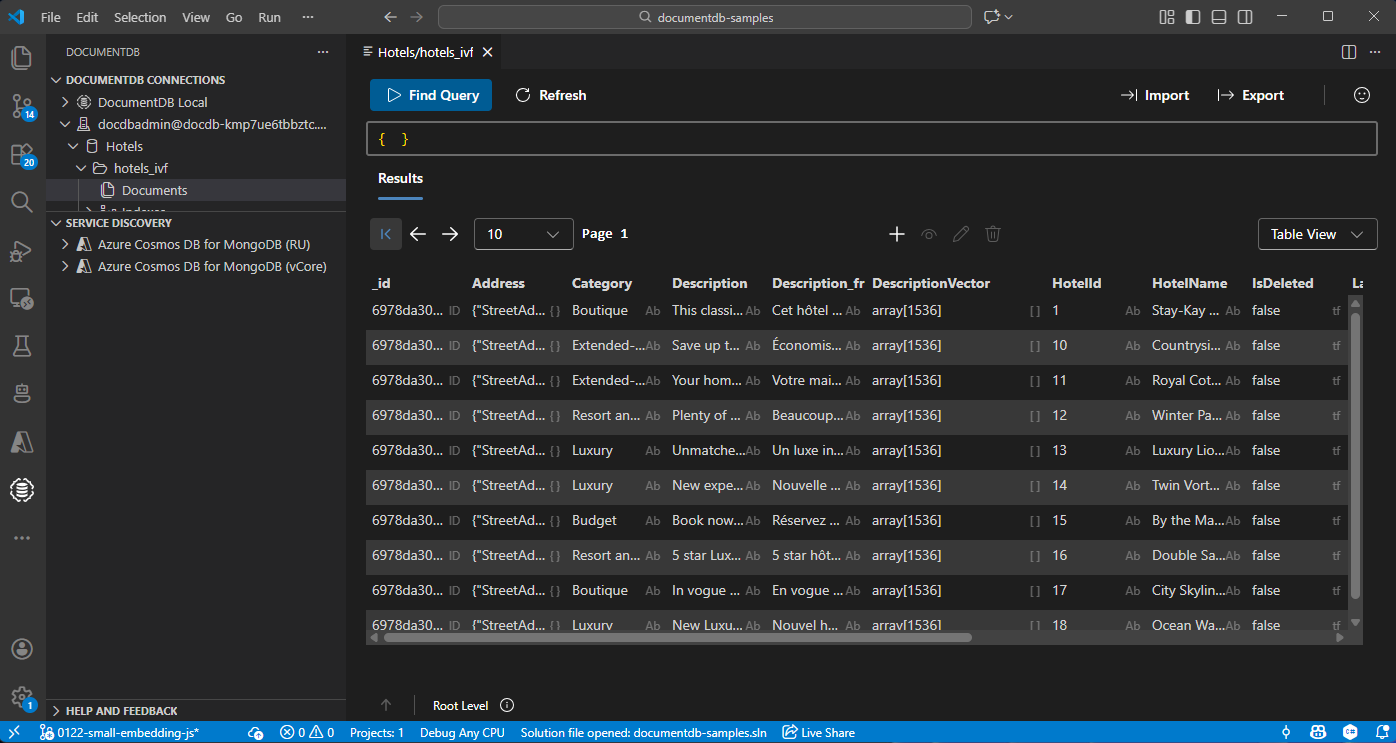
Visualize e gere dados no Visual Studio Code
Selecione a extensão DocumentDB no Visual Studio Code para se ligar à sua conta Azure DocumentDB.
Veja os dados e índices na base de dados de Hotéis.
Limpeza de recursos
Elimina o grupo de recursos, a conta Azure DocumentDB e o recurso Azure OpenAI quando não precisares para evitar custos extra.