Nota
O acesso a esta página requer autorização. Podes tentar iniciar sessão ou mudar de diretório.
O acesso a esta página requer autorização. Podes tentar mudar de diretório.
Um dos recursos centrais do Windows Workflow Foundation (WF) é a capacidade do tempo de execução de persistir e descarregar fluxos de trabalho ociosos em um banco de dados. As etapas em Como: Executar um fluxo de trabalho demonstraram os conceitos básicos de hospedagem de fluxo de trabalho usando um aplicativo de console. Foram mostrados exemplos de fluxos de trabalho iniciais, manipuladores de ciclo de vida do fluxo de trabalho e marcadores de retomada. Para demonstrar a persistência do fluxo de trabalho de forma eficaz, é necessário um host de fluxo de trabalho mais complexo que suporte a inicialização e retomada de várias instâncias de fluxo de trabalho. Esta etapa do tutorial demonstra como criar um aplicativo host de formulário do Windows que oferece suporte a iniciar e retomar várias instâncias de fluxo de trabalho, persistência de fluxo de trabalho e fornece uma base para os recursos avançados, como controle e controle de versão, demonstrados nas etapas subsequentes do tutorial.
Nota
Esta etapa do tutorial e as etapas subsequentes usam todos os três tipos de fluxo de trabalho de Como: Criar um fluxo de trabalho.
Para criar o banco de dados de persistência
Abra o SQL Server Management Studio e conecte-se ao servidor local, por exemplo, .\SQLEXPRESS. Clique com o botão direito do mouse no nó Bancos de dados no servidor local e selecione Novo banco de dados. Nomeie o novo banco de dados WF45GettingStartedTutorial, aceite todos os outros valores e selecione OK.
Nota
Verifique se você tem a permissão Criar Banco de Dados no servidor local antes de criar o banco de dados.
Escolha Abrir, Arquivo no menu Arquivo. Navegue até a seguinte pasta: C:\Windows\Microsoft.NET\Framework\v4.0.30319\sql\en
Selecione os dois arquivos a seguir e clique em Abrir.
SqlWorkflowInstanceStoreLogic.sql
SqlWorkflowInstanceStoreSchema.sql
Escolha SqlWorkflowInstanceStoreSchema.sql no menu Janela . Verifique se WF45GettingStartedTutorial está selecionado na lista suspensa Bancos de dados disponíveis e escolha Executar no menu Consulta.
Escolha SqlWorkflowInstanceStoreLogic.sql no menu Janela . Verifique se WF45GettingStartedTutorial está selecionado na lista suspensa Bancos de dados disponíveis e escolha Executar no menu Consulta.
Aviso
É importante executar as duas etapas anteriores na ordem correta. Se as consultas forem executadas fora de ordem, ocorrerão erros e o banco de dados de persistência não está configurado corretamente.
Para adicionar a referência aos assemblies DurableInstancing
Clique com o botão direito do mouse em NumberGuessWorkflowHost no Gerenciador de Soluções e selecione Adicionar Referência.
Selecione Assemblies na lista Add Reference e digite
DurableInstancingna caixa Search Assemblies . Isso filtra as montagens e torna as referências desejadas mais fáceis de selecionar.Marque a caixa de seleção ao lado de System.Activities.DurableInstancing e System.Runtime.DurableInstancing na lista Resultados da Pesquisa e clique em OK.
Para criar o formulário de host de fluxo de trabalho
Clique com o botão direito do mouse em NumberGuessWorkflowHost no Gerenciador de Soluções e escolha Adicionar, Novo Item.
Na lista Modelos instalados, escolha Windows Form, digite
WorkflowHostFormna caixa Nome e clique em Adicionar.Configure as seguintes propriedades no formulário.
Property valor FormBorderStyle FixoÚnico MaximizeBox False Tamanho 400, 420 Adicione os seguintes controles ao formulário na ordem especificada e configure as propriedades conforme indicado.
Controlo Propriedade: Valor Botão Designação: NewGame
Localização: 13, 13
Tamanho: 75, 23
Texto: Novo JogoEtiqueta Localização: 94, 18
Texto: Adivinhe um número de 1 aCaixa de Combinação Designação: NumberRange
DropDownStyle: DropDownList
Itens: 10, 100, 1000
Localização: 228, 12
Tamanho: 143, 21Etiqueta Localização: 13, 43
Texto: Tipo de fluxo de trabalhoCaixa de Combinação Nome: WorkflowType
DropDownStyle: DropDownList
Itens: StateMachineNumberGuessWorkflow, FlowchartNumberGuessWorkflow, SequentialNumberGuessWorkflow
Localização: 94, 40
Tamanho: 277, 21Etiqueta Nome: WorkflowVersion
Localização: 13, 362
Texto: Versão do fluxo de trabalhoCaixa de Grupo Localização: 13, 67
Tamanho: 358, 287
Texto: JogoNota
Ao adicionar os seguintes controles, coloque-os no GroupBox.
Controlo Propriedade: Valor Etiqueta Localização: 7, 20
Texto: ID da instância do fluxo de trabalhoCaixa de Combinação Nome: InstanceId
DropDownStyle: DropDownList
Localização: 121, 17
Tamanho: 227, 21Etiqueta Localização: 7, 47
Texto: GuessTextBox Designação: Guess
Localização: 50, 44
Tamanho: 65, 20Botão Designação: EnterGuess
Localização: 121, 42
Tamanho: 75, 23
Texto: Digite GuessBotão Designação: QuitGame
Localização: 274, 42
Tamanho: 75, 23
Texto: SairTextBox Nome: WorkflowStatus
Localização: 10, 73
Multilinha: Verdadeiro
Somente leitura: Verdadeiro
Barras de rolagem: Vertical
Tamanho: 338, 208Defina a propriedade AcceptButton do formulário como EnterGuess.
O exemplo a seguir ilustra o formulário preenchido.
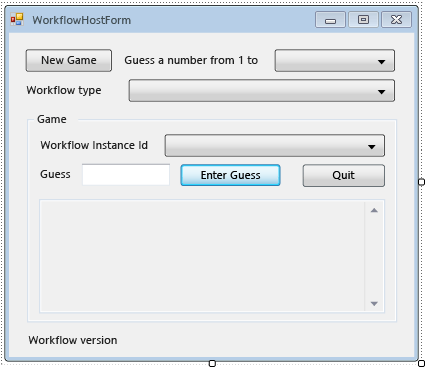
Para adicionar as propriedades e os métodos auxiliares do formulário
As etapas nesta seção adicionam propriedades e métodos auxiliares à classe de formulário que configuram a interface do usuário do formulário para dar suporte à execução e retomada de fluxos de trabalho de adivinhação de número.
Clique com o botão direito do mouse em WorkflowHostForm no Gerenciador de Soluções e escolha Exibir Código.
Adicione as seguintes
using(ouImports) instruções na parte superior do arquivo com as outrasusing(ouImports) instruções.Imports System.Activities Imports System.Activities.DurableInstancing Imports System.Data.SqlClient Imports System.IO Imports System.Windows.Formsusing System.Activities; using System.Activities.DurableInstancing; using System.Data.SqlClient; using System.IO; using System.Windows.Forms;Adicione as seguintes declarações de membro à classe WorkflowHostForm .
Importante
A Microsoft recomenda que você use o fluxo de autenticação mais seguro disponível. Se você estiver se conectando ao SQL do Azure, as Identidades Gerenciadas para recursos do Azure serão o método de autenticação recomendado.
Const connectionString = "Server=.\SQLEXPRESS;Initial Catalog=WF45GettingStartedTutorial;Integrated Security=SSPI"
Dim store As SqlWorkflowInstanceStore
Dim workflowStarting As Boolean
const string connectionString = "Server=.\\SQLEXPRESS;Initial Catalog=WF45GettingStartedTutorial;Integrated Security=SSPI"; SqlWorkflowInstanceStore store; bool workflowStarting;Nota
Se a cadeia de conexão for diferente, atualize
connectionStringpara fazer referência ao banco de dados.Adicione uma
WorkflowInstanceIdpropriedade àWorkflowFormHostclasse.Public ReadOnly Property WorkflowInstanceId() As Guid Get If InstanceId.SelectedIndex = -1 Then Return Guid.Empty Else Return New Guid(InstanceId.SelectedItem.ToString()) End If End Get End Propertypublic Guid WorkflowInstanceId { get { return InstanceId.SelectedIndex == -1 ? Guid.Empty : (Guid)InstanceId.SelectedItem; } }A
InstanceIdcaixa de combinação exibe uma lista de ids de instância de fluxo de trabalho persistente e aWorkflowInstanceIdpropriedade retorna o fluxo de trabalho selecionado no momento.Adicione um manipulador para o evento de formulário
Load. Para adicionar o manipulador, alterne para o modo Design do formulário, clique no ícone Eventos na parte superior da janela Propriedades e clique duas vezes em Carregar.Private Sub WorkflowHostForm_Load(sender As Object, e As EventArgs) Handles Me.Load End Subprivate void WorkflowHostForm_Load(object sender, EventArgs e) { }Adicione o seguinte código a
WorkflowHostForm_Load.' Initialize the store and configure it so that it can be used for ' multiple WorkflowApplication instances. store = New SqlWorkflowInstanceStore(connectionString) WorkflowApplication.CreateDefaultInstanceOwner(store, Nothing, WorkflowIdentityFilter.Any) ' Set default ComboBox selections. NumberRange.SelectedIndex = 0 WorkflowType.SelectedIndex = 0 ListPersistedWorkflows()// Initialize the store and configure it so that it can be used for // multiple WorkflowApplication instances. store = new SqlWorkflowInstanceStore(connectionString); WorkflowApplication.CreateDefaultInstanceOwner(store, null, WorkflowIdentityFilter.Any); // Set default ComboBox selections. NumberRange.SelectedIndex = 0; WorkflowType.SelectedIndex = 0; ListPersistedWorkflows();Quando o formulário é carregado, o
SqlWorkflowInstanceStoreé configurado, as caixas de combinação intervalo e tipo de fluxo de trabalho são definidas como valores padrão e as instâncias de fluxo de trabalho persistentes são adicionadas àInstanceIdcaixa de combinação.Adicione um
SelectedIndexChangedmanipulador paraInstanceId. Para adicionar o manipulador, alterne para o modo Design do formulário, selecione aInstanceIdcaixa de combinação, clique no ícone Eventos na parte superior da janela Propriedades e clique duas vezes em SelectedIndexChanged.Private Sub InstanceId_SelectedIndexChanged(sender As Object, e As EventArgs) Handles InstanceId.SelectedIndexChanged End Subprivate void InstanceId_SelectedIndexChanged(object sender, EventArgs e) { }Adicione o seguinte código a
InstanceId_SelectedIndexChanged. Sempre que o usuário seleciona um fluxo de trabalho usando a caixa de combinação, esse manipulador atualiza a janela de status.If InstanceId.SelectedIndex = -1 Then Return End If ' Clear the status window. WorkflowStatus.Clear() ' Get the workflow version and display it. ' If the workflow is just starting then this info will not ' be available in the persistence store so do not try and retrieve it. If Not workflowStarting Then Dim instance As WorkflowApplicationInstance = _ WorkflowApplication.GetInstance(WorkflowInstanceId, store) WorkflowVersion.Text = _ WorkflowVersionMap.GetIdentityDescription(instance.DefinitionIdentity) ' Unload the instance. instance.Abandon() End Ifif (InstanceId.SelectedIndex == -1) { return; } // Clear the status window. WorkflowStatus.Clear(); // Get the workflow version and display it. // If the workflow is just starting then this info will not // be available in the persistence store so do not try and retrieve it. if (!workflowStarting) { WorkflowApplicationInstance instance = WorkflowApplication.GetInstance(this.WorkflowInstanceId, store); WorkflowVersion.Text = WorkflowVersionMap.GetIdentityDescription(instance.DefinitionIdentity); // Unload the instance. instance.Abandon(); }Adicione o seguinte
ListPersistedWorkflowsmétodo à classe de formulário.Private Sub ListPersistedWorkflows() Using localCon As New SqlConnection(connectionString) Dim localCmd As String = _ "SELECT [InstanceId] FROM [System.Activities.DurableInstancing].[Instances] ORDER BY [CreationTime]" Dim cmd As SqlCommand = localCon.CreateCommand() cmd.CommandText = localCmd localCon.Open() Using reader As SqlDataReader = cmd.ExecuteReader(CommandBehavior.CloseConnection) While (reader.Read()) ' Get the InstanceId of the persisted Workflow. Dim id As Guid = Guid.Parse(reader(0).ToString()) InstanceId.Items.Add(id) End While End Using End Using End Subusing (var localCon = new SqlConnection(connectionString)) { string localCmd = "SELECT [InstanceId] FROM [System.Activities.DurableInstancing].[Instances] ORDER BY [CreationTime]"; SqlCommand cmd = localCon.CreateCommand(); cmd.CommandText = localCmd; localCon.Open(); using (SqlDataReader reader = cmd.ExecuteReader(CommandBehavior.CloseConnection)) { while (reader.Read()) { // Get the InstanceId of the persisted Workflow. Guid id = Guid.Parse(reader[0].ToString()); InstanceId.Items.Add(id); } } }ListPersistedWorkflowsConsulta o armazenamento de instâncias para instâncias de fluxo de trabalho persistentes e adiciona as IDs de instância àcboInstanceIdcaixa de combinação.Adicione o seguinte
UpdateStatusmétodo e o delegado correspondente à classe de formulário. Esse método atualiza a janela de status no formulário com o status do fluxo de trabalho em execução no momento.Private Delegate Sub UpdateStatusDelegate(msg As String) Public Sub UpdateStatus(msg As String) ' We may be on a different thread so we need to ' make this call using BeginInvoke. If InvokeRequired Then BeginInvoke(New UpdateStatusDelegate(AddressOf UpdateStatus), msg) Else If Not msg.EndsWith(vbCrLf) Then msg = msg & vbCrLf End If WorkflowStatus.AppendText(msg) ' Ensure that the newly added status is visible. WorkflowStatus.SelectionStart = WorkflowStatus.Text.Length WorkflowStatus.ScrollToCaret() End If End Subprivate delegate void UpdateStatusDelegate(string msg); public void UpdateStatus(string msg) { // We may be on a different thread so we need to // make this call using BeginInvoke. if (InvokeRequired) { BeginInvoke(new UpdateStatusDelegate(UpdateStatus), msg); } else { if (!msg.EndsWith("\r\n")) { msg += "\r\n"; } WorkflowStatus.AppendText(msg); WorkflowStatus.SelectionStart = WorkflowStatus.Text.Length; WorkflowStatus.ScrollToCaret(); } }Adicione o seguinte
GameOvermétodo e o delegado correspondente à classe de formulário. Quando um fluxo de trabalho é concluído, esse método atualiza a interface do usuário do formulário removendo a ID da instância do fluxo de trabalho concluído da caixa de combinação InstanceId .Private Delegate Sub GameOverDelegate() Private Sub GameOver() If InvokeRequired Then BeginInvoke(New GameOverDelegate(AddressOf GameOver)) Else ' Remove this instance from the InstanceId combo box. InstanceId.Items.Remove(InstanceId.SelectedItem) InstanceId.SelectedIndex = -1 End If End Subprivate delegate void GameOverDelegate(); private void GameOver() { if (InvokeRequired) { BeginInvoke(new GameOverDelegate(GameOver)); } else { // Remove this instance from the combo box. InstanceId.Items.Remove(InstanceId.SelectedItem); InstanceId.SelectedIndex = -1; } }
Para configurar o armazenamento de instâncias, manipuladores de ciclo de vida do fluxo de trabalho e extensões
Adicione um
ConfigureWorkflowApplicationmétodo à classe de formulário.Private Sub ConfigureWorkflowApplication(wfApp As WorkflowApplication) End Subprivate void ConfigureWorkflowApplication(WorkflowApplication wfApp) { }Esse método configura o
WorkflowApplication, adiciona as extensões desejadas e adiciona manipuladores para os eventos do ciclo de vida do fluxo de trabalho.Em
ConfigureWorkflowApplication, especifique oSqlWorkflowInstanceStorepara oWorkflowApplication.' Configure the persistence store. wfApp.InstanceStore = store// Configure the persistence store. wfApp.InstanceStore = store;Em seguida, crie uma
StringWriterinstância e adicione-aExtensionsà coleção doWorkflowApplication. Quando umStringWriteré adicionado às extensões, ele captura todaWriteLinea saída da atividade. Quando o fluxo de trabalho fica ocioso, aWriteLinesaída pode ser extraída doStringWriterformulário e exibida no formulário.' Add a StringWriter to the extensions. This captures the output ' from the WriteLine activities so we can display it in the form. Dim sw As New StringWriter() wfApp.Extensions.Add(sw)// Add a StringWriter to the extensions. This captures the output // from the WriteLine activities so we can display it in the form. var sw = new StringWriter(); wfApp.Extensions.Add(sw);Adicione o seguinte manipulador para o
Completedevento. Quando um fluxo de trabalho é concluído com êxito, o número de voltas realizadas para adivinhar o número é exibido na janela de status. Se o fluxo de trabalho for encerrado, as informações de exceção que causaram o encerramento serão exibidas. No final do manipulador, oGameOvermétodo é chamado, o que remove o fluxo de trabalho concluído da lista de fluxos de trabalho.wfApp.Completed = _ Sub(e As WorkflowApplicationCompletedEventArgs) If e.CompletionState = ActivityInstanceState.Faulted Then UpdateStatus($"Workflow Terminated. Exception: {e.TerminationException.GetType().FullName}{vbCrLf}{e.TerminationException.Message}") ElseIf e.CompletionState = ActivityInstanceState.Canceled Then UpdateStatus("Workflow Canceled.") Else Dim turns As Integer = Convert.ToInt32(e.Outputs("Turns")) UpdateStatus($"Congratulations, you guessed the number in {turns} turns.") End If GameOver() End SubwfApp.Completed = delegate(WorkflowApplicationCompletedEventArgs e) { if (e.CompletionState == ActivityInstanceState.Faulted) { UpdateStatus($"Workflow Terminated. Exception: {e.TerminationException.GetType().FullName}\r\n{e.TerminationException.Message}"); } else if (e.CompletionState == ActivityInstanceState.Canceled) { UpdateStatus("Workflow Canceled."); } else { int turns = Convert.ToInt32(e.Outputs["Turns"]); UpdateStatus($"Congratulations, you guessed the number in {turns} turns."); } GameOver(); };Adicione o seguinte
AbortedeOnUnhandledExceptionmanipuladores. OGameOvermétodo não é chamado doAbortedmanipulador porque quando uma instância de fluxo de trabalho é anulada, ela não termina e é possível retomar a instância posteriormente.wfApp.Aborted = _ Sub(e As WorkflowApplicationAbortedEventArgs) UpdateStatus($"Workflow Aborted. Exception: {e.Reason.GetType().FullName}{vbCrLf}{e.Reason.Message}") End Sub wfApp.OnUnhandledException = _ Function(e As WorkflowApplicationUnhandledExceptionEventArgs) UpdateStatus($"Unhandled Exception: {e.UnhandledException.GetType().FullName}{vbCrLf}{e.UnhandledException.Message}") GameOver() Return UnhandledExceptionAction.Terminate End FunctionwfApp.Aborted = delegate(WorkflowApplicationAbortedEventArgs e) { UpdateStatus($"Workflow Aborted. Exception: {e.Reason.GetType().FullName}\r\n{e.Reason.Message}"); }; wfApp.OnUnhandledException = delegate(WorkflowApplicationUnhandledExceptionEventArgs e) { UpdateStatus($"Unhandled Exception: {e.UnhandledException.GetType().FullName}\r\n{e.UnhandledException.Message}"); GameOver(); return UnhandledExceptionAction.Terminate; };Adicione o seguinte
PersistableIdlemanipulador. Esse manipulador recupera aStringWriterextensão que foi adicionada, extrai a saída das atividades e a exibe na janela deWriteLinestatus.wfApp.PersistableIdle = _ Function(e As WorkflowApplicationIdleEventArgs) ' Send the current WriteLine outputs to the status window. Dim writers = e.GetInstanceExtensions(Of StringWriter)() For Each writer In writers UpdateStatus(writer.ToString()) Next Return PersistableIdleAction.Unload End FunctionwfApp.PersistableIdle = delegate(WorkflowApplicationIdleEventArgs e) { // Send the current WriteLine outputs to the status window. var writers = e.GetInstanceExtensions<StringWriter>(); foreach (var writer in writers) { UpdateStatus(writer.ToString()); } return PersistableIdleAction.Unload; };A PersistableIdleAction enumeração tem três valores: None, Persist, e Unload. Persist faz com que o fluxo de trabalho persista, mas não faz com que o fluxo de trabalho seja descarregado. Unload faz com que o fluxo de trabalho persista e seja descarregado.
O exemplo a seguir é o método complete
ConfigureWorkflowApplication.Private Sub ConfigureWorkflowApplication(wfApp As WorkflowApplication) ' Configure the persistence store. wfApp.InstanceStore = store ' Add a StringWriter to the extensions. This captures the output ' from the WriteLine activities so we can display it in the form. Dim sw As New StringWriter() wfApp.Extensions.Add(sw) wfApp.Completed = _ Sub(e As WorkflowApplicationCompletedEventArgs) If e.CompletionState = ActivityInstanceState.Faulted Then UpdateStatus($"Workflow Terminated. Exception: {e.TerminationException.GetType().FullName}{vbCrLf}{e.TerminationException.Message}") ElseIf e.CompletionState = ActivityInstanceState.Canceled Then UpdateStatus("Workflow Canceled.") Else Dim turns As Integer = Convert.ToInt32(e.Outputs("Turns")) UpdateStatus($"Congratulations, you guessed the number in {turns} turns.") End If GameOver() End Sub wfApp.Aborted = _ Sub(e As WorkflowApplicationAbortedEventArgs) UpdateStatus($"Workflow Aborted. Exception: {e.Reason.GetType().FullName}{vbCrLf}{e.Reason.Message}") End Sub wfApp.OnUnhandledException = _ Function(e As WorkflowApplicationUnhandledExceptionEventArgs) UpdateStatus($"Unhandled Exception: {e.UnhandledException.GetType().FullName}{vbCrLf}{e.UnhandledException.Message}") GameOver() Return UnhandledExceptionAction.Terminate End Function wfApp.PersistableIdle = _ Function(e As WorkflowApplicationIdleEventArgs) ' Send the current WriteLine outputs to the status window. Dim writers = e.GetInstanceExtensions(Of StringWriter)() For Each writer In writers UpdateStatus(writer.ToString()) Next Return PersistableIdleAction.Unload End Function End Subprivate void ConfigureWorkflowApplication(WorkflowApplication wfApp) { // Configure the persistence store. wfApp.InstanceStore = store; // Add a StringWriter to the extensions. This captures the output // from the WriteLine activities so we can display it in the form. var sw = new StringWriter(); wfApp.Extensions.Add(sw); wfApp.Completed = delegate(WorkflowApplicationCompletedEventArgs e) { if (e.CompletionState == ActivityInstanceState.Faulted) { UpdateStatus($"Workflow Terminated. Exception: {e.TerminationException.GetType().FullName}\r\n{e.TerminationException.Message}"); } else if (e.CompletionState == ActivityInstanceState.Canceled) { UpdateStatus("Workflow Canceled."); } else { int turns = Convert.ToInt32(e.Outputs["Turns"]); UpdateStatus($"Congratulations, you guessed the number in {turns} turns."); } GameOver(); }; wfApp.Aborted = delegate(WorkflowApplicationAbortedEventArgs e) { UpdateStatus($"Workflow Aborted. Exception: {e.Reason.GetType().FullName}\r\n{e.Reason.Message}"); }; wfApp.OnUnhandledException = delegate(WorkflowApplicationUnhandledExceptionEventArgs e) { UpdateStatus($"Unhandled Exception: {e.UnhandledException.GetType().FullName}\r\n{e.UnhandledException.Message}"); GameOver(); return UnhandledExceptionAction.Terminate; }; wfApp.PersistableIdle = delegate(WorkflowApplicationIdleEventArgs e) { // Send the current WriteLine outputs to the status window. var writers = e.GetInstanceExtensions<StringWriter>(); foreach (var writer in writers) { UpdateStatus(writer.ToString()); } return PersistableIdleAction.Unload; }; }
Para habilitar o início e a retomada de vários tipos de fluxo de trabalho
Para retomar uma instância de fluxo de trabalho, o host precisa fornecer a definição de fluxo de trabalho. Neste tutorial, há três tipos de fluxo de trabalho, e as etapas subsequentes do tutorial apresentam várias versões desses tipos. WorkflowIdentity Fornece uma maneira para um aplicativo host associar informações de identificação a uma instância de fluxo de trabalho persistente. As etapas nesta seção demonstram como criar uma classe de utilitário para ajudar a mapear a identidade do fluxo de trabalho de uma instância de fluxo de trabalho persistente para a definição de fluxo de trabalho correspondente. Para obter mais informações sobre WorkflowIdentity controle de versão e controle de versão, consulte Usando WorkflowIdentity e controle de versão.
Clique com o botão direito do mouse em NumberGuessWorkflowHost no Gerenciador de Soluções e escolha Adicionar, Classe. Digite
WorkflowVersionMapna caixa Nome e clique em Adicionar.Adicione as instruções a seguir
usingouImportsna parte superior do arquivo com as outrasusingImportsou instruções.Imports System.Activities Imports NumberGuessWorkflowActivitiesusing System.Activities; using NumberGuessWorkflowActivities;Substitua a declaração de
WorkflowVersionMapclasse pela seguinte declaração.Public Module WorkflowVersionMap Dim map As Dictionary(Of WorkflowIdentity, Activity) ' Current version identities. Public StateMachineNumberGuessIdentity As WorkflowIdentity Public FlowchartNumberGuessIdentity As WorkflowIdentity Public SequentialNumberGuessIdentity As WorkflowIdentity Sub New() map = New Dictionary(Of WorkflowIdentity, Activity) ' Add the current workflow version identities. StateMachineNumberGuessIdentity = New WorkflowIdentity With { .Name = "StateMachineNumberGuessWorkflow", .Version = New Version(1, 0, 0, 0) } FlowchartNumberGuessIdentity = New WorkflowIdentity With { .Name = "FlowchartNumberGuessWorkflow", .Version = New Version(1, 0, 0, 0) } SequentialNumberGuessIdentity = New WorkflowIdentity With { .Name = "SequentialNumberGuessWorkflow", .Version = New Version(1, 0, 0, 0) } map.Add(StateMachineNumberGuessIdentity, New StateMachineNumberGuessWorkflow()) map.Add(FlowchartNumberGuessIdentity, New FlowchartNumberGuessWorkflow()) map.Add(SequentialNumberGuessIdentity, New SequentialNumberGuessWorkflow()) End Sub Public Function GetWorkflowDefinition(identity As WorkflowIdentity) As Activity Return map(identity) End Function Public Function GetIdentityDescription(identity As WorkflowIdentity) As String Return identity.ToString() End Function End Modulepublic static class WorkflowVersionMap { static Dictionary<WorkflowIdentity, Activity> map; // Current version identities. static public WorkflowIdentity StateMachineNumberGuessIdentity; static public WorkflowIdentity FlowchartNumberGuessIdentity; static public WorkflowIdentity SequentialNumberGuessIdentity; static WorkflowVersionMap() { map = new Dictionary<WorkflowIdentity, Activity>(); // Add the current workflow version identities. StateMachineNumberGuessIdentity = new WorkflowIdentity { Name = "StateMachineNumberGuessWorkflow", Version = new Version(1, 0, 0, 0) }; FlowchartNumberGuessIdentity = new WorkflowIdentity { Name = "FlowchartNumberGuessWorkflow", Version = new Version(1, 0, 0, 0) }; SequentialNumberGuessIdentity = new WorkflowIdentity { Name = "SequentialNumberGuessWorkflow", Version = new Version(1, 0, 0, 0) }; map.Add(StateMachineNumberGuessIdentity, new StateMachineNumberGuessWorkflow()); map.Add(FlowchartNumberGuessIdentity, new FlowchartNumberGuessWorkflow()); map.Add(SequentialNumberGuessIdentity, new SequentialNumberGuessWorkflow()); } public static Activity GetWorkflowDefinition(WorkflowIdentity identity) { return map[identity]; } public static string GetIdentityDescription(WorkflowIdentity identity) { return identity.ToString(); } }WorkflowVersionMapContém três identidades de fluxo de trabalho que mapeiam para as três definições de fluxo de trabalho deste tutorial e é usado nas seções a seguir quando os fluxos de trabalho são iniciados e retomados.
Para iniciar um novo fluxo de trabalho
Adicione um
Clickmanipulador paraNewGame. Para adicionar o manipulador, alterne para o modo Design do formulário e clique duas vezes emNewGame. UmNewGame_Clickmanipulador é adicionado e o modo de exibição alterna para o modo de exibição de código para o formulário. Sempre que o usuário clica nesse botão, um novo fluxo de trabalho é iniciado.Private Sub NewGame_Click(sender As Object, e As EventArgs) Handles NewGame.Click End Subprivate void NewGame_Click(object sender, EventArgs e) { }Adicione o seguinte código ao manipulador de cliques. Esse código cria um dicionário de argumentos de entrada para o fluxo de trabalho, digitado pelo nome do argumento. Este dicionário tem uma entrada que contém o intervalo do número gerado aleatoriamente recuperado da caixa de combinação de intervalo.
Dim inputs As New Dictionary(Of String, Object)()
inputs.Add("MaxNumber", Convert.ToInt32(NumberRange.SelectedItem))
var inputs = new Dictionary<string, object>(); inputs.Add("MaxNumber", Convert.ToInt32(NumberRange.SelectedItem));Em seguida, adicione o seguinte código que inicia o fluxo de trabalho. A
WorkflowIdentitydefinição de fluxo de trabalho correspondente ao tipo de fluxo de trabalho selecionado é recuperada usando aWorkflowVersionMapclasse auxiliar. Em seguida, uma novaWorkflowApplicationinstância é criada usando a definiçãoWorkflowIdentityde fluxo de trabalho e o dicionário de argumentos de entrada.Dim identity As WorkflowIdentity = Nothing Select Case WorkflowType.SelectedItem.ToString() Case "SequentialNumberGuessWorkflow" identity = WorkflowVersionMap.SequentialNumberGuessIdentity Case "StateMachineNumberGuessWorkflow" identity = WorkflowVersionMap.StateMachineNumberGuessIdentity Case "FlowchartNumberGuessWorkflow" identity = WorkflowVersionMap.FlowchartNumberGuessIdentity End Select Dim wf As Activity = WorkflowVersionMap.GetWorkflowDefinition(identity) Dim wfApp = New WorkflowApplication(wf, inputs, identity)WorkflowIdentity identity = null; switch (WorkflowType.SelectedItem.ToString()) { case "SequentialNumberGuessWorkflow": identity = WorkflowVersionMap.SequentialNumberGuessIdentity; break; case "StateMachineNumberGuessWorkflow": identity = WorkflowVersionMap.StateMachineNumberGuessIdentity; break; case "FlowchartNumberGuessWorkflow": identity = WorkflowVersionMap.FlowchartNumberGuessIdentity; break; }; Activity wf = WorkflowVersionMap.GetWorkflowDefinition(identity); WorkflowApplication wfApp = new WorkflowApplication(wf, inputs, identity);Em seguida, adicione o código a seguir que adiciona o fluxo de trabalho à lista de fluxos de trabalho e exibe as informações de versão do fluxo de trabalho no formulário.
' Add the workflow to the list and display the version information.
workflowStarting = True
InstanceId.SelectedIndex = InstanceId.Items.Add(wfApp.Id)
WorkflowVersion.Text = identity.ToString()
workflowStarting = False
// Add the workflow to the list and display the version information. workflowStarting = true; InstanceId.SelectedIndex = InstanceId.Items.Add(wfApp.Id); WorkflowVersion.Text = identity.ToString(); workflowStarting = false;Chamada
ConfigureWorkflowApplicationpara configurar o armazenamento de instâncias, extensões e manipuladores de ciclo de vida do fluxo de trabalho para estaWorkflowApplicationinstância.' Configure the instance store, extensions, and ' workflow lifecycle handlers. ConfigureWorkflowApplication(wfApp)// Configure the instance store, extensions, and // workflow lifecycle handlers. ConfigureWorkflowApplication(wfApp);Por fim, ligue para
Run.' Start the workflow. wfApp.Run()// Start the workflow. wfApp.Run();O exemplo a seguir é o manipulador concluído
NewGame_Click.Private Sub NewGame_Click(sender As Object, e As EventArgs) Handles NewGame.Click ' Start a new workflow. Dim inputs As New Dictionary(Of String, Object)() inputs.Add("MaxNumber", Convert.ToInt32(NumberRange.SelectedItem)) Dim identity As WorkflowIdentity = Nothing Select Case WorkflowType.SelectedItem.ToString() Case "SequentialNumberGuessWorkflow" identity = WorkflowVersionMap.SequentialNumberGuessIdentity Case "StateMachineNumberGuessWorkflow" identity = WorkflowVersionMap.StateMachineNumberGuessIdentity Case "FlowchartNumberGuessWorkflow" identity = WorkflowVersionMap.FlowchartNumberGuessIdentity End Select Dim wf As Activity = WorkflowVersionMap.GetWorkflowDefinition(identity) Dim wfApp = New WorkflowApplication(wf, inputs, identity) ' Add the workflow to the list and display the version information. workflowStarting = True InstanceId.SelectedIndex = InstanceId.Items.Add(wfApp.Id) WorkflowVersion.Text = identity.ToString() workflowStarting = False ' Configure the instance store, extensions, and ' workflow lifecycle handlers. ConfigureWorkflowApplication(wfApp) ' Start the workflow. wfApp.Run() End Subprivate void NewGame_Click(object sender, EventArgs e) { var inputs = new Dictionary<string, object>(); inputs.Add("MaxNumber", Convert.ToInt32(NumberRange.SelectedItem)); WorkflowIdentity identity = null; switch (WorkflowType.SelectedItem.ToString()) { case "SequentialNumberGuessWorkflow": identity = WorkflowVersionMap.SequentialNumberGuessIdentity; break; case "StateMachineNumberGuessWorkflow": identity = WorkflowVersionMap.StateMachineNumberGuessIdentity; break; case "FlowchartNumberGuessWorkflow": identity = WorkflowVersionMap.FlowchartNumberGuessIdentity; break; }; Activity wf = WorkflowVersionMap.GetWorkflowDefinition(identity); var wfApp = new WorkflowApplication(wf, inputs, identity); // Add the workflow to the list and display the version information. workflowStarting = true; InstanceId.SelectedIndex = InstanceId.Items.Add(wfApp.Id); WorkflowVersion.Text = identity.ToString(); workflowStarting = false; // Configure the instance store, extensions, and // workflow lifecycle handlers. ConfigureWorkflowApplication(wfApp); // Start the workflow. wfApp.Run(); }
Para retomar um fluxo de trabalho
Adicione um
Clickmanipulador paraEnterGuess. Para adicionar o manipulador, alterne para o modo Design do formulário e clique duas vezes emEnterGuess. Sempre que o usuário clica nesse botão, um fluxo de trabalho é retomado.Private Sub EnterGuess_Click(sender As Object, e As EventArgs) Handles EnterGuess.Click End Subprivate void EnterGuess_Click(object sender, EventArgs e) { }Adicione o código a seguir para garantir que um fluxo de trabalho seja selecionado na lista de fluxo de trabalho e que a suposição do usuário seja válida.
If WorkflowInstanceId = Guid.Empty Then
    MessageBox.Show("Please select a workflow.")
    Return
End If

Dim userGuess As Integer
If Not Int32.TryParse(Guess.Text, userGuess) Then
    MessageBox.Show("Please enter an integer.")
    Guess.SelectAll()
    Guess.Focus()
    Return
End If
if (WorkflowInstanceId == Guid.Empty) { MessageBox.Show("Please select a workflow."); return; } int guess; if (!Int32.TryParse(Guess.Text, out guess)) { MessageBox.Show("Please enter an integer."); Guess.SelectAll(); Guess.Focus(); return; }Em seguida, recupere a
WorkflowApplicationInstanceinstância do fluxo de trabalho persistente. AWorkflowApplicationInstancerepresenta uma instância de fluxo de trabalho persistente que ainda não foi associada a uma definição de fluxo de trabalho. ODefinitionIdentitydeWorkflowApplicationInstancecontém oWorkflowIdentityda instância de fluxo de trabalho persistente. Neste tutorial, aWorkflowVersionMapclasse de utilitário é usada para mapear aWorkflowIdentitydefinição de fluxo de trabalho correta. Depois que a definição do fluxo de trabalho é recuperada, umWorkflowApplicationé criado, usando a definição de fluxo de trabalho correta.Dim instance As WorkflowApplicationInstance = _ WorkflowApplication.GetInstance(WorkflowInstanceId, store) ' Use the persisted WorkflowIdentity to retrieve the correct workflow ' definition from the dictionary. Dim wf As Activity = _ WorkflowVersionMap.GetWorkflowDefinition(instance.DefinitionIdentity) ' Associate the WorkflowApplication with the correct definition Dim wfApp As New WorkflowApplication(wf, instance.DefinitionIdentity)WorkflowApplicationInstance instance = WorkflowApplication.GetInstance(WorkflowInstanceId, store); // Use the persisted WorkflowIdentity to retrieve the correct workflow // definition from the dictionary. Activity wf = WorkflowVersionMap.GetWorkflowDefinition(instance.DefinitionIdentity); // Associate the WorkflowApplication with the correct definition var wfApp = new WorkflowApplication(wf, instance.DefinitionIdentity);Depois de
WorkflowApplicationcriado, configure o armazenamento de instâncias, manipuladores de ciclo de vida do fluxo de trabalho e extensões chamandoConfigureWorkflowApplication. Essas etapas devem ser feitas sempre que um novoWorkflowApplicationé criado e devem ser feitas antes que a instância do fluxo de trabalho seja carregada noWorkflowApplication. Depois que o fluxo de trabalho é carregado, ele é retomado com o palpite do usuário.' Configure the extensions and lifecycle handlers. ' Do this before the instance is loaded. Once the instance is ' loaded it is too late to add extensions. ConfigureWorkflowApplication(wfApp) ' Load the workflow. wfApp.Load(instance) ' Resume the workflow. wfApp.ResumeBookmark("EnterGuess", userGuess)// Configure the extensions and lifecycle handlers. // Do this before the instance is loaded. Once the instance is // loaded it is too late to add extensions. ConfigureWorkflowApplication(wfApp); // Load the workflow. wfApp.Load(instance); // Resume the workflow. wfApp.ResumeBookmark("EnterGuess", guess);Finalmente, desmarque a caixa de texto de adivinhação e prepare o formulário para aceitar outra suposição.
' Clear the Guess textbox.
Guess.Clear()
Guess.Focus()
// Clear the Guess textbox. Guess.Clear(); Guess.Focus();O exemplo a seguir é o manipulador concluído
EnterGuess_Click.Private Sub EnterGuess_Click(sender As Object, e As EventArgs) Handles EnterGuess.Click If WorkflowInstanceId = Guid.Empty Then MessageBox.Show("Please select a workflow.") Return End If Dim userGuess As Integer If Not Int32.TryParse(Guess.Text, userGuess) Then MessageBox.Show("Please enter an integer.") Guess.SelectAll() Guess.Focus() Return End If Dim instance As WorkflowApplicationInstance = _ WorkflowApplication.GetInstance(WorkflowInstanceId, store) ' Use the persisted WorkflowIdentity to retrieve the correct workflow ' definition from the dictionary. Dim wf As Activity = _ WorkflowVersionMap.GetWorkflowDefinition(instance.DefinitionIdentity) ' Associate the WorkflowApplication with the correct definition Dim wfApp As New WorkflowApplication(wf, instance.DefinitionIdentity) ' Configure the extensions and lifecycle handlers. ' Do this before the instance is loaded. Once the instance is ' loaded it is too late to add extensions. ConfigureWorkflowApplication(wfApp) ' Load the workflow. wfApp.Load(instance) ' Resume the workflow. wfApp.ResumeBookmark("EnterGuess", userGuess) ' Clear the Guess textbox. Guess.Clear() Guess.Focus() End Subprivate void EnterGuess_Click(object sender, EventArgs e) { if (WorkflowInstanceId == Guid.Empty) { MessageBox.Show("Please select a workflow."); return; } int guess; if (!Int32.TryParse(Guess.Text, out guess)) { MessageBox.Show("Please enter an integer."); Guess.SelectAll(); Guess.Focus(); return; } WorkflowApplicationInstance instance = WorkflowApplication.GetInstance(WorkflowInstanceId, store); // Use the persisted WorkflowIdentity to retrieve the correct workflow // definition from the dictionary. Activity wf = WorkflowVersionMap.GetWorkflowDefinition(instance.DefinitionIdentity); // Associate the WorkflowApplication with the correct definition var wfApp = new WorkflowApplication(wf, instance.DefinitionIdentity); // Configure the extensions and lifecycle handlers. // Do this before the instance is loaded. Once the instance is // loaded it is too late to add extensions. ConfigureWorkflowApplication(wfApp); // Load the workflow. wfApp.Load(instance); // Resume the workflow. wfApp.ResumeBookmark("EnterGuess", guess); // Clear the Guess textbox. Guess.Clear(); Guess.Focus(); }
Para encerrar um fluxo de trabalho
Adicione um
Clickmanipulador paraQuitGame. Para adicionar o manipulador, alterne para o modo Design do formulário e clique duas vezes emQuitGame. Sempre que o usuário clica nesse botão, o fluxo de trabalho selecionado no momento é encerrado.Private Sub QuitGame_Click(sender As Object, e As EventArgs) Handles QuitGame.Click End Subprivate void QuitGame_Click(object sender, EventArgs e) { }Adicione o seguinte código ao
QuitGame_Clickmanipulador. Esse código primeiro verifica se um fluxo de trabalho está selecionado na lista de fluxos de trabalho. Em seguida, ele carrega a instância persistente em umWorkflowApplicationInstance, usa oDefinitionIdentitypara determinar a definição de fluxo de trabalho correta e, em seguida, inicializa oWorkflowApplication. Em seguida, as extensões e os manipuladores do ciclo de vida do fluxo de trabalho são configurados com uma chamada paraConfigureWorkflowApplication.WorkflowApplicationUma vez configurado, ele é carregado e, em seguidaTerminate, é chamado.If WorkflowInstanceId = Guid.Empty Then MessageBox.Show("Please select a workflow.") Return End If Dim instance As WorkflowApplicationInstance = _ WorkflowApplication.GetInstance(WorkflowInstanceId, store) ' Use the persisted WorkflowIdentity to retrieve the correct workflow ' definition from the dictionary. Dim wf As Activity = WorkflowVersionMap.GetWorkflowDefinition(instance.DefinitionIdentity) ' Associate the WorkflowApplication with the correct definition. Dim wfApp As New WorkflowApplication(wf, instance.DefinitionIdentity) ' Configure the extensions and lifecycle handlers. ConfigureWorkflowApplication(wfApp) ' Load the workflow. wfApp.Load(instance) ' Terminate the workflow. wfApp.Terminate("User resigns.")if (WorkflowInstanceId == Guid.Empty) { MessageBox.Show("Please select a workflow."); return; } WorkflowApplicationInstance instance = WorkflowApplication.GetInstance(WorkflowInstanceId, store); // Use the persisted WorkflowIdentity to retrieve the correct workflow // definition from the dictionary. Activity wf = WorkflowVersionMap.GetWorkflowDefinition(instance.DefinitionIdentity); // Associate the WorkflowApplication with the correct definition var wfApp = new WorkflowApplication(wf, instance.DefinitionIdentity); // Configure the extensions and lifecycle handlers ConfigureWorkflowApplication(wfApp); // Load the workflow. wfApp.Load(instance); // Terminate the workflow. wfApp.Terminate("User resigns.");
Para criar e executar o aplicativo
Clique duas vezes em Program.cs (ou Module1.vb) no Gerenciador de Soluções para exibir o código.
Adicione a seguinte
using(ouImports) instrução na parte superior do arquivo com as outrasusing(ouImports) instruções.Imports System.Windows.Formsusing System.Windows.Forms;Remova ou comente o código de hospedagem de fluxo de trabalho existente de Como: Executar um fluxo de trabalho e substitua-o pelo código a seguir.
Sub Main()
    Application.EnableVisualStyles()
    Application.Run(New WorkflowHostForm())
End Sub
static void Main(string[] args) { Application.EnableVisualStyles(); Application.Run(new WorkflowHostForm()); }Clique com o botão direito do mouse em NumberGuessWorkflowHost no Gerenciador de Soluções e escolha Propriedades. Na guia Aplicativo, especifique Aplicativo do Windows para o tipo de saída. Esta etapa é opcional, mas se não for seguida, a janela do console será exibida além do formulário.
Pressione Ctrl+Shift+B para criar o aplicativo.
Verifique se NumberGuessWorkflowHost está definido como o aplicativo de inicialização e pressione Ctrl+F5 para iniciar o aplicativo.
Selecione um intervalo para o jogo de adivinhação e o tipo de fluxo de trabalho a iniciar e clique em Novo Jogo. Insira um palpite na caixa Adivinhar e clique em Ir para enviar seu palpite. Observe que a
WriteLinesaída das atividades é exibida no formulário.Inicie vários fluxos de trabalho usando diferentes tipos de fluxo de trabalho e intervalos de números, insira algumas suposições e alterne entre os fluxos de trabalho selecionando na lista ID da instância do fluxo de trabalho.
Observe que quando você alterna para um novo fluxo de trabalho, as suposições anteriores e o progresso do fluxo de trabalho não são exibidos na janela de status. A razão pela qual o status não está disponível é porque ele não é capturado e salvo em qualquer lugar. Na próxima etapa do tutorial, Como: Criar um participante de acompanhamento personalizado, você cria um participante de acompanhamento personalizado que salva essas informações.
Colabore connosco no GitHub
A fonte deste conteúdo pode ser encontrada no GitHub, onde também pode criar e rever issues e pull requests. Para mais informações, consulte o nosso guia para colaboradores.
