Nota
O acesso a esta página requer autorização. Podes tentar iniciar sessão ou mudar de diretório.
O acesso a esta página requer autorização. Podes tentar mudar de diretório.
O PowerShell 7.4 introduziu o conceito de provedores de feedback. Um provedor de feedback é um módulo do PowerShell que implementa a interface IFeedbackProvider para fornecer sugestões de comando com base em tentativas de execução de comandos do usuário. O provedor é acionado quando há uma execução bem-sucedida ou falha. Os provedores de feedback usam informações do sucesso ou falha para fornecer feedback.
Pré-requisitos
Para criar um provedor de feedback, você deve satisfazer os seguintes pré-requisitos:
- Instalar o PowerShell 7.4 ou superior
- Você deve habilitar o recurso experimental
PSFeedbackProviderpara habilitar o suporte para provedores de feedback e preditores. Para obter mais informações, consulte Usando recursos experimentais.
- Você deve habilitar o recurso experimental
- Instalar o SDK do .NET 8 - 8.0.0 ou superior
- Consulte a página Download .NET 8.0 para obter a versão mais recente do SDK.
Visão geral de um provedor de feedback
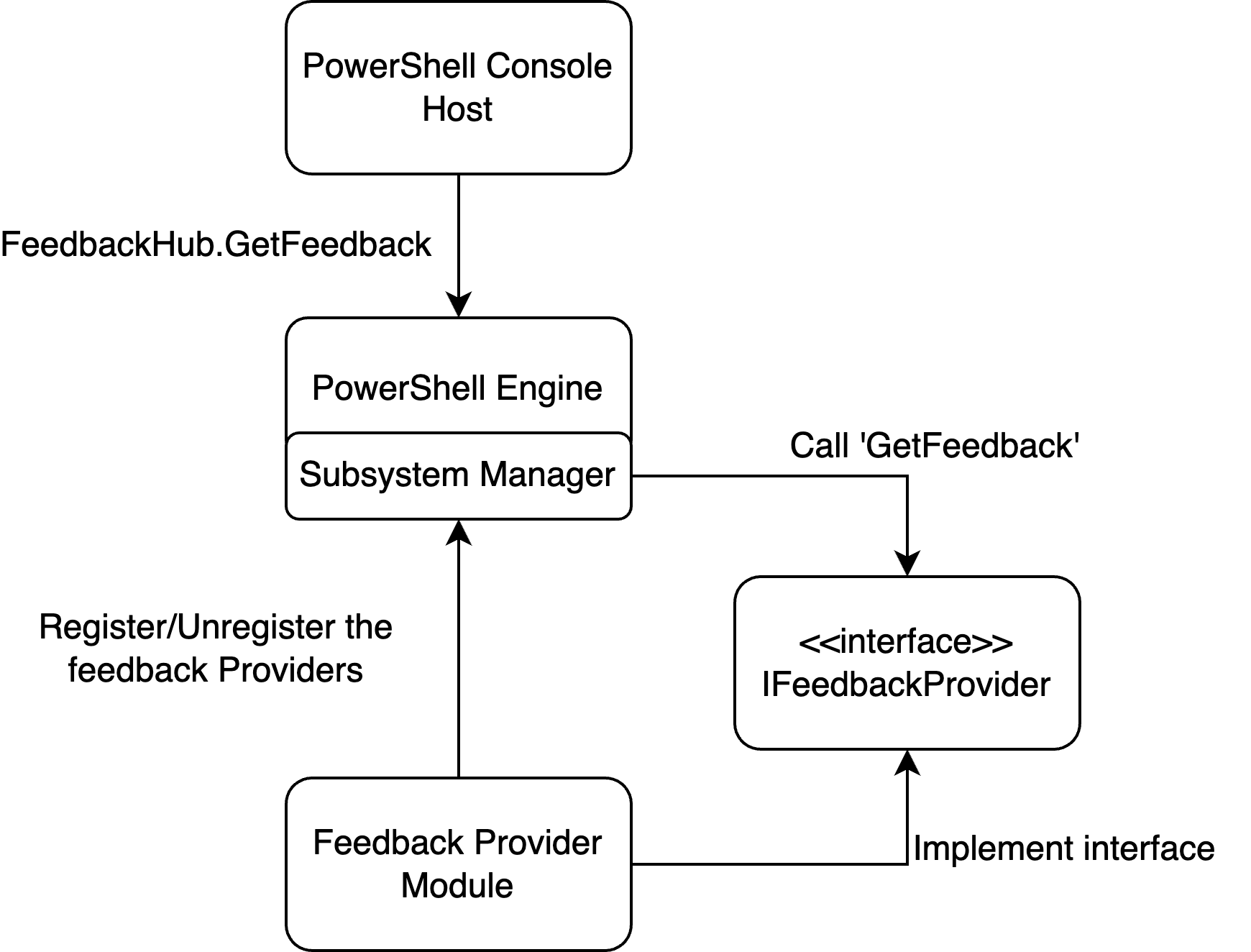
Um provedor de feedback é um módulo binário do PowerShell que implementa a interface System.Management.Automation.Subsystem.Feedback.IFeedbackProvider. Essa interface declara os métodos para obter feedback com base na entrada da linha de comando. A interface de feedback pode fornecer sugestões com base no sucesso ou falha do comando invocado pelo usuário. As sugestões podem ser qualquer coisa que você queira. Por exemplo, você pode sugerir maneiras de resolver um erro ou práticas melhores, como evitar o uso de aliases. Para obter mais informações, consulte a postagem no blog "O que são provedores de feedback?".
O diagrama a seguir mostra a arquitetura de um provedor de feedback:
Os exemplos a seguir orientam você pelo processo de criação de um provedor de feedback simples. Além disso, podes registar o provedor na interface do preditor de comandos para adicionar sugestões de feedback à experiência do preditor da linha de comandos. Para obter mais informações sobre preditores, consulte Usando preditores no PSReadLine e Como criar um preditor de linha de comando.
Etapa 1 - Criar um novo projeto de biblioteca de classes
Use o seguinte comando para criar um novo projeto no diretório do projeto:
dotnet new classlib --name MyFeedbackProvider
Adicione uma referência de pacote para o pacote System.Management.Automation ao seu arquivo .csproj. O exemplo a seguir mostra o arquivo de .csproj atualizado:
<Project Sdk="Microsoft.NET.Sdk">

  <PropertyGroup>
    <TargetFramework>net8.0</TargetFramework>
    <ImplicitUsings>enable</ImplicitUsings>
    <Nullable>enable</Nullable>
  </PropertyGroup>

  <ItemGroup>
    <PackageReference Include="System.Management.Automation" Version="7.4.0-preview.3">
        <ExcludeAssets>contentFiles</ExcludeAssets>
        <PrivateAssets>All</PrivateAssets>
    </PackageReference>
  </ItemGroup>
</Project>
Observação
Você deve alterar a versão do assembly System.Management.Automation para corresponder à versão da visualização do PowerShell que você está a visar. A versão mínima é 7.4.0-preview.3.
Etapa 2 - Adicionar a definição de classe para seu provedor
Altere o nome do arquivo Class1.cs para corresponder ao nome do seu provedor. Este exemplo usa myFeedbackProvider.cs. Este arquivo contém as duas classes principais que definem o provedor de feedback.
O exemplo a seguir mostra o modelo básico para as definições de classe.
using System.Management.Automation;
using System.Management.Automation.Subsystem;
using System.Management.Automation.Subsystem.Feedback;
using System.Management.Automation.Subsystem.Prediction;
using System.Management.Automation.Language;

namespace myFeedbackProvider;

public sealed class myFeedbackProvider : IFeedbackProvider, ICommandPredictor
{

}

public class Init : IModuleAssemblyInitializer, IModuleAssemblyCleanup
{

}
Etapa 3 - Implementar a classe Init
A classe Init registra e cancela o registro do provedor de feedback com o gerenciador do subsistema. O método OnImport() é executado quando o módulo binário está sendo carregado. O método OnRemove() é executado quando o módulo binário está sendo removido. Este exemplo registra o provedor de feedback e o subsistema de previsão de comando.
public class Init : IModuleAssemblyInitializer, IModuleAssemblyCleanup
{
    private const string Id = "<ADD YOUR GUID HERE>";

    public void OnImport()
    {
        var feedback = new myFeedbackProvider(Id);
        SubsystemManager.RegisterSubsystem(SubsystemKind.FeedbackProvider, feedback);
        SubsystemManager.RegisterSubsystem(SubsystemKind.CommandPredictor, feedback);
    }

    public void OnRemove(PSModuleInfo psModuleInfo)
    {
        SubsystemManager.UnregisterSubsystem<ICommandPredictor>(new Guid(Id));
        SubsystemManager.UnregisterSubsystem<IFeedbackProvider>(new Guid(Id));
    }
}
Substitua o valor de espaço reservado <ADD YOUR GUID HERE> por um Identificador Global Único (Guid) exclusivo. Você pode gerar um Guid usando o cmdlet New-Guid.
New-Guid
O Guid é um identificador exclusivo para o seu provedor. O provedor deve ter um ID exclusivo para ser registrado no subsistema.
Etapa 4 - Adicionar membros da classe e definir o construtor
O código a seguir implementa as propriedades definidas nas interfaces, adiciona os membros de classe necessários e cria o construtor para a classe myFeedbackProvider.
/// <summary>
/// Gets the global unique identifier for the subsystem implementation.
/// </summary>
private readonly Guid _guid;
public Guid Id => _guid;

/// <summary>
/// Gets the name of a subsystem implementation, this will be the name displayed when triggered
/// </summary>
public string Name => "myFeedbackProvider";

/// <summary>
/// Gets the description of a subsystem implementation.
/// </summary>
public string Description => "This is very simple feedback provider";

/// <summary>
/// Default implementation. No function is required for a feedback provider.
/// </summary>
Dictionary<string, string>? ISubsystem.FunctionsToDefine => null;

/// <summary>
/// Gets the types of trigger for this feedback provider.
/// </summary>
/// <remarks>
/// The default implementation triggers a feedback provider by <see cref="FeedbackTrigger.CommandNotFound"/> only.
/// </remarks>
public FeedbackTrigger Trigger => FeedbackTrigger.All;

/// <summary>
/// List of candidates from the feedback provider to be passed as predictor results
/// </summary>
private List<string>? _candidates;

/// <summary>
/// PowerShell session used to run PowerShell commands that help create suggestions.
/// </summary>
private PowerShell _powershell;

internal myFeedbackProvider(string guid)
{
    _guid = new Guid(guid); // Save guid
    _powershell = PowerShell.Create(); // Create PowerShell instance
}
Etapa 5 - Criar o método GetFeedback()
O método GetFeedback usa dois parâmetros, context e token. O parâmetro context recebe as informações sobre o gatilho para que você possa decidir como responder com sugestões. O parâmetro token é usado para cancelamento. Esta função retorna um FeedbackItem contendo a sugestão.
/// <summary>
/// Gets feedback based on the given commandline and error record.
/// </summary>
/// <param name="context">The context for the feedback call.</param>
/// <param name="token">The cancellation token to cancel the operation.</param>
/// <returns>The feedback item.</returns>
public FeedbackItem? GetFeedback(FeedbackContext context, CancellationToken token)
{
    // Target describes the different kinds of triggers to activate on,
    var target = context.Trigger;
    var commandLine = context.CommandLine;
    var ast = context.CommandLineAst;

    // defining the header and footer variables
    string header;
    string footer;

    // List of the actions
    List<string>? actions = new List<string>();

    // Trigger on success code goes here

    // Trigger on error code goes here

    return null;
}
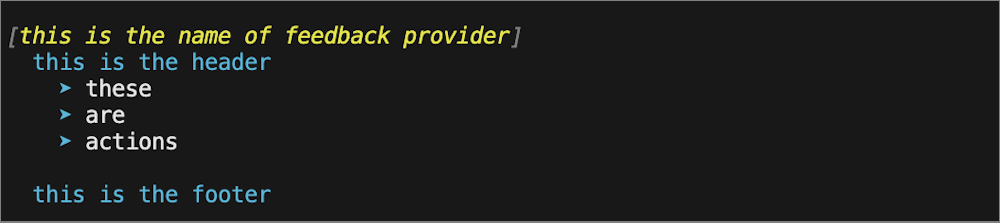
A imagem a seguir mostra como esses campos são usados nas sugestões exibidas para o usuário.
Criar sugestões para um gatilho de sucesso
Para uma invocação bem-sucedida, queremos expandir todos os aliases usados na última execução. Usando o CommandLineAst, identificamos quaisquer comandos com alias e criamos uma sugestão para usar o nome de comando totalmente qualificado.
// Trigger on success
if (target == FeedbackTrigger.Success)
{
    // Getting the commands from the AST and only finding those that are Commands
    var astCmds = ast.FindAll((cAst) => cAst is CommandAst, true);

    // Inspect each of the commands
    foreach(var command in astCmds)
    {

        // Get the command name
        var aliasedCmd = ((CommandAst) command).GetCommandName();

        // Check if its an alias or not, if so then add it to the list of actions
        if(TryGetAlias(aliasedCmd, out string commandString))
        {
            actions.Add($"{aliasedCmd} --> {commandString}");
        }
    }

    // If no alias was found return null
    if(actions.Count == 0)
    {
        return null;
    }

    // If aliases are found, set the header to a description and return a new FeedbackItem.
    header = "You have used an aliased command:";
    // Copy actions to _candidates for the predictor
    _candidates = actions;

    return new FeedbackItem(header, actions);
}
Implementar o método TryGetAlias()
O método TryGetAlias() é uma função auxiliar privada que retorna um valor booleano para indicar se o comando é um alias. No construtor de classe, criamos uma instância do PowerShell que podemos usar para executar comandos do PowerShell. O método TryGetAlias() usa essa instância do PowerShell para invocar o método GetCommand para determinar se o comando é um alias. O objeto AliasInfo retornado por GetCommand contém o nome completo do comando com alias.
/// <summary>
/// Checks if a command is an alias.
/// </summary>
/// <param name="command">The command to check if alias</param>
/// <param name="targetCommand">The referenced command by the aliased command</param>
/// <returns>True if an alias and false if not</returns>
private bool TryGetAlias(string command, out string targetCommand)
{
    // Create PowerShell runspace as a session state proxy to run GetCommand and check
    // if its an alias
    AliasInfo? pwshAliasInfo =
        _powershell.Runspace.SessionStateProxy.InvokeCommand.GetCommand(command, CommandTypes.Alias) as AliasInfo;

    // if its null then it is not an aliased command so just return false
    if(pwshAliasInfo is null)
    {
        targetCommand = String.Empty;
        return false;
    }

    // Set targetCommand to referenced command name
    targetCommand = pwshAliasInfo.ReferencedCommand.Name;
    return true;
}
Criar sugestões para um gatilho de falha
Quando a execução de um comando falha, queremos sugerir que o utilizador utilize Get-Help para obter mais informações sobre como usar o comando.
// Trigger on error
if (target == FeedbackTrigger.Error)
{
    // Gets the command that caused the error.
    var erroredCommand = context.LastError?.InvocationInfo.MyCommand;
    if (erroredCommand is null)
    {
        return null;
    }

    header = $"You have triggered an error with the command {erroredCommand}. Try using the following command to get help:";

    actions.Add($"Get-Help {erroredCommand}");
    footer = $"You can also check online documentation at https://learn.microsoft.com/en-us/powershell/module/?term={erroredCommand}";

    // Copy actions to _candidates for the predictor
    _candidates = actions;
    return new FeedbackItem(header, actions, footer, FeedbackDisplayLayout.Portrait);
}
Etapa 6 - Enviar sugestões para o preditor de linha de comando
Outra forma do seu provedor de feedback de melhorar a experiência do usuário é fornecer sugestões de comando para a interface ICommandPredictor. Para obter mais informações sobre como criar um preditor de linha de comando, consulte Como criar um preditor de linha de comando.
O código seguinte implementa os métodos necessários da interface ICommandPredictor para adicionar a função preditiva ao seu fornecedor de feedback.
-
CanAcceptFeedback()- Este método retorna um valor booleano que indica se o preditor aceita um tipo específico de feedback. -
GetSuggestion()- Este método retorna um objetoSuggestionPackageque contém as sugestões a serem exibidas pelo preditor. -
OnCommandLineAccepted()- Este método é chamado quando uma linha de comando é aceita para ser executada.
/// <summary>
/// Gets a value indicating whether the predictor accepts a specific kind of feedback.
/// </summary>
/// <param name="client">Represents the client that initiates the call.</param>
/// <param name="feedback">A specific type of feedback.</param>
/// <returns>True or false, to indicate whether the specific feedback is accepted.</returns>
public bool CanAcceptFeedback(PredictionClient client, PredictorFeedbackKind feedback)
{
    return feedback switch
    {
        PredictorFeedbackKind.CommandLineAccepted => true,
        _ => false,
    };
}

/// <summary>
/// Get the predictive suggestions. It indicates the start of a suggestion rendering session.
/// </summary>
/// <param name="client">Represents the client that initiates the call.</param>
/// <param name="context">The <see cref="PredictionContext"/> object to be used for prediction.</param>
/// <param name="cancellationToken">The cancellation token to cancel the prediction.</param>
/// <returns>An instance of <see cref="SuggestionPackage"/>.</returns>
public SuggestionPackage GetSuggestion(
    PredictionClient client,
    PredictionContext context,
    CancellationToken cancellationToken)
{
    if (_candidates is not null)
    {
        string input = context.InputAst.Extent.Text;
        List<PredictiveSuggestion>? result = null;

        foreach (string c in _candidates)
        {
            if (c.StartsWith(input, StringComparison.OrdinalIgnoreCase))
            {
                result ??= new List<PredictiveSuggestion>(_candidates.Count);
                result.Add(new PredictiveSuggestion(c));
            }
        }

        if (result is not null)
        {
            return new SuggestionPackage(result);
        }
    }

    return default;
}

/// <summary>
/// A command line was accepted to execute.
/// The predictor can start processing early as needed with the latest history.
/// </summary>
/// <param name="client">Represents the client that initiates the call.</param>
/// <param name="history">History command lines provided as references for prediction.</param>
public void OnCommandLineAccepted(PredictionClient client, IReadOnlyList<string> history)
{
    // Reset the candidate state once the command is accepted.
    _candidates = null;
}
Etapa 7 - Criar o provedor de feedback
Agora você está pronto para criar e começar a usar seu provedor de feedback! Para criar o projeto, execute o seguinte comando:
dotnet build
Este comando cria o módulo PowerShell como um arquivo DLL no seguinte caminho da pasta do projeto: bin/Debug/net8.0/myFeedbackProvider
Pode deparar-se com o erro error NU1101: Unable to find package System.Management.Automation. ao compilar em máquinas Windows. Para corrigir isso, adicione um arquivo nuget.config ao diretório do projeto e adicione o seguinte:
<?xml version="1.0" encoding="utf-8"?>
<configuration>
  <packageSources>
    <clear />
    <add key="nuget.org" value="https://api.nuget.org/v3/index.json" />
  </packageSources>
  <disabledPackageSources>
    <clear />
  </disabledPackageSources>
</configuration>
Usando um provedor de feedback
Para testar seu novo provedor de comentários, importe o módulo compilado para sua sessão do PowerShell. Isso pode ser feito importando a pasta descrita após a construção ter sido bem-sucedida:
Import-Module ./bin/Debug/net8.0/myFeedbackProvider
Quando estiver satisfeito com o módulo, crie um manifesto do módulo, publique-o na Galeria do PowerShell e instale-o no $Env:PSModulePath. Para obter mais informações, consulte Como criar um manifesto de módulo. Você pode adicionar o comando Import-Module ao script $PROFILE para que o módulo esteja disponível na sessão do PowerShell.
Você pode obter uma lista de provedores de feedback instalados, usando o seguinte comando:
Get-PSSubsystem -Kind FeedbackProvider
Kind              SubsystemType      IsRegistered Implementations
----              -------------      ------------ ---------------
FeedbackProvider  IFeedbackProvider          True {general}
Observação
Get-PSSubsystem é um cmdlet experimental que foi introduzido no PowerShell 7.1 Você deve habilitar o recurso experimental PSSubsystemPluginModel para usar esse cmdlet. Para obter mais informações, consulte Usando recursos experimentais.
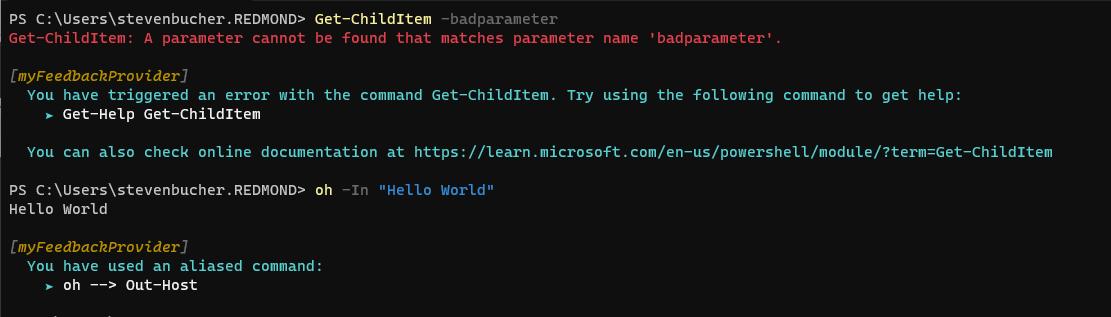
A captura de tela a seguir mostra alguns exemplos de sugestões do novo provedor.
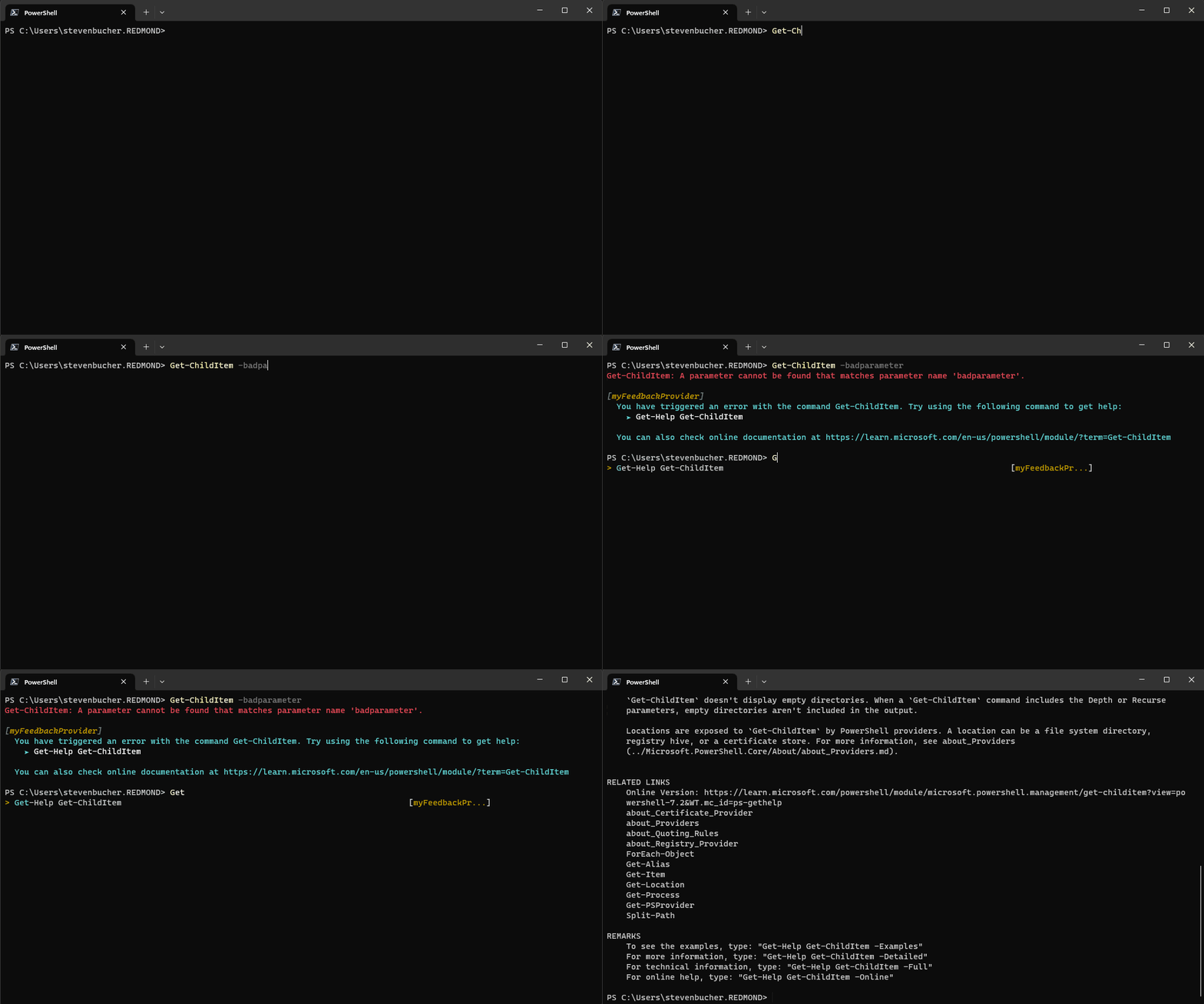
A seguir está um GIF mostrando como a integração do preditor funciona a partir do novo provedor.
Outros fornecedores de feedback
Criamos outro provedor de feedback que pode ser usado como uma boa referência para exemplos mais profundos.
comando-não-encontrado
O provedor de feedback command-not-found utiliza a ferramenta command-not-found em sistemas Linux para fornecer sugestões quando se tenta executar comandos nativos, mas estão em falta. Você pode encontrar o código no Repositório GitHub ou pode fazer o download na PowerShell Gallery por si mesmo.
Adaptador PowerShell
O Microsoft.PowerShell.PowerShellAdapter é um provedor de feedback que ajuda você a converter saídas de texto de comandos nativos em objetos do PowerShell. Ele deteta "adaptadores" em seu sistema e sugere que você os use quando usar o comando nativo. Você pode saber mais sobre os Adaptadores do PowerShell na publicação do blog Fornecedor de Feedback do Adaptador do PowerShell. Você também pode encontrar o código no Repositório GitHub ou pode fazer o download você mesmo na Galeria PowerShell .
Apêndice - Código de implementação completo
O código a seguir combina os exemplos anteriores na implementação completa da classe provider.
using System.Management.Automation;
using System.Management.Automation.Subsystem;
using System.Management.Automation.Subsystem.Feedback;
using System.Management.Automation.Subsystem.Prediction;
using System.Management.Automation.Language;

namespace myFeedbackProvider;

public sealed class myFeedbackProvider : IFeedbackProvider, ICommandPredictor
{
    /// <summary>
    /// Gets the global unique identifier for the subsystem implementation.
    /// </summary>
    private readonly Guid _guid;
    public Guid Id => _guid;

    /// <summary>
    /// Gets the name of a subsystem implementation, this will be the name displayed when triggered
    /// </summary>
    public string Name => "myFeedbackProvider";

    /// <summary>
    /// Gets the description of a subsystem implementation.
    /// </summary>
    public string Description => "This is very simple feedback provider";

    /// <summary>
    /// Default implementation. No function is required for a feedback provider.
    /// </summary>
    Dictionary<string, string>? ISubsystem.FunctionsToDefine => null;

    /// <summary>
    /// Gets the types of trigger for this feedback provider.
    /// </summary>
    /// <remarks>
    /// The default implementation triggers a feedback provider by <see cref="FeedbackTrigger.CommandNotFound"/> only.
    /// </remarks>
    public FeedbackTrigger Trigger => FeedbackTrigger.All;

    /// <summary>
    /// List of candidates from the feedback provider to be passed as predictor results
    /// </summary>
    private List<string>? _candidates;

    /// <summary>
    /// PowerShell session used to run PowerShell commands that help create suggestions.
    /// </summary>
    private PowerShell _powershell;

    // Constructor
    internal myFeedbackProvider(string guid)
    {
        _guid = new Guid(guid); // Save guid
        _powershell = PowerShell.Create(); // Create PowerShell instance
    }

    #region IFeedbackProvider
    /// <summary>
    /// Gets feedback based on the given commandline and error record.
    /// </summary>
    /// <param name="context">The context for the feedback call.</param>
    /// <param name="token">The cancellation token to cancel the operation.</param>
    /// <returns>The feedback item.</returns>
    public FeedbackItem? GetFeedback(FeedbackContext context, CancellationToken token)
    {
        // Target describes the different kinds of triggers to activate on,
        var target = context.Trigger;
        var commandLine = context.CommandLine;
        var ast = context.CommandLineAst;

        // defining the header and footer variables
        string header;
        string footer;

        // List of the actions
        List<string>? actions = new List<string>();

        // Trigger on success
        if (target == FeedbackTrigger.Success)
        {
            // Getting the commands from the AST and only finding those that are Commands
            var astCmds = ast.FindAll((cAst) => cAst is CommandAst, true);

            // Inspect each of the commands
            foreach(var command in astCmds)
            {

                // Get the command name
                var aliasedCmd = ((CommandAst) command).GetCommandName();

                // Check if its an alias or not, if so then add it to the list of actions
                if(TryGetAlias(aliasedCmd, out string commandString))
                {
                    actions.Add($"{aliasedCmd} --> {commandString}");
                }
            }

            // If no alias was found return null
            if(actions.Count == 0)
            {
                return null;
            }

            // If aliases are found, set the header to a description and return a new FeedbackItem.
            header = "You have used an aliased command:";
            // Copy actions to _candidates for the predictor
            _candidates = actions;

            return new FeedbackItem(header, actions);
        }

        // Trigger on error
        if (target == FeedbackTrigger.Error)
        {
            // Gets the command that caused the error.
            var erroredCommand = context.LastError?.InvocationInfo.MyCommand;
            if (erroredCommand is null)
            {
                return null;
            }

            header = $"You have triggered an error with the command {erroredCommand}. Try using the following command to get help:";

            actions.Add($"Get-Help {erroredCommand}");
            footer = $"You can also check online documentation at https://learn.microsoft.com/en-us/powershell/module/?term={erroredCommand}";

            // Copy actions to _candidates for the predictor
            _candidates = actions;
            return new FeedbackItem(header, actions, footer, FeedbackDisplayLayout.Portrait);
        }
        return null;
    }

    /// <summary>
    /// Checks if a command is an alias.
    /// </summary>
    /// <param name="command">The command to check if alias</param>
    /// <param name="targetCommand">The referenced command by the aliased command</param>
    /// <returns>True if an alias and false if not</returns>
    private bool TryGetAlias(string command, out string targetCommand)
    {
        // Create PowerShell runspace as a session state proxy to run GetCommand and check
        // if its an alias
        AliasInfo? pwshAliasInfo =
            _powershell.Runspace.SessionStateProxy.InvokeCommand.GetCommand(command, CommandTypes.Alias) as AliasInfo;

        // if its null then it is not an aliased command so just return false
        if(pwshAliasInfo is null)
        {
            targetCommand = String.Empty;
            return false;
        }

        // Set targetCommand to referenced command name
        targetCommand = pwshAliasInfo.ReferencedCommand.Name;
        return true;
    }
    #endregion IFeedbackProvider

    #region ICommandPredictor

    /// <summary>
    /// Gets a value indicating whether the predictor accepts a specific kind of feedback.
    /// </summary>
    /// <param name="client">Represents the client that initiates the call.</param>
    /// <param name="feedback">A specific type of feedback.</param>
    /// <returns>True or false, to indicate whether the specific feedback is accepted.</returns>
    public bool CanAcceptFeedback(PredictionClient client, PredictorFeedbackKind feedback)
    {
        return feedback switch
        {
            PredictorFeedbackKind.CommandLineAccepted => true,
            _ => false,
        };
    }

    /// <summary>
    /// Get the predictive suggestions. It indicates the start of a suggestion rendering session.
    /// </summary>
    /// <param name="client">Represents the client that initiates the call.</param>
    /// <param name="context">The <see cref="PredictionContext"/> object to be used for prediction.</param>
    /// <param name="cancellationToken">The cancellation token to cancel the prediction.</param>
    /// <returns>An instance of <see cref="SuggestionPackage"/>.</returns>
    public SuggestionPackage GetSuggestion(
        PredictionClient client,
        PredictionContext context,
        CancellationToken cancellationToken)
    {
        if (_candidates is not null)
        {
            string input = context.InputAst.Extent.Text;
            List<PredictiveSuggestion>? result = null;

            foreach (string c in _candidates)
            {
                if (c.StartsWith(input, StringComparison.OrdinalIgnoreCase))
                {
                    result ??= new List<PredictiveSuggestion>(_candidates.Count);
                    result.Add(new PredictiveSuggestion(c));
                }
            }

            if (result is not null)
            {
                return new SuggestionPackage(result);
            }
        }

        return default;
    }

    /// <summary>
    /// A command line was accepted to execute.
    /// The predictor can start processing early as needed with the latest history.
    /// </summary>
    /// <param name="client">Represents the client that initiates the call.</param>
    /// <param name="history">History command lines provided as references for prediction.</param>
    public void OnCommandLineAccepted(PredictionClient client, IReadOnlyList<string> history)
    {
        // Reset the candidate state once the command is accepted.
        _candidates = null;
    }

    #endregion;
}

public class Init : IModuleAssemblyInitializer, IModuleAssemblyCleanup
{
    private const string Id = "<ADD YOUR GUID HERE>";

    public void OnImport()
    {
        var feedback = new myFeedbackProvider(Id);
        SubsystemManager.RegisterSubsystem(SubsystemKind.FeedbackProvider, feedback);
        SubsystemManager.RegisterSubsystem(SubsystemKind.CommandPredictor, feedback);
    }

    public void OnRemove(PSModuleInfo psModuleInfo)
    {
        SubsystemManager.UnregisterSubsystem<ICommandPredictor>(new Guid(Id));
        SubsystemManager.UnregisterSubsystem<IFeedbackProvider>(new Guid(Id));
    }
}
Colabore connosco no GitHub
A fonte deste conteúdo pode ser encontrada no GitHub, onde também pode criar e rever issues e pull requests. Para mais informações, consulte o nosso guia para colaboradores.
