Nota
O acesso a esta página requer autorização. Pode tentar iniciar sessão ou alterar os diretórios.
O acesso a esta página requer autorização. Pode tentar alterar os diretórios.
Ao usar ligação coluna a coluna, uma aplicação atribui um ou dois, ou em alguns casos três, arrays a cada coluna para os quais os dados devem ser devolvidos. O primeiro array contém os valores de dados, e o segundo array contém buffers de comprimento/indicadores. Indicadores e valores de comprimento podem ser armazenados em buffers separados definindo os campos de descritores SQL_DESC_INDICATOR_PTR e SQL_DESC_OCTET_LENGTH_PTR para valores diferentes; se isto for feito, um terceiro array é limitado. Cada array contém tantos elementos quantas linhas há no conjunto de linhas.
A aplicação declara que está a usar binding coluna a coluna com o atributo SQL_ATTR_ROW_BIND_TYPE statement, que determina o tipo de binding para buffers de conjunto de linhas em oposição aos buffers de conjunto de parâmetros. O driver devolve os dados de cada linha em elementos sucessivos de cada array. A ilustração seguinte mostra como funciona a encadernação por colunas.
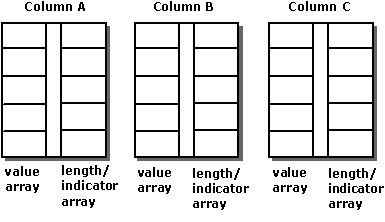
Por exemplo, o seguinte código associa arrays de 10 elementos às colunas OrderID, SalesPerson e Status:
#define ROW_ARRAY_SIZE 10

SQLUINTEGER    OrderIDArray[ROW_ARRAY_SIZE], NumRowsFetched;
SQLCHAR        SalesPersonArray[ROW_ARRAY_SIZE][11],
               StatusArray[ROW_ARRAY_SIZE][7];
SQLINTEGER     OrderIDIndArray[ROW_ARRAY_SIZE],
               SalesPersonLenOrIndArray[ROW_ARRAY_SIZE],
               StatusLenOrIndArray[ROW_ARRAY_SIZE];
SQLUSMALLINT   RowStatusArray[ROW_ARRAY_SIZE], i;
SQLRETURN      rc;
SQLHSTMT       hstmt;

// Set the SQL_ATTR_ROW_BIND_TYPE statement attribute to use
// column-wise binding. Declare the rowset size with the
// SQL_ATTR_ROW_ARRAY_SIZE statement attribute. Set the
// SQL_ATTR_ROW_STATUS_PTR statement attribute to point to the
// row status array. Set the SQL_ATTR_ROWS_FETCHED_PTR statement
// attribute to point to cRowsFetched.
SQLSetStmtAttr(hstmt, SQL_ATTR_ROW_BIND_TYPE, SQL_BIND_BY_COLUMN, 0);
SQLSetStmtAttr(hstmt, SQL_ATTR_ROW_ARRAY_SIZE, ROW_ARRAY_SIZE, 0);
SQLSetStmtAttr(hstmt, SQL_ATTR_ROW_STATUS_PTR, RowStatusArray, 0);
SQLSetStmtAttr(hstmt, SQL_ATTR_ROWS_FETCHED_PTR, &NumRowsFetched, 0);

// Bind arrays to the OrderID, SalesPerson, and Status columns.
SQLBindCol(hstmt, 1, SQL_C_ULONG, OrderIDArray, 0, OrderIDIndArray);
SQLBindCol(hstmt, 2, SQL_C_CHAR, SalesPersonArray, sizeof(SalesPersonArray[0]),
            SalesPersonLenOrIndArray);
SQLBindCol(hstmt, 3, SQL_C_CHAR, StatusArray, sizeof(StatusArray[0]),
            StatusLenOrIndArray);

// Execute a statement to retrieve rows from the Orders table.
SQLExecDirect(hstmt, "SELECT OrderID, SalesPerson, Status FROM Orders", SQL_NTS);

// Fetch up to the rowset size number of rows at a time. Print the actual
// number of rows fetched; this number is returned in NumRowsFetched.
// Check the row status array to print only those rows successfully
// fetched. Code to check if rc equals SQL_SUCCESS_WITH_INFO or
// SQL_ERROR not shown.
while ((rc = SQLFetchScroll(hstmt,SQL_FETCH_NEXT,0)) != SQL_NO_DATA) {
   for (i = 0; i < NumRowsFetched; i++) {
      if ((RowStatusArray[i] == SQL_ROW_SUCCESS) ||
            (RowStatusArray[i] == SQL_ROW_SUCCESS_WITH_INFO)) {
         if (OrderIDIndArray[i] == SQL_NULL_DATA)
            printf(" NULL      ");
         else
            printf("%d\t", OrderIDArray[i]);
         if (SalesPersonLenOrIndArray[i] == SQL_NULL_DATA)
            printf(" NULL      ");
         else
            printf("%s\t", SalesPersonArray[i]);
         if (StatusLenOrIndArray[i] == SQL_NULL_DATA)
            printf(" NULL\n");
         else
            printf("%s\n", StatusArray[i]);
      }
   }
}

// Close the cursor.
SQLCloseCursor(hstmt);