Notă
Accesul la această pagină necesită autorizare. Puteți încerca să vă conectați sau să modificați directoarele.
Accesul la această pagină necesită autorizare. Puteți încerca să modificați directoarele.
The meeting preparation card helps you prepare for upcoming customer meetings directly in Microsoft Teams. This AI-powered tool provides a concise snapshot of essential meeting details and insights without disrupting their workflow.
The card draws on insights from your personal activity and your team's collective knowledge, giving you quick access to the information you need. This enables you to walk into every meeting informed, confident, and ready to drive meaningful outcomes.
Prerequisites
- If you're using Salesforce as your CRM, turn on the server-to-server connection.
- Invite at least one external contact that is saved in CRM to the meeting.
View a meeting preparation card
The meeting preparation card is displayed in your personal chat with the Sales bot or in the Chat tab of the Sales personal app in Teams. The meeting preparation card is sent at a time that is configured by your administrator. By default, the meeting preparation card is sent one hour before the meeting. If you schedule the meeting less than an hour before the start time, the card appears soon after you send the meeting invite.
Important
The meeting preparation card is displayed in the language set for your Microsoft 365 account. To change the language of the meeting preparation card to your preferred language, change the display language in your Microsoft account settings.
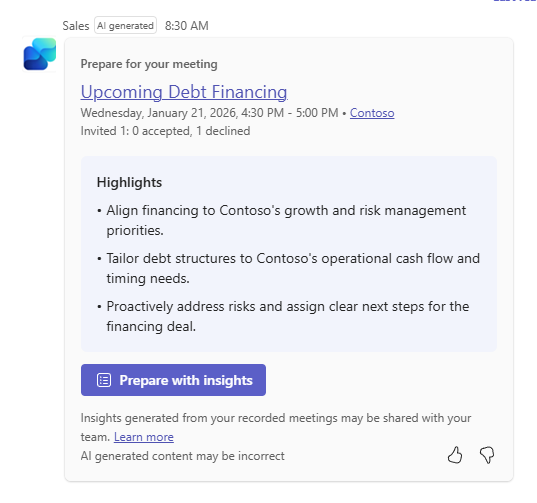
The meeting preparation card contains the following information:
Meeting title: The subject of the meeting as specified in the meeting invite. It is a clickable link that opens the meeting in calendar.
Meeting date and time: The scheduled date and time of the meeting.
Highlights: Below the meeting details, the card displays up to three high-value AI highlights to help you prepare more effectively. These highlights are dynamically generated based on:
- Previous meetings and emails with the customer.
- Insights contributed by other sellers on the same account.
- CRM-linked context such as contacts, opportunities, and account activity.
- The inferred sales stage and meeting intent.
Highlights may include:
- Key discussion themes or priorities from recent customer interactions.
- Risks, objections, or open questions to be aware of before the meeting.
- Notable stakeholders or decision-makers involved in recent communications.
Each highlight is written to be actionable and concise, enabling you to absorb the most important context in seconds.
Prepare with insights: A button that opens the detailed meeting preparation view alongside Sales agent chat interface. This allows you to explore deeper insights, ask follow-up questions, and access additional context without leaving your workflow.
Detailed meeting preparation view
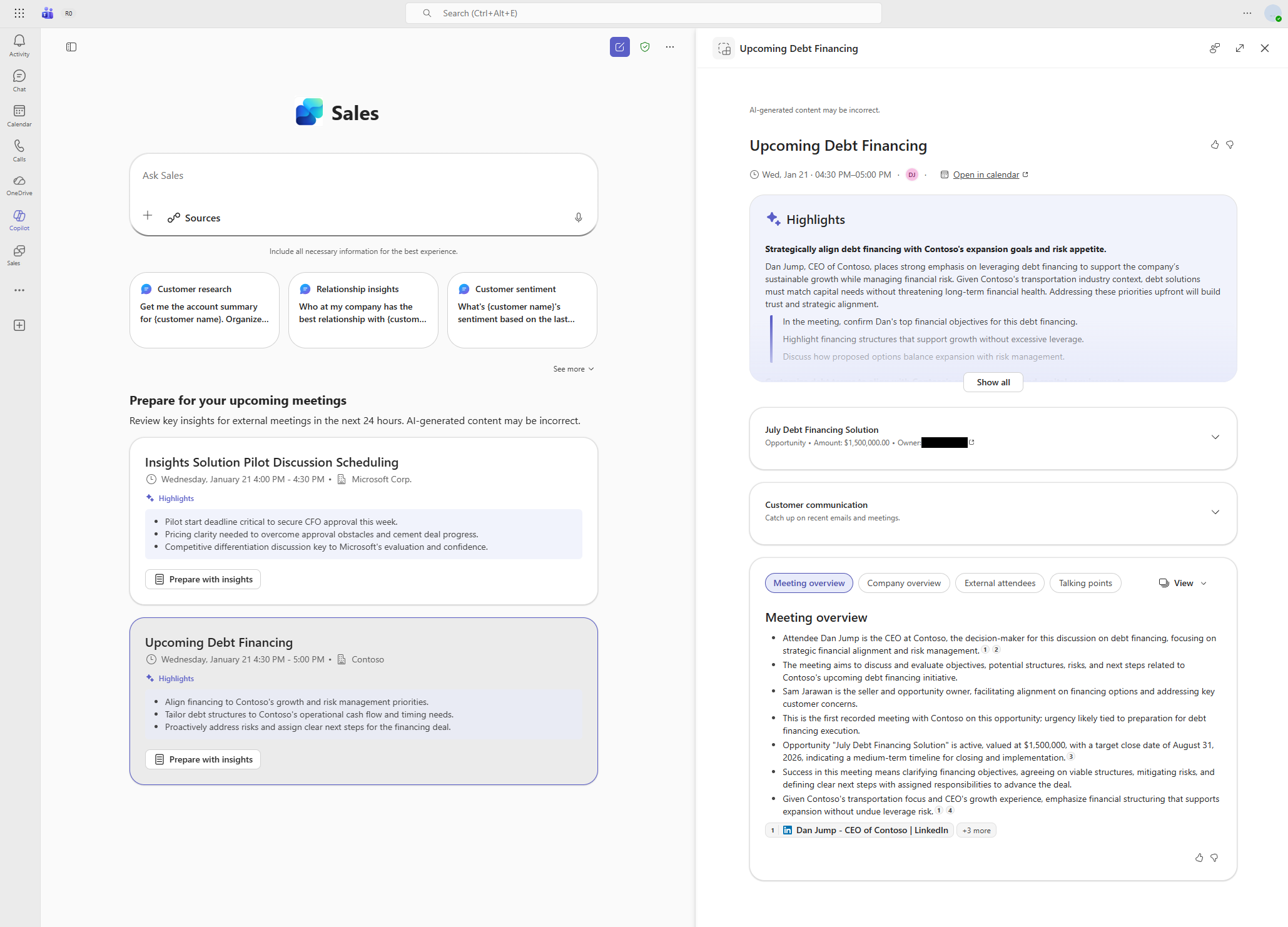
The detailed meeting preparation view includes:
Meeting information: View the meeting title, time, and a direct link to open the meeting in calendar.
Highlights: This section offers more detailed information on the topics featured in the meeting card. Each highlight includes relevant context and recommends actions tailored to your upcoming meeting.
CRM record summary: This section is displayed only if the meeting is linked to a CRM record such as an opportunity or account. It shows AI-generated summary of the record. Note that meeting can only be linked to a CRM record from the Sales pane in Outlook.
Customer communication: This section is displayed only if the meeting is connected to an opportunity. It shows insights from recent emails and meetings related to the linked CRM record. It may include insights from conversations organized by other team members for the same record, providing a complete view of past customer interactions. Note that insights are displayed only if enabled by your administrator. Learn more about the Customer communication card.
AI-generated insights: This section provides in-depth, AI-driven context to help you prepare for your meeting. It includes:
- Meeting overview: A summary of the meeting's purpose.
- Company overview: AI-generated highlights about the company. If no CRM record is linked, AI uses the domains of external attendees to infer the company. If there are multiple domains, AI selects the best match.
- External attendees: AI-enriched details about external participants, based on their email domains (not just CRM contacts).
- Talking points: Tailored to your role (for example, seller or executive), and may include:
- Strategic themes
- Icebreaker questions
- Discovery questions
- Potential use cases
- Likely objections
- Communication highlights (optional): An AI summary of previous team discussions, such as:
- What's going well
- What are the risks
- What's happening next
You can configure the view to show insights either in a card-based format or as a list. Select View and then choose Card or All in one.
Note
- On the left side, just below the Sales agent chat input box, you'll see a list of your upcoming meetings scheduled within the next 24 hours.
- Meeting preparation insights are generated automatically for all upcoming sales meetings.
- If you schedule a new meeting, it may take up to 15 minutes for insights to be generated and for the notification to appear.
- Until insights are ready, meetings in the left panel are labelled as "Insights not available". Once insights are available, the meeting entry updates to show the highlights.
Alternate version of the meeting preparation card
Based on the license you have, you might see the below version of the meeting preparation card.
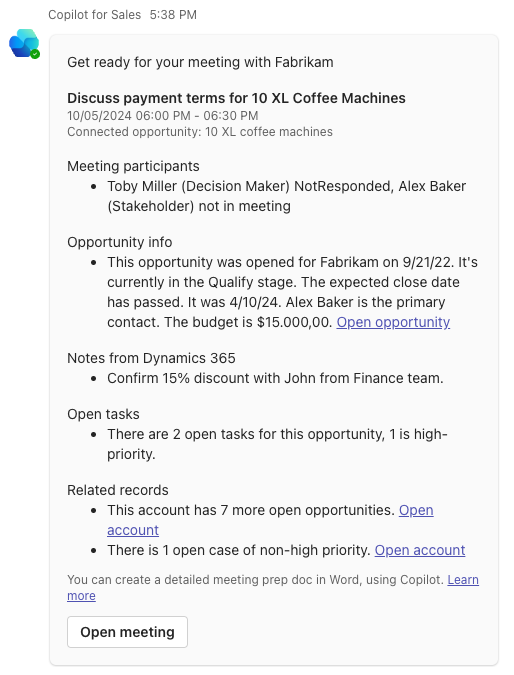
The meeting preparation card contains the following information:
Matched account: Title of the card shows the name of the account matched in CRM.
General meeting information: Information about the meeting such as its name, date, time, number of participants, and their acceptance status.
Opportunity: Name of the matched opportunity, key fields as configured by your administrator, and AI-generated summary of key CRM information such as open and closed dates, current stage, budget, related records, and open tasks retrieved from CRM. If the meeing is saved to a CRM opportunity, the connected opportunity is used to generate the insights. If the meeting is not saved to a CRM opportunity, the most recent opportunity linked to the meeting participants is used to generate the insights. If no opportunity is found, the card displays the matched account summary instead.
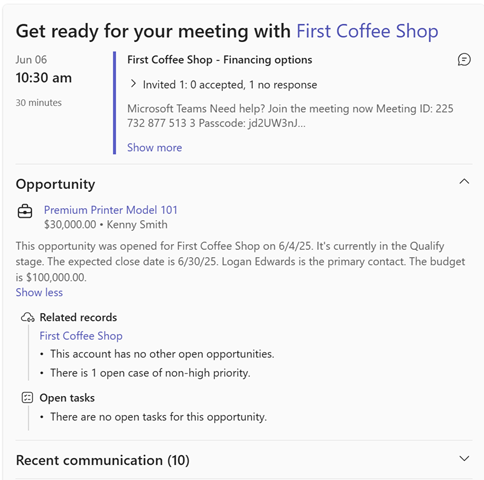
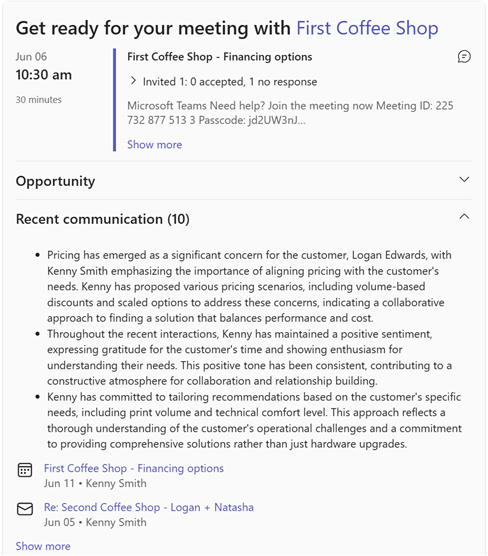
Recent communication: Displays up to 10 most recent meetings or emails on the opportunity. In addition to the meetings you organized or participated in, it may also include meetings conducted by other team members for the same opportunity. In this way, you can have a complete view of the past customer interactions. It shows AI-generated summary of the past meetings and AI-generated insights per individual meeting such as key discussion points or key objections raised by the customer. Meetings without AI-generated insights may also be shown in the list, such as meetings that were not recorded or the Sales app was not added to the meetings.
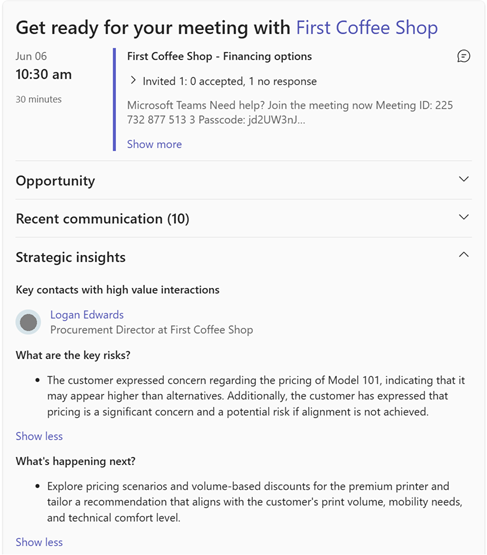
Strategic insights: Shows key contacts of the opportunity in CRM among the meeting participants, key risks identified and their summary from all past interactions, and the next follow-up action items agreed with the customer. This section is displayed only if the AI-generated insights are available.
Meeting requirements for preparation cards
To generate a meeting preparation card, the meeting must meet the following requirements:
- Has at least one internal participant and no more than 29 internal participants
- Isn't canceled
- Isn't marked as private
- Isn't an all-day event
- Isn't a recurring meeting
- Is scheduled for a future date and time
Limitations
- The Sales app is automatically added to Teams meetings that include at least one external participant. This process might take a few minutes after the meeting is created and is required for the meeting to be recognized as a sales meeting. If you start and record the meeting before the Sales app is added, the meeting isn't recognized as a sales meeting and no post-meeting follow-up notification is generated.
- Only past meetings have insights generated. Email insights aren't included currently.
- Meeting insights are linked only to one opportunity in CRM.
- The card is sent only after the meeting is initially scheduled. If you make changes to the meeting after scheduling it, no new card is generated.
How does the card work?
The AI-generated insights displayed on the meeting preparation card are based on opportunities identified and matched with meeting participants who are recognized as contacts in your CRM. If there are multiple meeting participants who are contacts, the Sales app uses the Microsoft Graph API to determine the order and prioritizes the first contact returned with most recent modification in CRM to locate linked opportunities in CRM. When multiple opportunities are linked with this contact, the most recent one is selected for display on the card. After identifying the relevant opportunity, the Sales app pulls the emails and meetings saved in CRM that are linked to this opportunity, and uses AI-powered soft-linking to scan and match the other unsaved meetings related to this opportunity, including meetings organized by other team members, such as peer sellers. The system then generates a summary of all matched past meetings, providing synthesized insights into key risks and upcoming actions. Insights are presented in your supported local language and your local time zone.
Note
You must check the AI-generated content carefully because it can have mistakes. It's your responsibility to review the AI-generated content to make sure it's accurate and appropriate.
Key fallback scenarios
It might happen that appropriate data is not available to generate the required insights. Here are some common fallback scenarios:
- When an opportunity is matched with the meeting participant as a CRM contact but no past meeting is detected regarding this opportunity, the card displays:
- General information about the meeting
- Opportunity summary
- Up to 10 recent emails or meetings with the contact
- When an opportunity is not available in CRM or no matched opportunity is found, but there's a matched account, the card displays:
- General information about the meeting
- Matched account summary
- Up to 10 recent emails or meetings with the contact
- When the meeting participant is not a CRM contact, the card displays:
- General information about the meeting
- Up to 10 recent emails or meetings with the participant
Data storage and retention
Insights generated from the customer meetings such as recap, customer objections, and questions are stored in Dataverse. The meeting preparation card is generated using this data. The data is retained for 90 days and then deleted. Insights of a meeting are accessible to those who attended the meeting and to those who have access to the opportunity in CRM.
Meeting sensitivity labels
Currently, meetings with all types of sensitivity labels are included to generate insights. If you have any concerns, contact Microsoft support. Learn more about sensitivity labels in Teams.