Poznámka
Na prístup k tejto stránke sa vyžaduje oprávnenie. Môžete sa skúsiť prihlásiť alebo zmeniť adresáre.
Na prístup k tejto stránke sa vyžaduje oprávnenie. Môžete skúsiť zmeniť adresáre.
Applies to:  IoT Edge 1.5
Important
IoT Edge 1.5 LTS is the supported release. IoT Edge 1.4 LTS is end of life as of November 12, 2024. If you are on an earlier release, see Update IoT Edge.
The IoT Edge runtime is a set of programs that turn a device into an IoT Edge device. The runtime components let IoT Edge devices receive code to run at the edge, and then communicate results.
The IoT Edge runtime is responsible for the following functions on IoT Edge devices:
- Install and update workloads.
- Maintain Azure IoT Edge security standards.
- Ensure IoT Edge modules keep running.
- Report module health to the cloud for remote monitoring.
- Manage communication between:
- Downstream devices and IoT Edge devices
- Modules on an IoT Edge device
- An IoT Edge device and the cloud
- IoT Edge devices
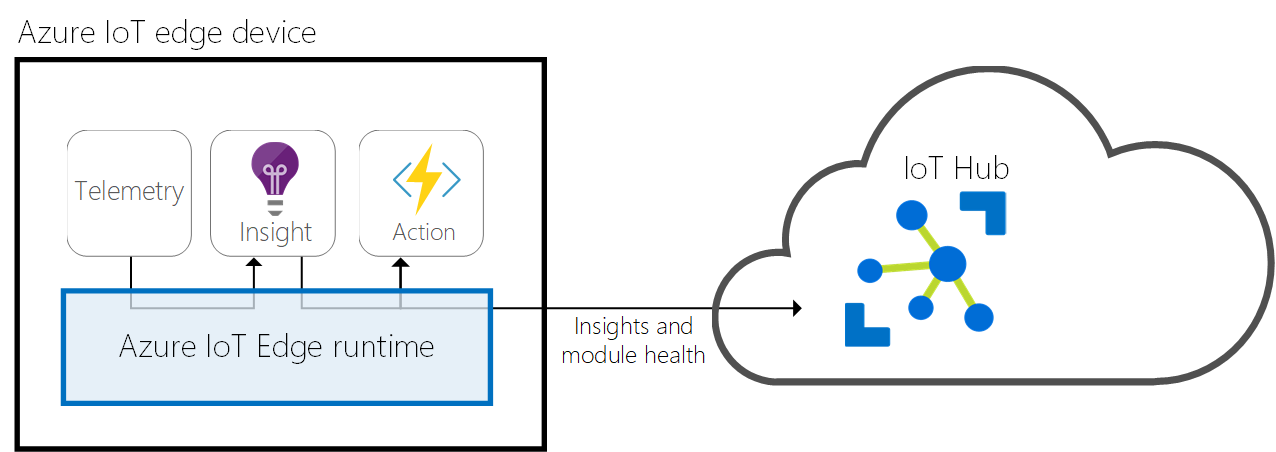
The responsibilities of the IoT Edge runtime fall into two categories: communication and module management. Two components of the IoT Edge runtime perform these roles. The IoT Edge agent deploys and monitors the modules, and the IoT Edge hub handles communication.
Both the IoT Edge agent and the IoT Edge hub are modules, just like any other module running on an IoT Edge device. They're sometimes referred to as the runtime modules.
IoT Edge agent
The IoT Edge agent is one of two modules in the Azure IoT Edge runtime. It instantiates modules, ensures they keep running, and reports their status to IoT Hub. You write this configuration data as a property of the IoT Edge agent module twin.
The IoT Edge security daemon starts the IoT Edge agent on device startup. The agent retrieves its module twin from IoT Hub and inspects the deployment manifest. The deployment manifest is a JSON file that declares the modules that need to be started.
Each item in the deployment manifest contains specific information about a module and is used by the IoT Edge agent for controlling the module's lifecycle. For more information about all the properties used by the IoT Edge agent to control modules, see Properties of the IoT Edge agent and IoT Edge hub module twins.
The IoT Edge agent sends runtime response to IoT Hub. Here's a list of possible responses:
- 200 - OK
- 400 - The deployment configuration is malformed or invalid.
- 417 - The device doesn't have a deployment configuration set.
- 412 - The schema version in the deployment configuration is invalid.
- 406 - The IoT Edge device is offline or not sending status reports.
- 500 - An error occurred in the IoT Edge runtime.
For more information about creating deployment manifests, see Learn how to deploy modules and establish routes in IoT Edge.
Security
The IoT Edge agent plays a critical role in the security of an IoT Edge device. For example, it performs actions like verifying a module's image before starting it.
For more information about the Azure IoT Edge security framework, see IoT Edge security manager.
IoT Edge hub
The IoT Edge hub is the other module that makes up the Azure IoT Edge runtime. It acts as a local proxy for IoT Hub by exposing the same protocol endpoints as IoT Hub. This consistency means that clients can connect to the IoT Edge runtime just as they would to IoT Hub.
The IoT Edge hub isn't a full local version of IoT Hub. It delegates some tasks to IoT Hub. For example, to enable a device to connect, the IoT Edge hub automatically downloads authorization information from IoT Hub on its first connection. After the first connection is established, the IoT Edge hub caches authorization information locally. Future connections from that device are authorized without needing to download authorization information from the cloud again.
Cloud communication
To reduce the bandwidth that your IoT Edge solution uses, the IoT Edge hub optimizes how many actual connections are made to the cloud. The IoT Edge hub takes logical connections from modules or downstream devices and combines them for a single physical connection to the cloud. The details of this process are transparent to the rest of the solution. Clients think they have their own connection to the cloud even though they're all sent over the same connection. The IoT Edge hub can either use the AMQP or the MQTT protocol to communicate upstream with the cloud, independently from protocols used by downstream devices. However, the IoT Edge hub currently only supports combining logical connections into a single physical connection by using AMQP as the upstream protocol and its multiplexing capabilities. AMQP is the default upstream protocol.
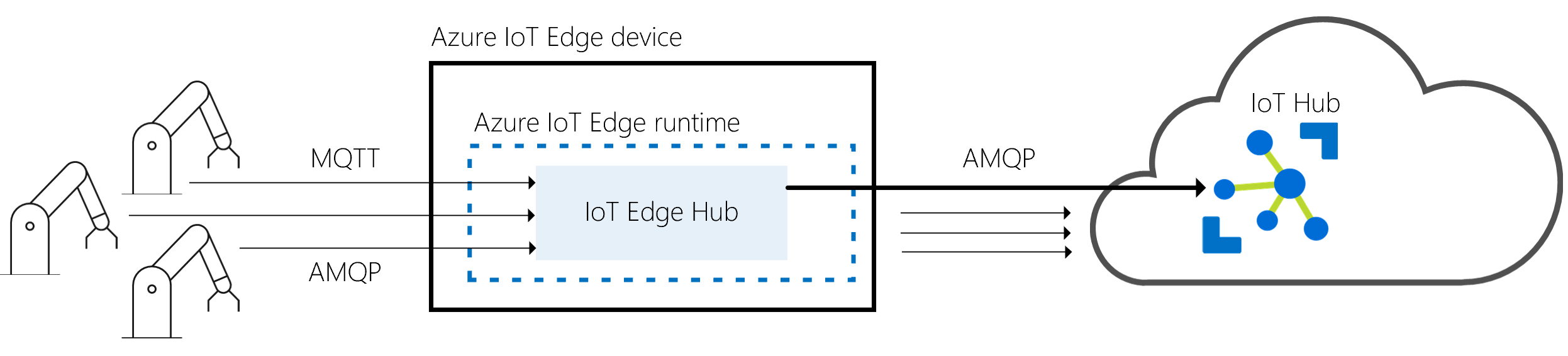
The IoT Edge hub can determine whether it's connected to IoT Hub. If the connection is lost, the IoT Edge hub saves messages or twin updates locally. Once a connection is reestablished, it syncs all the data. A property of the IoT Edge hub's module twin determines the location used for this temporary cache. The size of the cache isn't capped and grows as long as the device has storage capacity. For more information, see Offline capabilities.
Local communication
The IoT Edge hub facilitates local communication. It enables device-to-module and module-to-module communications by brokering messages to keep devices and modules independent from each other. The IoT Edge hub supports the message routing features supported by IoT Hub.
Using routing
The brokering mechanism uses the same routing features as the IoT Hub to specify how it passes messages between devices or modules. First, devices or modules specify the inputs on which they accept messages and the outputs to which they write messages. Then a solution developer can route messages between a source (for example, outputs), and a destination (for example, inputs), with potential filters.
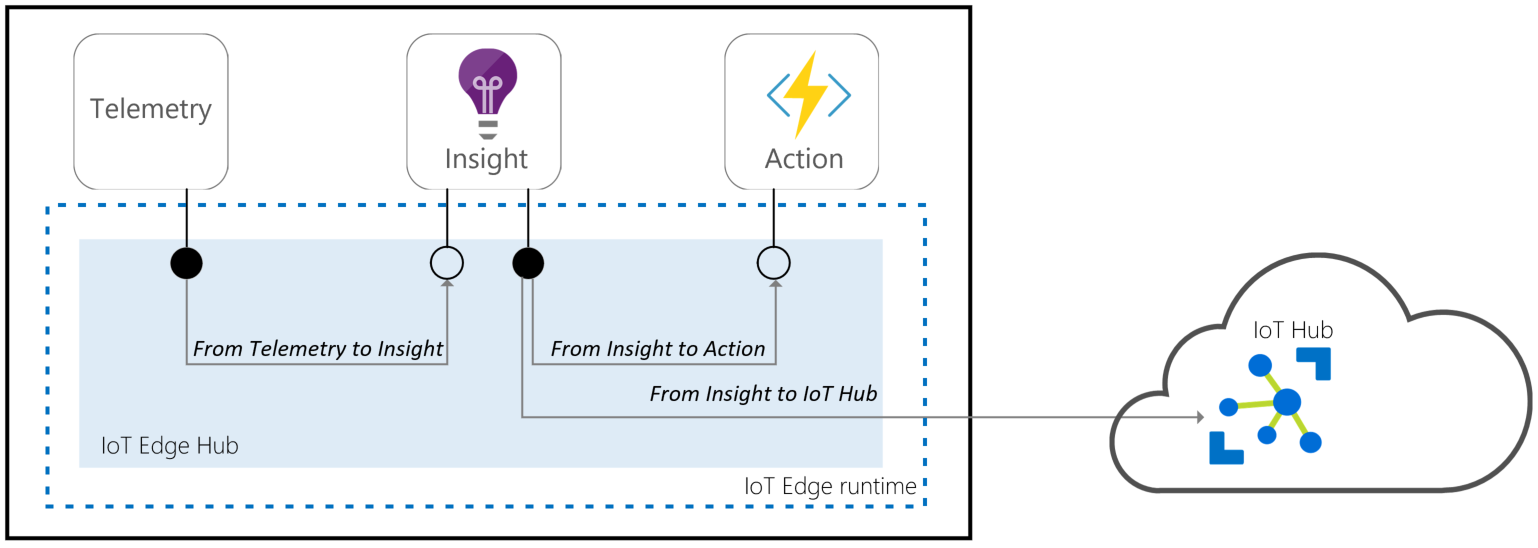
Devices or modules that use the Azure IoT Device SDKs with the AMQP protocol can use routing. All messaging IoT Hub primitives, such as telemetry, direct methods, C2D, and twins, are supported but communication over user-defined topics isn't supported.
For more information about routes, see Learn how to deploy modules and establish routes in IoT Edge.
The following brokering mechanism features are available:
| Features | Routing |
|---|---|
| D2C telemetry | ✔ |
| Local telemetry | ✔ |
| DirectMethods | ✔ |
| Twin | ✔ |
| C2D for devices | ✔ |
| Ordering | ✔ |
| Filtering | ✔ |
| User-defined topics | |
| Device-to-Device | |
| Local broadcasting |
Connecting to the IoT Edge hub
The IoT Edge hub accepts connections from device or module clients, either over the MQTT protocol or the AMQP protocol.
Note
The IoT Edge hub supports clients that connect using MQTT or AMQP. It doesn't support clients that use HTTP.
When a client connects to the IoT Edge hub, the following steps happen:
- If Transport Layer Security (TLS) is used (recommended), the client and the IoT Edge hub build a TLS channel to establish an encrypted communication.
- The client sends authentication information to the IoT Edge hub to identify itself.
- The IoT Edge hub authorizes or rejects the connection based on its authorization policy.
Secure connections (TLS)
By default, the IoT Edge hub only accepts connections secured with Transport Layer Security (TLS). For example, it accepts encrypted connections that a third party can't decrypt.
When a client connects to the IoT Edge hub on port 8883 (MQTTS) or 5671 (AMQPS), it establishes a TLS channel. During the TLS handshake, the IoT Edge hub sends its certificate chain that the client needs to validate. To validate the certificate chain, you must install the root certificate of the IoT Edge hub as a trusted certificate on the client. If the root certificate isn't trusted, the IoT Edge hub rejects the client library with a certificate verification error.
The transparent gateway and prepare a downstream device documentation describe the steps to install this root certificate of the broker on device clients. Modules can use the same root certificate as the IoT Edge hub by using the IoT Edge daemon API.
Authentication
The IoT Edge Hub only accepts connections from devices or modules that have an IoT Hub identity. For example, these devices and modules are registered in IoT Hub and use one of the three client authentication methods that IoT Hub supports to prove their identity: Symmetric keys authentication, X.509 self-signed authentication, or X.509 CA signed authentication. The IoT Edge hub can verify these IoT Hub identities locally, so connections can still be made while offline.
IoT Edge modules currently only support symmetric key authentication.
Authorization
The IoT Edge hub verifies that a client belongs to its set of trusted clients defined in IoT Hub. You specify the set of trusted clients by setting up parent/child or device/module relationships in IoT Hub. When you create a module in IoT Edge, you automatically establish a trust relationship between this module and its IoT Edge device. This is the only authorization model supported by the routing brokering mechanism.
Remote configuration
The cloud entirely controls the IoT Edge hub. It gets its configuration from IoT Hub via its module twin. The twin contains a desired property called routes that declares how messages are passed within a deployment. For more information about routes, see declare routes.
Additionally, you can configure several settings by setting up environment variables on the IoT Edge hub.
Runtime quality telemetry
IoT Edge collects anonymous telemetry from the host runtime and system modules to improve product quality. This information is called runtime quality telemetry. The IoT Edge agent periodically sends the collected telemetry as device-to-cloud messages to IoT Hub. These messages don't appear in your regular telemetry and don't consume any message quota.
The IoT Edge agent and hub generate metrics that you can collect to understand device performance. A subset of these metrics is collected by the IoT Edge Agent as part of runtime quality telemetry. The metrics collected for runtime quality telemetry are labeled with the tag ms_telemetry. For information about all the available metrics, see Access built-in metrics.
Any personally or organizationally identifiable information, such as device and module names, are removed before upload to ensure the anonymous nature of the runtime quality telemetry.
The IoT Edge agent collects the runtime quality telemetry hourly and sends one message to IoT Hub every 24 hours.
If you want to opt out of sending runtime quality telemetry from your devices, use one of the following methods:
- Set the
SendRuntimeQualityTelemetryenvironment variable tofalsefor edgeAgent. - Uncheck the option in the Azure portal during deployment.