Poznámka
Na prístup k tejto stránke sa vyžaduje oprávnenie. Môžete sa skúsiť prihlásiť alebo zmeniť adresáre.
Na prístup k tejto stránke sa vyžaduje oprávnenie. Môžete skúsiť zmeniť adresáre.
Note
Community interest groups have now moved from Yammer to Microsoft Viva Engage. To join a Viva Engage community and take part in the latest discussions, fill out the Request access to Finance and Operations Viva Engage Community form and choose the community you want to join.
Important
The Carbon Flighting Service manages access to the System administration utility. Only system admins can access the System network printers management page.
Domain admins use the Document Routing Agent (DRA) to register network printers with the finance and operations service. After you register the printers, the organization admin is responsible for making them available to users. Manage the settings on the Manage network printers page (Organization administration > Setup > Network printers).
Because the settings on the Manage network printers page are intended for organization admins, the data is limited to the active legal entity. Since system admins can't manage network printer settings across legal entities, it can be difficult to update settings across legal entities in some situations, such as when network printer changes occur. For example, a network printer instance is deleted when a network printer path is updated or hardware is replaced, or someone tries to purge all documents in the printer queue.
The System administration utility is a recovery tool for inadvertent print instructions. It also simplifies the task of managing network printer settings, such as access from specific legal entities.
Access the feature
After you turn on the feature, a Preview group appears on the Options tab of the Action Pane on the Manage network printers page.
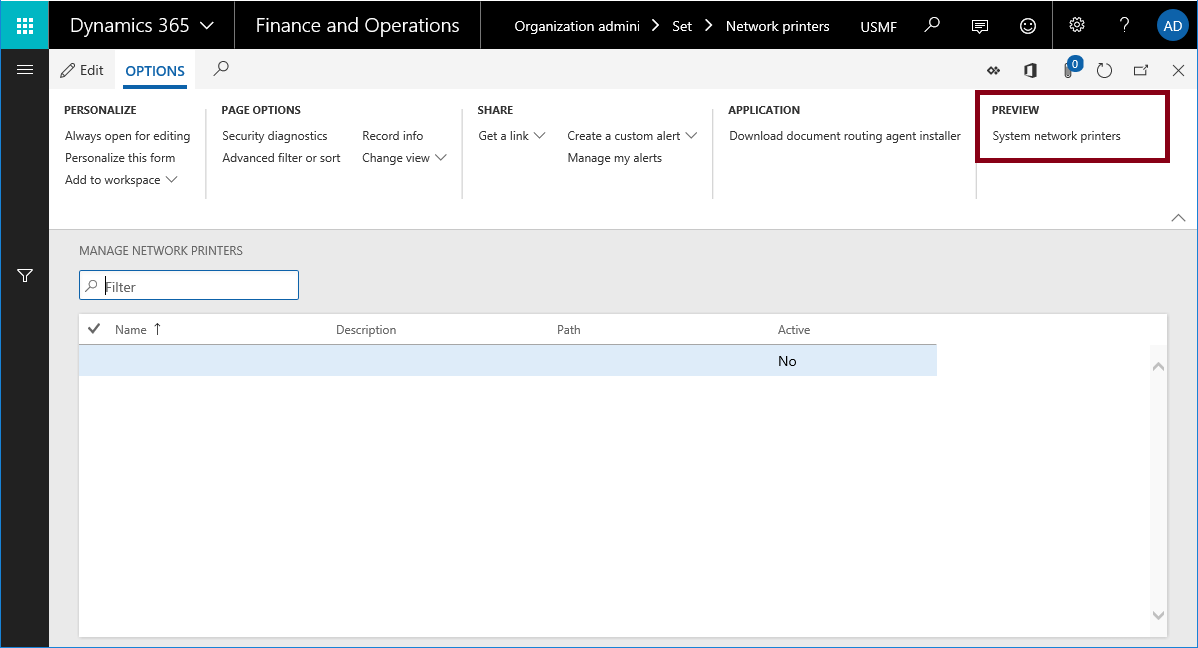
- Select Organization administration > Setup > Network printers.
- On the Action Pane, in the Preview group, select System network printers.
- On the System network printers page, register the network printers with the service by using the DRA. You see the configuration information for each legal entity in the organization.
Supported operations
Currently, the System administration utility supports only delete operations. Here are the results when you delete network printers by using the System network printers page:
- You delete all documents in the printer queue that are directed at the printer.
- You delete the network printer for all legal entities in the organization.
- Domain admins can register devices by using the old printer name.
- Organization admins can continue to use the existing tools to manage network printer settings for a single legal entity.