opomba,
Dostop do te strani zahteva pooblastilo. Poskusite se vpisati alispremeniti imenike.
Dostop do te strani zahteva pooblastilo. Poskusite lahko spremeniti imenike.
Azure API Management
Azure DevOps
Azure Pipelines
GitHub
APIOps is a methodology that applies the concepts of GitOps and DevOps to API deployment. This architecture demonstrates how to use APIOps CLI to extract, review, and promote Azure API Management configuration through a Git-based workflow. Use this approach to manage the API lifecycle, improve API quality, and maintain an auditable record of approved changes.
Architecture
The following diagram illustrates the high-level APIOps CLI configuration promotion workflow. Teams review API Management artifacts in Git, and then continuous integration and continuous delivery (CI/CD) pipelines promote the approved configuration to target API Management environments.
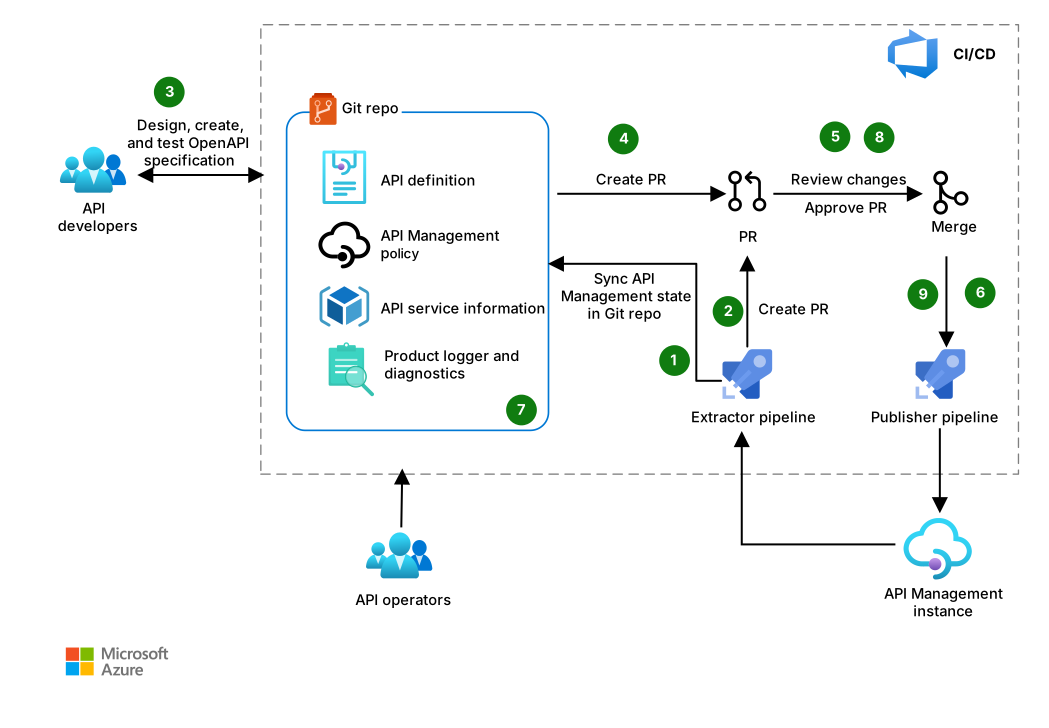
Download a Visio file of this architecture.
Workflow
API Management configuration starts by either extracting an existing API Management configuration or by authoring CLI-compatible API Management artifacts. The operational workflow starts with either of these artifact inputs. Both paths lead to the same pull request, validation, approval, and deployment process:
(A) Extract-first: An API operator runs
apiops extractagainst an existing API Management instance to create API Management artifact files in their local Git checkout branch. The operator uses these artifacts to propose a baseline or capture an approved configuration change.(B) Code-first: An API developer authors or updates APIOps CLI-compatible API specifications, information files, policies, and related API Management artifacts in their local Git checkout branch.
Use the following lifecycle for either input:
Create a configuration change. After the initial extraction or code-first artifact creation checkin, the API configuration repository becomes the authoritative source of truth for API Management configuration artifacts. The repository maintains the version history and audit record for each deployment. To make a change, an API operator or developer creates a branch from the protected branch in the API configuration repository and makes one logical change related to the API.
Review and validate the change. The operator or developer opens a pull request to merge their branch into a protected branch. The required owners and reviewers of the API contract, policies, and API Management configuration review the pull request. The CI/CD system runs the following checks and tests:
- API-specification linting
- Breaking-change detection against the approved contract
- Security scanning of specifications and repository content
- API tests that verify expected behavior, authentication, policy effects, and back-end dependencies
These checks don't require Microsoft tools. The team uses whatever suitable tools meet its organization's support, security, and licensing requirements.
Approve the immutable deployment input. Required owners or reviewers approve the pull request, and an authorized repository maintainer merges the reviewed changes after all required checks and reviews pass. The merged, immutable commit and its protected-branch artifacts become the repository's auditable source of truth.
The team protects the protected repo branches from direct pushes, requires environment or service-connection approvals for sensitive targets, and uses separate least-privilege identities for extraction and publishing. They record the approved commit with its pull request, reviews, and validation results for auditability.
Preview the deployment. The CI/CD pipeline runs
apiops publish --dry-runfor the approved commit using the same target and override file without publishing. The release approver reviews the resources that the dry run creates, updates, deletes, or skips. The team treats a successful dry run as a deployment gate, not a substitute for automated API tests.Publish and promote. After the dry run passes validation, the CI/CD pipeline uses
apiops publishto publish the same reviewed commit. For multiple environments, the platform team keeps shared artifacts stable and uses reviewed override configuration files for values such as back-end URLs, resource IDs, and secret references. The team promotes the commit through nonproduction before production, and prevents more than one pipeline from writing to the same target at the same time.Note
The configuration accepts workspace child overrides, but doesn't apply them when you publish. Publishing applies overrides only to the workspace container itself. Don't rely on workspace child overrides to promote environment-specific workspace APIs, backends, named values, or other child resources. Validate an alternate promotion approach for those resources, or defer the promotion until the Workspace-scoped override properties not applied known issue is resolved.
Validate and reconcile after deployment. After publishing, the operations team runs automated smoke and regression tests, monitors API Management and back-end health, and compares the deployed result with the approved commit. The team investigates and resolves unexpected changes through pull requests rather than editing production directly.
If an API operator makes an approved emergency change directly in API Management, the operator must run an extraction in a Git checkout, review and commit the artifact change on their branch, push the branch, and open a pull request. The required owners or reviewers must review and approve the pull request, and an authorized repository maintainer must merge it so that the repository remains authoritative.
Components
API Management is a managed service that creates consistent API gateways for back-end services. In this architecture, it provides the source configurations that the APIOps CLI extracts and the target environments where the CLI publishes approved API definitions, policies, products, diagnostics, named values, and other supported configuration.
APIOps CLI is an open-source project that provides tooling for an opinionated APIOps approach. In this architecture, it extracts API Management configuration to artifact files, publishes artifacts to API Management, and can scaffold CI/CD workflows.
A Git repository stores API Management artifacts and, where applicable, API contracts. It provides the review history and the approved source of truth for pipeline deployments.
A CI/CD system runs validation, extraction, and publishing by using a workload identity or other supported noninteractive credential. In this architecture, GitHub Actions or Azure Pipelines define the CI/CD workflows.
Alternatives
You can substitute or augment this architecture with other Azure services or approaches, depending on your workload's functional and nonfunctional requirements. Consider the following alternatives and trade-offs.
Bicep or Terraform and APIOps can serve different parts of the same solution. A team that owns both the API Management configuration and infrastructure can use infrastructure as code (IaC) to provision the API Management service and its supporting infrastructure, and use the same IaC pipeline to manage API Management configuration. Choose this approach when the infrastructure and configuration change and deploy together, and when parameters can express the differences between environments.
Use the APIOps pattern when API definitions, policies, and related configuration have separate owners or a release lifecycle that's independent of the service infrastructure. APIOps is also appropriate when you need to extract existing configuration, review API-focused artifacts, or promote the same approved configuration across multiple environments or API Management instances. More frequent API and policy changes or more environments increase the value of this dedicated workflow.
These factors don't have fixed thresholds. Base the decision primarily on ownership, review requirements, and deployment boundaries. For a smaller API estate with a low rate of change, begin with a manual pull request workflow and add extraction schedules or deployment automation only after the repository baseline and approval process are established.
Scenario details
APIOps uses version control to manage APIs and create an audit trail of changes to API definitions, policies, products, diagnostics, and other API Management configuration. Reviewing changes earlier and more often helps teams identify deviations from API standards before deployment. As more APIs use the same process, teams can improve consistency across their API estate.
This workflow deploys API Management configuration to an API Management instance. It doesn't deploy API back ends, application compute or data resources, networking, or the API Management service infrastructure. Use separate governed IaC and application pipelines to deploy those layers.
This solution helps teams:
- Maintain an overview of environments and API Management instances.
- Track critical changes to APIs and policies.
- Create an audit trail for approved deployments.
- Reconcile approved changes that originate outside the repository.
Choose artifact sources and ownership
Choose from the following ways that artifacts enter the repository and who owns them before you automate deployment:
- Extract-first: Extract a known-good API Management instance to establish the initial artifact baseline. Review the checked-in generated artifacts before treating the repository as the source of truth.
- Code-first: Keep the API contract, such as an OpenAPI description, with the application source or the APIOps repository. Define who transforms that contract into the API Management artifacts that the pipeline publishes. Validate the intended import and artifact workflow with a nonproduction API Management instance. Don't assume that an arbitrary source layout is directly consumable by the CLI.
- Shared responsibility: Establish whether API developers, platform operators, or both own changes to policies, products, diagnostics, named values, and API definitions. After the baseline is accepted, route every change through the same repository and review process.
Potential use cases
Organizations that develop and manage APIs, including organizations with a single API exposed through API Management.
Highly regulated sectors such as insurance, banking, finance, and government that need traceable review and deployment records.
Considerations
These considerations implement the pillars of the Azure Well-Architected Framework, which is a set of guiding tenets that you can use to improve the quality of a workload. For more information, see Well-Architected Framework.
Reliability
Reliability helps ensure that your application can meet the commitments that you make to your customers. For more information, see Design review checklist for Reliability.
For nonbreaking API changes, use API Management revisions to deploy and test a noncurrent revision before you make it current. If validation fails after release, restore the previous revision as current. Use API versions for breaking contract changes so existing consumers can continue to use the earlier version.
Coordinate API Management configuration changes with the deployment strategy for each API back end. Reverting an APIOps commit restores only the configuration represented by that commit. It doesn't restore an incompatible or unavailable back end. Record the APIOps commit, API Management revision, and back-end release that form each known-good deployment. Test the complete rollback procedure in a nonproduction environment, including policies, named values, secret references, dependencies, and back-end compatibility.
Security
Security provides assurances against deliberate attacks and the misuse of valuable data and systems. For more information, see Design review checklist for Security.
Use the repository and pipeline as the normal path for applying API Management changes. Developers and operators don't need persistent write access to production API Management instances. Grant elevated access only when necessary, and only for a limited time. Reconcile any resulting change to the repository.
Use the following mechanisms to protect the Git repository that stores API Management artifacts:
- Pull request review: Protect branches that deploy configuration and require review by the appropriate reviewers.
- Credential isolation: Prefer federated workload identity if available. Store environment-specific secrets in an approved secret store or repository environment, not in artifacts or pipeline files.
- Commit integrity: Require signed commits to verify commit provenance. Configure branch protections to prevent force pushes and branch deletion, require multifactor authentication for users to approve or merge changes, and preserve the commit and pull request history for deployments.
- Artifact review: Inspect extraction output and publish inputs for secrets, redacted markers, and unintended environment-specific values. Validate that a change doesn't broaden API access or weaken a policy.
Manage the APIOps CLI as a repository dependency. Pin @azure-tools/apiops-cli in package.json to a tested version, commit the lock file, and use npm ci. Review generated identity settings, variables, triggers, and protection rules before enabling a production pipeline.
Cost Optimization
Cost Optimization focuses on ways to reduce unnecessary expenses and improve operational efficiencies. For more information, see Design review checklist for Cost Optimization.
APIOps CLI is open-source software, but this scenario incurs costs for the API Management instances and the selected source-control and CI/CD platform. A single fixed estimate isn't provided because API Management prices vary by region, tier, unit count, capacity model, availability-zone or multiregion configuration, and usage. CI/CD charges also depend on runner type, included minutes, concurrency, storage, and retention.
Create a scenario-specific estimate in the Azure pricing calculator and record the following assumptions with the architecture decision:
| Estimate input | Assumption to record |
|---|---|
| API Management region | The deployment region for each development, test, staging, and production instance. |
| Tier and capacity | The tier or v2 tier, number of units or gateways, and operating hours for each environment. |
| Resiliency | Any availability-zone or additional-region deployment, including the units in each location. |
| Usage-based charges | Expected requests or operations and any applicable workspace, self-hosted gateway, networking, monitoring, or data-transfer charges. |
| CI/CD platform | GitHub-hosted, self-hosted, or Azure Pipelines agents. Expected pipeline runs, duration, concurrency, storage, and log or artifact retention. |
| Source control and licenses | Number of users and any paid GitHub or Azure DevOps plan features. |
Use the current API Management pricing details to select the applicable billing model. For CI/CD and source-control assumptions, see Azure DevOps pricing and GitHub pricing. Export or capture the calculator estimate, its currency, the pricing date, and all assumptions so reviewers can reproduce and update it. Recalculate before deployment and when regions, tiers, unit counts, environments, or pipeline usage change.
Operational Excellence
Operational Excellence covers the operations processes that deploy an application and keep it running in production. For more information, see Design review checklist for Operational Excellence.
APIOps makes deployments repeatable and creates a commit history for post-change analysis. Tag or otherwise record the commit that each environment receives, retain pipeline logs, and monitor the API Management instance and dependent APIs after deployment.
For multiple environments, promote the same reviewed artifact commit through development, staging, and production. Use environment overrides only for values that must differ between environments, and review those files with the same care as the artifacts. Workspace child overrides aren't applied at publish time, so don't use them for environment promotion. Test rollback procedures before an incident occurs. A Git revert still requires validation and a controlled publish to restore API Management.
The CLI provides init, extract, and publish commands and can scaffold GitHub Actions or Azure DevOps pipelines. Review command details in the APIOps CLI documentation.
Migrate safely from the legacy APIOps Toolkit
If your APIOps process uses the legacy APIOps Toolkit, plan to upgrade. That approach uses separate Extractor and Publisher binaries and pipeline templates. The APIOps CLI uses a single Node.js CLI, but its artifact format is designed to be compatible with existing toolkit artifacts. Treat migration as a controlled cutover, not as an in-place production upgrade.
Tag the known-good toolkit artifacts and pipeline, and preserve the existing publisher as a rollback option. Don't change the legacy publisher and introduce the new publisher in the same deployment.
In a migration branch, use the latest APIOps CLI version and run
apiops initwithout using--force. The command detects conflicting files and exits rather than overwriting them. Compare and deliberately integrate the generated pipelines, identity guidance, filters, and override files.Use the artifacts with
apiops publish --dry-runand the target environment's overrides against a nonproduction API Management instance. Review the resources that the CLI would create, update, or delete. Test one controlled publish and validate the deployed APIs, policies, named values, and dependencies.Don't use workspace child overrides, which aren't applied at publish time, as part of the migration or promotion design. Validate an alternate promotion approach for affected child resources, or postpone their migration until the Workspace-scoped override properties not applied known issue is resolved.
At cutover, allow only one publisher to write to an API Management instance. Disable the legacy publisher trigger before enabling the CLI publisher. Deploy a reviewed commit, and monitor the result. Keep the tagged Toolkit pipeline and artifact baseline until the new workflow completes a successful release cycle.
For compatibility details and command-by-command migration examples, see Migration from APIOps Toolkit.
Deploy this scenario
Follow the APIOps CLI Documentation in the APIOps CLI GitHub repository. Start with a nonproduction API Management instance and use the current APIOps CLI release guidance.
Contributors
Microsoft maintains this article. The following contributors wrote this article.
Principal authors:
- Pat Altimore | Senior Content Developer
- Wael Kdouh | Senior Principal Solution Architect
- Rishabh Saha | Senior Principal Solution Architect
To see nonpublic LinkedIn profiles, sign in to LinkedIn.