opomba,
Dostop do te strani zahteva pooblastilo. Poskusite se vpisati alispremeniti imenike.
Dostop do te strani zahteva pooblastilo. Poskusite lahko spremeniti imenike.
This page explains how to configure your Azure DevOps pipelines to authenticate the Databricks CLI and make API calls to Azure Databricks.
Before you begin
Complete these steps before you configure Azure DevOps authentication:
Create the service principal in Azure and add it to your Azure Databricks workspace with appropriate permissions. Without this step, authentication fails even if your pipeline is configured correctly.
For Microsoft Entra ID managed service principals, create a Microsoft Entra ID application in Azure, then add it to your workspace. See Service principals and Manage service principals.
Add a step to your pipeline to install the Databricks CLI on the agent:
- script: |
    curl -fsSL https://raw.githubusercontent.com/databricks/setup-cli/main/install.sh | sh
  displayName: 'Install Databricks CLI'
Tip
To pin the CLI installation to a specific version instead of using the latest, replace
mainwith a version tag (for example,v0.224.0).
Choose an authentication method
Azure DevOps manages authentication through service connections. Access them in the Azure DevOps portal under Project settings > Service connections.
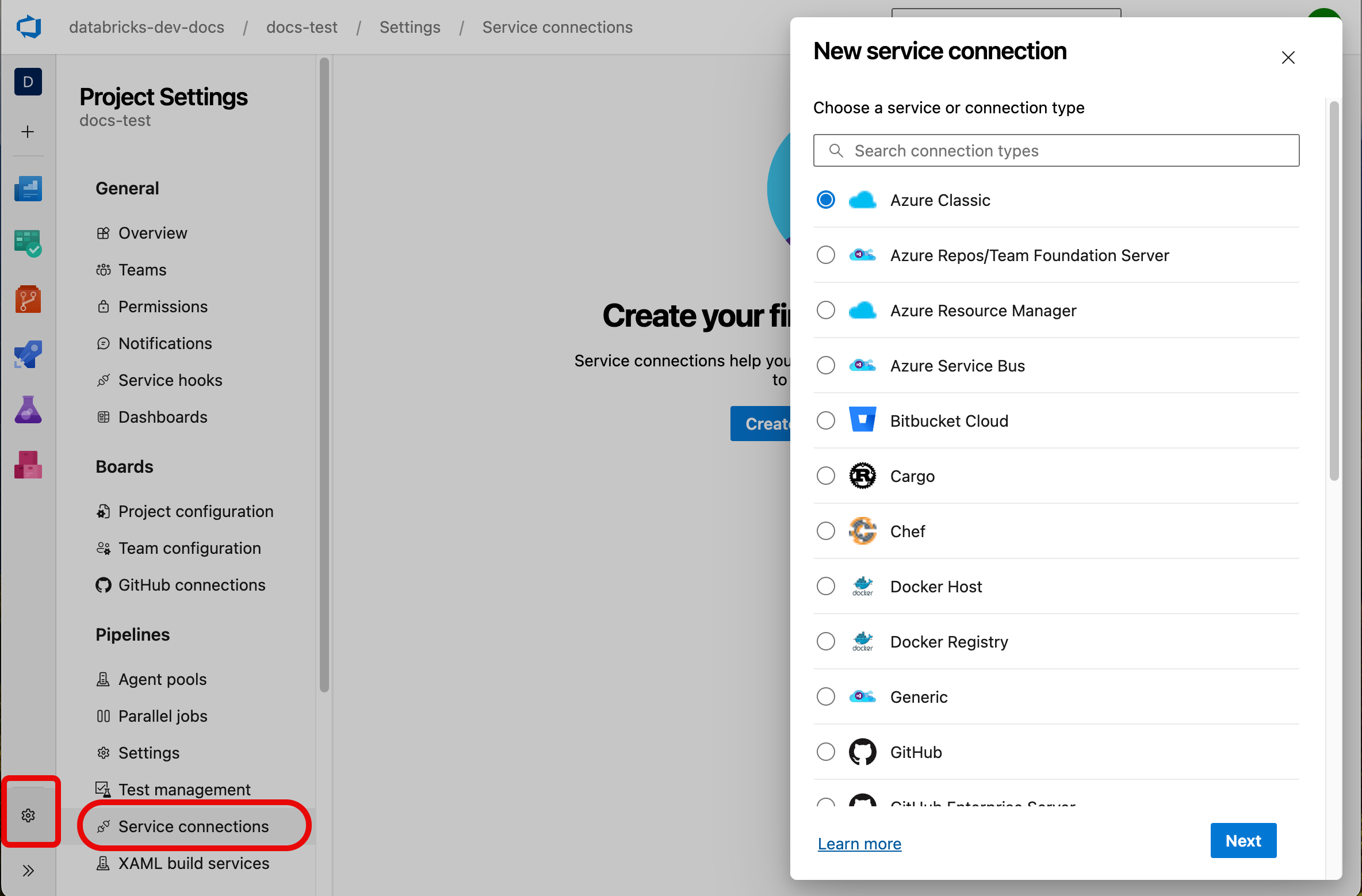
To authenticate the Databricks CLI, use the Azure Resource Manager service connection type with one of these methods:
| Method | Description | Best for |
|---|---|---|
| Workload identity federation (recommended) | Uses OpenID Connect (OIDC) to acquire tokens. Requires configuring Azure DevOps-generated issuer and subject identifier with your service principal. | Secure, secret-free authentication |
| Service principal with client secret | Uses a client ID and secret to generate short-lived OAuth tokens. Requires generating a secret for the service principal. | Scenarios requiring shared credentials across tasks |
| Managed identity | Uses the identity assigned to the VM or container running the pipeline. Only applicable for self-hosted runners. See the Azure documentation. | Self-hosted runners with assigned identities |
Note
Use workload identity federation when possible. It doesn't rely on secrets, so it's more secure than other methods. It works automatically with the AzureCLI@2 task without manual configuration. See Create a service connection that uses workload identity federation.
Configure Azure CLI authentication
The Databricks CLI uses Azure CLI for authentication by default. All Databricks CLI commands must run inside an AzureCLI@2 task, which means each task authenticates independently. This introduces some latency but requires minimal configuration.
- task: AzureCLI@2
  inputs:
    azureSubscription: <your-service-connection-name>
    useGlobalConfig: true
    scriptType: bash
    scriptLocation: inlineScript
    inlineScript: |
      export DATABRICKS_HOST=https://adb-<workspace-id>.<region>.azuredatabricks.net
      databricks bundle deploy
Update these values:
azureSubscription: The name of your Azure Resource Manager service connection.useGlobalConfig: Required. Ensures subprocesses spawned bydatabricks bundlecommands can access the authenticated session.DATABRICKS_HOST: Set this if it's not already defined in your bundle configuration or a previous step.
Configure client secret authentication
Use a client secret when you need to share credentials across multiple tasks or when Azure CLI authentication adds too much latency.
This approach retrieves authentication details from the service connection in one task, then exports them as job-scoped environment variables for subsequent tasks.
- task: AzureCLI@2
  inputs:
    azureSubscription: <your-service-connection-name>
    addSpnToEnvironment: true
    scriptType: bash
    scriptLocation: inlineScript
    inlineScript: |
      echo "##vso[task.setvariable variable=ARM_CLIENT_ID]${servicePrincipalId}"
      echo "##vso[task.setvariable variable=ARM_CLIENT_SECRET]${servicePrincipalKey}"
      echo "##vso[task.setvariable variable=ARM_TENANT_ID]${tenantId}"

- script: |
    export DATABRICKS_HOST=https://adb-<workspace-id>.<region>.azuredatabricks.net
    databricks bundle deploy
Note:
- The
addSpnToEnvironmentkey exposesservicePrincipalId,servicePrincipalKey, andtenantIdto the inline script. - The
##vsocommands promote task-scoped variables to job-scoped variables that the Databricks CLI automatically recognizes. - By default,
ARM_CLIENT_SECRETis accessible to all subsequent steps. To restrict access, addissecret=trueto the variable definition, then explicitly pass it to each step that needs it. The secret is masked in logs regardless of this setting.
For a complete example, see Authorize a Microsoft Entra service principal to access Git folders.
Configure managed identity authentication
Managed identity authentication relies on the VM or container configuration rather than pipeline tasks. This method doesn't require the AzureCLI@2 task.
- script: |
    export DATABRICKS_AZURE_RESOURCE_ID=/subscriptions/<subscription-id>/resourceGroups/<resource-group>/providers/Microsoft.Databricks/workspaces/<workspace-name>
    export ARM_CLIENT_ID=<managed-identity-client-id>
    export ARM_USE_MSI=true
    export DATABRICKS_HOST=https://adb-<workspace-id>.<region>.azuredatabricks.net
    databricks current-user me
Update these values:
DATABRICKS_AZURE_RESOURCE_ID: Find this value under Properties for your workspace in the Azure portal.ARM_CLIENT_ID: The client ID of the managed identity.DATABRICKS_HOST: Optional. If not set, the value is inferred fromDATABRICKS_AZURE_RESOURCE_ID.
The managed identity must have the Contributor role on the Azure Databricks workspace.