Белешка
Приступ овој страници захтева ауторизацију. Можете покушати да се пријавите или промените директоријуме.
Приступ овој страници захтева ауторизацију. Можете покушати да промените директоријуме.
The Durable Extension for Microsoft Agent Framework brings durable execution to agents, multi-agent orchestrations, and Microsoft Agent Framework workflows. You can use it to persist agent sessions, checkpoint orchestration and workflow progress, recover from failures, and scale work across distributed hosts without changing your core agent logic.
The extension supports two hosting models in C# and Python:
- Azure Functions for managed, serverless hosting with the Azure Functions programming model.
- Bring-your-own-compute / self-hosted for running durable agents and workflows in your own worker process, service, container, Kubernetes environment, or existing app infrastructure.
Overview
Durable agents combine the Agent Framework programming model with Durable Task infrastructure, such as the Durable Task Scheduler, to create agents that:
- Persist state automatically across requests and worker executions
- Resume after failures without losing conversation context or repeating completed work
- Scale across distributed, stateless workers based on demand
- Orchestrate multi-agent workflows with reliable execution guarantees
- Checkpoint Agent Framework workflows built with the graph-based workflow model
- Pause for human input or external events without consuming compute or model tokens while waiting
- Stream responses reliably when configured with a reliable stream broker, such as Redis
- Manage session lifecycle with session time-to-live (TTL) cleanup and dashboard-based monitoring
When to use durable agents
Choose durable agents when you need:
- Persistent conversation state: Agent sessions survive process crashes, restarts, and scale-out events
- Complex orchestrations: Coordinate multiple agents with deterministic, reliable workflows that can run for days or weeks
- Event-driven orchestration: Integrate with triggers, queues, webhooks, timers, or existing application events
- Automatic conversation state: Agent conversation history is automatically managed and persisted without requiring explicit state handling in your code
- Durable Agent Framework workflows: Make graph-based Microsoft Agent Framework workflows durable so each step can be checkpointed and resumed
- Long-lived sessions: Keep useful conversations available while using session time-to-live (TTL) cleanup to remove idle sessions automatically
- Reliable real-time responses: Stream token output durably for applications that need real-time UX with delivery guarantees
This hosting approach differs from managed service-based agent hosting (such as Foundry Agent Service), which provides fully managed infrastructure without requiring you to deploy or manage worker hosts. Durable agents are ideal when you need the flexibility of code-first deployment combined with durable state management.
Choose a hosting model
| Hosting model | Choose it when you need |
|---|---|
| Azure Functions | A managed, serverless hosting model; built-in scale-out and scale-to-zero; Azure Functions triggers and bindings; HTTP endpoints generated by the Functions programming model; the MCP server trigger; and minimal host infrastructure management. |
| Bring-your-own-compute / self-hosted | More control over the host process, deployment environment, runtime lifecycle, infrastructure, networking, authentication, or integration with an existing app or service. Use this model for containers, Kubernetes, long-running workers, console apps, custom services, or non-Functions hosting environments. |
When hosted in the Azure Functions Flex Consumption hosting plan, agents can scale to thousands of instances or to zero instances when not in use, allowing you to pay only for the compute you need. In self-hosted scenarios, your own host controls process lifetime, scaling, networking, and deployment.
Getting started
In a .NET project, choose the package set for your hosting model.
For Azure Functions hosting, add the Azure Functions integration package and the Functions worker packages.
dotnet add package Azure.AI.Projects --prerelease
dotnet add package Azure.Identity
dotnet add package Microsoft.Agents.AI.Foundry --prerelease
dotnet add package Microsoft.Agents.AI.Hosting.AzureFunctions --prerelease
Note
In addition to these packages, ensure your project uses version 2.2.0 or later of the Microsoft.Azure.Functions.Worker package.
For bring-your-own-compute hosting, add the base Durable Task integration package and the Durable Task Scheduler worker/client packages used by your host:
dotnet add package Microsoft.Agents.AI.DurableTask --prerelease
dotnet add package Microsoft.DurableTask.Client.AzureManaged
dotnet add package Microsoft.DurableTask.Worker.AzureManaged
dotnet add package Microsoft.Extensions.Hosting
In a Python project, choose the package for your hosting model.
For Azure Functions hosting, install the Azure Functions integration package.
pip install azure-identity
pip install agent-framework-azurefunctions --pre
For bring-your-own-compute hosting, install the Durable Task integration package.
pip install azure-identity
pip install agent-framework-durabletask --pre
Azure Functions hosting
With the Durable Extension, you can deploy and host Microsoft Agent Framework agents in Azure Functions with built-in HTTP endpoints and orchestration-based invocation. Azure Functions provides event-driven, pay-per-invocation pricing with automatic scaling and minimal infrastructure management.
When you configure a durable agent in Azure Functions, the extension automatically creates HTTP endpoints for your agent and manages the underlying infrastructure for storing conversation state, handling concurrent requests, and coordinating multi-agent workflows. The Azure Functions hosting integration also provides Functions-specific conveniences such as generated REST APIs for sending messages, checking status, and managing sessions, plus triggers such as the MCP server trigger for hosting agents as MCP servers without writing trigger glue.
using System;
using Azure.AI.Projects;
using Azure.Identity;
using Microsoft.Agents.AI;
using Microsoft.Agents.AI.Hosting.AzureFunctions;
using Microsoft.Azure.Functions.Worker.Builder;
using Microsoft.Extensions.Hosting;

var endpoint = Environment.GetEnvironmentVariable("AZURE_OPENAI_ENDPOINT");
var deploymentName = Environment.GetEnvironmentVariable("AZURE_OPENAI_DEPLOYMENT") ?? "gpt-4o-mini";

// Create an AI agent following the standard Microsoft Agent Framework pattern
AIAgent agent = new AIProjectClient(new Uri(endpoint), new DefaultAzureCredential())
    .AsAIAgent(
        model: deploymentName,
        instructions: "You are good at telling jokes.",
        name: "Joker");

// Configure the function app to host the agent with durable thread management
// This automatically creates HTTP endpoints and manages state persistence
using IHost app = FunctionsApplication
    .CreateBuilder(args)
    .ConfigureFunctionsWebApplication()
    .ConfigureDurableAgents(options =>
        options.AddAIAgent(agent)
    )
    .Build();
app.Run();
Warning
DefaultAzureCredential is convenient for development but requires careful consideration in production. In production, consider using a specific credential (e.g., ManagedIdentityCredential) to avoid latency issues, unintended credential probing, and potential security risks from fallback mechanisms.
import os
from agent_framework.azure import AgentFunctionApp
from agent_framework.openai import OpenAIChatCompletionClient
from azure.identity import DefaultAzureCredential

endpoint = os.getenv("AZURE_OPENAI_ENDPOINT")
deployment_name = os.getenv("AZURE_OPENAI_CHAT_COMPLETION_MODEL", "gpt-4o-mini")
api_version = os.getenv("AZURE_OPENAI_API_VERSION")

# Create an AI agent following the standard Microsoft Agent Framework pattern
agent = OpenAIChatCompletionClient(
    azure_endpoint=endpoint,
    model=deployment_name,
    api_version=api_version,
    credential=DefaultAzureCredential()
).as_agent(
    instructions="You are good at telling jokes.",
    name="Joker"
)

# Configure the function app to host the agent with durable thread management
# This automatically creates HTTP endpoints and manages state persistence
app = AgentFunctionApp(agents=[agent])
Bring-your-own-compute / self-hosted hosting
Use bring-your-own-compute hosting when you want the Durable Extension capabilities without using the Azure Functions programming model. In this model, your process starts a Durable Task worker, registers durable agents or workflows, and connects to a Durable Task Scheduler backend. Client code can run in the same process or in a separate service.
Self-hosted workers use the same core Durable Extension capabilities as Azure Functions hosting: checkpointing and resumption, deterministic agent orchestration, durable Agent Framework workflows, human-in-the-loop waits, reliable streaming, idle-session cleanup, dashboard visibility, and distributed execution across stateless worker instances. Your host is responsible for exposing its own APIs, lifecycle management, networking, authentication, and deployment model.
Configure your host with the base Durable Task integration package. Use ConfigureDurableAgents for durable agents and ConfigureDurableWorkflows for graph-based Microsoft Agent Framework workflows.
string connectionString = Environment.GetEnvironmentVariable("DURABLE_TASK_SCHEDULER_CONNECTION_STRING")
    ?? "Endpoint=http://localhost:8080;TaskHub=default;Authentication=None";

IHost host = Host.CreateDefaultBuilder(args)
    .ConfigureServices(services =>
    {
        services.ConfigureDurableAgents(
            options => options.AddAIAgent(agent),
            workerBuilder: builder => builder.UseDurableTaskScheduler(connectionString),
            clientBuilder: builder => builder.UseDurableTaskScheduler(connectionString));
    })
    .Build();

await host.StartAsync();
See the .NET Durable Agents console samples and .NET Durable Workflows console samples for runnable self-hosted examples.
Use the Durable Task integration package to run a worker process that registers agents and listens for requests. Client code can connect to the same Durable Task Scheduler task hub from another process.
from agent_framework.azure import DurableAIAgentWorker
from durabletask.azuremanaged.worker import DurableTaskSchedulerWorker

worker = DurableTaskSchedulerWorker(
    host_address="http://localhost:8080",
    secure_channel=False,
    taskhub="default",
)

agent_worker = DurableAIAgentWorker(worker)
agent_worker.add_agent(agent)

worker.start()
See the Python Durable Task samples for worker-client examples, including single-agent hosting, multi-agent routing, reliable streaming, orchestration chaining, concurrency, conditionals, and human-in-the-loop patterns.
Durable Agent Framework workflows
Durability is not limited to durable orchestrations. Microsoft Agent Framework workflows built with the graph-based workflow model can also be made durable. The Durable Extension checkpoints workflow execution so completed executor and agent steps are not repeated after a process restart or failure.
Use durable orchestrations when you want imperative coordination with code-based branching, timers, activities, and external events. Use durable Agent Framework workflows when you want a declarative graph of executors and agents with typed routing, fan-out/fan-in, conditional edges, workflow events, shared state, sub-workflows, or human-in-the-loop request ports.
Note
Durable Agent Framework workflows are different from checkpoint storage in standard workflows. Checkpoint storage helps resume a workflow run in the Agent Framework runtime. The Durable Extension runs the workflow on Durable Task infrastructure so workflow progress is checkpointed and recovered across distributed durable workers. For standard workflow checkpointing, see Checkpoints and resuming.
Register graph-based workflows with ConfigureDurableWorkflows for self-hosted apps or ConfigureDurableWorkflows on the Functions app builder for Azure Functions hosting.
See the .NET Durable Workflows Azure Functions samples and .NET Durable Workflows console samples.
Durable workflow samples are available for Azure Functions hosting, including shared state, no shared state, parallel workflow execution, and human-in-the-loop workflows.
See the Python Azure Functions samples for durable agent, orchestration, MCP server, and workflow examples.
Samples
| Language | Hosting model | Samples |
|---|---|---|
| C# | Azure Functions | .NET Durable Agents - Azure Functions, .NET Durable Workflows - Azure Functions |
| C# | Bring-your-own-compute / self-hosted | .NET Durable Agents - Console Apps, .NET Durable Workflows - Console Apps |
| Python | Azure Functions | Python Azure Functions samples |
| Python | Bring-your-own-compute / self-hosted | Python Durable Task samples |
Stateful agent threads with conversation history
Agents maintain persistent threads that survive across multiple interactions. Each thread is identified by a unique thread ID and stores the complete conversation history in durable storage managed by Durable Task infrastructure, such as the Durable Task Scheduler.
This pattern enables conversational continuity where agent state is preserved through process crashes and restarts, allowing full conversation history to be maintained across user threads. The durable storage ensures that even if a host process restarts or work resumes on a different worker instance, the conversation seamlessly continues from where it left off.
Use session time-to-live (TTL) cleanup for workloads that need durable continuity during active use but should automatically clean up idle conversations. TTL-based cleanup prevents unused sessions and conversation history from accumulating indefinitely while preserving active session state.
The following Azure Functions example demonstrates multiple HTTP requests to the same thread, showing how conversation context persists. In self-hosted apps, use the Durable Task client APIs from your own process or service.
# First interaction - start a new thread
curl -X POST https://your-function-app.azurewebsites.net/api/agents/Joker/run \
  -H "Content-Type: text/plain" \
  -d "Tell me a joke about pirates"

# Response includes thread ID in x-ms-thread-id header and joke as plain text
# HTTP/1.1 200 OK
# Content-Type: text/plain
# x-ms-thread-id: @dafx-joker@263fa373-fa01-4705-abf2-5a114c2bb87d
#
# Why don't pirates shower before they walk the plank? Because they'll just wash up on shore later!

# Second interaction - continue the same thread with context
curl -X POST "https://your-function-app.azurewebsites.net/api/agents/Joker/run?thread_id=@dafx-joker@263fa373-fa01-4705-abf2-5a114c2bb87d" \
  -H "Content-Type: text/plain" \
  -d "Tell me another one about the same topic"

# Agent remembers the pirate context from the first message and responds with plain text
# What's a pirate's favorite letter? You'd think it's R, but it's actually the C!
Agent state is maintained in durable storage, enabling distributed execution across multiple instances. Any instance can resume an agent's execution after interruptions or failures, ensuring continuous operation.
Reliable streaming
The Durable Extension supports reliable streaming for applications that need real-time token delivery with durable delivery guarantees. Streaming can be used with the core extension in both hosting models, but distributed hosts need a reliable stream broker, such as Redis, so token streams can be delivered consistently across process restarts, reconnects, or worker changes.
Use reliable streaming when the user experience depends on incremental responses, but the workload still needs durable execution semantics. For runnable examples, see the Python Durable Task samples, which include reliable streaming patterns.
Deterministic multi-agent orchestrations
The Durable Extension supports building deterministic workflows that coordinate multiple agents using Durable Task orchestrations. In Azure Functions, these use Durable Functions orchestrations; in bring-your-own-compute hosts, they run through the Durable Task worker and client you configure.
Orchestrations are code-based workflows that coordinate multiple operations (like agent calls, external API calls, or timers) in a reliable way. Deterministic means the orchestration code executes the same way when replayed after a failure, making workflows reliable and debuggable—when you replay an orchestration's history, you can see exactly what happened at each step.
Orchestrations execute reliably, surviving failures between agent calls, and provide predictable and repeatable processes. This makes them ideal for complex multi-agent scenarios where you need guaranteed execution order and fault tolerance.
Sequential orchestrations
In the sequential multi-agent pattern, specialized agents execute in a specific order, where each agent's output can influence the next agent's execution. This pattern supports conditional logic and branching based on agent responses.
When using agents in orchestrations, you must use the context.GetAgent() API to get a DurableAIAgent instance, which is a special subclass of the standard AIAgent type that wraps one of your registered agents. The DurableAIAgent wrapper ensures that agent calls are properly tracked and checkpointed by the durable orchestration framework.
using Microsoft.Azure.Functions.Worker;
using Microsoft.DurableTask;
using Microsoft.Agents.AI.DurableTask;

[Function(nameof(SpamDetectionOrchestration))]
public static async Task<string> SpamDetectionOrchestration(
    [OrchestrationTrigger] TaskOrchestrationContext context)
{
    Email email = context.GetInput<Email>();

    // Check if the email is spam
    DurableAIAgent spamDetectionAgent = context.GetAgent("SpamDetectionAgent");
    AgentSession spamSession = await spamDetectionAgent.CreateSessionAsync();

    AgentResponse<DetectionResult> spamDetectionResponse = await spamDetectionAgent.RunAsync<DetectionResult>(
        message: $"Analyze this email for spam: {email.EmailContent}",
        session: spamSession);
    DetectionResult result = spamDetectionResponse.Result;

    if (result.IsSpam)
    {
        return await context.CallActivityAsync<string>(nameof(HandleSpamEmail), result.Reason);
    }

    // Generate response for legitimate email
    DurableAIAgent emailAssistantAgent = context.GetAgent("EmailAssistantAgent");
    AgentSession emailSession = await emailAssistantAgent.CreateSessionAsync();

    AgentResponse<EmailResponse> emailAssistantResponse = await emailAssistantAgent.RunAsync<EmailResponse>(
        message: $"Draft a professional response to: {email.EmailContent}",
        session: emailSession);

    return await context.CallActivityAsync<string>(nameof(SendEmail), emailAssistantResponse.Result.Response);
}
When using agents in orchestrations, you must use the app.get_agent() method to get a durable agent instance, which is a special wrapper around one of your registered agents. The durable agent wrapper ensures that agent calls are properly tracked and checkpointed by the durable orchestration framework.
import azure.durable_functions as df
from typing import cast
from agent_framework.azure import AgentFunctionApp
from pydantic import BaseModel

class SpamDetectionResult(BaseModel):
    is_spam: bool
    reason: str

class EmailResponse(BaseModel):
    response: str

app = AgentFunctionApp(agents=[spam_detection_agent, email_assistant_agent])

@app.orchestration_trigger(context_name="context")
def spam_detection_orchestration(context: df.DurableOrchestrationContext):
    email = context.get_input()

    # Check if the email is spam
    spam_agent = app.get_agent(context, "SpamDetectionAgent")
    spam_thread = spam_agent.create_session()

    spam_result_raw = yield spam_agent.run(
        messages=f"Analyze this email for spam: {email['content']}",
        session=spam_thread,
        response_format=SpamDetectionResult
    )
    spam_result = cast(SpamDetectionResult, spam_result_raw.get("structured_response"))

    if spam_result.is_spam:
        result = yield context.call_activity("handle_spam_email", spam_result.reason)
        return result

    # Generate response for legitimate email
    email_agent = app.get_agent(context, "EmailAssistantAgent")
    email_thread = email_agent.create_session()

    email_response_raw = yield email_agent.run(
        messages=f"Draft a professional response to: {email['content']}",
        session=email_thread,
        response_format=EmailResponse
    )
    email_response = cast(EmailResponse, email_response_raw.get("structured_response"))

    result = yield context.call_activity("send_email", email_response.response)
    return result
Orchestrations coordinate work across multiple agents, surviving failures between agent calls. The orchestration context provides methods to retrieve and interact with hosted agents within orchestrations.
Parallel orchestrations
In the parallel multi-agent pattern, you execute multiple agents concurrently and then aggregate their results. This pattern is useful for gathering diverse perspectives or processing independent subtasks simultaneously.
using Microsoft.Azure.Functions.Worker;
using Microsoft.DurableTask;
using Microsoft.Agents.AI.DurableTask;

[Function(nameof(ResearchOrchestration))]
public static async Task<string> ResearchOrchestration(
    [OrchestrationTrigger] TaskOrchestrationContext context)
{
    string topic = context.GetInput<string>();

    // Execute multiple research agents in parallel
    DurableAIAgent technicalAgent = context.GetAgent("TechnicalResearchAgent");
    DurableAIAgent marketAgent = context.GetAgent("MarketResearchAgent");
    DurableAIAgent competitorAgent = context.GetAgent("CompetitorResearchAgent");

    // Start all agent runs concurrently
    Task<AgentResponse<TextResponse>> technicalTask =
        technicalAgent.RunAsync<TextResponse>($"Research technical aspects of {topic}");
    Task<AgentResponse<TextResponse>> marketTask =
        marketAgent.RunAsync<TextResponse>($"Research market trends for {topic}");
    Task<AgentResponse<TextResponse>> competitorTask =
        competitorAgent.RunAsync<TextResponse>($"Research competitors in {topic}");

    // Wait for all tasks to complete
    await Task.WhenAll(technicalTask, marketTask, competitorTask);

    // Aggregate results
    string allResearch = string.Join("\n\n",
        technicalTask.Result.Result.Text,
        marketTask.Result.Result.Text,
        competitorTask.Result.Result.Text);

    DurableAIAgent summaryAgent = context.GetAgent("SummaryAgent");
    AgentResponse<TextResponse> summaryResponse =
        await summaryAgent.RunAsync<TextResponse>($"Summarize this research:\n{allResearch}");

    return summaryResponse.Result.Text;
}
import azure.durable_functions as df
from agent_framework.azure import AgentFunctionApp

app = AgentFunctionApp(agents=[technical_agent, market_agent, competitor_agent, summary_agent])

@app.orchestration_trigger(context_name="context")
def research_orchestration(context: df.DurableOrchestrationContext):
    topic = context.get_input()

    # Execute multiple research agents in parallel
    technical_agent = app.get_agent(context, "TechnicalResearchAgent")
    market_agent = app.get_agent(context, "MarketResearchAgent")
    competitor_agent = app.get_agent(context, "CompetitorResearchAgent")

    technical_task = technical_agent.run(messages=f"Research technical aspects of {topic}")
    market_task = market_agent.run(messages=f"Research market trends for {topic}")
    competitor_task = competitor_agent.run(messages=f"Research competitors in {topic}")

    # Wait for all tasks to complete
    results = yield context.task_all([technical_task, market_task, competitor_task])

    # Aggregate results
    all_research = "\n\n".join([r.get('response', '') for r in results])

    summary_agent = app.get_agent(context, "SummaryAgent")
    summary = yield summary_agent.run(messages=f"Summarize this research:\n{all_research}")

    return summary.get('response', '')
The parallel execution is tracked using a list of tasks. Automatic checkpointing ensures that completed agent executions are not repeated or lost if a failure occurs during aggregation.
Human-in-the-loop orchestrations
Deterministic agent orchestrations can pause for human input, approval, or review without consuming compute resources. Durable execution enables orchestrations to wait for days or even weeks while waiting for human responses. When combined with serverless hosting, all compute resources are spun down during the wait period, eliminating compute costs until the human provides their input.
using Microsoft.Azure.Functions.Worker;
using Microsoft.DurableTask;
using Microsoft.Agents.AI.DurableTask;

[Function(nameof(ContentApprovalWorkflow))]
public static async Task<string> ContentApprovalWorkflow(
    [OrchestrationTrigger] TaskOrchestrationContext context)
{
    string topic = context.GetInput<string>();

    // Generate content using an agent
    DurableAIAgent contentAgent = context.GetAgent("ContentGenerationAgent");
    AgentResponse<GeneratedContent> contentResponse =
        await contentAgent.RunAsync<GeneratedContent>($"Write an article about {topic}");
    GeneratedContent draftContent = contentResponse.Result;

    // Send for human review
    await context.CallActivityAsync(nameof(NotifyReviewer), draftContent);

    // Wait for approval with timeout
    HumanApprovalResponse approvalResponse;
    try
    {
        approvalResponse = await context.WaitForExternalEvent<HumanApprovalResponse>(
            eventName: "ApprovalDecision",
            timeout: TimeSpan.FromHours(24));
    }
    catch (OperationCanceledException)
    {
        // Timeout occurred - escalate for review
        return await context.CallActivityAsync<string>(nameof(EscalateForReview), draftContent);
    }

    if (approvalResponse.Approved)
    {
        return await context.CallActivityAsync<string>(nameof(PublishContent), draftContent);
    }

    return "Content rejected";
}
import azure.durable_functions as df
from datetime import timedelta
from agent_framework.azure import AgentFunctionApp

app = AgentFunctionApp(agents=[content_agent])

@app.orchestration_trigger(context_name="context")
def content_approval_workflow(context: df.DurableOrchestrationContext):
    topic = context.get_input()

    # Generate content using an agent
    content_agent = app.get_agent(context, "ContentGenerationAgent")
    draft_content = yield content_agent.run(
        messages=f"Write an article about {topic}"
    )

    # Send for human review
    yield context.call_activity("notify_reviewer", draft_content)

    # Wait for approval with timeout
    approval_task = context.wait_for_external_event("ApprovalDecision")
    timeout_task = context.create_timer(
        context.current_utc_datetime + timedelta(hours=24)
    )

    winner = yield context.task_any([approval_task, timeout_task])

    if winner == approval_task:
        timeout_task.cancel()
        approval_data = approval_task.result
        if approval_data.get("approved"):
            result = yield context.call_activity("publish_content", draft_content)
            return result
        return "Content rejected"

    # Timeout occurred - escalate for review
    result = yield context.call_activity("escalate_for_review", draft_content)
    return result
Deterministic agent orchestrations can wait for external events, durably persisting their state while waiting for human feedback, surviving failures, restarts, and extended waiting periods. When the human response arrives, the orchestration automatically resumes with full conversation context and execution state intact.
Providing human input
To send approval or input to a waiting orchestration, raise an external event to the orchestration instance using the Durable Task client SDK or the Azure Functions Durable extension endpoints. For example, a reviewer might approve content through a web form that calls:
await client.RaiseEventAsync(instanceId, "ApprovalDecision", new HumanApprovalResponse
{
    Approved = true,
    Feedback = "Looks great!"
});
approval_data = {
    "approved": True,
    "feedback": "Looks great!"
}
await client.raise_event(instance_id, "ApprovalDecision", approval_data)
Cost efficiency
Human-in-the-loop workflows with durable agents are extremely cost-effective when hosted on the Azure Functions Flex Consumption plan. For a workflow waiting 24 hours for approval, you only pay for a few seconds of execution time (the time to generate content, send notification, and process the response)—not the 24 hours of waiting. During the wait period, no compute resources are consumed.
Observability with Durable Task Scheduler
The Durable Task Scheduler (DTS) is the recommended durable backend for your durable agents, offering the best performance, fully managed infrastructure, and built-in observability through a UI dashboard. Azure Functions apps can use other storage backends (like Azure Storage), but DTS is optimized specifically for durable workloads and provides superior performance and monitoring capabilities. Self-hosted workers also use DTS for durable scheduling, state, and dashboard visibility.
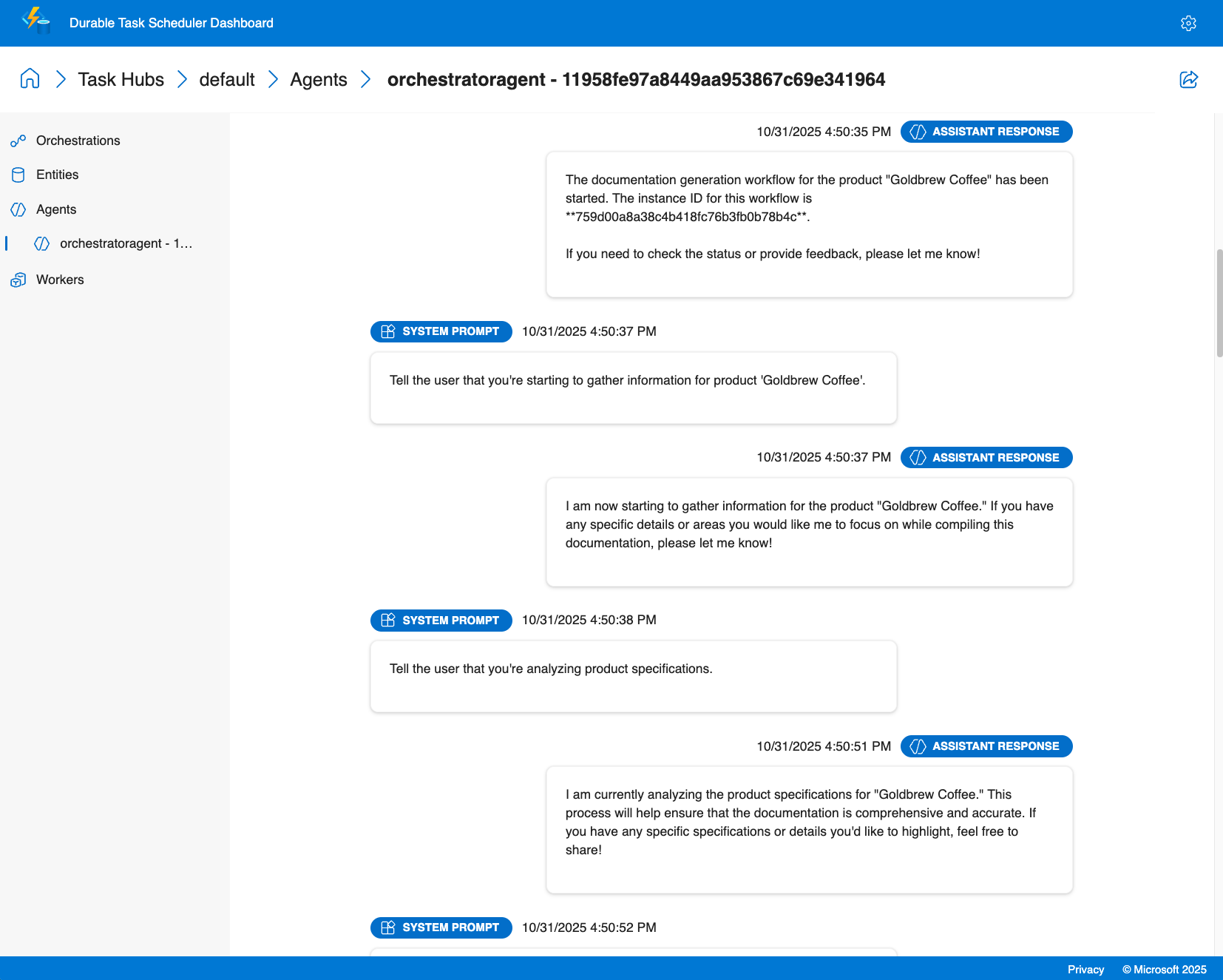
Agent session insights
- Conversation history: View complete chat history for each agent session, including all messages, tool calls, and conversation context at any point in time
- Task timing: Monitor how long specific tasks and agent interactions take to complete
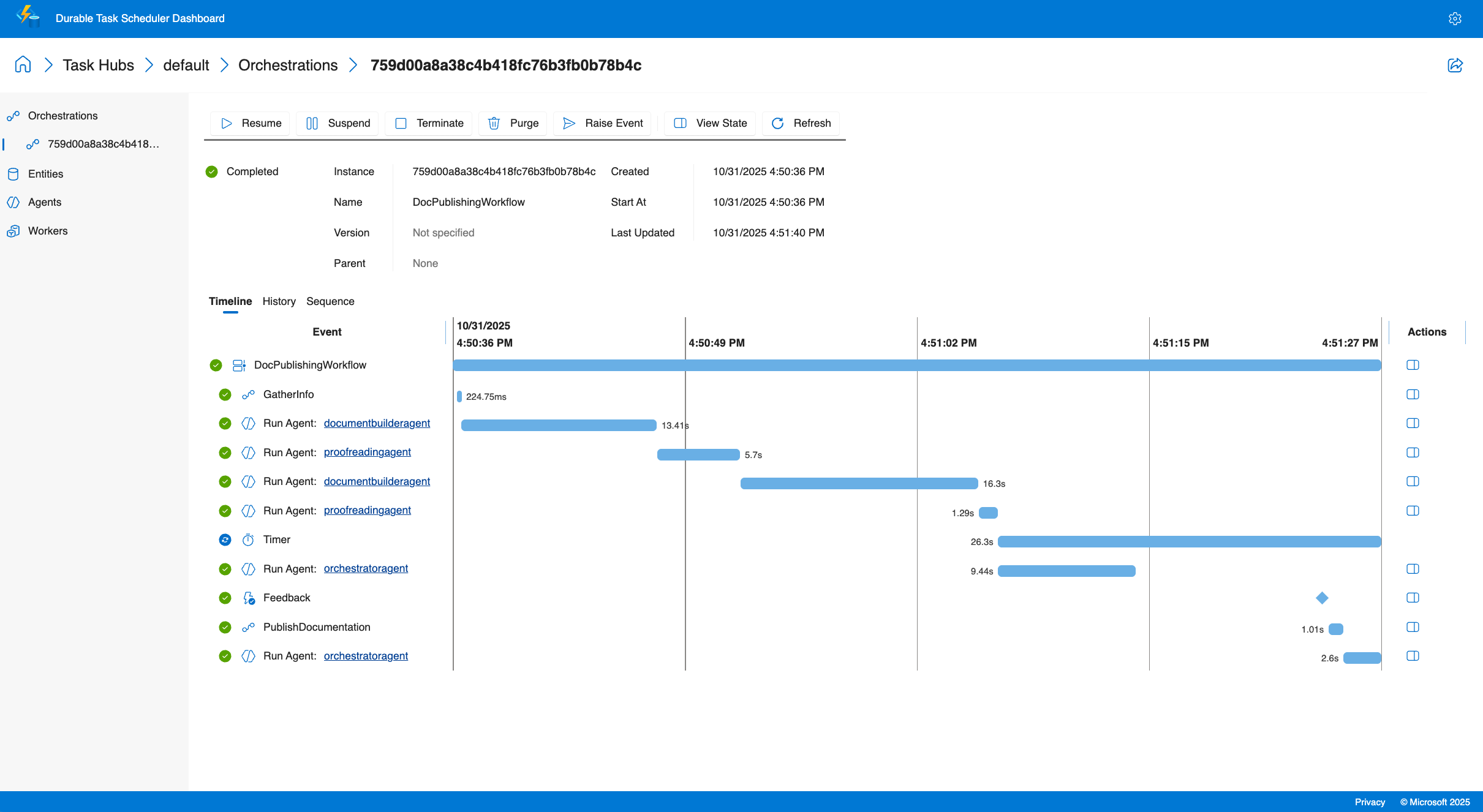
Orchestration insights
- Multi-agent visualization: See the execution flow when calling multiple specialized agents with visual representation of parallel executions and conditional branching
- Execution history: Access detailed execution logs
- Real-time monitoring: Track active orchestrations, queued work items, and agent states across your deployment
- Performance metrics: Monitor agent response times, token usage, and orchestration duration
Debugging capabilities
- View structured agent outputs and tool call results
- Trace tool invocations and their outcomes
- Monitor external event handling for human-in-the-loop scenarios
The dashboard enables you to understand exactly what your agents are doing, diagnose issues quickly, and optimize performance based on real execution data.
Tutorial: Create and run a durable agent with Azure Functions
This tutorial shows you how to create and run a durable AI agent using the Azure Functions hosting model for the Durable Extension. You'll build an Azure Functions app that hosts a stateful agent with built-in HTTP endpoints, and learn how to monitor it using the Durable Task Scheduler dashboard. For self-hosted agents, see the samples.
Prerequisites
Before you begin, ensure you have the following prerequisites:
- .NET 9.0 SDK or later
- Azure Functions Core Tools v4.x
- Azure Developer CLI (azd)
- Azure CLI installed and authenticated
- Docker Desktop installed and running (for local development with Azurite and the Durable Task Scheduler emulator)
- An Azure subscription with permissions to create resources
Note
Microsoft Agent Framework is supported with all actively supported versions of .NET. For the purposes of this sample, we recommend the .NET 9 SDK or a later version.
- Python 3.10 or later
- Azure Functions Core Tools v4.x
- Azure Developer CLI (azd)
- Azure CLI installed and authenticated
- Docker Desktop installed and running (for local development with Azurite and the Durable Task Scheduler emulator)
- An Azure subscription with permissions to create resources
Download the quickstart project
Use Azure Developer CLI to initialize a new project from the durable agents quickstart template.
Create a new directory for your project and navigate to it:
mkdir MyDurableAgent
cd MyDurableAgent
Initialize the project from the template:
azd init --template durable-agents-quickstart-dotnetWhen prompted for an environment name, enter a name like
my-durable-agent.
This downloads the quickstart project with all necessary files, including the Azure Functions configuration, agent code, and infrastructure as code templates.
Create a new directory for your project and navigate to it:
mkdir MyDurableAgent
cd MyDurableAgent
Initialize the project from the template:
azd init --template durable-agents-quickstart-pythonWhen prompted for an environment name, enter a name like
my-durable-agent.Create and activate a virtual environment:
uv venv .venv
source .venv/bin/activate
Note
python3 -m venv .venv also works, but can hang indefinitely on Windows with Microsoft Store Python due to a known ensurepip issue. Use uv venv .venv to avoid this.
Install the required packages:
python -m pip install -r requirements.txt
This downloads the quickstart project with all necessary files, including the Azure Functions configuration, agent code, and infrastructure as code templates. It also prepares a virtual environment with the required dependencies.
Provision Azure resources
Use Azure Developer CLI to create the required Azure resources for your durable agent.
Provision the infrastructure:
azd provisionThis command creates:
- An Azure OpenAI service with a gpt-4o-mini deployment
- An Azure Functions app with Flex Consumption hosting plan
- An Azure Storage account for the Azure Functions runtime and durable storage
- A Durable Task Scheduler instance (Consumption plan) for managing agent state
- Necessary networking and identity configurations
When prompted, select your Azure subscription and choose a location for the resources.
The provisioning process takes a few minutes. Once complete, azd stores the created resource information in your environment.
Review the agent code
Now let's examine the code that defines your durable agent.
Open Program.cs to see the agent configuration:
using Azure.AI.Projects;
using Azure.Identity;
using Microsoft.Agents.AI;
using Microsoft.Agents.AI.Hosting.AzureFunctions;
using Microsoft.Azure.Functions.Worker.Builder;
using Microsoft.Extensions.Hosting;

var endpoint = Environment.GetEnvironmentVariable("AZURE_OPENAI_ENDPOINT")
    ?? throw new InvalidOperationException("AZURE_OPENAI_ENDPOINT environment variable is not set");
var deploymentName = Environment.GetEnvironmentVariable("AZURE_OPENAI_DEPLOYMENT") ?? "gpt-4o-mini";

// Create an AI agent following the standard Microsoft Agent Framework pattern
AIAgent agent = new AIProjectClient(new Uri(endpoint), new DefaultAzureCredential())
    .AsAIAgent(
        model: deploymentName,
        instructions: "You are a helpful assistant that can answer questions and provide information.",
        name: "MyDurableAgent");

using IHost app = FunctionsApplication
    .CreateBuilder(args)
    .ConfigureFunctionsWebApplication()
    .ConfigureDurableAgents(options => options.AddAIAgent(agent))
    .Build();
app.Run();
This code:
- Retrieves your Azure OpenAI configuration from environment variables.
- Creates an Azure OpenAI client using Azure credentials.
- Creates an AI agent with instructions and a name.
- Configures the Azure Functions app to host the agent with durable thread management.
Open function_app.py to see the agent configuration:
import os
from agent_framework.azure import AgentFunctionApp
from agent_framework.openai import OpenAIChatCompletionClient
from azure.identity import DefaultAzureCredential

endpoint = os.getenv("AZURE_OPENAI_ENDPOINT")
if not endpoint:
    raise ValueError("AZURE_OPENAI_ENDPOINT is not set.")
deployment_name = os.getenv("AZURE_OPENAI_CHAT_COMPLETION_MODEL", "gpt-4o-mini")
api_version = os.getenv("AZURE_OPENAI_API_VERSION")

# Create an AI agent following the standard Microsoft Agent Framework pattern
agent = OpenAIChatCompletionClient(
    azure_endpoint=endpoint,
    model=deployment_name,
    api_version=api_version,
    credential=DefaultAzureCredential()
).as_agent(
    instructions="You are a helpful assistant that can answer questions and provide information.",
    name="MyDurableAgent"
)

# Configure the function app to host the agent with durable thread management
app = AgentFunctionApp(agents=[agent])
This code:
- Retrieves your Azure OpenAI configuration from environment variables.
- Creates an Azure OpenAI client using Azure credentials.
- Creates an AI agent with instructions and a name.
- Configures the Azure Functions app to host the agent with durable thread management.
The agent is now ready to be hosted in Azure Functions. The durable task extension automatically creates HTTP endpoints for interacting with your agent and manages conversation state across multiple requests.
Configure local settings
Create a local.settings.json file for local development based on the sample file included in the project.
Copy the sample settings file:
cp local.settings.sample.json local.settings.json
Get your Azure OpenAI endpoint from the provisioned resources:
azd env get-value AZURE_OPENAI_ENDPOINTOpen
local.settings.jsonand replace<your-resource-name>in theAZURE_OPENAI_ENDPOINTvalue with the endpoint from the previous command.
Your local.settings.json should look like this:
{
  "IsEncrypted": false,
  "Values": {
    // ... other settings ...
    "AZURE_OPENAI_ENDPOINT": "https://your-openai-resource.openai.azure.com",
    "AZURE_OPENAI_DEPLOYMENT": "gpt-4o-mini",
    "TASKHUB_NAME": "default"
  }
}
Note
The local.settings.json file is used for local development only and is not deployed to Azure. For production deployments, these settings are automatically configured in your Azure Functions app by the infrastructure templates.
Start local development dependencies
To run durable agents locally, you need to start two services:
- Azurite: Emulates Azure Storage services (used by Azure Functions for managing triggers and internal state).
- Durable Task Scheduler (DTS) emulator: Manages durable state (conversation history, orchestration state) and scheduling for your agents
Start Azurite
Azurite emulates Azure Storage services locally. The Azure Functions uses it for managing internal state. You'll need to run this in a new terminal window and keep it running while you develop and test your durable agent.
Open a new terminal window and pull the Azurite Docker image:
docker pull mcr.microsoft.com/azure-storage/azuriteStart Azurite in a terminal window:
docker run -p 10000:10000 -p 10001:10001 -p 10002:10002 mcr.microsoft.com/azure-storage/azuriteAzurite will start and listen on the default ports for Blob (10000), Queue (10001), and Table (10002) services.
Keep this terminal window open while you're developing and testing your durable agent.
Tip
For more information about Azurite, including alternative installation methods, see Use Azurite emulator for local Azure Storage development.
Start the Durable Task Scheduler emulator
The DTS emulator provides the durable backend for managing agent state and orchestrations. It stores conversation history and ensures your agent's state persists across restarts. It also triggers durable orchestrations and agents. You'll need to run this in a separate new terminal window and keep it running while you develop and test your durable agent.
Open another new terminal window and pull the DTS emulator Docker image:
docker pull mcr.microsoft.com/dts/dts-emulator:latestRun the DTS emulator:
docker run -p 8080:8080 -p 8082:8082 mcr.microsoft.com/dts/dts-emulator:latestThis command starts the emulator and exposes:
- Port 8080: The gRPC endpoint for the Durable Task Scheduler (used by your Functions app)
- Port 8082: The administrative dashboard
The dashboard will be available at
http://localhost:8082.
Keep this terminal window open while you're developing and testing your durable agent.
Tip
To learn more about the DTS emulator, including how to configure multiple task hubs and access the dashboard, see Develop with Durable Task Scheduler.
Run the function app
Now you're ready to run your Azure Functions app with the durable agent.
In a new terminal window (keeping both Azurite and the DTS emulator running in separate windows), navigate to your project directory.
Start the Azure Functions runtime:
func startYou should see output indicating that your function app is running, including the HTTP endpoints for your agent:
Functions:
     http-MyDurableAgent: [POST] http://localhost:7071/api/agents/MyDurableAgent/run
     dafx-MyDurableAgent: entityTrigger
These endpoints manage conversation state automatically - you don't need to create or manage thread objects yourself.
Test the agent locally
Now you can interact with your durable agent using HTTP requests. The agent maintains conversation state across multiple requests, enabling multi-turn conversations.
Start a new conversation
Create a new thread and send your first message:
curl -i -X POST http://localhost:7071/api/agents/MyDurableAgent/run \
  -H "Content-Type: text/plain" \
  -d "What are three popular programming languages?"
Sample response (note the x-ms-thread-id header contains the thread ID):
HTTP/1.1 200 OK
Content-Type: text/plain
x-ms-thread-id: @dafx-mydurableagent@263fa373-fa01-4705-abf2-5a114c2bb87d
Content-Length: 189

Three popular programming languages are Python, JavaScript, and Java. Python is known for its simplicity and readability, JavaScript powers web interactivity, and Java is widely used in enterprise applications.
Save the thread ID from the x-ms-thread-id header (e.g., @dafx-mydurableagent@263fa373-fa01-4705-abf2-5a114c2bb87d) for the next request.
Continue the conversation
Send a follow-up message to the same thread by including the thread ID as a query parameter:
curl -X POST "http://localhost:7071/api/agents/MyDurableAgent/run?thread_id=@dafx-mydurableagent@263fa373-fa01-4705-abf2-5a114c2bb87d" \
  -H "Content-Type: text/plain" \
  -d "Which one is best for beginners?"
Replace @dafx-mydurableagent@263fa373-fa01-4705-abf2-5a114c2bb87d with the actual thread ID from the previous response's x-ms-thread-id header.
Sample response:
Python is often considered the best choice for beginners among those three. Its clean syntax reads almost like English, making it easier to learn programming concepts without getting overwhelmed by complex syntax. It's also versatile and widely used in education.
Notice that the agent remembers the context from the previous message (the three programming languages) without you having to specify them again. Because the conversation state is stored durably by the Durable Task Scheduler, this history persists even if you restart the function app or the conversation is resumed by a different instance.
Monitor with the Durable Task Scheduler dashboard
The Durable Task Scheduler provides a built-in dashboard for monitoring and debugging your durable agents. The dashboard offers deep visibility into agent operations, conversation history, and execution flow.
Access the dashboard
Open the dashboard for your local DTS emulator at
http://localhost:8082in your web browser.Select the default task hub from the list to view its details.
Select the gear icon in the top-right corner to open the settings, and ensure that the Enable Agent pages option under Preview Features is selected.
Explore agent conversations
In the dashboard, navigate to the Agents tab.
Select your durable agent thread (e.g.,
mydurableagent - 263fa373-fa01-4705-abf2-5a114c2bb87d) from the list.You'll see a detailed view of the agent thread, including the complete conversation history with all messages and responses.
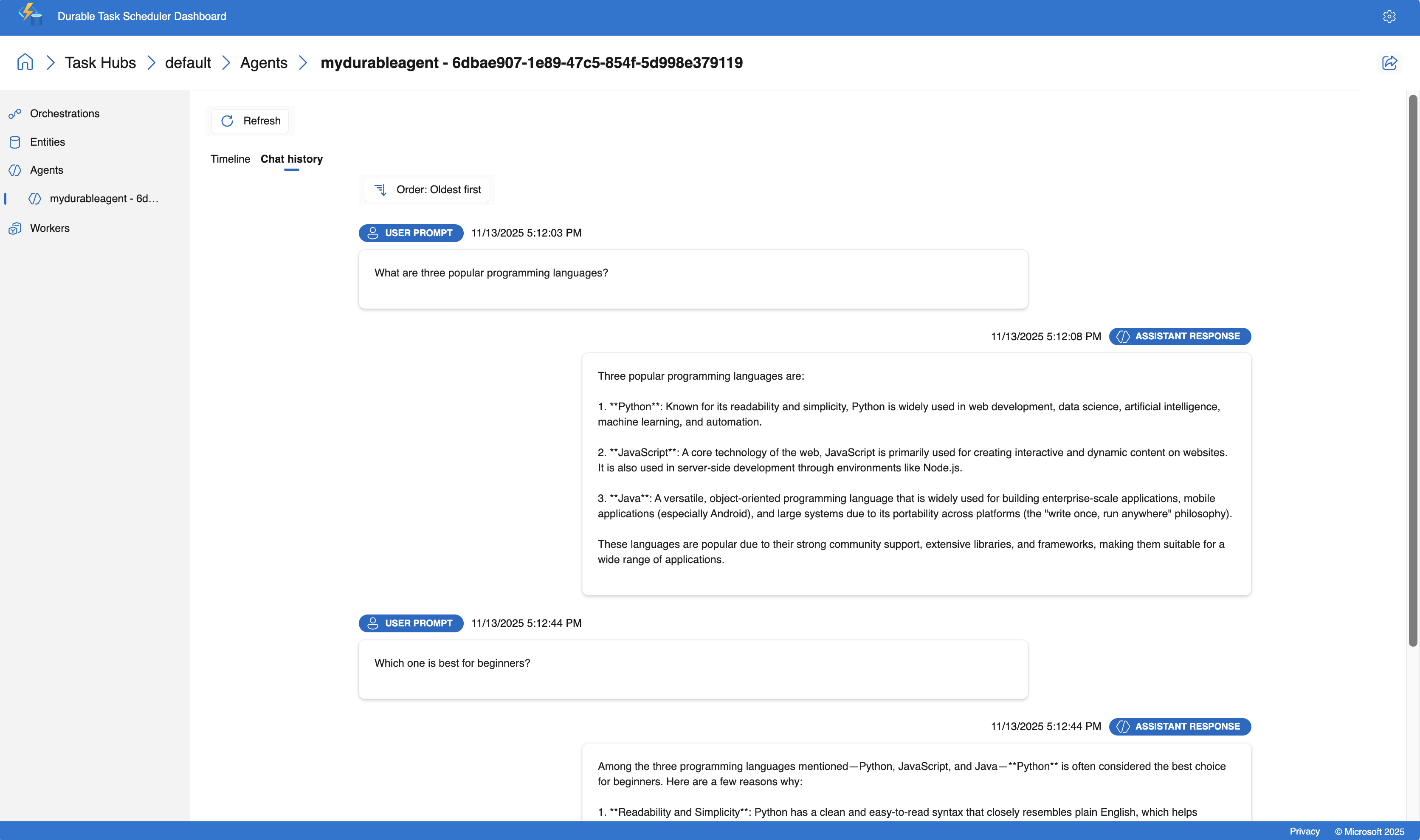
The dashboard provides a timeline view to help you understand the flow of the conversation. Key information include:
- Timestamps and duration for each interaction
- Prompt and response content
- Number of tokens used
Tip
The DTS dashboard provides real-time updates, so you can watch your agent's behavior as you interact with it through the HTTP endpoints.
Deploy to Azure
Now that you've tested your durable agent locally, deploy it to Azure.
Deploy the application:
azd deployThis command packages your application and deploys it to the Azure Functions app created during provisioning.
Wait for the deployment to complete. The output will confirm when your agent is running in Azure.
Test the deployed agent
After deployment, test your agent running in Azure.
Get the function key
Azure Functions requires an API key for HTTP-triggered functions in production:
API_KEY=`az functionapp function keys list --name $(azd env get-value AZURE_FUNCTION_NAME) --resource-group $(azd env get-value AZURE_RESOURCE_GROUP) --function-name http-MyDurableAgent --query default -o tsv`
Start a new conversation in Azure
Create a new thread and send your first message to the deployed agent:
curl -i -X POST "https://$(azd env get-value AZURE_FUNCTION_NAME).azurewebsites.net/api/agents/MyDurableAgent/run?code=$API_KEY" \
  -H "Content-Type: text/plain" \
  -d "What are three popular programming languages?"
Note the thread ID returned in the x-ms-thread-id response header.
Continue the conversation in Azure
Send a follow-up message in the same thread. Replace <thread-id> with the thread ID from the previous response:
THREAD_ID="<thread-id>"
curl -X POST "https://$(azd env get-value AZURE_FUNCTION_NAME).azurewebsites.net/api/agents/MyDurableAgent/run?code=$API_KEY&thread_id=$THREAD_ID" \
  -H "Content-Type: text/plain" \
  -d "Which is easiest to learn?"
The agent maintains conversation context in Azure just as it did locally, demonstrating the durability of the agent state.
Monitor the deployed agent
You can monitor your deployed agent using the Durable Task Scheduler dashboard in Azure.
Get the name of your Durable Task Scheduler instance:
azd env get-value DTS_NAMEOpen the Azure portal and search for the Durable Task Scheduler name from the previous step.
In the overview blade of the Durable Task Scheduler resource, select the default task hub from the list.
Select Open Dashboard at the top of the task hub page to open the monitoring dashboard.
View your agent's conversations just as you did with the local emulator.
The Azure-hosted dashboard provides the same debugging and monitoring capabilities as the local emulator, allowing you to inspect conversation history, trace tool calls, and analyze performance in your production environment.
Tutorial: Orchestrate durable agents with Azure Functions
This tutorial shows you how to orchestrate multiple durable AI agents using the Azure Functions hosting model and the fan-out/fan-in pattern. You'll extend the durable agent from the previous tutorial to create a multi-agent system that processes a user's question, then translates the response into multiple languages concurrently. For self-hosted orchestration examples, see the samples.
Understanding the orchestration pattern
The orchestration you'll build follows this flow:
- User input - A question or message from the user
- Main agent - The
MyDurableAgentfrom the first tutorial processes the question - Fan-out - The main agent's response is sent concurrently to both translation agents
- Translation agents - Two specialized agents translate the response (French and Spanish)
- Fan-in - Results are aggregated into a single JSON response with the original response and translations
This pattern enables concurrent processing, reducing total response time compared to sequential translation.
Register agents at startup
To properly use agents in durable orchestrations, register them at application startup. They can be used across orchestration executions.
Update your Program.cs to register the translation agents alongside the existing MyDurableAgent:
using System;
using Azure.AI.Projects;
using Azure.Identity;
using Microsoft.Agents.AI;
using Microsoft.Agents.AI.Hosting.AzureFunctions;
using Microsoft.Azure.Functions.Worker.Builder;
using Microsoft.Extensions.Hosting;

// Get the Azure OpenAI configuration
string endpoint = Environment.GetEnvironmentVariable("AZURE_OPENAI_ENDPOINT")
    ?? throw new InvalidOperationException("AZURE_OPENAI_ENDPOINT is not set.");
string deploymentName = Environment.GetEnvironmentVariable("AZURE_OPENAI_DEPLOYMENT")
    ?? "gpt-4o-mini";

// Create the Microsoft Foundry client
AIProjectClient client = new(new Uri(endpoint), new DefaultAzureCredential());

// Create the main agent from the first tutorial
AIAgent mainAgent = client.AsAIAgent(
    model: deploymentName,
    instructions: "You are a helpful assistant that can answer questions and provide information.",
    name: "MyDurableAgent");

// Create translation agents
AIAgent frenchAgent = client.AsAIAgent(
    model: deploymentName,
    instructions: "You are a translator. Translate the following text to French. Return only the translation, no explanations.",
    name: "FrenchTranslator");

AIAgent spanishAgent = client.AsAIAgent(
    model: deploymentName,
    instructions: "You are a translator. Translate the following text to Spanish. Return only the translation, no explanations.",
    name: "SpanishTranslator");

// Build and configure the Functions host
using IHost app = FunctionsApplication
    .CreateBuilder(args)
    .ConfigureFunctionsWebApplication()
    .ConfigureDurableAgents(options =>
    {
        // Register all agents for use in orchestrations and HTTP endpoints
        options.AddAIAgent(mainAgent);
        options.AddAIAgent(frenchAgent);
        options.AddAIAgent(spanishAgent);
    })
    .Build();

app.Run();
Update your function_app.py to register the translation agents alongside the existing MyDurableAgent:
import os
from azure.identity import DefaultAzureCredential
from agent_framework.azure import AgentFunctionApp
from agent_framework.openai import OpenAIChatCompletionClient

# Get the Azure OpenAI configuration
endpoint = os.getenv("AZURE_OPENAI_ENDPOINT")
if not endpoint:
    raise ValueError("AZURE_OPENAI_ENDPOINT is not set.")
deployment_name = os.getenv("AZURE_OPENAI_CHAT_COMPLETION_MODEL", "gpt-4o-mini")
api_version = os.getenv("AZURE_OPENAI_API_VERSION")

# Create the Azure OpenAI client
chat_client = OpenAIChatCompletionClient(
    azure_endpoint=endpoint,
    model=deployment_name,
    api_version=api_version,
    credential=DefaultAzureCredential()
)

# Create the main agent from the first tutorial
main_agent = chat_client.as_agent(
    instructions="You are a helpful assistant that can answer questions and provide information.",
    name="MyDurableAgent"
)

# Create translation agents
french_agent = chat_client.as_agent(
    instructions="You are a translator. Translate the following text to French. Return only the translation, no explanations.",
    name="FrenchTranslator"
)

spanish_agent = chat_client.as_agent(
    instructions="You are a translator. Translate the following text to Spanish. Return only the translation, no explanations.",
    name="SpanishTranslator"
)

# Create the function app and register all agents
app = AgentFunctionApp(agents=[main_agent, french_agent, spanish_agent])
Create an orchestration function
An orchestration function coordinates the workflow across multiple agents. It retrieves registered agents from the durable context and orchestrates their execution, first calling the main agent, then fanning out to translation agents concurrently.
Create a new file named AgentOrchestration.cs in your project directory:
using System.Collections.Generic;
using System.Threading.Tasks;
using Microsoft.Agents.AI;
using Microsoft.Agents.AI.DurableTask;
using Microsoft.Azure.Functions.Worker;
using Microsoft.DurableTask;

namespace MyDurableAgent;

public static class AgentOrchestration
{
    // Define a strongly-typed response structure for agent outputs
    public sealed record TextResponse(string Text);

    [Function("agent_orchestration_workflow")]
    public static async Task<Dictionary<string, string>> AgentOrchestrationWorkflow(
        [OrchestrationTrigger] TaskOrchestrationContext context)
    {
        var input = context.GetInput<string>() ?? throw new ArgumentNullException(nameof(context), "Input cannot be null");

        // Step 1: Get the main agent's response
        DurableAIAgent mainAgent = context.GetAgent("MyDurableAgent");
        AgentResponse<TextResponse> mainResponse = await mainAgent.RunAsync<TextResponse>(input);
        string agentResponse = mainResponse.Result.Text;

        // Step 2: Fan out - get the translation agents and run them concurrently
        DurableAIAgent frenchAgent = context.GetAgent("FrenchTranslator");
        DurableAIAgent spanishAgent = context.GetAgent("SpanishTranslator");

        Task<AgentResponse<TextResponse>> frenchTask = frenchAgent.RunAsync<TextResponse>(agentResponse);
        Task<AgentResponse<TextResponse>> spanishTask = spanishAgent.RunAsync<TextResponse>(agentResponse);

        // Step 3: Wait for both translation tasks to complete (fan-in)
        await Task.WhenAll(frenchTask, spanishTask);

        // Get the translation results
        TextResponse frenchResponse = (await frenchTask).Result;
        TextResponse spanishResponse = (await spanishTask).Result;

        // Step 4: Combine results into a dictionary
        var result = new Dictionary<string, string>
        {
            ["original"] = agentResponse,
            ["french"] = frenchResponse.Text,
            ["spanish"] = spanishResponse.Text
        };

        return result;
    }
}
Add the orchestration function to your function_app.py file:
import azure.durable_functions as df

@app.orchestration_trigger(context_name="context")
def agent_orchestration_workflow(context: df.DurableOrchestrationContext):
    """
    Orchestration function that coordinates multiple agents.
    Returns a dictionary with the original response and translations.
    """
    input_text = context.get_input()

    # Step 1: Get the main agent's response
    main_agent = app.get_agent(context, "MyDurableAgent")
    main_response = yield main_agent.run(input_text)
    agent_response = main_response.text

    # Step 2: Fan out - get the translation agents and run them concurrently
    french_agent = app.get_agent(context, "FrenchTranslator")
    spanish_agent = app.get_agent(context, "SpanishTranslator")

    parallel_tasks = [
        french_agent.run(agent_response),
        spanish_agent.run(agent_response)
    ]

    # Step 3: Wait for both translation tasks to complete (fan-in)
    translations = yield context.task_all(parallel_tasks) # type: ignore

    # Step 4: Combine results into a dictionary
    result = {
        "original": agent_response,
        "french": translations[0].text,
        "spanish": translations[1].text
    }

    return result
Test the orchestration
Ensure your local development dependencies from the first tutorial are still running:
- Azurite in one terminal window
- Durable Task Scheduler emulator in another terminal window
With your local development dependencies running:
Start your Azure Functions app in a new terminal window:
func startThe Durable Functions extension automatically creates built-in HTTP endpoints for managing orchestrations. Start the orchestration using the built-in API:
curl -X POST http://localhost:7071/runtime/webhooks/durabletask/orchestrators/agent_orchestration_workflow \
  -H "Content-Type: application/json" \
  -d '"\"What are three popular programming languages?\""'
The response includes URLs for managing the orchestration instance:
{
  "id": "abc123def456",
  "statusQueryGetUri": "http://localhost:7071/runtime/webhooks/durabletask/instances/abc123def456",
  "sendEventPostUri": "http://localhost:7071/runtime/webhooks/durabletask/instances/abc123def456/raiseEvent/{eventName}",
  "terminatePostUri": "http://localhost:7071/runtime/webhooks/durabletask/instances/abc123def456/terminate",
  "purgeHistoryDeleteUri": "http://localhost:7071/runtime/webhooks/durabletask/instances/abc123def456"
}
Query the orchestration status using the
statusQueryGetUri(replaceabc123def456with your actual instance ID):curl http://localhost:7071/runtime/webhooks/durabletask/instances/abc123def456
Poll the status endpoint until
runtimeStatusisCompleted. When complete, you'll see the orchestration output with the main agent's response and its translations:{ "name": "agent_orchestration_workflow", "instanceId": "abc123def456", "runtimeStatus": "Completed", "output": { "original": "Three popular programming languages are Python, JavaScript, and Java. Python is known for its simplicity...", "french": "Trois langages de programmation populaires sont Python, JavaScript et Java. Python est connu pour sa simplicité...", "spanish": "Tres lenguajes de programación populares son Python, JavaScript y Java. Python es conocido por su simplicidad..." } }
Monitor the orchestration in the dashboard
The Durable Task Scheduler dashboard provides visibility into your orchestration:
Open
http://localhost:8082in your browser.Select the "default" task hub.
Select the "Orchestrations" tab.
Find your orchestration instance in the list.
Select the instance to see:
- The orchestration timeline
- Main agent execution followed by concurrent translation agents
- Each agent execution (MyDurableAgent, then French and Spanish translators)
- Fan-out and fan-in patterns visualized
- Timing and duration for each step
Deploy the orchestration to Azure
Deploy the updated application using Azure Developer CLI:
azd deploy
This deploys your updated code with the new orchestration function and additional agents to the Azure Functions app created in the first tutorial.
Test the deployed orchestration
After deployment, test your orchestration running in Azure.
Get the system key for the durable extension:
SYSTEM_KEY=$(az functionapp keys list --name $(azd env get-value AZURE_FUNCTION_NAME) --resource-group $(azd env get-value AZURE_RESOURCE_GROUP) --query "systemKeys.durabletask_extension" -o tsv)
Start the orchestration using the built-in API:
curl -X POST "https://$(azd env get-value AZURE_FUNCTION_NAME).azurewebsites.net/runtime/webhooks/durabletask/orchestrators/agent_orchestration_workflow?code=$SYSTEM_KEY" \
  -H "Content-Type: application/json" \
  -d '"\"What are three popular programming languages?\""'
- Use the
statusQueryGetUrifrom the response to poll for completion and view the results with translations.
Next steps
Additional resources: