Белешка
Приступ овој страници захтева ауторизацију. Можете покушати да се пријавите или промените директоријуме.
Приступ овој страници захтева ауторизацију. Можете покушати да промените директоријуме.
The SQL Database Projects extension is a Visual Studio Code extension for developing SQL databases in a project-based development environment. Compatible databases that use the Microsoft SQL Database Engine include SQL Server, Azure SQL Database, Azure SQL Managed Instance, Fabric Data Warehouse, and SQL database in Fabric. A SQL project is a local representation of SQL objects that comprise the schema for a single database, such as tables, stored procedures, or functions. When you build a SQL Database project, you create a .dacpac file. You can update new and existing databases to match the contents of the .dacpac by publishing the SQL Database project with the SQL Database Projects extension or by publishing the .dacpac with the SqlPackage command line interface.
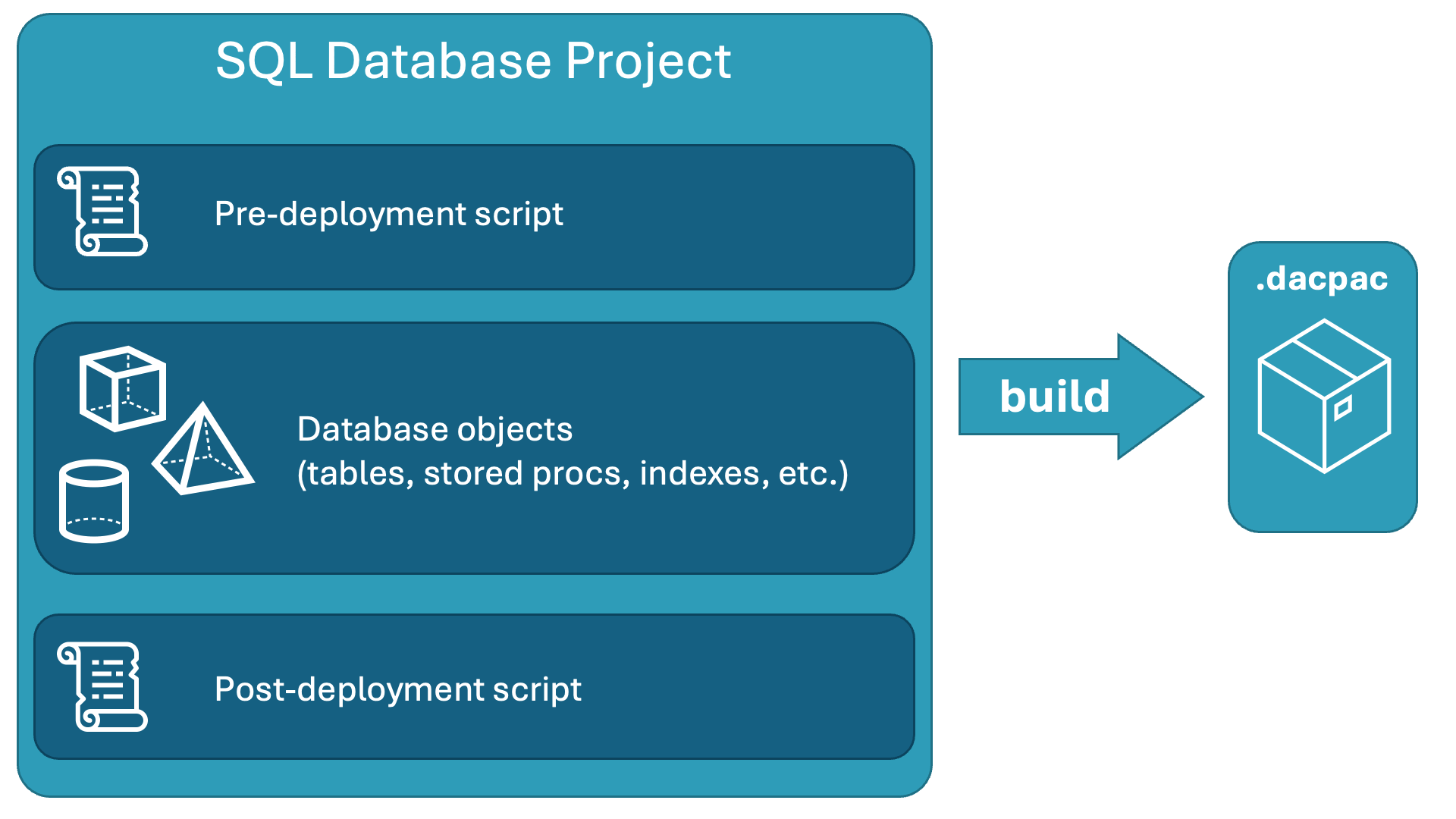
For more information about SQL projects concepts, see What are SQL database projects?
Extension features
The SQL Database Projects extension provides the following features:
- Create a new blank Microsoft.Build.Sql project.
- Create a new project from a connected database.
- Open a project previously created in Visual Studio Code, or in SQL Server Data Tools.
- Edit a project by adding or removing objects (tables, views, stored procedures) or custom scripts in the project.
- Organize files and scripts in folders.
- Add references to system databases or a user dacpac.
- Build a single project.
- Deploy a single project.
- Load connection details (SQL Windows authentication) and SQLCMD variables from deployment profile.
Install
You can install the SQL Database Project extension in Visual Studio Code.
The SQL Database Projects extension is installed with the MSSQL extension for Visual Studio Code.
Dependencies
The SQL Database Projects extension depends on the .NET SDK (required) and AutoRest.Sql (optional).
.NET SDK
The extension requires the .NET SDK for project build functionality. If the extension can't detect a supported version, it prompts you to install the .NET SDK. You can download and install the .NET SDK for Windows, macOS, and Linux.
To check currently installed versions of the dotnet SDK, open a terminal and run the following command:
dotnet --list-sdks
After you install the .NET SDK, your environment is ready to use the SQL Database Projects extension.
Common issues
Missing nuget.org from the list of sources can result in error messages such as:
error MSB4236: The SDK 'Microsoft.Build.Sql/0.1.9-preview' specified could not be found.Unable to find package Microsoft.Build.Sql. No packages exist with this id in source(s): Microsoft Visual Studio Offline Packages
To check if nuget.org is registered as a source, run
dotnet nuget list sourcefrom the command line and review the results for an[Enabled]item referencing nuget.org. If nuget.org isn't registered as a source, rundotnet nuget add source https://api.nuget.org/v3/index.json -n nuget.org.Unsupported .NET SDK versions can result in error messages such as:
error MSB4018: The "SqlBuildTask" task failed unexpectedly.error MSB4018: System.TypeInitializationException: The type initializer for 'SqlSchemaModelStaticState' threw an exception. ---> System.IO.FileNotFoundException: Could not load file or assembly 'System.Runtime, Version=4.2.2.0, Culture=neutral, PublicKeyToken=b03f5f7f11d50a3a'. The system cannot find the file specified. [c:\Users\ .sqlproj]_(where the linked nonexisting file has an unmatched closing square bracket).
You can force the SQL Database Projects extension to use the v6.x version of the .NET SDK when multiple versions are installed. To do so, add a global.json file to the folder that contains the SQL project.
For more information on troubleshooting SQL projects build, see Troubleshoot SQL project build.
SQLCLR
Visual Studio Code doesn't support SQLCLR objects in database projects, because these objects rely on .NET Framework, and the SQL Database Projects extension uses .NET to build projects.
Workspace
SQL database projects are contained within a logical workspace (folder) in Visual Studio Code. By default, you can access all SQL projects within the folders open in the current workspace in the SQL Database Projects view.
You can manually add and remove projects from a workspace through the interface in the Projects pane. You can manually edit the settings for a workspace in the .code-workspace file, if necessary.
In the following example .code-workspace file, the folders array lists all folders included in the Explorer pane. The dataworkspace.excludedProjects array within settings lists all the SQL projects excluded from the Projects pane.
{
  "folders": [
    {
      "path": "."
    },
    {
      "name": "WideWorldImportersDW",
      "path": "..\\WideWorldImportersDW"
    }
  ],
  "settings": {
    "dataworkspace.excludedProjects": [
      "AdventureWorksLT.sqlproj"
    ]
  }
}