Not
Åtkomst till den här sidan kräver auktorisering. Du kan prova att logga in eller ändra kataloger.
Åtkomst till den här sidan kräver auktorisering. Du kan prova att ändra kataloger.
Problem
=========
無法修改Licensing Mode to Per User
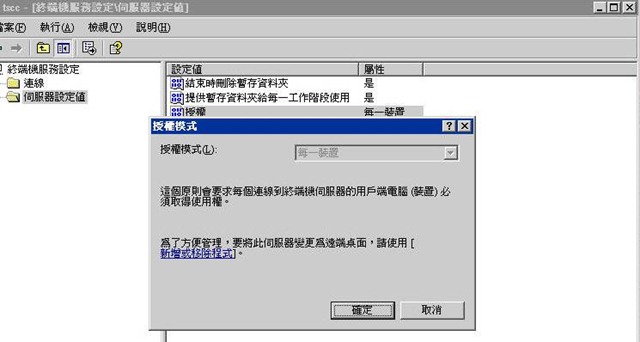
Cause
=====
GPO
Solution
=======
After change the GPO setting, this issue was fixed.
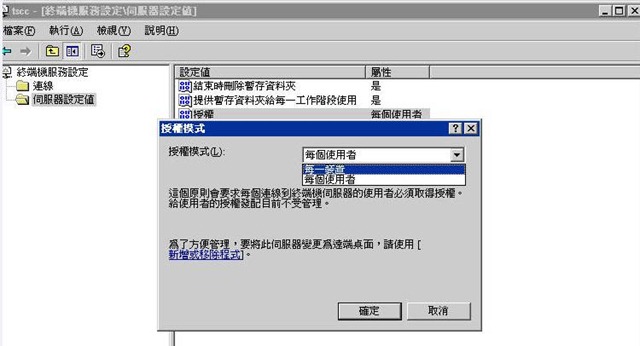
設定終端機伺服器授權模式
To configure the Terminal Server Licensing mode
Using Group Policies (best practice)
1. 開啟 [群組原則]。
2. 在 [電腦設定]、[系統管理範本]、[Windows 元件]、[終端機服務] 中,連按兩下 [終端機伺服器授權模式] 。
3. 按一下 [啟用]。
4. 按一下 [每個使用者] 或 [每一裝置],再按 [確定]。
每一裝置 CAL 對每一個執行 Windows Server 2003 的用戶端電腦或裝置授與存取終端機伺服器的權利。每個使用者 CAL 對一位使用者授與從不限數量之裝置存取終端機伺服器的權利。
![clip_image002[4]](https://msdntnarchive.z22.web.core.windows.net/media/TNBlogsFS/BlogFileStorage/blogs_technet/csstwplatform/WindowsLiveWriter/CannotchangeLicensingModefromPerDeviceto_A14A/clip_image002%5B4%5D.jpg "clip_image002[4]")
Comments
- Anonymous
January 01, 2003
To resolve it open the Broadcom Advanced Control Suite and disable IPv4 Large Send Offload and your problem will be solved.