Not
Åtkomst till den här sidan kräver auktorisering. Du kan prova att logga in eller ändra kataloger.
Åtkomst till den här sidan kräver auktorisering. Du kan prova att ändra kataloger.
Problem
=======
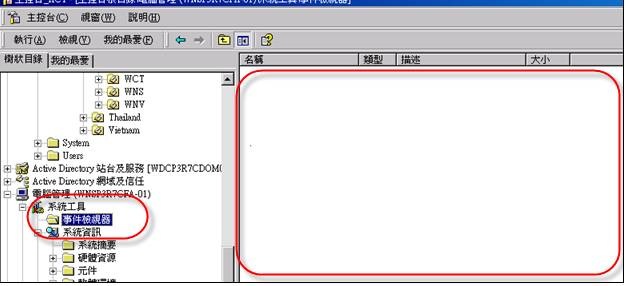
Remote Server Event Log Access 'Access Denied'
Cause
======
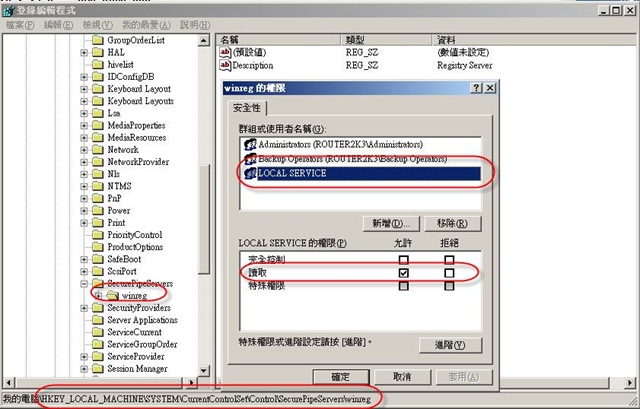
- Opened Regedit at Workstation and checked the following settings:
=============================================================
HKLM\SYSTEM\CurrentControlSet\CONTROL\SecurePipeServes\winreg
Ensure LocalService has read permission
Solution
======
To resolve this issue, use Registry Editor to grant Read Only permissions to the Local Service user account. To do this, follow these steps:
- Click Start, click Run, type regedit, and then click OK.
- Expand the following registry subkey:
HKEY_LOCAL_MACHINE\SYSTEM\CurrentControlSet\Control\ SecurePipeServers
- Right-click winreg, and then click Permissions.
- Click Add.
- In the Enter the object names to select box, type Local Service, and then click OK.
Alternatively, you can type the name of a user or group that you want to grant access permission. - In the Permissions for LOCAL SERVICE list, next to Read, click to select the Allow check box.
- Quit Registry Editor, and then restart your computer.