Not
Åtkomst till den här sidan kräver auktorisering. Du kan prova att logga in eller ändra kataloger.
Åtkomst till den här sidan kräver auktorisering. Du kan prova att ändra kataloger.
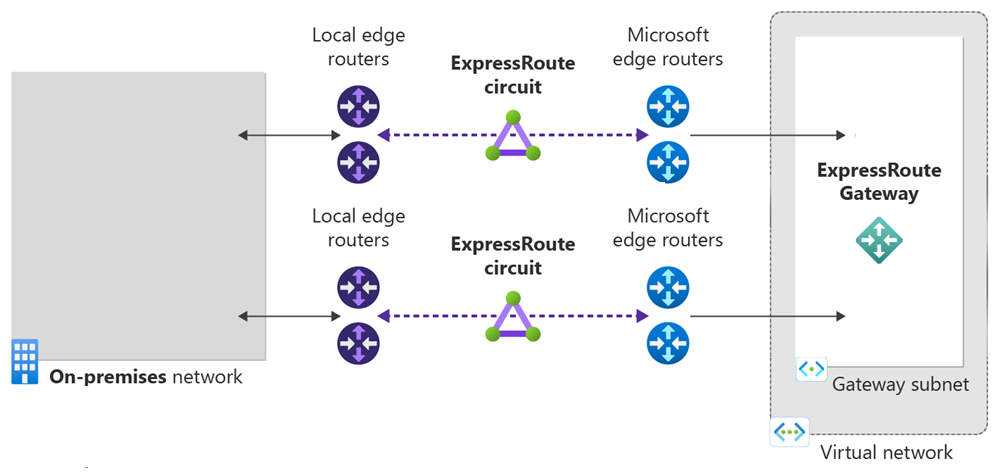
I den här snabbstarten använder du Terraform för att skapa en Azure ExpressRoute-krets och dess tillhörande infrastruktur. Terraform-mallen skapar en fullständig ExpressRoute-konfiguration, inklusive ett virtuellt nätverk, ExpressRoute-gateway, kretskonfiguration och privat peering. Alla resurser distribueras med konfigurerbara parametrar som gör att du kan anpassa distributionen efter dina specifika krav.
Terraform möjliggör definition, förhandsversion och distribution av molninfrastruktur. Med Terraform skapar du konfigurationsfiler med hjälp av HCL-syntax. Med HCL-syntaxen kan du ange molnleverantören – till exempel Azure – och de element som utgör din molninfrastruktur. När du har skapat konfigurationsfilerna skapar du en körningsplan som gör att du kan förhandsgranska ändringarna i infrastrukturen innan de distribueras. När du har verifierat ändringarna tillämpar du körningsplanen för att distribuera infrastrukturen.
I den här artikeln kan du se hur du:
- Skapa en Azure-resursgrupp med ett unikt namn
- Skapa ett virtuellt nätverk med ett undernät för gatewayen
- Skapa en ExpressRoute-gateway med konfigurerbar SKU
- Skapa en ExpressRoute-krets med konfigurerbara inställningar för tjänstprovider
- Konfigurera privat peering för ExpressRoute-kretsen
- Utdata av nyckelresursidentifierare och konfigurationsinformation
Förutsättningar
Skapa ett Azure-konto med en aktiv prenumeration. Du kan skapa ett konto kostnadsfritt.
Implementera Terraform-koden
Kommentar
Exempelkoden för den här artikeln finns på Azure Terraform GitHub-lagringsplatsen. Du kan visa loggfilen som innehåller testresultaten från aktuella och tidigare versioner av Terraform.
Se fler artiklar och exempelkod som visar hur du använder Terraform för att hantera Azure-resurser.
Skapa en katalog där du kan testa och köra Terraform-exempelkoden och göra den till den aktuella katalogen.
Skapa en fil med namnet
main.tfoch infoga följande kod:# Create Resource Group resource "random_pet" "rg_name" { prefix = var.resource_group_name_prefix } resource "azurerm_resource_group" "rg" { location = var.resource_group_location name = random_pet.rg_name.id tags = var.tags } # Random String for unique naming resource "random_string" "name" { length = 8 special = false upper = false lower = true numeric = false } # Create Virtual Network resource "azurerm_virtual_network" "vnet" { name = "vnet-${random_string.name.result}" address_space = var.virtual_network_address_space location = azurerm_resource_group.rg.location resource_group_name = azurerm_resource_group.rg.name tags = var.tags } # Create ExpressRoute Gateway using Azure Verified Module with HOBO module "expressroute_gateway" { source = "Azure/avm-ptn-vnetgateway/azurerm" version = "~> 0.10.0" # Basic Configuration location = azurerm_resource_group.rg.location name = "vgw-${random_string.name.result}" parent_id = azurerm_resource_group.rg.id # ExpressRoute Gateway Configuration type = "ExpressRoute" sku = var.gateway_sku hosted_on_behalf_of_public_ip_enabled = var.enable_hosted_on_behalf_of_public_ip # Enable Azure-managed public IP (HOBO) # Virtual Network Configuration virtual_network_id = azurerm_virtual_network.vnet.id subnet_address_prefix = var.gateway_subnet_address_prefix # GatewaySubnet CIDR # Optional: Enable telemetry for Azure Verified Module enable_telemetry = true # Express Route Circuit Connection (if circuit is provided) express_route_circuits = var.express_route_circuit_id != null ? { "primary" = { id = var.express_route_circuit_id connection = { authorization_key = var.express_route_authorization_key } } } : {} tags = merge(var.tags, { environment = "production" project = "expressroute-hobo" gateway_type = "ExpressRoute" deployment = "azure-verified-module" }) depends_on = [azurerm_virtual_network.vnet] } # Create ExpressRoute Circuit (if enabled) resource "azurerm_express_route_circuit" "circuit" { count = var.create_express_route_circuit ? 1 : 0 name = "erc-${random_string.name.result}" resource_group_name = azurerm_resource_group.rg.name location = azurerm_resource_group.rg.location service_provider_name = var.service_provider_name peering_location = var.peering_location bandwidth_in_mbps = var.bandwidth_in_mbps sku { tier = var.circuit_sku_tier family = var.circuit_sku_family } tags = merge(var.tags, { environment = "production" project = "expressroute-hobo" }) } # Create ExpressRoute Circuit Peering (if circuit is created) resource "azurerm_express_route_circuit_peering" "private" { count = var.create_express_route_circuit && var.create_private_peering ? 1 : 0 peering_type = "AzurePrivatePeering" express_route_circuit_name = azurerm_express_route_circuit.circuit[0].name resource_group_name = azurerm_resource_group.rg.name primary_peer_address_prefix = var.primary_peer_address_prefix secondary_peer_address_prefix = var.secondary_peer_address_prefix vlan_id = var.vlan_id peer_asn = var.peer_asn }Skapa en fil med namnet
outputs.tfoch infoga följande kod:output "resource_group_name" { description = "Name of the resource group" value = azurerm_resource_group.rg.name } output "express_route_circuit_id" { description = "ID of the ExpressRoute circuit (if created)" value = var.create_express_route_circuit ? azurerm_express_route_circuit.circuit[0].id : null } output "express_route_circuit_service_key" { description = "Service key for the ExpressRoute circuit (if created)" value = var.create_express_route_circuit ? azurerm_express_route_circuit.circuit[0].service_key : null sensitive = true } output "gateway_id" { description = "ID of the ExpressRoute Virtual Network Gateway" value = module.expressroute_gateway.virtual_network_gateway.id } output "gateway_name" { description = "Name of the ExpressRoute Virtual Network Gateway" value = module.expressroute_gateway.virtual_network_gateway.name } output "gateway_subnet_id" { description = "ID of the GatewaySubnet created by the module" value = module.expressroute_gateway.subnet.id } output "hosted_on_behalf_of_public_ip_note" { description = "Information about the Azure-managed public IP for ExpressRoute gateway" value = "This ExpressRoute Virtual Network Gateway uses an Azure-managed public IP address. The public IP is automatically provisioned and managed by Azure, and is not visible in your subscription's public IP resources. This feature is only available for ExpressRoute gateways, not VPN gateways." } output "public_ip_addresses" { description = "Public IP addresses created by the module (empty when using HOBO for ExpressRoute)" value = module.expressroute_gateway.public_ip_addresses } output "virtual_network_id" { description = "ID of the virtual network" value = azurerm_virtual_network.vnet.id } output "virtual_network_gateway_connections" { description = "Virtual Network Gateway Connections created by the module" value = module.expressroute_gateway.virtual_network_gateway_connections }Skapa en fil med namnet
providers.tfoch infoga följande kod:terraform { required_version = ">= 1.3" required_providers { azapi = { source = "Azure/azapi" version = "~> 2.4" } azurerm = { source = "hashicorp/azurerm" version = "~> 4.0" } random = { source = "hashicorp/random" version = "~> 3.5" } } } provider "azurerm" { features {} }Skapa en fil med namnet
variables.tfoch infoga följande kod:variable "resource_group_location" { type = string default = "eastus" description = "Location of the resource group." } variable "resource_group_name_prefix" { type = string default = "rg" description = "Prefix of the resource group name that's combined with a random ID so name is unique in your Azure subscription." } variable "tags" { type = map(string) default = {} description = "A map of tags to assign to all resources." } # Virtual Network Configuration variable "virtual_network_address_space" { type = list(string) default = ["10.0.0.0/16"] description = "The address space that is used by the virtual network." validation { condition = length(var.virtual_network_address_space) > 0 error_message = "At least one address space must be provided." } } variable "gateway_subnet_address_prefix" { type = string default = "10.0.0.0/24" description = "The address prefix for the GatewaySubnet. Must be at least /29." validation { condition = can(cidrhost(var.gateway_subnet_address_prefix, 0)) && tonumber(split("/", var.gateway_subnet_address_prefix)[1]) <= 29 error_message = "gateway_subnet_address_prefix must be a valid CIDR block with at least /29 prefix." } } # ExpressRoute Gateway Configuration variable "gateway_sku" { type = string default = "ErGw1AZ" description = "The SKU of the ExpressRoute Virtual Network Gateway. Valid values: ErGw1AZ, ErGw2AZ, ErGw3AZ, ErGwScale, HighPerformance, Standard, UltraPerformance." validation { condition = contains(["ErGw1AZ", "ErGw2AZ", "ErGw3AZ", "ErGwScale", "HighPerformance", "Standard", "UltraPerformance"], var.gateway_sku) error_message = "gateway_sku must be one of: ErGw1AZ, ErGw2AZ, ErGw3AZ, ErGwScale, HighPerformance, Standard, UltraPerformance." } } variable "enable_hosted_on_behalf_of_public_ip" { type = bool default = true description = "Enable Azure-managed public IP for the ExpressRoute gateway (HOBO feature). When enabled, Azure manages the public IP internally and it won't appear in your subscription." } # ExpressRoute Circuit Configuration variable "create_express_route_circuit" { type = bool default = true description = "Whether to create an ExpressRoute circuit. Set to false if you want to connect to an existing circuit." } variable "express_route_circuit_id" { type = string default = null description = "ID of an existing ExpressRoute circuit to connect to. Only used if create_express_route_circuit is false." } variable "express_route_authorization_key" { type = string default = null description = "Authorization key for connecting to an existing ExpressRoute circuit." sensitive = true } variable "service_provider_name" { type = string default = "Equinix" description = "The name of the ExpressRoute circuit service provider." } variable "peering_location" { type = string default = "Washington DC" description = "The name of the peering location and not the Azure resource location." } variable "bandwidth_in_mbps" { type = number default = 50 description = "The bandwidth in Mbps of the ExpressRoute circuit." validation { condition = contains([50, 100, 200, 500, 1000, 2000, 5000, 10000], var.bandwidth_in_mbps) error_message = "bandwidth_in_mbps must be one of: 50, 100, 200, 500, 1000, 2000, 5000, 10000." } } variable "circuit_sku_tier" { type = string default = "Standard" description = "The service tier of the ExpressRoute circuit SKU." validation { condition = contains(["Basic", "Local", "Standard", "Premium"], var.circuit_sku_tier) error_message = "circuit_sku_tier must be one of: Basic, Local, Standard, Premium." } } variable "circuit_sku_family" { type = string default = "MeteredData" description = "The billing mode for the ExpressRoute circuit SKU." validation { condition = contains(["MeteredData", "UnlimitedData"], var.circuit_sku_family) error_message = "circuit_sku_family must be either MeteredData or UnlimitedData." } } # ExpressRoute Private Peering Configuration variable "create_private_peering" { type = bool default = true description = "Whether to create Azure Private Peering for the ExpressRoute circuit." } variable "primary_peer_address_prefix" { type = string default = "192.168.10.16/30" description = "A /30 subnet for the primary link." validation { condition = can(cidrhost(var.primary_peer_address_prefix, 0)) error_message = "primary_peer_address_prefix must be a valid CIDR block." } } variable "secondary_peer_address_prefix" { type = string default = "192.168.10.20/30" description = "A /30 subnet for the secondary link." validation { condition = can(cidrhost(var.secondary_peer_address_prefix, 0)) error_message = "secondary_peer_address_prefix must be a valid CIDR block." } } variable "vlan_id" { type = number default = 200 description = "A valid VLAN ID to establish this peering on." validation { condition = var.vlan_id >= 1 && var.vlan_id <= 4094 error_message = "vlan_id must be between 1 and 4094." } } variable "peer_asn" { type = number default = 65001 description = "A valid private ASN for the customer side BGP session." validation { condition = (var.peer_asn >= 64512 && var.peer_asn <= 65534) || (var.peer_asn >= 4200000000 && var.peer_asn <= 4294967294) error_message = "peer_asn must be a valid private ASN (64512-65534 or 4200000000-4294967294)." } }
Initiera Terraform
Kör terraform init för att initiera Terraform-distributionen. Det här kommandot laddar ned den Azure-provider som krävs för att hantera dina Azure-resurser.
terraform init -upgrade
Viktiga punkter:
- Parametern
-upgradeuppgraderar nödvändiga provider-plugin-program till den senaste versionen som uppfyller konfigurationens versionsbegränsningar.
Skapa en Terraform-körningsplan
Kör terraform plan för att skapa en exekveringsplan.
terraform plan -out main.tfplan
Viktiga punkter:
- Kommandot
terraform planskapar en körningsplan, men kör den inte. I stället avgör den vilka åtgärder som krävs för att skapa den konfiguration som anges i konfigurationsfilerna. Med det här mönstret kan du kontrollera om körningsplanen matchar dina förväntningar innan du gör några ändringar i faktiska resurser. - Med den valfria
-outparametern kan du ange en utdatafil för planen. Med hjälp av parametern-outser du till att planen du granskade är exakt vad som tillämpas.
Tillämpa en Terraform-körningsplan
Kör terraform apply för att tillämpa exekveringsplanen på din molninfrastruktur.
terraform apply main.tfplan
Viktiga punkter:
-
terraform applyExempelkommandot förutsätter att du tidigare kördeterraform plan -out main.tfplan. - Om du har angett ett annat filnamn för parametern
-outanvänder du samma filnamn i anropet tillterraform apply. - Om du inte använde parametern
-outanroparterraform applydu utan några parametrar.
Verifiera resultatet
Hämta namnet på Azure-resursgruppen.
resource_group_name=$(terraform output -raw resource_group_name)Hämta namnet på ExpressRoute-kretsens.
circuit_name=$(terraform output -raw expressroute_circuit_name)Hämta gatewaynamnet.
gateway_name=$(terraform output -raw gateway_name)Kör
az network express-route showför att visa ExpressRoute-kretsen.az network express-route show --name $circuit_name --resource-group $resource_group_nameKör
az network vnet-gateway showför att visa den virtuella Azure-nätverksgatewayen.az network vnet-gateway show --name $gateway_name --resource-group $resource_group_name
Rensa resurser
Gör följande när du inte längre behöver de resurser som skapats via Terraform:
Kör terraform plan och ange
destroyflagga.terraform plan -destroy -out main.destroy.tfplanViktiga punkter:
- Kommandot
terraform planskapar en körningsplan, men kör den inte. I stället avgör den vilka åtgärder som krävs för att skapa den konfiguration som anges i konfigurationsfilerna. Med det här mönstret kan du kontrollera om körningsplanen matchar dina förväntningar innan du gör några ändringar i faktiska resurser. - Med den valfria
-outparametern kan du ange en utdatafil för planen. Med hjälp av parametern-outser du till att planen du granskade är exakt vad som tillämpas.
- Kommandot
Kör terraform apply för att tillämpa utökningsplanen.
terraform apply main.destroy.tfplan
Felsöka Terraform i Azure
Felsöka vanliga problem när du använder Terraform i Azure.
Nästa steg
Se fler artiklar om virtuell Azure-nätverksgateway.
Om du vill lära dig hur du länkar ett virtuellt nätverk till en krets fortsätter du till ExpressRoute-självstudierna.