Not
Åtkomst till den här sidan kräver auktorisering. Du kan prova att logga in eller ändra kataloger.
Åtkomst till den här sidan kräver auktorisering. Du kan prova att ändra kataloger.
This Android platform-specific sets the height of the navigation bar on a NavigationPage. It's consumed in XAML by setting the NavigationPage.BarHeight bindable property to an integer value:
<NavigationPage ...
                xmlns:android="clr-namespace:Xamarin.Forms.PlatformConfiguration.AndroidSpecific.AppCompat;assembly=Xamarin.Forms.Core"
                android:NavigationPage.BarHeight="450">
    ...
</NavigationPage>
Alternatively, it can be consumed from C# using the fluent API:
using Xamarin.Forms.PlatformConfiguration;
using Xamarin.Forms.PlatformConfiguration.AndroidSpecific.AppCompat;
...

public class AndroidNavigationPageCS : Xamarin.Forms.NavigationPage
{
    public AndroidNavigationPageCS()
    {
        On<Android>().SetBarHeight(450);
    }
}
The NavigationPage.On<Android> method specifies that this platform-specific will only run on app compat Android. The NavigationPage.SetBarHeight method, in the Xamarin.Forms.PlatformConfiguration.AndroidSpecific.AppCompat namespace, is used to set the height of the navigation bar on a NavigationPage. In addition, the NavigationPage.GetBarHeight method can be used to return the height of the navigation bar in the NavigationPage.
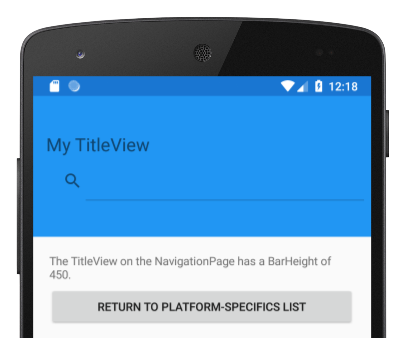
The result is that the height of the navigation bar on a NavigationPage can be set: