Kommentar
Åtkomst till den här sidan kräver auktorisering. Du kan prova att logga in eller ändra kataloger.
Åtkomst till den här sidan kräver auktorisering. Du kan prova att ändra kataloger.
Innan du börjar här rekommenderar vi att du tar en titt på vår översiktsartikel för QR-kodspårning som innehåller en översikt, en enhetssupporttabell och metodtips.
Hämta QR-paketet
Du kan ladda ned NuGet-paketet för QR-kodidentifiering här.
Identifiera QR-koder
Lägga till webbkamerafunktionen
Du måste lägga till funktionen webcam i manifestet för att identifiera QR-koder. Den här funktionen krävs eftersom data i identifierade koder i användarens miljö kan innehålla känslig information.
Behörighet kan begäras genom att anropa QRCodeWatcher.RequestAccessAsync():
C#:
await QRCodeWatcher.RequestAccessAsync();
C++:
co_await QRCodeWatcher.RequestAccessAsync();
Behörighet måste begäras innan du skapar ett QRCodeWatcher-objekt.
QR-kodidentifiering kräver webcam funktionen, men identifieringen sker med hjälp av enhetens spårningskameror. Detta ger en bredare identifiering av FOV och bättre batteritid jämfört med identifiering med enhetens foto/videokamera (PV).
Identifiera QR-koder i C++
using namespace winrt::Windows::Foundation;
using namespace winrt::Microsoft::MixedReality::QR;

class QRListHelper
{
public:
    QRListHelper(MyApplication& app) :
        m_app(app)
    {}

    IAsyncAction SetUpQRCodes()
    {
        if (QRCodeWatcher::IsSupported())
        {
            QRCodeWatcherAccessStatus status = co_await QRCodeWatcher::RequestAccessAsync();
            InitializeQR(status);
        }
    }

private:
    void OnAddedQRCode(const IInspectable&, const QRCodeAddedEventArgs& args)
    {
        m_app.OnAddedQRCode(args);
    }

    void OnUpdatedQRCode(const IInspectable&, const QRCodeUpdatedEventArgs& args)
    {
        m_app.OnUpdatedQRCode(args);
    }

    void OnEnumerationComplete(const IInspectable&, const IInspectable&)
    {
        m_app.OnEnumerationComplete();
    }

    MyApplication& m_app;
    QRCodeWatcher m_qrWatcher{ nullptr };

    void InitializeQR(QRCodeWatcherAccessStatus status)
    {
        if (status == QRCodeWatcherAccessStatus::Allowed)
        {
            m_qrWatcher = QRCodeWatcher();
            m_qrWatcher.Added({ this, &QRListHelper::OnAddedQRCode });
            m_qrWatcher.Updated({ this, &QRListHelper::OnUpdatedQRCode });
            m_qrWatcher.EnumerationCompleted({ this, &QRListHelper::OnEnumerationComplete });
            m_qrWatcher.Start();
        }
        else
        {
            // Permission denied by system or user
            // Handle the failures
        }
    }
};
Hämta koordinatsystemet för en QR-kod
Varje identifierad QR-kod exponerar ett rumsligt koordinatsystem som är justerat med QR-koden i det övre vänstra hörnet av den snabba identifieringsrutan längst upp till vänster:
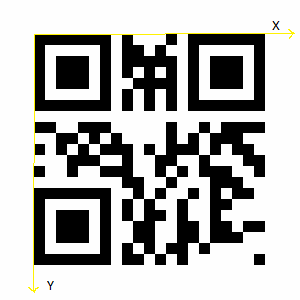
När du använder QR SDK direkt pekar Z-axeln på papperet (visas inte).
QR-kodens SpatialCoordinateSystem justeras enligt bilden. Du kan hämta koordinatsystemet från plattformen genom att anropa SpatialGraphInteropPreview::CreateCoordinateSystemForNode och skicka in kodens SpatialGraphNodeId.
C++-koden nedan visar hur du skapar en rektangel och placerar den med hjälp av QR-kodens koordinatsystem:
// Creates a 2D rectangle in the x-y plane, with the specified properties.
std::vector<float3> MyApplication::CreateRectangle(float width, float height)
{
    std::vector<float3> vertices(4);

    vertices[0] = { 0, 0, 0 };
    vertices[1] = { width, 0, 0 };
    vertices[2] = { width, height, 0 };
    vertices[3] = { 0, height, 0 };

    return vertices;
}
Du kan använda den fysiska storleken för att skapa QR-rektangeln:
std::vector<float3> qrVertices = CreateRectangle(code.PhysicalSideLength(), code.PhysicalSideLength());
Koordinatsystemet kan användas för att rita QR-koden eller koppla hologram till platsen:
using namespace winrt::Windows::Perception::Spatial;
using namespace winrt::Windows::Perception::Spatial::Preview;
SpatialCoordinateSystem qrCoordinateSystem = SpatialGraphInteropPreview::CreateCoordinateSystemForNode(code.SpatialGraphNodeId());
Helt och hållet kan QRCodeAddedHandler se ut ungefär så här:
void MyApplication::OnAddedQRCode(const QRCodeAddedEventArgs& args)
{
    QRCode code = args.Code();
    std::vector<float3> qrVertices = CreateRectangle(code.PhysicalSideLength(), code.PhysicalSideLength());
    std::vector<unsigned short> qrCodeIndices = TriangulatePoints(qrVertices);
    XMFLOAT3 qrAreaColor = XMFLOAT3(DirectX::Colors::Aqua);

    SpatialCoordinateSystem qrCoordinateSystem = SpatialGraphInteropPreview::CreateCoordinateSystemForNode(code.SpatialGraphNodeId());
    std::shared_ptr<SceneObject> m_qrShape =
        std::make_shared<SceneObject>(
            m_deviceResources,
            qrVertices,
            qrCodeIndices,
            qrAreaColor,
            qrCoordinateSystem);

    m_sceneController->AddSceneObject(m_qrShape);
}
API-referens för QR Code-spårning
namespace Microsoft.MixedReality.QR
{
    /// <summary>
    /// Represents a detected QR code.
    /// </remarks>
    public class QRCode
    {
        /// <summary>
        /// Unique id that identifies this QR code for this session.
        /// </summary>
        public Guid Id { get; }

        /// <summary>
        /// Spatial graph node id for this QR code to create a coordinate system.
        /// </summary>
        public Guid SpatialGraphNodeId { get; }

        /// <summary>
        /// Version of this QR code. Version 1-40 are regular QR codes and M1 to M4 are Micro QR code formats 1-4.
        /// </summary>
        public QRVersion Version { get; }

        /// <summary>
        /// Physical width and height of this QR code in meters.
        /// </summary>
        public float PhysicalSideLength { get; }

        /// <summary>
        /// Decoded QR code data.
        /// </summary>
        public String Data { get; }

        /// <summary>
        /// Size of the RawData of this QR code.
        /// </summary>
        public UInt32 RawDataSize { get; }

        /// <summary>
        /// Gets the error-corrected raw data bytes.
        /// Used when the platform is unable to decode the code's format,
        /// allowing your app to decode as needed.
        /// </summary>
        public void GetRawData(byte[] buffer);

        /// <summary>
        /// The last detected time in 100ns QPC ticks.
        /// </summary>
        public System.TimeSpan SystemRelativeLastDetectedTime { get; }

        /// <summary>
        /// The last detected time.
        /// </summary>
        public System.DateTimeOffset LastDetectedTime { get; }
    }

    /// <summary>
    /// Event arguments for a QRCodeWatcher's Added event.
    /// </summary>
    public class QRCodeAddedEventArgs
    {
        /// <summary>
        /// Gets the QR Code that was added
        /// </summary>
        public QRCode Code { get; }
    }

    /// <summary>
    /// Event arguments for a QRCodeWatcher's Removed event.
    /// </summary>
    public class QRCodeRemovedEventArgs
    {
        /// <summary>
        /// Gets the QR Code that was removed.
        /// </summary>
        public QRCode Code { get; }
    }

    /// <summary>
    /// Event arguments for a QRCodeWatcher's Updated event.
    /// </summary>
    public class QRCodeUpdatedEventArgs
    {
        /// <summary>
        /// Gets the QR Code that was updated.
        /// </summary>
        public QRCode Code { get; }
    }

    /// <summary>
    /// Represents the status of an access request for QR code detection.
    /// </summary>
    public enum QRCodeWatcherAccessStatus
    {
        /// <summary>
        /// The system has denied permission for the app to detect QR codes.
        /// </summary>
        DeniedBySystem = 0,
        /// <summary>
        /// The app has not declared the webcam capability in its manifest.
        /// </summary>
        NotDeclaredByApp = 1,
        /// <summary>
        /// The user has denied permission for the app to detect QR codes.
        /// </summary>
        DeniedByUser = 2,
        /// <summary>
        /// A user prompt is required to get permission to detect QR codes.
        /// </summary>
        UserPromptRequired = 3,
        /// <summary>
        /// The user has given permission to detect QR codes.
        /// </summary>
        Allowed = 4,
    }

    /// <summary>
    /// Detects QR codes in the user's environment.
    /// </summary>
    public class QRCodeWatcher
    {
        /// <summary>
        /// Gets whether QR code detection is supported on the current device.
        /// </summary>
        public static bool IsSupported();

        /// <summary>
        /// Request user consent before using QR code detection.
        /// </summary>
        public static IAsyncOperation<QRCodeWatcherAccessStatus> RequestAccessAsync();

        /// <summary>
        /// Constructs a new QRCodeWatcher.
        /// </summary>
        public QRCodeWatcher();

        /// <summary>
        /// Starts detecting QR codes.
        /// </summary>
        /// <remarks>
        /// Start should only be called once RequestAccessAsync has succeeded.
        /// Start should not be called if QR code detection is not supported.
        /// Check that IsSupported returns true before calling Start.
        /// </remarks>
        public void Start();

        /// <summary>
        /// Stops detecting QR codes.
        /// </summary>
        public void Stop();

        /// <summary>
        /// Get the list of QR codes detected.
        /// </summary>
        /// <remarks>
        /// </remarks>
        public IList<QRCode> GetList();

        /// <summary>
        /// Event representing the addition of a QR Code.
        /// </summary>
        public event EventHandler<QRCodeAddedEventArgs> Added;

        /// <summary>
        /// Event representing the removal of a QR Code.
        /// </summary>
        public event EventHandler<QRCodeRemovedEventArgs> Removed;

        /// <summary>
        /// Event representing the update of a QR Code.
        /// </summary>
        public event EventHandler<QRCodeUpdatedEventArgs> Updated;

        /// <summary>
        /// Event representing the enumeration of QR Codes completing after a Start call.
        /// </summary>
        public event EventHandler<Object> EnumerationCompleted;
    }

    /// <summary>
    /// Version info for QR codes, including Micro QR codes.
    /// </summary>
    public enum QRVersion
    {
        QR1 = 1,
        QR2 = 2,
        QR3 = 3,
        QR4 = 4,
        QR5 = 5,
        QR6 = 6,
        QR7 = 7,
        QR8 = 8,
        QR9 = 9,
        QR10 = 10,
        QR11 = 11,
        QR12 = 12,
        QR13 = 13,
        QR14 = 14,
        QR15 = 15,
        QR16 = 16,
        QR17 = 17,
        QR18 = 18,
        QR19 = 19,
        QR20 = 20,
        QR21 = 21,
        QR22 = 22,
        QR23 = 23,
        QR24 = 24,
        QR25 = 25,
        QR26 = 26,
        QR27 = 27,
        QR28 = 28,
        QR29 = 29,
        QR30 = 30,
        QR31 = 31,
        QR32 = 32,
        QR33 = 33,
        QR34 = 34,
        QR35 = 35,
        QR36 = 36,
        QR37 = 37,
        QR38 = 38,
        QR39 = 39,
        QR40 = 40,
        MicroQRM1 = 41,
        MicroQRM2 = 42,
        MicroQRM3 = 43,
        MicroQRM4 = 44,
    }
}