หมายเหตุ
การเข้าถึงหน้านี้ต้องได้รับการอนุญาต คุณสามารถลอง ลงชื่อเข้าใช้หรือเปลี่ยนไดเรกทอรีได้
การเข้าถึงหน้านี้ต้องได้รับการอนุญาต คุณสามารถลองเปลี่ยนไดเรกทอรีได้
As AKS clusters scale and host workloads from multiple teams or tenants, shared infrastructure can make isolation more complex. You might need stronger isolation to prevent resource-intensive or bursty workloads from disrupting predictable workloads. You might also need to isolate sensitive workloads to meet security requirements.
To meet these requirements, you might isolate your workloads through logical or physical isolation strategies. For logical isolation, use Kubernetes namespaces to separate resources and deployments. Namespaces share the underlying cluster infrastructure, so they don't provide the same physical isolation boundary as separate clusters. While separate clusters provide a physical boundary, this strategy can increase costs when the clusters don't use their full capacity.
Pod sandboxing on AKS introduces the ability to run your workloads in separate lightweight pod virtual machines (VMs). Each pod VM provides a compute isolation boundary: the workload runs with its own guest kernel and is isolated from the host kernel and workloads in other pod VMs.
Pod sandboxing is built on the open-source Kata Containers project.
Important
The pod VM boundary provides compute isolation only. It doesn't isolate the AKS control plane, storage or data paths, or actions performed by users with cluster-admin access. Pod sandboxing alone doesn't provide complete hard multitenancy. For a multitenant deployment, review the AKS guidance for multitenant solutions and apply the required identity, network, storage, and governance controls.
Architecture and components
Pod sandboxing uses the Kata Containers runtime to create a lightweight pod VM for each sandboxed pod. The following diagram shows how the host-side components create and manage the isolated pod VM and how the guest-side components run the workload.
- In the pod manifest, set
runtimeClassName: kata-vm-isolationto select the Kata Containers runtime. - Containerd invokes the Kata shim (
containerd-shim-kata-v2) instead of the standard runtime shim. - The Kata shim starts the Cloud Hypervisor virtual machine monitor (VMM), which creates a pod VM with a separate guest kernel and the Kata agent.
- The Kata agent creates and manages the containers and workload processes inside the pod VM.
- When the pod VM is deleted, the Kata shim shuts down the pod VM and releases its resources back to the container host.
Benefits and use cases
Pod sandboxing isolates each sandboxed pod in a lightweight pod VM with its own guest kernel. This compute boundary separates the workload from the host kernel and workloads in other pod VMs. Combine pod sandboxing with controls such as network policies and Azure Policy to address network and governance risks that the pod VM boundary doesn't cover. For guidance on selecting controls for multitenant deployments, see AKS guidance for multitenant solutions.
Common use cases
Pod sandboxing can help you:
- Host workloads from different tenants on the same AKS cluster while providing a separate compute isolation boundary for each sandboxed pod.
- Isolate untrusted workloads from the host kernel and workloads in other pod VMs while continuing to use shared cluster capacity.
- Protect sensitive or high-value workloads from workloads running in other pod VMs.
- Reduce the effect of resource-intensive or bursty workloads on other sandboxed pods by applying CPU and memory requests and limits to each pod VM.
- Limit the compute blast radius of a workload failure to its pod VM.
Workload isolation
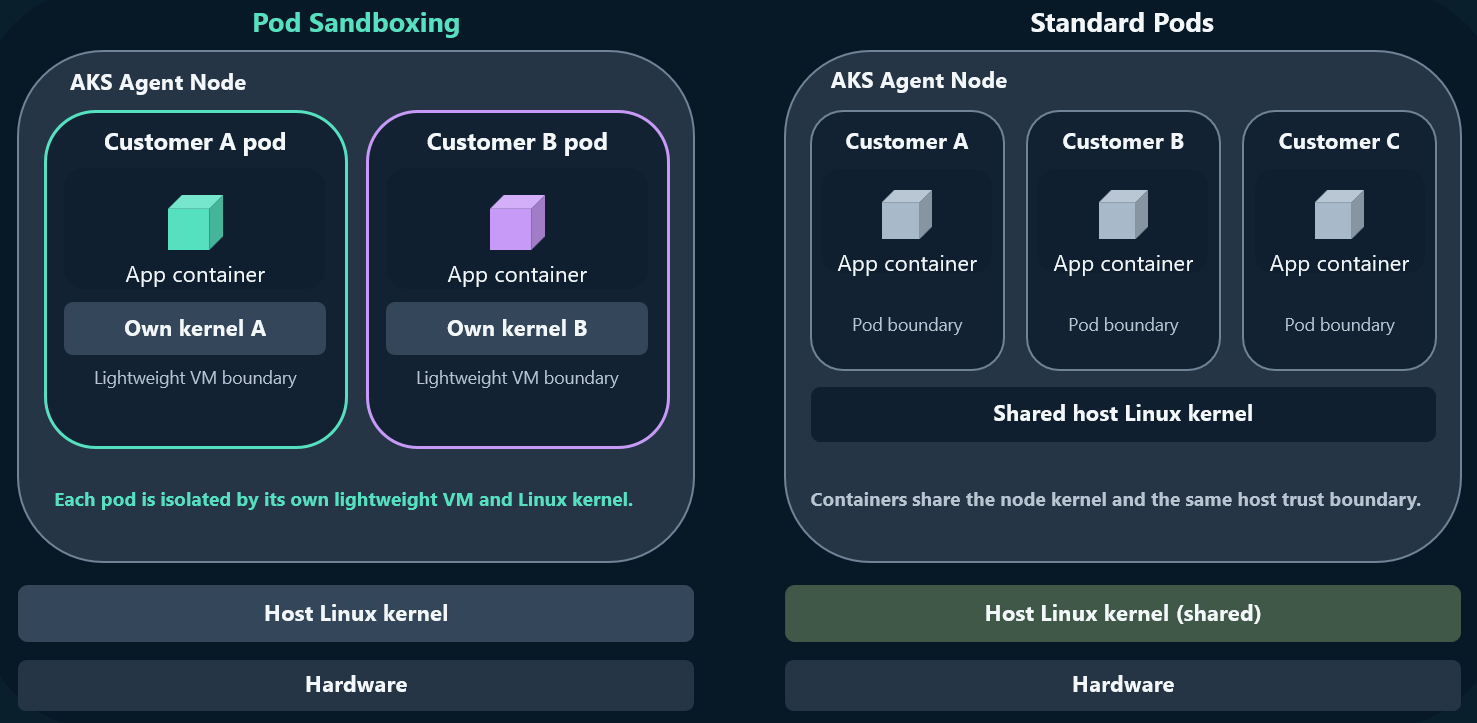
Pod sandboxing lets you colocate workloads on shared cluster nodes while maintaining a separate compute isolation boundary for each sandboxed pod.
You can declare resource requests and limits for your workloads. AKS applies default values when you omit them. The pod VM limits a resource-intensive workload to the CPU and memory allocated to that VM. If a workload causes its pod VM to fail, the compute isolation boundary protects workloads in other pod VMs from that failure.
Flexibility
You can run sandboxed and standard pods in the same cluster. This flexibility lets you apply pod VM isolation only to workloads that require it.
Open-source components
Pod sandboxing uses open-source components, including the Cloud Hypervisor VMM and the Kata Containers runtime. Open development provides transparency into the isolation components and enables community review. The architecture also separates the guest kernel in each pod VM from the Azure Linux host kernel.
Migrate existing workloads
For a basic deployment, add the Kata runtime class to an existing pod specification to run the workload in a pod VM. This manifest change doesn't guarantee behavior identical to a pod that uses the standard runc runtime. Before migration, validate the workload's operational behavior and Kubernetes feature compatibility, and account for the pod VM's resource sizing and overhead. For more information, see Considerations for Pod sandboxing.
Next steps
- Review Pod sandboxing considerations before deployment.
- Deploy Pod sandboxing on AKS.