หมายเหตุ
การเข้าถึงหน้านี้ต้องได้รับการอนุญาต คุณสามารถลอง ลงชื่อเข้าใช้หรือเปลี่ยนไดเรกทอรีได้
การเข้าถึงหน้านี้ต้องได้รับการอนุญาต คุณสามารถลองเปลี่ยนไดเรกทอรีได้
With Azure Backup, you can back up and restore your data from your Recovery Services vaults by using private endpoints. Private endpoints use one or more private IP addresses from your Azure virtual network to effectively bring the service into your virtual network.
This article helps you understand how private endpoints for Azure Backup work in the version 1 experience of creating private endpoints. It provides scenarios where using private endpoints helps maintain the security of your resources.
Azure Backup also provides a version 2 experience for creating and using private endpoints. Learn more.
Considerations before you start
You can create private endpoints for new Recovery Services vaults only, if no items are registered to the vault. You must create private endpoints before you try to protect any items in the vault. However, private endpoints are currently not supported for Backup vaults.
Customer-managed keys (CMKs) with a network-restricted key vault aren't supported with a vault that's enabled for private endpoints.
One virtual network can contain private endpoints for multiple Recovery Services vaults. Also, one Recovery Services vault can have private endpoints in multiple virtual networks. You can create a maximum of 12 private endpoints for a vault.
If public network access for the vault is set to Allow from all networks, the vault allows backups and restores from any machine registered to the vault. If public network access for the vault is set to Deny, the vault allows backups and restores only from the machines registered to the vault that are requesting backups/restores via private IPs allocated for the vault.
A private endpoint connection for Azure Backup uses a total of 11 private IPs in your subnet, including the IPs that Azure Backup uses for storage. This number might be higher for certain Azure regions. We recommend that you have enough private IPs (/25) available when you try to create private endpoints for Azure Backup.
Although both Azure Backup and Azure Site Recovery use a Recovery Services vault, this article discusses use of private endpoints for Azure Backup only.
Private endpoints for Azure Backup don't include access to Microsoft Entra ID. You need to provide access to Microsoft Entra ID separately.
IPs and fully qualified domain names (FQDNs) that are required for Microsoft Entra ID to work in a region need outbound access to be allowed from the secured network when you're performing:
- A backup of databases in Azure virtual machines (VMs).
- A backup that uses the Microsoft Azure Recovery Services (MARS) agent.
You can also use network security group (NSG) tags and Azure Firewall tags for allowing access to Microsoft Entra ID, as applicable.
You need to re-register the Recovery Services resource provider with the subscription if you registered it before May 1, 2020. To re-register the provider, go to your subscription in the Azure portal, go to Resource provider on the left menu, and then select Microsoft.RecoveryServices > Re-register.
Cross-region restore for SQL Server and SAP HANA database backups isn't supported if the vault has private endpoints enabled.
When you move a Recovery Services vault that's already using private endpoints to a new tenant, you need to update the Recovery Services vault to re-create and reconfigure the vault's managed identity. Create private endpoints in the new tenant as needed. If you don't do these tasks, the backup and restore operations will start failing. Also, any Azure role-based access control (Azure RBAC) permissions set up within the subscription need to be reconfigured.
Recommended and supported scenarios
While private endpoints are enabled for the vault, they're used for backup and restore of SQL Server and SAP HANA workloads in an Azure VM, MARS agent backup, and System Center Data Protection Manager (DPM) only. You can also use the vault for the backup of other workloads, though they don't require private endpoints. In addition to backups of SQL Server and SAP HANA workloads and backups via the MARS agent, private endpoints are used to perform file recovery for Azure VM backups.
The following table provides more information:
| Scenario | Recommendations |
|---|---|
| Backup of workloads in an Azure VM (SQL Server, SAP HANA), backup via MARS agent, DPM server | We recommend the use of private endpoints to allow backup and restore without needing to add to an allow list any IPs or FQDNs for Azure Backup or Azure Storage from your virtual networks. In that scenario, ensure that VMs that host SQL databases can reach Microsoft Entra IPs or FQDNs. |
| Azure VM backup | A VM backup doesn't require you to allow access to any IPs or FQDNs. So, it doesn't require private endpoints for backup and restore of disks. However, file recovery from a vault that contains private endpoints would be restricted to virtual networks that contain a private endpoint for the vault. For legacy recovery points from VMs that used unmanaged disks, ensure that the storage account used for restore metadata and temporary VHD files allows access to trusted Microsoft services if it's protected by an access control list (ACL). |
| Azure Files backup | An Azure Files backup is stored in the local storage account. So it doesn't require private endpoints for backup and restore. |
| Changed virtual network for a private endpoint in the vault and virtual machine | Stop backup protection and configure backup protection in a new vault with private endpoints enabled. |
Note
Private endpoints are supported only with DPM 2022, Microsoft Azure Backup Server (MABS) v4, and later.
Unsupported scenario
For backup and restore operations, a private endpoint-enabled Recovery Services vault is not compatible with a private endpoint-enabled Azure key vault to store CMKs in a Recovery Services vault.
Difference in network connections for private endpoints
As mentioned earlier, private endpoints are especially useful for backups of workloads (SQL Server and SAP HANA) in Azure VMs and backups of MARS agents.
In all the scenarios (with or without private endpoints), both the workload extensions (for backup of SQL Server and SAP HANA instances running inside Azure VMs) and the MARS agent make connection calls to Microsoft Entra ID. They make the calls to FQDNs mentioned under sections 56 and 59 in Microsoft 365 Common and Office Online.
In addition to these connections, when the workload extension or MARS agent is installed for a Recovery Services vault without private endpoints, connectivity to the following domains is required:
| Service | Domain names | Port |
|---|---|---|
| Azure Backup | *.backup.windowsazure.com |
443 |
| Azure Storage | *.blob.core.windows.net *.queue.core.windows.net *.blob.storage.azure.net *.storage.azure.net |
443 |
| Microsoft Entra ID | *.login.microsoft.com Allow access to FQDNs under sections 56 and 59. |
443 As applicable |
When the workload extension or MARS agent is installed for a Recovery Services vault with a private endpoint, the following endpoints are involved:
| Service | Domain names | Port |
|---|---|---|
| Azure Backup | *.privatelink.<geo>.backup.windowsazure.com |
443 |
| Azure Storage | *.blob.core.windows.net *.queue.core.windows.net *.blob.storage.azure.net *.storage.azure.net |
443 |
| Microsoft Entra ID | *.login.microsoft.com Allow access to FQDNs under sections 56 and 59. |
443 As applicable |
Note
In the preceding text, <geo> refers to the region code (for example, eus for East US and ne for North Europe). For more information on the region codes, see the following list:
To automatically update the MARS agent, allow access to download.microsoft.com/download/MARSagent/*.
For a Recovery Services vault with private endpoint setup, the name resolution for the FQDNs (privatelink.<geo>.backup.windowsazure.com, *.blob.core.windows.net, *.queue.core.windows.net, *.blob.storage.azure.net) should return a private IP address. You can achieve this by using:
- Azure Private DNS zones.
- Custom DNS.
- DNS entries in host files.
- Conditional forwarders to Azure DNS or Azure Private DNS zones.
The private endpoints for blobs and queues follow a standard naming pattern. They start with <name of the private endpoint>_ecs or <name of the private endpoint>_prot, and they're suffixed with _blob and _queue (respectively).
Note
We recommend that you use Azure Private DNS zones. They enable you to manage the DNS records for blobs and queues by using Azure Backup. The managed identity assigned to the vault is used to automate the addition of DNS records whenever a new storage account is allocated for backup data.
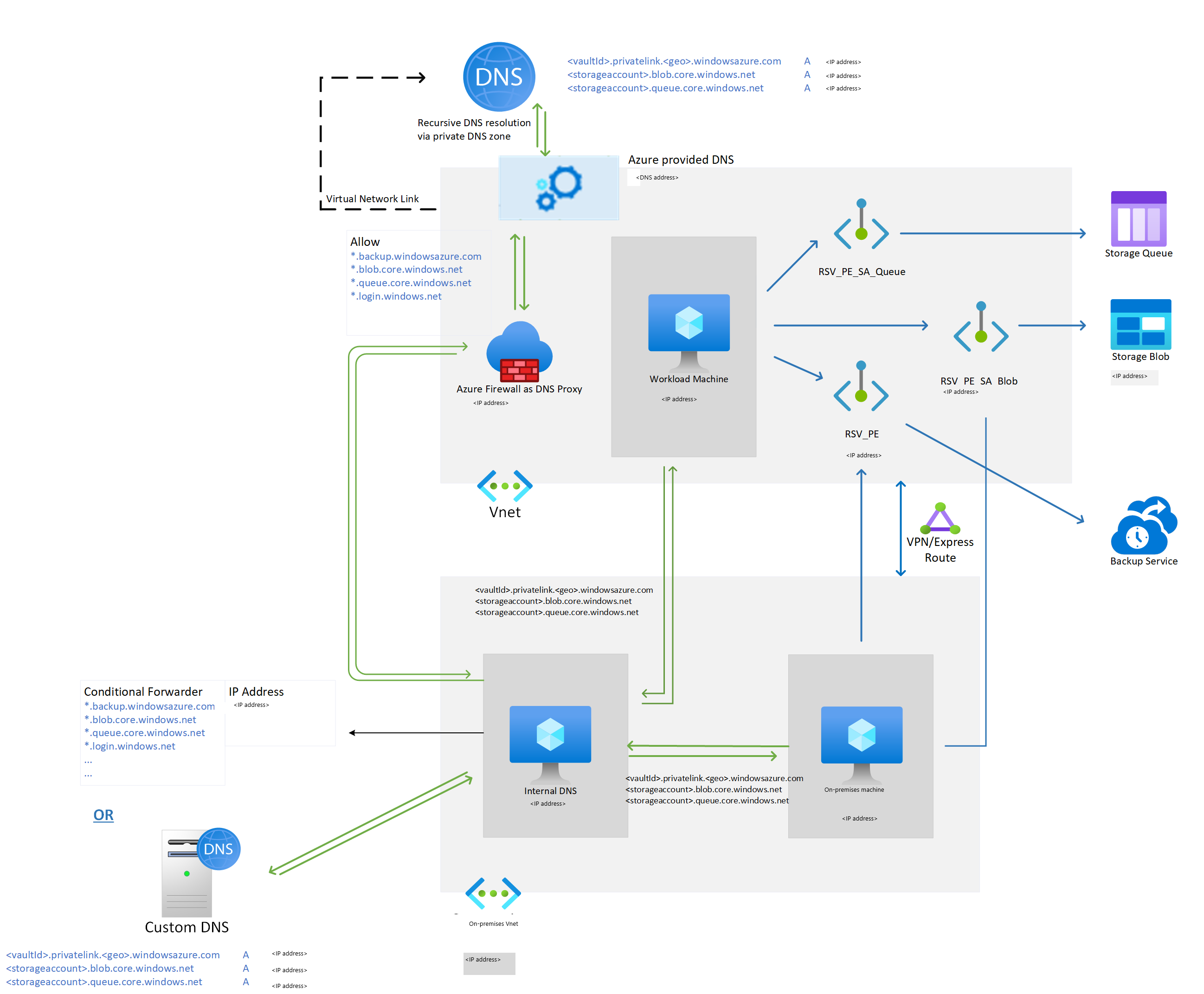
If you configured a DNS proxy server by using third-party proxy servers or firewalls, the preceding domain names must be allowed and redirected to one of these choices:
- Custom DNS that has DNS records for the preceding FQDNs
- 168.63.129.16 on the Azure virtual network that has private DNS zones linked to it
The following example shows Azure Firewall used as a DNS proxy to redirect the domain name queries for a Recovery Services vault, blob, queues, and Microsoft Entra ID to 168.63.129.16.
For more information, see Create and use private endpoints.
Network connectivity setup for a vault with private endpoints
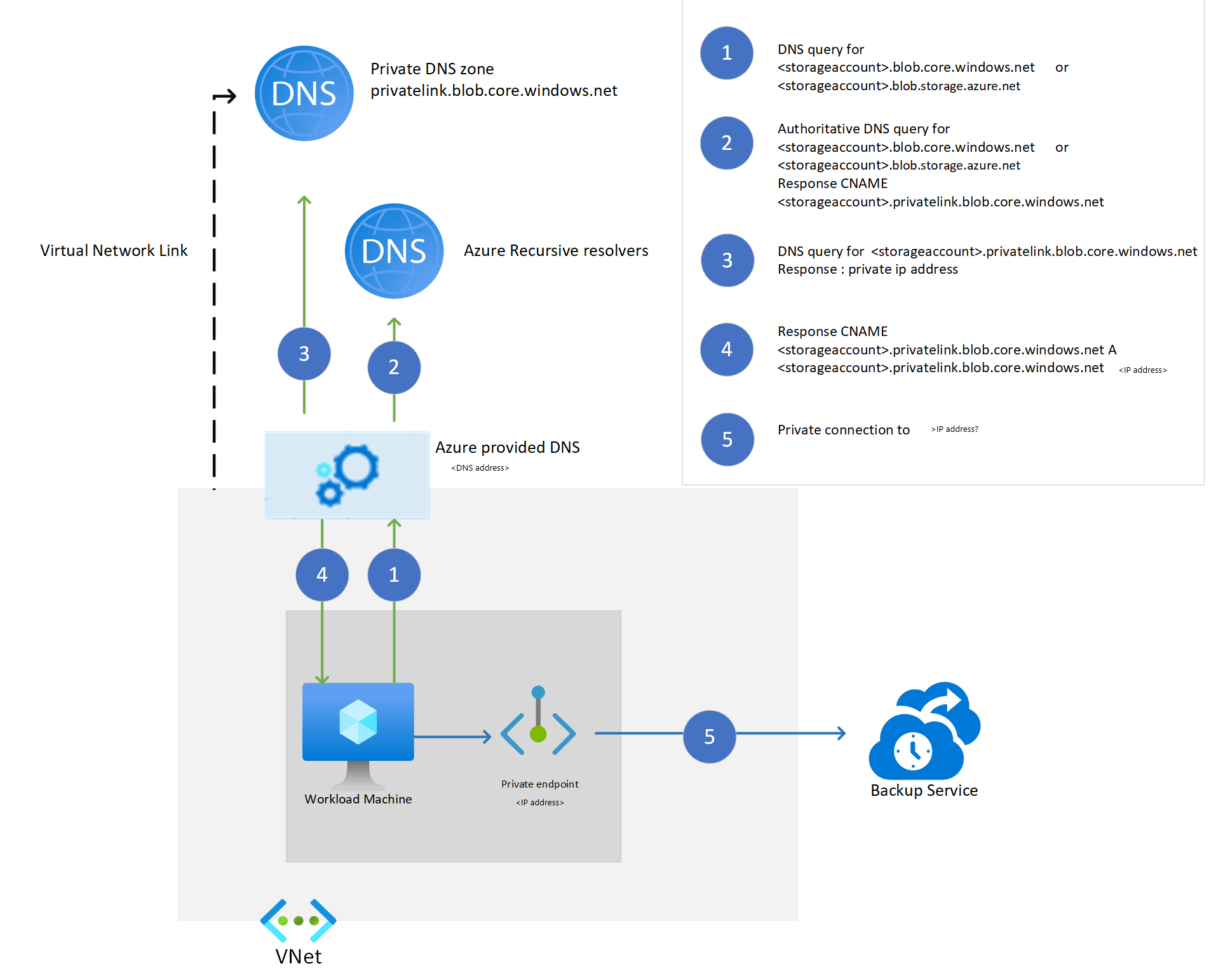
The private endpoint for Recovery Services is associated with a network interface (NIC). For private endpoint connections to work, all traffic for the Azure service must be redirected to the network interface. You can achieve this redirection by adding DNS mapping for private IPs associated with the network interface against the service, blob, or queue URL.
When workload backup extensions are installed on the virtual machine registered to a Recovery Services vault with a private endpoint, the extension attempts a connection on the private URL of the Azure Backup services: <vault_id>.<azure_backup_svc>.privatelink.<geo>.backup.windowsazure.com. If the private URL doesn't work, the extension tries the public URL: <azure_backup_svc>.<geo>.backup.windowsazure.com.
Note
In the preceding text, <geo> refers to the region code (for example, eus for East US and ne for North Europe). For more information on the region codes, see the following list:
These private URLs are specific for the vault. Only extensions and agents that are registered to the vault can communicate with Azure Backup over these endpoints. If the public network access for the Recovery Services vault is configured as Deny, this setting restricts the clients that aren't running in the virtual network from requesting backup and restore operations on the vault.
We recommend setting the public network access to Deny, along with private endpoint setup. As the extension and agent try to use the private URL initially, the *.privatelink.<geo>.backup.windowsazure.com DNS resolution of the URL should return the corresponding private IP associated with the private endpoint.
The solutions for DNS resolution are:
- Azure Private DNS zones
- Custom DNS
- DNS entries in host files
- Conditional forwarders to Azure DNS or Azure Private DNS zones
When you create the private endpoint for Recovery Services via the Azure portal with the Integrate with private DNS zone option, the required DNS entries for private IP addresses for Azure Backup services (*.privatelink.<geo>backup.windowsazure.com) are created automatically whenever the resource is allocated. In other solutions, you need to create the DNS entries manually for these FQDNs in the custom DNS or in the host files.
For the manual management of DNS records for blobs and queues after the VM discovery for the communication channel, see DNS records for blobs and queues (only for custom DNS servers/host files) after the first registration. For the manual management of DNS records after the first backup for backup storage account blobs, see DNS records for blobs (only for custom DNS servers/host files) after the first backup.
You can find the private IP addresses for the FQDNs on the pane for the private endpoint that you created for the Recovery Services vault.
The following diagram shows how the resolution works when you use a private DNS zone to resolve these private service FQDNs.
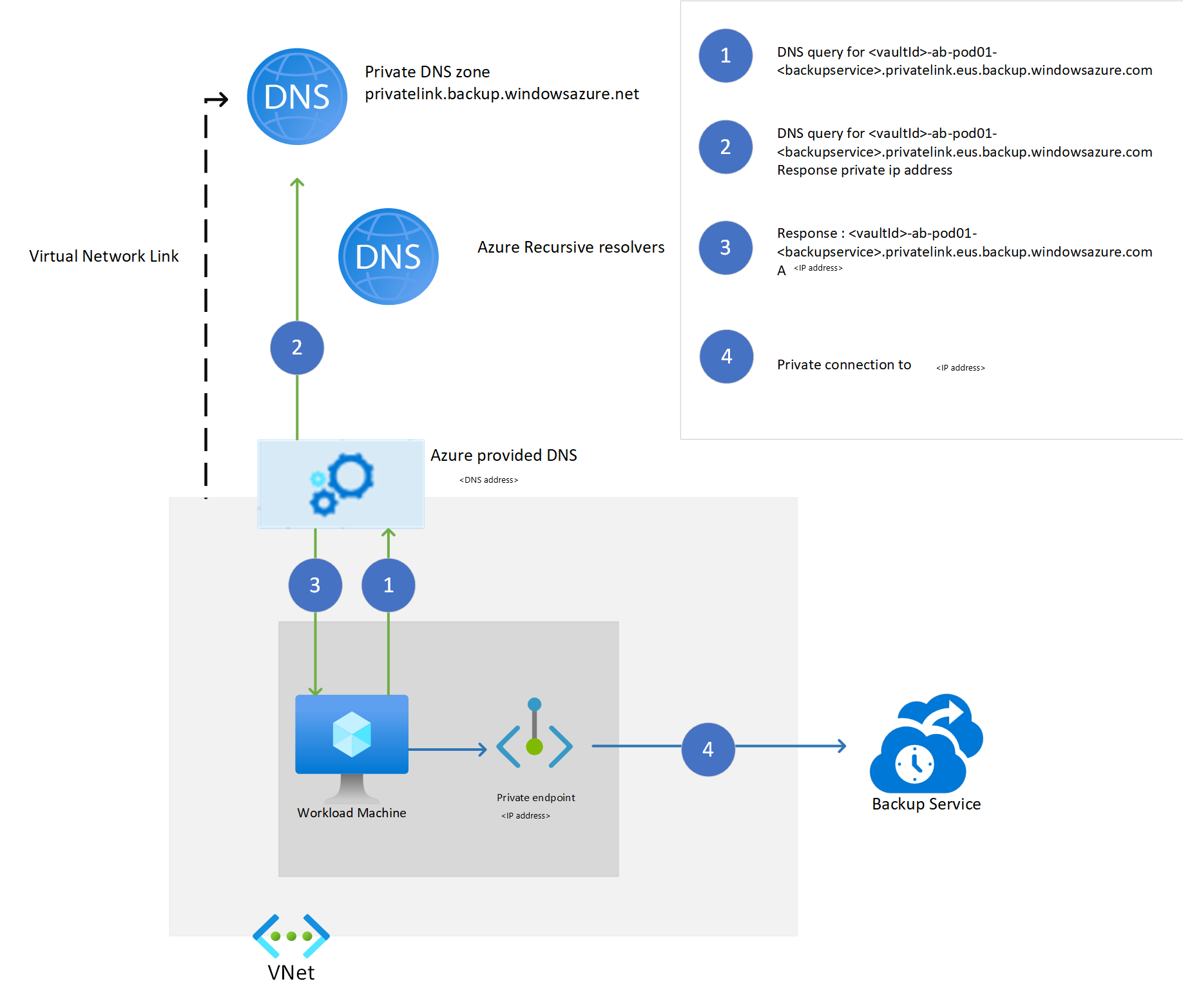
The workload extension running on an Azure VM requires a connection to at least two storage accounts. The first one is used as communication channel, via queue messages. The second one is for storing backup data. The MARS agent requires access to one storage account used for storing backup data.
For a private endpoint-enabled vault, the Azure Backup service creates a private endpoint for these storage accounts. This action prevents any network traffic related to Azure Backup (control plane traffic to the service, and backup data to the storage blob) from leaving the virtual network. In addition to Azure Backup cloud services, the workload extension and agent require connectivity to Azure Storage accounts and Microsoft Entra ID.
As a prerequisite, the Recovery Services vault requires permissions for creating additional private endpoints in the same resource group. We also recommend providing the Recovery Services vault the permissions to create DNS entries in the private DNS zones (privatelink.blob.core.windows.net, privatelink.queue.core.windows.net). The Recovery Services vault searches for private DNS zones in the resource groups where the virtual network and private endpoint are created. If it has the permissions to add DNS entries in these zones, it creates these entries. Otherwise, you must create them manually.
Note
Integration with private DNS zones in different subscriptions is unsupported in this experience.
The following diagram shows how the name resolution works for storage accounts that use a private DNS zone.