หมายเหตุ
การเข้าถึงหน้านี้ต้องได้รับการอนุญาต คุณสามารถลอง ลงชื่อเข้าใช้หรือเปลี่ยนไดเรกทอรีได้
การเข้าถึงหน้านี้ต้องได้รับการอนุญาต คุณสามารถลองเปลี่ยนไดเรกทอรีได้
APPLIES TO:  Azure Data Factory
Azure Synapse Analytics
Azure Data Factory
Azure Synapse Analytics
Tip
Try out Data Factory in Microsoft Fabric, an all-in-one analytics solution for enterprises. Microsoft Fabric covers everything from data movement to data science, real-time analytics, business intelligence, and reporting. Learn how to start a new trial for free!
This article outlines how to use the Copy Activity in an Azure Data Factory or Synapse Analytics pipeline to copy data from Jira. It builds on the copy activity overview article that presents a general overview of copy activity.
Important
The Jira connector version 2.0 provides improved native Jira support. If you are using Jira connector version 1.0 in your solution, please upgrade the Jira connector before March 31, 2026. Refer to this section for details on the difference between version 2.0 and version 1.0.
Supported capabilities
This Jira connector is supported for the following capabilities:
| Supported capabilities | IR |
|---|---|
| Copy activity (source/-) | ① ② |
| Lookup activity | ① ② |
① Azure integration runtime ② Self-hosted integration runtime
For a list of data stores that are supported as sources/sinks, see the Supported data stores table.
The service provides a built-in driver to enable connectivity, therefore you don't need to manually install any driver using this connector.
Getting started
To perform the copy activity with a pipeline, you can use one of the following tools or SDKs:
- Copy Data tool
- Azure portal
- .NET SDK
- Python SDK
- Azure PowerShell
- REST API
- Azure Resource Manager template
Create a linked service to Jira using UI
Use the following steps to create a linked service to Jira in the Azure portal UI.
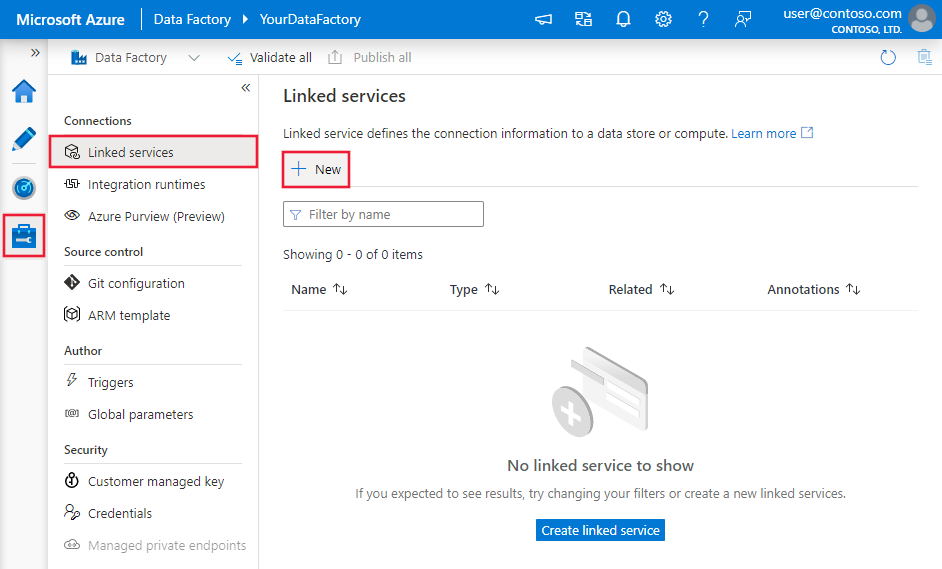
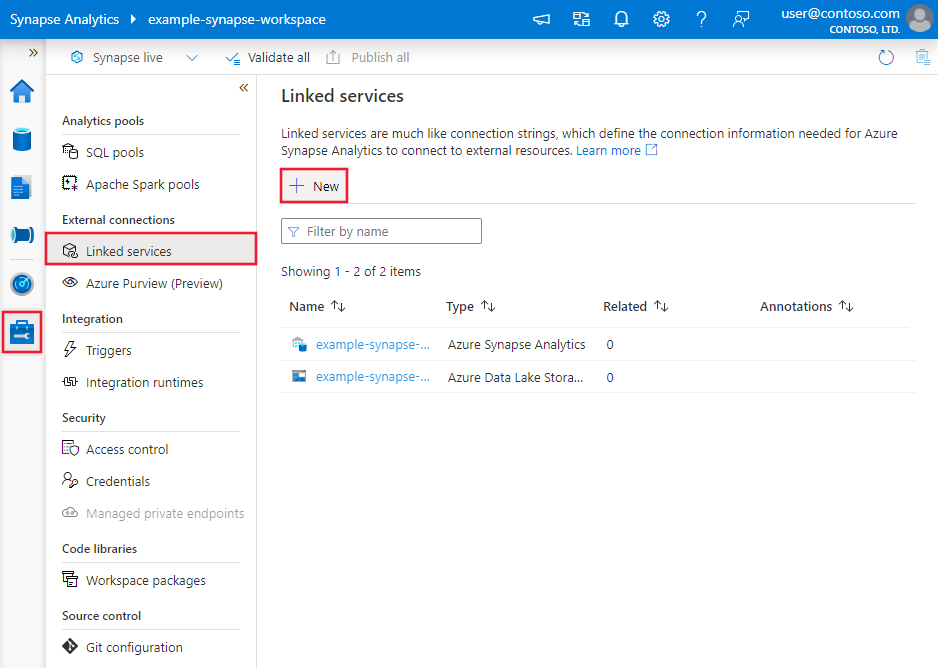
Browse to the Manage tab in your Azure Data Factory or Synapse workspace and select Linked Services, then click New:
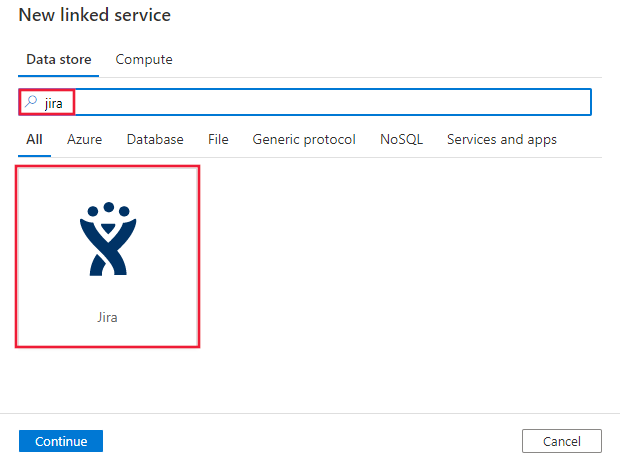
Search for Jira and select the Jira connector.
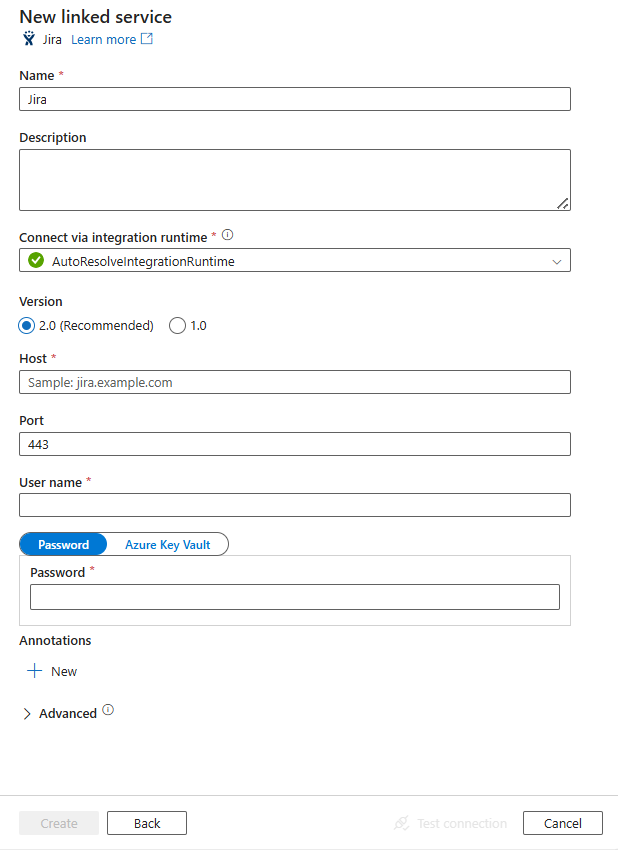
Configure the service details, test the connection, and create the new linked service.
Connector configuration details
The following sections provide details about properties that are used to define Data Factory entities specific to Jira connector.
Linked service properties
The Jira connector now supports version 2.0. Refer to this section to upgrade your Jira connector version from version 1.0. For the property details, see the corresponding sections.
Version 2.0
The Jira linked service supports the following properties when applying version 2.0:
| Property | Description | Required |
|---|---|---|
| type | The type property must be set to: Jira | Yes |
| version | The version that you specify. The value is 2.0. |
Yes |
| host | The IP address or host name of the Jira service. For example, jira.example.com. |
Yes |
| port | The TCP port that the Jira server uses to listen for client connections. The default value is 443 if connecting through HTTPS, or 8080 if connecting through HTTP. | No |
| username | The user name that you use to access Jira Service. | Yes |
| password | The Atlassian API token (if two-step verification is enabled on the Atlassian account) or password corresponding to the user name that you provided in the username field. Mark this field as a SecureString to store it securely, or reference a secret stored in Azure Key Vault. | Yes |
| connectVia | The integration runtime to be used to connect to the data store. If no value is specified, the property uses the default Azure integration runtime. You can use the self-hosted integration runtime and its version should be 5.61 or above. | No |
Example:
{
    "name": "JiraLinkedService",
    "properties": {
        "type": "Jira",
        "version": "2.0",
        "typeProperties": {
            "host" : "<host>",
            "port" : "<port>",
            "username" : "<username>",
            "password": {
                "type": "SecureString",
                "value": "<password>"
            }
        }
    }
}
Version 1.0
The Jira linked service supports the following properties when applying version 1.0:
| Property | Description | Required |
|---|---|---|
| type | The type property must be set to: Jira | Yes |
| host | The IP address or host name of the Jira service. (for example, jira.example.com) | Yes |
| port | The TCP port that the Jira server uses to listen for client connections. The default value is 443 if connecting through HTTPS, or 8080 if connecting through HTTP. | No |
| username | The user name that you use to access Jira Service. | Yes |
| password | The Atlassian API token (if two-step verification is enabled on the Atlassian account) or password corresponding to the user name that you provided in the username field. Mark this field as a SecureString to store it securely, or reference a secret stored in Azure Key Vault. | Yes |
| useEncryptedEndpoints | Specifies whether the data source endpoints are encrypted using HTTPS. The default value is true. | No |
| useHostVerification | Specifies whether to require the host name in the server's certificate to match the host name of the server when connecting over TLS. The default value is true. | No |
| usePeerVerification | Specifies whether to verify the identity of the server when connecting over TLS. The default value is true. | No |
Example:
{
    "name": "JiraLinkedService",
    "properties": {
        "type": "Jira",
        "typeProperties": {
            "host" : "<host>",
            "port" : "<port>",
            "username" : "<username>",
            "password": {
                "type": "SecureString",
                "value": "<password>"
            }
        }
    }
}
Dataset properties
For a full list of sections and properties available for defining datasets, see the datasets article. This section provides a list of properties supported by Jira dataset.
To copy data from Jira, set the type property of the dataset to JiraObject. The following properties are supported:
| Property | Description | Required |
|---|---|---|
| type | The type property of the dataset must be set to: JiraObject | Yes |
| schema | Name of the schema. This property is only supported in version 2.0. | Yes |
| table | Name of the table. This property is only supported in version 2.0. | Yes |
| tableName | Name of the table. This property is only supported in version 1.0. | No (if "query" in activity source is specified) |
Example
{
    "name": "JiraDataset",
    "properties": {
        "type": "JiraObject",
        "typeProperties": {},
        "schema": [],
        "linkedServiceName": {
            "referenceName": "<Jira linked service name>",
            "type": "LinkedServiceReference"
        }
    }
}
The connector version 2.0 supports the following Jira tables:
- AdvancedSettings
- AllAccessibleProjectTypes
- AllApplicationRoles
- AllAvailableDashboardGadgets
- AllDashboards
- AllFieldConfigurations
- AllFieldConfigurationSchemes
- AllIssueTypeSchemes
- AllLabels
- AllPermissions
- AllPermissionSchemes
- AllProjectCategories
- AllProjectRoles
- AllProjectTypes
- AllUserDataClassificationLevels
- AllUsers
- AllUsersDefault
- AllWorkflowSchemes
- ApplicationProperty
- ApproximateLicenseCount
- AttachmentMeta
- AutoComplete
- AvailableTimeTrackingImplementations
- Banner
- BulkGetGroups
- Configuration
- CurrentUser
- DashboardsPaginated
- DefaultEditor
- DefaultShareScope
- Events
- FavouriteFilters
- FieldAutoCompleteForQueryString
- FieldConfigurationSchemeMappings
- Fields
- FieldsPaginated
- FiltersPaginated
- FindComponentsForProjects
- FindGroups
- IdsOfWorklogsDeletedSince
- IdsOfWorklogsModifiedSince
- IssueAllTypes
- IssueLimitReport
- IssueLinkTypes
- IssueNavigatorDefaultColumns
- IssuePickerResource
- IssueSecuritySchemes
- IssueTypeSchemesMapping
- IssueTypeScreenSchemeMappings
- IssueTypeScreenSchemes
- License
- Locale
- MyFilters
- NotificationSchemes
- NotificationSchemeToProjectMappings
- Plans
- PrioritySchemes
- Recent
- Screens
- ScreenSchemes
- Search
- SearchProjects
- SearchProjectsUsingSecuritySchemes
- SearchResolutions
- SearchSecuritySchemes
- SearchWorkflows
- SecurityLevelMembers
- SecurityLevels
- SelectedTimeTrackingImplementation
- ServerInfo
- SharedTimeTrackingConfiguration
- StatusCategories
- Statuses
- TrashedFieldsPaginated
- UserDefaultColumns
Copy activity properties
For a full list of sections and properties available for defining activities, see the Pipelines article. This section provides a list of properties supported by Jira source.
Jira as source
To copy data from Jira, set the source type in the copy activity to JiraSource. The following properties are supported in the copy activity source section:
| Property | Description | Required |
|---|---|---|
| type | The type property of the copy activity source must be set to: JiraSource | Yes |
| query | Use the custom SQL query to read data. For example: "SELECT * FROM MyTable". |
No (if "tableName" in dataset is specified) |
Note
query is not supported in version 2.0.
Example:
"activities":[
    {
        "name": "CopyFromJira",
        "type": "Copy",
        "inputs": [
            {
                "referenceName": "<Jira input dataset name>",
                "type": "DatasetReference"
            }
        ],
        "outputs": [
            {
                "referenceName": "<output dataset name>",
                "type": "DatasetReference"
            }
        ],
        "typeProperties": {
            "source": {
                "type": "JiraSource",
                "query": "SELECT * FROM MyTable"
            },
            "sink": {
                "type": "<sink type>"
            }
        }
    }
]
Data type mapping for Jira
When you copy data from Jira, the following mappings apply from Jira's data types to the internal data types used by the service. To learn about how the copy activity maps the source schema and data type to the sink, see Schema and data type mappings.
| Jira data type | Interim service data type (for version 2.0) | Interim service data type (for version 1.0) |
|---|---|---|
| string | String | Varchar, Text |
| integer | Integer | Int, Bigint |
| datetime | String, DateTime | DateTime, Timestamp |
| boolean | Boolean | Bit, Boolean |
| object | Object | Flattened, Json |
| array | Array | Json, Separate table |
Lookup activity properties
To learn details about the properties, check Lookup activity.
Jira connector lifecycle and upgrade
The following table shows the release stage and change logs for different versions of the Jira connector:
| Version | Release stage | Change log |
|---|---|---|
| Version 1.0 | End of support announced | / |
| Version 2.0 | GA version available | • Support schema and table in Dataset. • Support specific Jira tables. For the supported table list, go to Dataset properties. • The self-hosted integration runtime version should be 5.61 or above. • The data type mapping for the Jira linked service version 2.0 is different from that for the version 1.0. For the latest data type mapping, go to Data type mapping for Jira. • useEncryptedEndpoints, useHostVerification, usePeerVerification are not supported in the linked service. • query is not supported. • OAuth 1.0 authentication is not supported. |
Upgrade the Jira connector from version 1.0 to version 2.0
In Edit linked service page, select version 2.0 and configure the linked service by referring to Linked service properties version 2.0.
The data type mapping for the Jira linked service version 2.0 is different from that for the version 1.0. To learn the latest data type mapping, see Data type mapping for Jira.
If you use the self-hosted integration runtime, its version should be 5.61 or above.
queryis only supported in version 1.0. You should useschemaandtableinstead ofqueryin version 2.0.
Note
Version 2.0 supports specific Jira tables. For the supported table list, go to Dataset properties.
Related content
For a list of data stores supported as sources and sinks by the copy activity, see supported data stores.