หมายเหตุ
การเข้าถึงหน้านี้ต้องได้รับการอนุญาต คุณสามารถลอง ลงชื่อเข้าใช้หรือเปลี่ยนไดเรกทอรีได้
การเข้าถึงหน้านี้ต้องได้รับการอนุญาต คุณสามารถลองเปลี่ยนไดเรกทอรีได้
Important
This feature is in Public Preview.
Materialization for metric views accelerates queries by using materialized views to pre-compute aggregations. Lakeflow Spark Declarative Pipelines orchestrates user-defined materialized views for a given metric view. At query time, the query optimizer routes queries to the best materialized view using automatic aggregate-aware query matching (query rewriting). You query the metric view as usual, with no additional manual effort. Databricks refreshes the materializations to keep them up to date and chooses which materialization to query for faster queries at lower cost.
How materialization works
Materialization for metric views involves two phases: defining the materialization and running queries against it.
Definition phase
When you define a metric view with materialization, you specify your fields, measures, and refresh schedule in the metric view YAML. From that definition, Databricks creates a managed Lakeflow Spark Declarative pipeline that builds and maintains the materialized views.
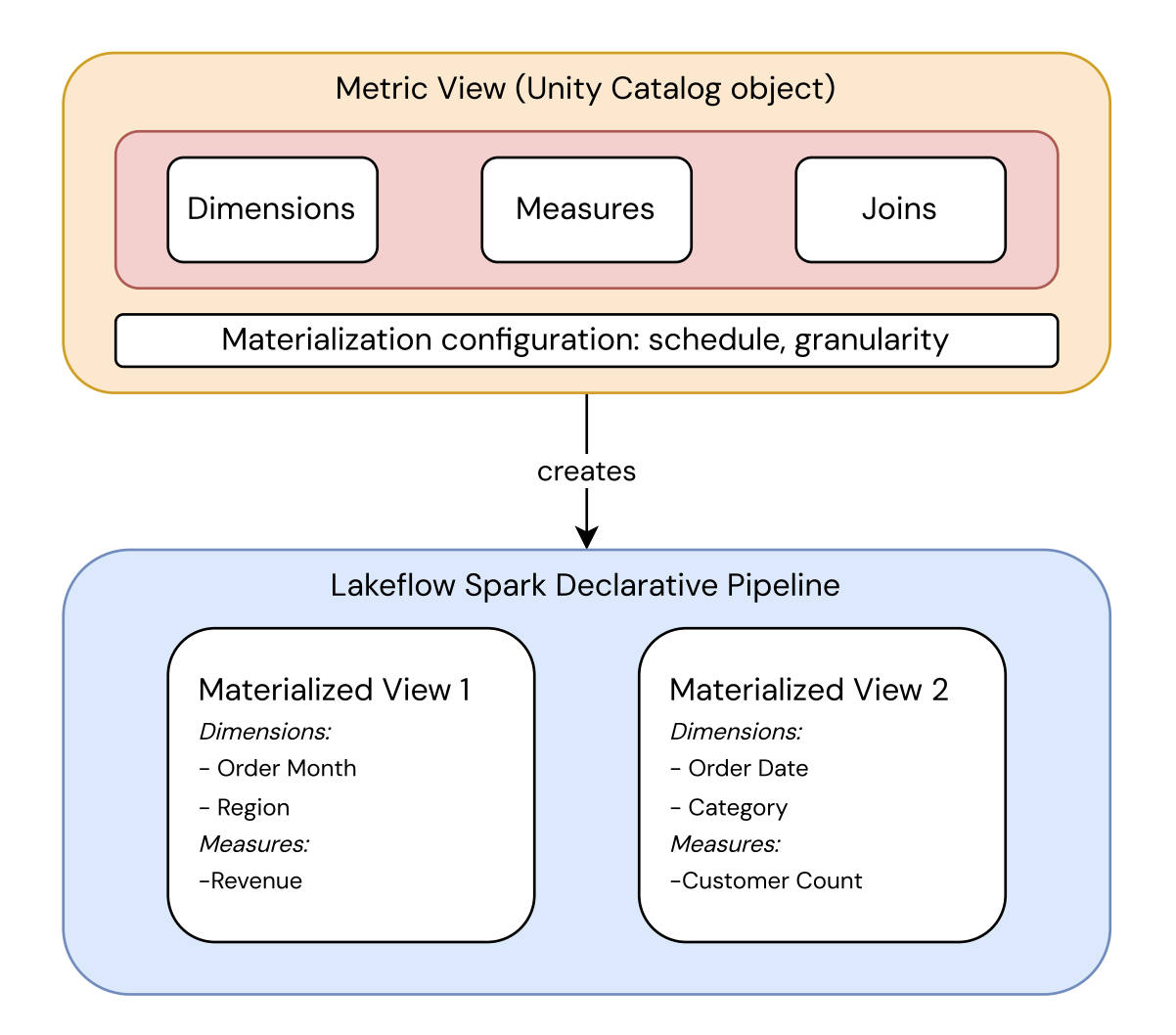
This keeps the metric definition separate from how it's stored:
- The metric view is a Unity Catalog object that defines the metric's fields, measures, and joins, along with the materialization configuration (schedule and granularity). It's the single source of truth for what the metric means.
- The pipeline materializes that definition into one or more materialized views, each pre-computed at a specific granularity. Databricks chooses which one to read at query time.
Query execution
When you run SELECT ... FROM <metric_view>, the query optimizer uses aggregate-aware query rewriting to optimize performance:
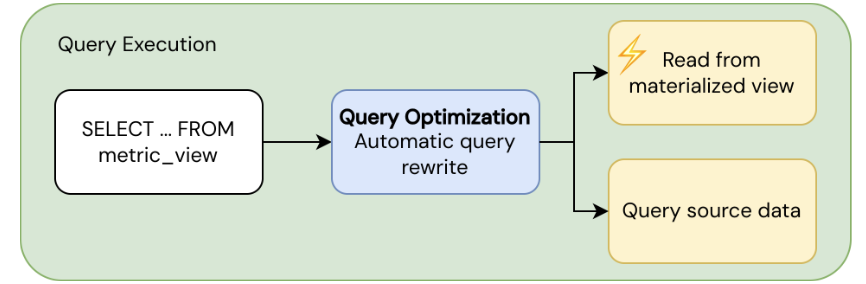
- Fast path: Reads from pre-computed materialized views when a suitable materialization exists.
- Fallback path: Reads from source data directly when no suitable materialization is available.
The query optimizer automatically balances performance and freshness by choosing between materialized and source data. You receive results transparently regardless of which path the optimizer uses. For more about running queries against metric views, see Query metric views.
Requirements
To use materialization for metric views:
- Your workspace must have serverless compute enabled. This is required to run Lakeflow Spark Declarative Pipelines.
- A SQL warehouse or compute resource running Databricks Runtime 17.3 or above.
Configuration reference
You configure materialization in a top-level materialization field in the metric view YAML definition. This field sets the query rewrite mode (always relaxed), an optional refresh schedule, and a list of materialized_views to maintain. Each materialized view is either aggregated (pre-computes specific dimensions and measures) or unaggregated (materializes the full data model).
For the complete field-by-field specification, including required and optional fields, allowed values, and the schedule clause restrictions, see Materialization.
Example definition
The following example defines a metric view with one unaggregated and two aggregated materializations:
version: 1.1

source: prod.operations.orders_enriched_view

filter: revenue > 0

fields:
  - name: category
    expr: substring(category, 5)

  - name: color
    expr: color

measures:
  - name: total_revenue
    expr: SUM(revenue)

  - name: number_of_suppliers
    expr: COUNT(DISTINCT supplier_id)

materialization:
  schedule: every 6 hours
  mode: relaxed

  materialized_views:
    - name: baseline
      type: unaggregated

    - name: revenue_breakdown
      type: aggregated
      dimensions:
        - category
        - color
      measures:
        - total_revenue

    - name: suppliers_by_category
      type: aggregated
      dimensions:
        - category
      measures:
        - number_of_suppliers
Query rewrite mode
In relaxed mode, automatic query rewrite only verifies whether candidate materialized views have the necessary fields and measures to serve the query.
The following checks are skipped:
- Freshness: It doesn't verify that the materialization is up to date.
- SQL settings: It doesn't verify that settings such as
TIMEZONEorANSI_MODEmatch. - Determinism: It doesn't verify that the materialized results are fully deterministic.
Queries that match a materialization use the last refresh. Queries that don't match fall back to source and return live data. As a result, data freshness can vary depending on whether a query qualifies for rewrite. To verify consistency, align your materialization refresh schedule with your source pipeline. For example, if your source updates daily with a batch pipeline, schedule materialization refreshes to run after that pipeline completes. Alternatively, use an unaggregated materialization to guarantee that all queries read from the same snapshot.
Query rewrite doesn't occur if the materialization was built from data that includes:
- Row-level security (RLS), column-level masking (CLM), or ABAC policies, because pre-computed results can bypass per-user access controls that are meant to be enforced at query time.
- Invoker-dependent expressions, which are expressions whose result changes based on who runs the query (for example,
current_user()oris_member()). A materialization is pre-computed once and shared, so serving it to a different user would return incorrect or insecure results.
In these cases, the query automatically routes back to the source tables.
Types of materializations for metric views
The following sections explain the types of materialized views available for metric views and provide guidance on selecting the appropriate configuration for your data sources and query patterns.
Aggregated type
This type pre-computes aggregations for specified measure and field combinations for targeted coverage.
Use an aggregated type when there are specific dimension and measure combinations that are queried frequently. With aggregated materializations, both exact match and rollup match strategies apply, providing the best query performance for those patterns.
For optimal aggregations:
- Include the most commonly used dimensions in
GROUP BYclauses. - Include any potential filter columns (columns used in
WHEREat query time). - Materialize at the most detailed level your queries need. For example, a materialization at
(region, sku, event_day)can serve all of the following:GROUP BY regionGROUP BY region, event_monthGROUP BY skuwithWHERE region = 'US'
- Avoid dimensions so granular that they produce mostly single-row groups (for example, a raw timestamp with millisecond precision). This has no benefit and inflates storage.
- Watch for non-additive measures. Non-additive measures can't be re-aggregated from partial results (for example,
COUNT(DISTINCT),MEDIAN, and percentiles) and require an exact match against a materialization.
A single aggregation can only serve queries that match its specific dimensions (exact match) or a subset of its dimensions (rollup match). Databricks recommends creating multiple aggregated materializations for different query shapes.
Unaggregated type
This type materializes the entire unaggregated data model (the source, joins, filter, and fields fields) for wider coverage with less performance lift compared to the aggregated type.
Use an unaggregated type when any of the following are true:
- Your metric view involves expensive source transformations or joins.
- Query patterns are unpredictable or varied.
- All users querying the metric view must see consistency within the data.
With unaggregated materializations, expensive source views and joins compute once at refresh rather than on every query. When both aggregated and unaggregated materializations exist, Databricks computes the aggregated materializations from the unaggregated one. This provides a consistent snapshot and avoids redundant recomputation of the source. An unaggregated match is always eligible regardless of query shape, subject to the restrictions described in Query rewrite mode.
An unaggregated materialization doesn't help when the source is a direct table reference without a selective filter. In that case, it has no benefit over querying the source directly.
For additional guidance on how and when to use these materialization types, see Choose a materialization type for metric views.
Automatic query rewrite
When you query a metric view, query rewrite automatically routes your query to the best available materialization. It uses three query rewrite strategies: exact match, rollup match, and unaggregated match.
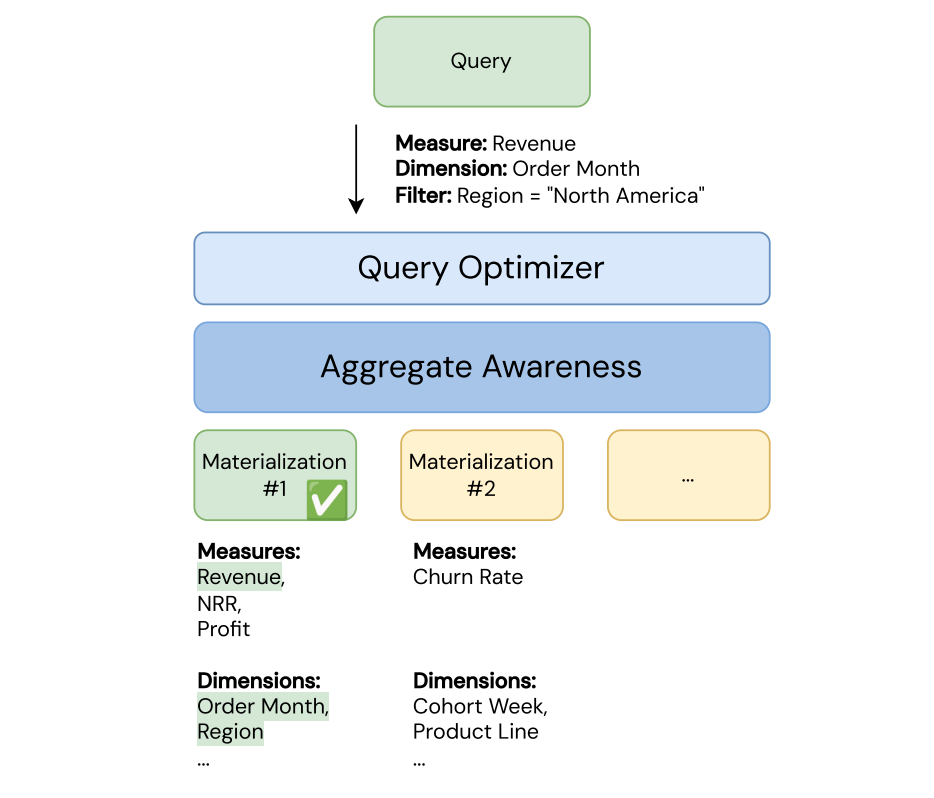
The query automatically runs on the best materialization instead of the base tables using this algorithm:
- First, the query optimizer attempts an exact match.
- If there is no exact match, the query optimizer attempts a rollup match.
- If there is no rollup match and an unaggregated materialization exists, the query optimizer tries an unaggregated match.
- If there is no unaggregated match, the query reads directly from the source tables.
The following sections explain how each strategy works.
Note
Materializations must finish materializing before query rewrite can take effect.
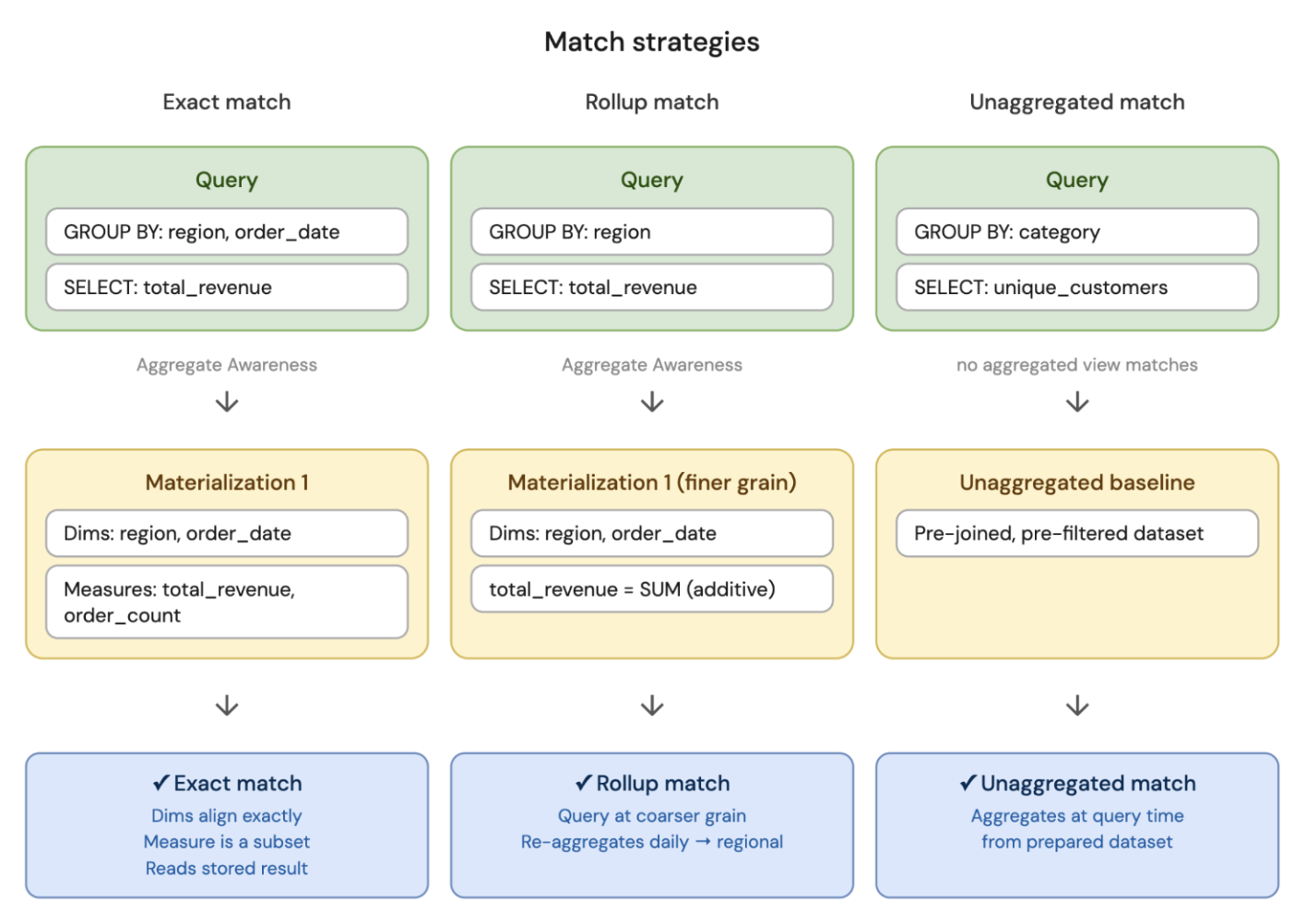
Exact match
The query asks for exactly what was pre-computed in the materialization. Query rewrite reads the stored result with no extra work, enabling fast results.
To qualify for exact match:
- The query's
GROUP BYexpressions must exactly match the materialization dimensions. - The query's measures must be a subset of the materialization measures.
For example, a materialization has dimensions [region, order_date] and measures [total_revenue, order_count]. A query that groups by region and order_date and asks for total_revenue is an exact match, because the dimensions are the same and the measure was pre-computed.
Rollup match
The query asks for a summary at a coarser level than what was pre-computed. The optimizer reads the pre-computed result and re-aggregates it up to the level the query needs.
To qualify for rollup match:
- Coarser grain: The query groups by fewer dimensions or a broader time granularity than the materialization.
- All measures are additive: Every measure your query asks for must be one that can be correctly recomputed by combining partial results (for example,
SUMofSUMs orMAXofMAXes).MEDIANcan't be rolled up because it relies on the group distribution. - Any participating filters must be deterministic expressions: If your query has a
WHEREclause, the filter must always produce the same result for the same input. For example,WHERE region = 'US'is deterministic, but expressions such asrand()oruuid()are not.
Rollup match isn't eligible for non-additive measures, because they can't be correctly re-aggregated from partial results. See Additive measures.
For example, using the same materialization with dimensions [region, order_date] and measures [total_revenue, order_count], a query that groups by only region and asks for total_revenue is a rollup match. The query needs fewer dimensions than what was materialized, so the engine collapses the daily totals into region-level totals.
Additive measures
A measure is additive if its aggregate result can be correctly recomputed by re-aggregating from existing aggregated materializations. This is the core requirement for rollup matching.
Any aggregate using DISTINCT (for example, COUNT(DISTINCT), SUM(DISTINCT)) is non-additive and can't be rolled up.
The following functions are additive:
SUMCOUNTMINMAXBIT_ANDBIT_ORBIT_XORBOOL_ANDBOOL_OR
Additional restrictions apply to additive measures:
- The measure definition must contain exactly one aggregate function. A measure whose definition combines multiple aggregates (for example,
sum(cost) + min(revenue)) isn't eligible for rollup matching. - If the measure definition includes a
FILTERclause, it must be deterministic. - The measure can't be a window measure (for example, a rolling 7-day total or year-over-year comparison defined with a window block).
Unaggregated match
The query doesn't match any pre-computed aggregation, but the expensive prep work (joins and filters) is already done. Query rewrite starts from the prepared dataset of the unaggregated materialization instead of going back to the source tables.
If an unaggregated materialization exists, this strategy is always eligible as a fallback before going to source. Any query shape can use it, subject to the restrictions described in Query rewrite mode.
For example, your query groups by category and asks for unique_customers, but no aggregated materialization includes those fields and measures. However, an unaggregated materialization exists with the joined, filtered dataset ready. The query optimizer reads from that prepared dataset and runs GROUP BY category, COUNT(DISTINCT customer_id) at query time, instead of re-joining the raw tables from scratch.
Verify a query is using materialized views
There are two ways to check if a query is using a materialized view:
- Run
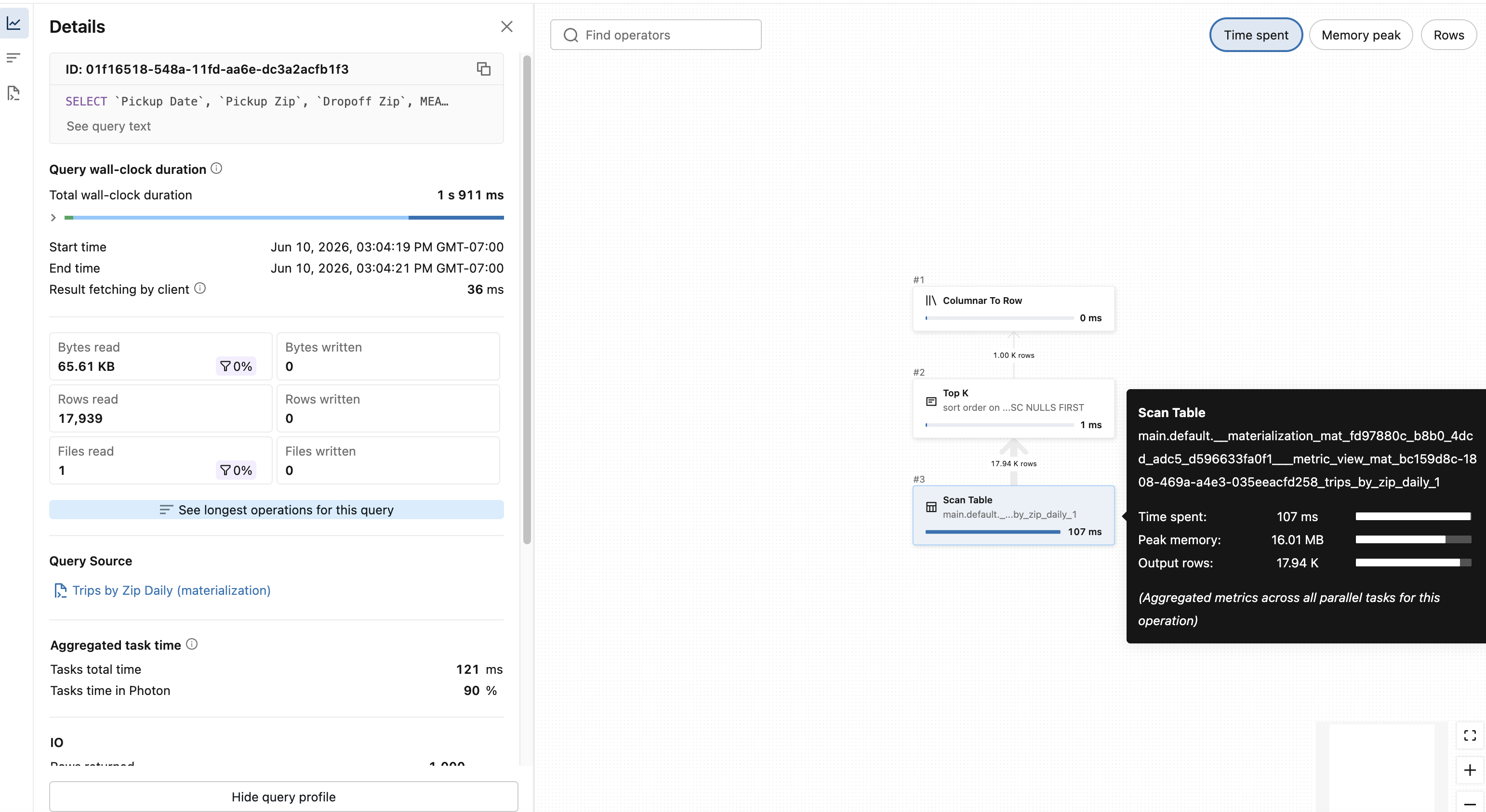
EXPLAIN EXTENDEDon your query to see the query plan. If the materialization was hit, the leaf node includes__materialization_mat_<pipeline ID>___metric_view_mat_and the name of the materialization from the YAML file. - Look at the query profile, as shown below.
Materialization lifecycle
This section explains how materializations are created, managed, and refreshed throughout their lifecycle.
Create and modify
When you create or modify a metric view (using CREATE, ALTER, or Catalog Explorer), the metric view definition updates immediately. Materialized views refresh asynchronously in the background using a managed Lakeflow Spark Declarative Pipelines pipeline.
- On create: If your metric view includes materializations, Databricks creates a pipeline and triggers an initial refresh immediately. While the refresh is in progress, the metric view is still queryable; queries fall back to source until the materialization is fully created.
- On modify: No refresh is triggered unless you are enabling materializations for the first time. Existing materializations aren't used for query rewrite until the next refresh completes.
Changing the materialization schedule doesn't trigger a refresh.
Without a schedule, the pipeline runs an initial update on creation, but subsequent refreshes must be triggered manually or the data goes stale. Databricks recommends always defining a schedule so that data stays fresh, unless you are testing or prototyping.
See Manual refresh for finer control over refresh behavior.
Inspect underlying pipeline
Materialization for metric views is implemented using Lakeflow Spark Declarative Pipelines. You can access the pipeline in two ways:
- In Catalog Explorer: The Overview tab for the metric view includes a direct link under the Refresh Schedule heading. To learn how to access Catalog Explorer, see What is Catalog Explorer?.
- Using SQL: Run
DESCRIBE EXTENDED. The Refresh Information section contains the pipeline link and the current refresh status.
DESCRIBE EXTENDED my_metric_view;
Example output:
-- Returns additional metadata such as parent schema, owner, access time etc.
> DESCRIBE EXTENDED my_metric_view;
                      col_name                       data_type    comment
 ------------------------------- ------------------------------ ----------
                           ...                             ...        ...

 # Detailed Table Information
                           ...                             ...

                      Language                            YAML
              Table properties                             ...
 # Refresh Information
         Latest Refresh Status                       Succeeded
                Latest Refresh                     https://...
              Refresh Schedule                   EVERY 6 HOURS
Manual refresh
From the link to the Lakeflow Spark Declarative Pipelines page, you can manually start a pipeline update to update the materializations. You can also trigger a manual refresh using the following SQL command:
REFRESH MATERIALIZED VIEW <metric-view-name>
Incremental refresh
The materialized views use incremental refresh whenever possible and have the same limitations as standard materialized views regarding data sources and plan structure.
For details on prerequisites and restrictions, see Incremental refresh for materialized views.
Billing
Refreshing materialized views incurs Lakeflow Spark Declarative Pipelines usage charges. To find the DBU consumption of the pipeline, see What is the DBU consumption of a serverless pipeline?.
Known restrictions
The following restrictions apply to materialization for metric views:
- After a materialization is created for a metric view, you can't change the owner.
- Only the exact match strategy is eligible for metric views with one-to-many joins.