หมายเหตุ
การเข้าถึงหน้านี้ต้องได้รับการอนุญาต คุณสามารถลอง ลงชื่อเข้าใช้หรือเปลี่ยนไดเรกทอรีได้
การเข้าถึงหน้านี้ต้องได้รับการอนุญาต คุณสามารถลองเปลี่ยนไดเรกทอรีได้
Azure Logic Apps is a cloud service and platform for automating enterprise business process workflows and integrating services, systems, apps, and data across cloud, on-premises, and hybrid environments with little or no code.
This platform supports the following primary scenarios:
- Orchestrate business process workflows across multiple systems.
- Connect legacy, modern, and cutting-edge platforms by using 1,400+ prebuilt connectors.
- Build integration workflows visually with access to options for custom code.
- Create deterministically or dynamically run workflows that use AI agents and large language models.
To decide whether this service fits your workload, compare automation services. To get started with building a workflow, choose a getting-started guide. To select a hosting model, compare Consumption and Standard workflows.
For example, the following sample workflow shows how Azure Logic Apps can route an incoming order for manual review when the cost exceeds a specified threshold:
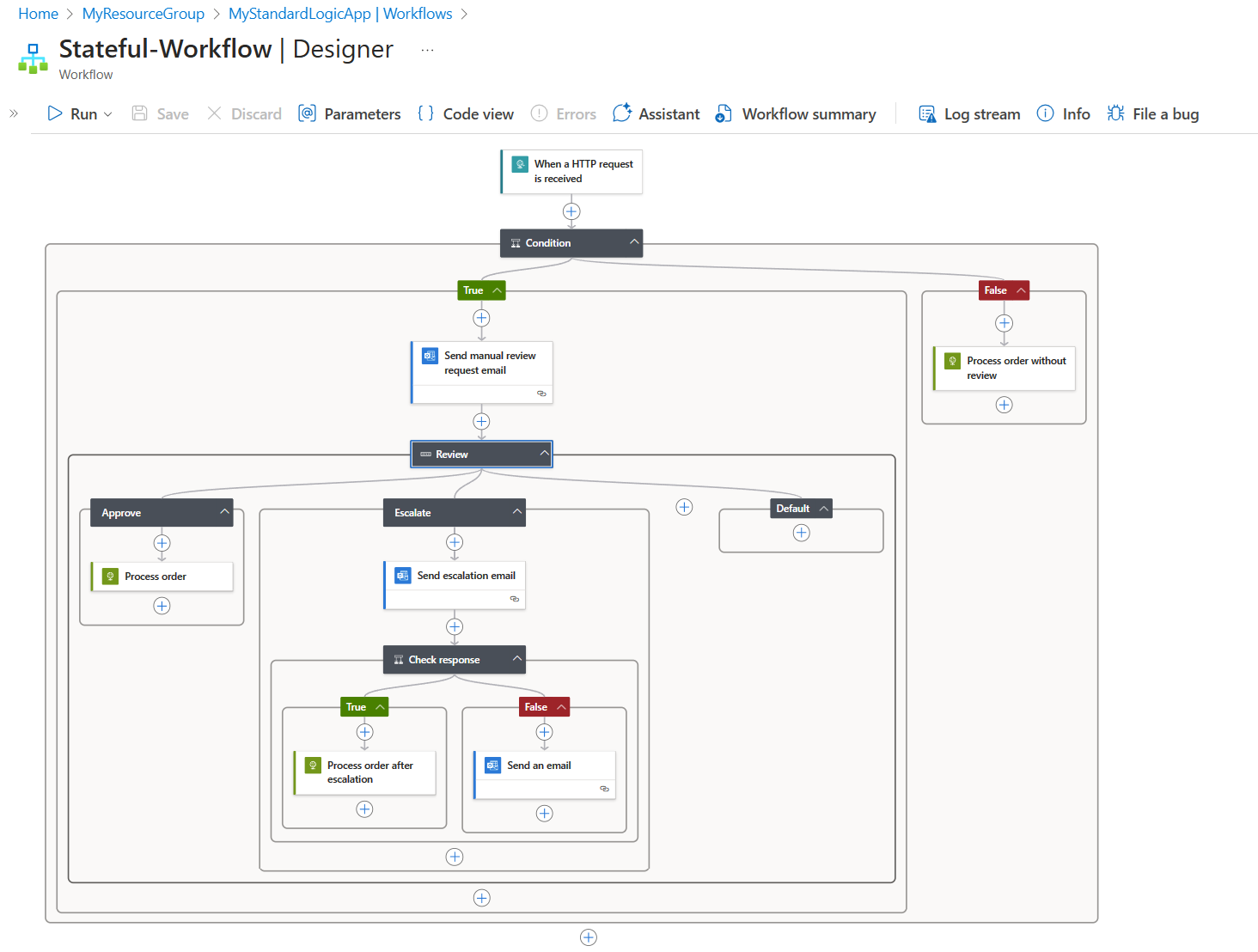
The workflow uses conditions and switches to determine the next action. For more information about the logic behind this workflow, see How logic apps work.
Other common example automation scenarios include:
- Send an Office 365 notification when a file is uploaded.
- Process customer orders across cloud and on-premises systems.
- Move files from an SFTP or FTP server to Azure Blob Storage.
- Analyze social media sentiment and create alerts for review.
This overview helps you explore the following concepts:
- Benefits from using Azure Logic Apps
- Core concepts
- Capabilities and hosting options
- How logic app workflows run
- Automation service comparison
- Get started guides
Why use Azure Logic Apps?
Azure Logic Apps helps you:
Integrate systems faster: Choose from 1,400+ prebuilt Microsoft-managed connectors for Azure services, Microsoft services, external apps, databases, and on-premises systems.
Reduce or eliminate the work to access your resources. Focus on designing and developing your solutions' business logic and functionality to meet your business needs.
Build visually: Create orchestration logic with a workflow designer rather than write all the integration code yourself.
Optimize performance: Use built-in connectors that run natively and directly on the Azure Logic Apps runtime.
These connector operations communicate with service endpoints, run your own code, control your workflow structure, manipulate data, or connect to commonly used resources with increased speed, capacity, and throughput.
Access managed services: Use managed connectors for prebuilt access to service and system APIs.
These connector operations run in global, multitenant Azure. For example:
- Office 365 services such as Outlook, Excel, and SharePoint
- Enterprise systems such as SAP and IBM MQ
Extend workflows with code: Run inline code, call Azure Functions, or create custom connectors when prebuilt operations don't meet your requirements.
Use managed scaling: Let Azure host, monitor, and scale your workflows while you focus on business logic.
When you build workflows with Azure Logic Apps, you usually don't have to write any code. However, if you need to create and run your own code, Azure Logic Apps supports this capability. For example, in workflows that run in multitenant Azure Logic Apps, you can write and run JavaScript code snippets directly within your workflow. For more complex and structured code, you can create and call functions from your workflows when you use the Azure Functions platform. For workflows that run in single-tenant Azure Logic Apps, App Service Environment (ASE) v3, or partially connected environments, you can write and run JavaScript code snippets, .NET code, C# scripts, and PowerShell scripts directly within your workflow.
If your workflow needs to interact with events from other Azure services, custom apps, or other solutions, you can monitor, route, and publish events by using Azure Event Grid or Azure Event Hubs.
For more information, see:
- Add and run JavaScript code inline with workflows
- Azure Functions overview and Call Azure Functions from workflows
- Create and run .NET code from Standard workflows
- Add and run C# scripts
- Add and run PowerShell scripts
Microsoft Azure fully manages Azure Logic Apps, which frees you from worrying about hosting, scaling, managing, monitoring, and maintaining solutions built with these services. When you use these capabilities to create "serverless" apps and solutions, you can focus more on building the business logic and functionality. Serverless platforms automatically scale to meet your needs, make integrations work faster, and help you build robust cloud apps using little to no code.
To learn how other companies improved their agility and increased focus on their core businesses when they combined Azure Logic Apps with other Azure services and Microsoft products, check out these customer stories.
Key terms
The following table briefly defines core terminology and concepts in Azure Logic Apps.
| Term | Description |
|---|---|
| Logic app | The Azure resource that you create when you want to build a workflow. Basically, you can create the following types of logic app resources: - A Consumption logic app resource that supports a single workflow, which is hosted and run in multitenant Azure Logic Apps - A Standard logic app resource that supports multiple workflows, which are hosted and run in single-tenant Azure Logic Apps, App Service Environment (ASE) v3 - Windows plans only, or a partially connected environment Learn more about logic app resource types along with their respective computing resource and billing models. |
| Workflow | A series of operations that define a task, business process, or workload. Each workflow always starts with a single trigger operation, after which you must add one or more action operations. |
| Trigger | The first operation in any workflow that specifies the criteria to meet before running any subsequent operations in that workflow. For example, a trigger event might be getting an email in your inbox or detecting a new file in a storage account. |
| Action | Each subsequent operation that follows the trigger in the workflow. |
| Built-in connector | This connector or operation type runs natively on the Azure Logic Apps runtime for faster performance, compared to Microsoft-managed connectors that are hosted and run in Azure. Built-in connectors support workflow control, running your own code, data processing, endpoint communication, and other workflow tasks. For more information, see Built-in connectors. |
| Managed connector | This connector or operation type is a Microsoft-managed proxy for a service or system API. Most managed connectors require an authenticated connection. For more information, see Managed connectors. |
| Integration account | This Azure resource lets you define and store B2B artifacts to use in your workflows. After you create and link an integration account to your logic app, your workflows can use these B2B artifacts. Your workflows can also exchange messages that follow Electronic Data Interchange (EDI) and Enterprise Application Integration (EAI) standards. For example, you can define trading partners, agreements, schemas, maps, and other B2B artifacts. You can create workflows that use these artifacts and exchange messages over protocols such as AS2, EDIFACT, X12, and RosettaNet. |
Azure Logic Apps capabilities
You can start small with a workflow that connects your current systems and services, and then add capabilities as your integration requirements grow:
- Build workflows visually.
- Connect cloud, on-premises, and hybrid systems.
- Choose a hosting environment.
- Build AI agentic workflows.
- Exchange enterprise and B2B messages.
- Run custom code.
- Access resources in Azure virtual networks.
Visually create and edit workflows with easy-to-use tools
Each workflow always starts with a trigger followed by any number of actions from the connectors gallery.
To save time and simplify complex processes, create your workflows by using the graphical workflow designer in the Azure portal or Visual Studio Code. Each workflow also has an underlying definition that's defined in JavaScript Object Notation (JSON) format. If you prefer, you can edit workflows by changing this JSON definition. For some creation and management tasks, you can also use Azure PowerShell and Azure CLI commands. For automated deployment, Azure Logic Apps supports Azure Resource Manager templates.
Connect different systems across various environments
Some patterns and processes are easy to describe but hard to implement in code. Azure Logic Apps helps you seamlessly connect disparate systems across cloud, on-premises, and hybrid environments. For example, you can connect a cloud marketing solution to an on-premises billing system, or centralize messaging across APIs and systems using Azure Service Bus. Azure Logic Apps provides a fast, reliable, and consistent way to deliver reusable and reconfigurable solutions for these scenarios.
Create and deploy to different environments
Based on your scenario, solution requirements, and desired capabilities, choose whether to create a Consumption or Standard logic app workflow. Based on this choice, the workflow can run in multitenant Azure Logic Apps, single-tenant Azure Logic Apps, an App Service Environment (v3), or a hybrid environment, which can be partially connected or your own infrastructure. With single-tenant Azure Logic Apps, your workflows can more easily access resources protected by Azure virtual networks. If you create single tenant-based workflows using the hybrid deployment hosting option, you can also run workflows on premises using infrastructure that you control. For more information, see Single-tenant versus multitenant in Azure Logic Apps.
The following table briefly summarizes differences between a Consumption and Standard logic app workflow. You also learn the differences between the multitenant environment, single-tenant environment, App Service Environment v3 (ASEv3), and hybrid environment for deploying, hosting, and running your logic app workflows.
| Hosting option | Benefits | Resource sharing and usage | Pricing and billing model | Limits management |
|---|---|---|---|---|
| Consumption Host environment: Multitenant Azure Logic Apps |
- Easiest to get started - Pay for what you use - Fully managed |
A single logic app resource can have only one workflow. All logic apps across Microsoft Entra tenants share the same processing (compute), storage, network, and so on. Note: Regarding data residency and redundancy: - In workflows or workflow sections that don't interact with agents, the data is replicated in the paired region. For high availability, geo-redundant storage (GRS) is enabled. - Any agents in a workflow use an Azure OpenAI model that can originate from any region, so data residency isn't guaranteed for data that the model handles. |
Consumption (pay-per-execution) | Azure Logic Apps manages the default values for these limits, but you can change some of these values, if that option exists for a specific limit. |
| Standard (Workflow Service Plan) Host environment: Single-tenant Azure Logic Apps |
- More built-in connectors hosted on the single-tenant runtime for higher throughput and lower costs at scale - More control and fine-tuning capability around runtime and performance settings - Integrated support for virtual networks and private endpoints. - Create your own built-in connectors. |
A single logic app resource can have multiple stateful and stateless workflows. Workflows in a single logic app and tenant share the same processing (compute), storage, network, and so on. Data stays in the same region where you deploy your logic app. |
Standard, based on a hosting plan with a selected pricing tier. If you run stateful workflows, which use external storage, the Azure Logic Apps runtime makes storage transactions that follow Azure Storage pricing. |
You can change the default values for many limits, based on your scenario's needs. Important: Some limits have hard upper maximums. In Visual Studio Code, the changes you make to the default limit values in your logic app project configuration files won't appear in the designer experience. For more information, see Edit app and environment settings for logic apps in single-tenant Azure Logic Apps. |
| Standard (App Service Environment v3) Host environment: App Service Environment v3 (ASEv3) - Windows plans only |
Same capabilities as single-tenant plus the following benefits: - Fully isolate your logic apps. - Create and run more logic apps than in single-tenant Azure Logic Apps. - Pay only for the ASE App Service plan, no matter the number of logic apps that you create and run. - Can enable autoscaling or manually scale with more virtual machine instances or a different App Service plan. - Inherit the network setup from the selected ASEv3. For example, when you deploy to an internal ASE, workflows can access the resources in a virtual network associated with the ASE and have internal access points. Note: If accessed from outside an internal ASE, run histories for workflows in that ASE can't access action inputs and outputs. |
A single logic app can have multiple stateful and stateless workflows. Workflows in a single logic app and tenant share the same processing (compute), storage, network, and so on. Data stays in the same region where you deploy your logic apps. |
App Service plan | You can change the default values for many limits, based on your scenario's needs. Important: Some limits have hard upper maximums. In Visual Studio Code, the changes you make to the default limit values in your logic app project configuration files won't appear in the designer experience. For more information, see Edit app and environment settings for logic apps in single-tenant Azure Logic Apps. |
| Standard (Hybrid) Host environment: Your own on-premises infrastructure |
- Scenarios where you need to control, and manage your own infrastructure. - Capabilities that let you build and host integration solutions for partially connected environments that require local processing, storage, and network access. - Supports infrastructure that can include on-premises systems, private clouds, and public clouds. - Workflows are powered by the Azure Logic Apps runtime, which is hosted on premises as part of an Azure Container Apps extension. For more information, see the following articles: - Set up your own infrastructure for Standard logic apps using hybrid deployment - Create Standard logic app workflows for hybrid deployment on your own infrastructure |
A single logic app can have multiple stateful and stateless workflows. Workflows in a single logic app and tenant share the same processing (compute), storage, network, and so on. Data stays in the same region where you deploy your logic apps. |
Hybrid pricing | You can change the default values for many limits, based on your scenario's needs. Important: Some limits have hard upper maximums. In Visual Studio Code, the changes you make to the default limit values in your logic app project configuration files won't appear in the designer experience. For more information, see Edit app and environment settings for logic apps in single-tenant Azure Logic Apps. |
AI agentic capabilities
Azure Logic Apps supports AI-powered automation through deterministic and probabilistic agentic workflows. These workflows combine large language models (LLMs), agent loops, agents, MCP servers, and tools built from connector actions to interpret natural-language instructions, make decisions, access data, and complete multistep tasks across Microsoft and non-Microsoft systems. You can also expose workflows and connector actions as reusable tools for agents in Microsoft Foundry, while Azure Logic Apps handles orchestration concerns such as long-running processes, retries, error handling, and integration with external systems.
For more information, see:
- Agentic workflows in Azure Logic Apps
- What is Azure Logic Apps Automation?
- Compare automation platforms
Enterprise integration and B2B scenarios
Businesses and organizations electronically communicate with each other by using different industry-standard message protocols and formats, such as EDIFACT, AS2, X12, and RosettaNet. You can automate workflows that exchange and transform B2B messages following these protocols, which Azure Logic Apps handles smoothly and securely by using encryption and digital signatures.
To define business-to-business (B2B) artifacts that you use in workflows, such as partners, agreements, schemas, maps, and others, create an integration account for these artifacts. After you link this account to your logic app resource, your workflow can use these artifacts and exchange messages that comply with Electronic Data Interchange (EDI) and Enterprise Application Integration (EAI) standards.
Learn more by choosing a task that matches your scenario:
Create an integration account to define and store B2B artifacts, for example:
Choose an EDI protocol to exchange messages, for example:
Process XML messages and flat files.
-
Your workflows can communicate with BizTalk Server by using the BizTalk Server connector. You can then run or extend BizTalk-like operations in your workflows by using integration account connectors. In the other direction, BizTalk Server can communicate with your workflows by using the Microsoft BizTalk Server Adapter for Azure Logic Apps. Learn how to set up and use the BizTalk Server Adapter in your BizTalk Server.
Reuse workflows across environments with Azure Resource Manager templates
Create your logic app workflows as Azure Resource Manager templates so that you can set up and automate deployments across multiple environments and regions.
Run custom code when no connector exists
If no suitable connector is available to run the code you want, you have other options for your workflows:
For Consumption and Standard workflows, you can use the following capabilities:
- Include the Inline Code action that runs JavaScript.
- Create and run code with Azure Functions.
- Create and use custom connector operations. For Consumption workflows, see Custom connectors for Consumption. For Standard workflows, see Create custom built-in connectors.
- Create and call custom APIs.
For Standard workflows, you can use the following extra capabilities:
- Include Inline Code actions that run C# scripts or PowerShell scripts.
- Create custom functions to run .NET code.
Direct access to resources in Azure virtual networks
When you use Azure Logic Apps (Standard), your workflows can access secured resources such as virtual machines, other services, and systems in an Azure virtual network. Azure Logic Apps (Standard) is a single-tenant instance of Azure Logic Apps that uses dedicated resources and runs separately from global, multitenant Azure Logic Apps.
By hosting and running logic app workflows in your own dedicated instance, you reduce the impact that other Azure tenants might have on app performance or the "noisy neighbors" effect.
Azure Logic Apps (Standard) provides the following benefits:
You get your own static IP addresses, which are separate from the static IP addresses that logic apps share in multitenant Azure Logic Apps. You can also set up a single public, static, and predictable outbound IP address to communicate with destination systems. By using this IP address, you don't have to set up extra firewall openings at those destination systems.
You get increased limits on run duration, storage retention, throughput, HTTP request and response timeouts, message sizes, and custom connector requests. For more information, see Limits and configuration for Azure Logic Apps.
How logic apps work
A logic app workflow always starts with a single trigger. The trigger fires when a condition is met, for example, when a specific event happens or when data meets specific criteria. Many triggers include scheduling capabilities that control how often your workflow runs. After the trigger fires, one or more actions run operations that process, handle, or convert data that travels through the workflow, or that advance the workflow to the next step.
In the earlier example order workflow, the following steps occur:
The trigger receives an order.
A condition compares the order cost with the review threshold.
Orders below the threshold continue processing.
Orders above the threshold require sending email for manual review.
A switch handles the reviewer's response:
- Approve: Continue processing the order.
- Escalate: Get more information and reevaluate the order.
- Requirements not met: Send an email about the problem.
Guaranteed message delivery
Azure Logic Apps delivers a message "at least once". No messages are lost, and rarely does the service deliver a message more than once. However, if your business doesn't handle or can't handle duplicate messages, you need to implement idempotence. This approach accepts identical or duplicate messages, while preserving data integrity and system stability. After the first execution, duplicate operations don't change the result.
Pricing models for Consumption and Standard logic apps
Each logic app hosting option (multitenant, single-tenant, App Service Environment (ASE) v3, or partially connected environment) has a different pricing model. For example, multitenant Consumption logic app workflows follow the Consumption pricing model, while single-tenant Standard logic app workflows follow the Standard pricing model. For specific pricing details, see Azure Logic Apps pricing.
Choose the appropriate automation service
To decide whether Azure Logic Apps matches your workload, use the following comparisons:
| Choose | Scenarios |
|---|---|
| Azure Logic Apps | Designer-first automated orchestration workflows for enterprise business processes across services, systems, applications, and data sources. Can call functions in Azure Functions. |
| Azure Functions | Code-first automated orchestrations using the Durable Functions extension. Can call workflows in Azure Logic Apps. |
| Microsoft Power Automate | Codeless automation workloads for business users, office workers, and citizen developers. |
| Azure Automation Runbooks | Infrastructure management and straightforward remediation tasks, such as restarting virtual machines. |
For detailed decision information, see:
- Choose the right integration and automation services in Azure
- Compare Azure automation platforms
- Azure Automation Runbooks
Get started
Before you try out Azure Logic Apps, you need an Azure account and subscription. If you don't have a subscription, get a free Azure account.
When you're ready, choose a get-started guide based on your scenario:
| You want to create | Start here |
|---|---|
| Consumption-based, multitenant workflow | Create Consumption logic app workflows |
| Isolated, single-tenant, ASE v3, or hybrid workflow | Create Standard logic app workflows |
| Autonomous agentic workflow | Create autonomous agentic workflows |
| Conversational agentic workflow | Create conversational agentic workflows |
| Dynamically run agentic workflow | Create dynamically-run agentic workflows |