หมายเหตุ
การเข้าถึงหน้านี้ต้องได้รับการอนุญาต คุณสามารถลอง ลงชื่อเข้าใช้หรือเปลี่ยนไดเรกทอรีได้
การเข้าถึงหน้านี้ต้องได้รับการอนุญาต คุณสามารถลองเปลี่ยนไดเรกทอรีได้
Customers rely on Azure Backup to store backup data including their Long-Term Retention (LTR) backup data as per the retention needs defined by the organization's compliance rules. In most cases, the older backup data is rarely accessed and is only stored for compliance needs.
Azure Backup supports backup of Long-Term Retention points in the archive tier, in addition to Snapshots and the Standard tier.
Support matrix
Supported workloads
Archive tier supports the following workloads:
| Workloads | Operations |
|---|---|
| Azure Virtual Machines | Only monthly and yearly recovery points. Daily and weekly recovery points aren't supported. Age >= 3 months in Vault-standard tier Retention left >= 6 months. No active on-demand, daily, and weekly dependencies. There are no unexpired daily or weekly recovery points between the recovery point considered for archival and the next monthly or yearly recovery point. |
| SQL Server in Azure Virtual Machines SAP HANA in Azure Virtual Machines |
Only full recovery points. Logs and differentials aren't supported. Age >= 45 days in Vault-standard tier. Retention left >= 6 months. No dependencies. |
A recovery point becomes archivable only if all the above conditions are met.
Note
Archive tier support for Azure Virtual Machines, SQL Servers in Azure VMs and SAP HANA in Azure VM is now generally available in multiple regions. For the detailed list of supported regions, see the supported regions.
Caution
Archive tier isn't supported on vaults configured with ZRS storage.
Supported clients
Archive tier supports the following clients:
Supported regions
| Supported workload | Supported region |
|---|---|
| Azure VMs, SQL Server in Azure VMs, SAP HANA in Azure VMs | Australia East, Australia Southeast, Brazil South, Canada Central, Canada East, Central US, East Asia, East US 2, East US, France Central, Germany West Central, Central India, South India, Japan East, Japan West, Korea Central, Korea South, North Central US, North Europe, Norway East, South Central US, South East Asia, UAE North, UK South, UK West, West Central US, West Europe, West US 2, West US, US Gov Arizona, US Gov Virginia, US Gov Texas, China North 2, China East 2, South Africa North, South Africa West, Sweden Central, Sweden South, Switzerland North. |
How Azure Backup moves recovery points to the Vault-archive tier?
Archive recommendations (only for Azure Virtual Machines)
The recovery points for Azure Virtual Machines are incremental. When you move recovery points to archive tier, they're converted to full recovery points (to ensure that all recovery points in Archive tier are independent and isolated from each other). Thus, overall backup storage (Vault-standard + Vault-archive) might increase.
The amount of storage increase depends on the churn pattern of the Virtual Machines.
- The higher the churn in the Virtual Machines, lesser is the overall backup storage when a recovery point is moved to archive tier.
- If the churn in the Virtual Machine is low, moving to Archive tier might lead to increase in Backup storage. This might offset the price difference between the Vault-standard tier and Vault-archive tier. Therefore, that might increase the overall cost.
To resolve this, Azure Backup provides recommendation set. The recommendation set returns a list of recovery points, which if moved together to Archive tier ensures cost savings.
Note
- The cost savings depends on various reasons and might differ for every instance.
- The recommendation algorithm for IaaS virtual machines doesn't consider changes in disk configuration. If you add or remove disks from a virtual machine, the backup storage recommendations might not accurately show your updated requirements.
Modify protection
Azure Backup offers two ways to modify protection for a data-source:
- Modifying an existing policy
- Protecting the datasource with a new policy
In both scenarios, the new policy is applied to all older recovery points, which are in standard tier and archive tier. So, older recovery points might get deleted if there's a policy change.
When you move recovery points to archive, they're subjected to an early deletion period of 180 days. The charges are prorated. If you delete a recovery point that hasn't stayed in vault-archive for 180 days, then you're charged for the remaining retention period selected at vault-archive tier price.
Stop protection and delete data
Stop protection and delete data deletes all recovery points. For recovery points in archive that haven't stayed for a duration of 180 days in archive tier, deletion of recovery points leads to early deletion cost.
Stop protection and retain data
Azure Backup now supports tiering to archive when you choose to Stop protection and retain data. If the backup item is associated with a long term retention policy and is moved to Stop protection and retain data state, you can choose to move recommended recovery points to vault-archive tier.
Note
For Azure VM backups, moving recommended recovery points to vault-archive saves costs. For other supported workloads, you can choose to move all eligible recovery points to archive to save costs. If backup item is associated with a short term retention policy and it's moved to Stop protection & retain data state, you can't tier the recovery points to archive.
Archive tier pricing
You can view the Archive tier pricing from our pricing page.
Frequently asked questions
What happens to archive recovery points if I stop protection and retain data?
The recovery point remains in archive forever. For more information, see Impact of stop protection on recovery points.
Is Cross Region restore supported from archive tier?
No. Cross‑Region Restore (CRR) from Archive‑tier recovery points - including recovery points that are rehydrated into Standard tier during restore. When a recovery point is restored from Archive tier, it's temporarily rehydrated into Standard tier for use only within the source region.
Rehydration doesn't make the recovery point eligible for Cross‑Region Restore. CRR validation requires metadata markers that aren't preserved after rehydration, and attempting CRR from rehydrated Archive RPs might fail.
To perform Cross‑Region Restore, use a Recovery Point that resides in Standard tier.
I can see eligible recovery points for my Virtual Machine, but I can't seeing any recommendation. What can be the reason?
The recovery points for Virtual Machines meet the eligibility criteria. So, there are archivable recovery points. However, the churn in the Virtual Machine might be low, thus there are no recommendations. In this scenario, though you can move the archivable recovery points to archive tier, but it might increase the overall backup storage costs.
How do I ensure that all recovery points are moved to Archive tier, if moved via Azure portal?
To ensure that all recovery points are moved to Archive tier,
- Select the required workload.
- Go to Move Recovery Points by following these steps.
If the list of recovery points is blank, then all the eligible/recommended recovery points are moved to the vault Archive tier.
Can I use 'File Recovery' option to restore specific files in Azure VM backup for archived recovery points?
No. Currently, the File Recovery option doesn't support restoring specific files from an archived recovery point of an Azure VM backup.
What are the possible reasons if my VM recovery point wasn't moved to archive?
Before you move VM recovery points to archive tier, ensure that the following criteria are met:
- The recovery point should be a monthly or yearly recovery point.
- The age of the recovery point in standard tier needs to be >= 3 months.
- The remaining retention duration should be >= 6 months.
- There should be no unexpired daily or weekly recovery point between the recovery point in consideration and the next monthly or yearly recovery point.
To check the type of recovery point, go to the backup instance, and then select the link to view all recovery points.
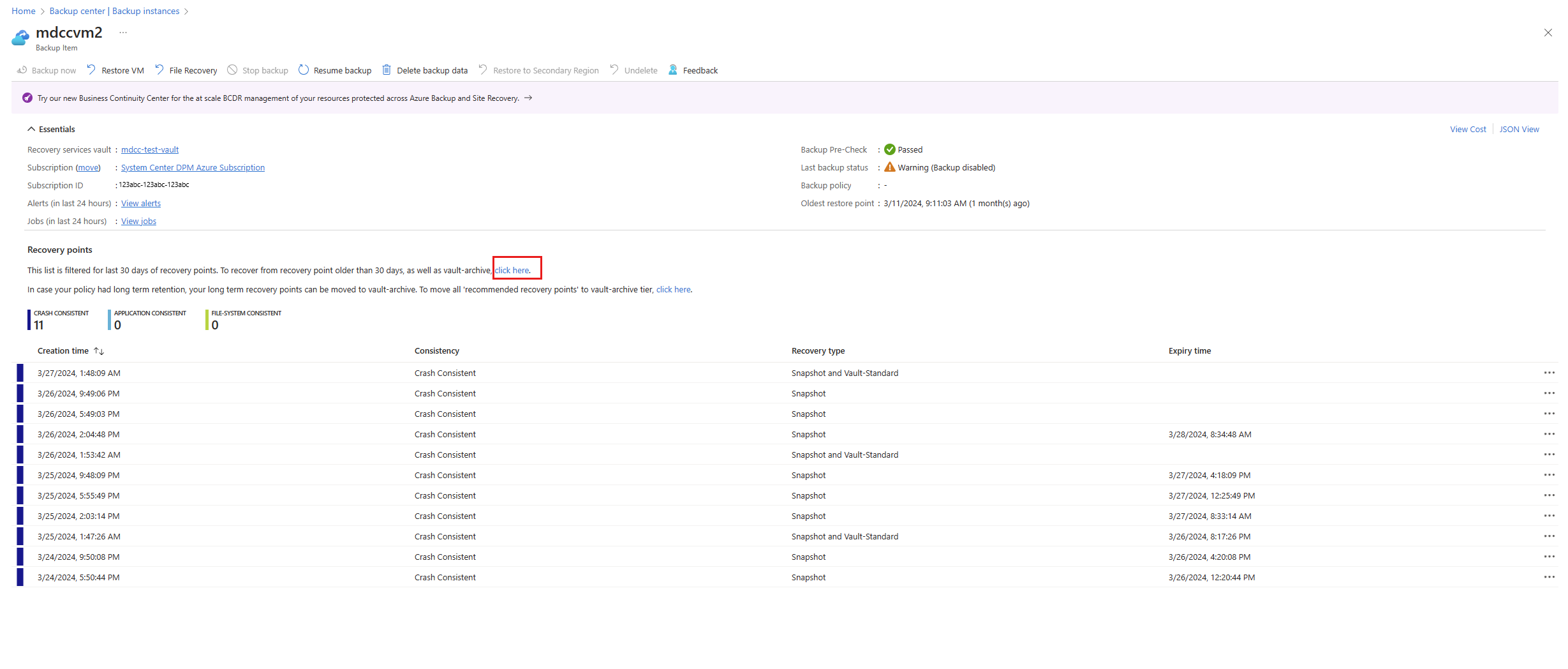
You can also filter from the list of all recovery points as per daily, weekly, monthly, and yearly.
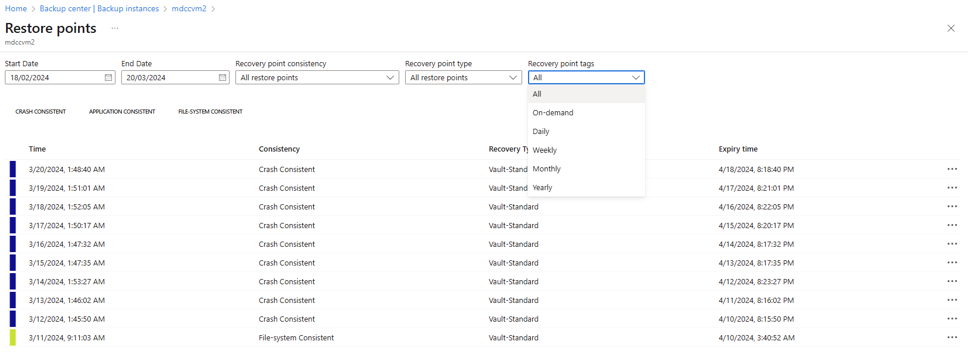
Can I retrieve snapshot to Standard Tier Permanently after the recovery point is moved to Archive Tier?
No, after moving the recovery point to the archive tier, it can't return to the standard tier permanently. Rehydration provides the only method to place the RP in the standard tier for a specified duration during restore. The recovery point remains in the archive tier.
Note
You can do the rehydration process during the restore from a recovery point only.