หมายเหตุ
การเข้าถึงหน้านี้ต้องได้รับการอนุญาต คุณสามารถลอง ลงชื่อเข้าใช้หรือเปลี่ยนไดเรกทอรีได้
การเข้าถึงหน้านี้ต้องได้รับการอนุญาต คุณสามารถลองเปลี่ยนไดเรกทอรีได้
When you queue blobs for ingestion from your own storage accounts, use managed identities as an alternative to shared access signature (SAS) tokens and Shared Keys authentication methods. Managed identities provide a more secure way to ingest data because you don't need to share your customer SAS tokens or shared keys with the service. Instead, assign a managed identity to your cluster and grant it read permissions for the storage account used to ingest data. You can revoke these permissions at any time.
Note
- This authentication method only applies to Azure blobs and Azure Data Lake files residing in customer owned storage accounts. It doesn't apply to local files uploaded by using the Kusto SDK.
- Only queued ingestion is supported. Inline ingestion in Kusto Query Language and direct ingestion by using SDK APIs aren't supported.
Assign a managed identity to your cluster
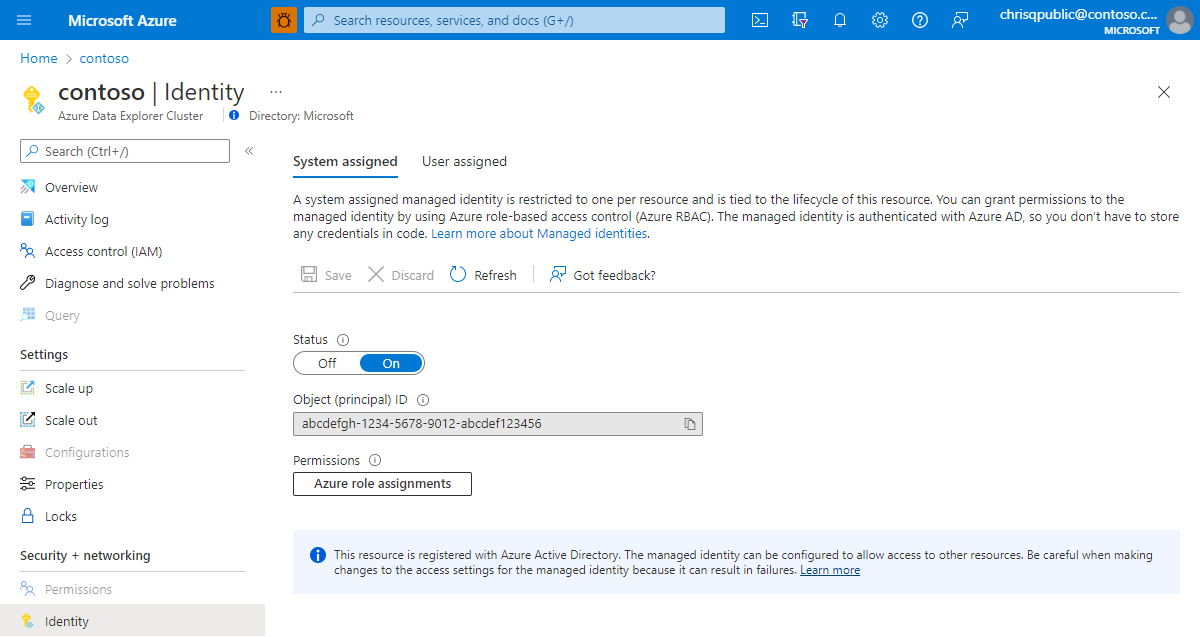
Follow Managed identities overview to add a System or User Assigned managed identity to your cluster. If your cluster already has the desired managed identity assigned to it, copy its object ID by using the following steps:
Sign in to the Azure portal by using an account associated with the Azure subscription that contains your cluster.
Navigate to your cluster and select Identity.
Select the appropriate identity type, system or user assigned, and then copy the object ID of the required identity.
Grant permissions to the managed identity
In the Azure portal, go to the storage account that contains the data you want to ingest.
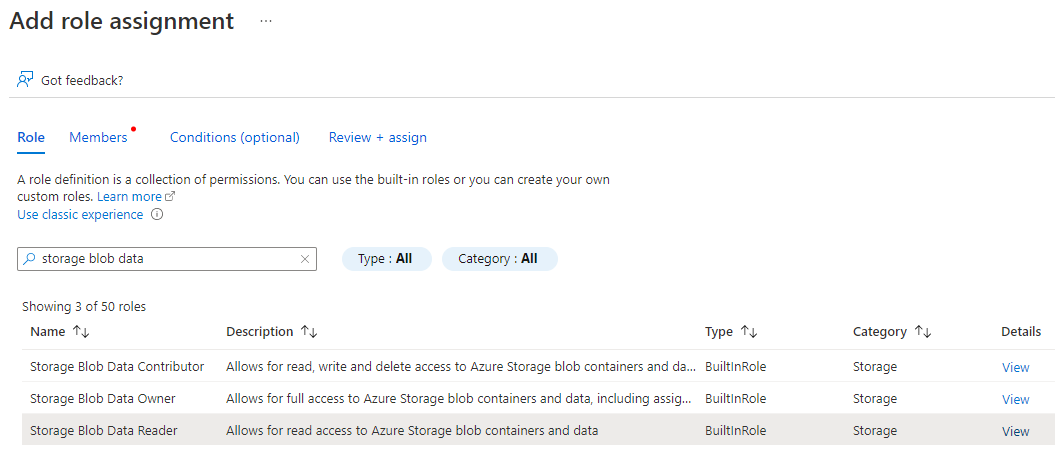
Select Access Control and then select + Add > Add Role Assignment.
Grant the managed identity Storage Blob Data Reader, or Storage Blob Data Contributor if you intend to use the DeleteSourceOnSuccess source option, permissions to the storage account.
Note
Granting Owner or Contributor permissions isn't sufficient and causes the ingestion to fail.
Important
If network problems occur, Azure Storage might return a Download Forbidden error.
This error might happen if you use a private link to access your storage account.
In such cases, if the permissions are correct, check the connectivity to your storage account.
Set the managed identity policy in Azure Data Explorer
To use the managed identity to ingest data into your cluster, grant the NativeIngestion usage option to the selected managed identity. Native ingestion refers to the ability to use an SDK for ingestion from an external source. For more information on the available SDKs, see Client libraries.
You can define the usage Managed Identity policy at the cluster or database level of the target cluster.
To apply the policy at the database level, run the following command:
.alter-merge database <database name> policy managed_identity "[ { 'ObjectId' : '<managed_identity_id>', 'AllowedUsages' : 'NativeIngestion' }]"
To apply the policy at the cluster level, run the following command:
.alter-merge cluster policy managed_identity "[ { 'ObjectId' : '<managed_identity_id>', 'AllowedUsages' : 'NativeIngestion' }]"
Replace <managed_identity_id> with the object ID of the required managed identity.
Note
You must have the All Database Admin permission on the cluster to edit the Managed Identity Policy.
Queue blobs for ingestion with managed identity by using Kusto SDK
When you ingest data by using a Kusto SDK, generate your blob URI by using managed identity authentication by appending ;managed_identity={objectId} to the unauthorized blob URI. If you ingest data by using your cluster's system assigned managed identity, you can append ;managed_identity=system to the blob URI.
Important
You must use a queued ingestion client. Using managed identities with direct ingestion or inline ingestion in Kusto Query Language aren't supported.
The following examples show blob URIs for system and user assigned managed identities.
- System assigned:
https://demosa.blob.core.windows.net/test/export.csv;managed_identity=system - User assigned:
https://demosa.blob.core.windows.net/test/export.csv;managed_identity=6a5820b9-fdf6-4cc4-81b9-b416b444fd6d
Important
- When you use managed identities to ingest data by using the C# SDK, you must provide a blob size in
StorageSourceOptions. If you don't set the size, the SDK attempts to fill in the blob size by accessing the storage account, resulting in a failure. - The size parameter should be the raw (uncompressed) data size, not the blob size.
- If you don't know the size at the time of ingestion, specify a value of zero (0). The service attempts to discover the size by using the managed identity for authentication.