หมายเหตุ
การเข้าถึงหน้านี้ต้องได้รับการอนุญาต คุณสามารถลอง ลงชื่อเข้าใช้หรือเปลี่ยนไดเรกทอรีได้
การเข้าถึงหน้านี้ต้องได้รับการอนุญาต คุณสามารถลองเปลี่ยนไดเรกทอรีได้
Azure Private Link creates a private, secure connection between your Azure Databricks resources and your Azure services and serverless resources, ensuring your network traffic isn't exposed to the public internet.
Azure Databricks supports three types of Private Link connectivity:
- Inbound (front-end): Secures connections from users to workspaces
- Outbound (serverless): Secures connections from Azure Databricks serverless compute to your Azure resources
- Classic (back-end): Secures connections from classic compute to the control plane
Private connectivity overview
Azure Private Link enables secure, private connectivity from your Azure VNets and on-premises networks to Azure services, ensuring that your traffic remains isolated from the public internet. This capability helps organizations address security and compliance requirements. It enables end-to-end private networking and minimizes the risk of data exfiltration.
You can enable inbound (front-end), outbound (serverless), or classic compute (back-end) Private Link connections independently or in combination. The right choice depends on your security and compliance requirements. You can also enforce private connectivity for the workspace, causing Azure Databricks to reject all public network connections automatically. This combined approach delivers comprehensive network isolation, reducing your attack surface and supporting compliance for sensitive workloads.
With Private Link, you can:
- Block data access from unauthorized networks or the public internet when using the Azure Databricks web application or APIs.
- Lower the risk of data exfiltration by restricting network exposure to approved private endpoints only.
Choose the right Private Link implementation
Use this guide to determine which implementation best fits your needs.
| Consideration | Inbound (front-end) only | Outbound (serverless) only | Classic compute plane (back-end) only | Complete private isolation |
|---|---|---|---|---|
| Primary security goal | Only authorized individuals can access my Azure Databricks resources. | Secure data access from serverless | Lock down classic compute plane | Maximum isolation (secure everything) |
| User connectivity | Private or public | Public (internet) | Public (internet) | Private only |
| Serverless data access | Public (internet) | Private (to customer resources) | Public (internet) | Private (to customer resources) |
| Cluster connectivity to control plane | Public (standard secure path) | Public (standard secure path) | Private (required) | Private (required) |
| Prerequisites | Premium plan, VNet injection, SCC | Premium plan | Premium plan, VNet injection, SCC | Premium plan, VNet injection, SCC |
| Workspace network access setting | Public access enabled | No change required | Public access enabled | Public access disabled |
| Required NSG rules | AllRules | N/A | NoAzureDatabricksRules | NoAzureDatabricksRules |
| Required private endpoints | Front-end (databricks_ui_api), browser auth | NCC private endpoints | Back-end (databricks_ui_api) | All (front-end, back-end, browser auth, NCC) |
| Relative cost | Cost per endpoint and data transfer | Cost per endpoint and data processed | Cost per endpoint and data transfer | Can be a higher cost (all endpoints, including data transfer and processing) |
Inbound connectivity (front-end)
Inbound Private Link secures the connection from users to the Azure Databricks workspace. Traffic routes through a private endpoint in your transit VNet instead of public IPs. Inbound Private Link provides secure access to:
- Azure Databricks web application
- REST API
- Databricks Connect API
See Configure front-end private connectivity.
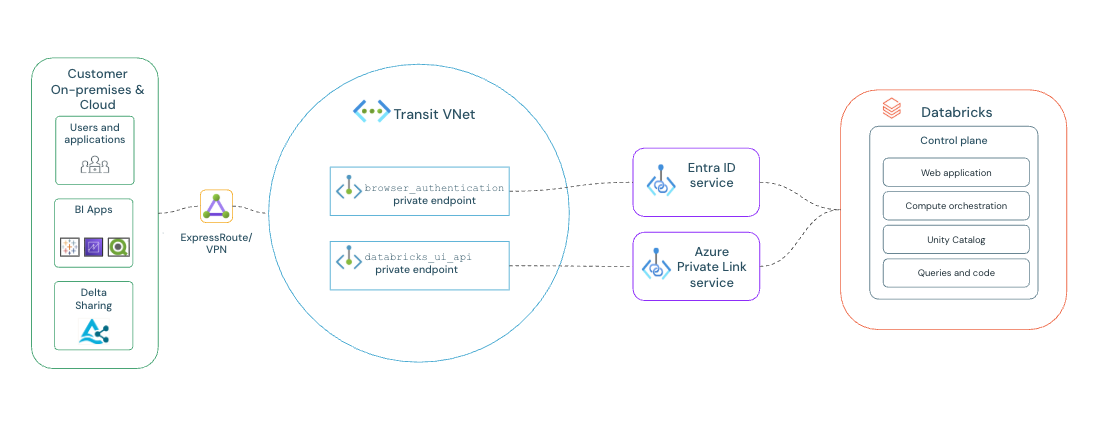
Web authentication for browser-based SSO
Web authentication for browser-based SSO
When using Private Link for front-end access, a specialized browser_authentication endpoint is required to make Single Sign-On (SSO) work for web browser logins over a private connection. It securely handles the SSO authentication callbacks from Microsoft Entra ID that otherwise are blocked on a private network. This process doesn't affect REST API authentication.
- Deployment rule: Only one
browser_authenticationendpoint can exist per Azure region and private DNS zone. This single endpoint serves all workspaces in that region that share the same DNS configuration. - Production best practice: To prevent outages, create a dedicated "private web auth workspace" in each production region. Its sole purpose is to host this critical endpoint. Disable "Public network access" for this workspace and verify no other front-end private endpoints are created for it. If this host workspace is deleted, web login fails for all other workspaces in the region.
- Alternative configuration: For simpler deployments, you can host the endpoint on an existing workspace instead of creating a dedicated one. This is suitable for non-production environments or if you're confident you only have one workspace in the region. However, be aware that deleting the host workspace immediately breaks authentication for any other workspaces that depend on it.
Outbound connectivity (serverless)
Outbound Private Link enables private connectivity from Azure Databricks serverless compute resources to your Azure resources. Unlike inbound and classic compute plane Private Link, which secure connections to Azure Databricks, outbound Private Link secures connections from serverless compute to your customer resources.
Serverless Private Link uses Network Connectivity Configurations (NCCs), which are account-level regional constructs that manage private endpoint creation at scale. NCCs can be attached to multiple workspaces in the same region.
Private connectivity to Azure resources
Private connectivity to Azure resources
Enables serverless compute to access Azure resources such as Azure Storage and Azure SQL through private endpoints without traversing the public internet. Your data traffic remains entirely within the Azure network.
Private connectivity to VNet resources
Private connectivity to VNet resources
Enables serverless compute to access resources in your VNet, such as databases and internal services, through private endpoints via an Azure load balancer.
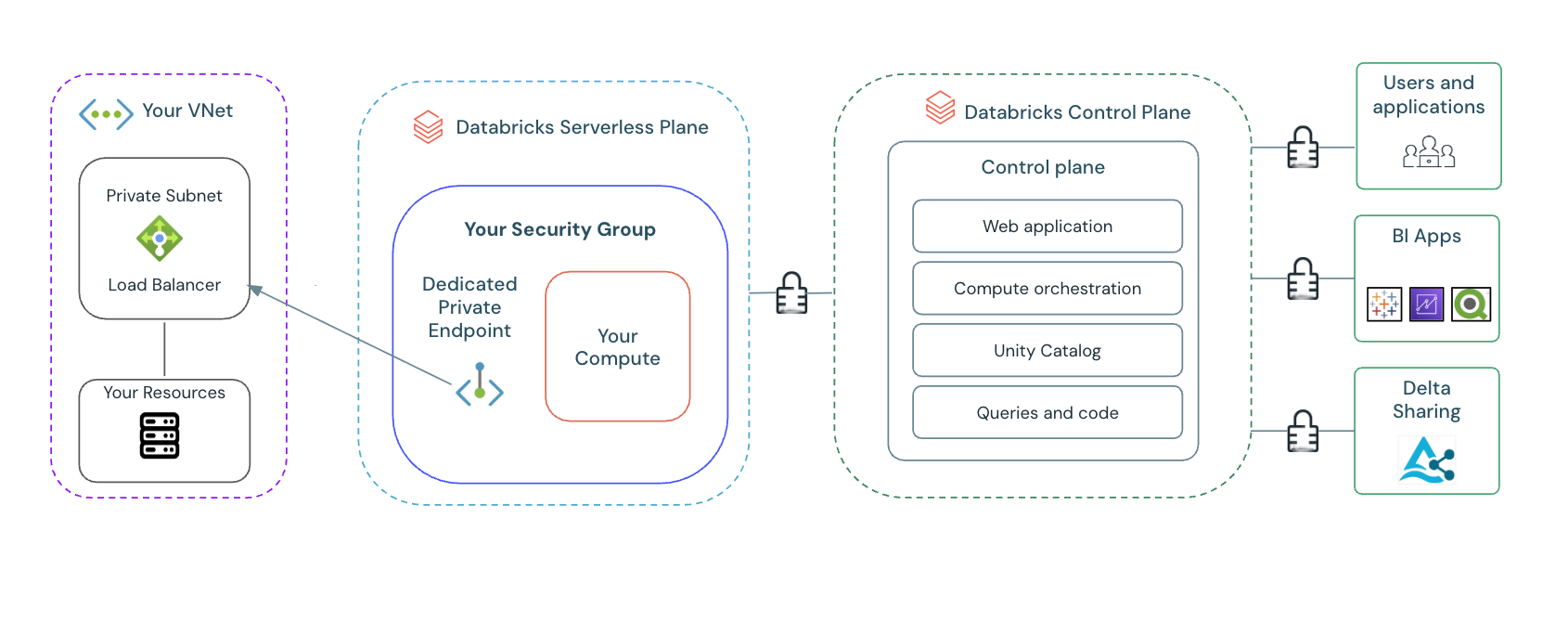
See Configure private connectivity to resources in your VNet.
Key concepts for outbound connectivity
Key concepts for outbound connectivity
- Network Connectivity Configuration (NCC): An account-level regional construct that manages private endpoints and controls how serverless compute accesses customer resources.
- Private endpoint rules: Define the specific resources that serverless compute can access privately.
- Workspace attachment model: NCCs can be attached to up to 50 workspaces in the same region.
- Limits and quotas:
- Up to 10 NCCs per region per account
- 100 private endpoints per region (distributed across NCCs)
- Up to 50 workspaces per NCC
Classic compute plane private connectivity
Classic compute plane Private Link secures the connection from Azure Databricks clusters to the control plane. Clusters connect to the control plane for REST APIs and secure cluster connectivity relay.
Classic compute plane Private Link addresses:
- Compliance requirements: Helps meet strict regulatory and corporate compliance mandates that require all internal cloud traffic to remain on a private network.
- Network perimeter hardening: Implementing classic compute plane Private Link alongside private endpoints for Azure services lets you restrict network exposure. This reduces data exfiltration risks by ensuring that data-processing clusters have no path to unauthorized services or destinations on the public internet.
See Configure back-end private connectivity.
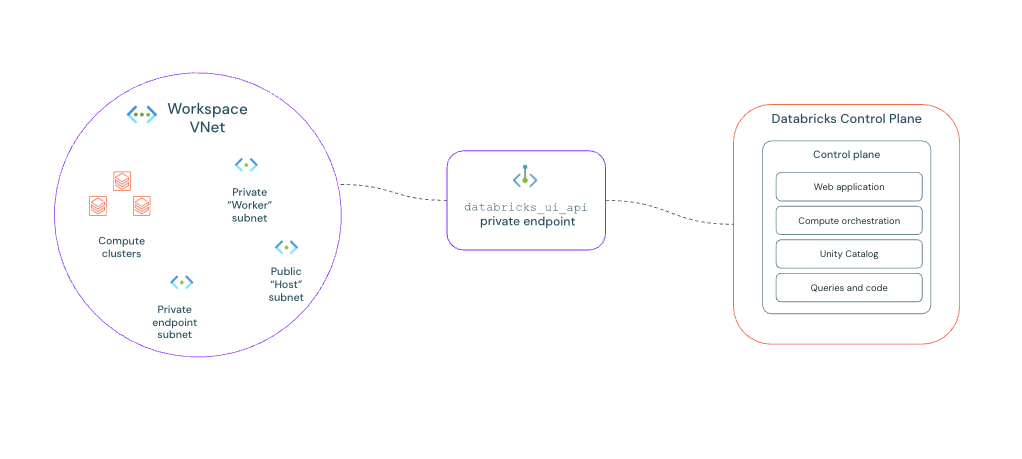
Note
You can set up classic compute plane private connectivity independently. It doesn't require inbound or serverless connectivity.
Virtual networks for private connectivity
Private connectivity uses two distinct virtual networks (VNets).
- Transit VNet: This VNet functions as a central hub for user connectivity and contains the inbound private endpoints required for client access to workspaces and for browser-based SSO authentication.
- Workspace VNet: This is a VNet you create specifically to host your Azure Databricks workspace and classic private endpoints.
Subnet allocation and sizing
Plan your subnets in each VNet to support private connectivity and deployments.
Transit VNet subnets:
- Private endpoint subnet: Allocates IP addresses for all inbound private endpoints.
- Browser authentication workspace subnets: Two dedicated subnets, a host or public subnet and a container or private subnet, are recommended for deploying the browser authentication workspace.
Workspace VNet subnets:
- Workspace subnets: Two subnets, a host or public subnet and a container or private subnet, are required for the Azure Databricks workspace deployment itself. For sizing information related to workspace subnets, see Address space guidance.
- Classic private endpoint subnet: An additional subnet is required to host the private endpoint for classic compute plane private connectivity.
Sizing depends on your individual implementation needs, but you can use the following as a guide:
| VNet | Subnet purpose | Recommended CIDR Range |
|---|---|---|
| Transit | Private endpoints subnet | /26 to /25 |
| Transit | Browser authentication workspace | /28 or /27 |
| Workspace | Classic private endpoint subnet | /27 |
Azure Databricks private endpoints
Azure Databricks uses two distinct types of private endpoints to privatize traffic. Understand their different roles to implement them correctly.
- Workspace endpoint (
databricks_ui_api): This is the primary private endpoint for securing traffic to and from your workspace. It handles REST API calls for both inbound and classic compute plane Private Link. - Web authentication endpoint (
browser_authentication): This is a specialized, additional endpoint required only to make Single Sign-On (SSO) work for web browser logins over a private connection. It's required for inbound and end-to-end connectivity.
For private endpoints, note the following:
- Shared endpoints: Private endpoints can be shared across multiple workspaces that use the same workspace VNet because they are VNet-level resources. A single set of private endpoints can serve all workspaces deployed in that VNet and region.
- Region-specific: Private endpoints are region-specific resources. Workspaces in different regions require separate private endpoint configurations.
Key considerations
Before you configure private connectivity, keep the following in mind:
- If you have a Network Security Groups policy enabled on the private endpoint, you must allow ports 443, 6666, 3306, and 8443-8451 for Inbound Security Rules in the network security group on the subnet where the private endpoint is deployed.
- To create a connection between your network and the Azure portal and its services, you might need to add Azure portal URLs to your allowlist. See Allow the Azure portal URLs on your firewall or proxy server.