หมายเหตุ
การเข้าถึงหน้านี้ต้องได้รับการอนุญาต คุณสามารถลอง ลงชื่อเข้าใช้หรือเปลี่ยนไดเรกทอรีได้
การเข้าถึงหน้านี้ต้องได้รับการอนุญาต คุณสามารถลองเปลี่ยนไดเรกทอรีได้
Currently viewing:  Foundry (classic) portal version - Switch to version for the new Foundry portal
Note
Links in this article might open content in the new Microsoft Foundry documentation instead of the Foundry (classic) documentation you're viewing now.
Microsoft Foundry organizes AI workloads through a layered architecture: a top-level Foundry resource for governance, projects for development isolation, and connected Azure services for storage, search, and secrets management.
This article provides IT operations and security teams with details on the Foundry resource and underlying Azure service architecture, its components, and its relation with other Azure resource types. Use this information to guide how to customize your Foundry deployment to your organization's requirements. For more information on how to roll out Foundry in your organization, see Foundry Rollout.
When to use this architecture
Consider the Foundry resource model when your scenario involves:
- First-time setup: You're starting a new AI project and want a single resource that bundles model access, agent hosting, and evaluation tooling.
- Multi-team access: Multiple teams need isolated projects with shared model deployments and centralized governance.
- Compliance-driven design: Your organization requires private networking, customer-managed encryption, or Azure RBAC scoping at both resource and project levels.
- Azure OpenAI migration: You're moving from a standalone Azure OpenAI resource and want to keep existing policies and RBAC while adding agent and evaluation capabilities.
For single-developer exploration, a Foundry resource with one project is the recommended default. If your workload only requires Azure OpenAI completions without agent hosting or evaluation, a standalone Azure OpenAI resource might be sufficient.
Azure AI resource types and providers
Within the Azure AI product family, you can use these Azure resource providers that support user needs at different layers in the stack.
| Resource provider | Purpose | Supported services |
|---|---|---|
| Microsoft.CognitiveServices | Supports Agentic and GenAI application development composing and customizing prebuilt models. | Foundry; Azure OpenAI; Azure Speech in Foundry Tools; Azure Language in Foundry Tools; Azure Vision in Foundry Tools |
| Microsoft.Search | Supports knowledge retrieval over your data | Azure AI Search |
For most AI development scenarios—including agent building, model deployment, and evaluation workflows—the Foundry resource is the recommended starting point. Foundry resources share the Microsoft.CognitiveServices provider namespace with services such as Azure OpenAI, Speech, Vision, and Language. This shared provider namespace helps align management APIs, access control patterns, networking, and policy behavior across related AI resources.
Use the following table to identify which resource type matches your workload. It shows the specific resource types and capabilities within the Microsoft.CognitiveServices provider:
| Resource type | Resource provider and type | Kind | Supported capabilities |
|---|---|---|---|
| Microsoft Foundry | Microsoft.CognitiveServices/account |
AIServices |
Agents, Evaluations, Azure OpenAI, Speech, Vision, Language, and Content Understanding (API only; portal support varies by region) |
| Foundry project | Microsoft.CognitiveServices/account/project |
AIServices |
Subresource to the above |
| Azure Speech in Foundry Tools | Microsoft.CognitiveServices/account |
Speech |
Speech |
| Azure Language in Foundry Tools | Microsoft.CognitiveServices/account |
Language |
Language |
| Azure Vision in Foundry Tools | Microsoft.CognitiveServices/account |
Vision |
Vision |
Resource types under the same provider namespaces share the same management APIs, and use similar Azure role-based access control (Azure RBAC) actions, networking configurations, and aliases for Azure Policy configuration. If you're upgrading from Azure OpenAI to Foundry, your existing custom Azure policies and Azure RBAC actions continue to apply.
Foundry resource hierarchy
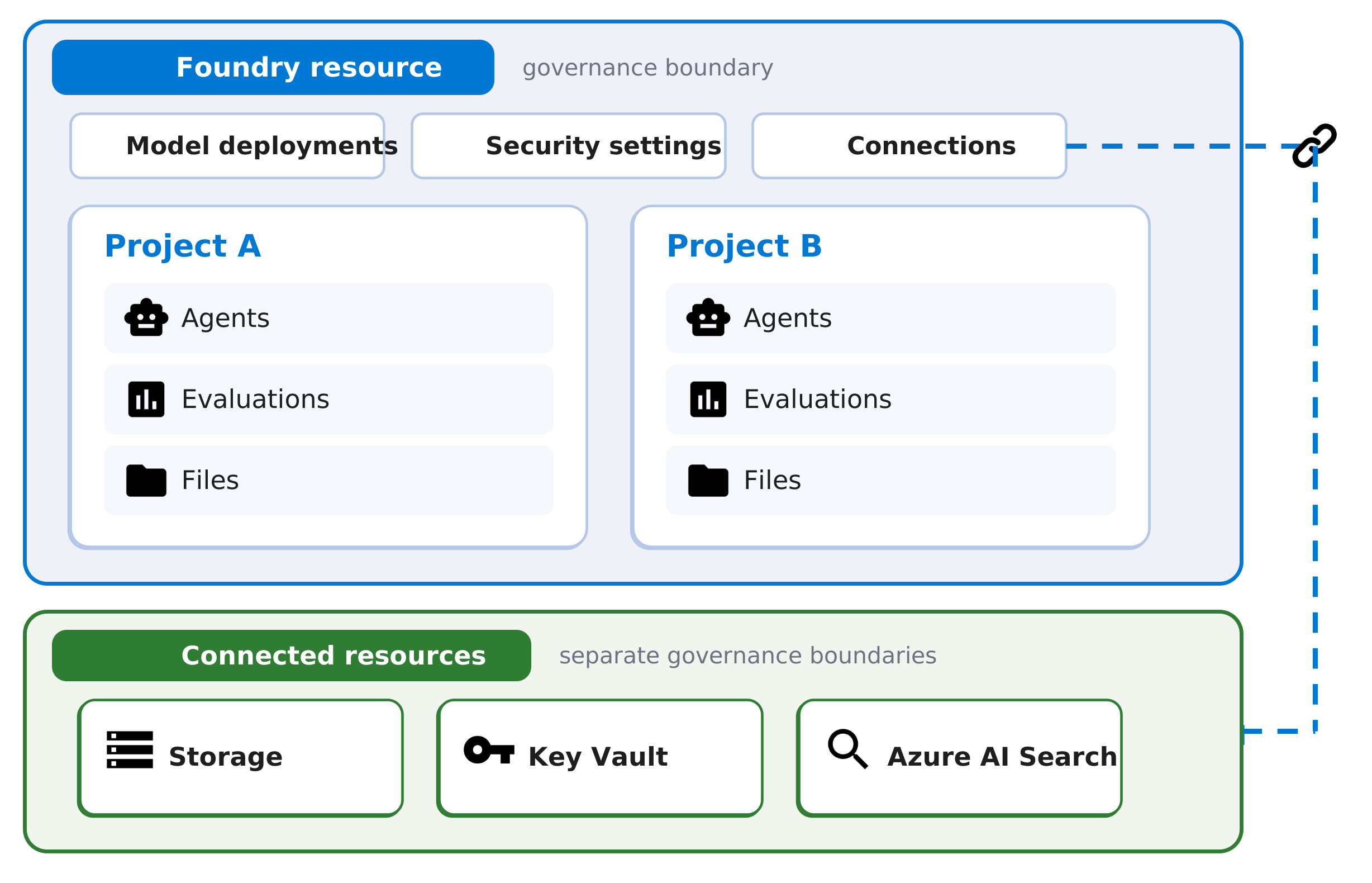
The following diagram shows a Foundry resource with model deployments, security settings, connections, and two projects. Connected Azure services such as Storage, Key Vault, and Azure AI Search are separate Azure resources under their own governance boundaries:
Important
Connected resources like Storage, Key Vault, and Azure AI Search are independent Azure resources with their own governance boundaries. You manage networking, access policies, and compliance settings for these resources separately from the Foundry resource.
Use this model when planning architecture and access boundaries:
- Foundry resource: Top-level Azure resource where you manage governance settings such as networking, security, and model deployments.
- Project: Development boundary inside the Foundry resource where teams build and evaluate use cases. Projects let teams prototype within a preconfigured environment, reusing existing model deployments and connections without repeated IT setup.
- Project assets: Files, agents, evaluations, and related artifacts scoped to a project.
- Connected resources: Azure services such as Storage, Key Vault, and Azure AI Search that the Foundry resource references through connections. These resources have separate governance boundaries, so you manage their networking and access policies independently.
This separation lets IT teams apply centralized controls at the resource level while development teams work within project-level boundaries.
Note
Most new APIs are available at the project scope. However, some capabilities originally supported at the account level through Azure OpenAI, Speech, Vision, and Language services are available only at the Foundry resource level, not at the project scope. For example, the Translator API is available only from the Foundry resource level. Plan your deployment structure based on which API scopes your workloads require.
Security-driven separation of concerns
Foundry enforces a clear separation between management and development operations to ensure secure and scalable AI workloads.
Top-level resource governance
The top-level Foundry resource scopes management operations such as configuring security, establishing connectivity with other Azure services, and managing deployments. Dedicated project containers isolate development activities and provide boundaries for access control, files, agents, and evaluations.
Role-based access control
Azure RBAC actions reflect this separation of concerns. Control plane actions, such as creating deployments and projects, are distinct from data plane actions, such as building agents, running evaluations, and uploading files. You can scope RBAC assignments at both the top-level resource and individual project level. Assign managed identities at either scope to support secure automation and service access. For more information, see Role-based access control for Microsoft Foundry.
Common starter assignments for least-privilege onboarding include:
- Azure AI User for each developer user principal at the Foundry resource scope.
- Azure AI User for each project managed identity at the Foundry resource scope.
For role definitions and scope planning guidance, see Role-based access control for Microsoft Foundry.
Monitoring and observability
Azure Monitor segments metrics by scope. You can view management and usage metrics at the top-level resource, while project-specific metrics, such as evaluation performance or agent activity, are scoped to the individual project containers.
Key monitoring capabilities include:
- Resource-level metrics: Token consumption, model latency, request counts, and error rates across all projects.
- Project-level metrics: Evaluation run outcomes, agent invocation counts, and file operation activity.
- Diagnostic logging: Enable diagnostic settings to route logs to Log Analytics, Storage, or Event Hubs for analysis and retention.
For more information, see Azure Monitor overview.
Computing infrastructure
Foundry manages compute infrastructure for model hosting, agent execution, and batch processing.
Model deployment types
Standard deployment in Foundry resources provides model hosting architecture.
Managed compute for agents and evaluations
Agents, Evaluations, and Batch jobs run as managed container compute, fully managed by Microsoft. Evaluations invoke model endpoints and compare outputs against grading criteria. Foundry stores results within the project scope, accessible through the portal or SDK.
Virtual network integration
When your agents connect with external systems, you can isolate network traffic using container injection, where the platform injects a subnet into your virtual network, enabling local communication with your Azure resources within the same virtual network.
Foundry supports two networking models for outbound isolation:
| Model | How it works | Trade-off |
|---|---|---|
| Customer-managed VNet (BYO) | You provide the VNet and a dedicated subnet delegated to Microsoft.App/environments. The platform injects into your subnet, enabling local communication with your private Azure resources. |
Full control over network configuration; requires your own network management. |
| Managed VNet (preview) | Foundry manages the VNet on your behalf. | Simpler setup; limits customization options. For details, see Configure managed virtual network. |
Note
Some network-isolated scenarios require the SDK or CLI instead of the portal. For example, deployments with private endpoints that block all public access aren't configurable through the portal UI. For details, see How to configure a private link for Foundry.
Tenant isolation
Microsoft-managed compute runs workloads in logically isolated environments per project. Customer code doesn't share runtime containers with other tenants.
Content safety and guardrails
Foundry integrates content safety controls into the model and agent inference pipeline. Guardrails define risks to detect, intervention points to scan (user input, output, tool calls (preview), and tool responses (preview)), and response actions when a risk is detected. Content filters run inline with model requests and can be configured per deployment. For more information, see Guardrails and controls overview and Content filtering severity levels.
Scaling
Managed compute for agents and evaluations scales automatically based on workload demand. Model hosting scales based on deployment configuration.
Regional availability
Compute capabilities vary by Azure region. Model availability, deployment type options, and feature support such as Agents or evaluations might differ across regions. Confirm that your target region supports the required capabilities before provisioning. For current availability, see Feature availability across cloud regions.
Data storage
Foundry provides flexible and secure data storage options to support a wide range of AI workloads.
Managed storage for file upload
In the default setup, Foundry uses Microsoft-managed storage accounts that are logically separated and support direct file uploads for select use cases, such as OpenAI models and Agents, without requiring a customer-provided storage account.
Bring your own storage
You can optionally connect your own Azure Storage accounts. Foundry tools such as evaluations and batch processing can read inputs from and write outputs to these accounts. For details on supported scenarios, see Bring-your-own resources with the Agent service.
Agent state storage
- With the basic agent setup, the Agent service stores threads, messages, and files in Microsoft-managed multitenant storage, with logical separation.
- With the standard agent setup, you bring your own Azure resources for all customer data—including files, conversations, and vector stores. In this configuration, data is isolated by project within your storage accounts.
Customer-managed key encryption
By default, Azure services encrypt data at rest and in transit using Microsoft-managed keys with FIPS 140-2 compliant 256-bit AES encryption. No code changes are required.
To use your own keys instead, confirm these prerequisites before enabling customer-managed keys for Foundry:
- Key Vault is deployed in the same Azure region as your Foundry resource.
- Soft delete and purge protection are enabled on Key Vault.
- Managed identities have required key permissions, such as the Key Vault Crypto User role when using Azure RBAC.
Bring your own Key Vault
By default, Foundry stores all API key-based connection secrets in a managed Azure Key Vault. If you prefer to manage secrets yourself, connect your key vault to the Foundry resource. One Azure Key Vault connection manages all project and resource level connection secrets. For more information, see how to set up an Azure Key Vault connection to Foundry.
To learn more about data encryption, see customer-managed keys for encryption with Foundry.
Data residency and compliance
Foundry stores all data at rest in the designated Azure geography. Inferencing data (prompts and completions) is processed according to the deployment type: global deployments might route to any Azure region, data zone deployments stay within the US or EU zone, and standard or regional deployments process in the deployment region. For details, see Deployment types. Foundry doesn't support automatic cross-region failover. If your organization requires multi-region availability, deploy separate Foundry resources in each target region and manage data synchronization and routing at the application layer. For compliance certification details, see Azure compliance documentation.
Validate architecture decisions
Before rollout, validate the following for your target environment:
- Verify that required models and features are available in your deployment regions. For details, see Feature availability across cloud regions.
- Check that role assignments are scoped correctly at both the Foundry resource and project levels. For details, see Role-based access control for Microsoft Foundry.
- Validate network isolation requirements and private access paths. For details, see How to configure a private link for Foundry.
- Confirm encryption and secret-management requirements, including customer-managed keys and Azure Key Vault integration. For details, see Customer-managed keys for encryption with Foundry and how to set up an Azure Key Vault connection to Foundry.
- Review quotas and limits for your target resources, including model deployment limits and rate limits. For details, see Azure OpenAI quotas and limits and Agent Service limits, quotas, and regions.
Related content
- Foundry rollout across my organization
- Role-based access control for Microsoft Foundry
- Customer-managed keys for encryption with Foundry
- How to configure a private link for Foundry
- Bring-your-own resources with the Agent service
- Azure Monitor overview
- Azure OpenAI quotas and limits
- Deployment types for Foundry Models
- Guardrails and controls overview
- Feature availability across cloud regions