หมายเหตุ
การเข้าถึงหน้านี้ต้องได้รับการอนุญาต คุณสามารถลอง ลงชื่อเข้าใช้หรือเปลี่ยนไดเรกทอรีได้
การเข้าถึงหน้านี้ต้องได้รับการอนุญาต คุณสามารถลองเปลี่ยนไดเรกทอรีได้
The Microsoft Quantum Development Kit (QDK) extension for Visual Studio Code (VS Code) automatically runs Q# and OpenQASM programs on its local sparse simulator.
This article explains how to run programs on the local simulator and how to add Pauli noise to Q# simulations. To use the other QDK simulators from Python, see Run quantum simulations with the QDK Python package.
How the local simulator works
The sparse simulator stores only the nonzero amplitudes of a quantum state. When most computational basis amplitudes are zero, this representation uses less memory and can simulate some programs with more qubits than a full-state simulator, which stores every amplitude.
The performance benefit depends on whether the quantum state remains sparse in the computational basis. For more information, see Jaques and Häner (arXiv:2105.01533).
Run a quantum program in VS Code
- Install the QDK extension for VS Code.
- Open a Q# (
.qs) or OpenQASM (.qasm) file. - Select Run from the code lens at the start of the file or above the Q#
Mainoperation.
The simulation output appears in the VS Code terminal. For Q# programs, select Debug to inspect the program's quantum state as it runs.
Add Pauli noise to Q# simulations
The sparse simulator supports Pauli noise for Q# programs in the QDK extension. Use ConfigurePauliNoise to set the probabilities of Pauli $X$, $Y$, and $Z$ errors in a program. The QDK extension settings also support a global Pauli noise model.
Note
You can't add a noise model to an OpenQASM simulation in the QDK extension. To build operation-specific noise models for Q# or OpenQASM programs, use the QDK Python package and the NoiseConfig API.
Add Pauli noise in the VS Code settings
- In VS Code, set global Pauli noise for Q# programs in the Q# > Simulation:Pauli Noise user setting for the QDK extension.
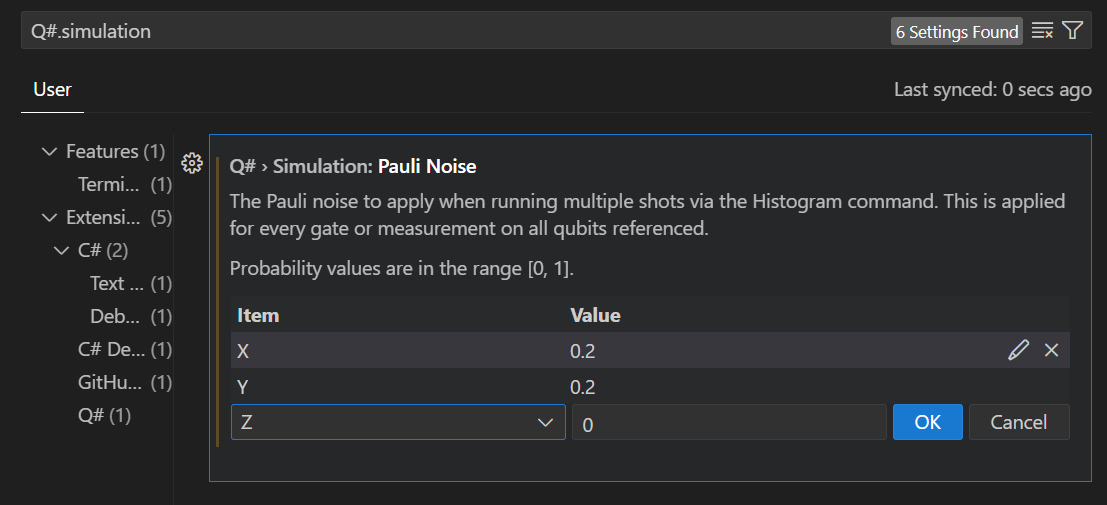
The noise settings apply to histogram results for all gates, measurements, and qubits in all Q# programs in VS Code.
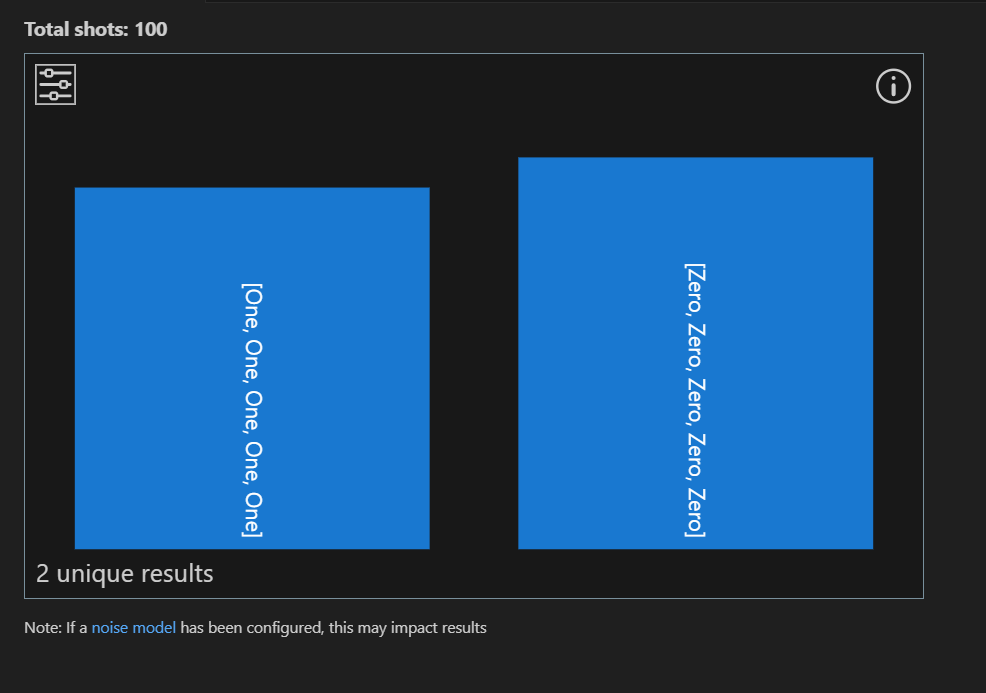
Without noise, a histogram for this GHZ sample program shows $\ket{00000}$ for about half the measurements and $\ket{11111}$ for the other half.
import Std.Diagnostics.*;
import Std.Measurement.*;

operation Main() : Result[] {
    let num = 5;
    return GHZSample(num);
}

operation GHZSample(n: Int) : Result[] {
    use qs = Qubit[n];
    H(qs[0]);
    ApplyCNOTChain(qs);
    let results = MeasureEachZ(qs);
    ResetAll(qs);
    return results;
}
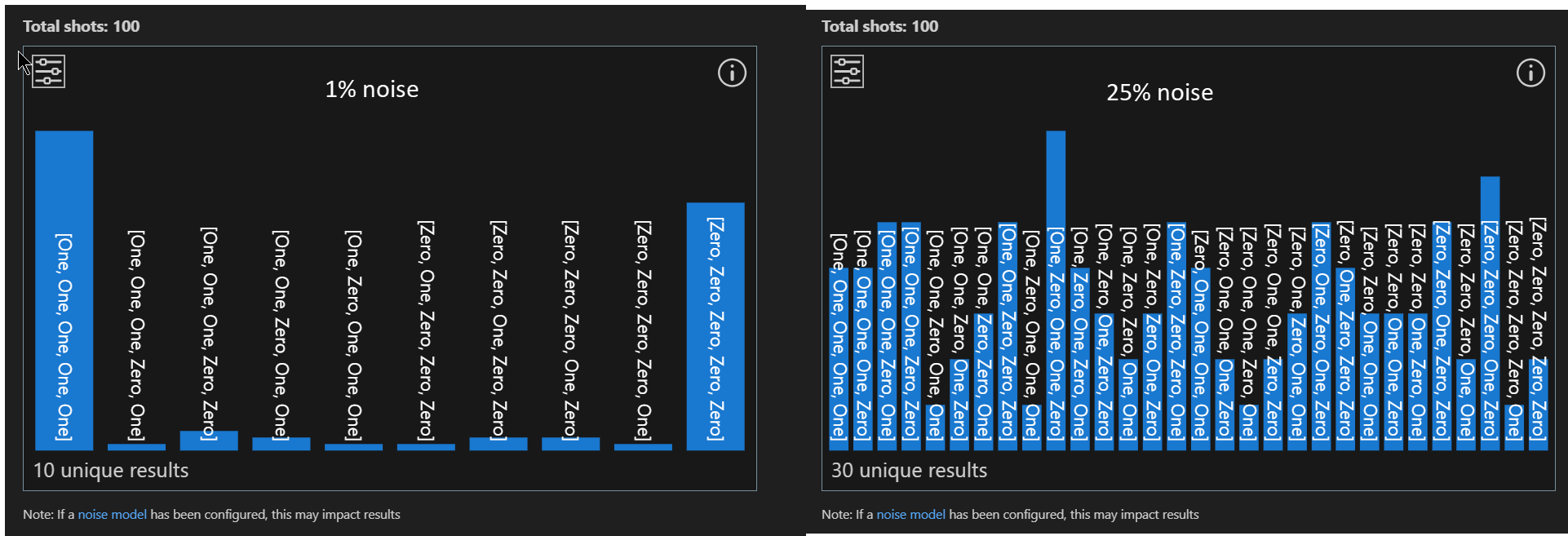
At a 1% bit-flip noise rate, the results start to spread. At 25%, the histogram is indistinguishable from pure noise.
Add Pauli noise to individual Q# programs
Use ConfigurePauliNoise to set or change a Q# program's noise model and control when and where noise occurs.
Note
The VS Code settings apply noise to all Q# programs, but ConfigurePauliNoise overrides those settings for the program that calls it.
In the previous program, add noise immediately after qubit allocation:
operation GHZSample(n: Int) : Result[] {
    use qs = Qubit[n];

    // 5% bit-flip noise applies to all subsequent operations.
    ConfigurePauliNoise(0.05, 0.0, 0.0);

    H(qs[0]);
    ApplyCNOTChain(qs);
    let results = MeasureEachZ(qs);
    ResetAll(qs);
    return results;
}
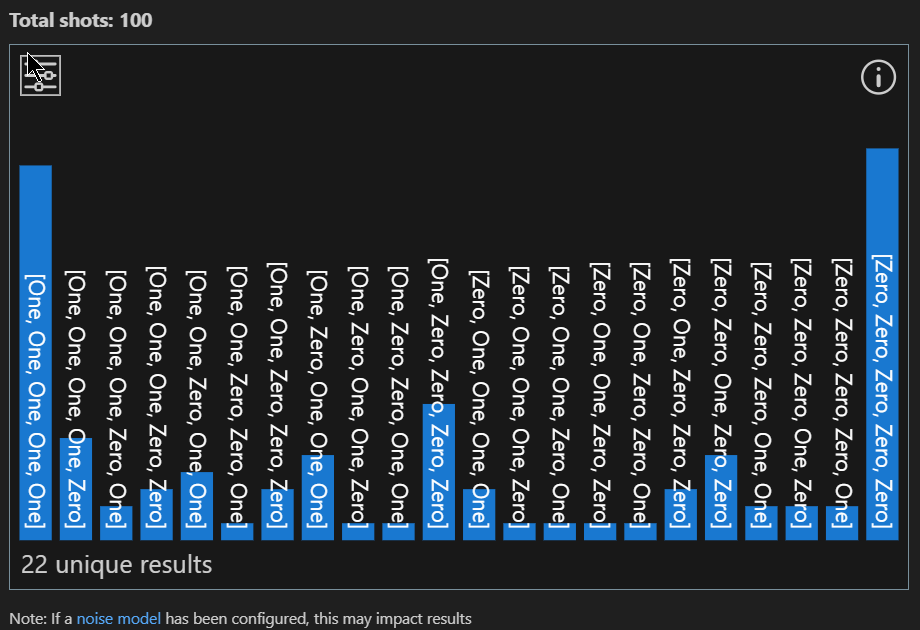
To apply noise only to the measurement operation, set the noise model immediately before measurement and clear it afterward:
operation GHZSample(n: Int) : Result[] {
    use qs = Qubit[n];
    H(qs[0]);
    ApplyCNOTChain(qs);

    // Noise applies only to the measurement operation.
    ConfigurePauliNoise(0.05, 0.0, 0.0);

    let results = MeasureEachZ(qs);
    ResetAll(qs);
    return results;
}
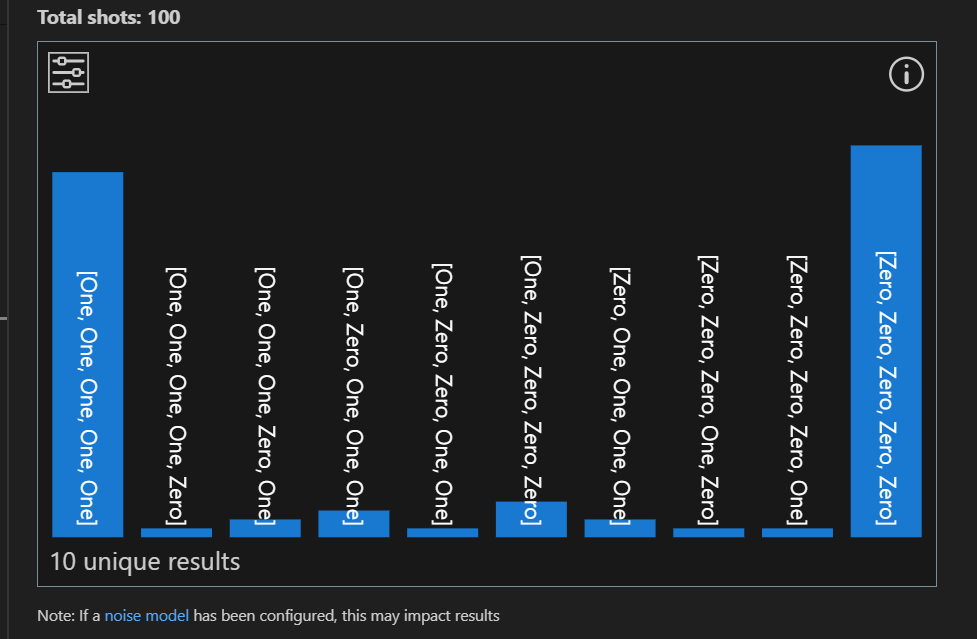
To change or clear the noise configuration at different points in your program, call ConfigurePauliNoise multiple times. For example, apply 5% bit-flip noise to the Hadamard gate and then clear the noise configuration for the rest of the program.
operation GHZSample(n: Int) : Result[] {
    use qs = Qubit[n];

    // Noise applies to the H operation.
    ConfigurePauliNoise(0.05, 0.0, 0.0);

    H(qs[0]);

    // Clear the noise settings.
    ConfigurePauliNoise(0.0, 0.0, 0.0);

    ApplyCNOTChain(qs);
    let results = MeasureEachZ(qs);
    ResetAll(qs);
    return results;
}
Other Q# noise functions
ConfigurePauliNoise supports any Pauli noise model. Use these functions and operations from the Std.Diagnostics namespace to configure or apply noise:
| Function | Description | Example |
|---|---|---|
ConfigurePauliNoise |
Sets Pauli noise for a simulation. Pass either the probabilities of Pauli $X$, $Y$, and $Z$ errors or a Pauli noise model. The configuration applies to all subsequent gates, measurements, and qubits in a Q# program and overrides the VS Code extension noise settings. Subsequent calls override earlier configurations. | ConfigurePauliNoise(0.1, 0.0, 0.5)or ConfigurePauliNoise(BitFlipNoise(0.1)) |
BitFlipNoise |
Returns a noise model with only Pauli $X$ errors at the specified probability. | 10% bit-flip noise:ConfigurePauliNoise(BitFlipNoise(0.1)) $\equiv$ ConfigurePauliNoise(0.1, 0.0, 0.0) |
PhaseFlipNoise |
Returns a noise model with only Pauli $Z$ errors at the specified probability. | 10% phase-flip noise:ConfigurePauliNoise(PhaseFlipNoise(0.1)) $\equiv$ ConfigurePauliNoise(0.0, 0.0, 0.1) |
DepolarizingNoise |
Returns a noise model with equal probabilities for Pauli $X$, $Y$, and $Z$ errors. | 6% depolarizing noise:ConfigurePauliNoise(DepolarizingNoise(0.06)) $\equiv$ ConfigurePauliNoise(0.02, 0.02, 0.02) |
NoNoise |
Returns a model with zero error probabilities. Pass it to ConfigurePauliNoise to clear the current noise configuration. |
ConfigurePauliNoise(NoNoise()) $\equiv$ ConfigurePauliNoise(0.0, 0.0, 0.0) |
ApplyIdleNoise |
Applies configured noise to a single qubit during simulation. | ...use q = Qubit[2];ConfigurePauliNoise(0.1, 0.0, 0.0);ApplyIdleNoise(q[0]);... |