หมายเหตุ
การเข้าถึงหน้านี้ต้องได้รับการอนุญาต คุณสามารถลอง ลงชื่อเข้าใช้หรือเปลี่ยนไดเรกทอรีได้
การเข้าถึงหน้านี้ต้องได้รับการอนุญาต คุณสามารถลองเปลี่ยนไดเรกทอรีได้
User and Entity Behavior Analytics (UEBA) in Microsoft Sentinel analyzes logs and alerts from connected data sources to build baseline behavioral profiles of your organization's entities—such as users, hosts, IP addresses, and applications. Using machine learning, UEBA identifies anomalous activity that might indicate a compromised asset.
You can enable UEBA and configure data sources directly from the UEBA tab. See Access UEBA from the UEBA tab.
This article explains how to enable UEBA and configure data sources from your Microsoft Sentinel workspace settings and from supported data connectors. Before you begin, review the Prerequisites section for required roles and permissions.
For more information about UEBA, see Identify threats with entity behavior analytics.
Note
For information about feature availability in US Government clouds, see the Microsoft Sentinel tables in Cloud feature availability for US Government customers.
Important
After March 31, 2027, Microsoft Sentinel will no longer be supported in the Azure portal and will be available only in the Microsoft Defender portal. All customers using Microsoft Sentinel in the Azure portal will be redirected to the Defender portal and will use Microsoft Sentinel in the Defender portal only.
If you're still using Microsoft Sentinel in the Azure portal, we recommend that you start planning your transition to the Defender portal to ensure a smooth transition and take full advantage of the unified security operations experience offered by Microsoft Defender.
Prerequisites
To enable or disable User and Entity Behavior Analytics (UEBA) (these prerequisites aren't required to use UEBA):
Your user must be assigned to the Microsoft Entra ID Security Administrator role in your tenant or the equivalent permissions.
Your user must be assigned at least one of the following Azure roles (Azure RBAC):
- Owner at the resource group level or higher.
- Contributor at the resource group level or higher.
- (Least privileged) Microsoft Sentinel Contributor at the workspace level or higher and Log Analytics Contributor at the resource group level or higher.
Your workspace must not have any Azure resource locks applied to it. For more information, see Azure resource locking.
Note
- No special license is required to add UEBA functionality to Microsoft Sentinel, and there's no extra cost for using it.
- However, since UEBA generates new data and stores it in new tables that UEBA creates in your Log Analytics workspace, additional data storage charges apply.
Access UEBA from UEBA tab
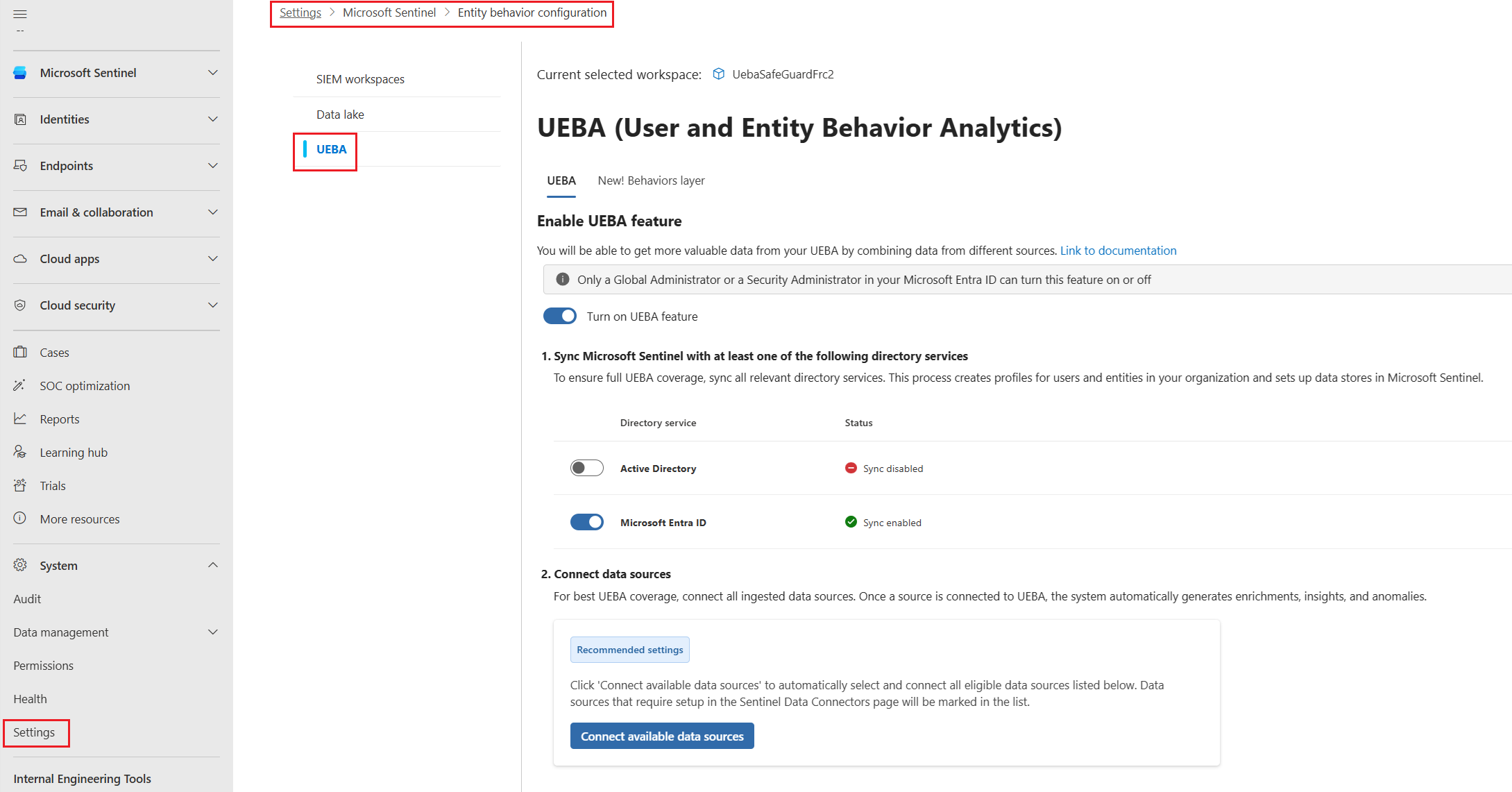
To get to the Entity behavior configuration page:
- From the Microsoft Defender portal navigation menu, select System >Settings > Microsoft Sentinel.
- Select the UEBA tab.
Configure UEBA
To configure UEBA on the Entity behavior configuration page, complete the following steps:
On the Entity behavior configuration page, toggle on Turn on UEBA feature.
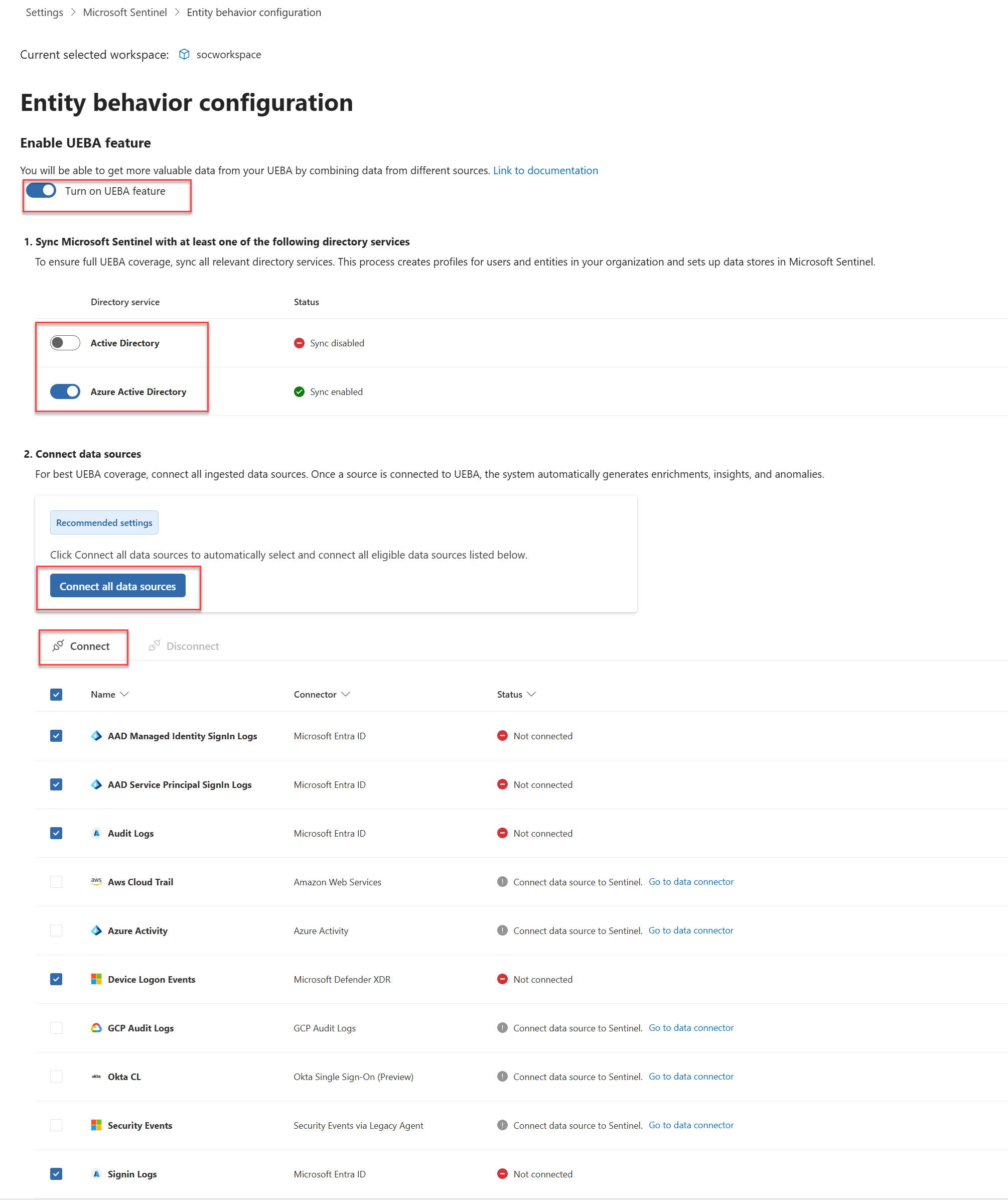
Select the directory services from which you want to synchronize user entities with Microsoft Sentinel.
- Active Directory on-premises
- Microsoft Entra ID
To sync user entities from on-premises Active Directory, you must onboard your Azure tenant to Microsoft Defender for Identity (either standalone or as part of Microsoft Defender XDR) and you must have the MDI sensor installed on your Active Directory domain controller. For more information, see Microsoft Defender for Identity prerequisites.
Select Connect all data sources to connect all eligible data sources, or select specific data sources from the list.
You can only enable these data sources from the Defender and the Azure portals:
- Signin Logs
- Audit Logs
- Azure Activity
- Security Events
You can enable these data sources from the Defender portal only:
- AAD Managed Identity Signin logs (Microsoft Entra ID)
- AAD Service Principal Signin logs (Microsoft Entra ID)
- AWS CloudTrail
- Amazon GuardDuty
CommonSecurityLogfor supported Check Point, Fortinet, and Zscaler events- Device Logon Events
- Okta CL
- GCP Audit Logs
UEBA analyzes identity signals and supported network and cloud signals. For the authoritative list of sources, required tables, supported vendor logs, and field requirements, see Microsoft Sentinel UEBA reference. For anomaly details, see UEBA anomalies.
Note
After enabling UEBA, you can enable supported data sources for UEBA directly from the data connector pane, or from the Defender portal Settings page.
Select Connect.
Enable anomaly detection in your Microsoft Sentinel workspace:
- From the Microsoft Defender portal navigation menu, select Settings > Microsoft Sentinel > SIEM workspaces.
- Select the workspace you want to configure.
- From the workspace configuration page, select Anomalies and toggle on Detect Anomalies.
UEBA investigation and hunting data is available in tables such as
BehaviorAnalyticsandBehaviorInfo. For table schemas and usage guidance, see Microsoft Sentinel UEBA reference and Translate raw security logs to behavioral insights using UEBA behaviors.
Install the UEBA Essentials solution (optional)
The UEBA Essentials solution is a collection of dozens of prebuilt hunting queries curated and maintained by Microsoft security experts. The solution includes multicloud anomaly detection queries across Azure, Amazon Web Services (AWS), Google Cloud Platform (GCP), and Okta.
Install the solution to get started quickly with threat hunting and investigations using UEBA data, instead of building these detection capabilities from scratch.
For more information, see Install or update Microsoft Sentinel solutions.
Enable the UEBA behaviors layer
The UEBA behaviors layer generates enriched summaries of activity observed in multiple data sources. Unlike alerts or anomalies, behaviors don't necessarily indicate risk. They create an abstraction layer that optimizes your data for investigations, hunting, and detection by improving clarity, context, and correlation. Behavior records can also include anomaly insights and contextual enrichment associated with the activity.
For more information about the UEBA behaviors layer and how to enable it, see Enable the UEBA behaviors layer in Microsoft Sentinel.
Related articles
- Investigate incidents with UEBA data - Learn how to investigate UEBA anomalies in your incidents.
- UEBA data sources and table schemas - Explore the data sources and schema references for UEBA.