หมายเหตุ
การเข้าถึงหน้านี้ต้องได้รับการอนุญาต คุณสามารถลอง ลงชื่อเข้าใช้หรือเปลี่ยนไดเรกทอรีได้
การเข้าถึงหน้านี้ต้องได้รับการอนุญาต คุณสามารถลองเปลี่ยนไดเรกทอรีได้
These are the latest features in the Stable release of Microsoft Edge DevTools.
New experiment: Explain console errors/warnings with Copilot in Sidebar
You can use Microsoft Copilot in the Microsoft Edge Sidebar to explain DevTools console errors. If the Sidebar is enabled in Microsoft Edge, you can search for or explain console errors using Microsoft Copilot in the Sidebar, by clicking the Explain this message in sidebar button next to a message in the Console:
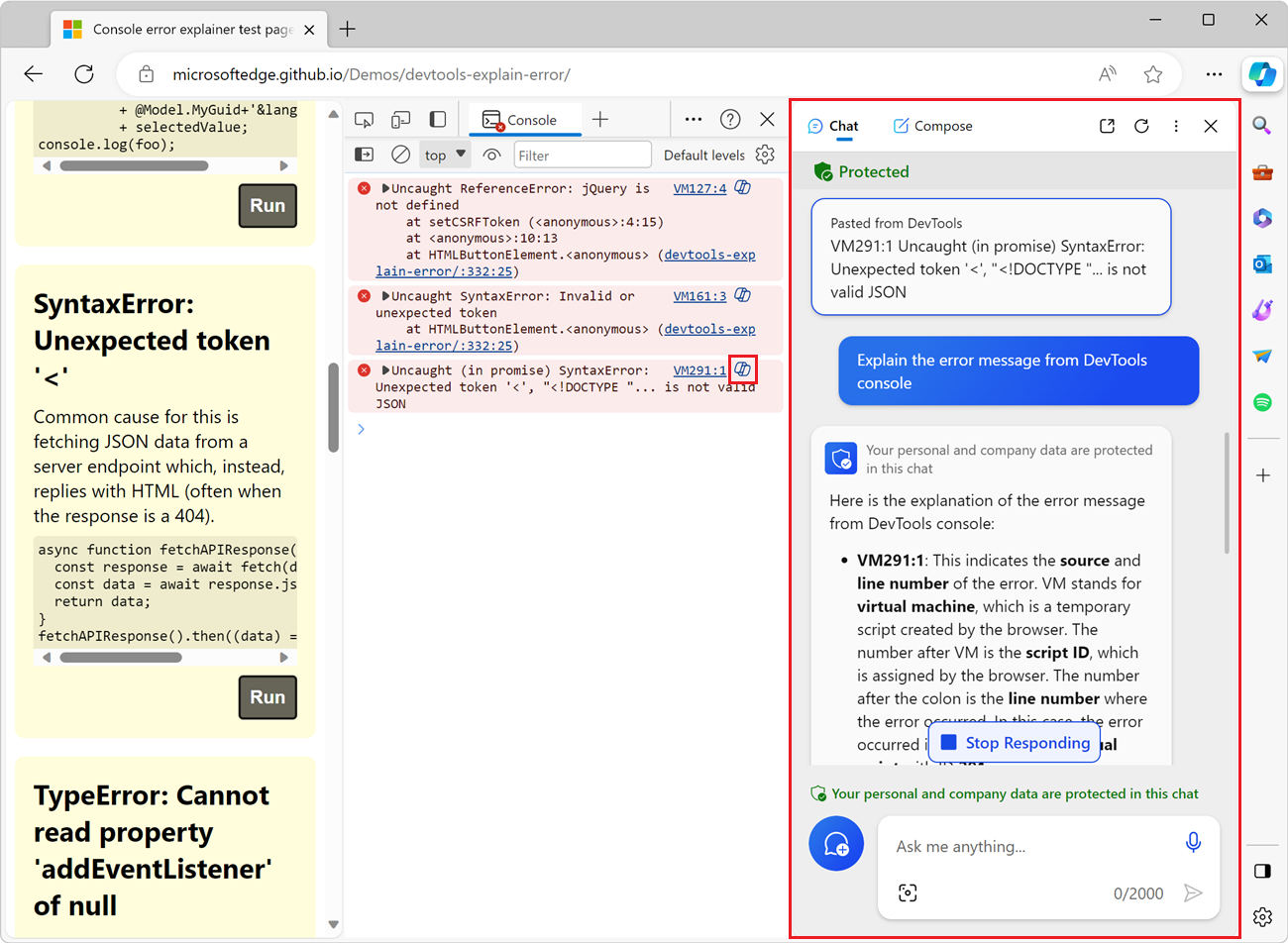
This feature is available as an experiment starting in Microsoft Edge 117. This feature is not available when the Sidebar is turned off.
By default, this experiment is turned off. To enable this experiment, specify the feature flag msEdgeAIExplainConsoleError; for example, run Microsoft Edge from the command line using the enable-features command-line option, as follows:
msedge.exe --enable-features=msEdgeAIExplainConsoleError
Or, go to edge://flags and toggle the flag Explain DevTools with AI.
See also:
Console has content when re-opened in Quick View
Before Microsoft Edge 117, the Console was blank after closing and then re-opening the Console tool in Quick View (the secondary toolbar and panel in Focus Mode). This issue has been resolved; the Console re-opens with the expected content.
Accessibility fixes
In Microsoft Edge 117, the following accessibility issues have been addressed:
In the High Contrast theme, updated the hover color for the Move Activity Bar button, the Help button, and the Customize and control DevTools (...) button, for consistency with other buttons.
In the Memory tool, improved the High Contrast theme, so that all heap snapshot information is more visible.
Fixed the Narrator in the Issues tool, to announce the correct size and position for each level.
Fixed the keyboard focus for screen readers, so that when you click a source-code link in the Issues tool, the relevant code has focus in the Elements tool.
Announcements from the Chromium project
Microsoft Edge 117 also includes the following updates from the Chromium project:
- Network panel improvements
- Performance: See the changes in fetch priority for network events
- Sources settings enabled by default: Code folding and automatic file reveal
- Improved debugging of third-party cookie issues
- Debug preloading in the Application panel
- The C/C++ WebAssembly debugging extension for DevTools is now open source
- New experimental features