หมายเหตุ
การเข้าถึงหน้านี้ต้องได้รับการอนุญาต คุณสามารถลอง ลงชื่อเข้าใช้หรือเปลี่ยนไดเรกทอรีได้
การเข้าถึงหน้านี้ต้องได้รับการอนุญาต คุณสามารถลองเปลี่ยนไดเรกทอรีได้
Available only within the Package Manager Console in Visual Studio on Windows.
Registers a tab expansion for the parameters of the specified command, such that when Tab is used when entering a command, the expanded values appear as available options for the parameter in question. Any previous expansions for the command are overwritten.
Syntax
Register-TabExpansion [-Name] <String> [-Definition] <Object> [<CommonParameters>]
Parameters
| Parameter | Description |
|---|---|
| Name | (Required) The command to which to register expansions. The -Name switch itself is optional. |
| Definition | (Required) An object describing the argument in the syntax @{'<parameter>' = {'<value1>', '<value2>', ...}} where <parameter> is the name of the parameter to modify and each <value> provides a specific expansion. Both single and double quotes are accepted. |
None of these parameters accept pipeline input or wildcard characters.
Common Parameters
Register-TabExpansion supports the following common PowerShell parameters: Debug, Error Action, ErrorVariable, OutBuffer, OutVariable, PipelineVariable, Verbose, WarningAction, and WarningVariable.
Examples
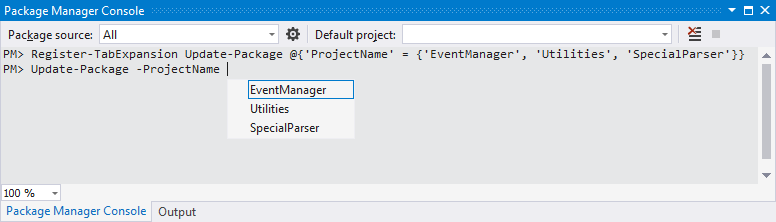
Consider a solution that contains three projects names EventManager, Utilities, and SpecialParser. The developer frequently uses the Update-Package command at different times with each of those projects. She finds it convenient to have the Update-Package command provide auto-completion expansions for the -ProjectName argument so she doesn't need to type out a project name each time.
The following command, then, registers those three project names as an expansion for the -ProjectName parameter:
Register-TabExpansion Update-Package @{'ProjectName' = {'EventManager', 'Utilities', 'SpecialParser'}}
The developer can then type Update-Package -ProjectName , press Tab, and see the expansions offered as auto-completion options: