หมายเหตุ
การเข้าถึงหน้านี้ต้องได้รับการอนุญาต คุณสามารถลอง ลงชื่อเข้าใช้หรือเปลี่ยนไดเรกทอรีได้
การเข้าถึงหน้านี้ต้องได้รับการอนุญาต คุณสามารถลองเปลี่ยนไดเรกทอรีได้
Agents in Microsoft 365 are purpose-built to bring specialized skills and knowledge into Microsoft 365 Copilot. Embedded directly in Microsoft 365 Copilot Chat and the Microsoft 365 apps you use every day, these out-of-the-box agents take on unique roles to work alongside you and your team. This collaboration makes your work easier, keeps teams aligned, and helps accelerate decision-making to unlock faster business value.
For Copilot administrators, it can be overwhelming to know where to start. Existing administrators can also be unfamiliar with how some features can enhance their data security.
To address the need for shorter, actionable, and prescriptive guidance, you can use this deployment blueprint.
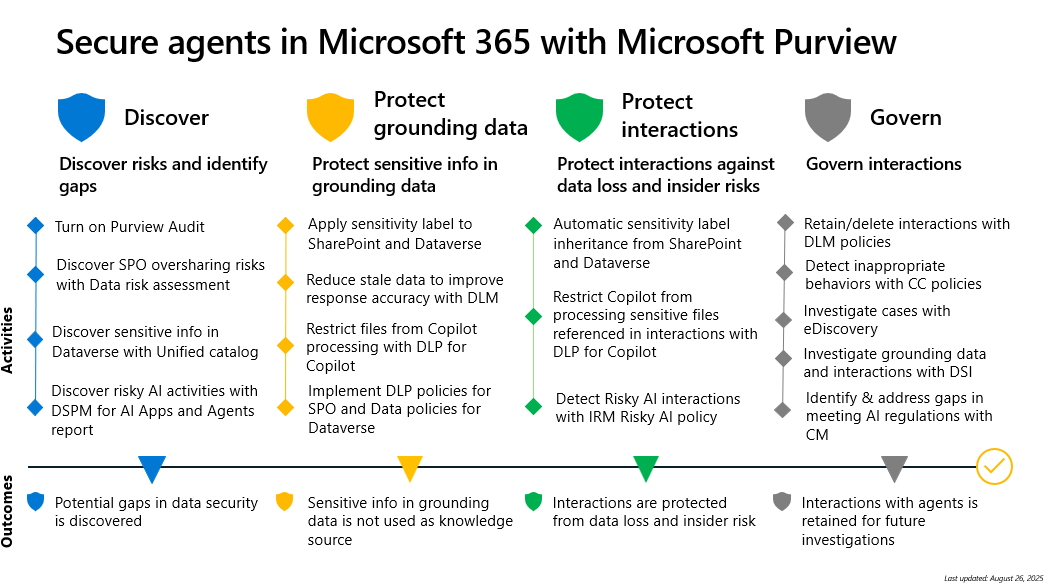
In this deployment blueprint, we provide a recommended approach to secure agents in Microsoft 365 utilizing Microsoft Purview, from grounding data to interactions.
The blueprint breaks the deployment into four phases:
Discover risks and identify gaps
Protect sensitive info in grounding data
Protect interactions against data loss and insider risks
Govern interactions
The blueprint provides:
An overview of Purview
Problem summary of why we need to secure agents in Microsoft 365
A recommended, staged approach to secure agents in Microsoft 365
Detailed guidance for using the features in Purview to secure agents in Microsoft 365, from grounding data to interactions.
Download the blueprint and documentation
| Deployment model | Description |
|---|---|
 |
Use this deployment model to assist organizations in securing Copilot agents. This model includes |
Related content